filex
Health Uyari
- License — License: MIT
- Description — Repository has a description
- Active repo — Last push 0 days ago
- Low visibility — Only 5 GitHub stars
Code Basarisiz
- rm -rf — Recursive force deletion command in backend/examples/plugin-diskfs/acceptance.sh
Permissions Gecti
- Permissions — No dangerous permissions requested
Bu listing icin henuz AI raporu yok.
filex - self-hosted file manager. Go backend + Vue 3 / React / Web Component frontend. Pluggable storage (local, S3, SFTP, WebDAV, FTP), auth (local, OIDC, LDAP, proxy-header) and DB drivers. Single binary or container. MIT.

filex — self-hosted file manager that embeds anywhere





A single Go binary with a full-featured web UI, pluggable storage/auth/DB drivers,
real-time collaboration, an embeddable web component, a desktop app with
background folder sync, and a built-in MCP server so AI agents can drive it
natively.
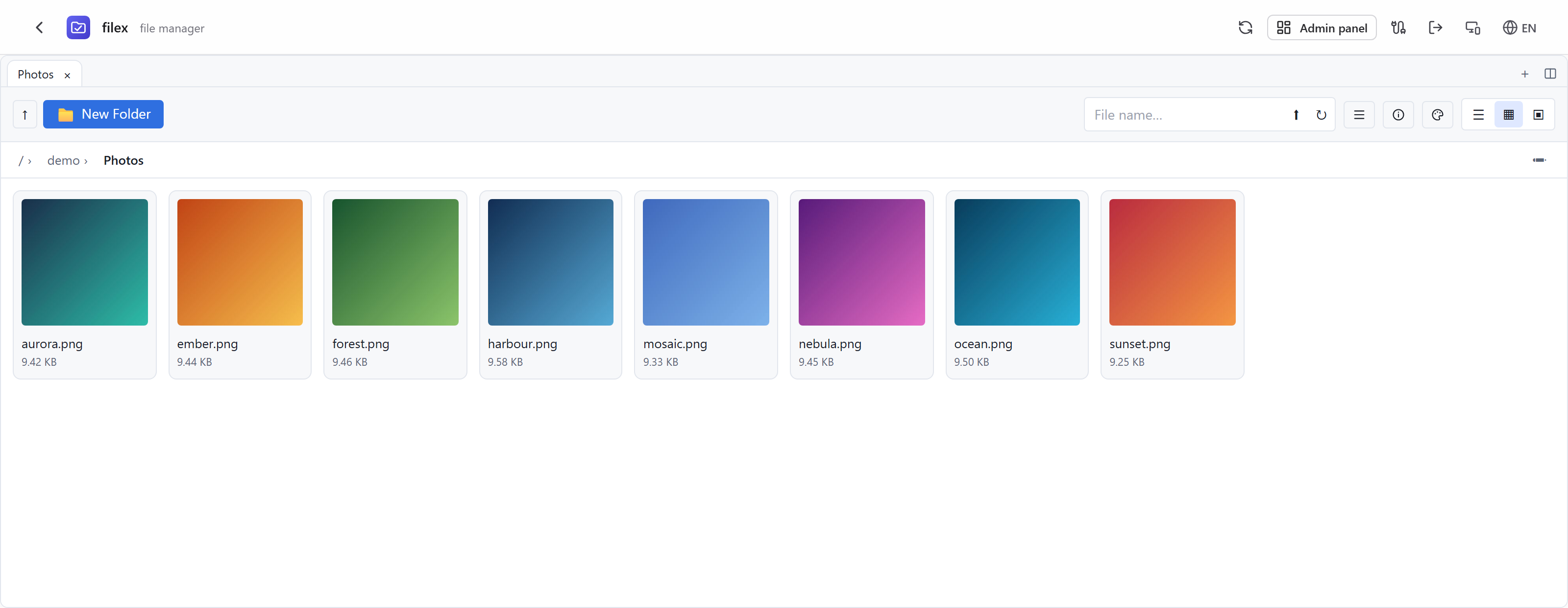
Try it now
Live demo: demo.filex.sh — sign in with [email protected] / demo
(admin role, sandbox resets nightly). Or run your own in one line:
docker run -p 5212:5212 -v $(pwd)/data:/data ghcr.io/brf-tech/filex:latest
Open http://localhost:5212/admin — the first run prints admin credentials and embed
instructions to the console.
Prefer a window over a browser tab? The desktop app (Windows / Linux) signs in to
any filex server and syncs folders in the background:
latest release ·
docs/DESKTOP.md.
Why filex
Most self-hosted file managers are either too small (a directory listing with uploads)
or too big (a groupware suite you deploy for the file tab). filex aims at the gap:
- Embeds anywhere — the same UI ships as a Vue 3 component, a React component and a
framework-agnostic<filex-explorer>web component. Put a real file manager inside
your product, backed by your own filex server and locked to a per-tenant folder. - AI-agent-native — a token-scoped REST surface (
/api/ai) plus a native
MCP server (/api/ai/mcp). Hand an agent a token confined to one folder and it can
list, read, write, share and zip — nothing else. - Real-time — presence avatars (a profile picture set once on the account, shown for
every client signed in as you) and live file updates over WebSocket, in the native UI
and in embedded contexts (short-lived ticket auth, API-polling fallback). - On your desktop too — the same explorer ships as a Windows/Linux/macOS app that keeps
local folders in step with the server from the tray, updates itself, and holds several
accounts (or tenants) side by side. Right-click a folder → Keep on this computer and
it mirrors under one filex folder; everything else stays online-only in the window.
Headless machines get the same engine asfilex sync/filex client. - Speaks the protocols both ways — filex can connect to local disks, S3, FTP, SFTP,
WebDAV and SMB/NAS shares, and it can be reached as S3, SFTP, FTPS,
NFSv3 and WebDAV. Pointrclone,restic,aws s3, WinSCP, FileZilla, a
scanner that only learned FTP or a media player that only learned NFS at filex, and
they land in the same tree, with the same permissions, the same trash and the same
quota as the web UI. Off-LAN there is alsofilex mount, which attaches a remote
server over ordinary HTTPS — a folder on Linux, a drive letter on Windows
(docs/PROTOCOLS.md). - Multi-tenant by design — storage-per-tenant with native tenancy mode, RBAC roles +
per-item grants, confined API tokens, per-token identities for audit trails. - Boringly deployable — one binary or one container; SQLite by default, Postgres/MySQL
when you want them; every driver switched by env vars.
┌─────────────────────────────────────────────────────────────┐
│  filex (Go binary, ~40 MB slim / 250 MB w/ thumbnails)      │
├─────────────────────────────────────────────────────────────┤
│  HTTP API (chi)  │  Admin UI (Vue 3, embedded)              │
│  Auth Drivers:   │  local · oidc · ldap · proxy-header      │
│  Storage Drivers:│  local · s3 · ftp · sftp · webdav · smb  │
│  Served as:      │  s3 · sftp · ftps · nfs · webdav         │
│  DB Drivers:     │  sqlite (default) · mysql · postgres     │
│  Queue Drivers:  │  sqlite (default) · redis · postgres     │
│  Realtime:       │  WebSocket presence + live updates       │
│  RBAC:           │  roles + per-item grants + share invites │
│  AI / MCP:       │  /api/ai REST + native MCP server        │
│  Sync Worker:    │  ETag diff + tombstone guard             │
│  Replica Layer:  │  primary→replica + rules + reconcile     │
│  Protection:     │  trash + versions + ClamAV scanning      │
│  E2E folders:    │  client-side WebCrypto (server blind)    │
│  Notifications:  │  webhook + in-app bell + read/unread     │
│  Search:         │  Bleve (full-text, embedded)             │
│  Thumbnails:     │  image · video · pdf · office            │
│  Plug & Play:    │  OnlyOffice · Drawio · Mermaid           │
└─────────────────────────────────────────────────────────────┘
                          ▲
                          │ HTTP API
       ┌──────────────────┼──────────────────┐
       │                  │                  │
   @brftech/         @brftech/          @brftech/
   filex-core        filex             filex-react
   (Vue 3 SFC)       (Web Component)   (React adapter)
       │                  │                  │
       ▼                  ▼                  ▼
   Vue 3 apps       Any framework      React apps
                    (vanilla, Angular,
                    Svelte, Solid, …)

   Same API, no server plugins:  desktop app (Electron, Windows/Linux/macOS)
                                 CLI client (filex client · filex sync)
Screenshots
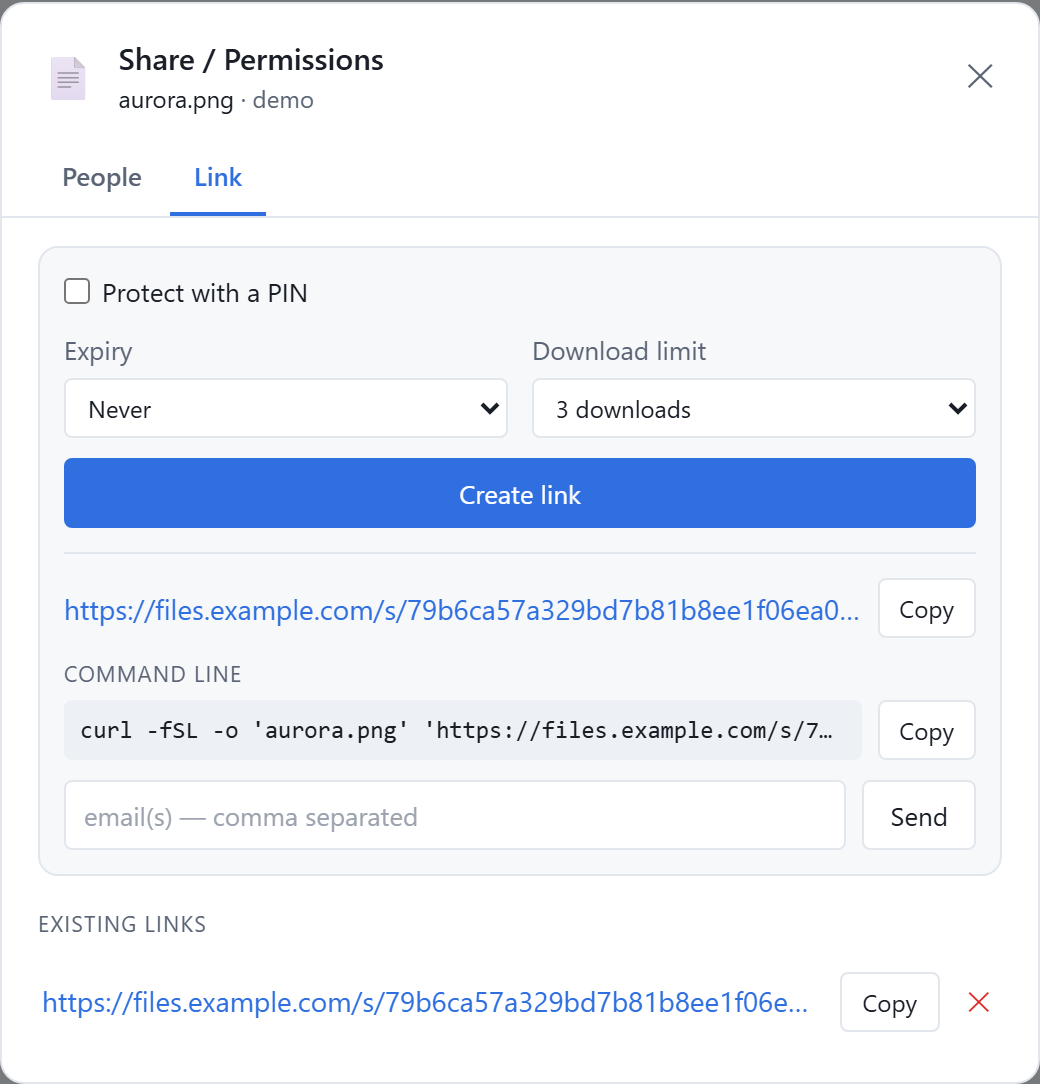
Sharing — PIN, expiry, download limit, one-line curl |
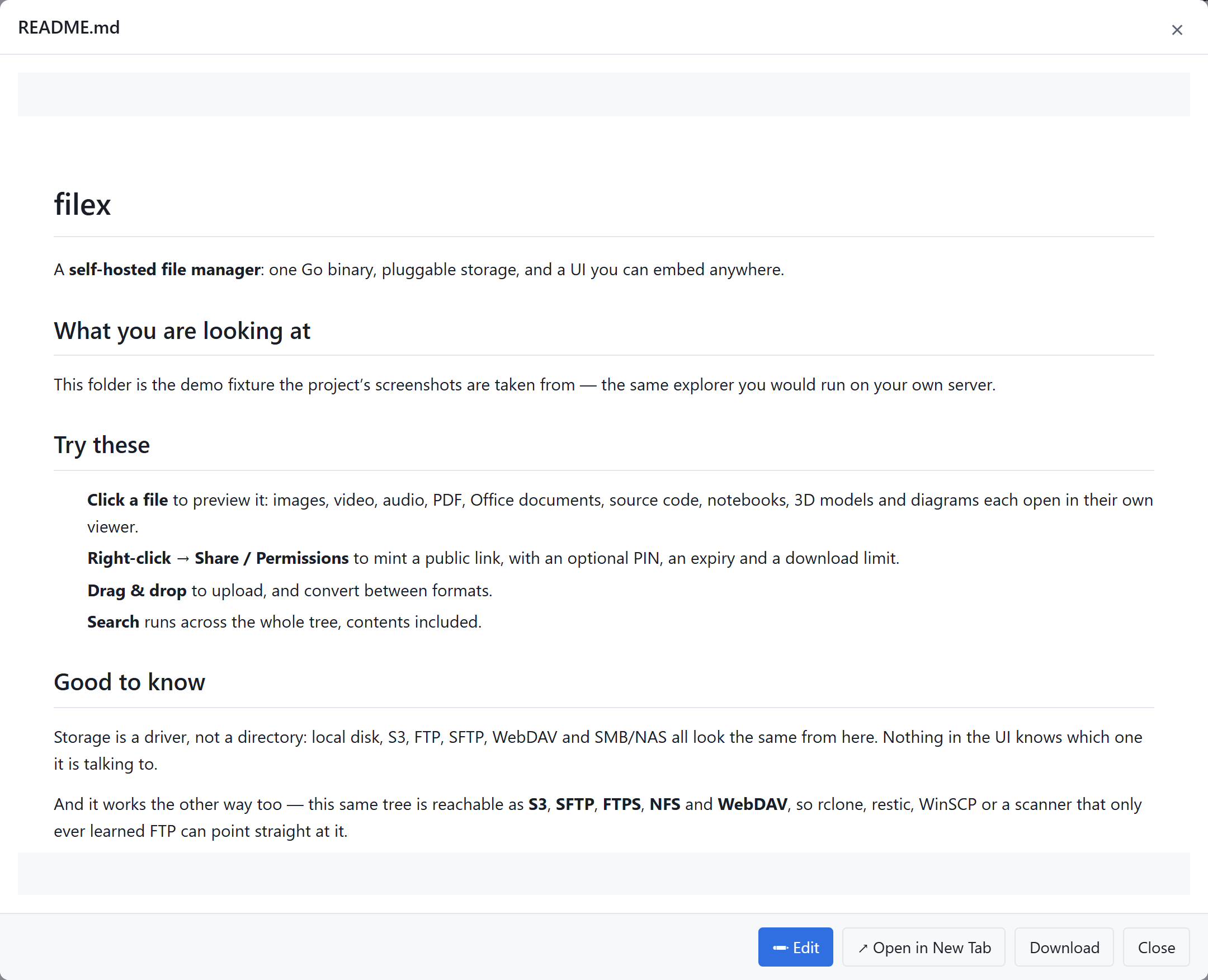
Markdown viewer |
|---|---|
 |
 |
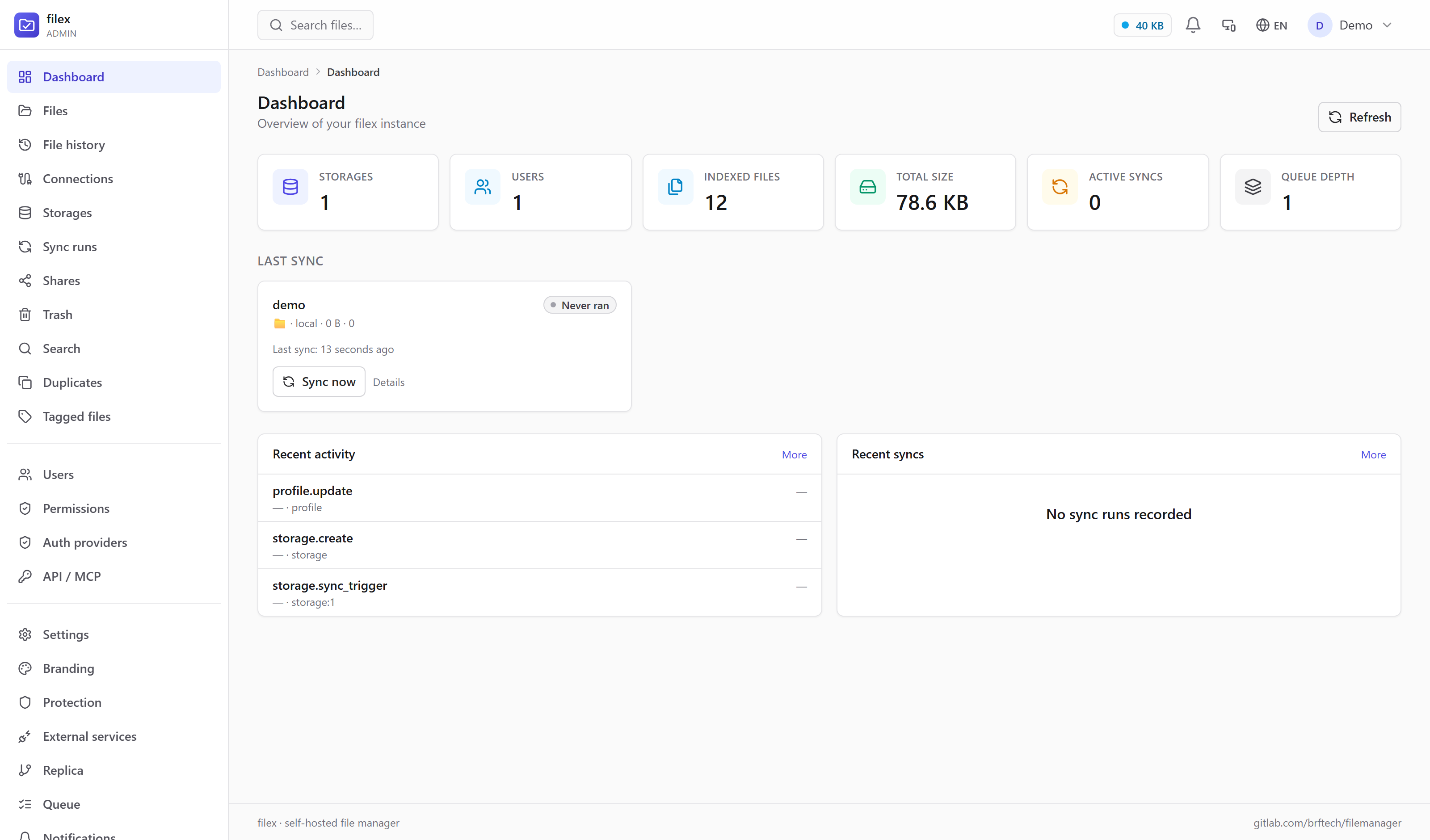
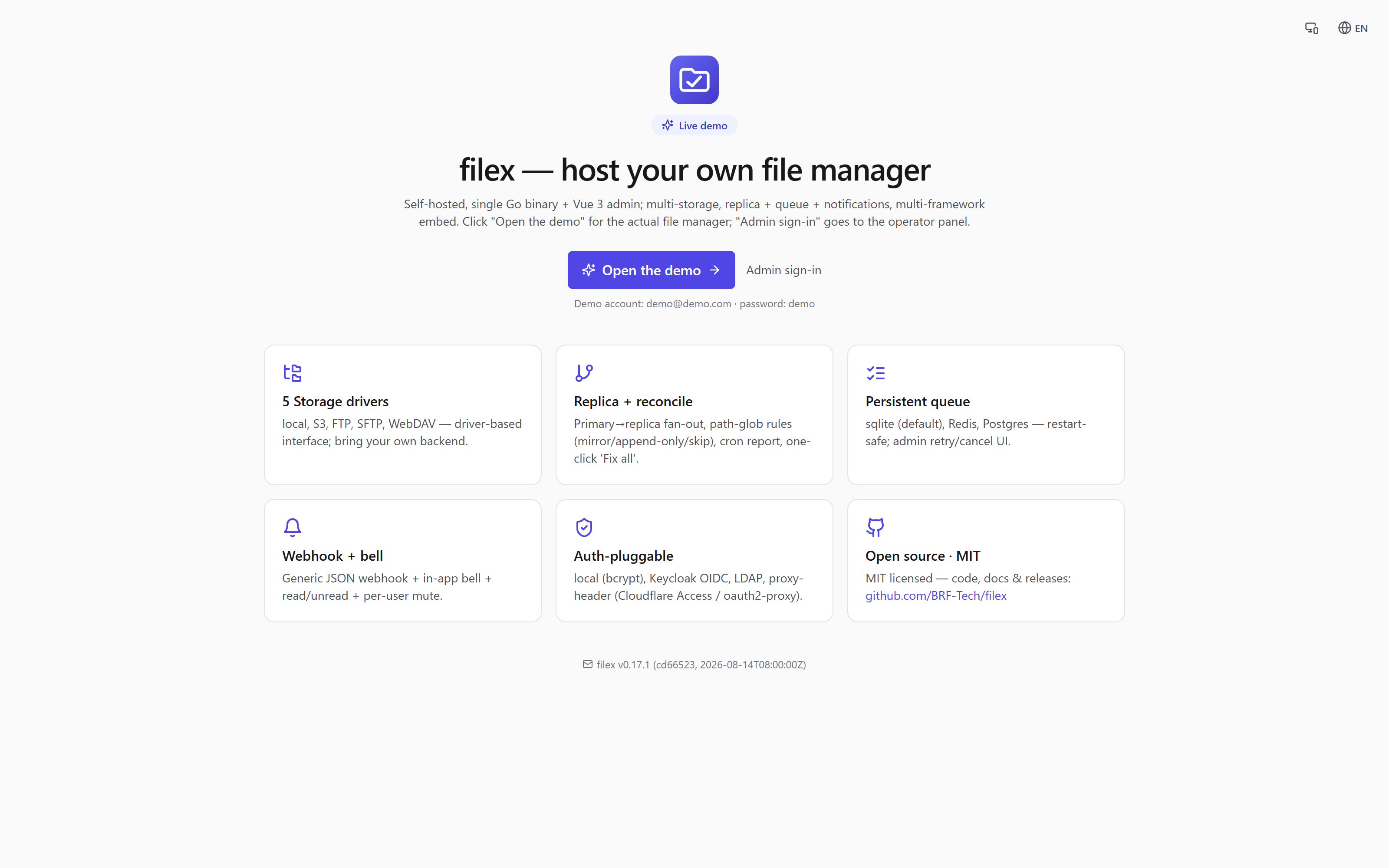
| Admin panel | Demo landing |
|---|---|
 |
 |
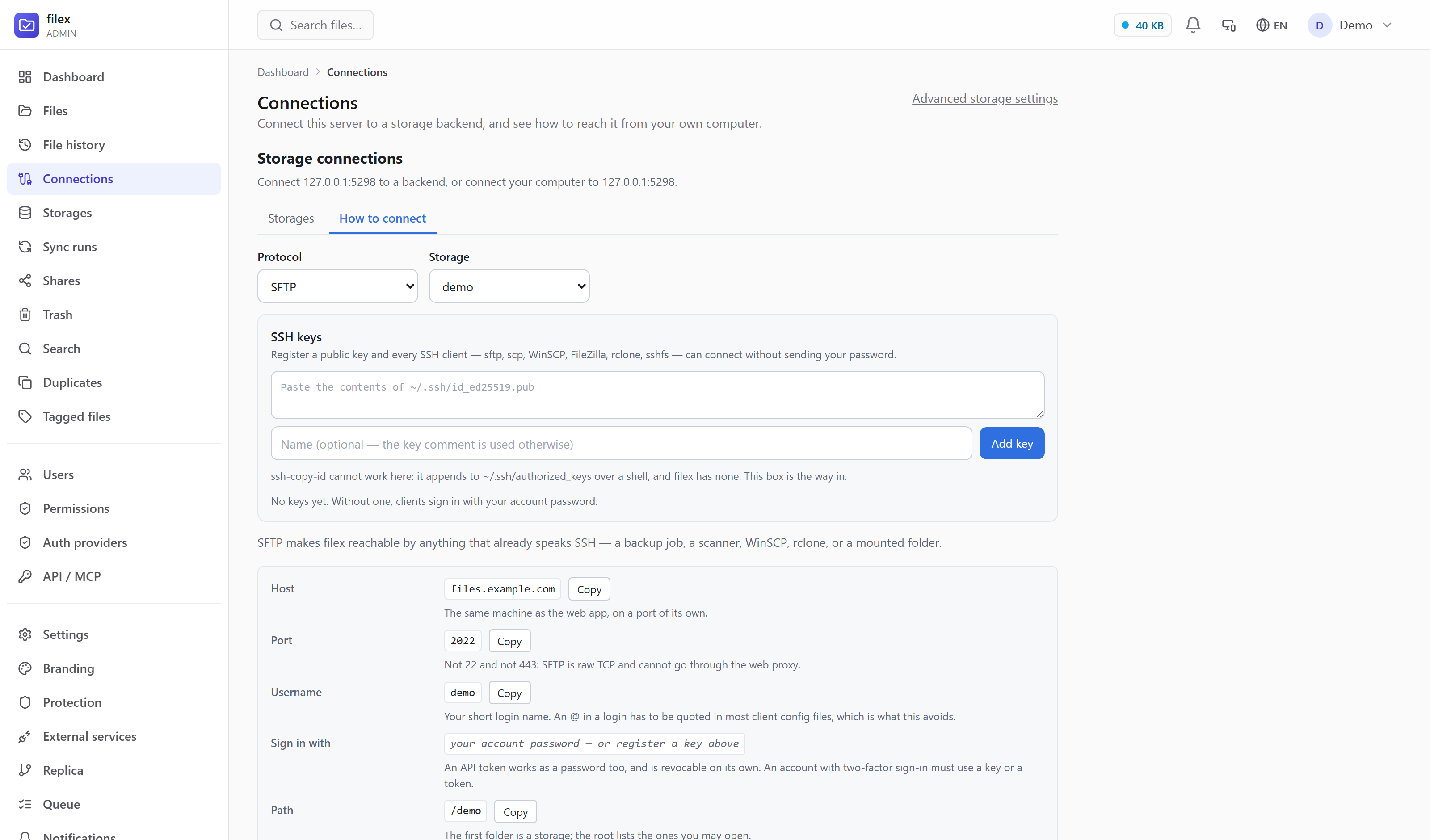
| Reaching filex from anything — S3, SFTP, FTPS, NFS, WebDAV. Every command is built from your deployment |
|---|
 |
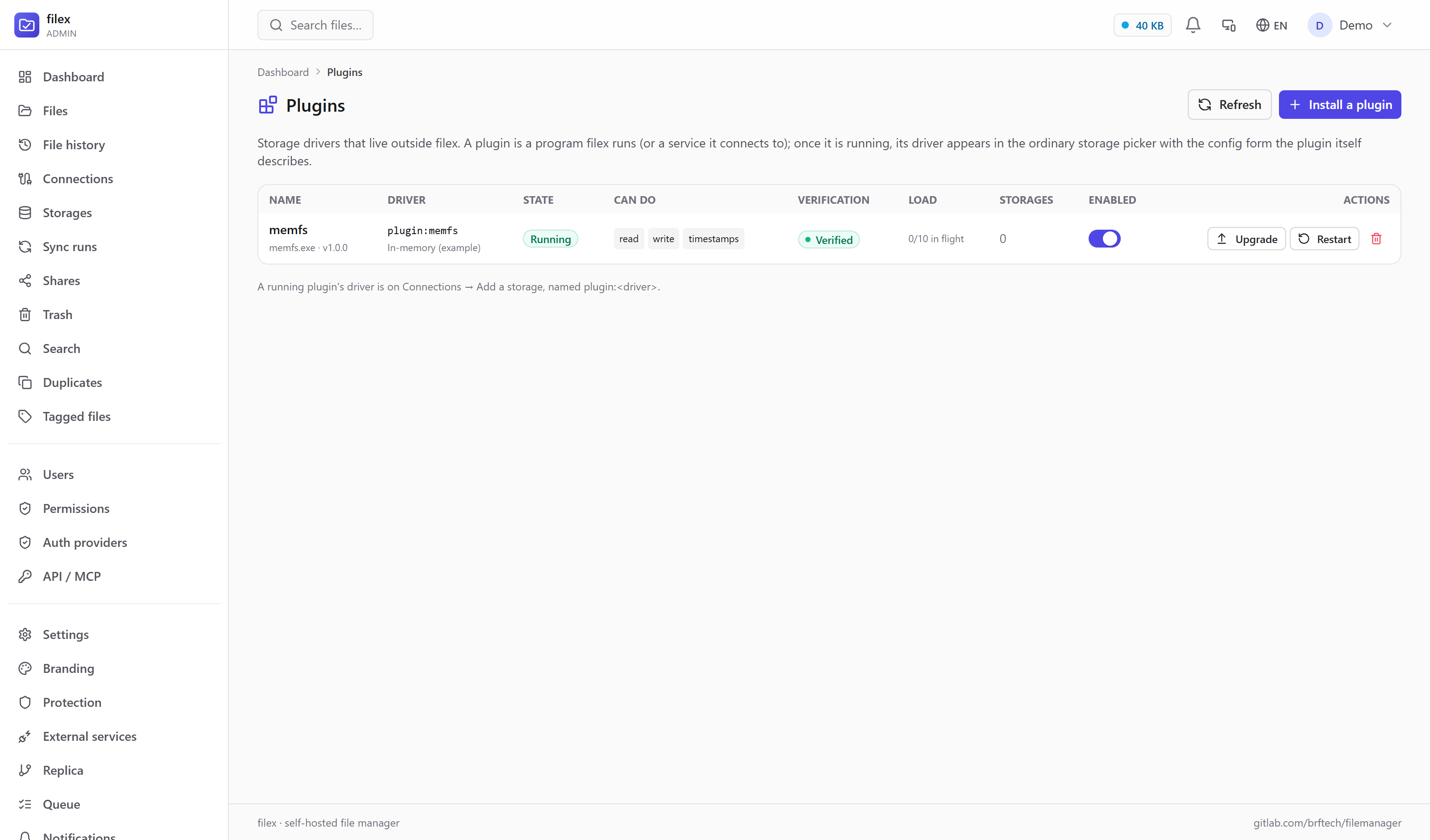
| A storage filex does not ship — installed as a plugin, describing its own config form |
|---|
 |
Quick start — binary
# Download from https://github.com/BRF-Tech/filex/releases
./filex serve
═══════════════════════════════════════════════════════════════
  filex · self-hosted file manager
═══════════════════════════════════════════════════════════════
  Listening on:   http://0.0.0.0:5212
  Admin UI:       http://0.0.0.0:5212/admin
  Embed JS:       http://0.0.0.0:5212/embed.js

  First run detected. Initial admin user created:
    Email:    admin@local
    Password: kT9_x4Pq2Nm-BvLs
  Saved to:  ~/.filex/.first-run.txt (mode 0600, shown ONCE)
  Change at: /admin/profile
═══════════════════════════════════════════════════════════════
Self-host with Compose or Helm
The bare docker run above is enough to try filex out. For a real deployment,
ready-made stacks live in deploy/:
deploy/compose/— Docker Compose:- minimal — filex + SQLite + local disk (one service, zero dependencies).
- full — filex + PostgreSQL + Redis + Caddy (auto-HTTPS), plus toggleable
add-ons: OnlyOffice, Drawio, universal converter, MinIO (S3).
Turn each on/off with a Compose profile in.env.
deploy/helm/filex/— a Helm chart for Kubernetes
(Deployment + PVC + optional Ingress). Every add-on above is anenabled
toggle invalues.yaml— bundle PostgreSQL / Redis / MinIO, or wire external
OnlyOffice / Drawio / converter.
Step-by-step instructions for each tier are in
docs/INSTALLATION.md.
Embed in your app
Vue 3
pnpm add @brftech/filex-core
<script setup>
import { FileExplorer } from '@brftech/filex-core';
import '@brftech/filex-core/style.css';
</script>
<template>
  <FileExplorer :config="{ apiBase: 'http://localhost:5212', auth: { kind: 'bearer', token: '…' } }" />
</template>
React
pnpm add @brftech/filex-react
import { FileManager } from '@brftech/filex-react';
<FileManager config={{ apiBase: 'http://localhost:5212' }} onError={(e) => console.error(e)} />
Vanilla JS / any framework
<script type="module" src="https://cdn.jsdelivr.net/npm/@brftech/filex/dist/filex.js"></script>
<filex-explorer api-base="http://localhost:5212"></filex-explorer>
Multi-tenant hosts typically proxy the API server-side, inject a confined token
(root: tenant-folder) per request, and strip client headers — the sandbox is enforced by
the backend, not the widget. See docs/INTEGRATION.md.
Desktop app & CLI
The explorer also ships as a Windows / Linux desktop app — the same component the web
UI and the embeds render, not a separate half-copy:
- Several accounts at once — a rail of servers/tenants, each showing its own branding.
- Keep on this computer — right-click any folder, file or whole storage to mirror it
under one filex folder on the machine (movable from Settings); everything else stays
online-only, and every row says which it is (✓ ◐ ⟳ ☁). "Keep online only" hands the
local copy back to the Trash, or leaves it
(docs/DESKTOP.md). - Folder sync — pair a local folder with a server folder and they stay in step both
ways while the app sits in the tray: parallel transfers and listings, a first run that
resumes where it was interrupted, 30-day local trash, and an engine that refuses to
turn a missing folder into a mass delete (docs/SYNC.md). - Signs in through your browser, so SSO and MFA behave exactly as they do on the web.
- Updates itself — downloads quietly, installs on quit;
FILEX_NO_UPDATE=1opts out.
Installer, AppImage and .deb are attached to the
latest release — not code-signed yet,
so expect a SmartScreen prompt on Windows. Details: docs/DESKTOP.md.
The same binary is also a client for servers, scripts and headless machines:
filex client login --url https://files.example.com
filex client upload build/report.pdf docs://ci-artifacts/

filex sync add ~/Documents/work docs://work   # the engine the desktop app uses
filex sync run --watch 30s
See docs/CLI.md and docs/SYNC.md.
AI agents / MCP
filex ships a token-authenticated automation surface at /api/ai (list, read, write,
move, delete, search, share, zip) and speaks Model Context Protocol at /api/ai/mcp:
claude mcp add filex --transport http https://files.example.com/api/ai/mcp \
  --header "Authorization: Bearer <api-token>"
Tokens are scoped by verb (read,write,delete,share), optionally confined to a single
folder, gated by the same RBAC grants as the UI, and stamped with per-token identities
so audit logs, shares and presence show who (which integration) did what.
Details: docs/MCP.md.
Features
- Multi-storage — mount many storages at once (local, S3, FTP, SFTP, WebDAV, SMB/NAS); each appears as a top-level folder.
- Storage plugins — a storage filex has never heard of is a separate program you install from the admin panel: it describes its own config form, filex speaks a small HTTP/JSON protocol to it, and its driver then behaves like any built-in one. Any language; a Go SDK makes it three methods. filex probes every capability a plugin claims — at install, and again against the configuration you type when you save a storage on it — and refuses one that cannot do what it says, because a half-working driver produces failures that look like filex being broken. Upgrades replace the binary in place and roll back if the new one does not come up (docs/PLUGINS.md).
- Protocol gateway — the same tree is reachable as S3 (SigV4; aws-cli, rclone, restic, mc, s3fs), SFTP (OpenSSH, WinSCP, FileZilla, sshfs), FTPS (explicit TLS, for the equipment that only learned FTP), NFSv3 (LAN NAS clients, media players) and WebDAV — each with its own credential you can revoke on its own, and all of them behind the same permissions, trash and quota as the UI (docs/PROTOCOLS.md).
filex mount— attach a remote filex server to a folder over ordinary HTTPS: a folder on Linux, a drive letter on Windows (filex mount Z:, needs the free WinFsp). Not a sync: nothing is copied but a bounded read cache, so it opens one file out of a hundred thousand without downloading the rest.- Real-time collaboration — presence bar with live avatars + focus, instant file-change updates over WebSocket, polling fallback.
- RBAC + item permissions — roles, per-file/folder grants with inheritance, share invites by e-mail (SMTP), grant-aware search and listings.
- Sharing — public links with PIN, expiry and max-downloads; folder links stream as ZIP (cached + pre-warmed); file-request upload links for inbound drops; ShareX-compatible upload endpoint.
- Desktop app + folder sync — Windows/Linux/macOS app: tray-resident two-way sync, selective sync (right-click → Keep on this computer, one root folder per account, the rest online-only), several accounts at once, self-updating (macOS: unsigned build, updates by re-download until it is signed) (docs/DESKTOP.md, docs/SYNC.md).
- Trash & version history — deletes are reversible within a retention window, writes keep snapshots; both live in the storage you already mounted (docs/TRASH-VERSIONING.md).
- Upload protection — optional ClamAV scanning plus trash/version retention behind one admin surface (docs/PROTECTION.md).
- E2E encrypted folders — client-side WebCrypto; the server stores ciphertext and never receives a key (docs/E2E-ENCRYPTION.md).
- Native multi-tenancy — provider/tenant mode with per-tenant isolation on one instance (docs/MULTI-TENANCY.md).
- Driver-pluggable everything — storage / auth / DB / queue drivers opt-in via env (
FILEX_AUTH_DRIVERS=local,oidc,FILEX_QUEUE_DRIVER=postgres, …). - OIDC SSO-first — optional auto-redirect to your IdP with break-glass local login (
?local=1). - Replica + reconciliation — primary→replica fan-out (mirror / append-only / skip per path-glob rule), read fallback, scheduled status report, one-click "Fix all".
- Persistent op queue — restart-safe queue (SQLite / Redis / Postgres), worker pool with retries + cancel + admin dashboard.
- DB-backed file tree — listings come from the DB cache (1-5 ms), not the storage backend (~100 ms); periodic ETag-diff sync catches out-of-band changes.
- Viewers & editors — image/video/audio, PDF, Markdown (split editor + preview), CSV, code (Monaco), Office via OnlyOffice, Drawio + Mermaid diagrams, 3D models.
- Universal converter — optional side-car converts between document/image formats from the UI.
- Notifications — generic JSON webhook (Slack/Discord-agnostic) + in-app bell with read/unread + per-user mute matrix.
- Search — Bleve embedded, full-text + metadata, permission-aware.
- Thumbnails — image, video (ffmpeg), PDF (ghostscript), Office (libreoffice); capability-aware.
- Tabs, themes & deep links — several folders open side by side, light/dark/auto theme, and an address bar that tracks the open folder so a pasted link lands there.
- Audit log — every mutation recorded with actor, integration identity and metadata.
- CLI client — the same binary reaches a remote server (
filex client,filex sync) with no server-side plugin (docs/CLI.md). - Self-updating — patch releases install themselves, minor ones are announced for one-click upgrade (docs/UPDATES.md).
- Single binary — goreleaser matrix: linux/macOS/Windows × amd64/arm64. CGO=0, modernc.org/sqlite.
- i18n — English + Turkish out of the box.
Architecture
See docs/ARCHITECTURE.md.
Documentation
Getting started — Installation ·
Configuration · Releases ·
Updates
Clients — Desktop app · Folder sync ·
CLI · Integration / embedding ·
AI & MCP
Without a browser — Protocols (S3 · SFTP · FTPS · NFS · WebDAV ·filex mount) · WebDAV
Storage & access — Storage · Uploads & resume ·
Quotas · SSO (OIDC) ·
LDAP & proxy auth · RBAC & permissions ·
Multi-tenancy
Data & features — Sharing & file requests ·
ShareX ·
Trash & versioning · Protection ·
E2E encryption · Search ·
Notifications · Thumbnails ·
Replication
Operate & extend — Deployment · Docker ·
Metrics · Architecture ·
Backend API spec · Component API ·
Migration · OnlyOffice ·
Converter
Development
git clone https://github.com/BRF-Tech/filex.git
cd filex
pnpm install
pnpm run build:all    # builds packages, web, then Go binary
./bin/filex serve
Subdirectories:
backend/— Go HTTP service (cmd/filex, internal/*, db/queries, db/migrations)packages/core—@brftech/filex-core(Vue 3 SFC, source of truth)packages/webcomponent—@brftech/filex(Web Component wrapper)packages/react—@brftech/filex-react(React adapter via @lit/react)web/— Vue 3 admin UI (embedded into Go binary viago:embed)desktop/— Electron app (bundled main process, tray sync, auto-update)demo/— Standalone HTML demos for each frameworke2e/— Playwright suites (web, embeds, packaged desktop app) +shots/, the
script that retakes the screenshots abovedocker/— Dockerfiles + composedeploy/— ready-made Compose stacks + Helm chart (seedeploy/)docs/— Markdown documentationdocs-site/— VitePress site published at docs.filex.sh
Contributions welcome — see docs/CONTRIBUTING.md.
License
MIT — see LICENSE.
Yorumlar (0)
Yorum birakmak icin giris yap.
Yorum birakSonuc bulunamadi