claude-code-status-bar
Health Warn
- License — License: MIT
- Description — Repository has a description
- Active repo — Last push 0 days ago
- Low visibility — Only 6 GitHub stars
Code Fail
- fs module — File system access in install.sh
- rm -rf — Recursive force deletion command in statusline-command.sh
- fs module — File system access in statusline-helper.js
- rm -rf — Recursive force deletion command in tests/test_helper.bash
Permissions Pass
- Permissions — No dangerous permissions requested
No AI report is available for this listing yet.
Configurable status bar for Claude Code: usage limits with pacing markers, context window, git state, live activity, session cost, and 7 colour themes. Pure bash, zero dependencies.






Your quota burn, context fill, git state, and live activity, visible under every response.
Claude Code tells you about your rate limit when you hit it, and about your context window when it is nearly full. By then it is usually too late to do anything graceful about either. This status bar puts the numbers you normally discover too late where you can always see them, so you can answer four questions at a glance:
- Am I burning through my 5-hour or weekly quota too fast? Usage bars with pacing markers show where you should be for even consumption.
- How full is the context window? A colour-coded bar warns you before quality degrades.
- What is Claude actually doing right now? A live second line shows running tools, subagents, and task progress.
- What has this session cost? Session cost and burn rate, colour-coded.
Pure bash core, no jq, no compiled binaries. One-line install. Seven colour themes. Works on macOS, Linux, and Windows (Git Bash / MSYS2). Every network call runs in the background, so the bar itself never blocks.
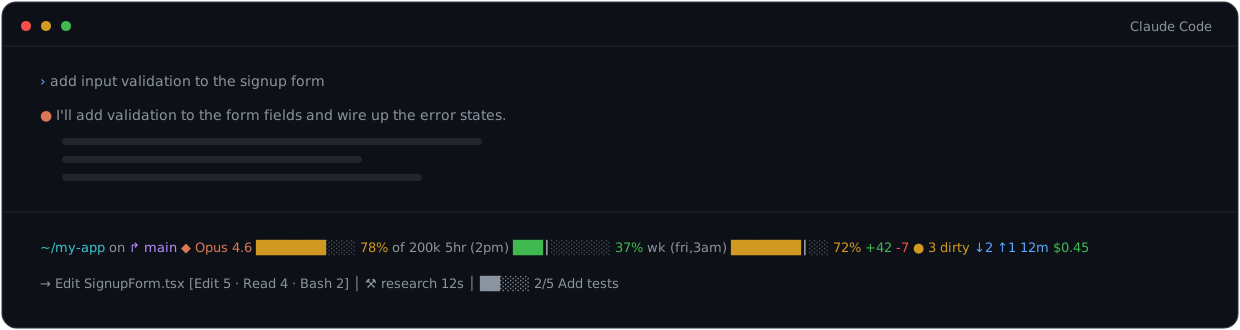
~/my-app on ↱ main  ◆ Opus 4.6  ███████░░░ 78% of 200k  5hr (2pm) ███│░░░░░░ 37%  wk (fri,3am) ███████│░░ 72%  +42 -7  ● 3 dirty  ↓2 ↑1  12m  $0.45
→ Edit SignupForm.tsx  [Edit 5 · Read 4 · Bash 2]  │  ⚒ research 12s  │  ██░░░ 2/5 Add tests
Contents: Highlights · Requirements · Install ·
The two-line layout · Segments ·
Usage limits & pacing · Configuration ·
CLI flags · Updating · Uninstall ·
How it works · Repository layout · Testing ·
Troubleshooting · Security · Changelog ·
License
Highlights
- 19 line-one segments plus a live activity line, individually toggleable (all except two automatic indicators, the 200k warning and the update notice).
- Pacing markers on the usage bars: a
│shows where your usage should be for even consumption across the window, so "37% used" becomes "37% used and comfortably under pace". - Live activity line: running tools, completed tool counts, subagent status, and todo progress, parsed from Claude Code's transcript by an optional Node.js helper.
- Pure bash core (bash 3.2+, stock macOS works). JSON is parsed with bash regex, so there is no jq dependency to install on Windows.
- Seven colour themes:
default,nord,dracula,solarized,tokyo-night,catppuccin,mono, plus fullNO_COLORsupport. - Never blocks: update checks, the usage API fallback, and transcript parsing all run in background subshells. The bar renders from caches.
- Config survives updates: your overrides live in
~/.claude/statusline.conf, which the installer never touches. - Security by default: restrictive file permissions (
umask 077), OAuth tokens passed to curl via stdin rather than the command line, and ANSI/control-character sanitisation of branch names, paths, and transcript content. - Tested: 28 BATS tests run in CI on Linux, macOS, and Windows (MSYS2), plus ShellCheck, on every push to main and every pull request.
Requirements
| Dependency | Needed for | Required? |
|---|---|---|
| bash 3.2+ | Everything (stock macOS bash works) | Yes |
| curl or wget | Install, update check, OAuth usage fallback | Yes |
| git | Branch, dirty count, ahead/behind, and stash segments | Optional |
| Node.js 14+ | Live activity line (line 2) only | Optional |
| python3 | Pretty-printed --dump-stdin output; installer fallback for the settings.json merge |
Optional |
Claude Code 2.1+ sends usage limits and the transcript path directly to the status bar. On older versions, usage limits fall back to the OAuth API and the activity line is unavailable. Segments whose data Claude Code does not send (vim mode, agent name, token counts) simply stay hidden.
Install
curl -fsSL https://raw.githubusercontent.com/briansmith80/claude-code-status-bar/main/install.sh | bash
The status bar appears after the next Claude Code response.
Windows: run the one-liner in Git Bash. From PowerShell, use
curl.exeinstead ofcurl(Git for Windows must be installed sobashis on your PATH).
The installer is non-interactive and transparent about what it does:
- Downloads
statusline-command.sh,statusline-helper.js(optional, best-effort), and the version file into~/.claude/. - Creates
~/.claude/settings.jsonwith astatusLineentry if the file does not exist, or merges the entry into your existing file (using node, python3, or python, whichever is available) without touching your other settings. - If
settings.jsonalready contains astatusLineentry, it is left completely untouched. Migrating from another status line? Remove your old entry first, then re-run the installer. - If no JSON-capable interpreter is available, it prints the exact snippet to paste into
settings.jsonyourself. - Clears the update-check cache so the new version is picked up immediately.
Re-running the installer is always safe; it is also the update mechanism.
Plugin install
If you prefer the Claude Code plugin system:
/plugin marketplace add briansmith80/claude-code-status-bar
/plugin install claude-code-status-bar
/claude-code-status-bar:setup
The plugin ships two slash commands:
| Command | What it does |
|---|---|
/claude-code-status-bar:setup |
Guided install: copies the files from the plugin cache (no network download), configures settings.json (asking before replacing an existing statusLine entry), runs a smoke test, and offers to set a theme and toggles. |
/claude-code-status-bar:configure |
Interactive editor for ~/.claude/statusline.conf: themes, segment toggles, display options, and grouping, written as a minimal diff against the defaults. |
Manual install
- Download the files to
~/.claude/:
curl -fsSL https://raw.githubusercontent.com/briansmith80/claude-code-status-bar/main/statusline-command.sh -o ~/.claude/statusline-command.sh
curl -fsSL https://raw.githubusercontent.com/briansmith80/claude-code-status-bar/main/VERSION -o ~/.claude/.statusline-version
# Optional: live activity line (requires Node.js)
curl -fsSL https://raw.githubusercontent.com/briansmith80/claude-code-status-bar/main/statusline-helper.js -o ~/.claude/statusline-helper.js
- Make it executable:
chmod +x ~/.claude/statusline-command.sh - Add to
~/.claude/settings.json:
{
  "statusLine": {
    "type": "command",
    "command": "bash ~/.claude/statusline-command.sh"
  }
}
The two-line layout
Line 1 is the metrics bar: directory, branch, model, context, usage limits, git state, duration, cost.
Line 2 is the live activity line, rendered dim so it stays out of the way:
→ Edit SignupForm.tsx [Edit 5 · Read 4 · Bash 2] │ ⚒ research 12s │ ██░░░ 2/5 Add tests
| You see | It means |
|---|---|
▶ Edit main.ts... |
Tools running right now (up to the last two) |
→ Edit main.ts |
The last completed tool, shown when nothing is running |
[Edit 5 · Read 4 · Bash 2] |
The top three tool counts for the session |
⚒ research 12s |
A running subagent with its elapsed time |
⚒ research ✓ (2) |
Finished subagents (and how many) |
██░░░ 2/5 Add tests |
Todo progress plus the current in-progress item |
Good to know:
- The line appears only when there is activity to show. It hides when the cached activity is more than 30 seconds old (typically the first refresh after a long pause) and reappears once the helper has re-parsed the transcript.
- Parsing happens in a background process, so the line runs one status bar refresh behind the transcript. That keeps the bar itself instant.
- It requires Node.js on your
PATH, thestatusline-helper.jsfile (installed by default), and a Claude Code version that sendstranscript_path(2.1+). If any of those are missing, line 2 silently stays off and everything else works. - Disable it entirely with
show_activity=falsein your config.
Segments
All segments are on by default except token counts and cost rate. Zero-valued segments auto-hide (configurable via auto_hide), and segments whose data is missing are simply omitted, so your actual bar is usually shorter than this table.
| Segment | Looks like | Toggle | Notes |
|---|---|---|---|
| Directory | ~/my-app |
show_directory |
Prefers workspace.current_dir, falls back to cwd; home shown as ~ |
| Branch | on ↱ main |
show_branch |
Short commit hash when detached; truncate long names with branch_max_length |
| Vim mode | NORMAL |
show_vim_mode |
Only when Claude Code sends vim.mode |
| Model | ◆ Opus 4.6 |
show_model |
Tier colours: Haiku green, Sonnet yellow, Opus orange (theme-aware) |
| Agent name | ▸ my-agent |
show_agent |
Only when running with an agent |
| Context bar | ███████░░░ 78% of 200k |
show_context_bar |
Green under 50%, yellow 50-79%, red 80%+; ▲ warning at context_warn_threshold |
| 200k warning | ▲ 200k+ |
(automatic) | When Claude Code reports exceeds_200k_tokens |
| Token counts | 45k in 12k out |
show_tokens (off) |
Cumulative input/output tokens; needs the nested context_window schema |
| 5-hour usage | 5hr (2pm) ███│░░░░░░ 37% |
show_usage_5h |
Rolling 5-hour window with reset time and pacing marker |
| Weekly usage | wk (fri,3am) ███████│░░ 72% |
show_usage_7d |
Rolling 7-day window with reset day/time and pacing marker |
| Lines changed | +42 -7 |
show_lines_changed |
Session lines added (green) and removed (red) |
| Dirty count | ● 3 dirty |
show_dirty_count |
Staged + unstaged + untracked files |
| Ahead/behind | ↓2 ↑1 |
show_ahead_behind |
Commits behind/ahead of upstream; hidden when there is no upstream |
| Stash count | ≡ stash:2 |
show_stash |
Git stash entries |
| Duration | 12m / 1h23m |
show_duration |
Session duration |
| Worktree | ⊞ hotfix |
show_worktree |
Worktree name when active |
| Cost | $0.45 |
show_cost |
Green under $1, yellow $1-5, red $5+ |
| Cost rate | $2.10/hr |
show_cost_rate (off) |
Burn rate; appears once the session is over a minute old |
| Update notice | ↑ update available |
(automatic) | Background version check against GitHub every 6 hours |
| Live activity | (line 2, see above) | show_activity |
Running tools, tool counts, subagents, todo progress |
Before the first API response of a session, the bar shows a dim Starting... placeholder. That is normal; the real segments appear as soon as Claude Code sends model and context data.
Usage limits & pacing
The bar shows your Anthropic usage limits as colour-coded progress bars with reset labels:
5hr (2pm) ███│░░░░░░ 37% wk (fri,3am) ███████│░░ 72%
- 5hr: the rolling 5-hour window, with its reset time (
2pm). - wk: the rolling 7-day window, with its reset day and time (
fri,3am). │pacing marker: where your usage should be for even consumption across the window. Bar past the marker means you are ahead of pace and may hit the limit early; behind it means you have headroom.~suffix (e.g.37%~): the data came from the OAuth fallback and is stale (more than two refresh intervals old).
Where the data comes from
- Stdin (preferred): Claude Code 2.1+ sends
rate_limitsdirectly in the JSON it pipes to the status bar. Real-time, zero network requests, no configuration. - OAuth API (fallback): on older Claude Code versions, the script fetches
api.anthropic.com/api/oauth/usagein a background subshell, cached for 10 minutes (usage_cache_seconds). On repeated failures it backs off exponentially, up to 30 minutes, tracked in~/.claude/.statusline-usage-backoff.
If neither source has data, the usage segments are hidden. Run --dump-stdin (see CLI flags) to check which fields your Claude Code version sends.
Credentials (OAuth fallback only)
The fallback reads your existing Claude Code token; nothing extra to configure:
| Platform | Credential source |
|---|---|
| macOS | Keychain (Claude Code-credentials), falling back to ~/.claude/.credentials.json |
| Linux | ~/.claude/.credentials.json |
| Windows / MSYS2 | ~/.claude/.credentials.json |
The token must have the user:profile scope, which browser sign-in grants automatically. Tokens created with claude setup-token only have user:inference and will not work; quit all Claude Code instances and restart to trigger a fresh browser OAuth login.
Configuration
Create ~/.claude/statusline.conf with only the lines you want to change. The file is never overwritten by updates. Every key is shown below with its default:
# ~/.claude/statusline.conf

# ── Theme ────────────────────────────────────────────────
colour_theme=default        # default | nord | dracula | solarized | tokyo-night | catppuccin | mono

# ── Segment toggles ──────────────────────────────────────
show_directory=true
show_branch=true
show_vim_mode=true
show_model=true
show_agent=true
show_context_bar=true
show_tokens=false           # opt-in
show_usage_5h=true
show_usage_7d=true
show_lines_changed=true
show_dirty_count=true
show_ahead_behind=true
show_stash=true
show_duration=true
show_worktree=true
show_cost=true
show_cost_rate=false        # opt-in; shows after the session is a minute old
show_activity=true          # the live line 2 (requires Node.js)

# ── Display ──────────────────────────────────────────────
use_icons=true              # ↱ ◆ ▸ ● ≡ ⊞ ↑ prefixes and the ▲ context warning
auto_hide=true              # hide zero-valued segments
bar_width=10                # progress bar width in characters
branch_max_length=          # truncate long branch names with … (empty = no limit)
context_warn_threshold=80   # context % that triggers the ▲ warning (needs use_icons=true)

# ── Truncation for narrow terminals ──────────────────────
enable_truncation=false     # drop low-priority segments when line 1 is too wide
max_width=                  # width budget (empty = auto: tput cols, then $COLUMNS, then 120)

# ── Grouping ─────────────────────────────────────────────
use_groups=false            # bracket related segments together
group_open="["
group_close="]"

# ── Usage limits ─────────────────────────────────────────
usage_cache_seconds=600     # OAuth fallback refresh interval (ignored when stdin provides limits)
A few details worth knowing:
NO_COLOR: when theNO_COLORenvironment variable is set, all colours are disabled regardless of theme.- Truncation order: with
enable_truncation=true, segments are dropped tier by tier, least important first: the update notice, then worktree, then duration, then ahead/behind and stash, then tokens, lines changed and dirty count, then cost and cost rate, then vim mode, model, agent and the usage bars, then the context bar, and last of all directory and branch. - Groups: with
use_groups=true, related segments are bracketed:[model + context][usage bars][git stats][duration + cost]. Directory/branch, vim, agent, tokens, worktree, and the update notice stay outside groups. Brackets wrap contiguous runs, so an ungrouped segment sitting between group members (an agent name or a worktree) splits the bracket around itself. - Legacy alias:
show_usage_weeklyfrom older configs still works as an alias forshow_usage_7d. - Trust level: the config is sourced as bash, so treat it like your
.bashrc: only put your own settings in it.
CLI flags
The script normally runs with no arguments, fed JSON on stdin by Claude Code. The flags exist for setup, diagnostics, and removal:
| Flag | Description |
|---|---|
--help, -h |
Show usage info and exit. |
--version, -v |
Print the installed version and exit. |
--check-update |
Clear the update cache and synchronously check GitHub for a newer version. Prints current and latest, plus the install one-liner if an update exists. |
--dump-config |
Print the resolved configuration (defaults merged with your statusline.conf) as sorted key=value lines. The fastest answer to "why isn't my override taking effect?" |
--dump-stdin |
Echo the JSON Claude Code sends (pretty-printed when a working python3 is on PATH) plus a YES/NO report of detected fields: rate_limits, transcript_path, nested model, nested context_window. Pipe JSON in: echo '<json>' | bash ~/.claude/statusline-command.sh --dump-stdin |
--uninstall |
Interactively remove all installed files. See Uninstall. |
Updating
When a new version is available you'll see ↑ update available in the bar (the check runs in the background every 6 hours and never slows anything down). To update, re-run the installer:
curl -fsSL https://raw.githubusercontent.com/briansmith80/claude-code-status-bar/main/install.sh | bash
It detects the existing installation, updates in place, and leaves statusline.conf and your settings.json entry alone. To check manually:
bash ~/.claude/statusline-command.sh --check-update
Right after a release, GitHub's raw CDN can serve the previous version for a few minutes. If
--check-updatereports an older version than expected, wait five minutes and try again.
Uninstall
bash ~/.claude/statusline-command.sh --uninstall
It lists what will be deleted and asks for confirmation, prompts separately before removing statusline.conf (so you can keep your config for a reinstall), and reminds you to remove the statusLine block from ~/.claude/settings.json yourself.
rm -f ~/.claude/statusline-command.sh
rm -f ~/.claude/statusline-helper.js
rm -f ~/.claude/.statusline-version
rm -f ~/.claude/.statusline-update-cache
rm -f ~/.claude/.statusline-usage-cache
rm -f ~/.claude/.statusline-usage-backoff
rm -f ~/.claude/.statusline-activity-cache
rm -rf ~/.claude/.statusline-transcript-cache
rm -f ~/.claude/statusline.conf   # your config; skip this line to keep it
Then remove the "statusLine" block from ~/.claude/settings.json.
How it works
Claude Code pipes a JSON payload to the script on every refresh. The script parses it with bash regex (no jq), builds the segments, and prints one or two lines. Everything slow happens in background subshells that write caches; the bar only ever reads caches, so it never waits on the network or on transcript parsing.
flowchart LR
    CC["Claude Code"] -->|"JSON on stdin"| S["statusline-command.sh"]
    S --> L1["Line 1: metrics"]
    S --> L2["Line 2: live activity"]
    S -.->|"background, every 6h"| U["Version check (GitHub)"]
    S -.->|"background, only without stdin limits"| O["OAuth usage API"]
    S -.->|"background, every refresh"| H["statusline-helper.js parses the transcript"]
    U & O & H -.->|"write"| C["caches in ~/.claude/"]
    C -.->|"read next refresh"| S
Files at ~/.claude/ after install:
| File | Purpose | Overwritten on update? |
|---|---|---|
statusline-command.sh |
The script Claude Code runs | Yes |
statusline-helper.js |
Node.js transcript parser (optional) | Yes |
.statusline-version |
Installed version | Yes |
statusline.conf |
Your config overrides | Never |
.statusline-update-cache |
Update check cache | Cleared on update |
.statusline-usage-cache |
OAuth usage cache | Auto-refreshes |
.statusline-usage-backoff |
OAuth failure backoff state | Auto-expires |
.statusline-activity-cache |
Live activity cache | Auto-refreshes |
.statusline-transcript-cache/ |
Parsed transcript cache | Auto-invalidates |
All caches are created with umask 077, so they are readable only by you.
Repository layout
claude-code-status-bar/
├── README.md
├── CHANGELOG.md                  # release history
├── LICENSE                       # MIT
├── VERSION                       # single source of truth for the version
├── install.sh                    # one-line installer / updater
├── statusline-command.sh         # the status bar (pure bash, installed to ~/.claude/)
├── statusline-helper.js          # optional Node.js transcript parser (live activity line)
├── docs/
│   └── assets/                   # README images (banner, terminal demo)
├── commands/
│   ├── setup.md                  # /claude-code-status-bar:setup
│   └── configure.md              # /claude-code-status-bar:configure
├── .claude-plugin/
│   ├── plugin.json               # plugin manifest
│   └── marketplace.json          # marketplace catalog for /plugin marketplace add
├── .github/workflows/
│   ├── shellcheck.yml            # lint (pushes to main, PRs)
│   └── tests.yml                 # BATS suite on Linux, macOS, Windows (MSYS2)
├── tests/                        # 28 BATS tests across 5 files
├── ROADMAP.md                    # feature roadmap & competitive landscape
├── SPRINTS.md                    # sprint plan
└── CLAUDE.md                     # project guide for working on this repo with Claude Code
Testing
A BATS suite under tests/ covers schema parsing (old flat and new nested formats), segments, all seven themes, NO_COLOR, config overrides, and context window formatting. Each test runs in a sandboxed HOME, so your real config and credentials are never touched. CI runs the suite on Linux, macOS, and Windows (MSYS2), plus ShellCheck.
To run locally, install bats-core:
brew install bats-core            # macOS
sudo apt-get install -y bats      # Debian / Ubuntu
# Windows (Git Bash / MSYS2): no pacman package; run bats-core from a clone
git clone --depth 1 https://github.com/bats-core/bats-core.git ~/bats-core
Then from the repo root:
bats tests/                       # macOS / Linux
~/bats-core/bin/bats tests/       # Windows
See tests/README.md for layout details.
Troubleshooting
- The bar doesn't appear at all. Check that
~/.claude/settings.jsonhas thestatusLineentry (the installer skips this step if anystatusLineentry already exists, including one from a different status line). Then wait for the next Claude Code response; the bar renders after responses, not on launch. - The bar just says
Starting...Normal. It means Claude Code hasn't sent model or context data yet, which happens at the start of every session. - A segment I enabled isn't showing. Most segments auto-hide when their value is zero or their data is missing. Run
bash ~/.claude/statusline-command.sh --dump-configto confirm your override took effect, and--dump-stdinto see which fields your Claude Code version actually sends. - Usage segments are missing. On Claude Code 2.1+ they should appear automatically from stdin. For the OAuth fallback: check credentials exist (see Credentials), then clear the caches and let them refresh:
rm -f ~/.claude/.statusline-usage-cache ~/.claude/.statusline-usage-backoff. The backoff file matters: after repeated failures the script waits up to 30 minutes before retrying. - Usage shows
~after the percentage. The OAuth data is stale. Usually transient; if it persists, clear the two cache files above. - The activity line never appears. It needs Node.js on
PATH,~/.claude/statusline-helper.js, and a Claude Code version that sendstranscript_path(--dump-stdinreports this as YES/NO). Also note it lags one refresh behind and hides when its cache is more than 30 seconds old. --check-updateshows an old version right after a release. GitHub's raw CDN caches for a few minutes. Try again shortly.
Security
Points that matter for a tool that runs on every response and can read your OAuth token:
- All cache and temp files are created with
umask 077(owner-readable only). - The OAuth token is passed to curl via
--config -on stdin, so it never appears in the process list. The wget fallback cannot do this and passes the header as a command-line argument, so curl is strongly preferred; wget also runs with--max-redirect=0to prevent token leakage on redirects. - Branch names, paths, worktree names, and all transcript-derived text are stripped of ANSI escapes and control characters before being printed to your terminal.
~/.claude/statusline.confis sourced as bash. It has the same trust level as your.bashrc.- The helper and its caches store activity summaries, not transcript content: tool names, file basenames, short command and pattern snippets (30 characters at most), and todo or agent description snippets (50 characters at most).
Changelog
Release history lives in CHANGELOG.md. Recent highlights:
- 2.1.1: README overhaul with verified examples, a fix for doubled progress bars under
NO_COLOR/mono, and the marketplace manifest for/plugin marketplace add. - 2.1.0: BATS test suite, three-platform CI, and four new CLI flags (
--help,--version,--dump-config,--uninstall). - 2.0.x: theme-aware Opus colouring,
of 1Mformatting for million-token context windows, nested-JSON parsing fixes. - 2.0.0: stdin-native rate limits, the live activity line, and plugin marketplace support.
License
MIT, see LICENSE.
Reviews (0)
Sign in to leave a review.
Leave a reviewNo results found