agent-usage
Health Uyari
- License — License: Apache-2.0
- Description — Repository has a description
- Active repo — Last push 0 days ago
- Low visibility — Only 5 GitHub stars
Code Uyari
- network request — Outbound network request in internal/server/static/app.js
Permissions Gecti
- Permissions — No dangerous permissions requested
This tool is a lightweight, cross-platform tracker for AI coding agent usage and costs. It parses local session data from tools like Claude Code and Codex, calculates expenses automatically using a remote pricing source, and displays the analytics on a local web dashboard.
Security Assessment
Overall Risk: Low. The tool operates primarily on local files, reading your AI agent session histories via read-only mounts to calculate token usage and expenses. It does not request dangerous system permissions, and no hardcoded secrets were found. There is a minor network warning: the frontend application (`app.js`) makes an outbound network request, which is expected behavior to fetch live model pricing data from the `litellm` repository. While it does not execute arbitrary shell commands or exfiltrate code, users should be aware that it accesses sensitive session data. If deploying via Docker, ensure you restrict external access by binding to `127.0.0.1` rather than `0.0.0.0` to keep your dashboard private.
Quality Assessment
The project has a clean bill of health for maintenance. It is actively developed (last updated today) and uses the permissive Apache-2.0 license. However, community trust and visibility are currently very low. With only 5 GitHub stars, it is a very new or niche tool that has not yet been widely vetted by the open-source community.
Verdict
Safe to use, though standard security hygiene (keeping the dashboard locally bound) is recommended.
Lightweight cross-platform AI coding agent usage & cost tracker. Single binary, SQLite, web dashboard. | 轻量跨平台 AI 编程工具用量与费用追踪器,单二进制、SQLite 存储、Web 仪表板。
agent-usage




Lightweight, cross-platform AI coding agent usage & cost tracker.
Single binary + SQLite — zero infrastructure required.
Collects local session data from Claude Code, Codex, OpenClaw, OpenCode and other AI coding agents, calculates costs automatically, and presents token usage, cost trends, and session details through a web dashboard.
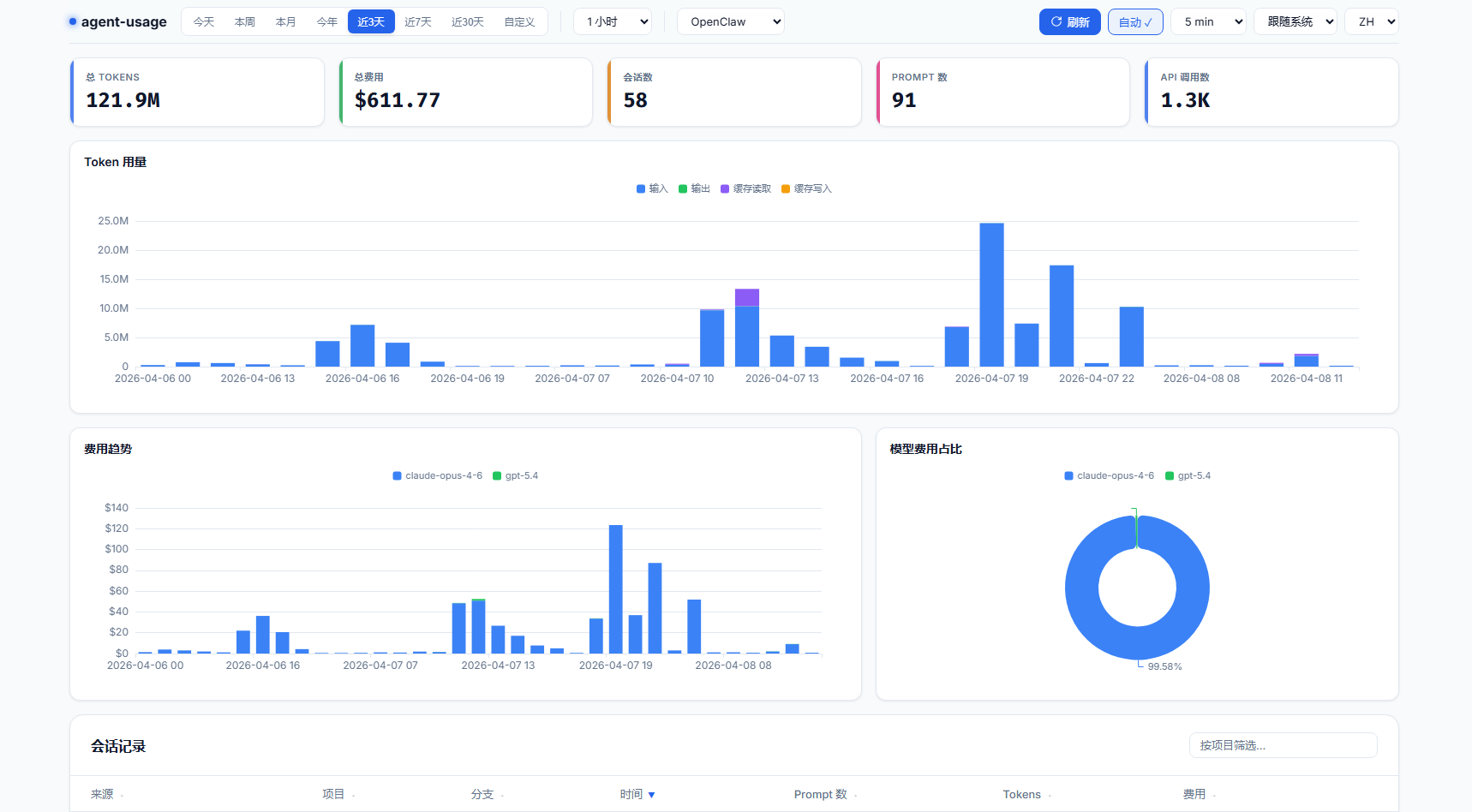
Features
- 📁 Local file parsing — reads Claude Code, Codex CLI, OpenClaw session files and OpenCode SQLite database directly
- 💰 Automatic cost calculation — fetches model pricing from litellm, supports backfill when prices update
- 🗄️ SQLite storage — single file, zero ops, data is correctable
- 📊 Web dashboard — dark-themed UI with ECharts: cost breakdown, token trends, session list
- 🔄 Incremental scanning — watches for new sessions, deduplicates automatically
- 📦 Single binary —
go:embedpacks the web UI into the executable - 🖥️ Cross-platform — Linux, macOS, Windows
Quick Start (Docker)
# One command to start
mkdir -p ./data && docker compose up -d

# Open dashboard
open http://localhost:9800
The default docker-compose.yml mounts ~/.claude/projects, ~/.codex/sessions, ~/.openclaw/agents, and ~/.local/share/opencode read-only. Data persists in ./data/.
The container uses config.docker.yaml by default (binds to 0.0.0.0, stores data in /data/). To override, mount your own config:
# In docker-compose.yml, uncomment:
volumes:
  - ./config.yaml:/etc/agent-usage/config.yaml:ro
See Docker Details for UID/GID permissions and local builds.
Query Usage from Agent Conversations
The skill works standalone — no need to install or run the agent-usage server. It parses local JSONL session files directly. If the agent-usage server is detected, it automatically switches to API queries for more accurate cost data.
# Installed via vercel-labs/skills, supports Claude Code, Cursor, Kiro, and 40+ agents
npx skills add briqt/agent-usage -y
Once installed, try: 查下 agent usage、agent usage 统计 or check agent usage. See skills/agent-usage/SKILL.md for details.
Configuration
server:
  port: 9800
  bind_address: "127.0.0.1"  # use "0.0.0.0" for remote access

collectors:
  claude:
    enabled: true
    paths:
      - "~/.claude/projects"
    scan_interval: 60s
  codex:
    enabled: true
    paths:
      - "~/.codex/sessions"
    scan_interval: 60s
  openclaw:
    enabled: true
    paths:
      - "~/.openclaw/agents"
    scan_interval: 60s
  opencode:
    enabled: true
    paths:
      - "~/.local/share/opencode/opencode.db"
    scan_interval: 60s

storage:
  path: "./agent-usage.db"

pricing:
  sync_interval: 1h  # fetched from GitHub; set HTTPS_PROXY env var if this fails
Config search order: --config flag > /etc/agent-usage/config.yaml > ./config.yaml.
Build from Source
# Clone
git clone https://github.com/briqt/agent-usage.git
cd agent-usage

# Build
go build -o agent-usage .

# Edit config
cp config.yaml config.local.yaml
# Adjust paths if needed

# Run
./agent-usage

# Open dashboard
open http://localhost:9800
Supported Data Sources
| Source | Session Location | Format |
|---|---|---|
| Claude Code | ~/.claude/projects/<project>/<session>.jsonl |
JSONL |
| Codex CLI | ~/.codex/sessions/<year>/<month>/<day>/<session>.jsonl |
JSONL |
| OpenClaw | ~/.openclaw/agents/<agentId>/sessions/<sessionId>.jsonl |
JSONL |
| OpenCode | ~/.local/share/opencode/opencode.db |
SQLite |
Adding New Sources
Each source needs a collector that:
- Scans session directories for JSONL files
- Parses entries and extracts token usage per API call
- Writes records to SQLite via the storage layer
See internal/collector/claude.go as a reference implementation.
Dashboard
The web dashboard provides:
- Sticky top bar — time presets, granularity, source filter (Claude/Codex/OpenClaw/OpenCode), auto-refresh
- Summary cards — total tokens, cost, sessions, prompts, API calls
- Token usage — stacked bar chart (input/output/cache read/cache write)
- Cost trend — stacked bar chart by model with consistent color mapping
- Cost by model — doughnut chart with percentage labels
- Session list — sortable, filterable table with expandable per-model detail
- Dark/Light theme — system-aware with manual toggle
- i18n — English and Chinese
- Timezone handling — all timestamps are stored in UTC; the frontend automatically converts to your browser's local timezone for date pickers, chart X-axis labels, and session timestamps
Architecture
agent-usage
├── main.go                     # Entry point, orchestrates components
├── config.yaml                 # Configuration
├── internal/
│   ├── config/                 # YAML config loader
│   ├── collector/
│   │   ├── collector.go        # Collector interface
│   │   ├── claude.go           # Claude Code session scanner
│   │   ├── claude_process.go   # Claude Code JSONL parser
│   │   ├── codex.go            # Codex CLI JSONL parser
│   │   ├── openclaw.go         # OpenClaw session scanner
│   │   ├── openclaw_process.go # OpenClaw JSONL parser
│   │   └── opencode.go         # OpenCode SQLite collector
│   ├── pricing/                # litellm price fetcher + cost formula
│   ├── storage/
│   │   ├── sqlite.go           # DB init + migrations
│   │   ├── api.go              # Query types + read operations
│   │   ├── queries.go          # Write operations
│   │   └── costs.go            # Cost recalculation + backfill
│   └── server/
│       ├── server.go           # HTTP server + REST API
│       └── static/             # Embedded web UI (HTML + JS + ECharts)
└── agent-usage.db              # SQLite database (generated at runtime)
Cost Calculation
Pricing is fetched from litellm's model price database and stored locally.
cost = (input - cache_read - cache_creation) × input_price
     + cache_creation × cache_creation_price
     + cache_read × cache_read_price
     + output × output_price
When prices update, historical records are automatically backfilled.
API Endpoints
All endpoints accept from and to (YYYY-MM-DD) query parameters. Optional: source (claude, codex, openclaw, opencode) to filter by agent, granularity (1m, 30m, 1h, 6h, 12h, 1d, 1w, 1M) for time-series endpoints.
| Endpoint | Description |
|---|---|
GET /api/stats |
Summary: total cost, tokens, sessions, prompts, API calls |
GET /api/cost-by-model |
Cost grouped by model |
GET /api/cost-over-time |
Cost time series (supports granularity) |
GET /api/tokens-over-time |
Token usage time series (supports granularity) |
GET /api/sessions |
Session list with cost/token totals |
GET /api/session-detail?session_id=ID |
Per-model breakdown for a session |
Invalid date formats or reversed date ranges return a 400 JSON error with a descriptive message.
Tech Stack
- Go — pure Go, no CGO required
- SQLite via
modernc.org/sqlite— pure Go SQLite driver - ECharts — charting library
go:embed— single binary deployment
Docker Details
Pre-built multi-arch images (amd64 + arm64) are published to ghcr.io/briqt/agent-usage.
The default docker-compose.yml runs as UID 1000. If your host user has a different UID, edit the user: field:
# Check your UID/GID
id -u  # e.g. 1000
id -g  # e.g. 1000

# Edit docker-compose.yml: user: "YOUR_UID:YOUR_GID"
This is required because ~/.claude/projects is mode 700 — only the owning UID can read it.
Building locally
docker build -t agent-usage:local .

# For China mainland, use GOPROXY:
docker build --build-arg GOPROXY=https://goproxy.cn,direct -t agent-usage:local .
Roadmap
- More agent sources (Cursor, Copilot, OpenCode, etc.)
- OTLP HTTP receiver for real-time telemetry
- OS service management (systemd / launchd / Windows Service)
- Export to CSV/JSON
- Alerting (cost thresholds)
- Multi-user support
Community
Join the discussion at Linux.do.
License
Yorumlar (0)
Yorum birakmak icin giris yap.
Yorum birakSonuc bulunamadi