claude-code-discord-status
Health Pass
- License — License: MIT
- Description — Repository has a description
- Active repo — Last push 0 days ago
- Community trust — 12 GitHub stars
Code Fail
- execSync — Synchronous shell command execution in src/cli.ts
- process.env — Environment variable access in src/cli.ts
- network request — Outbound network request in src/cli.ts
Permissions Pass
- Permissions — No dangerous permissions requested
This tool integrates with the Discord desktop app to display a live "Rich Presence" status card showing your current Claude Code activity. It tracks sessions, edits, and commands, displaying quirky aggregated stats when multiple instances run simultaneously.
Security Assessment
Risk: Medium. The tool functions as a local daemon that requires network requests to communicate with the Discord desktop application via its RPC (Rich Presence) protocol. It also requires environment variable access to detect active Claude sessions. However, the scan flagged synchronous shell command execution (`execSync`) in its CLI script. Synchronous execution can be a security risk if user-supplied or unsanitized input is passed to the shell, potentially allowing command injection. While no dangerous explicit permissions or hardcoded secrets were detected, the combination of local shell execution and active network communication warrants careful code review before adoption.
Quality Assessment
The project is fresh and actively maintained, with its last push occurring today. It is backed by the highly permissive MIT license, which is excellent for open-source adoption. Community trust is currently low but growing organically, as the repository has accumulated 12 GitHub stars. The setup process is straightforward and utilizes standard tooling (npm, jq). Because it is a small, focused utility with standard Node.js packaging, the barrier to entry and overall complexity remain very low.
Verdict
Use with caution — the utility is harmless in concept and actively maintained, but the reliance on synchronous shell execution means developers should quickly inspect the `cli.ts` source code before installing globally.
Show what Claude Code is doing as a live Discord Rich Presence card. Tracks sessions, displays current activity, and gets hilariously unhinged when you're running multiple instances.





Show what Claude Code is doing as a live Discord Rich Presence card.
Hooks into Claude Code's lifecycle events and updates your Discord status in real time.
Preview
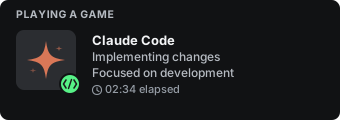
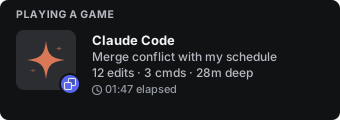
Single session (professional preset) · Multiple sessions (dev-humor preset)
Features
- Live activity updates — Your Discord card reflects what Claude is doing right now (editing, searching, running commands, thinking)
- Self-healing daemon — If the daemon dies (system restart, sleep/wake), it auto-restarts on the next Claude Code session
- Multi-session support — Running multiple Claude Code instances? The card escalates with quirky messages and aggregated stats
- Activity mode detection — Dominant activity type (coding, terminal, searching, thinking) changes the card icon
- Rotating tooltips — Hidden easter eggs on hover, rotating every 5 minutes
- Auto-reconnect — Daemon handles Discord RPC disconnects gracefully
Quick Start
Prerequisites
- Node.js >= 18
- jq (
brew install jq/apt install jq) - Discord desktop app running
- Claude Code CLI installed
Install & Setup
npm install -g claude-presence
claude-presence setup
Or try it without installing globally:
npx claude-presence setup
Tip: The global install (
npm install -g) is recommended — it puts the CLI on your PATH and keeps files in a stable location. Thenpxapproach works for a quick try but relies on npm's cache directory.
Setup will:
- Create a config at
~/.claude-presence/config.json - Copy the hook script to
~/.claude-presence/for persistence - Add lifecycle hooks to
~/.claude/settings.json - Start the daemon in the background
The daemon auto-restarts when needed — if it gets killed (system restart, sleep/wake), the next Claude Code session brings it back automatically.
Upgrading from v1.x
npm install -g claude-presence
claude-presence doctor --fix
Migration is automatic — your config, hooks, and settings are moved to the new ~/.claude-presence/ directory on first run. The old claude-code-discord-status package can be uninstalled after upgrading.
How It Works
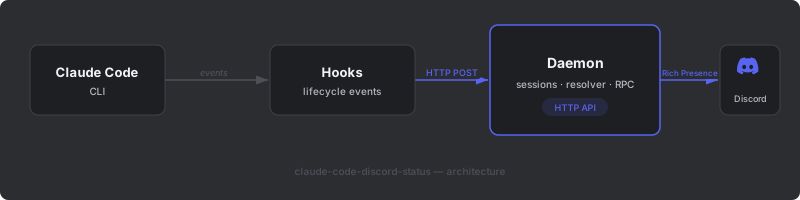
Two components work together:
- Hooks — Bash scripts fired by Claude Code lifecycle events (session start/end, tool use, prompt submit). They POST updates to the daemon's HTTP API. If the daemon isn't running, the hook auto-starts it.
- Daemon — Background process that holds the Discord RPC connection, tracks all sessions, resolves what to show, and pushes it to Discord.
See docs/architecture.md for the full deep dive.
CLI
claude-presence setup            # Interactive setup wizard
claude-presence status           # Check daemon status and active sessions
claude-presence start -d         # Start daemon in background
claude-presence stop             # Stop the daemon
claude-presence preset [name]    # Change message style
claude-presence doctor            # Diagnose and fix issues
claude-presence doctor --fix     # Auto-fix all issues
claude-presence update           # Update to latest version
claude-presence uninstall        # Remove everything
All commands also work with
npx claude-presence <command>.
Configuration
Config file: ~/.claude-presence/config.json
| Key | Env Override | Default | Description |
|---|---|---|---|
discordClientId |
CLAUDE_PRESENCE_CLIENT_ID |
1472915568930848829 |
Discord Application Client ID |
daemonPort |
CLAUDE_PRESENCE_PORT |
19452 |
Local HTTP server port |
preset |
CLAUDE_PRESENCE_PRESET |
minimal |
Message style preset |
The default client ID works out of the box — it's a public app identifier, not a secret.
See docs/setup.md for all config options, timeouts, and how to use a custom Discord application.
Message Presets
Choose how your Discord status sounds. Set during setup, or change anytime:
claude-presence preset            # Interactive selection
claude-presence preset dev-humor   # Set directly
| Preset | Style | Example |
|---|---|---|
minimal |
Terse, just the facts (default) | "Coding" |
professional |
Clean, understated | "Actively developing" |
dev-humor |
Classic programmer jokes | "// TODO: sleep" |
gen-z |
Quirky, meme-flavored | "No thoughts just code" |
chaotic |
Pushing to main, living dangerously | "Deploying on a Friday" |
Override via environment variable:
export CLAUDE_PRESENCE_PRESET=professional
Multi-Session Fun
When you're running multiple Claude Code sessions, the card gets quirky:
- 2 sessions — "Dual-wielding codebases", "Pair programming with myself"
- 3 sessions — "Triple threat detected", "Three-ring circus"
- 4 sessions — "4 parallel universes deep", "One for each brain cell"
- 5+ sessions — "Send help (5 projects)", "Gone feral (6 projects)"
Plus aggregate stats like 23 edits · 8 cmds · 2h 15m deep and rotating hover tooltips like "Technically I'm one Claude in a trenchcoat".
See docs/multi-session.md for the full message pool and how the resolver works.
Development
git clone https://github.com/BrunoJurkovic/claude-presence.git
cd claude-presence
npm install
npm run build
npm test
See CONTRIBUTING.md for guidelines.
License
MIT
Reviews (0)
Sign in to leave a review.
Leave a reviewNo results found