Orynivo
Health Uyari
- License — License: Apache-2.0
- Description — Repository has a description
- Active repo — Last push 0 days ago
- Low visibility — Only 6 GitHub stars
Code Basarisiz
- rm -rf — Recursive force deletion command in .github/scripts/test-upload-release-assets.sh
Permissions Gecti
- Permissions — No dangerous permissions requested
Bu listing icin henuz AI raporu yok.
Free, open-source Hi-Fi music library, player and self-hosted server for Windows, Linux and macOS — bit-perfect PCM/DSD, WASAPI/ASIO/direct ALSA, AirPlay, MCP. Apache-2.0.
Orynivo
A free, open-source Hi-Fi music library, player, and self-hosted server for
Windows, Linux, and macOS — for people who still own their music.
If you like what Roon does, but want software that is free, open source, and
keeps your files and listening data yours, Orynivo is built for you.



Website: orynivo.app · Downloads:
latest release ·
Docs: GitHub Wiki · Full
feature reference:
docs/FULL-FEATURE-REFERENCE.md
See Orynivo in action
https://github.com/user-attachments/assets/92e1cde3-b787-4752-8ad9-944d47d0b32f
If the embedded video does not play in your browser,
watch it on YouTube.
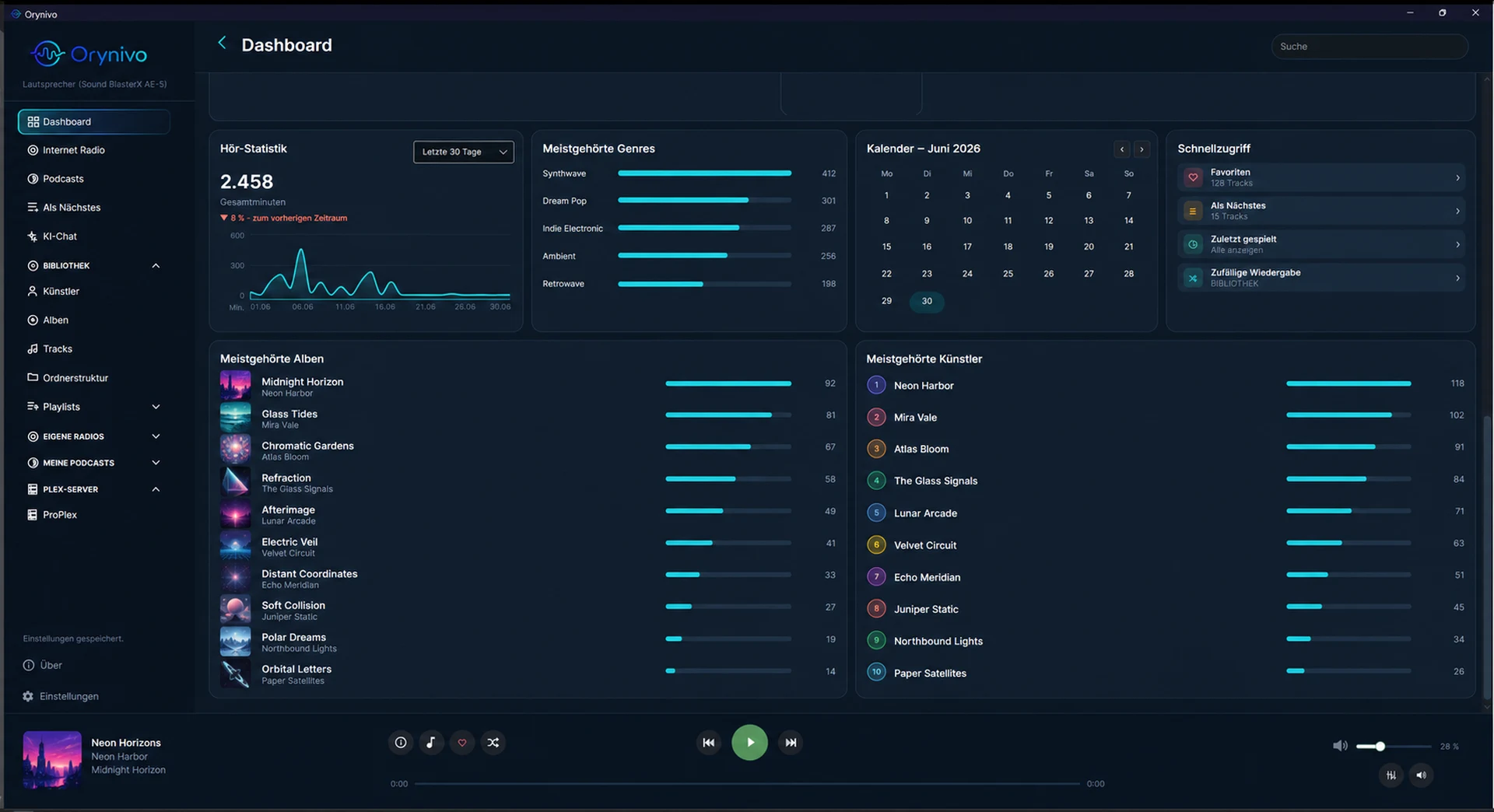
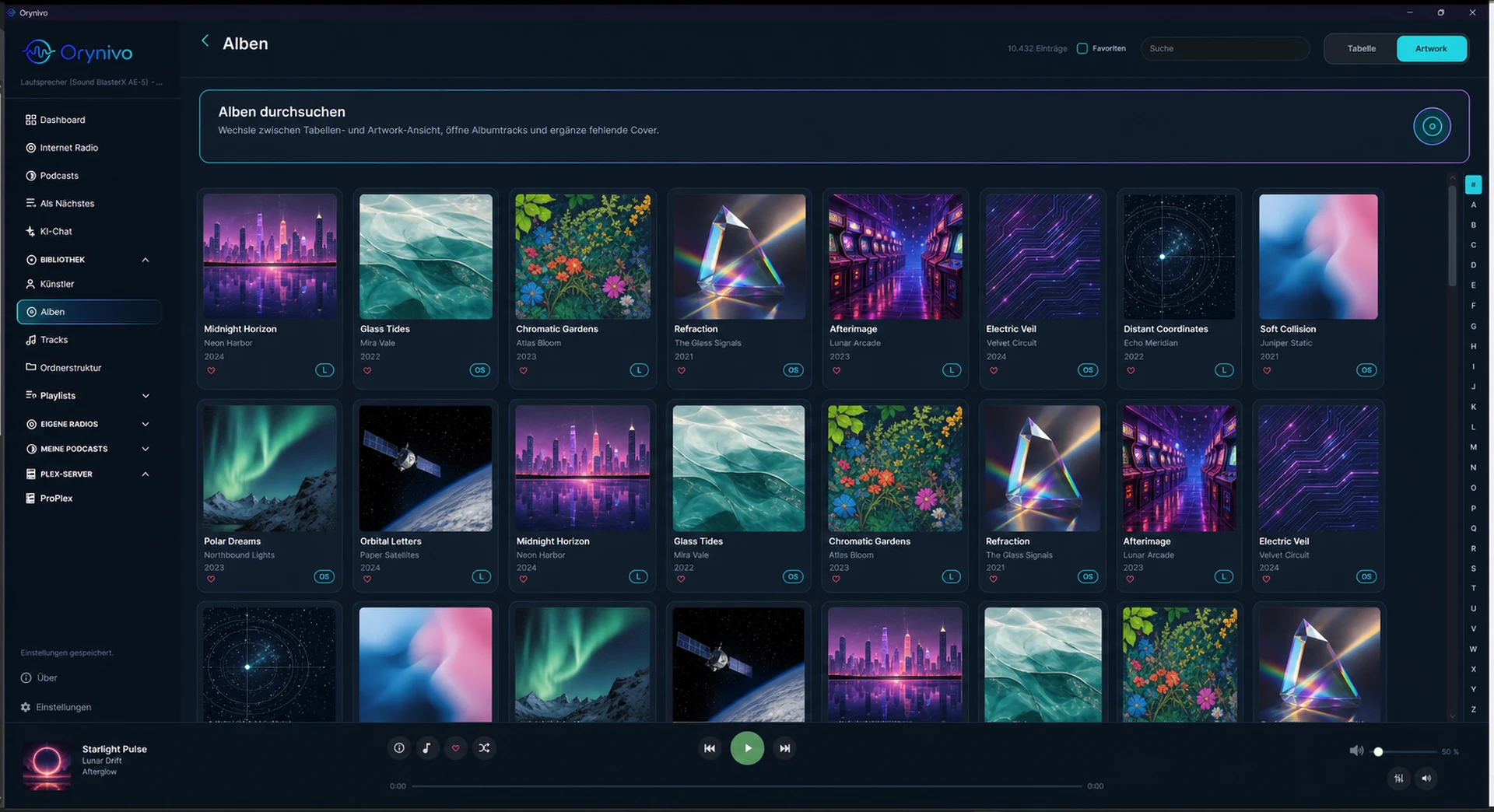
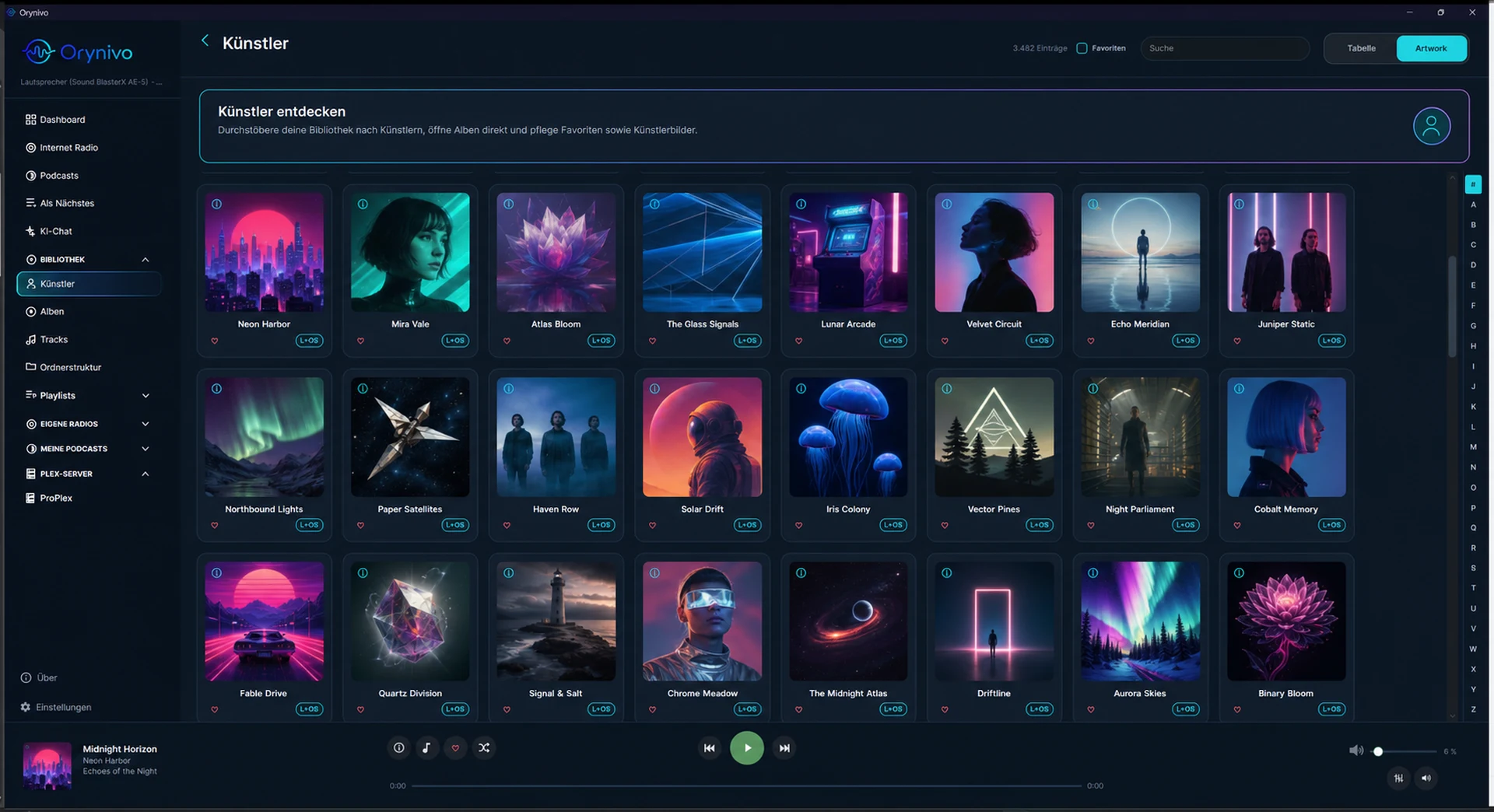
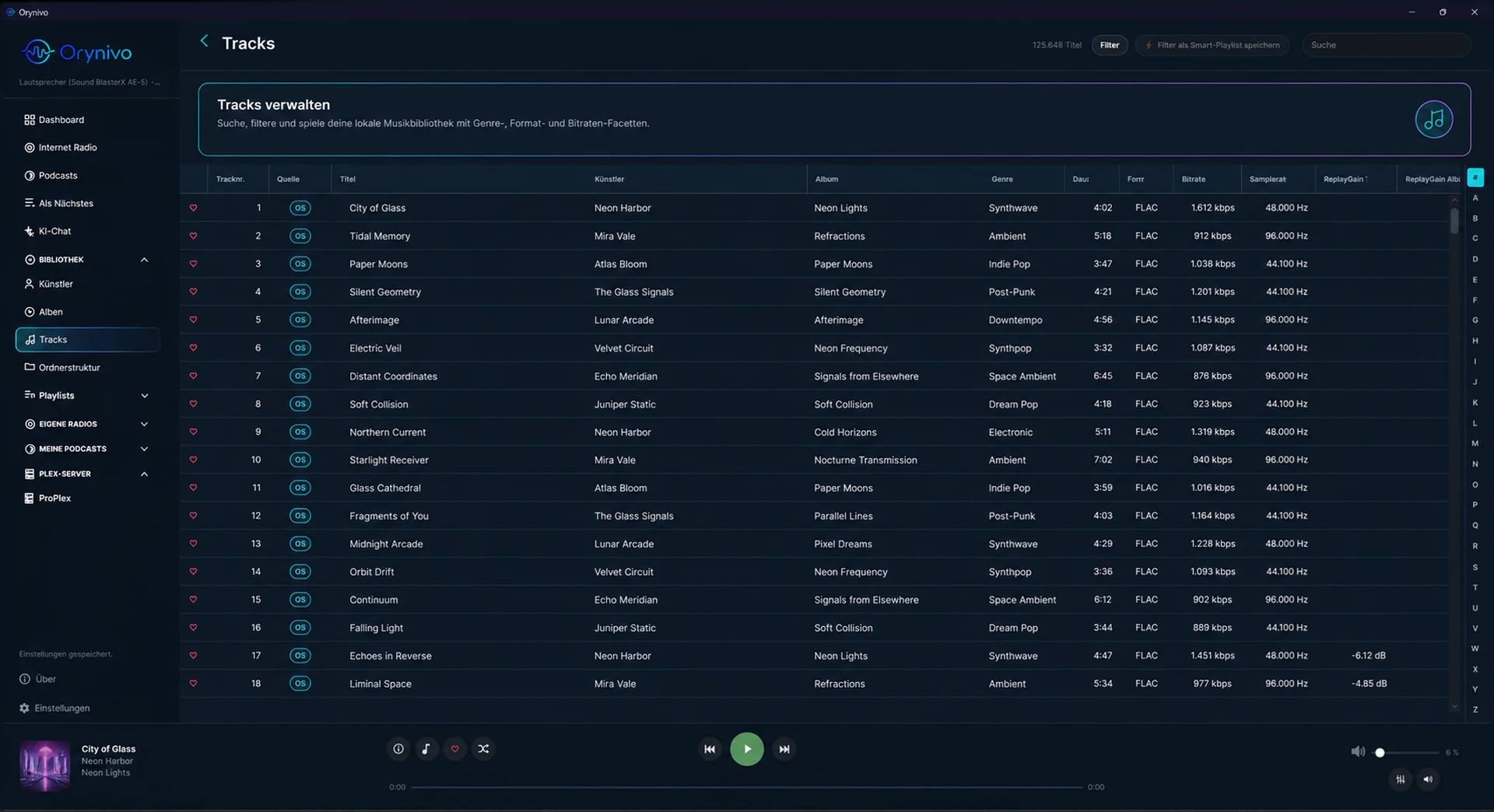
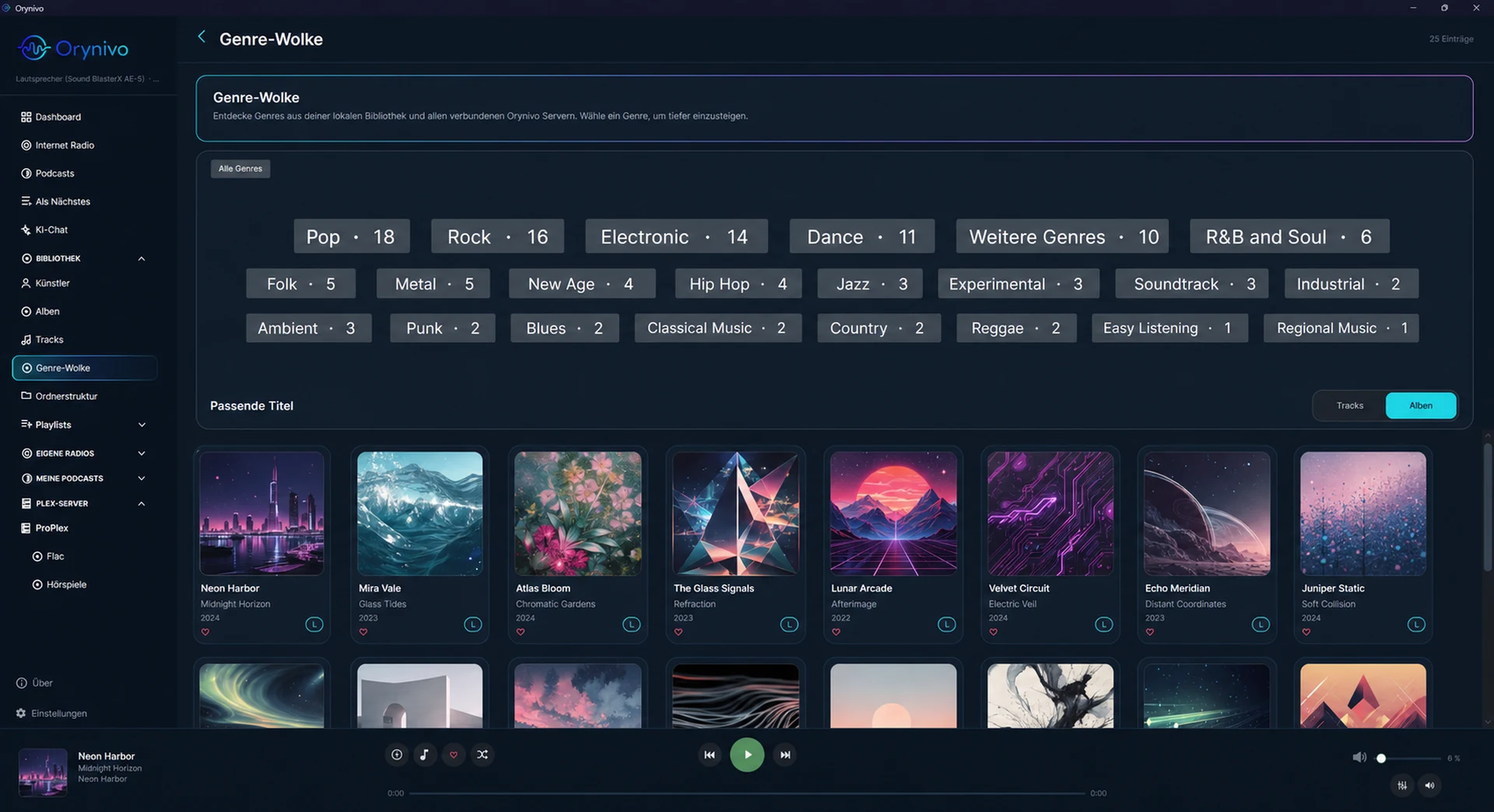
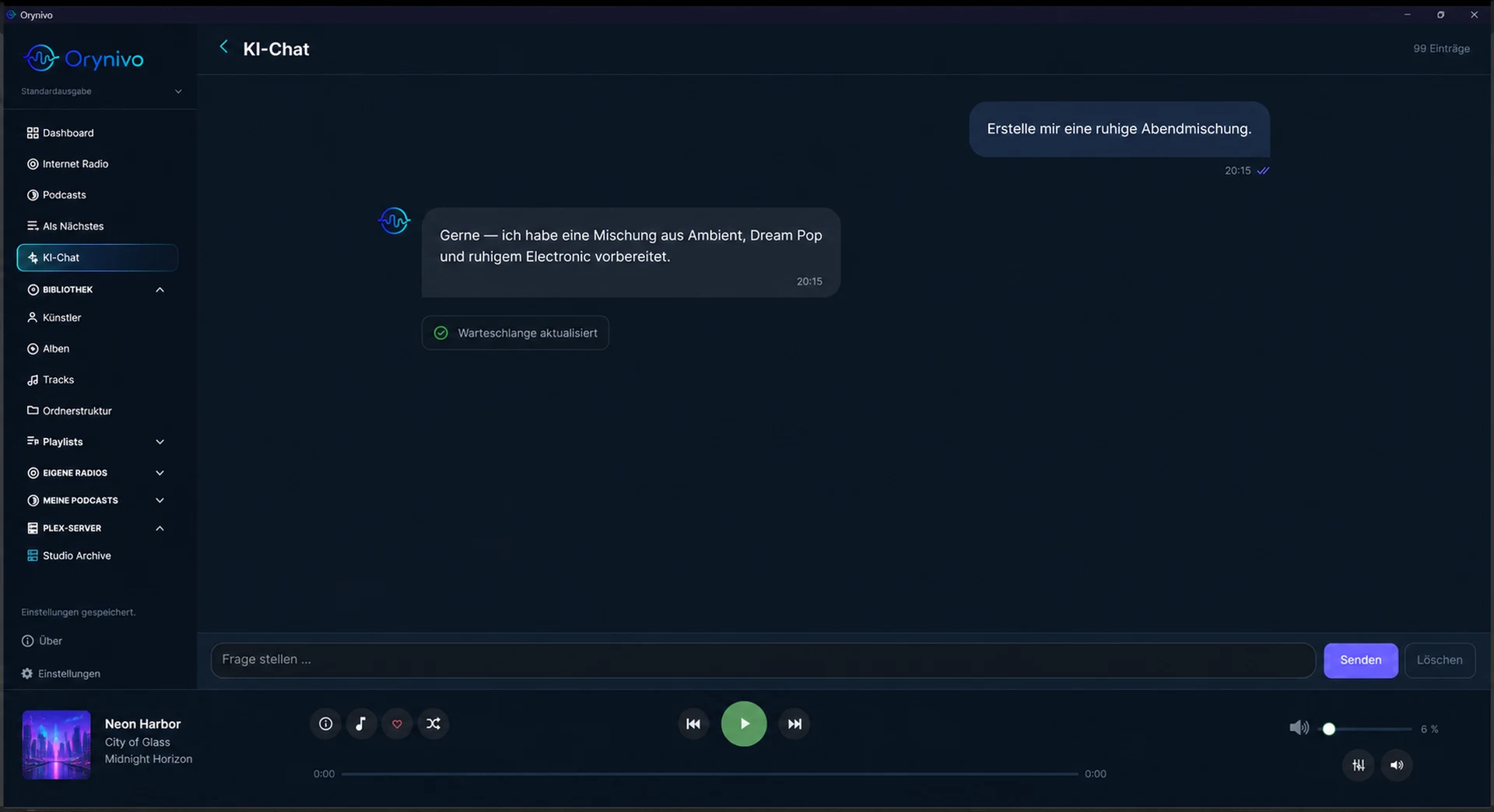
Screenshots
 |
 |
 |
 |
 |
 |
Why Orynivo?
- Bit-perfect audio. Exclusive WASAPI, cwASIO, and Steinberg ASIO output on
Windows; direct ALSA hardware profiles on Linux with native DSD (DSF/DFF) and
no ASIO bridge required. DoP fallback, gapless playback, ReplayGain, +6 dB PCM
boost, and a parametric EQ with Equalizer APO / AutoEQ import. - Your library, everywhere. Orynivo Server is a headless server for Linux,
macOS, and Windows that exposes your library over the local network via REST
and HTTP streaming. Desktop clients merge local and remote libraries into one
unified Artists / Albums / Tracks experience. - Made for large collections. Artists, albums, tracks, and folder views; CUE
sheets and MKA chapters; smart playlists; full-text search across local and
remote sources; bulk favorite/rating/genre editing that never rewrites your
media files. - Discovery built in. A hierarchical Genre Cloud across all connected
sources, Infinite Mix that keeps a queue replenished from your listening
habits, internet radio, podcasts, and lyrics. - AirPlay to your Hi-Fi. RAOP receiver discovery on every platform plus a
native AirPlay 2 bridge, verified with clean audible playback on a Sonos
stereo pair. - AI that stays local. Embedded AI chat through LM Studio, Ollama, or any
OpenAI-compatible endpoint, and an MCP server with 37 individually toggleable
tools for external assistants such as Claude Desktop. - Private by design. Apache-2.0 licensed, no telemetry, no account. API keys
and tokens live in an encrypted per-user credential store. The full UI is
available in English, German, French, Spanish, Russian, Simplified Chinese,
and Hindi.
Download
Self-contained builds (the .NET runtime is bundled; no prerequisites) from the
latest release:
| Component | Packages |
|---|---|
| Windows player | Setup.exe, portable ZIP (Windows 10/11 x64) |
| Linux player | DEB, RPM, Arch .pkg.tar.zst, portable tar.gz (x64 and ARM64) |
| macOS player | PKG and portable app ZIP (Apple Silicon and Intel) |
| Orynivo Server | DEB and RPM (Linux x64 / ARM64, incl. Raspberry Pi) |
The signed in-app updater installs updates through your native package manager
on Linux and verifies download digests on every platform.
Orynivo Server
Orynivo.Server scans the same library directories as the desktop app and
serves them over the local network: browse artists, albums, tracks, playlists,
artwork, waveforms, and lyrics, and stream audio with authenticated URLs that
work directly in FFmpeg and browsers. It runs as a plain binary or a systemd
service, and every release ships DEB/RPM packages. The
Wiki and the
full reference document the
complete REST API and setup.
Supported formats
DSF, DFF, FLAC, MP3, WAV, AIFF, M4A, MKA (with chapters), AAC,OGG, Opus, WMA, and CUE sheets referencing PCM sources. PCM is decoded via
FFmpeg, which Orynivo locates or downloads automatically.
Documentation
- HTTPS and reverse proxies — Caddy and nginx
examples for Orynivo Server and authenticated MCP access - GitHub Wiki — end-user guides
- Full feature & technical reference — every
feature, output profile, format behavior, and build detail - CHANGELOG.md · ROADMAP.md
Building from source
Requires the .NET 10 SDK:
dotnet restore Orynivo/Orynivo.csproj
dotnet build Orynivo/Orynivo.csproj --configuration Release
dotnet run --project Orynivo/Orynivo.csproj
Create the same self-contained linux-x64 output produced by CI:
dotnet restore Orynivo/Orynivo.csproj --runtime linux-x64
dotnet publish Orynivo/Orynivo.csproj --configuration Release \
  --runtime linux-x64 --self-contained true --no-restore \
  --output artifacts/Orynivo-linux-x64
Version tags publish self-contained desktop releases for linux-x64 andlinux-arm64. Each architecture receives a portable .tar.gz, a DEB package,
and an RPM package; Arch Linux additionally receives an x86_64 .pkg.tar.zst.
Installed packages place Orynivo under /usr/lib/orynivo, add the orynivo
command, and register a desktop launcher. All Linux player artifacts are covered
by the signed release manifest.
The unpublished AUR draft declares native .NET,
Avalonia and audio dependencies; it bundles the managed runtime. Clean-chroot
installation, a synthetic-profile upgrade from 0.48.0, virtual-display startup,
and maintainer-tested CachyOS playback and temporary desktop-menu startup
passed. AUR publication remains pending; see the validation notes for test
scope.
Build and publish the macOS desktop for either supported architecture:
dotnet restore Orynivo/Orynivo.csproj --runtime osx-arm64
dotnet publish Orynivo/Orynivo.csproj --configuration Release \
  --runtime osx-arm64 --self-contained true --no-restore \
  --output artifacts/Orynivo-osx-arm64
Use osx-x64 instead on an Intel Mac. Tagged releases package both runtime
identifiers as self-contained installable PKGs, portable Orynivo.app ZIPs, and
tar archives. Orynivo detects FFmpeg and FFprobe in the normal Homebrew,
MacPorts, pkgsrc, Fink, and per-user binary locations even when it is launched
from Finder. If neither tool is installed, it downloads architecture-matching
builds into the Orynivo per-user cache. OpenAL is provided by macOS.
An X11 or Wayland desktop session is required to run the Avalonia UI. FFmpeg and
FFprobe must be installed and available on PATH for playback, media probing,
waveforms, ReplayGain analysis, and other FFmpeg-backed library functions.
Settings checks the platform-appropriate executable names through the same
locator used at startup. The ALSA runtime (libasound.so.2, commonly packaged
as libasound2) is required for direct hardware output. The OpenAL runtime
(libopenal.so.1, commonly packaged as libopenal1) is required for the
system/default route.
AI Integration
Orynivo includes two complementary AI interfaces that share the same 32
player-control, queue-management, and library tools.
Embedded AI Chat
The AI Chat sidebar view connects to any OpenAI-compatible LLM endpoint —
LM Studio, Ollama, OpenAI,
Anthropic (via compatibility layer), or any custom /v1/chat/completions
provider. No external configuration file or MCP server is required: tools are
dispatched directly inside the application.
Responses stream token by token. The model calls tools autonomously — asking
"Spiele alle Beatles-Alben" makes it search the library, fill the queue with
the results, and start playback, all in one turn.
Configure the endpoint URL, optional API key, model name, and max-token limit
under Settings → Integration → AI Chat. Orynivo queries the
OpenAI-compatible /v1/models endpoint when this section is opened or the
connection values change, presents the returned identifiers in a selectable
list, and retains a free-form model field for compatibility endpoints that do
not advertise models. Load models refreshes the list manually, while Test
connection validates the current URL and key without saving them. LM Studio
and Ollama work without an API key. The sidebar entry can be shown or hidden
independently under Settings → Appearance, without disabling or deleting the
saved AI Chat configuration.
Available tools:
| Category | Tools |
|---|---|
| State | get_now_playing, get_queue, get_current_time |
| Playback | play, pause_resume, next_track, previous_track, stop, seek, set_volume |
| Queue | queue_append, queue_play_next, clear_queue, replace_queue |
| Library | search_library, get_track_key |
| Favorites, ratings, and discovery | set_current_favorite, set_tracks_favorite, set_tracks_rating, control_infinite_mix |
| Audio configuration | list_output_profiles, select_output_profile, list_equalizer_profiles, configure_equalizer |
| Lyrics | get_current_lyrics |
| Orynivo Server | list_orynivo_servers, scan_orynivo_server |
| Playlists | list_playlists, get_playlist_tracks, create_playlist, create_smart_playlist, create_similar_playlist |
| History | get_play_history, get_year_in_review |
| Web | search_web, fetch_page, fetch_page_as_markdown |
search_library accepts an optional free-text query plus a result category
(all, tracks, albums, or artists), inclusive yearFrom/yearTo release
years, inclusive ISO-8601 addedFrom/addedTo library dates, and relevance,
title, release-year, or library-addition ordering. This supports requests such
as “show newly added tracks”, “albums added since 2026-08-01”, and “albums from
1998”. The year is the release year stored in the media metadata; Orynivo does
not currently store a separate composition year. Filtered remote queries need an
Orynivo Server version that provides the authenticated structured-search
endpoint.
The model picks the right queue tool automatically: replace_queue clears the
old list and starts playing immediately when the user asks for new content;queue_append adds to the existing queue when the user wants to add more;clear_queue empties the queue without interrupting the current track. Library
search includes configured Orynivo Server libraries as opaqueorynivo://serverId/track/trackId references. Playback and queue tools resolve
those references inside the app, so API keys and authenticated stream URLs are
not exposed to the model.
Mobile web remote
The mobile web remote can be enabled under its separate Settings → Integration
→ Mobile web remote page. It listens on its own LAN port (default 49201)
and uses a dedicated generated bearer token; MCP permissions and its token are
not reused. Open http://<address-of-the-orynivo-computer>:49201/remote on a
phone, enter the remote token, and keep the page open for reconnecting live
player updates. The bare addresshttp://<address-of-the-orynivo-computer>:49201 redirects to that page as well.
Missing or rejected tokens are reported directly on the sign-in card. Tokens are
held only in the open page's memory, not in browser storage; reloading or
opening the plain URL requires entering the token again. The desktop stores this
token in its encrypted credential container and migrates tokens from older
plaintext settings automatically.
Settings lists the computer's active IPv4 addresses. Choose the address
reachable from your phone and save the settings first, then scan the locally
generated QR code. It includes the dedicated access token in a URL fragment for
direct sign-in; the page immediately removes the fragment from the address bar.
The fragment is not sent in HTTP requests, but the QR code itself grants access:
do not share it or include it in screenshots. QR generation uses the bundled
MIT-licensed QRCoder library and never contacts an external QR service. Use the
IP address if your phone cannot resolve the computer name; both devices must be
on a mutually reachable network. No port forwarding is needed.
The responsive interface has separate Now playing, Library,
Playlists, Internet Radio, Podcasts, and Up next sections, with
a bottom navigation bar on phones and a larger side-by-side artwork/player
layout on tablets. It shows state without disclosing file paths or authenticated
stream URLs. Previous, play/pause, next, stop, seek, volume, and direct
queue-entry controls are available. Current artwork is transferred as a bounded
thumbnail and retained through private browser cache headers. The search field
queries tracks in the local library and every configured Orynivo Server
concurrently. Results can be played immediately, inserted next, or appended; the
browser receives only an opaque identity and display metadata, never a physical
path, server address, or API key. LAN access is disabled by default. The current
track can be marked as a favourite, configured output profiles can be selected,
and queue entries can be moved or removed without opening the desktop window.
The library section browses artists, their albums, and album tracks from both
the local catalog and every configured Orynivo Server. The Playlists section
uses the desktop's shared regular and smart playlists, including resolvable
local and Orynivo Server tracks. Open a playlist to browse its tracks, play the
entire list (replacing the queue), or append it without replacing the current
music. Smart criteria are resolved live. Unresolved entries and standalone
imported streams not indexed in a library are currently omitted by this browser;
legacy server-only playlists remain outside the shared list, as on the desktop.
Refresh reloads newly created or edited playlists. Provider identities remain
opaque until a selected track is resolved inside the desktop for playback. Do
not forward this unencrypted HTTP port to the internet; use a trusted VPN or an
HTTPS reverse proxy for access outside the home network.
Single-track Play from MCP resolves remote references inside the owning playback
preparation. Mobile single-track Play also guards its identity lookup: a newer
start or Stop rejects older results before metadata registration or playback.
Clearing Up Next removes upcoming tracks from active gapless playback while
preserving the current track's position and pause state. Desktop, MCP and Mobile
wait until that playback change is ready. Pending starts are cancelled when no
track is active; ordinary single-track playback continues without rebuilding.
Clear also cancels pending queue replacement while the current track continues.
Append/Next and playlist append report success only if their queue change
survives clearing or replacement while playback preparation is pending. Mobile
queue move/remove actions follow the same rule and reject edits during shutdown.
Queue edits during a pending gapless start seek wait for its original start. The
final player retains the resumed position and pause state, with one entry in
playback history.
Gapless starts and queue replacement also include edits arriving during initial
player creation before they report playback ready.
Queue changes arriving during gapless preparation are combined before they
finish, preserving their order, duplicate entries and the current pause state.
The refresh coordination has offline lifecycle tests that run without an
application window or audio device. Complete output release also has offline
tests covering pending preparation and late-created player disposal. Shutdown
closes playback admission before cancellation hooks and shares one completion
across repeated requests, including requests made from those hooks.
Pending append/next and playlist-append lookups are discarded by Clear or
wholesale queue replacement. Ordinary start/Stop preserves independent queue
edits; shutdown rejects late lookup results.
MCP queue replacement and mobile playlist Play also guard their asynchronous
resolution against newer starts and Stop. Queue replacement preserves order and
duplicate entries, reports its playable count, and keeps the existing queue when
none of the requested references resolves.
Infinite Mix cancels pending recommendations on Stop, mix pause or replacement.
Late results cannot change the queue or overwrite a newer refill indicator.
Complete output release waits for pending refills, and starting an idle mix
returns after player preparation.
Gapless queue rebuilding also returns after preparation, preserving the audible
position and paused state without waiting for the track to finish.
Radio metadata and cross-device resume offers belong to the current playback
only. Stop and gapless track changes remove stale resume offers. Resume seeks
report failure without stopping playback, and complete output release waits for
a pending accepted resume seek.
Radio and podcast actions also complete after preparation. Podcasts apply saved
progress when no nonzero initial position is requested; explicit resume
positions retain precedence, including paused output switching and lock
reacquisition. Cancelling a pending episode resume preserves its previously
saved progress.
Playback commands from Mobile Remote and MCP wait for player preparation,
including initial seek, rather than the end of the track. Later playback errors
remain observed by the desktop. An abandoned MCP start is cancelled; an
unavailable mobile track or queue-index start is not reported as successful.
Internet Radio lists up to 100 saved stations and searches Radio Browser by
name. Podcasts lists up to 100 pinned shows and searches Apple Podcasts.
Open a show to browse its latest 500 feed episodes, including publication dates
and durations when available, then choose Play. Refresh returns to saved
stations or pinned shows; searching does not save or pin results. Playback runs
on the desktop computer and uses its selected output. Pinned podcast episodes
reuse saved resume progress and existing downloads, including when the show was
found through search. Search and feed availability depend on the providers.
Expired media selections require refreshing the list. The browser receives only
display metadata and bounded, process-local opaque identities, never feed or
audio URLs. All seven interface languages are available in the remote.
Remote verification:
dotnet run --project scripts/RemoteSmoke/RemoteSmoke.csproj checks the
production host with synthetic data. With Node.js and Playwright available,node scripts/verify-mobile-remote.cjs checks the embedded UI using a mock
server and headless Edge; it never controls the actual player.
MCP Server
The same 37 tools are available as an embedded Model Context Protocol (MCP)
HTTP/SSE server for external AI assistants such as
Claude Desktop. Enable it under Settings →
Integration → MCP Server, choose a port (default 49200), and point your
assistant at http://localhost:49200/mcp. It binds to localhost by default.
Allow access from the local network is an explicit opt-in setting that binds
MCP to all interfaces and requires a generated bearer token inAuthorization: Bearer <token> on every MCP request. Use HTTPS through a
trusted reverse proxy or a VPN when the network is not fully trusted, because
plain HTTP does not protect the token in transit. Each of the 37 tools has an
individual enable/disable toggle in Settings so you can limit what an external
assistant is allowed to do. The web tools (search_web, fetch_page,fetch_page_as_markdown) route through the MCP server, not the model directly:
searches use a configurable SearXNG instance and page fetches are hardened
against SSRF (http/https only, private/ loopback addresses blocked, response
size/redirect/timeout limits, no arbitrary downloads, request logging).
Configure the SearXNG URL and limits under Settings → Integration → MCP Server
→ Web browsing.
Orynivo Server reference
Orynivo.Server is a self-contained headless music server that runs on
Windows, Linux, and macOS. It scans the same local library directories and
exposes them over the local network so any HTTP client — another Orynivo
instance, a media player, or a custom app — can browse and stream your music.
API
All endpoints except /api/health require a pre-shared API key sent either as
an X-Api-Key header or a ?key= query parameter. The query-parameter form
works directly in FFmpeg and browser URLs.
| Endpoint | Description |
|---|---|
GET /api/health |
Status — no authentication required |
GET /api/info |
Server name, version, and configured library paths |
GET /api/settings/library-paths |
Configured library root paths |
PUT /api/settings/library-paths |
Replace configured library root paths, persist them, refresh watchers, and start a scan |
GET /api/files/directories?path= |
Browse server-side directories for remote path selection |
POST /api/scan |
Trigger a full library scan |
POST /api/scan/metadata |
Re-read metadata from every supported file, including timestamp-unchanged files |
GET /api/library/backup |
Download a versioned ZIP backup of the server library and artwork caches |
GET /api/tracks/{id}/position |
Read the profile-scoped cross-device resume position of a track |
PUT /api/tracks/{id}/position |
Store the profile-scoped cross-device resume position of a track |
PUT /api/library/backup |
Validate and restore a server library backup (maximum 2 GiB) |
GET /api/scan |
Scan status with current root, processed/total counts, current file, last result, errors, and LibraryChangedAt for client cache invalidation |
GET /api/artists |
All artists (id, name, favorite, biography/image flags) |
GET /api/artists/{id} |
Complete artist metadata, including cached biography/source fields |
POST /api/artists/{id}/profile |
Store client-refreshed artist biography/source fields and optional image bytes |
POST /api/artists/{id}/rename |
Rename one artist or merge it with a matching artist |
GET /api/artists/{id}/albums |
Albums for one artist |
GET /api/albums |
All albums (id, title, display artist, year, artwork paths) |
GET /api/albums/{id} |
One album without loading the complete album catalog |
GET /api/albums/{id}/tracks |
Track list for one album |
GET /api/tracks |
Paginated track list (?page=0&pageSize=500) |
GET /api/tracks/{id} |
Full metadata for one track |
GET /api/tracks/{id}/waveform |
Cached compact waveform peak data for the transport progress view |
GET /api/tracks/{id}/lyrics |
Cached plain/synced lyrics for one track |
PUT /api/tracks/{id}/lyrics |
Store client-downloaded lyrics on the server |
GET /api/tracks/facets |
Lightweight facet rows (genre, format, bitrate) for the Tracks filter |
GET /api/tracks/similarity-features?page=&pageSize= |
Paginated versioned similarity vectors (maximum 2,000 per page) |
POST /api/tracks/audio-features/analyze?limit= |
Start an opportunistic acoustic-descriptor batch (maximum 10 tracks) |
GET /api/genres/cloud |
Compact hierarchical genre counts and bounded recommendation candidates |
GET /api/library/summary |
Aggregate album, track, artist, and favorite counts without materializing library rows |
GET /api/library/doctor |
Compact read-only Library Doctor folder findings; inspectFiles=false skips physical file reads/hashing (omitting it retains full checks) |
POST /api/tracks/by-ids |
Track rows for a list of track IDs (facet-filtered results) |
PUT /api/tracks/{id}/genre |
Store the library-only genre override for one track; an empty value clears it. Media files are never rewritten |
GET /api/folders/tracks |
Lightweight track rows plus playback metadata for building a server library folder tree |
GET /api/artwork/album/{id}?size=96 |
Album artwork thumbnail or original image |
PUT /api/artwork/album/{id} |
Store raw client-selected album artwork bytes on the server |
GET /api/artwork/artist/{id} |
Artist image stored on the server |
PUT /api/artwork/artist/{id} |
Store raw client-selected artist image bytes on the server |
GET /api/playlists |
All playlists (regular and smart) |
GET /api/playlists/{id}/tracks |
Resolved track list (smart playlists are evaluated live) |
POST /api/playlists/{id}/resolve |
Resolve a smart playlist while applying client-side favorite track IDs; similarity references are resolved from the server's cached feature vectors |
POST /api/playlists/resolve-count |
Return the match count for ad-hoc smart-playlist criteria, including similarity references |
POST /api/playlists |
Create a regular playlist from server-side track IDs |
POST /api/playlists/smart |
Create a smart playlist from criteria |
PUT /api/playlists/{id}/smart |
Update a smart playlist name and criteria |
POST /api/playlists/{id}/tracks |
Append server-side track IDs to a regular playlist |
DELETE /api/playlists/{id} |
Delete a playlist on the server |
DELETE /api/playlist-tracks/{id} |
Remove one entry from a server playlist |
GET /api/search?q= |
Full-text search — returns matching tracks |
GET /api/search/full?q= |
Category search — returns tracks, albums, and artists |
GET /api/stream/{trackId} |
Byte-range HTTP streaming for regular files; FLAC transcode for CUE virtual tracks; ?ss= seeks server-side; ?format=opus|aac&bitrate=<64-320> requests a validated lossy transcode (unsupported values return 400) |
GET /api/stream/path?p= |
Stream by absolute file path |
GET /api/artwork/album/{id}?size= |
Album artwork (size=96 or size=320 for thumbnails) |
GET /api/artwork/track?p= |
Track artwork by file path |
GET /api/artwork/track/{id}?size= |
Track artwork by track ID (size=96 or size=320 for thumbnails) |
Configuration
Edit appsettings.json before first use:
{
  "Orynivo": {
    "ServerName": "Orynivo Server",
    "ApiKey": "change-this-to-a-long-random-string",
    "LibraryPaths": ["/music", "/mnt/nas/music"],
    "ScanOnStartup": true,
    "CalculateMissingReplayGainDuringScan": false,
    "ReplayGainFfmpegThreads": 1,
    "ReplayGainDelayMilliseconds": 250,
    "AllowRemoteUpdates": false,
    "BackupSchedule": {
      "Enabled": false,
      "IntervalDays": 7,
      "RetentionCount": 3,
      "Directory": ""
    }
  }
}
CalculateMissingReplayGainDuringScan defaults to false. Embedded ReplayGain
tags are still imported, while expensive FFmpeg analysis is skipped during
normal discovery scans. Enabling it can substantially lengthen scans of large or
chaptered files such as complete-concert MKA containers. Server ReplayGain work
defaults to one FFmpeg worker thread and a cancellable 250 ms pause between
analysed tracks. Packaged Linux services also use reduced CPU and I/O priority
so SSH and API traffic remain responsive. Set ReplayGainFfmpegThreads to 0
to restore FFmpeg's automatic thread choice; both limits can be overridden
through /etc/default/orynivo-server with the usual Orynivo__...
environment-variable names. ReplayGain maintenance keeps only compact album
identifiers between its track and album phases and refreshes the search index in
bounded batches, so memory usage remains proportional to a small work set rather
than the complete library.
BackupSchedule is disabled by default. When enabled, the server writes a
versioned library ZIP into its target folder (default: a backups folder below
the server data directory) at most once per IntervalDays and removes archives
beyond RetentionCount. The due check and the retention selection come from the
same shared helper the desktop uses, the last run is derived from the newest
archive so no extra state is stored, and the section holds no credentials. Audio
files are never included.
AllowRemoteUpdates is disabled by default. When enabled on a packaged Linux
server, an authenticated Orynivo desktop client can download the matching signed
DEB/RPM release, relay it to a server without internet access, and request its
installation. The server verifies the signed manifest and package hash again;
the unprivileged server process only stages the files. A narrowly scoped root
systemd updater performs the package-manager operation and restarts the service.
Automated DEB upgrades retain the existing administrator-edited/etc/orynivo-server/appsettings.json without prompting. Release builds
normalize and validate the packaged Bash maintainer scripts so DEB installation
cannot fail because of Windows CRLF shebang line endings. Portable, development,
Windows, and macOS server installations currently report managed updates as
unsupported.
The server binds to http://0.0.0.0:5280 by default. Override the port inappsettings.json under Kestrel:Endpoints:Http:Url.
When the Windows player is connected to an Orynivo Server, the server's music
directories can also be managed from the Orynivo Server connection dialog in
Settings → Library → Orynivo Server. The directory browser shows the server
filesystem, not the local Windows filesystem: Unix-like servers open at /,
while Windows servers expose their drive roots. The same dialog can start a
normal incremental server scan or explicitly re-read metadata from every file,
and shows live progress while large directories are being scanned. The metadata
refresh is slower because it bypasses timestamp-based skipping, but it does not
modify the audio files and retains confirmed library-only metadata corrections.
Track favorites and artist profiles remain untouched; when corrected tags create
a replacement album identity in the same physical directory, downloaded album
artwork and the album favorite flag are carried forward as well. Inaccessible
subdirectories such as Linux lost+found folders are skipped instead of
aborting the complete scan. Configured Orynivo Server connections are merged
into the main Artists, Albums, Tracks, and search-result library views. Rows
from a server are marked with an optional OS source badge that shows the
server name as a tooltip. The same connection dialog can download or restore a
complete server-library backup. It includes the SQLite database, playlists,
history, album artwork, artist images, and configured server directory list.
Audio files and API keys are never included. Restore validates the ZIP before
replacing data, rebuilds the search index, and leaves the original library in
place if installation fails. The shared Folder structure view is also available
with server-only configurations; a local library directory is not required to
browse folders reported by an Orynivo Server. The Windows client probes server
compatibility in Settings, reports missing newer endpoints explicitly, shows the
last successful connection time when a server is unreachable, and can clear
cached remote artwork, track lists, and folder trees per server or globally.
Each Orynivo Server connection stores its own streaming quality: Original,
or a lossy transcode at a chosen bitrate (Opus or AAC, 64–320 kbps). Lossy
requests are validated server-side and rejected with HTTP 400 when the format or
bitrate is unsupported, so the setting is safe to leave on a server that cannot
transcode. Seeking uses the server-side seek parameter and works for both
original and transcoded streams.
Running the server
dotnet:
dotnet run --project Orynivo.Server/Orynivo.Server.csproj
Linux (after package install):
# Edit config first
sudo nano /etc/orynivo-server/appsettings.json

# Enable and start the service
sudo systemctl enable --now orynivo-server

# Check logs
journalctl -u orynivo-server -f
FFmpeg must be installed separately on Linux and macOS and is required only for
CUE-sheet track transcoding. Regular audio files are served directly via
byte-range streaming without FFmpeg.
Features
- Playback through direct ALSA or OpenAL on Linux, and through cwASIO, the
optional Steinberg ASIO bridge, or exclusive-mode WASAPI on Windows - Classic AirPlay playback through automatically discovered RAOP receivers on
Windows, Linux, and macOS when a compatibleraop_playhelper is installed - Automatic PCM down-conversion through
ffmpegwhen the source sample rate
exceeds the selected ASIO or WASAPI device's capabilities; WASAPI uses the
highest supported 32-bit float, 24-bit PCM, or 16-bit PCM output format - Native stereo DSD playback for local and Orynivo-Server-streamed DSF and
uncompressed DFF files. Linux uses the kernel/ALSADSD_U32_BEinterface
directly, with DoP fallback and no cwASIO/Steinberg/native bridge dependency;
Windows uses cwASIO or the optional Steinberg ASIO bridge. Remote streams are
read incrementally through HTTP byte ranges. - Real-time DSF/DFF-to-PCM conversion for playback through WASAPI, with the
active conversion and PCM sample rate shown in the transport and status bar - Optional forced DSF/DFF-to-PCM conversion with cwASIO or Steinberg ASIO,
allowing volume, ReplayGain, and the parametric equalizer to affect DSD
sources - Optional +6 dB PCM output boost for users whose DAC plays native DSD
noticeably louder than PCM. The boost applies only to PCM playback paths;
native DSD remains bit-perfect. - PCM playback through
ffmpeg - Multiple named output profiles for quickly switching between configured output
devices; a quick-pick popup in the transport bar selects the active profile
without opening Settings. On first start, Orynivo creates and selects aDefaultWASAPI profile from the Windows default multimedia output device
when no output has been configured yet. - A lock button beside the transport Equalizer and Output quick-pickers can
close the active exclusive player and release its audio device for another
application. Orynivo preserves the source and playback position; selecting the
open lock reacquires the device and resumes playback without restarting the
application. Explicit release waits for both the active player and any earlier
player cleanup still running after a track transition's wait limit. It also
cancels and drains pending playback preparation, including players returned
late by a factory and outstanding system, slider or remote seeks. Normal
window close keeps the UI dispatcher alive until pending preparation and
output cleanup finish; Update installation and library import await the same
drain before application shutdown. Transport stop registers cleanup in the
background. - Output switching and output-lock reacquisition restore the saved position and
paused state when preparation finishes, without waiting for the track to end.
Superseded output selections and fade ramps cannot modify newer playback. - Overlapping playback requests keep the latest start: obsolete remote lookups
cannot register playback metadata, late-created players are cleaned up, and
failures from older starts cannot stop the current player. Active output and
cancellation share one session owner; failing cancellation callbacks do not
prevent output cleanup. Starts triggered during cancellation or backend
pause/resume callbacks retain their new transport state. Obsolete seek
completion cannot overwrite the current status. - Seeking, volume control, pause, and an editable persistent Up next queue
with play-next/append actions, drag-and-drop from track, album, and folder
views, removal, reordering, complete clearing, restore-last-queue, playlist
saving, and shuffle without repeating a track within the currently loaded
queue. The queue is stored in the SQLite library database instead of the JSON
settings file. Changing shuffle during playback immediately updates the
prepared sequence while preserving position and pause state. - Optional fade transitions can smooth queue advances that are not already
handled by the gapless PCM engine. - The transport progress control shows a waveform-style peak view for local
audio files and remote Orynivo Server tracks, caches compact peak data, and
keeps click/drag seeking on the same timeline. Remote tracks first use the
server waveform endpoint and fall back to local FFmpeg analysis of the
authenticated stream URL when the server cannot analyse the source format. - Remote Orynivo Server tracks keep their library title, artist, album, and
duration in transport metadata, play history, and Up next. Authenticated?key=stream URLs are not shown as titles and are not persisted in the
playback queue. - Configured Orynivo Server libraries are included in the same Artists, Albums,
Tracks, and search-result infrastructure as the local library. Server rows
reuse the local table/artwork masks and show an optionalOSsource badge
with the server name as tooltip. To avoid Avalonia DataGrid stalls, mixed
local/server rows are loaded into the combined row set before the first table
bind instead of replacing an already-visible table while the user scrolls.
Remote artwork is loaded lazily from authenticated server artwork endpoints
and cached in the Windows client's local data directory. - The Tracks filter includes a Source section with Local and every
configured Orynivo Server. Saved smart playlists can store the same source
restriction through stable source keys (local,server:<id>). - Remote Orynivo Server artist-info pages support renaming/merging artists and
assigning Wikimedia artist images. The Windows client performs the image
search and uploads the selected image to the server. For a unified artist,
biographies and images are synchronized with the matching local and other
reachable Orynivo Server identities while manual images remain protected. - Album and artist detail headers also accept JPEG, PNG, or WebP files selected
from the local device. Uploaded covers and artist images are stored in the
owning local or Orynivo Server cache; adjacent trash actions remove them.
Unified artist-image uploads and deletions are applied to every matching
reachable library identity. - Opening a remote server album from a selected artist initially scopes the
album tracks to that artist, with the same checkbox used by local albums to
show every track on the album. - Opening any local or remote album from a unified artist view retains that
album's source-specific artist identity, initially scopes the track list to
the selected artist, and offers the checkbox to show all album tracks. - Album views, Dashboard recommendations, and Recently Added displays combine
local and Orynivo Server records with the same artist and album title into one
source-aware logical album (L+OSwhen both contribute). When matching tags
occur in several physical folders (for example an original release, a sampler,
and a hi-res collection), the detail view retains every track and presents
each folder as a separate edition group; similarly named tracks are never
silently deduplicated. Untitled or explicitly unknown albums are omitted from
album-card/catalog surfaces because they cannot be identified usefully; their
tracks remain available through Tracks, folders, playlists, and track search.
Album database records without any remaining indexed tracks are also omitted
from local and Orynivo Server catalogs, detail views, recent lists, and
aggregate counts. Artwork cards show the complete album title in a tooltip
when the visible card label is shortened to fit. - File and directory context menus in an Orynivo Server Folder structure view
can append tracks to an existing mixed playlist or create a new shared local
playlist. Folder descendants are stored as stableorynivo://references;
authenticated playback URLs are never written as playlist entries. - Playlists live under the Library sidebar and can contain mixed local and
Orynivo Server tracks. Server tracks are stored in local playlists as stableorynivo://references and resolved to authenticated stream URLs only when
they are opened or queued, so?key=stream URLs are not persisted. Playlist
tables show the favorite heart first and the source column next to it. Regular
mixed playlists batch local metadata and remote ID lookups, preserve order and
duplicate entries, and cancel abandoned loads. Unavailable entries stay
visible as non-playable placeholders that can be removed. Failed sources offer
Try again, retaining usable rows and the selected entry/position. Smart
playlists resolve against the combined local and configured Orynivo Server
track set. Server catalogs are loaded across all pages; outdated incomplete
track caches are rebuilt automatically without changing favorites. - Remote Orynivo Server artists, albums, and tracks can be marked as favorites;
those favorite flags are stored only in the Windows client's settings. - Remote Orynivo Server album covers and artist images can be searched from the
Windows client; the client uploads the selected image bytes to the server, and
the server stores them in its own artwork cache. - Album cover searches display small previews as they arrive (up to three
concurrent downloads). Only the selected original is downloaded for saving;
failed downloads can be retried without losing the displayed previews.
Searches are cancelled when replaced or closed. Metadata-free timing records
inlogs/cover-search-performance.logseparate preview arrival, decoding, and
UI publication for troubleshooting; they contain no album names or URLs. - Remote Orynivo Server artist biographies can be refreshed from the Windows
client. Last.fm or Wikipedia requests run on the client; the server receives
only the resulting biography, source URL, language, and optional image bytes
to cache. - Optional Last.fm scrobbling of played tracks, configured under Settings →
Artist information with an API key, secret, and a two-step browser
authorization. Scrobbles are queued and flushed in the background, so playback
and artist-information lookups are never blocked; the session key and the API
secret are stored only in the encrypted per-user credential container.
Scrobbling applies to local and Orynivo Server library tracks, and both the
scrobble threshold and the pending queue survive restarts. The favourite
button also mirrors the current track as loved or unloved on Last.fm, which is
best effort and never blocks playback. - Windows System Media Transport Controls integration with global media keys,
play/pause/previous/next/stop and seek requests, system-overlay and
lock-screen metadata, album art, playback state, and timeline synchronization - Linux MPRIS 2 media player integration (
org.mpris.MediaPlayer2.orynivo) for
desktop media keys, panels, and applets, with the same transport commands,
metadata, position, playback status, and volume; credential-bearing remote
artwork URLs are never published to the session bus - Optional ReplayGain volume adjustment for PCM playback, using track or album
gain metadata with fallback to the other available value; native DSD output
remains bit-perfect. A small transport badge appears when ReplayGain is active
for the current PCM track. Automatic FFmpeg calculation of missing ReplayGain
values during scans is optional and disabled by default; embedded tags are
always imported, and missing values can still be calculated manually. - Multiple named parametric PCM equalizers with one selected profile, a live
frequency-response graph, editable preamp, dynamic filter rows, persisted
on/off state, and Equalizer APO/AutoEQ text-profile import. Preamp, peak,
low/high shelf, low/high pass, andGraphicEQprofiles are supported; changes
are crossfaded during playback and native DSD output remains bit-perfect - Optional headphone crossfeed with light, medium, and strong strength, applied
after ReplayGain and the equalizer in the ASIO and WASAPI PCM paths. It is off
by default, keeps correlated (mono) content centered, resets its filter
history after a seek, and never affects native DSD output - Optional loudness matching for internet radio and podcast streams, with a slow
bounded gain that avoids pumping on short passages. It applies only to those
streams, never to library tracks (which use ReplayGain) or native DSD, and
resets after a seek - SQLite music library with multiple monitored directories
- CUE-sheet support for large FLAC/WAV images: indexed CUE entries appear as
independent virtual tracks in library, folder, search, queue, playlist, and
playback-history workflows while retaining the shared physical audio file - Automatic recursive library monitoring with debounced create, update, rename,
and delete handling, plus periodic full reconciliation as a safety net - Settings → Review metadata starts with a fast review of indexed folder
metadata. It does not read audio files or contact MusicBrainz during this
initial analysis. Enable Also inspect files and refresh to check physical
readability and calculate duplicate-file checksums. Updated servers support
the same quick mode; older servers may still perform their full review.
Completed findings are available while other sources are still loading.
Progress shows the active phase, elapsed time and a measured estimate for that
phase when possible. Server reports do not supply a remaining-time estimate.
Select a local folder, open its MusicBrainz review, edit search terms if
needed, and compare current/proposed tracks before applying. File names and
disc numbers identify tracks with missing tags. Corrections affect only the
library, never audio-file tags. Server findings here are read-only; use server
ReplayGain maintenance or album/artist views for those separate tasks. Missing
files and duplicate candidates require manual review, never automatic
deletion. - Metadata and embedded artwork extraction through TagLibSharp
- Artist, album, track, and folder views
- Localized interface languages: German, English, French, Spanish, Russian,
Simplified Chinese, and Hindi. All seven use the same complete built-in
resources, documented inOrynivo/Localization/README.md. - Resizable table columns whose widths are preserved separately for each
library, search, playlist, Plex, radio, podcast, and history table - Context-sensitive column selection by right-clicking a table header, including
optional technical and tag metadata for local tracks and appropriate catalog
fields for radio and podcasts - Track context menus include Show track information, which displays the
physical file path first and then the complete available track metadata.
Remote playback URLs and credentials are never shown; Orynivo Server paths
include the configured server name (for example,Plex Orynivo: /u02/flac/file.flac). - Drag-and-drop table-column ordering persisted independently for each table and
main-content view - Space-saving accordion sections in the main sidebar, with configurable
visibility and persisted independent expansion for library, personal radio,
podcast, and playlist sections; the Internet Radio, Podcasts, and Up Next
sidebar items can each be hidden independently in Settings - Subtle interface motion for navigation and browsing: sidebar accordion rows
fade/collapse, Dashboard and library view changes fade in briefly, artwork
cards expose a lightweight hover overlay, and longer content loads use a
compact skeleton/progress state instead of a static blank/loading view. - Linked artist and album names for direct navigation to artist albums and album
tracks - Session-wide Back navigation across sidebar views, search results, dashboard
links, artist/album drill-downs, playlists, podcasts, radio, folders, and Plex
library views. Mixed local/Orynivo Server artist and album views remain
unified when restored, including source-aware selection when IDs overlap.
Remote details retain their owning server; invalid or removed source tags
cannot reopen an album from another active server. Server overview loads
reject late rows and status updates after leaving the view or starting a newer
load. Superseded top-level loads release their loading scope without replaying
a fade over the new view. Provider album track loads also reject late tracks
after navigation, configuration changes or a newer album load. Remote album
metadata lookups follow the same ownership checks, including Back restoration
during newer navigation to the same view. Local album workers retain copied
scopes and reject outdated detail updates after navigation or reloading.
Logical album tracks and artwork follow the same ownership rules, retaining
their captured local and server sources. Overlapping Back restores retain
ownership through delayed selection and scroll updates; an older completion
cannot end a newer restore or suppress history for new navigation - Conservative artist-name normalization for
feat.credits and unambiguous
case, accent, spacing, and punctuation variants, with a repair action for
existing libraries - A physical-folder-based Library Doctor review catches albums fragmented by bad
tags, missing or duplicate numbering, inconsistent album artists, missing
cover or artist artwork, missing/unreadable source files, missing track
ReplayGain, missing MusicBrainz recording IDs, and AcoustID duplicate
candidates. Same-size candidates receive a streaming full-file SHA-256 check
that separates byte-identical copies from alternate files or editions. It can
match a folder from Settings > Library > Review metadata against MusicBrainz
by editable album/artist search terms, title similarity, and all available
approximate track durations, then apply a confirmed release as persistent
library-only metadata without rewriting files. Explicit analysis runs outside
the UI thread and can be cancelled. Updated connected Orynivo Servers
contribute compact read-only findings through the authenticated API; older or
unavailable servers are reported without preventing local results. - A versioned provider-neutral similarity feature foundation combines existing
genre, BPM, mood-tag, favourite, rating, and listening-history signals in
Core. It performs no background audio analysis and is designed for identical
local and Orynivo Server ranking contracts. Its deterministic
nearest-neighbour ranker applies artist and album diversity limits to avoid
repetitive results. Remote vectors are retrieved in bounded authenticated
pages and are assigned the configured server's stable identity without
embedding its URL or API key. A track's context menu exposes Play more like
this for local and Orynivo Server library tracks. Orynivo loads and ranks
the compact vectors away from the UI thread, creates a diverse cross-library
queue, and begins with the selected track. Its transient ranked profile then
uses the existing Infinite Mix threshold refill, so playback continues beyond
the initial recommendation batch. Starting another mix or stopping Infinite
Mix discards that profile. Servers that have not yet added the endpoint are
skipped. The adjacent Mood mix submenu offers calm, balanced, and
energetic quick starts. These use explicit mood tags when available and fall
back to tempo plus preference/familiarity signals; they also start with the
selected track and continue through Infinite Mix. A Play activity mix
submenu next to it offers the curated Focus, Workout, and Wind
down presets, which rank tracks against cached acoustic descriptors (energy,
brightness, dynamics) and tempo and continue through the same Infinite Mix
queue. Repeated similarity and mood actions reuse a five-minute memory-only
vector cache. Catalog, favourite, rating, and server-configuration
invalidations clear it; no vectors or provider credentials are written to
disk. Similarity use also warms optional acoustic descriptors progressively.
Each provider analyzes only its own physical files and stores normalized
energy, brightness/transient activity, and dynamics in its SQLite library. A
cold similarity load schedules at most four tracks per provider; analysis is
sequential, limited to 90 seconds of 8-kHz mono audio, runs FFmpeg with one
thread at reduced priority, and never delays playback or the current action.
Failed sources are retried no sooner than seven days later. - Live A-Z/# quick navigation beside alphabetically sorted artist, album, and
track lists - Artist and album views with table and virtualized artwork modes, including
Favorites-only filtering in both modes - Interactive count-scaled genre cloud with hierarchical drill-down and
listening-history-based track suggestions, aggregated across the local library
and every configured Orynivo Server; recommendations can be viewed as playable
tracks or as album artwork cards. Its curated graph supports genres with
multiple parents, while unknown tags remain discoverable by their real names
under More genres. Opening a suggested album uses the full album detail
view; Back returns to the previous cloud level and mode. Cloud counts and
label sizes represent tracks in Tracks mode and distinct albums in Albums
mode. - Infinite Mix builds a continuously replenished Up Next queue from recent
listening habits, favorites, the local library, and all reachable Orynivo
Servers. It balances discovery with genre affinity and suppresses immediate
track, album, and artist repetition. Initial preparation is surfaced through a
progress overlay; later refills rotate through the complete matching genre
population and happen automatically in the background. Batches are ordered
harmonically: when a track's key has been estimated from a bounded audio
analysis, Infinite Mix, similarity, mood, and activity mixes walk the Camelot
wheel so consecutive tracks mix cleanly. Tracks without an estimated key keep
their ranking order. The estimated key appears as an optional Key column
in the track tables and in Show track information; Settings > Playback
offers Analyze audio features to analyze the complete library and the
configured Orynivo Servers instead of waiting for the background batches. - A Dashboard Year in review summary for any year with listening history:
listened hours, active days, a monthly breakdown, and the leading genres,
albums, and artists, exportable as a shareable PNG image or a single-page PDF - Dashboard with an artwork-backed greeting hero with a lightened-artwork rim,
live library counters (including local and configured Orynivo Server track
favorites), random playback and queue shortcuts, parallel Recently
Played/Recently Added artwork strips, album links plus source and favorite
state on history cards, a period-aware listening seven-point labeled and
smoothed listening-trend chart, compact proportional genre/album/artist
analytics, history-based album recommendations with period and mood selectors
plus a persisted List/animated cover-stage view, quick access, and a clickable
playback calendar. Album rankings retain artwork, and linked genres open the
matching filtered track list. - Dashboard performance investigations can use the bounded rolling
logs/dashboard-performance.logbeneath the Orynivo data directory. It
contains only phase names, elapsed times, build outcome, and server count;
library paths, media names, URLs, and credentials are never recorded.
Dashboard displays its last available sections immediately and refreshes
counters, media, recommendations, and listening statistics independently.
Unchanged sections retain their controls and scroll position; overlapping
source loads are coalesced. Sanitized restart previews also make the previous
Dashboard available before server requests finish after launching Orynivo.
Without a previous preview, the greeting appears first and data follows. - The last selectable sidebar view is restored on restart, including Genre
Cloud, Dashboard, AI Chat, playlists, saved radio/podcast entries, Orynivo
Server views, and Plex libraries. Missing or removed entries fall back to
Tracks. - Clickable populated calendar days with a modal daily listening history; local
title, album, and artist links open the corresponding library view, and title
links immediately start playback - Internet radio search through the free Radio Browser directory, direct
playback, persistent personal stations in the sidebar, station logos, and live
ICY title/artist metadata when supplied by the stream. Radio ICY updates and
locally cached station logos are also pushed to the Windows media overlay. - Multi-select genre filtering for radio search results using normalized station
tags, with filter options built from the complete Radio Browser tag statistics
rather than the first result page; selecting a genre runs a new server-side
station query - Podcast search through the public Apple Podcasts catalog, complete RSS/Atom
episode lists sorted newest first, persistent pinned podcasts in the sidebar,
downloadable episodes for offline playback with a size-limited local cache,
category and feed-language filters, played/in-progress state, and automatic
resume from the saved position - Podcast detail cards with large artwork, feed description and metadata, and
total, unheard, and started episode statistics - A transport info view for the currently playing podcast episode with centered
podcast artwork, publication data, duration, genre, and RSS summary - Radio and podcast filter catalogs are shown before a search; after entering a
search term, filter options and counts are recalculated from that result set - Podcast category and language filters can be used without entering a title
- Lucene.NET full-text search with partial-word and German umlaut variants
- Favorites for tracks, albums, and artists
- Regular playlists and live smart playlists with metadata, library-age,
playback-history, similarity, ordering, and result-limit criteria. A track's
context menu offers Save as smart playlist: similar tracks, which keeps
the nearest local and Orynivo Server neighbours of that reference track.
Shared smart playlists load selected sources with at most three simultaneous
server requests, retain available results after source failures, and offer
Try again with the selected track retained. A similarity reference can
belong to a source excluded from the results; overlapping provider track IDs
remain distinct. Incomplete source data shows an unavailable count in the
editor, and changing criteria or closing it cancels pending preview work - Smart playlists are created directly from active track filters and can be
refined later through their sidebar context menu. The editor previews the live
match count while criteria are changed, including unified local/server counts
and server-side counts when the connected Orynivo Server supports them, and it
shows every stored criterion — including the reference track of a similarity
smart playlist, whose minimum similarity score stays editable. The reference
can be replaced with Choose reference track, which searches the local
library and every configured Orynivo Server, or removed entirely. - UTF-8 M3U8 import and export for regular playlists, including relative local
paths, retained missing-file entries, and HTTP/HTTPS streams; credentialed
Plex URLs are excluded - Gapless sequential PCM playback through cwASIO, Steinberg ASIO, and exclusive
WASAPI: the next FFmpeg decoder is prefetched and handed to the existing
output session without reopening the audio device - Theme-aware table highlighting follows the currently audible track across
library, search, playlist, radio, podcast, and Plex views - Back navigation restores the previous selection and scroll position in album
and artist table or artwork views after returning from a drill-down - Double-clickable artist and album artwork cards also expose their primary
names as direct links to the same detail view. - Album cover changes and artist metadata/image updates retain the current
selection and list position - Album track details provide an in-place favorite button and artist-info action
alongside the album metadata. Album identity uses album title plus physical
album root, so equal titles stored in different album folders have independent
list entries, covers, and favorites. Compilations remain together, and
conventionalCD1/CD2orDisc 1/Disc 2subfolders appear as separate
groups inside one multi-disc album detail view. Disc tables expand fully
without their own scrollbars, and row selection does not move the outer page. - Opening a compilation from an artist keeps the full album header visible,
initially filters its tracks to that artist, and provides a switch to show
every track across all assigned discs. Physical directory/disc headings are
shown only when the current result contains multiple groups. - Playback history for local tracks, podcast episodes, and internet-radio
sessions, including position and completion state - Artwork downloads through the Cover Art Archive and manual MusicBrainz search,
preserving stylized punctuation in the primary query and falling back to
punctuation-normalized variants - Embedded or downloaded lyrics with synchronized LRC highlighting during
playback - Manual LRCLIB lyrics search with editable title and artist, result preview,
and explicit replacement of the cached lyrics - Cached artist images and localized biographies from Wikipedia/Wikimedia
- Local, remote-library and Now Playing artist profiles reject outdated results
after navigation, source changes or a newer artist/playback selection,
including delayed images, album/track lists and refresh completion. - Profile synchronization stops further updates after its request is abandoned.
Automatic artist profiles retain their row binding and background request;
delayed results cannot overwrite a replacement row or its loading state. - Now Playing remote profile requests retain playback and source ownership
inside the metadata provider, including delayed artist-image cache writes. - The profile lookup dialog retains the artist it was opened for and rejects
outdated confirmations. Profile refresh preserves the displayed album strip. - Manual Wikimedia Commons artist-image search with editable search text
- Artist image cache saves and deletions serialize per artist within the
process, preventing overlapping file replacement and format cleanup. Automatic
profile downloads stage complete images before replacement; cancelled, failed
or empty transfers preserve the current file. - Manually selected artist images are retained across profile refreshes,
renames, and artist merges - Manual artist-image synchronization retains its original server connections,
skips changed sources and invalidates shared caches after interrupted writes. - Image search selections, uploads and deletions retain their original artist
view and reject obsolete selections, image updates and failure messages after
navigation. - Manual image changes reject older profile-image updates while allowing the
current biography and loading state to finish. - Back restores the outer artist-detail scroll position after layout. New artist
details start at the top; old deferred callbacks cannot move another detail.
Hidden tables do not supply artist-detail selections. - Artist image requests retain their own rejection after a matching manual
change, even when another artist changes afterwards. Only live requests retain
observation state; completed requests release it. - Cross-library artist artwork copying checks current donor and target metadata
within shared artist write ordering. It preserves populated/manual targets and
current biography, rejects abandoned navigation or superseded image requests,
and keeps later manual upload/deletion authoritative. - Settings checks missing-artist-image eligibility again after preview and
ordered admission, preserving manual or automatic images added meanwhile.
Accepted remote images target only their original server/profile. Settings
shares artist write ordering with profile and detail image actions. - Remote artist context-menu image searches retain their original row and source
during selection, upload and synchronization, and share manual-image write
ordering with artist-detail actions. Superseded completions preserve current
artwork and status. - Automatic artist-row profile jobs share the artist write queue through
download, database persistence and artwork decoding. Waiting jobs recheck
their original row binding and current database manual-image state. - Now Playing server profile writes share manual-image ordering and source-owned
caches. Superseded images retain current biographies; forced biography refresh
preserves manual server artwork. - Server artist-detail profile downloads and image capture also share write
ordering, retaining later manual image changes and current biographies. They
recheck server manual-image state and keep downloaded files separate from
positive local artist cache IDs. - Local foreground profiles order download, database persistence and image
capture together with manual changes, preserving later manual image choices. - Primary server artist-detail profile uploads also share image write ordering;
obsolete image payloads are dropped while current biography updates continue. - Automatic unified profile synchronization uses the same write ordering as
manual artist-detail image changes, so later manual changes finish last. - Artist-detail search, upload and deletion order complete manual changes per
artist, including file, database and server writes. Superseded waiting actions
perform no writes. - Artist renaming in the artist information view, including a transactional
merge flow with an explicit choice of which artist profile to retain - Cross-server artist renames retain their original connections and skip changed
or removed sources before further rename or merge requests. - Local rename/merge dialogs retain their original artist view. Accepted changes
update the search index after navigation without reopening old details or
changing a newer playback artist or filter. - Server rename/merge dialogs also retain their source connection and reject
obsolete commits and detail updates. Playback artist changes require the
owning server as well as the original track/provider. - ZIP export and import for the managed library, playlists, personal radio
stations, pinned podcasts, history, artwork, and configured library
directories - Modern light and dark themes with neutral surfaces, a shared accent resource,
cover-derived transport accents, and refined sidebar/table/transport styling - Shared vector icons for compact symbol buttons, clearer empty states for
missing local libraries, servers, radios, and podcasts, plus a mini context
menu on the now-playing cover for opening the album/artist, searching cover
art, and toggling the favorite state - Gradient hover outlines for interactive artwork cards, source-appropriate
vector icons throughout the main sidebar (including a matching orange vector
lightning icon for smart playlists), and smoothly arrow-controlled 20-item
carousels for Recently Played and Recently Added; their arrows sit in the
section header beside Show all instead of covering artwork, and unavailable
directions stay in place as muted controls so the header never shifts - Edge-aligned equal-size Dashboard overview cards and a listening chart with
daily short-period points, readable sparse date labels, and a rounded Y-axis
ceiling above the curve peak; hovering any point shows its date and listened
minutes, while bounded curve smoothing keeps the plotted height proportional
to that Y-axis scale without overshooting measured values - Dashboard favorite totals match the unified Favorites view by counting only
currently resolvable local and Orynivo Server tracks - Persistent personal 1–5-star ratings for local and Orynivo Server tracks,
editable directly in shared track tables. An optional MusicBrainz rating
column shows cached community scores and vote counts; lookups prefer embedded
recording MBIDs and conservatively match artist, title, and duration only when
exactly one recording remains. Personal ratings are weighted strongly in
Infinite Mix, with community ratings used as a smaller secondary signal. Album
detail pages automatically refresh missing or stale MusicBrainz track ratings
in the background; cached results remain valid for 30 days and the requests
are serialized to respect MusicBrainz service limits. A uniquely resolved
artist/title/duration fallback persists its recording MBID. Ratings themselves
use direct recording lookups: MusicBrainz supports identifier searches in
batches, but those search results do not reliably carry community ratings and
therefore cannot safely replace one lookup per recording. Duplicate local and
server rows with the same recording MBID nevertheless share one lookup result,
avoiding redundant requests for mirrored libraries. A track that has not yet
been queried shows the larger Load rating action; temporary album-refresh
failures are retried up to three times and then show Try again. A
completed lookup without community votes is shown as Not rated, so
transient failures are not confused with a confirmed empty rating. The same
direct lookup also caches curated MusicBrainz genres and community tags with
at least two positive votes. They remain separate from embedded genres but
supplement Genre Cloud classification, genre filters, Infinite Mix, and
full-text search. Normal scans never contact MusicBrainz or rewrite files.
During active music playback, Orynivo continues this enrichment in one
rate-limited background queue for the local library and configured Orynivo
Servers. Pausing or stopping playback pauses the queue; opening an album or
explicitly requesting a rating takes priority. Known recordings refresh after
30 days, while unresolved artist/title matches wait 90 days before a retry so
ambiguous metadata does not generate repeated requests. - German, English, French, Spanish, Russian, Simplified Chinese, and Hindi user
interfaces - Plex browsing rejects obsolete pages and folder expansions after navigation or
source changes. Back returns to the rows, title, selection and scroll position
captured before drill-down and restores paging on the library overview. Plex
links from playback history retain their source without requiring a library
section. If the saved source changes or disappears, child Back returns to the
global origin. It falls back to Tracks when no origin exists or that origin
belongs to a removed Plex source. After switching to another view, global Back
restores the opened Plex detail and its parent views, including selection,
scroll and library paging. It revalidates the source and encrypted credentials
before restoring saved content. - Multiple Plex Media Server configurations with protected access tokens and
music-library discovery, artist/album/track browsing, folder navigation, and
playback, including an A–Z root-folder index and multi-part tracks decoded as
one logical item - Provider-neutral streaming interfaces with a prepared Qobuz configuration page
for future approved partner API access - Embedded MCP server (Model Context Protocol) that, when enabled under
Settings > Integration, exposes 23 player, queue, playlist, history, library,
and controlled web-browsing tools to any MCP-compatible AI assistant (e.g.
Claude Desktop). Tools can be individually enabled or disabled, the server
binds tolocalhostonly, and the TCP port is configurable (default 49200).
Genre discovery and Infinite Mix
Open Genre Cloud from the Library section to explore the genres found in the
local library and every configured Orynivo Server. The first level groups the
library into broad families. Selecting a label reveals its more specific genres
and immediately updates the recommendations below the cloud. The breadcrumb
buttons return to an earlier level. A leaf without further children remains
visible as the large center label instead of producing an empty view. The
Start Infinite Mix from cloud action opens the normal profile editor with
the genres represented at that level already selected. After confirmation,
Orynivo queries the selected branch and every recursive subgenre directly,
including tracks tagged with the parent genre itself; on a leaf level, only that
selected genre is used.
The selector above the recommendations changes both the result presentation and
the numbers in the cloud:
- Tracks shows playable, source-aware track suggestions. Counts and label
sizes represent matching tracks. - Albums shows artwork cards. Counts and label sizes represent distinct
matching albums. Double-clicking a card opens the normal album detail page;
Back restores the selected genre, mode, selection, and scroll position.
Unknown or unusually specific tags are retained under More genres rather
than being collapsed into a generic Other bucket. Suggestions use listening
history when available, but the cloud remains usable with a new or empty play
history. Remote results retain their owning server for playback, favorites,
artwork, and album/artist navigation.
Cloud requests abandoned by navigation or catalog changes cannot replace the
current recommendations, register playback metadata, or assign background
images. Branch and recommendation-mode changes reuse shared in-flight catalog
work while replacing the earlier view request.
Cloud assembly reuses local genre inputs until the catalog changes and loads
independent servers concurrently. Repeated genre values share classification,
and genre ancestry is precomputed. Album recommendations request only selected
album IDs. Updated servers support a single bounded batch; older servers use
bounded parallel detail requests without transferring the complete catalog.
Genre button layout and entrance animations follow the current cloud binding;
changing mode or leaving the view abandons pending callbacks.
Selecting a branch that needs loading immediately hides the previous cloud and
recommendations and shows an assembly message with a progress bar. Its
percentage counts completed source and assembly steps. Cached branches appear
directly; navigation or cancellation clears the loading feedback.
Resolved cloud levels are retained in a bounded in-memory session cache. After
the first load, reopening the root or one of the recently visited branches
reuses its merged taxonomy and source-aware recommendations instead of querying
and resolving every library again. Local file-watcher changes and newer remote
server library versions mark these entries stale without removing the last
displayed data. Reopening a stale level shows it first and revalidates in the
background; a top-level visit also refreshes a retained level. Unchanged results
retain the existing controls, while changed recommendations preserve
source-aware selection and scroll where possible. Failed refreshes keep the
previous level.
Credential-free display previews also restore recently visited levels after a
restart, before network requests complete. They contain display data and opaque
source IDs; playback and artwork URLs are reconstructed from current settings.
Dashboard and cloud previews share bounded storage under view-previews-v1 in
the data directory: at most 64 files, 4 MiB each, and seven days of reuse.
Source, authentication, and profile changes clear these previews. File I/O runs
in the background, and missing or corrupt previews fall back to ordinary
loading.
The current level uses available images from its recommended local and remote
artists as a muted grayscale tile background. Images are proportionally fitted
inside their tiles so portraits and landscape artwork remain complete. Orynivo
caches only the rendered mosaic for 24 hours; authenticated server artwork URLs
are never stored in that Genre Cloud cache. The generated backgrounds can be
cleared independently under Settings > Appearance without removing
downloaded artist images or other artwork. In the same section, the background
can be disabled entirely or switched between album covers and artist images. If
only a few matching images are available, Orynivo centers that set instead of
repeating it across the complete surface. The number of requested tiles follows
the current cloud width (up to 32), while a perceptual image fingerprint removes
duplicate pictures even when local and server copies use different files or
encodings. Sparse sets automatically use larger tiles: one row receives the
complete background height and divides the available width only among its actual
images, without cropping or distortion. The same Appearance block stores a
0–100% image-visibility slider, defaults it to 50%, and provides the independent
background-cache clear action.
Infinite Mix can be started from the Dashboard, Up next, or the current
Genre Cloud level. Before starting, its compact profile editor selects a calm,
balanced, or energetic mood; familiar-to-adventurous discovery level; 3, 7, 30,
or 90-day history period; local and individual Orynivo Server sources; favorite
and rarely-played weighting; and optional included or excluded genres.
Focus, Workout, and Wind down presets pre-fill those fields as a
starting point and can be adjusted afterwards. Initial creation shows a blocking
progress overlay so the start action cannot be mistaken for an unresponsive
button. The first 20 tracks are added to Up next; another batch is prepared
automatically in the background when five tracks remain. Existing queue entries
and immediate track, album, and artist repetitions are avoided. Selection
prefers different artists and albums first, then fills the batch with additional
eligible tracks when a narrow genre contains too few distinct albums to reach
the normal 20-track batch size. Genre rules use removable chips with type-ahead
suggestions gathered from the currently enabled local and Orynivo Server
libraries; custom genre text remains possible when a library does not offer a
matching suggestion.
While the mix is active, Up next shows a persistent active/paused status and
actions to pause or resume replenishment, adjust the profile, replace the next
suggestion, request more or less music like a selected suggestion, or exclude a
track from future mixes. The profile, genre feedback, and credential-free local
or server track exclusions are persisted in settings.json.
Supported Formats
The user interface recognizes, among others:
DSF, DFF, FLAC, MP3, WAV, AIFF, M4A, MKA (Matroska Audio),AAC, OGG, Opus, WMA, and CUE sheets referencing PCM source files such as
FLAC or WAV.
PCM formats are decoded by ffmpeg, which Orynivo downloads automatically on
Windows into %LOCALAPPDATA%\Orynivo\ffmpeg on first start if not already
installed. The Windows downloader resolves the current BtbN LGPL ZIP asset from
the GitHub release API so it is not tied to one fixed archive name. Actual codec
support depends on the build. MKA files containing Matroska chapters are
expanded into individually searchable and playable library tracks. Chapter
title, artist, album, album artist, genre, year, track number, and time
boundaries are read through ffprobe; the physical MKA is not shown as an
additional whole-file track. An MKA without usable chapters remains one ordinary
library track. MKA chapter probing limits FFprobe's analysis window and times
out after 30 seconds per file so damaged or slow network media cannot block a
complete scan. Library-only title corrections for virtual chapters are persisted
separately in SQLite and survive later scans without changing the MKA container.
For CUE sheets, Orynivo uses INDEX 01 boundaries to seek and stop FFmpeg
within the referenced source file; no temporary split files are created. When
WASAPI is selected, DSD audio in DSF or DFF containers is converted to PCM in
real time without creating a temporary file. When cwASIO or the optional
Steinberg ASIO backend is selected, DSF and uncompressed stereo DFF can be sent
as native DSD when the driver reports compatible DSD support; otherwise Orynivo
can fall back to the same FFmpeg-backed DSD-to-PCM path. On Linux, DSF and
uncompressed stereo DFF are sent directly through ALSA as native DSD_U32_BE,
with DoP as the fallback when the DAC supports it; no ASIO bridge is involved.
PCM and converted DSD are output at the highest supported endpoint sample rate
that does not exceed the source rate; if the endpoint exposes only higher rates,
its lowest supported rate is used. Unsupported sample rates and bit depths are
converted by ffmpeg.
Requirements
Windows player
- Windows 10 or Windows 11, x64
- .NET 10 SDK (for
building) - FFmpeg — downloaded automatically on first start if not
already present. To use a specific build, placeffmpeg.exeandffprobe.exe
inPATH, next toOrynivo.exe, or in%LOCALAPPDATA%\Orynivo\ffmpeg. - For cwASIO: Visual Studio 2022 with the Desktop development with C++
workload and an installed ASIO driver - Optional Steinberg bridge: Steinberg ASIO SDK 2.3
The MIT-licensed cwASIO sources are included under third_party/cwasio, so the
normal build provides ASIO support without the Steinberg SDK. The Steinberg ASIO
SDK is not included in the repository. The build script accepts its location
through -AsioSdkDir or the ASIO_SDK_DIR environment variable. It also checksthird_party\asiosdk, external\asiosdk, and, for compatibility with older
development environments, C:\Dev\asiosdk_2.3. When no SDK is found, only
cwASIO is offered. When the SDK is available, Settings offers both
Steinberg ASIO and cwASIO.
Linux player
- Linux x86-64 or ARM64 with an X11 or Wayland desktop
- FFmpeg and FFprobe available on
PATH - ALSA runtime (
libasound.so.2) for direct PCM, native DSD, and DoP output - OpenAL runtime (
libopenal.so.1) for the optional system-routed output - A DAC/ALSA endpoint advertising
DSD_U32_BEfor native DSD, or a DoP-capable
DAC for fallback playback
The Linux player does not build or load AsioBridge.dll or CwAsioBridge.dll.
Native DSF and uncompressed DFF output is sent directly through ALSA, so neither
the Steinberg ASIO SDK nor a platform-specific Orynivo bridge is required.
macOS player
- macOS 10.15 or newer on Apple Silicon (
arm64) or Intel (x64) - FFmpeg and FFprobe from
PATH, common package-manager locations, or Orynivo's
automatic per-user download - The system OpenAL framework used for PCM output
- Avalonia OpenGL rendering with a software fallback for Macs whose Metal shader
compiler exceeds Skia's compilation timeout - No ASIO, cwASIO, ALSA, or native DSD support
Tagged releases provide self-contained PKG installers and portable app bundles,
so the .NET runtime is not required. Development builds require the .NET 10 SDK.
The signed update mechanism selects and verifies the PKG matching the running
architecture before opening the normal macOS Installer.
Orynivo Server
- Linux, macOS, or Windows; x64 or ARM64
- .NET 10 SDK (for
building; not required when using a self-contained release package) - FFmpeg — recommended for CUE-sheet track transcoding
(Debian/Ubuntu:apt install ffmpeg; Fedora/Rocky: install from RPM Fusion) - Artwork thumbnail generation uses the bundled SkiaSharp native Linux assets;
ImageMagick or other external image conversion tools are not required. - No ASIO drivers or Windows dependencies
Release package reference
Download the latest builds from
Releases.
Windows player
| Package | Description |
|---|---|
Orynivo-{version}-win-x64-Setup.exe |
Installer — Start Menu entry and uninstaller |
Orynivo-{version}-win-x64-Portable.zip |
Portable — extract anywhere and run Orynivo.exe |
Both packages are self-contained (.NET 10 bundled, no prerequisites).
Linux player
| Package | Description |
|---|---|
Orynivo-{version}-linux-x64.tar.gz |
Portable x86-64 archive |
Orynivo-{version}-linux-arm64.tar.gz |
Portable ARM64 archive |
orynivo_{version}_amd64.deb / orynivo_{version}_arm64.deb |
Debian / Ubuntu |
orynivo-{version}-1.x86_64.rpm / orynivo-{version}-1.aarch64.rpm |
Fedora / Rocky / RHEL |
orynivo-{version}-1-x86_64.pkg.tar.zst |
Arch Linux x86-64 |
The Linux packages are self-contained with respect to .NET. FFmpeg, ALSA, and
OpenAL remain system runtime dependencies as described above. Tagged release
builds validate that the Arch archive contains its required root-level.PKGINFO metadata before publishing it.
The signed desktop updater detects Debian-family, RPM-family, and Arch-family
distributions. After verifying the selected package digest it requests
administrator authorization through PolicyKit and installs it with the native
package manager. CachyOS is treated as Arch Linux and receives the signed.pkg.tar.zst package; the package file itself is never launched as an
executable. Orynivo remains open until the privileged package manager exits and
closes only after a successful installation. Authentication cancellation or a
package-manager error leaves the update window open with a failure status.
macOS player
| Package | Description |
|---|---|
Orynivo-{version}-osx-arm64.pkg |
Installer for Apple Silicon Macs |
Orynivo-{version}-osx-x64.pkg |
Installer for Intel Macs |
Orynivo-{version}-osx-arm64-Portable.zip |
Portable app for Apple Silicon Macs |
Orynivo-{version}-osx-x64-Portable.zip |
Portable app for Intel Macs |
Orynivo-{version}-osx-arm64.tar.gz |
Alternative app archive for Apple Silicon |
Orynivo-{version}-osx-x64.tar.gz |
Alternative app archive for Intel |
The PKG installs Orynivo.app under /Applications. The bundle includes the
native Orynivo application icon. For portable use, extract the ZIP and openOrynivo.app from any writable directory. The builds are self-contained with
respect to .NET; FFmpeg and FFprobe are found in common package-manager
locations or downloaded automatically when absent. The current packages are not
code-signed or notarized, so macOS Gatekeeper may require explicitly opening the
app or installer from Finder's context menu.
Orynivo's startup and About-window update checks support both Mac architectures.
They select the matching PKG from the signed release manifest, verify its
SHA-256 digest, and open it in the macOS Installer. Installation still requires
the normal explicit macOS confirmation; Orynivo never invokes a privileged
installation command itself.
Linux server
| Package | Architecture |
|---|---|
orynivo-server_{version}_amd64.deb |
Debian / Ubuntu (x86-64) |
orynivo-server_{version}_arm64.deb |
Debian / Ubuntu (ARM64 / Raspberry Pi) |
orynivo-server-{version}-1.x86_64.rpm |
Fedora / Rocky / RHEL (x86-64) |
orynivo-server-{version}-1.aarch64.rpm |
Fedora / Rocky / RHEL (ARM64) |
All packages are self-contained (.NET 10 bundled). See the
Server section for post-install setup.
Build
Clone the repository:
git clone https://github.com/bschlaack/Orynivo.git
cd Orynivo
Windows player
Create a debug build:
.\build.ps1
The script builds the native x64 cwASIO bridge, optionally builds the Steinberg
bridge, and then builds the .NET application. It discovers Visual Studio throughvswhere.exe and falls back to MSBuild.exe from PATH.
Paths can be supplied without modifying project files:
.\build.ps1 -AsioSdkDir 'D:\SDKs\asiosdk_2.3'
.\build.ps1 -Configuration Release
.\build.ps1 -Configuration Release -SkipAsio
.\build.ps1 -Configuration Release -SkipAsio -SkipCwAsio
.\build.ps1 -Configuration Release -SkipAirPlay2Bridge
For a persistent local setup, set ASIO_SDK_DIR. MSBuild discovery can
similarly be overridden with -MSBuildPath or MSBUILD_EXE_PATH.-RequireAsio makes a missing Steinberg SDK fail the build. -SkipAsio
disables only the Steinberg bridge; -SkipCwAsio disables cwASIO. The default
build also compiles and tests the independent Qt-free Native/AirPlay2Bridge
transport milestone. -SkipAirPlay2Bridge skips that native project for a
focused managed/ASIO build; the incomplete bridge is not copied into the desktop
output.
Unit tests
The managed unit tests run on any platform:
dotnet test Orynivo.Core.Tests/Orynivo.Core.Tests.csproj
dotnet test Orynivo.Tests/Orynivo.Tests.csproj
dotnet test Orynivo.Server.Tests/Orynivo.Server.Tests.csproj
Orynivo.Core.Tests covers the cross-platform core library, including the
credential-free QueuePathPolicy and ReplayGain conversion. Orynivo.Tests
covers pure desktop helpers such as the transport accent colour maths; it never
starts the Avalonia UI. Orynivo.Server.Tests covers the server's API key and
profile-context middleware without starting the web host. Every database test
creates its own temporary library, so the suite is safe to run in parallel and
never touches your real library data.
scripts/verify-all.ps1 runs the same checks as CI in one command: the managed
builds with --warnaserror, all three test projects, the Windows headless UI
smoke suite on Windows, and all three parity scripts. It stops at the first
failure and prints a compact summary.
pwsh -NoProfile -File scripts/verify-all.ps1
The server test project also runs production track routes through an in-memory
HTTP host with temporary SQLite: paging, detail/ID resolution, authentication
and profile-isolated favorites/ratings. It starts no scans, watchers or FFmpeg
and uses no personal catalog or listening TCP port. Core profile regressions
also cover full lists, album/artist selections and path/ID/page resolution:
explicit false favorites and zero ratings override legacy shared values, while
absent personal state retains compatibility fallback.
Seven playlist endpoint cases also check ordered duplicate entries,
append/remove and deletion, per-profile track state, smart favorites/similarity
resolution and validation/authentication through the same isolated host.
Thirteen original-file streaming cases verify exact response bytes, byte ranges,
416 and fallback behavior, rejected options/access and client cancellation of a
held file-response write. They use synthetic byte files and exercise no audio
decoding or FFmpeg. Process-lifetime checks are described below.
Five process-lifetime cases run a small managed fixture child through the
production transcode runner. Cancellation and failed response writes must stop
and await that child before returning. These cases validate process cleanup, not
FFmpeg codecs, physical audio or a network-disconnect scenario.
Five composed fake-player cases also cover queue changes during held gapless
preparation and output replacement at simulated playing positions. They preserve
resume position/pause and wait for complete output release. These are software
ownership tests without real audio devices. See the
workflow verification scopes.
Synthetic catalog measurements
dotnet run --project scripts/CatalogBench/CatalogBench.csproj -c Release -- artifacts/catalog-benchmark.json
The tool generates temporary 1,000/100,000-track SQLite catalogs and records
warm query times and current-thread managed allocations. It reads no personal
media and performs no UI, HTTP, scan or audio work. This opt-in tool is outside
CI timing gates. See
measurement methodology and observations.
Windows headless workflow smoke
dotnet run --project Orynivo.Ui.Smoke/Orynivo.Ui.Smoke.csproj -c Debug
The tracked smoke suite runs in a separate process with a unique temporary data
root, cached synthetic artist metadata and fake server HTTP. It checks artist
navigation, Back with colliding source IDs, late profile/image selection and
outer artist scroll restoration. Ten search groups also cover superseded
queries, partial results, retry, seven languages, cache invalidation and
source-aware Back. Twelve remote album cases check late metadata, captured
source/fallback identity and superseded opening/restoration. Five local album
groups check abandoned publication and copied IDs. A populated remote album
journey starts from search, collides with a local ID and uses the actual Back
handler to restore source-aware selection/history. Eight album cache cases check
failed/full/empty recovery, timestamp invalidation, current favorites, corrupt
cache rebuilding and preservation of the last validated snapshot. Five unified
catalog recovery groups exercise actual Retry completion, navigation/cache
rejection, reentrant cancellation and configuration changes. External
profile/image transports fail closed. MainWindow stays unshown; only an isolated
headless scroll host performs layout. No playback, hardware checks or real
dialogs run. Windows CI executes the suite in Debug and Release; Linux/macOS
runtime coverage remains a follow-up.
Orynivo Server
The server has no native dependencies and builds on any platform:
dotnet build Orynivo.Server/Orynivo.Server.csproj
dotnet run --project Orynivo.Server/Orynivo.Server.csproj
To publish a self-contained binary for a specific platform:
# Linux x64
dotnet publish Orynivo.Server/Orynivo.Server.csproj \
  --runtime linux-x64 --self-contained true --output out/linux-x64

# Linux ARM64
dotnet publish Orynivo.Server/Orynivo.Server.csproj \
  --runtime linux-arm64 --self-contained true --output out/linux-arm64
Release builds (GitHub Actions)
The CI and release workflows use the Node.js 24 generations of GitHub's
checkout/.NET setup actions and the GitHub Release upload action.
Pushing a version tag triggers two parallel release workflows:
git tag v0.14.0
git push origin v0.14.0
| Workflow | Runner | Output |
|---|---|---|
release.yml |
Windows | Orynivo-{v}-win-x64-Setup.exe, Orynivo-{v}-win-x64-Portable.zip |
player-macos-release.yml |
macOS | Intel/Apple-Silicon PKGs, portable ZIPs, and tar archives |
server-release.yml |
Ubuntu | amd64/arm64 .deb and x86_64/aarch64 .rpm packages |
All release workflows upload to the same draft GitHub Release. Release workflows
accept only semantic vMAJOR.MINOR.PATCH tags whose commit is contained inmain; the tag version is embedded into desktop and server assemblies at build
time. To trigger a release by pushing the tag. Workflow dispatch may only
rebuild an already existing tag that passes the same main containment check.
Uploads reject a tag that moved away from the commit used to build the packages.
Retries replace any existing asset before uploading again, including transfers
that succeeded despite an HTTP error. The CI verify job exercises this recovery
offline with .github/scripts/test-upload-release-assets.sh.
After the draft is published, update-manifest.yml hashes the supported
Windows, Linux, macOS, and server packages, creates update-manifest.json,
signs it with the UPDATE_SIGNING_PRIVATE_KEY_PEM Actions secret, and attaches
the manifest/signature to the release. Release builds receive the matching ECDSA
P-256 public key through the UPDATE_SIGNING_PUBLIC_KEY_BASE64 repository
variable. Update functionality remains unavailable rather than accepting an
unsigned release when those values are not configured.
The manifest workflow waits for the Windows installer, every Linux and macOS
desktop artifact, and all four supported server DEB/RPM packages. It fails
instead of signing a partial asset list. To repair an already published release,
run Publish signed update manifest manually and enter its existing tag.
Configure signing once from a trusted administrator machine (never commit the
private PEM):
openssl ecparam -name prime256v1 -genkey -noout -out update-signing-private.pem
openssl ec -in update-signing-private.pem -pubout -outform DER \
  | base64 -w0 > update-signing-public.txt
gh secret set UPDATE_SIGNING_PRIVATE_KEY_PEM \
  --repo bschlaack/Orynivo < update-signing-private.pem
gh variable set UPDATE_SIGNING_PUBLIC_KEY_BASE64 \
  --repo bschlaack/Orynivo < update-signing-public.txt
Older GitHub CLI versions do not provide gh variable. Upgrade gh, or create
the public repository variable through the GitHub API (the value is a public
verification key, not the private signing secret):
gh api --method POST repos/bschlaack/Orynivo/actions/variables \
  -f name=UPDATE_SIGNING_PUBLIC_KEY_BASE64 \
  -f value="$(cat update-signing-public.txt)"
If the variable already exists, replace POST with PATCH and use the endpointrepos/bschlaack/Orynivo/actions/variables/UPDATE_SIGNING_PUBLIC_KEY_BASE64.
Store an offline backup of the private key; rotating it requires a transition
release because already-installed builds trust the public key embedded at their
own build time.
The About window displays the embedded version and can download, verify, and
launch a newer Windows installer, a distribution-matching Linux package, or the
architecture-matching macOS PKG. Settings > Orynivo Server offers the same
signed update for supported DEB/RPM servers and relays the package from the
desktop when the server itself cannot reach GitHub. Connected server rows show
the version returned by their authenticated info endpoint, and the complete
remote-cache action uses the standard Settings button treatment. Settings >
Appearance > Updates controls whether the client checks the signed manifest in
the background at startup and reports a newer matching desktop version. The
notification offers a localized Download and install action that starts the
same verified update flow as the About window; no download begins without that
explicit choice. Settings > Appearance also controls whether the main window
starts maximized. When maximized startup is disabled, Orynivo remembers the last
normal window size and position and restores it only when that placement still
intersects an attached screen. The embedded Settings view adapts to smaller
window heights by scrolling the active section while keeping its Save and Cancel
actions available. Server package uploads use a route-specific one-GiB safety
limit so self-contained DEB/RPM packages are not rejected by Kestrel's smaller
default request limit. The server also reappliesKestrel:Limits:MaxRequestBodySize after loading the editable/etc/orynivo-server/appsettings.json, so that global override is effective
despite the configuration file being layered after builder creation. When a
desktop update is explicitly installed from About, Orynivo first relays the same
signed release to every reachable update-enabled configured server. If a server
update fails, its name is shown before the user chooses whether the platform
installer should continue.
Local development builds derive their base version from the newest semantic v*
tag contained in origin/main and append -dev+<commit>; tags reachable only
from the development branch are intentionally ignored.
Run
.\Orynivo\bin\Debug\net10.0-windows10.0.19041.0\Orynivo.exe
Library directories and the desired output device can then be configured in
Settings. When no output has been configured yet, Orynivo creates a Default
WASAPI output from the Windows default multimedia output device so playback
works without manual setup. Named output profiles allow saving multiple backend
and device combinations; a quick-pick popup on the transport bar switches
between them without opening Settings. The adjacent lock button releases an
exclusively held device for other applications and can later resume the same
source at its saved position. ReplayGain can be disabled or switched to
track/album mode under the output-device settings. Automatic calculation of
missing ReplayGain values during library scans can be enabled separately; it is
disabled by default because analysing complete audio files makes initial scans
substantially slower. The first subsequent scan of each configured library root
refreshes unchanged files once to import existing ReplayGain tags regardless of
that option. The dedicated calculation button fills missing values later in the
local library and on every configured Orynivo Server, reporting each server's
progress in turn. Values already present are preserved. The desktop checkbox
controls local scans only. Each remote server exposes its own equivalent
checkbox in Settings → Library → Orynivo Server; opening the server dialog
loads the current value from that server, and saving applies and persists it
there without requiring a service restart. Configured server rows provide
separate Scan library and Calculate ReplayGain buttons. Each action
targets only that server and reports discovery or analysis progress, completion,
and failure directly beneath the server entry. The server editor uses the same
unambiguous library-scan label. Equalizer APO or AutoEQ .txt/.cfg profiles
can be imported in the same section. GraphicEQ curves are translated into a
log-frequency shelf cascade; the imported parameters are stored directly insettings.json, so the source profile file does not need to remain available.
The same settings section plots the combined response and exposes every filter
as an editable row. Rows follow the profile dynamically, and filters can be
added or removed without reimporting a file. Several named equalizers can be
created and retained, while the dropdown selects the only profile eligible for
active playback. With no selection, the editor and import controls remain
hidden. Profiles can be deleted after confirmation. Edits are previewed during
active PCM playback. The DSD playback option can force DSF/DFF files through
this PCM path even when cwASIO or Steinberg ASIO native DSD is available.
Available library roots are monitored automatically after configuration.
File-system events are debounced before updating the database and search index;
periodic full scans reconcile changes that a watcher may have missed. On the
server, startup and manually requested multi-root scans temporarily suspend
watcher processing for the complete pass, so periodic reconciliation cannot
interleave between roots or make the reported foreground scan appear stalled.
Desktop tables can be sorted ascending or descending by clicking their data
column headers. Formatted numeric, date, duration, source, favorite, and rating
columns sort by their underlying values rather than their rendered labels.
Right-clicking the artist-detail track table header opens the same complete
track-column chooser used by the main track views; its selection, order, and
widths are stored independently for that detail table. Each local directory also
offers Re-read metadata in Settings. This explicit maintenance scan
processes timestamp-unchanged files again and is useful when a database contains
stale tags from an older scan. It preserves track favorites and artist profiles,
and carries downloaded album artwork plus album favorites to a corrected album
identity within the same physical directory. Transient metadata-read failures
are retried and reported as failed files; they never replace an existing track's
tags with empty values. The Library Doctor also highlights conservatively
matched artist-name variants across the local library. These are review hints
only: Orynivo does not merge artists automatically because punctuation or
spelling differences can still identify distinct performers. Guided MusicBrainz
correction displays the current and proposed album identity and a track-by-track
title/artist preview. Nothing is written until the user selects a release and
explicitly applies that correction.
Project Structure
Orynivo/
├── Native/                  Native C++ bridges
│   ├── AirPlay2Bridge/      Standalone AirPlay 2 sender (versioned C ABI, CMake)
│   ├── AsioBridge/          Steinberg ASIO bridge
│   └── CwAsioBridge/        cwASIO bridge
├── third_party/cwasio/      Vendored cwASIO sources under the MIT License
├── Orynivo.Core/            Cross-platform library (net10.0, no platform dependencies)
│   ├── Audio/               FFmpeg decoder, acoustic analysis, ReplayGain, equalizer, crossfeed
│   ├── Library/             SQLite database, scanner, watcher, Lucene search, backups, models
│   ├── Scrobbling/          Last.fm request signing, scrobble rules, and HTTP client
│   ├── Streaming/           Provider-neutral contracts plus the Plex and Orynivo Server clients
│   ├── Updates/             Signed release-update verification and asset selection
│   └── Web/                 SSRF-guarded page fetching and SearXNG search
├── Orynivo/                 Avalonia desktop client (Windows, Linux, macOS)
│   ├── AI/                  Embedded AI chat, OpenAI-compatible client, Markdown rendering
│   ├── Assets/              Logos, application icon, and dashboard artwork
│   ├── Audio/               ASIO, cwASIO, WASAPI, OpenAL, AirPlay, PCM and DSD playback
│   ├── Compatibility/       Linux compatibility types (direct ALSA, OpenAL, credential stores)
│   ├── Controls/            Custom Avalonia controls and reusable table helpers
│   ├── Localization/        Complete built-in resources for all seven languages
│   ├── Mcp/                 Embedded MCP server, player bridge, and the 37 tools
│   ├── Remote/              Opt-in mobile web remote (service, page, and script)
│   ├── Scrobbling/          Desktop scrobbling service and pending-scrobble store
│   ├── Streaming/           Credential-store facades and the inactive Qobuz provider scaffold
│   └── MainWindow.*.cs      Main window, split into domain-sized partials
├── Orynivo.Server/          Cross-platform headless server (net10.0, ASP.NET Core)
│   ├── Endpoints/           Core, library, streaming, configuration, backup, and update routes
│   ├── Middleware/          API key and user-profile authentication
│   ├── Services/            Hosted library scan, watcher, and audio-feature maintenance
│   ├── Program.cs           Server entry point
│   └── appsettings.json     Default configuration
├── Orynivo.Core.Tests/      Unit tests for the cross-platform core library
├── Orynivo.Tests/           Unit tests for pure desktop helpers (no running UI required)
├── Orynivo.Ui.Smoke/        Windows headless synthetic artist/search/album workflows
├── Orynivo.Server.Tests/    Server middleware and isolated in-memory endpoint tests
├── scripts/                 Verification and smoke-test harnesses
│   ├── verify-localization-parity.ps1   Seven-language desktop/website/mobile parity
│   ├──     verify-mcp-tool-parity.ps1       MCP, AI tool schema, and Settings checklist parity
    verify-github-actions-pins.ps1   One consistent action version across all workflows
│   └── *Smoke/              Cover search, metadata, remote, and localization harnesses
├── html/                    Static localized product website (German source plus i18n.js)
├── Logo/                    Source logo, icon, and background artwork
├── installer/               Windows Inno Setup script and published installers
├── licenses/                Third-party license texts (LGPL, MIT, QRCoder)
├── .github/
│   ├── ISSUE_TEMPLATE/      Structured bug, feature, and security report forms
│   ├── player-release/      Linux desktop packaging (DEB, RPM, Arch)
│   ├── player-macos/        macOS PKG, ZIP, and tar packaging
│   ├── server-release/      systemd unit and Linux server packaging
│   ├── workflows/           CI, Windows/macOS/Linux and server releases, manifest signing
│   └── dependabot.yml       Weekly NuGet and GitHub Actions updates
├── build.ps1                Builds the native bridges and the .NET application
├── Orynivo.sln              Visual Studio solution
├── AGENTS.md                Repository-wide contributor and architecture rules
├── CHANGELOG.md             Release notes
└── README.md                This document
Local Data
Orynivo stores player data under %LOCALAPPDATA%\Orynivo\ on Windows and the
operating system's local application-data directory (normally$HOME/.local/share/Orynivo/) on Linux and macOS. ORYNIVO_DATA_DIR can
override that root; packaged Linux servers use /var/lib/orynivo-server.
settings.json: non-secret application settingscredentials.dat: encrypted Last.fm, Fanart.tv, AI Chat, Orynivo Server,
Plex, and streaming-provider credentialscredentials.key: Linux/macOS AES-GCM key, readable and writable only by the
current operating-system user (Windows uses DPAPI and does not create it)library.db: SQLite music library and playback historylogs\: timestamped crash reports for unhandled application errorslogs\seek.log: sanitized playback-seek, decoder, and server-transcode
diagnosticsartworks\: original artwork and generated thumbnailsartist-images\: cached Wikipedia/Wikimedia artist imagesremote-artworks\: artwork downloaded from connected Orynivo Serversremote-track-cache\andremote-folder-cache\: bounded remote-library
metadata caches, invalidated when the server reports a newer library scanserver-status.json: last successful connection time for configured Orynivo
Serverssearch-index\: Lucene.NET search indexwaveforms\: compact cached peak data for the transport waveformcatalog-filter-cache.json: cached radio genres and podcast
categories/languagesradio-logos\: cached internet-radio station logos used for robust Windows
media-overlay artwork updates
These files are not part of the repository.
The note button in the transport bar replaces the current main content with a
large lyrics view. The current cover is shown dimmed in the background. Orynivo
first uses cached synchronized lyrics, then downloaded or embedded plain lyrics
as a fallback. Missing lyrics can be requested from the public LRCLIB API and
are stored in library.db; synchronized LRC lines are highlighted and kept in
view using the current playback position. The refresh button performs a new
lookup, and a missing result is shown directly in the lyrics view. The
Karaoke action opens a fullscreen view of the synchronized lyrics with the
active line centered and emphasized while neighbouring lines fade out, using the
current cover as a dimmed backdrop. Enhanced LRC files that carry word
timestamps additionally highlight the active word and keep already-sung words in
the accent colour. It exits with Esc or a click and explains when a track only
has plain lyrics. For WASAPI, buffered but not yet audible frames are excluded
from the playback position so synchronized lyrics follow the actual output
timing.
The Artists page supports the same table/artwork modes as Albums. Profiles for
visible artists are loaded lazily in the selected UI language and cached in the
database and artist-images\. The stylized information button beside the lyrics
button opens the current artist profile in the main content area, with a large
image, biography, refresh action, and a link to the Wikipedia source. Opening an
album from an artist drill-down initially shows only that artist's tracks. The
album header provides a switch to show every track on the album.
The Settings library page can export this managed library data as a ZIP archive
and import it again. Audio files are intentionally not included; their existing
paths and the configured library directories are preserved in the backup. A
successful import rebuilds the search index and restarts the application state.
Exports show file-level progress and write to a temporary .tmp archive first;
the file is renamed to .zip only after the export completes successfully.
Imports use the same progress bar while extracting, validating, restoring
artwork, rebasing paths, and rebuilding the search index.
Scheduled backups can create that archive automatically. Choose an enable
toggle, an interval in days, how many backups to keep, and a backup folder
(default: a backups folder beneath the per-user data directory), or run one
immediately with Back up now. Orynivo writes the archive, removes older ones
beyond the retention count, and shows the last successful run.
Cloud backup target additionally uploads every completed archive to a WebDAV
collection. Only plain http/https URLs without embedded credentials are
accepted, the optional password is stored in the encrypted per-user credential
store and never written to settings.json, and a failed upload leaves the local
archive in place.
Visualizer
MilkDrop compatibility is partial: loading or compiling a .milk preset never
guarantees its original appearance. The implementation includes textured custom
shapes, per-mode default-wave geometry, independent sampler modes, retained blur
levels, display-only composite stages, and reference-based audio analysis. For
maintained execution paths, verification, and evidence limits, see
Visualizer status. Historical comparisons inROADMAP.md describe their original inputs and revision; they do not establish
complete fidelity for the current application.
The Visualizer transport button opens a fullscreen music visualizer. The
default render size is 640 x 360 at 60 frames per second. Escape closes it, a
click or Space switches the preset, the arrow keys step through them, and R
resets the picture. Reduce motion uses the simplified overlay path instead
of the animated preset feedback pipeline.
OpenGL is the default presentation path and runs supported pixel stages on the
GPU. Core evaluates expressions and prepares motion and overlays on a background
render thread. Representable position-writing blocks can use the emitted GLSL
warp; blocks that also write motion use the evaluated mesh. Unsupported presets
or unavailable/failed GL contexts retain CPU rendering. SettingORYNIVO_VISUALIZER_OPENGL=0 forces bitmap presentation. The bitmap fallback's
Skia raster runtime effects run on the CPU, not the GPU.
A preset switch continues from the previous preset's feedback instead of
restarting from black, and a configurable Preset switch cross-fade duration
(Settings > Playback > Visualizer, default 0 = hard switch) eases the switch
like MilkDrop: the outgoing preset keeps running and its non-motion per-frame
variables (decay, the wave colours and position, both border bands, the
motion-vector display, the video echo, gamma, and the blur range keys) are
blended into the incoming preset with MilkDrop's cosine curve, while the motion
variables that drive the warp stay on the incoming preset. On the OpenGL path
the warp's sampling coordinate also morphs from the outgoing preset's captured
mesh to the incoming one, so the geometry eases over the blend as well.
Presets are INI-style text with per_frame_init, per_frame, and per_pixel
expression blocks plus decay, zoom, warp, blur_level, wave_alpha, andwave_scale. A per_point block may move every waveform point, and shape_N_*
keys (sides, x, y, rad, ang, fill and border colours, additive) add
regular polygons with their own per_frame and per_point programs. The
supported expression subset is arithmetic, comparisons, logical operators, the
ternary operator, if(...), the usual math functions, pi, rand(n), the
compound assignments +=, -=, *=, /=, and %=,loop(count, statements), the shared megabuf/gmegabuf tables, and //
comments; unknown keys are ignored so third-party presets degrade instead of
failing. Milkdrop's warp_N/comp_N HLSL shader blocks run when they parse,
with bounded CPU fallback work and adaptive shader-grid resolution for expensive
interpreter/runtime-effect passes. Unsupported translation retains the CPU path
rather than silently claiming GPU execution. Own presets go into the folder
configured under Preset folder as .oryvis or .milk files (default: avisualizer-presets folder below the per-user data directory); a file that
cannot be parsed is skipped and counted in the on-screen label. Nine presets
ship with the application.
A shader may also declare its own texture, such as sampler sampler_seaweed;.
Orynivo resolves it to an image file of that name (.jpg, .png, .bmp,.gif, .webp, or .tga) in a textures folder beside the presets, the same
convention MilkDrop uses; no third-party texture is bundled.
Orynivo ships no third-party presets, but MilkDrop 2 preset collections can be
downloaded and placed in the Preset folder (or any subfolder). A well-known
free collection is
projectM's presets-cream-of-the-crop;
its presets are the user's own files and are neither bundled with nor licensed
by Orynivo. Settings > Playback > Visualizer offers a Download presets…
action that opens that page.
Settings > Visualisierung also offers Select presets…, which opens a dialog
listing every available preset — the built-ins and every discovered preset file
— with a checkbox each. Deactivated presets are skipped when the visualizer
opens, steps forward or back, advances automatically, or responds to a mouse
click. The choice is stored by a stable key (the built-in name or the file's
preset-relative path) and the dialog provides All and None actions plus
an active-count summary. The list is built without reading the preset files, so
a large collection opens instantly.
Maximum output sample rate
Playback offers a Maximum output sample rate option (Automatic by default)
that caps the PCM output rate for exclusive WASAPI and ASIO/cwASIO. Automatic
keeps the previous behaviour of using the highest rate the device offers; a cap
is useful when a driver advertises a rate it cannot reproduce cleanly, such as a
Sound BlasterX AE-5 in Direct Mode reporting 384 kHz. A cap only reorders the
candidates, so playback still falls back to a higher rate when the device
supports nothing at or below the cap.
Cross-device resume
Remote Orynivo Server tracks remember where you stopped. The client publishes
the audible position at most every 20 seconds to the authenticated,
profile-scoped /api/tracks/{id}/position endpoint, and starting that track on
another device offers a Resume transport action when the stored position is
meaningfully ahead. Only a position and timestamp are stored, never a stream URL
or API key.
Accessibility
- Reduce motion under Appearance disables the optional Genre Cloud,
Dashboard cover-stage, and karaoke animations. - The album and artist artwork grids open the selected card with Enter or Space,
and the transport controls (previous, play/pause, next, volume, artist info,
lyrics, favorite, shuffle, equalizer, and output) expose accessible names.
Dependency migration
.github/dependabot.yml deliberately ignores major upgrades that need a
reviewed migration instead of an automatic bump. The triggers, steps, and
required checks for each held-back line are recorded inDEPENDENCY-MIGRATION.md.
Current Limitations
- MilkDrop visual compatibility remains partial. Square shader matrices
(float2x2,float3x3, andfloat4x4) are implemented; acceptance and
internal renderer agreement do not prove complete Winamp fidelity. See
Visualizer status for the evidence limits. - Linux output profiles include direct ALSA
hw:endpoints and endpoints
exposed by OpenAL. A direct ALSA profile opens the DAC at the track's PCM
sample rate with ALSA software resampling disabled; it fails explicitly when
the device is busy or cannot accept that exact rate. The OpenAL system/default
route may still be mixed or resampled by PipeWire, PulseAudio, or OpenAL. - Linux supports stereo DSF and uncompressed stereo DFF/DSDIFF as native,
bit-perfectDSD_U32_BEthrough a compatible direct ALSA endpoint, including
authenticated Orynivo Server streams, with DoP as the fallback. DST-compressed
DFF remains unsupported for direct DSD output. DSD is not sent through OpenAL
because its mixing, gain, or format conversion could corrupt the payload or
DoP markers. - Native, bit-perfect DSD playback is available through compatible direct ALSA
hardware on Linux and through cwASIO or the optional Steinberg ASIO bridge on
Windows. WASAPI can play DSF/DFF by converting the audio to PCM in real time. - Builds without the optional Steinberg ASIO SDK still offer ASIO through the
vendored MIT-licensed cwASIO bridge. ASIO disappears from Settings only when
both native ASIO bridges are unavailable or intentionally skipped. - Native DFF playback currently supports only uncompressed stereo files.
- DST-compressed DFF files are not played natively.
- Kernel Streaming is represented in the settings model but is not yet
implemented. - Qobuz catalog access and playback are not yet active. The application contains
only the provider-neutral integration layer and settings scaffold; an approved
Qobuz partner API contract and official endpoint documentation are still
required. - Plex browsing is paginated to keep very large libraries responsive. Playback
availability depends on every selected Plex media part being directly
accessible and decodable by the installed FFmpeg build. Unexpected HTTP stream
termination is retried from the last decoded position before Orynivo advances
to the next queue item. - Renaming or merging artists updates Orynivo's internal library, album
assignments, and search index. It does not modify tags in the audio files. - ASIO devices may be unavailable for inspection or playback while another
application holds them exclusively. - Internet radio availability, metadata, and stream formats depend on the
external station and the Radio Browser directory. - Podcast search depends on the Apple Podcasts catalog. Episode availability and
audio compatibility depend on each publisher's RSS/Atom feed and media
enclosure. - The Steinberg ASIO SDK must be obtained separately and supplied to the build
script; it cannot be distributed with this repository.
Contributing
Issues, feature requests, and pull requests are welcome — please target thedevelopment branch. See CONTRIBUTING.md for the dev setup,
test suite, and what the maintainers look for.
License
Orynivo is licensed under the Apache License 2.0. Third-party
components are listed in THIRD_PARTY_NOTICES.md andlicenses/.
Orynivo is under active development. The database schema, user interface, and
available features may still change between releases.
Yorumlar (0)
Yorum birakmak icin giris yap.
Yorum birakSonuc bulunamadi