code-remote-starter
Health Warn
- License — License: MIT
- Description — Repository has a description
- Active repo — Last push 0 days ago
- Low visibility — Only 5 GitHub stars
Code Pass
- Code scan — Scanned 12 files during light audit, no dangerous patterns found
Permissions Pass
- Permissions — No dangerous permissions requested
No AI report is available for this listing yet.
Start Claude Code sessions in any directory on your Mac — from your phone.
Code Remote Starter
Start Claude Code sessions in any directory on your Mac — from your phone.



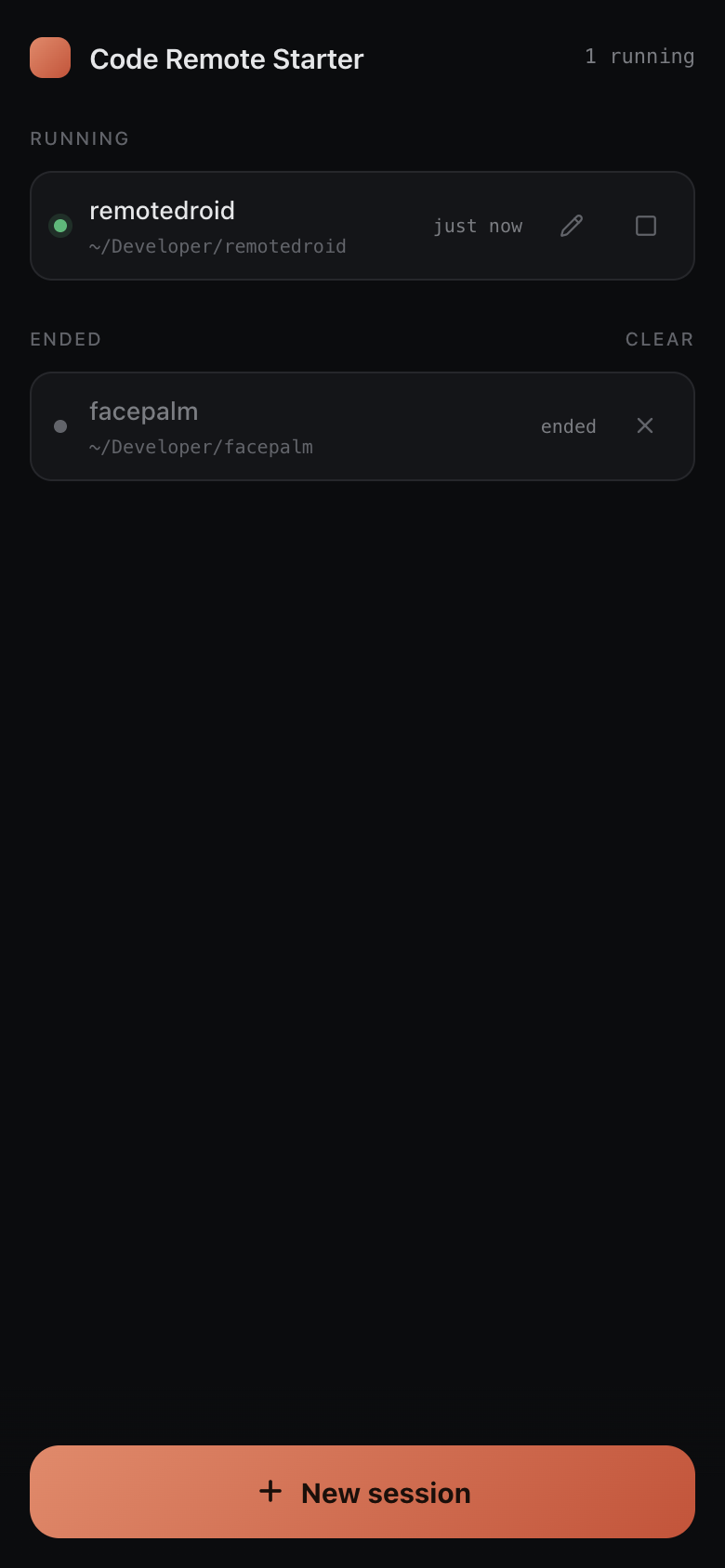
The Claude mobile app's Remote Control can drive sessions that already exist, but it can't
start a new session in a new directory. For that you still have to walk to your Mac, open a
terminal, cd, and run Claude Code. Code Remote Starter closes that gap: a small web app that
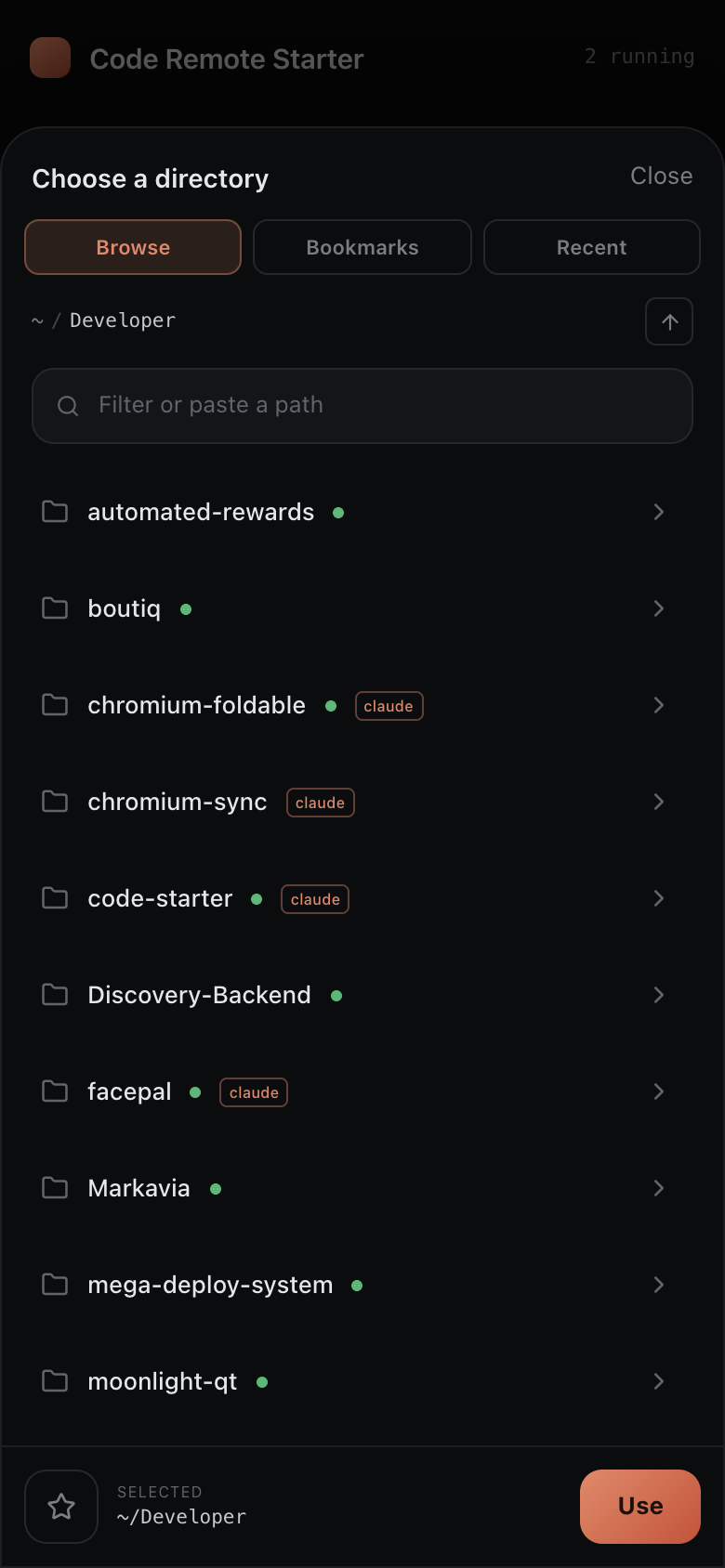
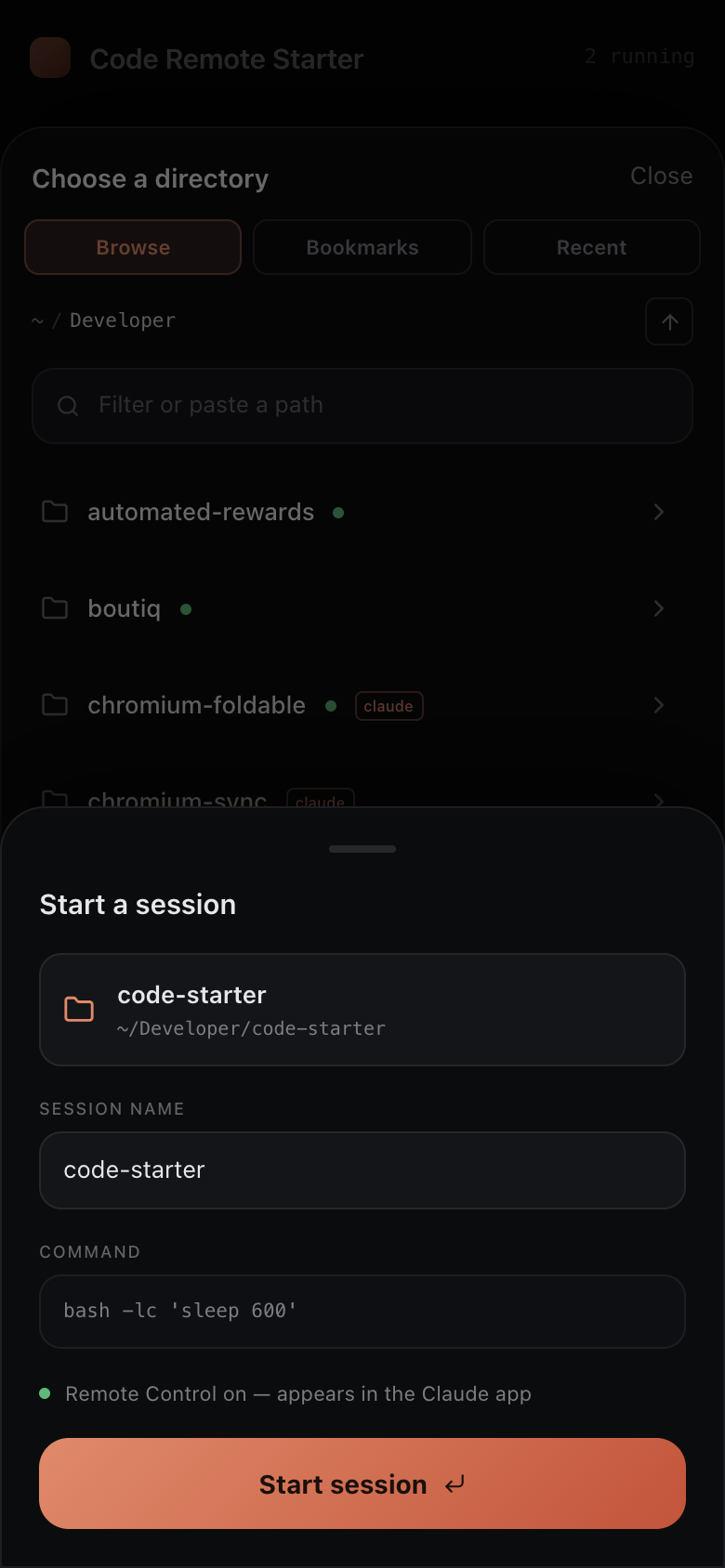
runs on your Mac and is reachable from your phone. Pick a directory, confirm, and it launches a
session there with Remote Control on — so it shows up in the Claude app and you drive it from
your phone as usual.
How it works
When you launch a session, the server runs your Claude Code command — the cym alias,claude --dangerously-skip-permissions --effort max — inside a detached tmux session in
the directory you chose:
claude --dangerously-skip-permissions --effort max
tmux keeps the process alive independently of the browser. With Remote Control enabled at
startup ("remoteControlAtStartup": true in ~/.claude/settings.json), the session registers
with Anthropic and appears in the Claude mobile app, where you do the actual work — exactly as if
you had typed cym in that directory yourself. Code Remote Starter is purely the launcher and
session manager — it never proxies your conversation.
The base command is configurable via baseCommand.
Requirements
- macOS
tmux—brew install tmux- Claude Code on your
PATH, signed in, with Remote Control enabled at startup
("remoteControlAtStartup": truein~/.claude/settings.json) - Node.js 20+
Quick start
git clone https://github.com/burakgon/code-remote-starter.git
cd code-remote-starter
npm install
npm run build
npm start
Run it from a shell where claude already works, so the launched sessions inherit your
sign-in. On start it prints an access URL for this Mac, plus a LAN URL and a QR code for
your phone:
  Code Remote Starter is listening on 0.0.0.0:4317

  On this Mac:
    http://localhost:4317/?token=…

  On your phone (same Wi-Fi / Tailscale) — scan the QR or open the URL:
    http://192.168.1.20:4317/?token=…
    █▀▀▀▀▀█ ▀▌▄█ █▀▀▀▀▀█
    …
Scan the QR with your phone's camera (on the same network) — it opens the full URL, so the long
token can't get truncated in transit.
For day-to-day development with hot reload:
npm run dev # Vite on :5173 proxying the API to the server on :4317
Reaching it from your phone
The server binds to 0.0.0.0 so it is reachable on your network, and the access token is what
protects it. The easiest way in is to scan the QR code printed at startup. Otherwise:
- Same Wi‑Fi: open
http://<your-mac-ip>:4317/?token=…on your phone. - Anywhere: put your Mac and phone on a private network such as
Tailscale and use the Mac's Tailscale address.
Code Remote Starter launches Claude Code with --dangerously-skip-permissions, so treat the URL
like a password and only expose it over networks you trust. A first-class tunnel is on the
roadmap.
Security
- Every HTTP request and the WebSocket require a valid token. The token is generated on first
run and stored in~/.config/code-remote-starter/config.json(mode0600). - The token arrives once via
?token=…, then is kept in aStrict,httpOnlycookie; the URL
is tidied so the token isn't left in the address bar. - State-changing requests are checked against an
Originallowlist (CSRF guard). - Brute-force protection: more than 5 wrong-token attempts from an IP within an hour locks
that IP for 30 minutes. Behind a local reverse proxy or tunnel (Cloudflare, nginx, …) the
forwarded client IP (CF-Connecting-IP/X-Forwarded-For) is used so the lock targets the
real attacker; on direct connections those headers are ignored to prevent spoofing. - Nothing leaves your machine except Claude Code's own traffic.
Configuration
~/.config/code-remote-starter/config.json:
| Key | Default | Description |
|---|---|---|
port |
4317 |
Port to listen on. |
host |
0.0.0.0 |
Interface to bind. |
baseCommand |
claude --dangerously-skip-permissions --effort max |
Command run in each session. |
token |
generated | Access token. |
Command-line flags override the config for a run: --port, --host, --command, --open.
npm start -- --port 8080 --command "claude --effort max"
Set CRS_CONFIG_DIR to relocate the config directory.
Features
- Touch-first directory picker: browse the filesystem, paste a path, with Git and
"used with Claude before" indicators. - Bookmark directories you launch into often, plus recent ones drawn from your launch history
and from where you've used Claude Code. - Live session list over a WebSocket — rename, stop (with confirmation), or dismiss / clear
finished sessions. - Installable PWA — add it to your phone's home screen for a full-screen, app-like launcher.
- A scannable QR code and LAN URL printed on startup, so opening it on your phone is one scan.
- Brute-force protection on the access token (per-IP lockout), correct behind a reverse proxy /
tunnel or on a direct connection. - One dark, considered interface that works on phone, foldable, and desktop. No emoji.
Development
npm run dev         # server + web with hot reload
npm test            # unit + integration tests (Vitest)
npm run typecheck   # tsc --noEmit
npm run lint        # ESLint
npm run build       # build web (and server bundle) into dist/
The backend lives in src/server (Hono + ws, sessions via tmux); the web app in src/web
(React + Vite + Tailwind). Design and implementation notes are under docs/superpowers/.
Roadmap
- Optional "working vs needs input" session status via a Claude Code hook.
- A built-in tunnel for zero-config remote access.
- Light theme.
License
MIT
Reviews (0)
Sign in to leave a review.
Leave a reviewNo results found