busabase
Health Warn
- License — License: MIT
- Description — Repository has a description
- Active repo — Last push 0 days ago
- Low visibility — Only 9 GitHub stars
Code Warn
- process.env — Environment variable access in apps/busabase-cli/src/run.ts
- network request — Outbound network request in apps/busabase-cli/src/run.ts
Permissions Pass
- Permissions — No dangerous permissions requested
No AI report is available for this listing yet.
⚡ The approval-first, open-source database & knowledge base for AI agents — review & approve every change before it's trusted. Local-first, self-hostable Airtable/Notion alternative.

Busabase
Local-first review database for AI-generated content, business data, datasets & multimodal knowledge.
AI can generate endless data — Busabase is where you review, approve, and merge what's good enough to trust.






Quick Start · Screenshots · Use Cases · API · Compare · Roadmap
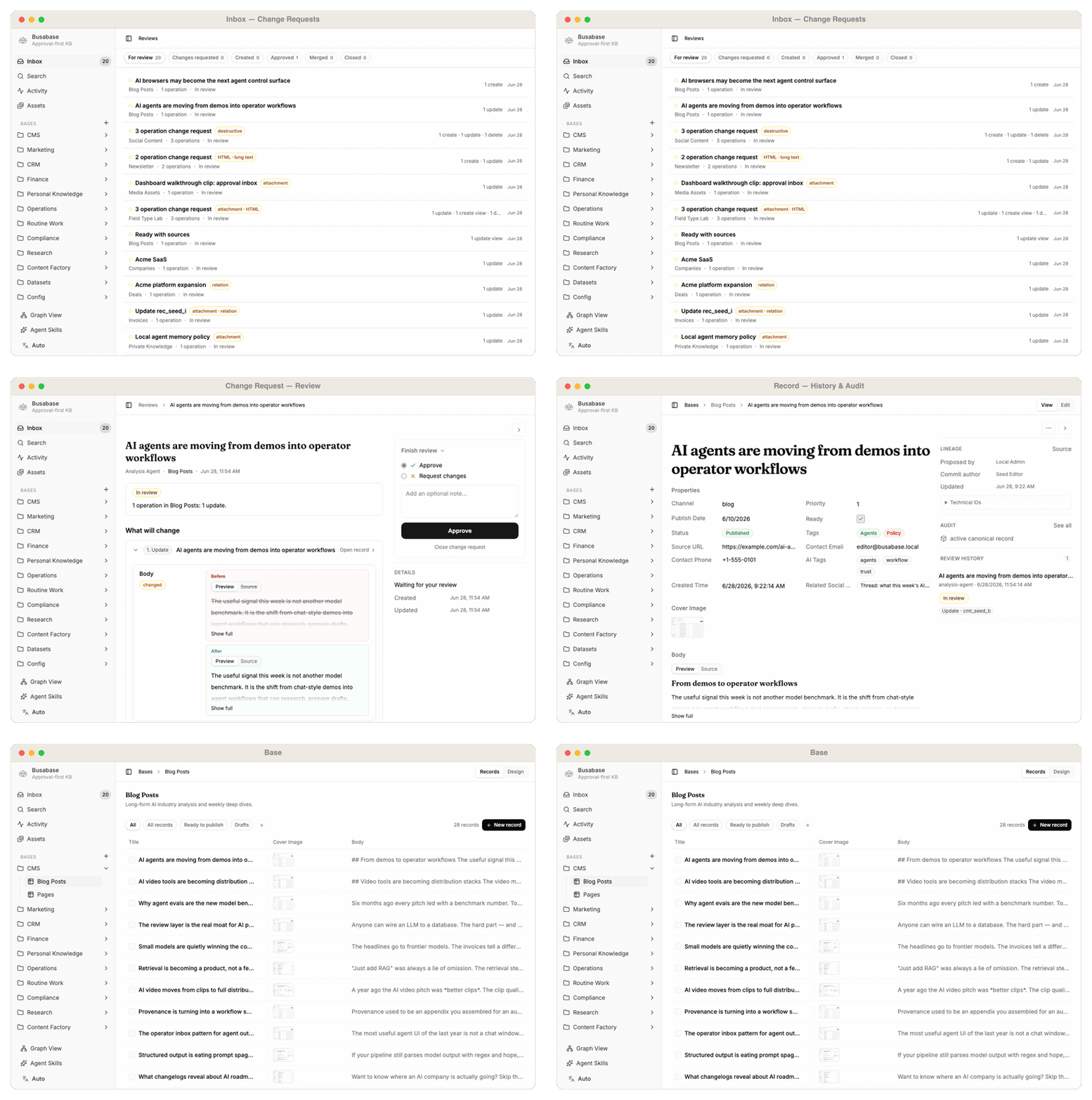
Busabase is a free and open-source (MIT) app for one simple problem:
AI can generate endless content and data, but someone still needs to decide what is good enough to trust.
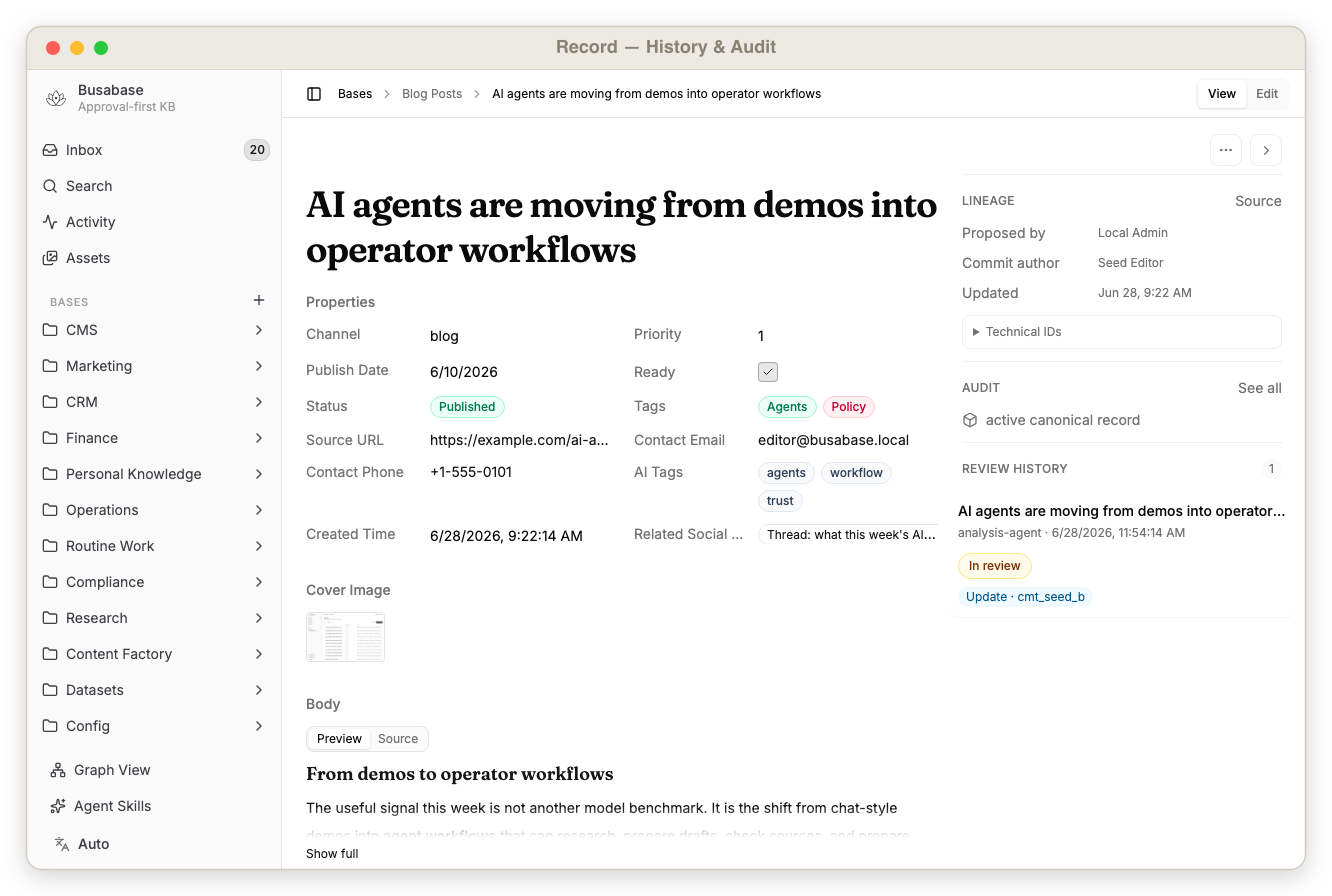
Busabase gives that approval process a home — an approval-first database and knowledge base for AI agents. It is a private CMS, project database, and structured source of truth with built-in Change Requests, Operations, comments, audit trails, and a simple API for apps and AI agents.
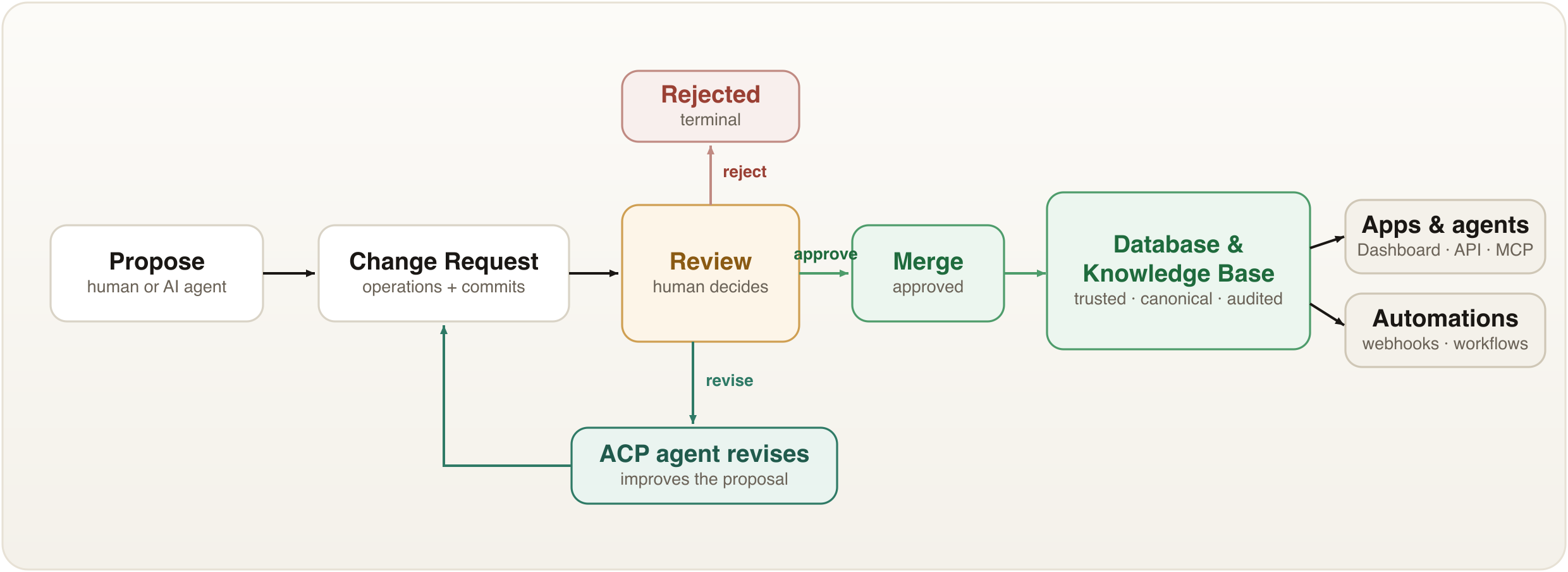
Free & open source. Local-first. Review-first. Agent-ready.
Run it yourself — no SaaS, no account, no vendor. Your data never has to leave your machine.
Quick Start
Pick whichever way you like — all of them give you the same review-first database.
⚡ Run it now — one command, zero setup
npx busabase server
Open http://localhost:15419/dashboard/inbox. That's the whole setup: a full local
instance with embedded PGlite and local file storage — no database to run, nothing to
configure. Busabase seeds example Bases, records, and Change Requests on first request,
so you can inspect the review workflow immediately.
npm i -g busabase     # install once, then just: busabase server
npx busabase-cli --help   # the API client on its own (talks to any busabase server)
🐳 Docker
docker run --rm -p 3000:3000 busabase/busabase
Open http://localhost:3000/dashboard/inbox. Defaults to local PGlite persistence — no
external services. Images are published to Docker Hub (busabase/busabase) and GHCR
(ghcr.io/busabase/busabase).
🖥️ Desktop app
Prefer a native app? Download Busabase for macOS, Windows, and Linux at
busabase.com/download. Fully native and fully offline —
all your data stays on your computer, never online.
🔧 From source
pnpm install
cp apps/busabase/.env.example apps/busabase/.env
pnpm --filter busabase dev
Open http://localhost:15419/dashboard/inbox. A local-start check runs first: if
dependencies, PG_DATABASE_URL, or STORAGE_URL are missing, it fails with a setup message
instead of a blank dashboard. The default .env.example uses PGlite under .data/busabase
and local file storage under .data/busabase-storage.
What you get after launch:
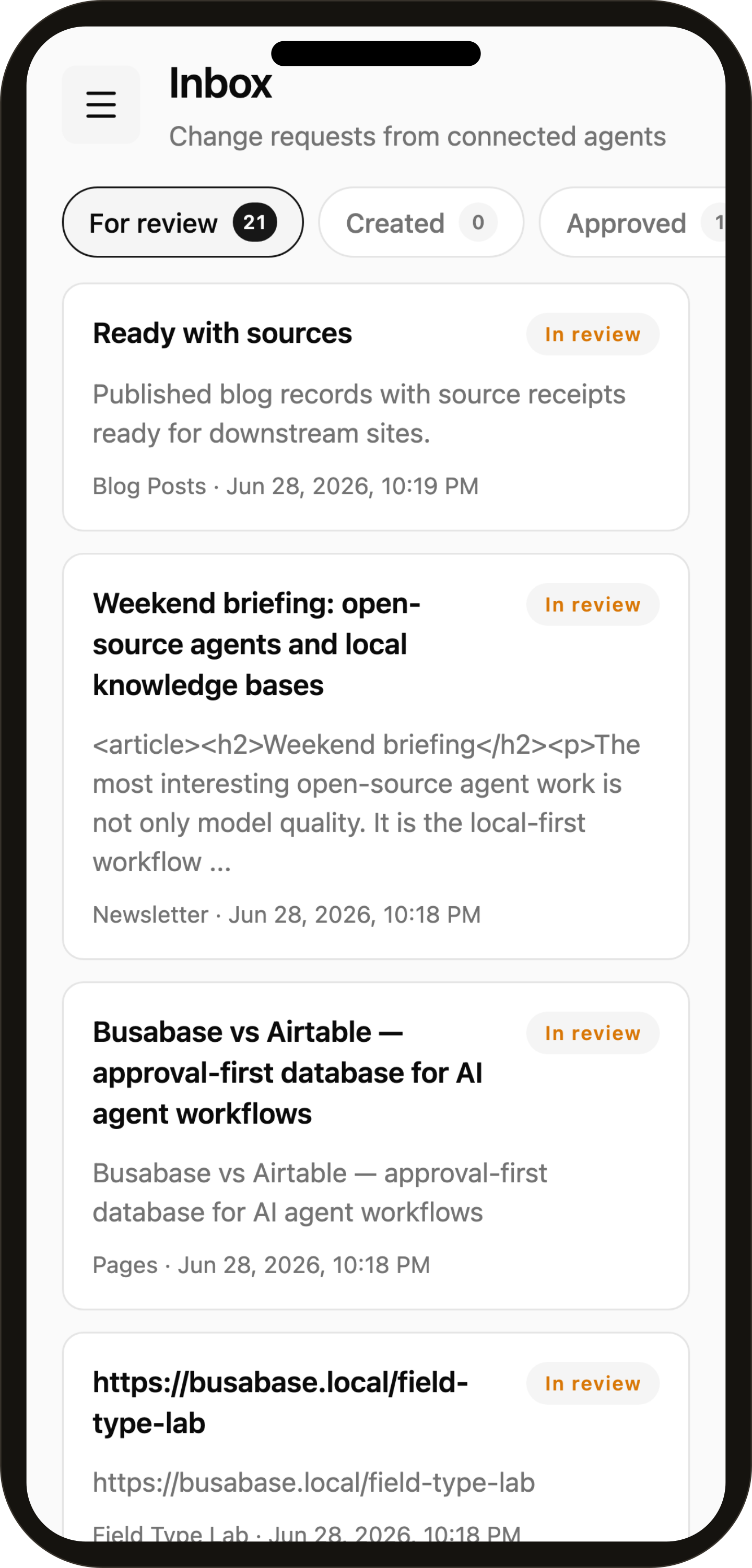
- an Inbox for reviewing Change Requests
- example Bases and records
- record-level history and audit trails
- local PGlite persistence under
.data/busabase - REST API endpoints for apps, workflows, and AI Agents
Where your data lives
npx busabase server and the desktop app share one local data root so you see the
same database whichever way you launch:
~/.busabase/data/
├── pgdata/    # embedded PGlite database
└── storage/   # uploaded attachments
Point them somewhere else with BUSABASE_DATA_DIR (or busabase server --db <dir>), or
set PG_DATABASE_URL / STORAGE_URL directly to use external Postgres / S3.
Docker writes to /data inside the container — bind-mount the same host folder to share
that one database with the CLI and desktop app:
docker run --rm -p 3000:3000 -v ~/.busabase/data:/data busabase/busabase
(Running from source with pnpm dev instead uses the repo's .env, i.e. .data/busabase.)
Only one process can hold the PGlite database at a time, so run one launcher at a time.
Screenshots
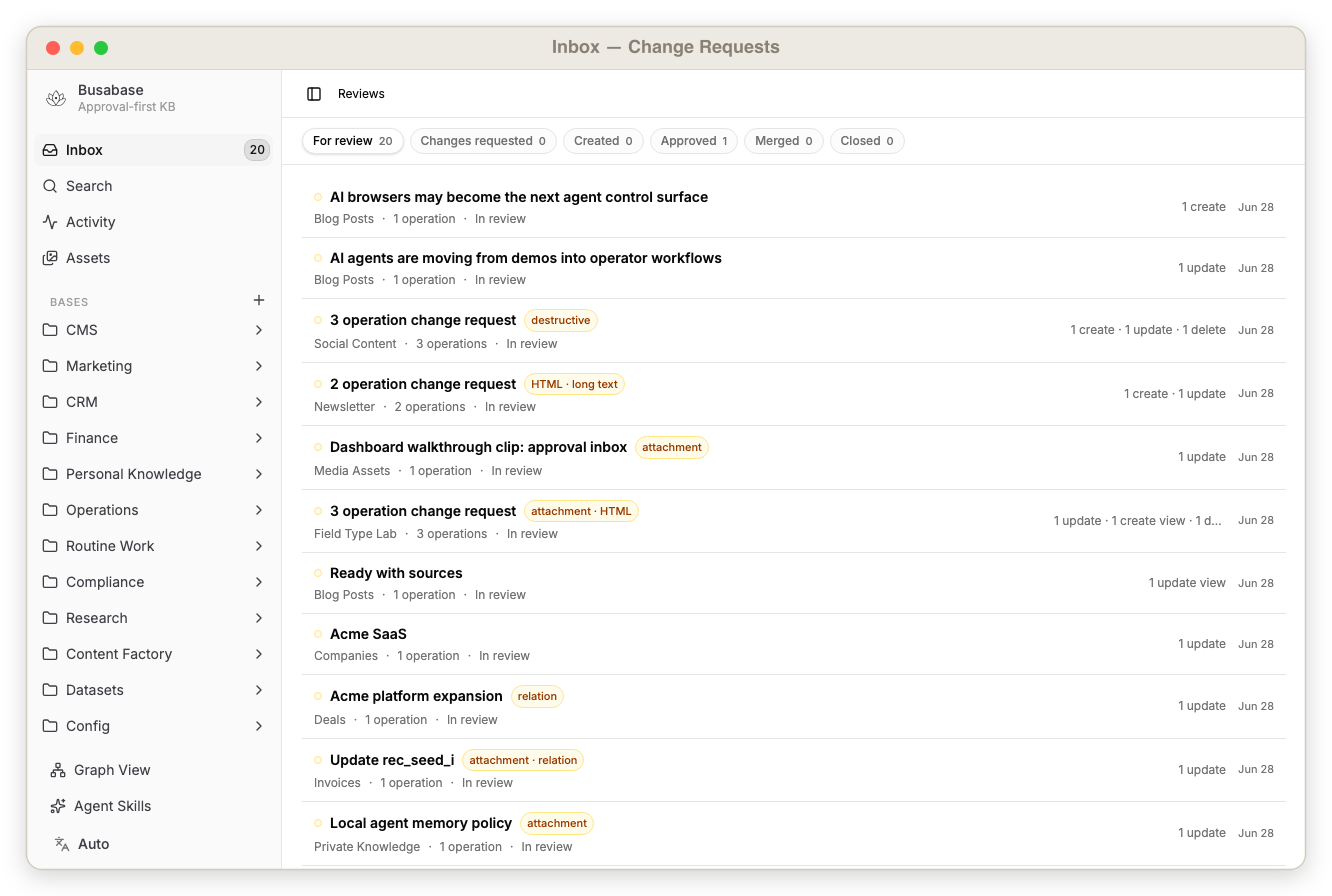 |
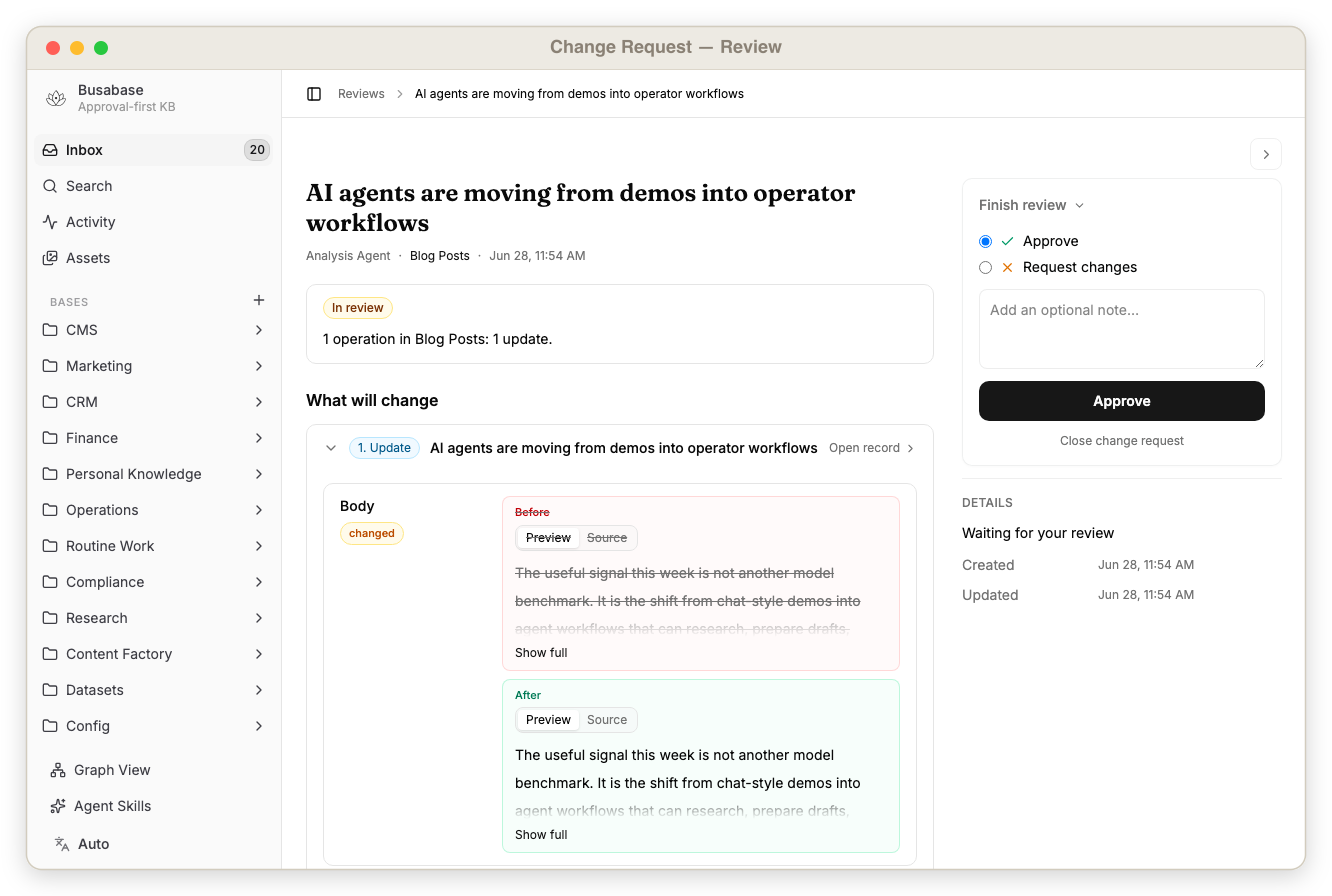 |
| Inbox with pending Change Requests, reviewer status, and approval actions | Agent-proposed changes before merge, including field diffs and reviewer actions |
 |
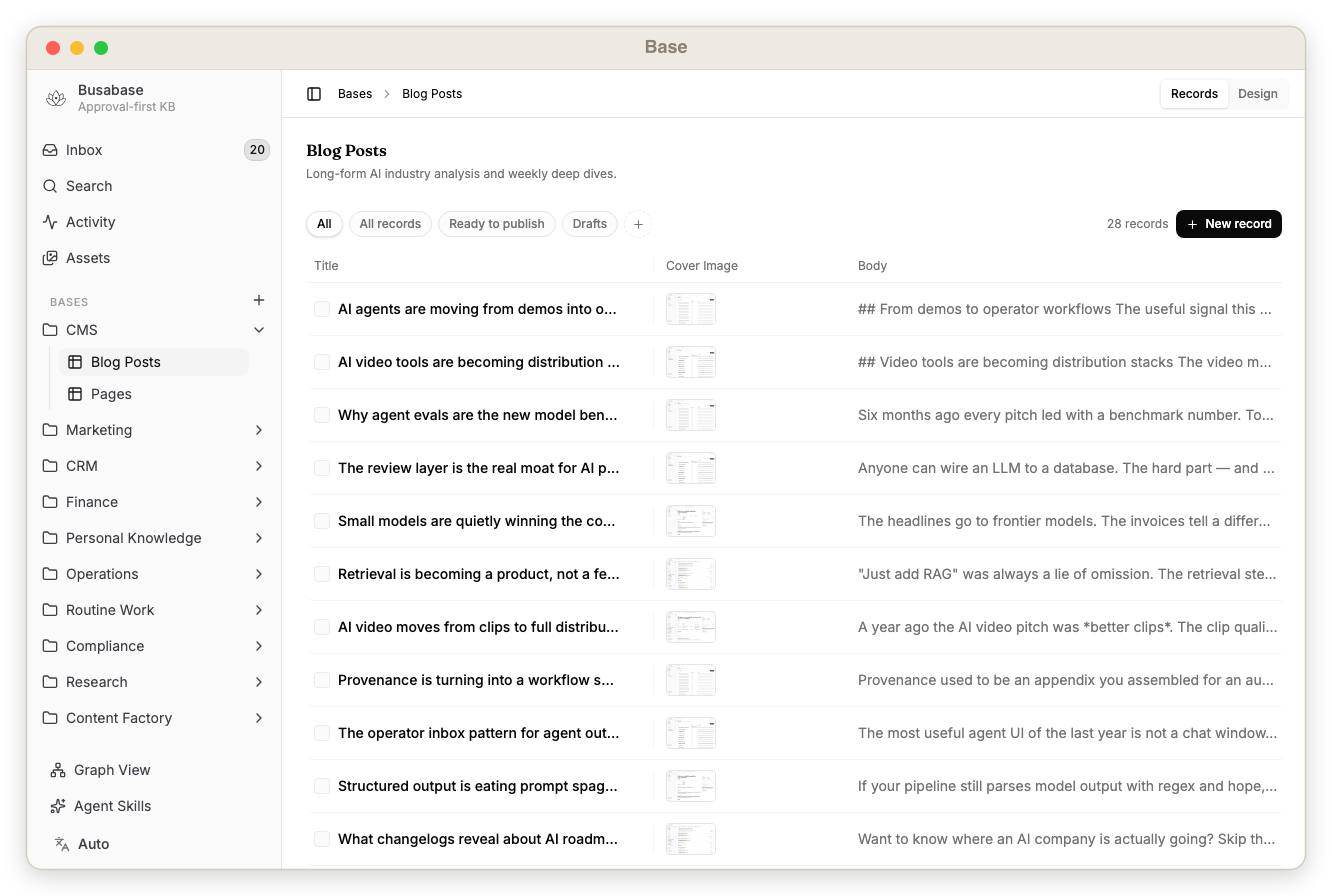 |
| Record detail page with fields, comments, review history, and lineage | Base table showing structured records and rich fields |
 |
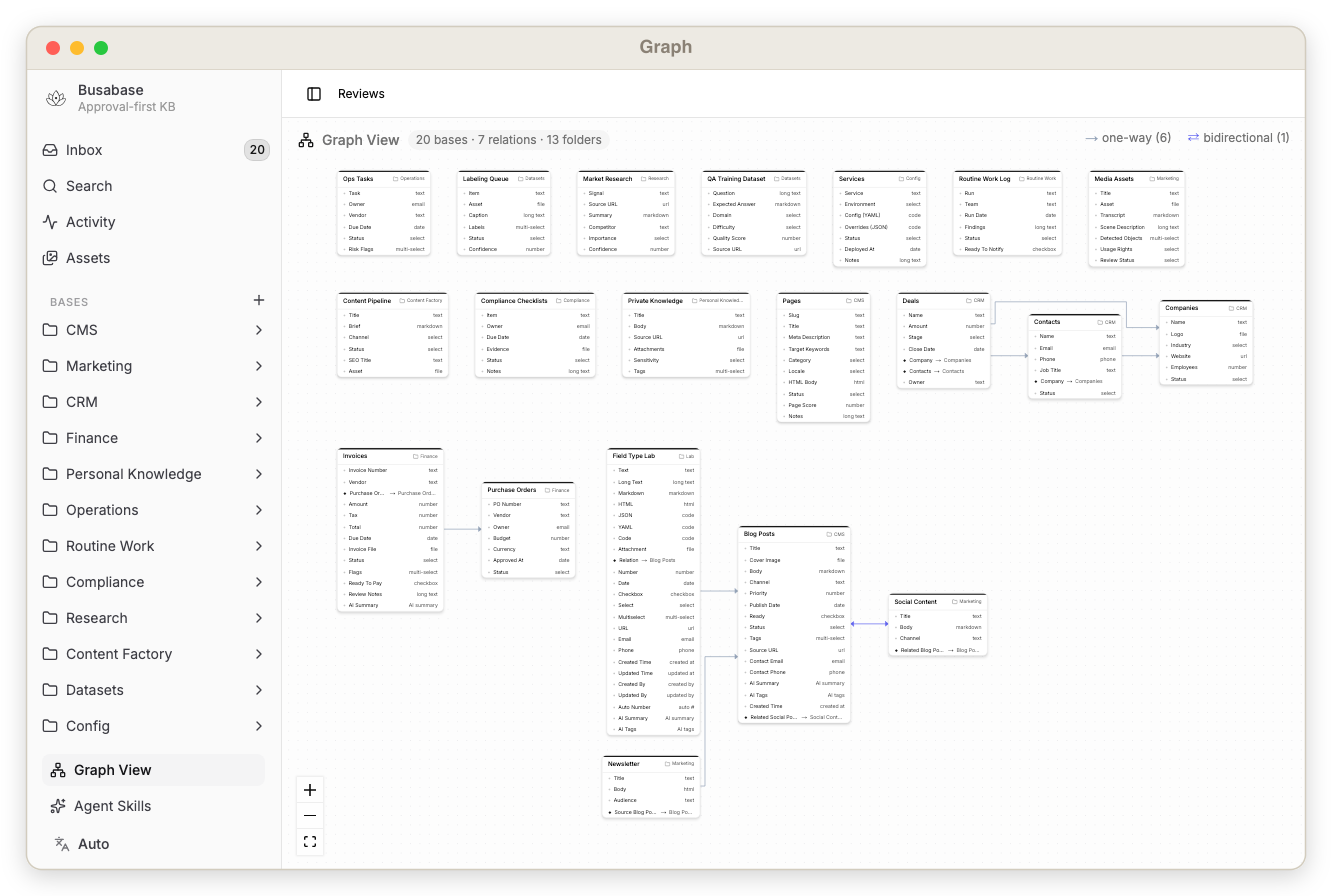 |
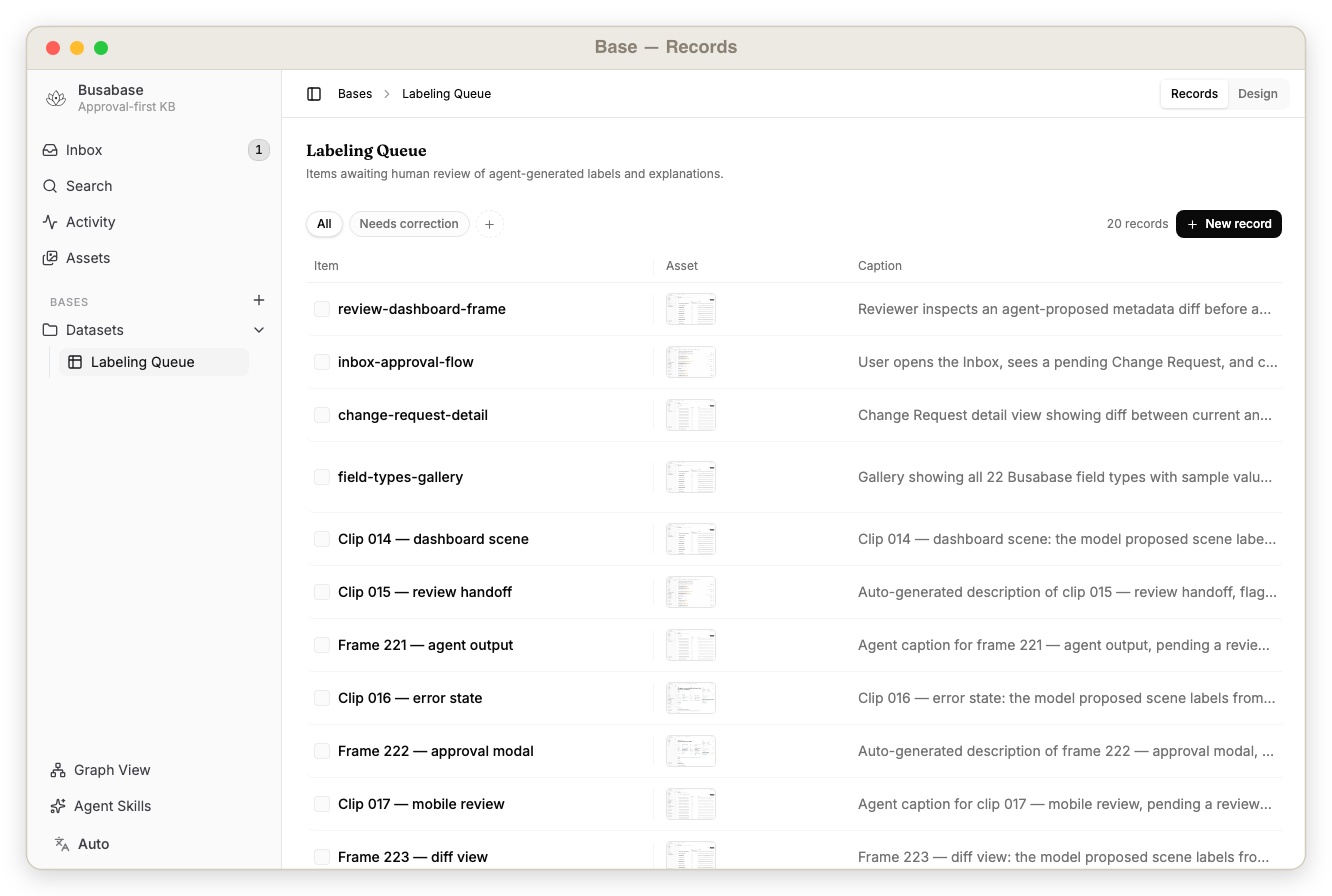
| Records inside a Base — typed fields, rich values, and approval status at a glance | Graph view showing relationships between seeded records across Bases |
On mobile
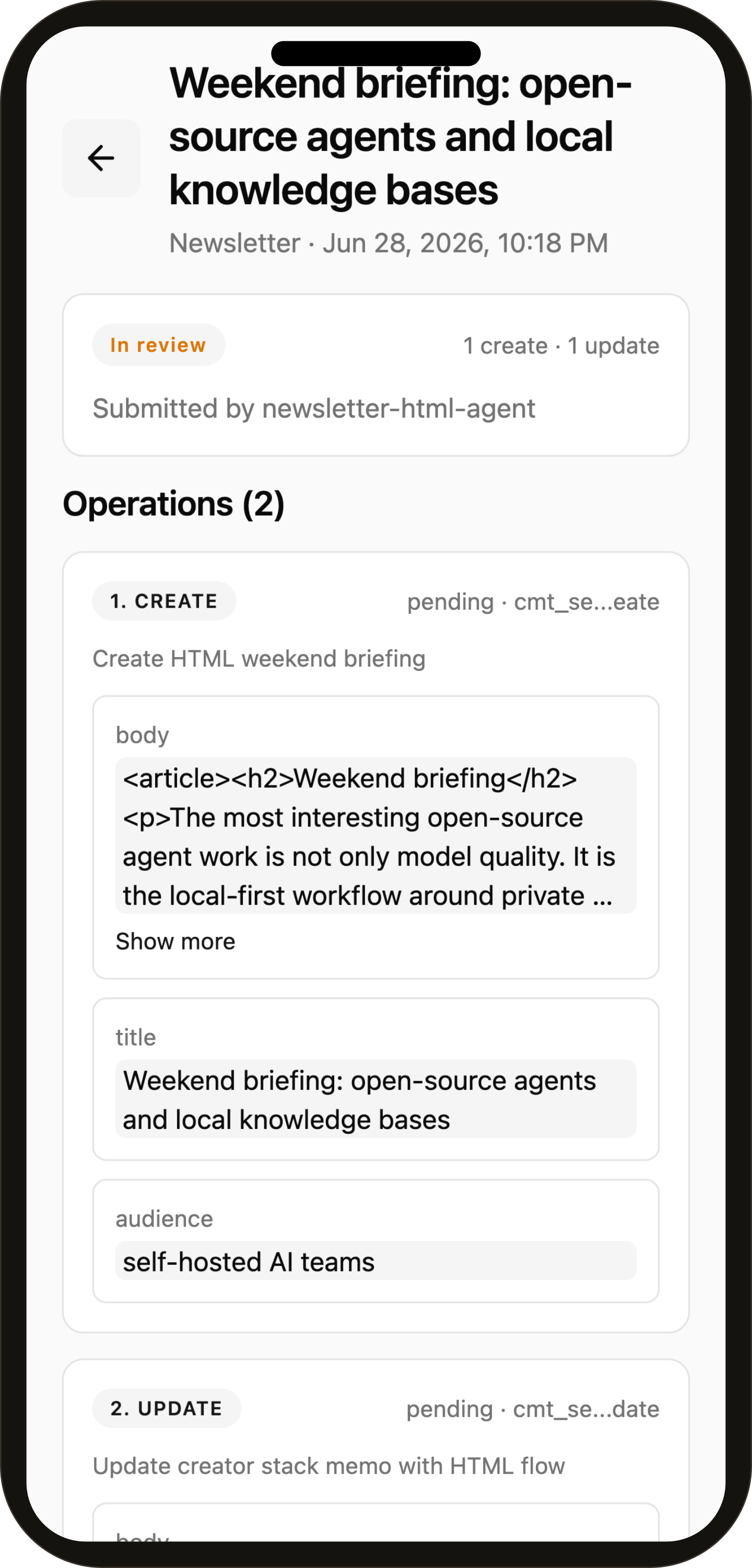
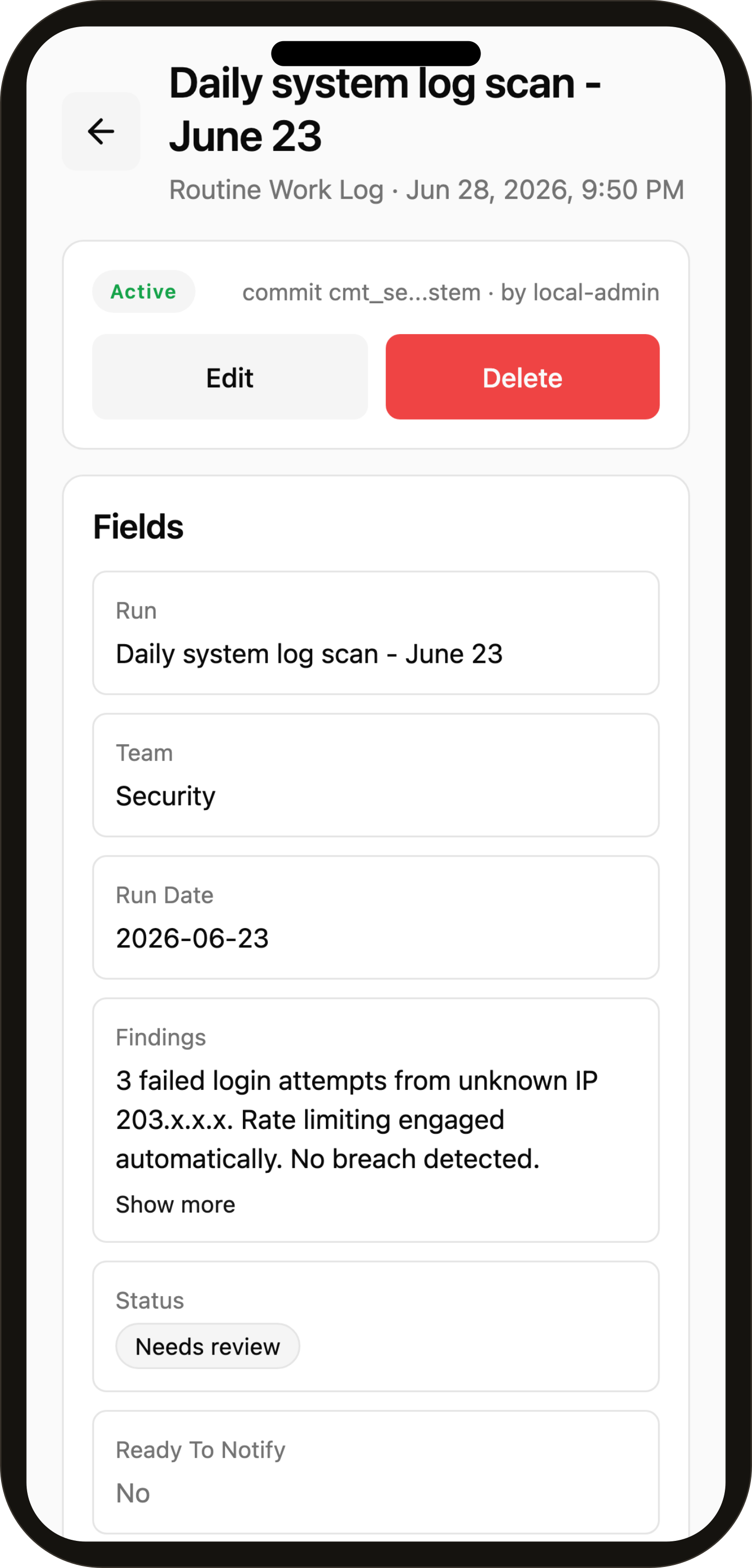
Review and approve agent Change Requests from your phone — the same inbox, proposal preview, and trusted records, in the Busabase mobile app.
Why This Exists
Most databases are good at storing data. Most CMS tools are good at publishing content. Most code platforms are good at reviewing files.
Busabase is for the middle layer that AI-heavy teams now need:
| Need | Busabase gives you |
|---|---|
| AI drafts a blog post | Review it before it becomes a published CMS record |
| Humans clean QA data | Approve high-quality examples before training or evaluation |
| Agents label videos | Check multimodal metadata before it enters the dataset |
| Agents update project or ERP data | Human reviewers approve changes before the system of record changes |
| A local AI tool needs memory | Expose a private, audited API over approved knowledge |
| Data changes should trigger work | Fire webhooks, automations, or external agents after approved merges |
| Someone changes a record | Track who proposed, reviewed, merged, viewed, or deleted it |
It is approval-first by default, agent-friendly by design, and still small enough to run locally.
Concepts
Core concepts:
| Concept | Meaning |
|---|---|
| Base | A table-like collection of records |
| Field | A typed property on a Base |
| Record | An approved row of data |
| Change Request | A reviewable proposal to change data |
| Operation | A create, update, delete, or variant action inside a Change Request |
| Commit | Immutable data snapshot behind an Operation |
| Comment | Discussion attached to records, Change Requests, operations, or commits |
| Audit Event | A trail of important reads, writes, reviews, merges, and deletes |
Use Cases
Any base an agent can write — reviewed first. A few of the things people build on Busabase:
| Use case | What you review |
|---|---|
| Blog CMS for Next.js | AI-drafted posts, reviewed before they publish |
| SEO Landing Pages | AI-generated landing pages, approved before they go live |
| Configuration Management | Service YAML/JSON reviewed before it ships |
| Finance & Invoice Review | Automated finance entries a human signs off |
| Data Stewardship & CRM Hygiene | A review queue that keeps business data clean |
| Compliance & Audit Checklists | Recurring checks with evidence and an audit trail |
| QA & Training Datasets | Curated, approved examples for training / eval / RAG |
| Multimodal Content Review | Image / audio / video metadata reviewed first |
| Market Intelligence | A human-reviewed research & monitoring feed |
| Content Factory Pipeline | Idea → draft → approved asset, end to end |
| Dataset Labeling Pipeline | Agent-first labeling with human review |
| Project Management & ERP | Operational data changes behind an approval gate |
| Canonical System of Record | The single source of approved, canonical data |
| Local Personal Knowledge Base | A private, audited database for you and your AI tools |
| Verified Routine Work | Recurring work that's done, reviewed, and recorded |
| Field Type Lab | Every field type and review op in one local scenario |
→ See all 16 use cases, with screenshots
Automation and ACP Agents
Busabase can become an event source for data workflows.
During review, a human can ask an ACP-compatible agent to improve the Change Request before it is merged:
- clean fields
- enrich missing metadata
- normalize categories
- rewrite a draft
- generate summaries or tags
- check policy, quality, or consistency
After merge, approved data can trigger downstream automation:
- send a webhook
- update an external system
- notify a reviewer or channel
- refresh a Next.js site
- kick off an ETL or dataset export
- call an external ACP Agent to continue the workflow
That makes Busabase more than a place to store data. It becomes a controlled handoff point between humans, applications, and agents.
Local Agents Operate Your Knowledge Base
Busabase is built to be driven by the agents already running on your own computer.
Because the API is local and trusted, you can point coding and automation agents — OpenClaw, Codex, Claude Code, Hermes, and similar local skills — directly at your Busabase instance. They can read approved knowledge, run skills against it, and propose changes back as Change Requests.
What a local agent can do with Busabase:
- read your private, approved knowledge as grounded context
- run a local skill that queries or summarizes your bases
- propose new records or edits as reviewable Change Requests
- enrich, clean, or label data without uncontrolled write access
- wait for human approval before anything becomes trusted
The pattern is simple:
Local agent reads approved knowledge ->
proposes a Change Request ->
you review on your own machine ->
approve -> merged into your local source of truth
This keeps the loop entirely on your hardware. The agent gets a real, structured memory to work against, and you keep authority over what becomes trusted — no private data has to leave your computer for any of it to work.
If OpenClaw is the revolution for agents on your local computer, then BusaBase is the revolution for the database and knowledge base on your local computer.
What Busabase Cares About
Busabase is not just asking "what is the latest value in this row?"
It also asks:
- Who proposed this data?
- Why should it change?
- Which fields changed?
- Is this a create, update, delete, or variant operation?
- What did the AI Agent produce before it was accepted?
- Who reviewed the agent output?
- Did a human ask the agent to revise?
- Was the proposal merged or rejected?
- What automation ran after merge?
- Can we trace the decision later?
That makes Busabase especially useful for AI Agent work. Agents can produce drafts, labels, summaries, reconciliations, or operational updates, but Busabase gives humans a preview layer before those outputs become trusted data.
How Busabase Compares
Busabase overlaps with familiar tools, but it's optimized for a different job: AI agents writing data, and humans approving it before it's trusted.
| Tool | Great for | What Busabase adds |
|---|---|---|
| Airtable | Flexible cloud tables for human teams | Local-first ownership + an approval gate: agents propose, humans approve, with diff preview, history, and audit trails |
| APITable | Open-source, API-first Airtable alternative | API-first plus a review layer between proposal and trusted record |
| NocoDB | Spreadsheet UI on top of your SQL database | Every write is a reviewable Change Request, not a direct row edit |
| Baserow | Self-hosted no-code database | Change Requests, audit trails, and agent hooks |
| Notion | Cloud docs, databases, and team knowledge | A pure, local, structured knowledge base with a built-in review flow — no vendor cloud |
| Confluence / Lark | Vendor-hosted team wikis | Runs on your machine first; data never has to leave it |
| Obsidian | Local-first Markdown notes for a human | Local too — but a structured database for agents: Change Requests, approval, and audit, not free-form notes |
| PostgreSQL | Reliable storage and querying | Human-readable Change Requests, reviews, comments, and automation around every change |
| GitHub Pull Requests | Code review over file diffs | Record-based review for content, datasets, CRM rows, tasks, and multimodal data |
Most of these assume the writer is a trusted human (or a script you wrote). Busabase assumes the writer is often an AI agent — and that not every agent write should be trusted automatically. So it adds what an agent-driven database needs:
- A proposal layer — agents submit Change Requests instead of editing rows directly.
- A preview before merge — see exactly what the agent produced, field by field.
- A revise loop — ask the agent to fix the proposal before it's accepted.
- An audit trail — every read, write, review, merge, and delete is traceable.
- A local, trusted API — built for agents on your own machine, not just human spreadsheet users.
Airtable / APITable: a database for people to edit.
Busabase: a database for agents to propose and people to approve.
Local-first, not cloud-first. Your data stays on your machine or private network by default. Need remote or agent access? Open a tunnel to expose selected endpoints instead of copying everything into a central cloud database. Self-hostable, free, and open-source.
Features
- Local-first open-source app
- Built-in review workflow
- Change Requests with multiple Operations
- Create, update, delete, and variant operations
- Commit history for record changes
- Comments on records and review objects
- Audit events for reads and writes
- Markdown, HTML, links, files, relation fields, and rich field types
- Search-ready indexed field values
- REST API for apps, workflows, and AI agents
- Human-in-the-loop collaboration for agent-proposed changes
- AI Agent output preview before merge
- Single source of truth for approved operational records
- Automation triggers after approved data changes
- ACP Agent hooks during review and after merge
- PGlite local persistence
- Docker-friendly deployment
API Surface
Busabase exposes a simple local REST API for dashboard clients, apps, and AI agents.
Typical resources include:
- Bases and nodes
- Records
- Search
- Comments
- Change Requests
- Reviews
- Merge actions
- Activity and audit events
The API is meant for trusted local or private-network usage in the open-source version.
Agent Proposal Example
This is the core agent loop: read the schema, submit a proposal, review it in the UI, then read the
canonical record after merge.
# 1. Find the Blog Posts base.
BLOG_BASE_ID=$(curl -s http://localhost:15419/api/v1/bases \
  | jq -r '.[] | select(.slug == "blog") | .id')

# 2. Let an agent propose a new record. This creates a Change Request, not canonical data.
CHANGE_REQUEST_ID=$(curl -s -X POST \
  "http://localhost:15419/api/v1/bases/$BLOG_BASE_ID/change-requests" \
  -H 'content-type: application/json' \
  -d '{
    "fields": {
      "title": "Agent market note",
      "body": "Drafted by an agent, waiting for human review.",
      "channel": "blog"
    },
    "message": "Agent proposed a market note",
    "submittedBy": "local-agent"
  }' | jq -r '.id')

# 3. Review it in the dashboard.
echo "Review: http://localhost:15419/dashboard/inbox/$CHANGE_REQUEST_ID"

# 4. Optional automation after a human approves: merge and read canonical records.
curl -s -X POST "http://localhost:15419/api/v1/change-requests/$CHANGE_REQUEST_ID/merge" \
  | jq '.record.id, .record.headCommit.fields.title'
curl -s "http://localhost:15419/api/v1/records?baseId=$BLOG_BASE_ID" \
  | jq '.[].headCommit.fields.title'
For machine-readable endpoint docs, open:
http://localhost:15419/api/v1/doc
When To Use Busabase
Use Busabase when:
- AI generates content but humans approve what becomes trusted.
- AI agents propose updates, but humans keep final authority.
- You want an approval-based project management, CRM, ERP, or operations database.
- You have routine operational work that must be completed, reviewed, and logged.
- Your team needs high-quality datasets with review history.
- You need humans to preview AI Agent outputs before they become trusted records.
- You want a CMS that treats content as structured records.
- You need a private local database that AI can read safely.
- You want data to stay distributed across people's local workspaces, with selective sharing when needed.
- You need a single source of truth for approved business data.
- You want approved data changes to trigger webhooks, workflows, or external agents.
- You want agents to help refine Change Requests before humans approve them.
- Your data is multimodal, not just rows of plain text.
- You care about who viewed, changed, reviewed, merged, or deleted data.
Do not use Busabase as your primary code review system. Use GitHub pull requests for code.
Roadmap
Busabase starts local-first, then expands outward.
Local Busabase
The open-source version runs locally and stores data under your control.
Use it when:
- your data should stay on your machine
- AI Agents need a private API to approved knowledge
- personal or team workflows need review and audit trails
- you want a database that can work without a hosted cloud account
Busabase Tunnel
A future tunnel mode can expose a local Busabase instance to the public internet or a controlled network without moving all data into a central cloud database.
Use it when:
- an external AI Agent needs to call your local Busabase API
- a collaborator needs temporary access to selected local data
- your company wants distributed data ownership across different people's machines
- data should remain local, but certain approved records or endpoints should be reachable
This is different from cloud-first tools like Notion or Airtable. Busabase can let data remain distributed with the people or teams who own it, while still offering controlled API access, review, automation, and audit trails.
Open-Source Shape
The local open-source version is intentionally small:
- no login by default
- one local workspace
- app-local Drizzle schema
- PGlite persistence under
.data/busabase - dashboard at
/dashboard/inbox - REST API for local apps and trusted agents
The goal is to make a private, reviewable data workspace that anyone can run.
Security Note
Busabase is designed for trusted local or private-network deployment.
Do not expose write endpoints to the public internet without a reverse proxy, token layer, or another access-control layer.
Contributing
Busabase is built in the open — bug reports, feature ideas, docs, and PRs are all welcome.
pnpm install
pnpm --filter busabase dev   # http://localhost:15419/dashboard/inbox
Before sending a PR, run pnpm --filter busabase typecheck && pnpm --filter busabase lint. Found a bug or have an idea? Open an issue or start a discussion.
Community
- ⭐ Star the repo if Busabase is useful to you — it genuinely helps others find it.
- 🐛 Issues · 💬 Discussions · 🌐 busabase.com
Star History
License
MIT © Busabase
Reviews (0)
Sign in to leave a review.
Leave a reviewNo results found