bbot
Health Gecti
- License — License: MIT
- Description — Repository has a description
- Active repo — Last push 0 days ago
- Community trust — 47 GitHub stars
Code Gecti
- Code scan — Scanned 12 files during light audit, no dangerous patterns found
Permissions Gecti
- Permissions — No dangerous permissions requested
Bu listing icin henuz AI raporu yok.
A face for AI agents: 30 expressions people read at a glance, lip-synced speech, and the Agent Face Protocol.
bbot
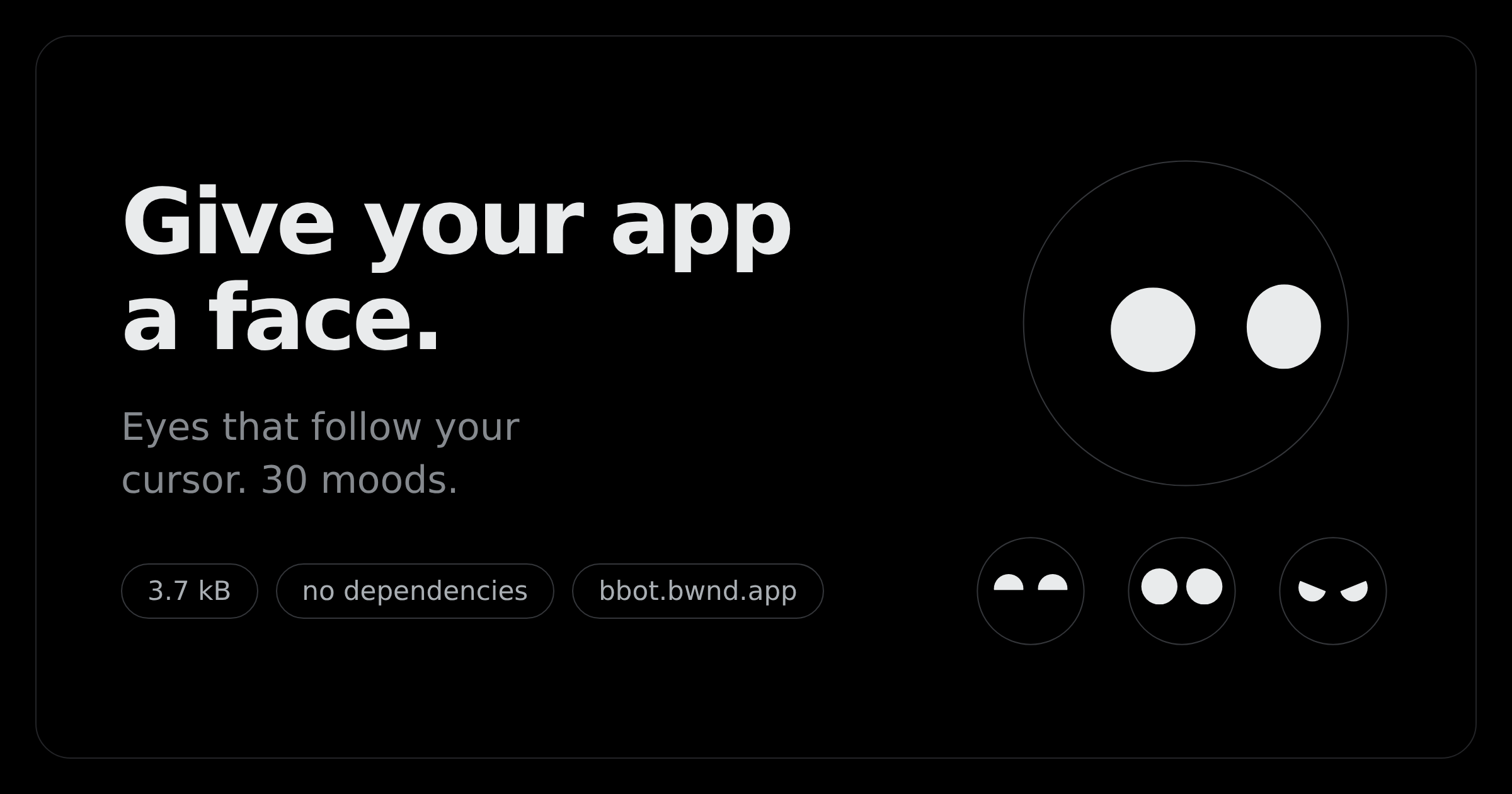
A face for AI agents.
It shows what an agent is doing and how it feels about it, in a way people read
at a glance: thinking, working, worried, pleased. It follows your cursor, blinks
on its own, and lip-syncs when the agent speaks. 30 moods, nine one-shot
reactions, 4.8 kB gzipped, no dependencies.
→ Try it live at bbot.bwnd.app
Install
npm i @bwnd/bbot
import { createFace } from '@bwnd/bbot'

const face = createFace(document.querySelector('#bot'), { expression: 'curious' })
face.react('bounce')
Styles are injected at runtime, so there is no CSS import and no <link>. React
is an optional peer dependency — the line above pulls in none of it.
Or skip the install entirely
The bundle is hosted with styles included, so this is a whole integration:
<div id="bot" style="width:160px;height:160px"></div>

<script type="module">
  import { createFace } from 'https://bbot.bwnd.app/face.js'

  const face = createFace(document.querySelector('#bot'), { expression: 'curious' })
  face.react('bounce')
</script>
Give the host element a width and height. The SVG fills its container, so
a container with no size renders nothing. This is the one thing people trip on.
Mirrored on jsDelivr if you'd rather pin a tag than track latest:
import { createFace } from 'https://cdn.jsdelivr.net/gh/bwndapp/bbot@main/dist/face.js'
React
import { Face } from '@bwnd/bbot/react'

<Face size={160} expression="curious" mouth pupils />
The React build is precompiled and ships styles inside it, so it works as-is with
Vite, Next, CRA or Parcel — no JSX transpilation of node_modules, no CSS
import. Drive it through a ref:
const face = useRef(null)

<Face ref={face} size={160} />

face.current.react('bounce')       // one-shot, decays on its own
face.current.setExpression('sad')  // springs across, never snaps
face.current.look(-1, 0, 1200)     // force the gaze left for 1.2s
Expressions
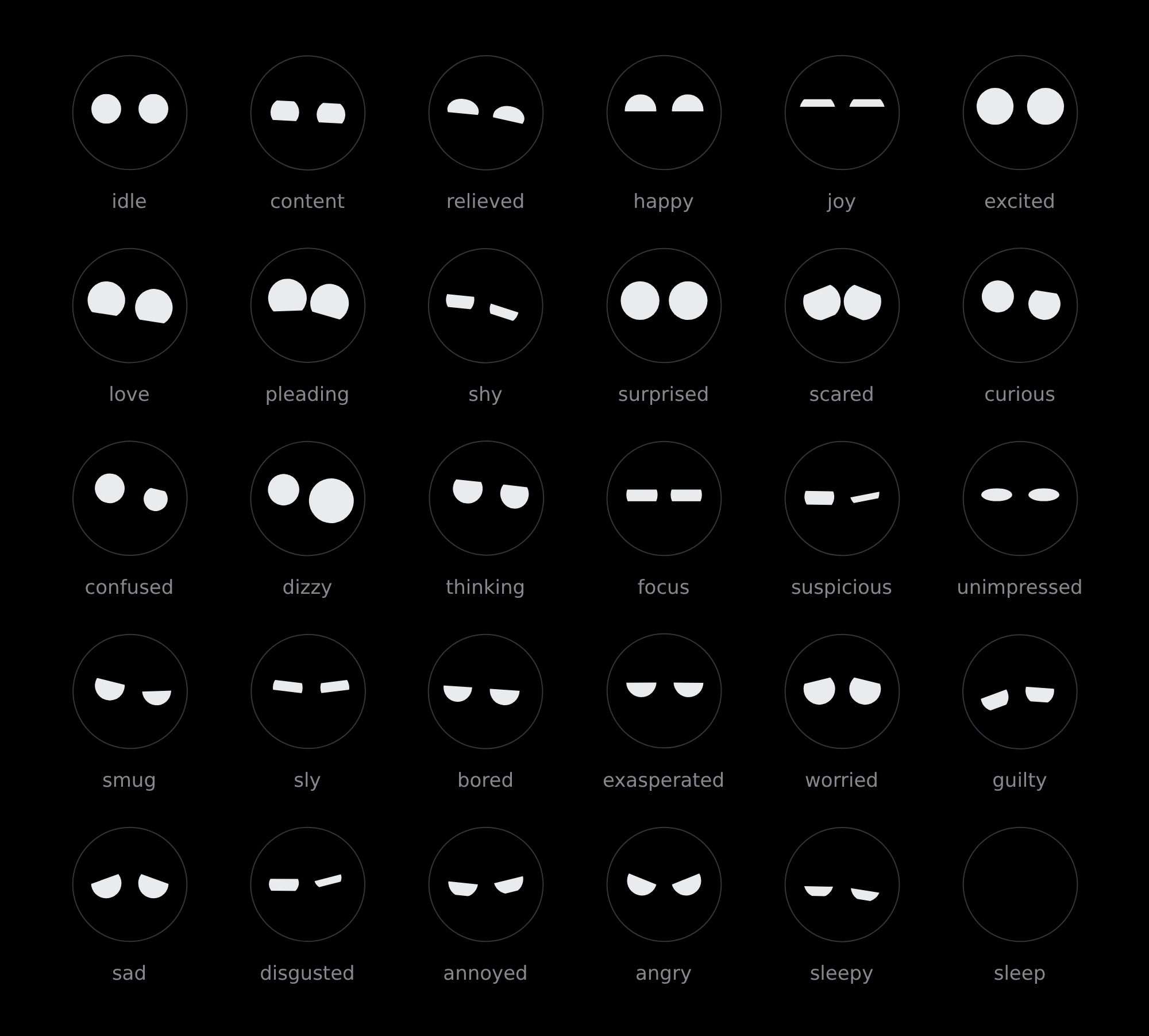
face.setExpression('sleepy')
Every field of an expression is a spring target, so moods cross-fade from
wherever they currently are rather than cutting. EXPRESSION_NAMES enumerates
them at runtime.
There is exactly one shape in this library: a circle. Every mood above comes
from two head-coloured rectangles sliding over each eye and rotating — angry
and sad are the same lid at opposite rotations.
Reactions
blink · wink · nod · shake · bounce · pop · boing · spin · jitter
face.react('nod')
Reactions layer on top of whatever mood is active and decay on their own. They
stack, so firing two at once is fine and intended. REACTION_NAMES enumerates
them.
Theming
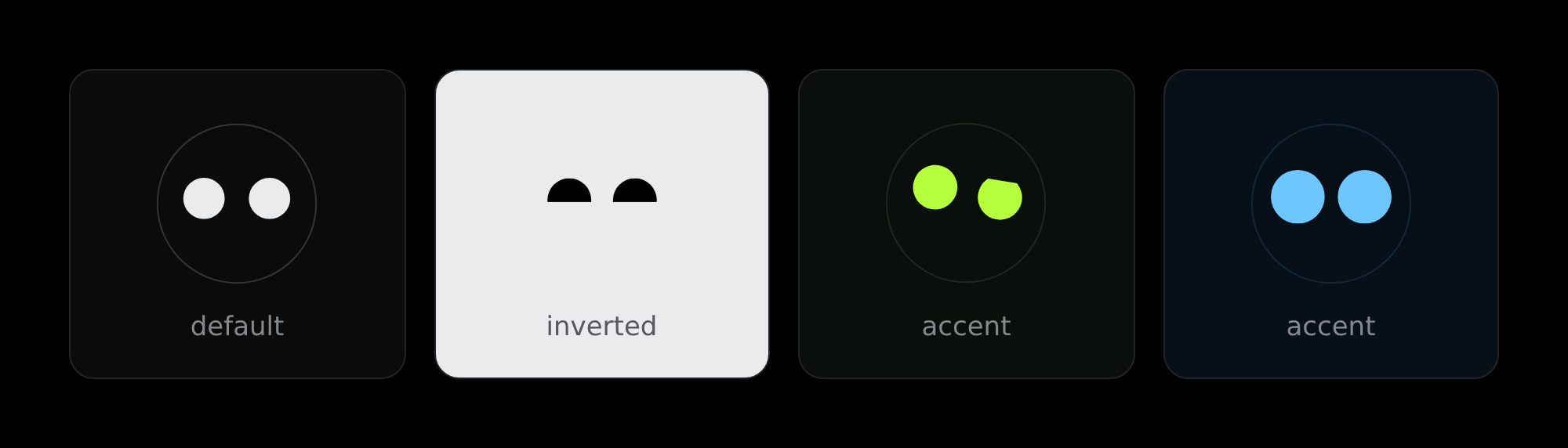
Four custom properties. Set them on the face, or on anything above it — the
library ships no colours of its own beyond dark-mode defaults.
#bot {
  --face-skin:  #000;      /* the big circle — and the lids, which must match  */
  --face-ink:   #e9ebec;   /* eyes and mouth                                   */
  --face-ring:  #2f3336;   /* hairline around the head; transparent by default */
  --face-pupil: var(--face-skin);
}
--face-skin is load-bearing. The lids are head-coloured rectangles clipped to
each eye, so if it doesn't match what sits behind the head, every expression
seams.
A custom property set on the face element itself beats one inherited from
an ancestor. If a theme isn't taking, that's usually why.
How it works
The head is a sphere
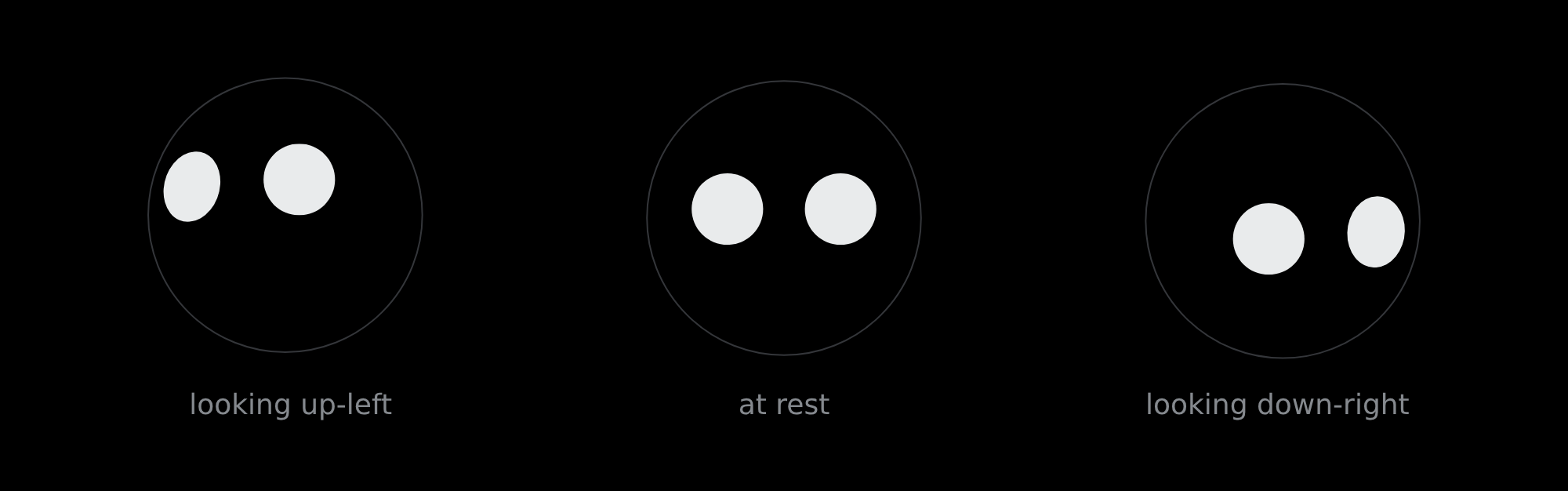
The eyes don't slide around a flat disc. Each feature has a resting spot on the
surface of a sphere that yaws and pitches to look at you, and the result is
projected orthographically back onto the screen. So features travel a curved
path and slow near the rim (a point at angle θ projects to R·sin θ), a circle
painted on the surface projects to an ellipse — full width across the radius,
squashed along it — and the eyes and mouth turn together as one ball.
Everything is a spring
No CSS transitions, no keyframes. Each animated value is a damped spring
integrated per frame, which is why a reaction can layer over a mood without the
two fighting.
Props
| prop | default | |
|---|---|---|
size |
140 |
px, square (React only) |
expression |
'idle' |
any key of EXPRESSIONS |
mouth |
false |
draw a mouth as well as eyes |
pupils |
false |
inner dot that tracks with parallax |
track |
true |
follow the pointer at all |
blink |
true |
involuntary blinking |
idle |
true |
glance around when the pointer goes quiet |
Everything except expression is read once, at construction — changing one
rebuilds the SVG. expression animates.
Performance
One requestAnimationFrame loop and one pointer listener for the whole page, no
matter how many faces. Each face costs ~15 setAttribute calls per frame, and
faces scrolled out of view skip their frame entirely via IntersectionObserver.
Coming back from offscreen or a background tab reschedules the blink timer
rather than firing the backlog at once.
prefers-reduced-motion drops the idle wander, the blinking, and the reaction
shake automatically — don't add your own guard.
Size
The stylesheet is injected by the bundle, so these are whole numbers — there is
nothing else to add.
| minified | gzipped | |
|---|---|---|
createFace (no framework) |
13.4 kB | 4.8 kB |
<Face> (React external) |
14.2 kB | 5.2 kB |
@bwnd/bbot/fx (optional) |
15.9 kB | 4.9 kB |
@bwnd/bbot/talk (optional) |
1.9 kB | 1.0 kB |
The last two are separate entry points and cost nothing unless you import
them.
Effects
@bwnd/bbot/fx adds a finish: ten independent knobs, each 0–1, composable.
import { createFace } from '@bwnd/bbot'
import { applyFx } from '@bwnd/bbot/fx'

const face = createFace(document.querySelector('#bot'))
const fx = applyFx(document.querySelector('#bot svg'), { chrome: 0.9, gloss: 0.8 })
fx.set({ bloom: 0.6 })   // change any knob at any time
gloss (catchlights), rim (a neon tube), chrome (a reflected room),glass (the body thins and the ink splits chromatically), bloom (a tight
burn), halation (a wide film bleed), holo, scan (scanlines), scratch
(a worn clearcoat) and hue (a slow drift).
Layers are built lazily, so a knob you leave at 0 costs nothing. chrome andscratch are the expensive two; the rest are close to free.
Talking
@bwnd/bbot/talk points a face at audio and lets it lip-sync. The face already
knows how to talk — face.talk(level) takes a 0–1 loudness — this is the half
that listens.
import { listen } from '@bwnd/bbot/talk'

const face = createFace(el, { mouth: true })
const stop = listen(document.querySelector('audio'), face)
listen takes an <audio>/<video>, a MediaStream (a mic, a WebRTC track)
or an AudioNode you have already wired up, and returns a stop().
It measures the sound's colour too, and passes it on as talk(level, { wide, round }) — treble share and bass share. Those pick the mouth shape: bright
audio goes wide and shallow ("ee"), dark audio small and round ("oo"), loud mids
drop the jaw ("ah"). talk(level) on its own just opens and shuts.
For rendering rather than playback there is analyseVoice(audioBuffer), whose.at(time) returns { level, wide, round }. Sync then follows the frame's own
timestamp rather than whatever the sound card is doing, which is exact even if
the encoder stutters — and it works where there is no audio device at all. It
tracks a live AnalyserNode to within 0.004.
For agents
bbot is the reference renderer for the Agent Face Protocol, an
open format for an AI agent to show what it's doing and how it feels about it:
a state (thinking, working, waiting, error…), one of 30 expressions,
a reaction, or speech with lip-sync. Every expression has a plain-language
gloss, so the same signal works as a face, a caption or screen-reader text.
{ "type": "face.state", "state": "working", "label": "Searching your files" }
The desktop widget in widget/ puts this on your desktop: chat
with any model through OpenRouter, a voice from ElevenLabs, and a face that
acts the conversation out.
Machine-readable docs are served next to the library, so an agent can work out
how to use it without a human in the loop:
Local development
npm install
npm run build     # -> dist/face.js, styles injected at runtime
npm run demo      # -> http://localhost:8080/demo/
Adding an expression
Add a row to EXPRESSIONS in src/expressions.js. The header comment documents
every field and its units. Two things learned the hard way:
- A shallow
lidTreads as a dent, not a lid. The chord across a circle is
already half its width at 6% closed. Go to ~0.3 or stay at 0. - Distinguish moods by shape, not amount.
happyandjoystarted as the
same dome at two sizes and read as one mood.joyonly became its own thing
once both lids came in and made it a crescent.
Brand assets
| file | |
|---|---|
docs/logo.svg |
the mark — one path, eyes punched out with evenodd, fills with currentColor |
docs/logo.png |
1024×1024 square icon, for avatars |
docs/logotype.png |
horizontal lockup, mark + wordmark |
The SVG takes any colour and needs no background to read — but currentColor
only resolves when it's inlined, not loaded through an <img>.
Credits
The visual language — near-black canvas, hairline borders doing the separating
instead of shadows, tightly tracked type, fully-round pill buttons — is inspired
by X's design system.
The face itself is an original implementation. The sphere projection, the lid
system, and the spring model were written from scratch for this library.
Built in the open in a bwnd incubator.
Contributing
See CONTRIBUTING.md, GOVERNANCE.md and
the Code of Conduct. Security issues: SECURITY.md.
Licence
MIT.
Yorumlar (0)
Yorum birakmak icin giris yap.
Yorum birakSonuc bulunamadi