clodable
Health Warn
- License — License: MIT
- Description — Repository has a description
- Active repo — Last push 0 days ago
- Low visibility — Only 5 GitHub stars
Code Pass
- Code scan — Scanned 12 files during light audit, no dangerous patterns found
Permissions Pass
- Permissions — No dangerous permissions requested
No AI report is available for this listing yet.
The open-source AI app builder that runs on your own computer. A Lovable-style interface on top of Claude Code: describe a change, watch it in the preview, publish in one click. Your code, data and keys stay in your own GitHub, Supabase and host accounts. Free and MIT.


The AI app builder you own.
Like Lovable, but on your own computer: open source, built on Claude Code, with every key in your name.


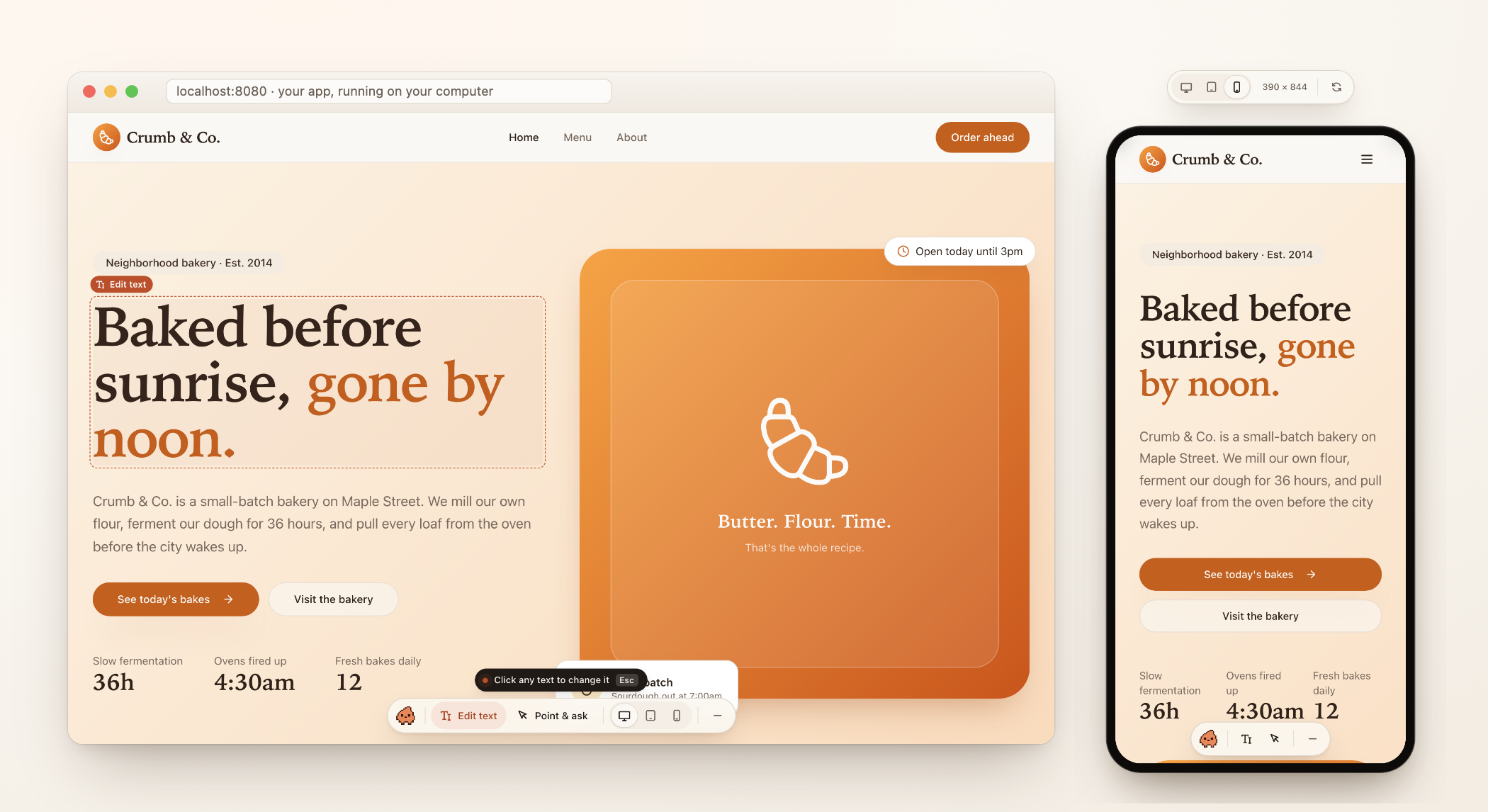
Get started
You'll need a Mac with Claude Desktop (on a paid Claude plan) and your app on GitHub. Lovable puts it there in one click.
- Add Clodable to Claude Desktop. Open Customize › Plugins, click Add › Add marketplace › Add from a repository, and enter
bworlds-co/clodable. Then, under Discover, click Add next to Clodable. - Open an empty folder in Claude Desktop's Code tab and type
/clodable. Clodable gets what it needs the first time, signs you in to GitHub and brings your app in.
Already use Claude Code in Terminal? claude plugin install clodable --marketplace bworlds-co/clodable does step 1.
Moving off Lovable, putting your site online, adding a backend: Clodable sets them up in your own Netlify and Supabase accounts when you need them (both free to start). On Lovable Cloud, type /move-off-lovable (how it goes).
Why Clodable
AI app builders like Lovable showed that anyone can build an app by describing it. Claude Code showed how much an AI can do when it works right in your code. Clodable brings the two together on your own computer: Lovable's simple way of building, the full power of Claude Code, and every account in your name.
For builders who aren't developers. If you can say what you want, you can shape your app: Claude makes the change, you see it in the preview beside the chat, and you publish when you're happy.
All of Claude Code, made simpler. Clodable is a plugin for Claude Code in Claude Desktop. Claude can change any file, add tables to your database, write backend functions and fix what breaks, and the skills, plugins and connectors you already use with Claude Code keep working. Clodable adds what a builder needs, like the live preview, the Publish button and Undo, and keeps the rest out of the way.
Yours, down to the keys. Your code is on your GitHub, your data in your own Supabase, your site on your own host. The keys to those accounts stay on your computer or in the accounts themselves, never in the chat. Clodable has no server, no account and no paid tier: it's free and open source, under the MIT license. Stop using it any day, and your app keeps running exactly as it is.
Coming from Lovable? Clodable moves your app, your data and your users to accounts you own, step by step, while your live app keeps running. See how the move goes.
Still early. Clodable is v0.2: it works end to end, but it isn't perfect yet, and it changes fast. Tell us what breaks.
Get started · How it works · Architecture · Decisions · Contributing
What it feels like




- Ask for a change in your own words. "Make the header feel warmer", or "Add a pricing page with three plans."
- Watch it appear in the live preview next to the chat. Your work is saved after every reply.
- Click Publish when you're happy. Clodable checks your app, and a minute later it's live.
- Changed your mind? Undo puts the previous version back.
You never see git, branches or deploy logs. Your developer, if you have one, sees all of it on GitHub, the way developers like it.
What works today
Clodable is built and tested with apps made with Lovable:
- Your app: either kind Lovable makes, a React app built with Vite or a TanStack Start app.
- Your database: your own Supabase project, or Lovable Cloud, which Clodable moves to a Supabase project in your name. No database yet? Clodable adds one on your own Supabase when your app needs sign-in or saved data.
- Your site: still on Lovable's hosting, on Netlify after the move, or on any host that deploys from GitHub, such as Vercel, Netlify or Cloudflare. Not online yet? Clodable puts it on your own Netlify, and each Publish updates it.
- Your computer: a Mac with Claude Desktop. Windows hasn't been tested yet, and the move off Lovable doesn't run there yet.
About Claude plans. Pro and Max are personal plans. For your company's app, use Claude Team or Enterprise. Anthropic's consumer terms don't allow business use of personal plans in the EU. Helping a client set up? Follow the onboarding playbook.
Apps from other AI app builders aren't supported yet. A React app built with Vite may already work, since that's what Clodable's preview runs, but none has been tested. Apps built with Next.js don't work yet.
Move off Lovable, to a stack you own

Your app, your data and your people move out of Lovable into accounts in your name. Clodable guides you step by step in its panel, and Claude does the technical work in the conversation. You click, decide, and paste your keys. Your live app keeps running on Lovable until you switch.
| On Lovable today | After the move |
|---|---|
| Lovable Cloud: your database, your people and their passwords, uploaded files, backend functions | Your own Supabase project |
| Lovable's hosting | Your own Netlify site, updated each time you Publish |
| Your domain | Points at your Netlify site: Clodable shows the records to change |
| Sign-up confirmations and password resets | Your own Resend account, sending from your domain |
| Lovable's AI | Your own key: OpenRouter, Google Gemini or OpenAI |
| Google sign-in, managed by Lovable | Your own Google sign-in, in your Google account |
| Lovable's connectors and app emails | Your own accounts with those services |
| Your code | On your GitHub, as it already is. Lovable's link to it is turned off at the end |
How it goes:
- Claude looks at your app to see what it uses: AI, sign-in, emails, payments, scheduled jobs, uploads. You see what it found, and each step fits your app.
- You choose how to move. Carefully, for an app people use: you try a working copy first, then your live app pauses for a few minutes while the latest data comes over, so nothing is lost. In one go, for a prototype: one export, and you're live on your own accounts.
- Get ready, beside your live app. A copy of your data and people on your Supabase, which you can try in the preview. Your site on Netlify. Your emails, your AI key, your sign-in.
- Go live. Clodable points your app at its new home, Publish puts it live, and your domain follows.
- Finish in Lovable, once you've signed in on the new site: unpublish, disconnect GitHub, remove Lovable Cloud. The panel gives you the exact clicks, and a message for your users.
You'll create free accounts with Supabase, Netlify and Resend along the way, plus an AI provider or a Google sign-in if your app uses them. Your keys go into the Clodable panel and stay on your computer or in those accounts: never in the chat. When a part is better done with someone technical, the panel says so up front. It's the same move for everyone, developers and agencies included.
In the preview
 |
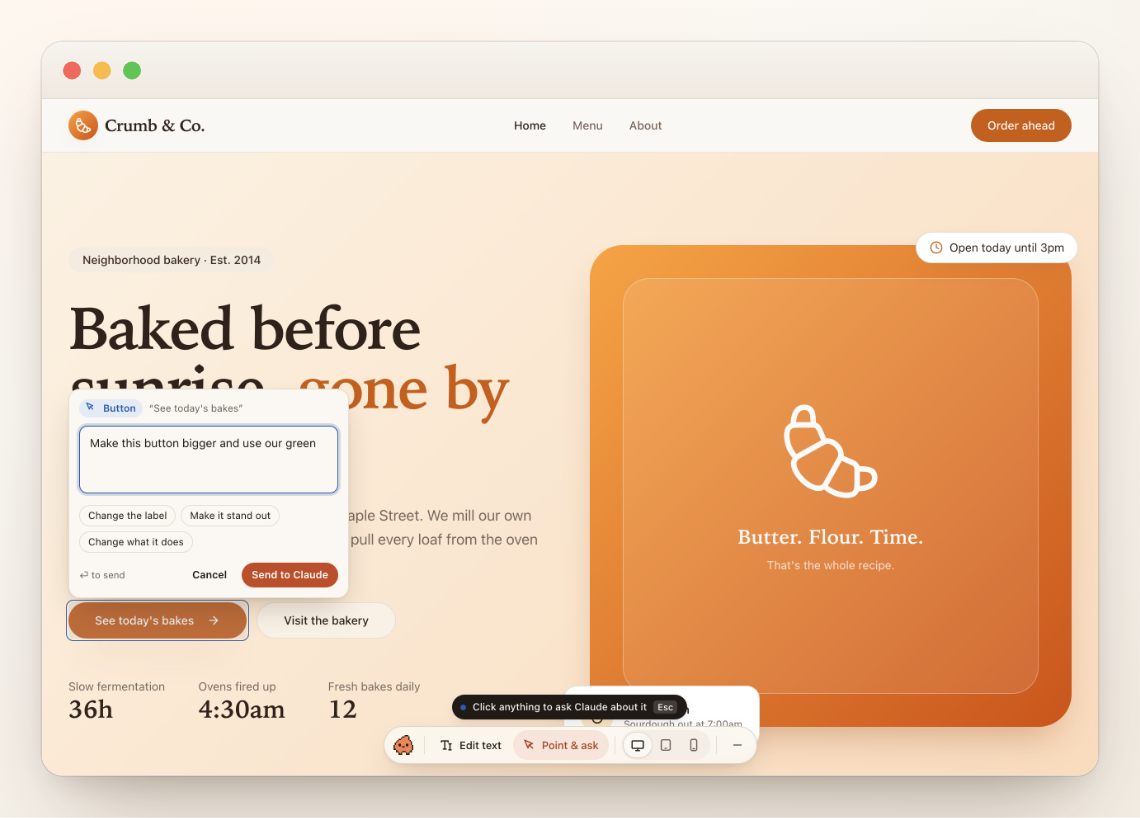 |
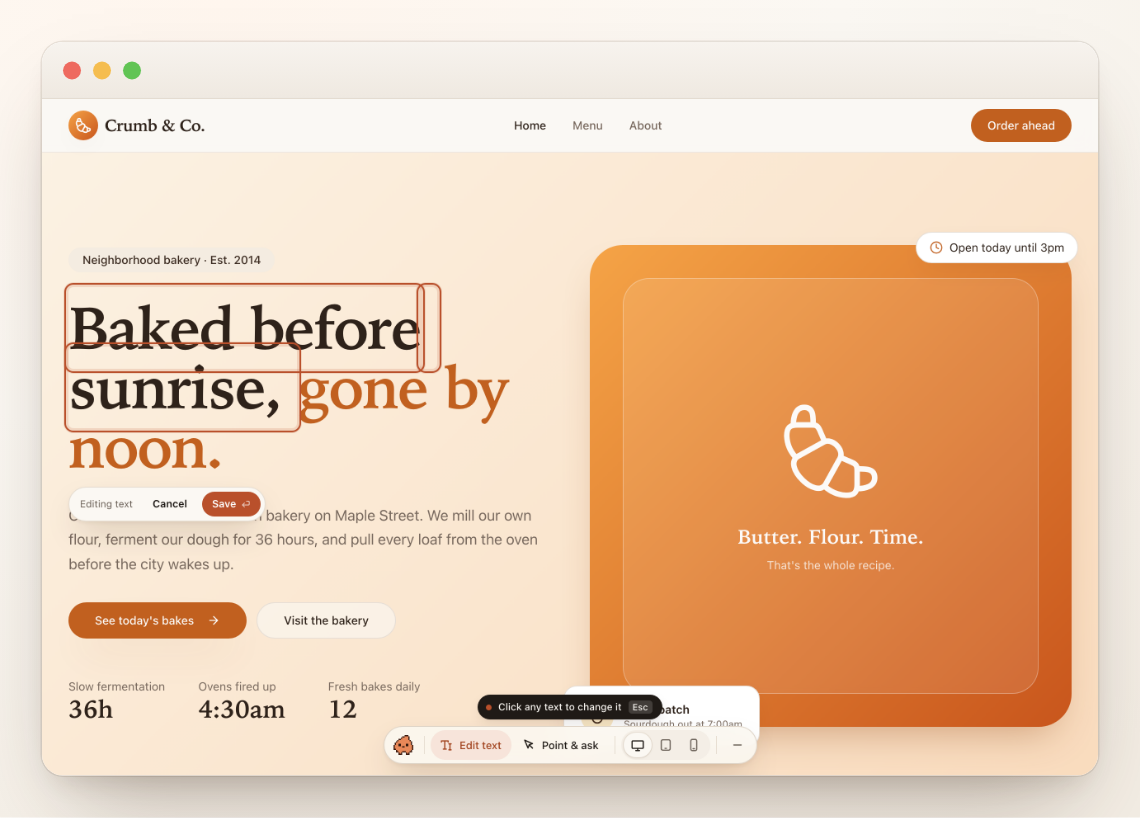
| Edit text in place. Click any words and type. The change goes straight into your code, without AI and without using your Claude plan. | Point & ask. Click any part of the page and say what should change. Claude knows exactly which element and which line you mean. |
 |
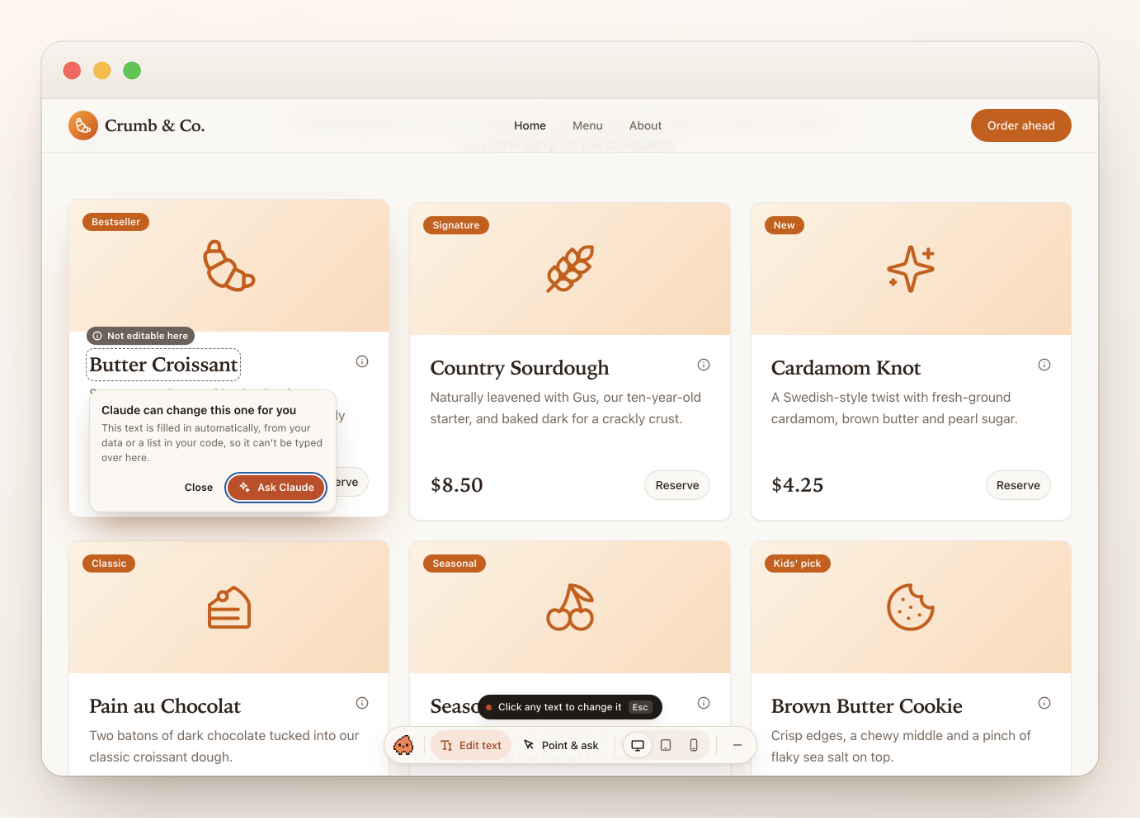 |
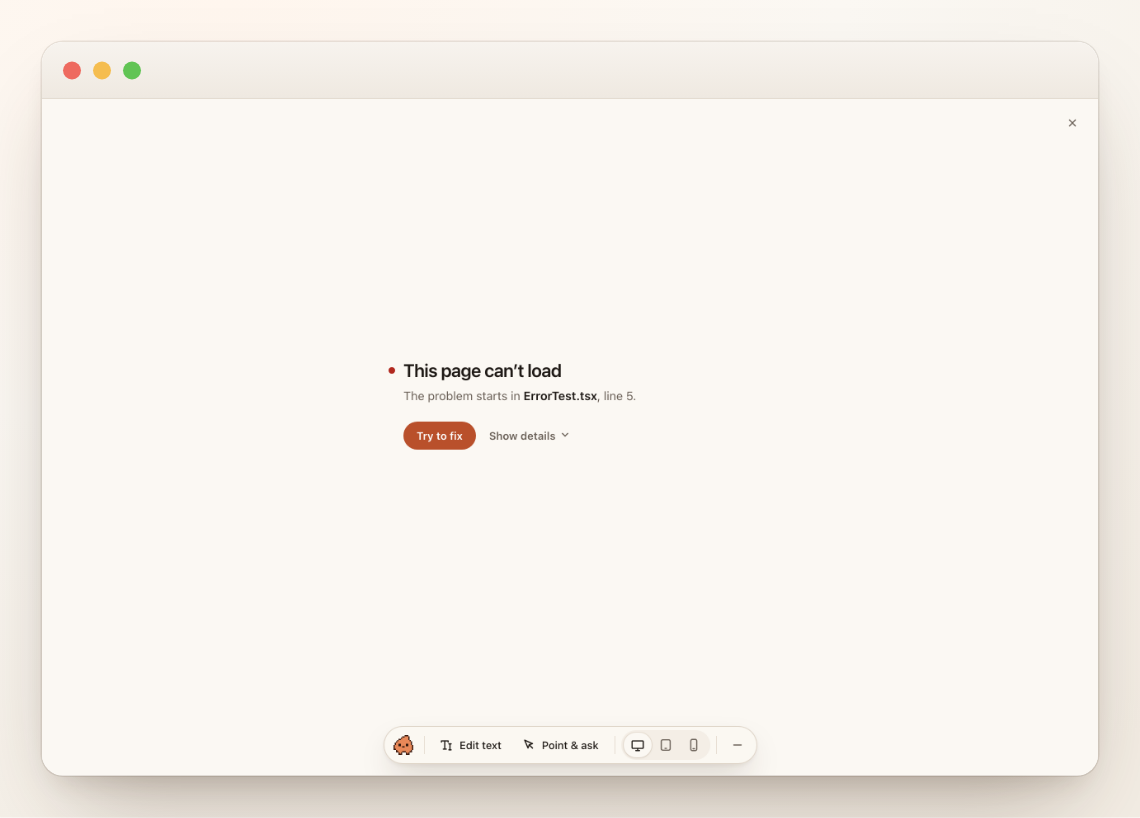
| Try to fix. If a page breaks, one click hands the error to Claude, with the page and the file. | Honest about limits. Text that comes from your data can't be typed over, so Clodable says so and offers to ask Claude. |
You can also preview your app at phone and tablet sizes, with real breakpoints. The toolbar only exists on your computer: visitors never see it.
In Claude Desktop
Clodable adds a Publish bar above the message box. It always tells you where you stand:
| You see | It means |
|---|---|
● 3 changes not live yet [Publish] |
Your work is saved on GitHub, in your draft |
Publishing · Checking it builds… |
Clodable is putting it live, step by step |
● You're live · crumb.co [Undo] |
Visitors now see your changes |
Not published · A page doesn't build [Fix it] |
Nothing changed for visitors. Claude can fix it |
Claude's activity is written in plain words ("Updated the Pricing page", "Changed your database: add phone to customers"). Before anything touches your live data, Clodable asks you, and says plainly when a change can't be undone.
How it works
YOUR COMPUTER · Claude Desktop
  1. Ask for a change
  2. Preview updates instantly
  3. Each reply is saved to your draft            ──▶  GitHub: draft/<you> + a pull request
        │
        │ 4. Publish: catch up with the live site → checks → merge
        ▼
PRODUCTION
  your host deploys main · edge functions go live · "You're live"
Underneath it's plain GitHub Flow: one draft branch per person, one pull request per draft, and main always equal to what's live. Everything Clodable does is a normal git commit, pull request or file, so a developer can open the hood and find nothing strange. See docs/ARCHITECTURE.md.
Your database is the one exception. Like Lovable, your preview uses your real data, and database changes apply when you confirm them. Claude is told to make them additive, so your live site keeps working until you publish.
For developers
pnpm install
pnpm build        # design, core, preview, CLI bundle, and the plugin's copy of it
pnpm test         # core, preview (vitest) · plus `pnpm test:plugin` for the Claude plugin
pnpm lint && pnpm typecheck
Run an example app with the toolbar, straight from source:
pnpm tsx scripts/dev-example.mts lovable-vite 5199 # or lovable-tanstack
Try the whole flow without a GitHub account. The CLI can run against a fake GitHub on your disk:
git clone --bare <some-app> /tmp/demo.git && git clone /tmp/demo.git /tmp/demo && cd /tmp/demo
export CLODABLE_FAKE_GITHUB=/tmp/demo.git
node <repo>/packages/cli/dist/clodable.mjs save -m "warmer welcome"
node <repo>/packages/cli/dist/clodable.mjs publish
Use your checkout in Claude Desktop and the terminal while you work on it. Install it once from the folder:
claude plugin install clodable --marketplace "$PWD"
In the terminal, Claude Code reads the plugin straight from plugin/ here, so your edits apply at the next session or /reload-plugins. Claude Desktop loads the copy made at install time instead (~/.claude/plugins/cache/clodable/clodable/<version>), so point that copy at your checkout once:
d=$(ls -d ~/.claude/plugins/cache/clodable/clodable/*/ | head -1); rm -rf "$d" && ln -s "$PWD/plugin" "${d%/}"
Clodable only acts in apps it set up, so your other projects are unaffected. To remove it: claude plugin marketplace remove clodable.
| Package | What it is |
|---|---|
packages/core |
The engine: drafts, publish, undo, checks, the move off Lovable, database and settings commands, repo kit, inbox |
packages/cli |
clodable: pretty output for people, NDJSON (--json) for programs |
packages/preview |
The dev-only Vite plugin and preview toolbar |
packages/design |
Tokens, icons and the logo (brand, UX principles) |
plugin |
The Claude Code plugin: Publish bar, panel, guards, auto-save, and the clodable-guide and clodable-move skills |
examples |
Faithful Lovable apps, classic Vite and TanStack Start, for development |
Clodable is built for Claude: Claude reads your app and decides, and the CLI does the exact work (keys, accounts, your data, the checks). Your app itself doesn't depend on Clodable. It's plain code on your GitHub, your data in your Supabase, your site on your host: that's the "no lock-in" promise.
What Clodable will never do
- Push to your live branch, force-push, or merge on its own. Only your Publish click does that.
- Put backend code live before you publish.
- Change your live data without asking you first.
- Send your code or data anywhere except your own accounts: GitHub, Supabase, your host, and the services you connect.
- Ask for your secret keys in the chat.
- Send a secret key to GitHub. Every save is checked with gitleaks before it leaves your computer, and a key stops it there.
- Ship its toolbar to your visitors.
- Touch a project it wasn't set up in. Your other folders look and work exactly as before.
Status

Clodable is v0.2: early, working end to end, and moving fast. The move off Lovable has run end to end on test apps; Google sign-in, your own domain and the careful switch haven't yet run against real accounts. The design decisions are recorded in docs/DECISIONS.md. Coming next:
- a local staging database;
- a "wait for my developer" mode;
- a secure form for your production keys.
License
MIT. Clodable is not affiliated with Anthropic or Lovable.
Reviews (0)
Sign in to leave a review.
Leave a reviewNo results found