kaas
Health Pass
- License — License: MIT
- Description — Repository has a description
- Active repo — Last push 0 days ago
- Community trust — 25 GitHub stars
Code Fail
- rm -rf — Recursive force deletion command in install.sh
Permissions Pass
- Permissions — No dangerous permissions requested
No AI report is available for this listing yet.
Turn scattered notes, docs and transcripts into a queryable Markdown wiki — an LLM knowledge-base compiler with MCP access, no embeddings, self-hosted.
KaaS — Knowledge as a Service
English · 中文
Turn scattered notes, documents, and transcripts into a searchable, queryable personal Wiki — powered by LLM-driven knowledge compilation.
Why We Built This
KaaS started as an internal tool. Our knowledge lived scattered across
documents, meetings, and email — and every time someone changed roles or left,
the context they'd built up walked out with them. New people spent weeks
piecing it back together.
A distillation pipeline fixed that. It compiles each person's scattered
material into a wiki tied to their role rather than their identity — so when
someone moves on, the raw data goes but the distilled judgment stays for whoever
fills the seat next.
The payoff is the same either way: the organization stops re-answering the same
questions. That's what convinced us it was worth open-sourcing.
What Makes This Different
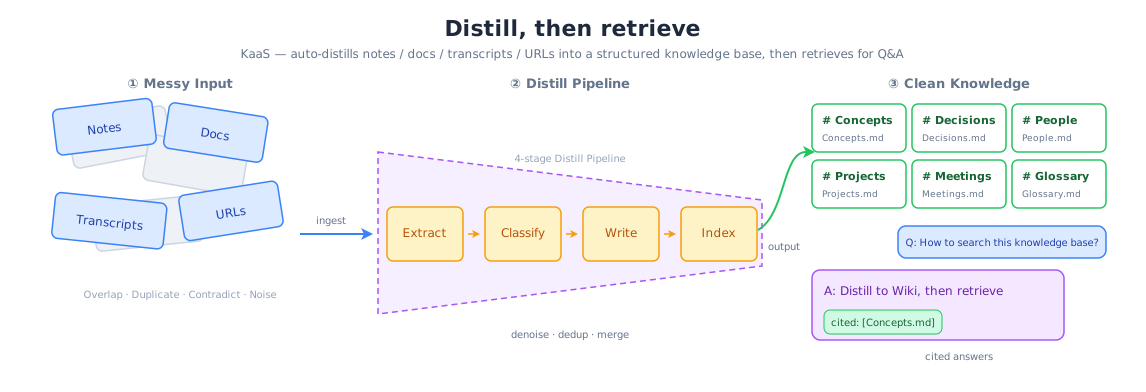
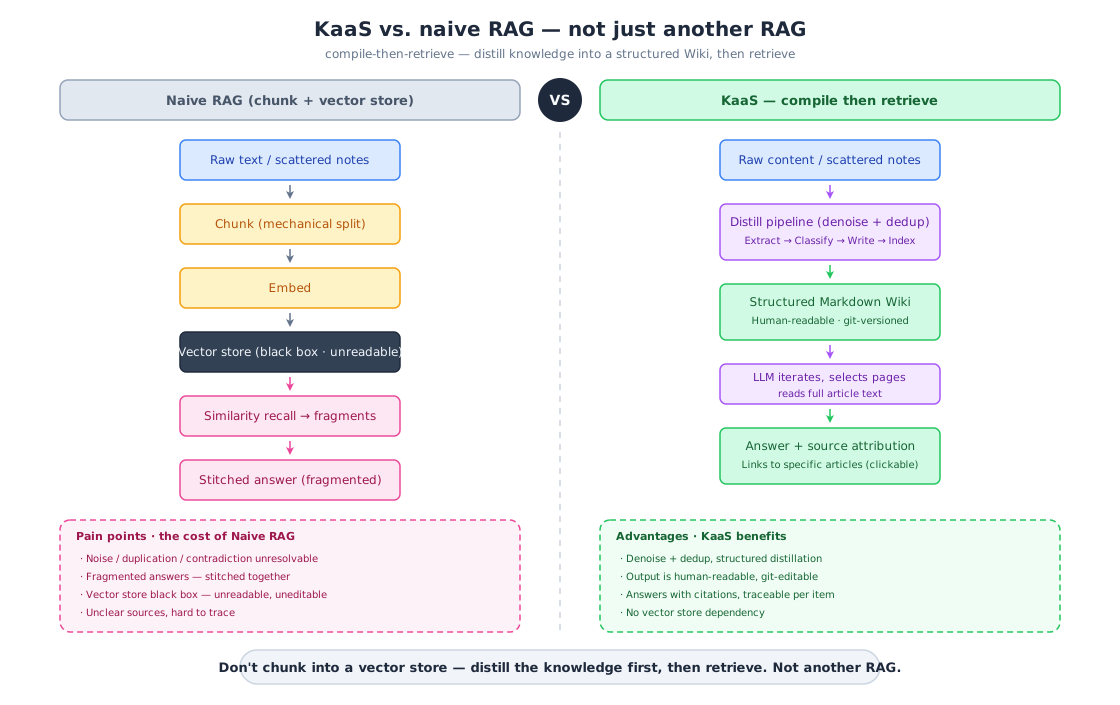
Unlike typical RAG systems that chunk and embed raw text, KaaS compiles your content through a 4-phase LLM pipeline:
Raw Content → Extract → Classify → Write → Index → Structured Wiki
The result is human-readable Markdown articles — not a black-box vector store. You can read, edit, and git-manage your knowledge base.
Quick Start with your AI agent
Already living in a coding agent (Claude Code, Codex, openclaw, …)? Skip Docker.
Copy this and paste it to your agent — it will install kb-ai, ask what to
distill, build the wiki, and wire up MCP so you can query it in any later session:
Set up KaaS to build a queryable knowledge base from my files.
Fetch https://raw.githubusercontent.com/bybit-exchange/kaas/main/docs/agent-quickstart.md
and follow it exactly.
Prefer a web UI, or want the full backend? Use the Docker path below.
Quick Start
KaaS calls LLMs through any OpenAI-compatible API (OpenAI, DeepSeek, Ollama, vLLM, Azure OpenAI, etc.). Pick either method below:
Option A: Docker
# Build the image
docker build -t kaas .

# Run
docker run -d --name kaas \
  -p 8080:8080 \
  -v ./data:/app/data \
  -e LLM_API_KEY=sk-xxx \
  -e LLM_BASE_URL=https://api.openai.com/v1 \
  -e LLM_MODEL=gpt-4o-mini \
  kaas
Option B: CLI Install
# Install (Linux/macOS, amd64/arm64)
curl -fsSL https://raw.githubusercontent.com/bybit-exchange/kaas/main/install.sh | sh

# Start the service
export LLM_API_KEY="sk-xxx"                         # OpenAI-compatible API key
export LLM_BASE_URL="https://api.openai.com/v1"     # API endpoint
export LLM_MODEL="gpt-4o-mini"                      # Model name
kaas serve                                          # Default: http://localhost:8080
Supported platforms: Linux/macOS, amd64/arm64. Uninstall: rm -rf ~/.local/share/kaas ~/.local/bin/kaas.
LLM_BASE_URLdefaults tohttps://api.openai.com/v1andLLM_MODELdefaults togpt-4o-mini.
Change them to point at any OpenAI-compatible endpoint.
Open http://localhost:8080.
Enable remote MCP (optional)
To let Claude Code or other MCP clients connect to the knowledge base:
docker run -d --name kaas \
  -p 8080:8080 \
  -v ./data:/app/data \
  -e LLM_API_KEY=sk-xxx \
  -e KAAS_MCP_ENABLED=true \
  -e KAAS_MCP_TOKEN=your-secret-token \
  kaas
MCP client URL: http://<host>:8080/mcp, Authorization: Bearer your-secret-token.
Or run locally:
make dev
Architecture
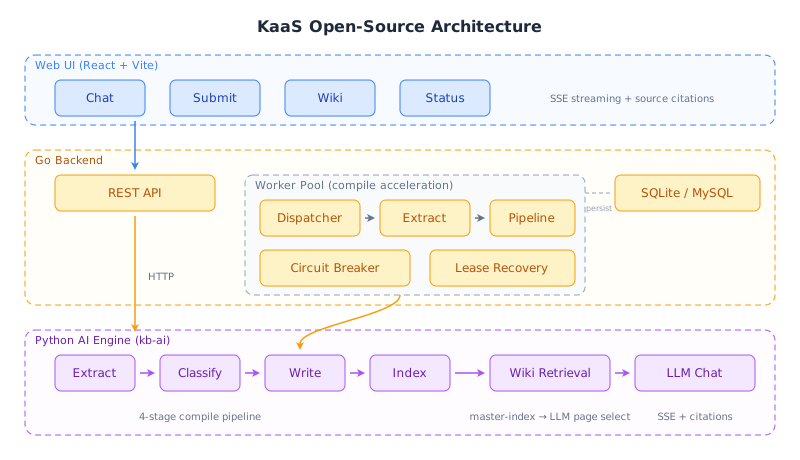
| Layer | Tech | Purpose |
|---|---|---|
| Web UI | React + Vite + shadcn/ui | Chat, Submit, Wiki, Status |
| Backend | Go (net/http + go-zero/conf) | REST API, Worker Pool, Task Queue, MCP endpoint |
| AI Engine | Python (kb-ai daemon) | LLM Compile Pipeline, LLM-iterative retrieval, Chat |
| Storage | SQLite (default) / MySQL | Job queue, compile state |
| Retrieval | LLM iterative | master-index → LLM page selection → full-article context (no embeddings) |
The Go backend spawns the Python AI engine as a long-running daemon process, communicating via a multiplexed stdin/stdout protocol. A single Docker image bundles everything — no sidecar containers needed.
Features
- 4-Phase Compile Pipeline: Extract concepts/entities/decisions → Classify into articles → Write/merge Markdown → Update markdown indexes
- Worker Acceleration: Concurrent extract/pipeline workers, circuit breaker, lease recovery
- Streaming Chat: SSE streaming with source citations pointing back to wiki articles
- Multiple Input Sources: Paste text, upload files, or provide URLs
- Incremental Compilation: Only recompiles new/changed content
- Git-Friendly Output: All wiki articles are plain Markdown
- MCP Access: Query the compiled wiki from any MCP-capable coding agent via an
asktool
MCP Access
Expose the compiled wiki to any Model Context Protocol
client (Claude Code, Codex, openclaw, …) through a single ask tool —ask(query, paths?, model?) returns a cited Markdown answer grounded in the
wiki. Two transports:
stdio (local — the agent spawns the server, fully self-contained):
# The agent launches this; set KAAS_KB_DIR to the knowledge-base root and
# the LLM_* credentials in the environment.
kb-ai mcp                       # stdio is the default transport
# Claude Code:
claude mcp add kaas -- kb-ai mcp
For Codex / openclaw, add a stdio MCP server with command kb-ai mcp and envKAAS_KB_DIR + LLM_*.
streamable-http (remote — published through the backend's :8080 origin):
Run the container with KAAS_MCP_ENABLED=true (see Quick Start).
The backend exposes the MCP endpoint at /mcp. Point a remote agent at it:
# Claude Code:
claude mcp add --transport http kaas http://host:8080/mcp
Set KAAS_MCP_TOKEN to require Authorization: Bearer <token> on the HTTP
transport (off by default — local/intranet assumption). stdio has no network
surface and is unauthenticated.
Configuration
All configuration lives in etc/kaas.toml. Copy and edit it:
[llm]
api_key = "sk-..."
base_url = "https://api.openai.com/v1"
model = "gpt-4o-mini"

[ai.mcp]
enabled = false          # set true to expose /mcp endpoint
token = ""               # bearer token for MCP auth (empty = no auth)
timeout_sec = 120        # tools/call timeout
With Docker, pass secrets as environment variables — they override the TOML at
startup:
| Env Var | Overrides | Default |
|---|---|---|
LLM_API_KEY |
[llm] api_key |
(empty) |
LLM_BASE_URL |
[llm] base_url |
https://api.openai.com/v1 |
LLM_MODEL |
[llm] model |
gpt-4o-mini |
LLM_SUMMARIZE_MODEL |
[llm] summarize_model |
same as model |
KAAS_MCP_ENABLED |
[ai.mcp] enabled |
false |
KAAS_MCP_TOKEN |
[ai.mcp] token |
(empty = no auth) |
KAAS_WEB_DIR |
[server] web_dir |
/app/web/dist (in Docker) |
KAAS_AI_MCP_URL |
[ai] mcp_url |
(deprecated — use KAAS_MCP_ENABLED) |
Development
The quickest way to start all services locally:
make dev
This launches the Go backend (which auto-spawns the Python AI daemon) and the Vite dev server together.
To run components individually:
# Backend (spawns Python daemon automatically)
go run ./cmd/kaas -f etc/kaas.toml

# Frontend (hot-reload)
cd web && pnpm dev

# MCP server (stdio — for local agent integration)
cd py && KAAS_KB_DIR=./data uv run kb-ai mcp

# Tests
make test
Contributing
Contributions are welcome — see CONTRIBUTING.md for dev setup,
how to run the tests, and commit conventions.
Acknowledgments
The core idea — compiling knowledge into a persistent, interlinked wiki that
compounds over time instead of re-deriving answers via RAG on each query — was
inspired by Andrej Karpathy's "LLM Wiki"
gist. Thanks for the clear articulation of the pattern.
License
MIT — see LICENSE.
Reviews (0)
Sign in to leave a review.
Leave a reviewNo results found