claude-product-skills
Health Uyari
- License — License: NOASSERTION
- Description — Repository has a description
- Active repo — Last push 0 days ago
- Low visibility — Only 5 GitHub stars
Code Gecti
- Code scan — Scanned 12 files during light audit, no dangerous patterns found
Permissions Gecti
- Permissions — No dangerous permissions requested
Bu listing icin henuz AI raporu yok.
Claude Code skills aimed at product work rather than the codebase — the Figma file you draw in and the spec beside it
fig · pm
한국어 · English
Most Claude Code skills are aimed at the codebase. These two are aimed at the work beside it — the Figma file you draw in, and the spec you write next to it. One repo, installed separately.
| Plugin | What it does |
|---|---|
| fig | Everything around drawing a screen — the to-draw list before, the audit and sync after |
| pm | Write and verify product specs, then draft, file and reconcile the tasks |
claude plugin marketplace add byjunyoung/claude-product-skills
claude plugin install fig@byjunyoung
claude plugin install pm@byjunyoung      # if you also write specs
Neither needs the other. Most of what follows is about fig; pm has its own section, and the two config values you set when you run both are in Where the two meet.
Where it fits · Who it's for · What it solves · How you use it · The skills · Getting started · Configuration · Troubleshooting · Design principles · pm · Where the two meet
Where it fits
Figma tooling splits into two halves: the half that draws what's inside a screen, and the half that handles everything around it.
Figma's official plugins (figma-use, figma-generate-design, figma-generate-library) are the first half. Give them code or a description and they produce screens and components.
This bundle is the second half. Before you draw, it lays out the section skeleton and stubs the states that are missing, so the gap list is what you draw next. After, it checks whether names follow the convention, whether screens sit where they belong, whether flow arrows actually connect, whether changes shipped to engineering made it back into the canonical page. It runs on top of the official plugins, so you use both.
Drawing is the official plugins' job. What happens around the drawing is this bundle's.
Who it's for
Designers, and whoever writes the spec next to them.
Teams where one file is edited by several people over a long time. It doesn't matter whether you're drawing new screens or revising old ones.
- Teams sharing a file that has grown to hundreds of screens
- Anyone who repeats the cycle of drawing a feature's screens and handing them to engineering
- Anyone who has to keep handed-off designs and the canonical Figma page in step
- Teams that have file conventions but no way to check whether they're followed
Here's where it attaches when you're drawing something new. The official plugins draw what's inside a screen; this bundle handles what comes before and after.
Before   Lay out the section skeleton, stub missing states as dashed placeholders — that stub list is your to-draw list
During   Catch settings that tagged along when you duplicated a screen to make a variant
After    Wire up transition arrows and state groups, then pass the audit before handing off
Where it isn't the right tool:
- A one-off job of a screen or two is faster by hand
- Building a component library from scratch belongs to the official
figma-generate-library
What it solves
A design file rarely breaks when one person owns it. It breaks when there are several people, hundreds of screens, and a few months of history. Four things recur.
- Duplication residue — duplicate a screen to make a new one and the original's settings come along. An unused display toggle stays on, rendering an empty slot with nothing in it. It's invisible at zoomed-out scale
- Stale canonical page — engineering has already shipped, but the canonical Figma page still shows the old screen. The next person plans against it
- Broken arrows — move a screen and its flow arrows don't follow. Redrawing by hand costs enough that people leave them
- The screen nobody drew — "what shows up in this case?" You find out that screen doesn't exist when engineering asks
None of the four is catchable by eye, and by the time you do catch one, engineering has already asked. This bundle measures for them instead.
How you use it
Three rhythms: the cycle of drawing and handing off one feature, the per-release pass that keeps the canonical page current, and a health check you can run any time.
The cycle — drawing one feature through handoff
/fig:setup    First time in a file, observe its conventions and draft a config
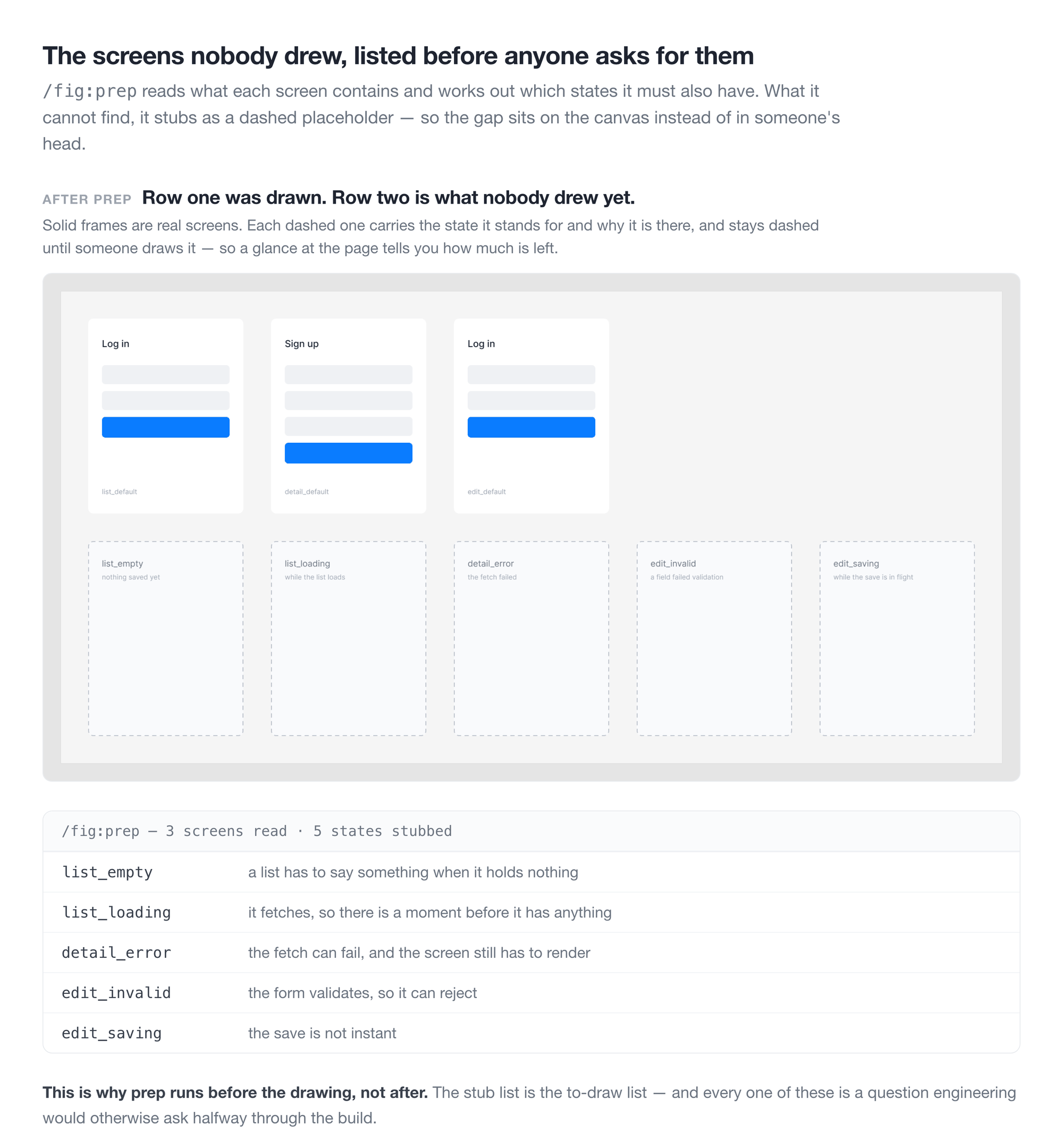
/fig:prep     Lay out the section skeleton, stub missing states as placeholders
   ·          Draw the screens (official plugins, or by hand)
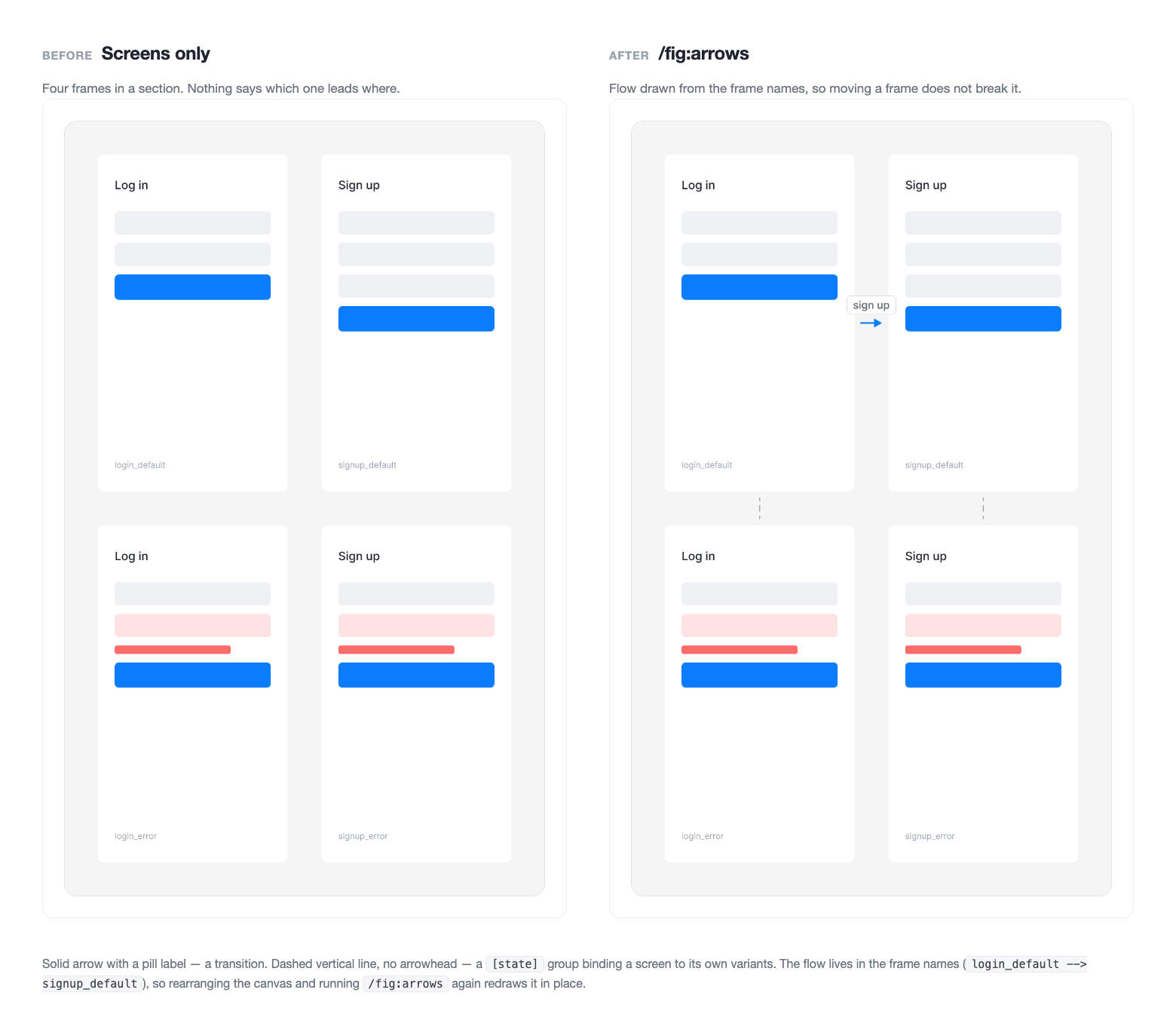
/fig:arrows   Wire transition arrows and state groups
/fig:lint     Audit structure, flow, and components in one pass
/fig:handoff  Gate the passing sections and hand over the links
/fig:diff     For revisions to existing screens, pin change annotations
prep comes first because it builds the to-draw list. A list screen needs an empty state; a form needs a validation-failure state. Stub those as dashed placeholders and the gaps become visible. The point is that they surface before engineering asks.
lint is the gate you have to pass. It never writes to the file, so running it repeatedly is safe.
Per release — bringing the canonical page current
/fig:sync Full audit of what made it into canonical → apply → archive
Working copies and the canonical page use identical screen names, so comparing names tells you nothing about what's missing. The audit judges on three signals together: the text inside a screen, the screen's height, and its component links.
When the structure matches, it edits values rather than replacing the whole screen. Node ids survive, so deep links from specs and tickets keep working.
Any time — a file health check
/fig:lint     Structure, flow, and component audit (zero writes)
/fig:tokens   Check that colors are bound to design system tokens
Neither touches the file. Run one when you inherit a file someone else has been in, or when you reopen something old, and you'll know where it stands.
Two side branches
/fig:proto    Before engineering starts, rebuild the design as a single HTML page that really accepts input and saves
/fig:code     Apply the design to a frontend repo
/fig:qa       Audit a shipped screen against the spec and report defects
/fig:deck     Turn a document into a deck (run deck-setup first)
proto isn't a click-through demo. Enter a value, save it, and it shows up in the list. Clicking through surfaces ordering problems that a static design hides.
deck moves one source document into a presentation flow and builds a Figma Slides deck. It uses the team template's coordinates, colors and type as-is — when a content shape isn't in the catalog it never invents a layout, it fits the nearest archetype by trimming content or splitting the slide. /fig:deck-setup measures those values into local assets, which stay out of the published plugin since template backgrounds carry company wordmarks.
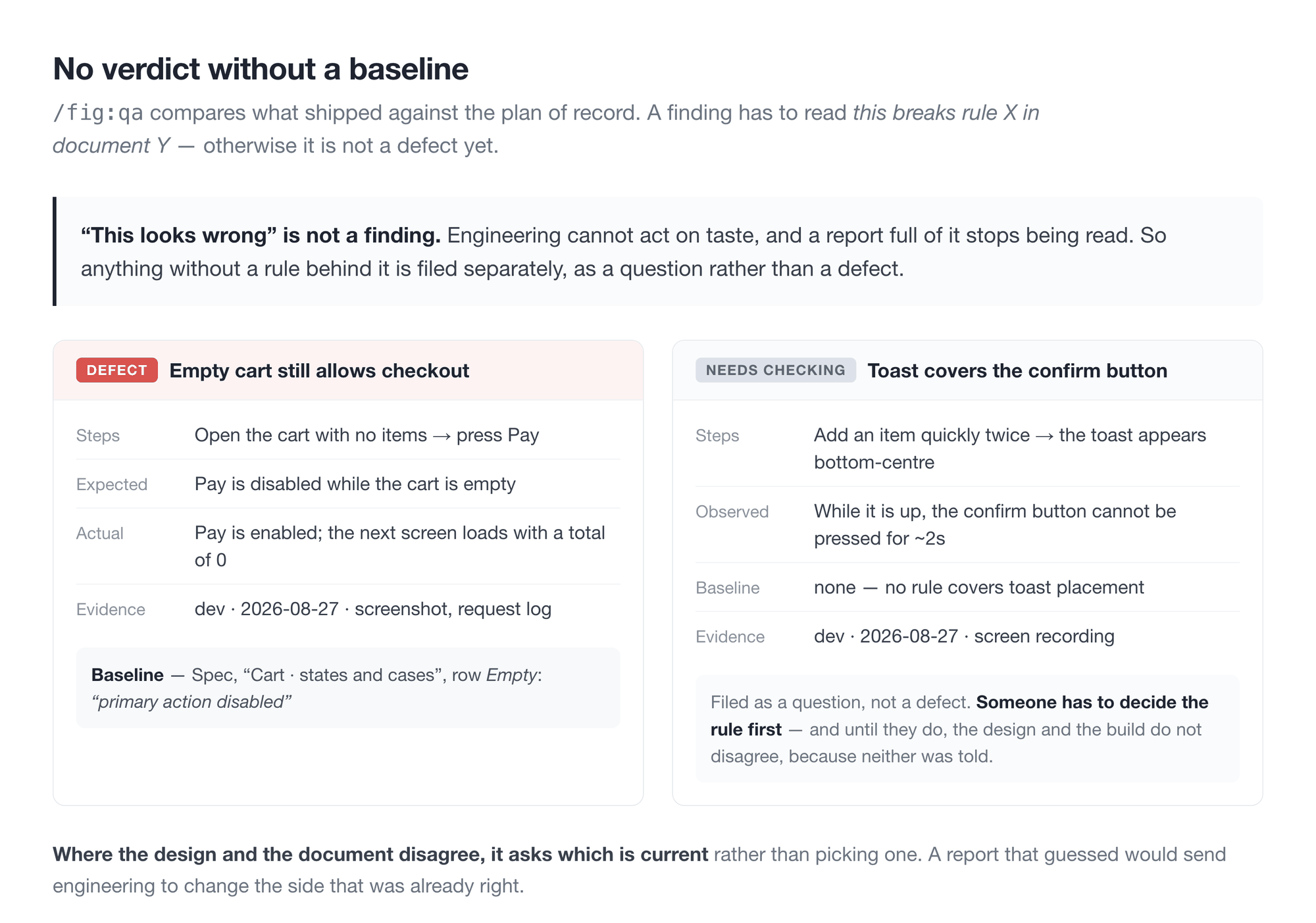
qa audits what actually shipped against the spec. The rule is that a finding reads "this breaks rule X in document Y", never "this looks off" — anything without a baseline is filed as needs-checking rather than a defect.
code separates what the design owns (numbers, colors, copy, states) from what the code owns (file structure, naming, state management), so neither overwrites the other.
What it looks like
The whole flow
flowchart TD
    setup["fig:setup<br/>observe → config"]
    prep["fig:prep<br/>section skeleton · missing screens"]
    draw["Draw screens<br/>official plugins or by hand"]
    arrows["fig:arrows<br/>flow arrows · state groups"]
    tokens["fig:tokens<br/>color token audit"]
    lint{"fig:lint<br/>audit gate · zero writes"}
    proto["fig:proto<br/>working prototype"]
    handoff["Handoff"]
    diff["fig:diff<br/>change annotations"]
    code["fig:code<br/>apply to frontend"]
    sync["fig:sync<br/>canonical page after release"]
    qa["fig:qa<br/>audit what shipped"]

    setup --> prep --> draw --> arrows --> tokens --> lint
    lint -- violations --> prep
    lint -- pass --> proto
    lint -- pass --> handoff
    handoff --> diff
    handoff --> code
    handoff --> qa
    handoff -. after release .-> sync
    sync --> lint
The skills
| Command | What it does |
|---|---|
/fig:setup |
Observe a file's conventions and draft a config |
/fig:read |
Collect the page and screen inventory |
/fig:prep |
Normalize names · place into sections · stub missing screens |
/fig:arrows |
Create and re-sync flow arrows |
/fig:lint |
Read-only audit gate (zero writes) |
/fig:handoff |
Pick from the lint-passed sections · hand over the links · one line in the task doc |
/fig:tokens |
Audit design system token binding for colors |
/fig:sync |
Full canonical-page audit → apply → archive |
/fig:diff |
Annotate changes · write up the task doc |
/fig:proto |
Working single-file HTML prototype |
/fig:code |
Apply the design to a frontend repo |
/fig:qa |
Audit a shipped screen against the spec and report defects |
/fig:deck-setup |
Measure a team slide template into local deck assets |
/fig:deck |
Turn a source document into a Figma Slides deck |
What /fig:lint looks at
| Area | What it catches |
|---|---|
| Structure | Screens outside any section · screens past section bounds · overlapping screens · naming violations · section number vs. placement mismatch |
| Flow | Arrows cutting through unrelated screens · arrowheads pointing at empty space · screens on no flow at all · labels covering an arrowhead or another line |
| Components | Settings that tagged along in a duplicate, leaving an empty slot rendered |
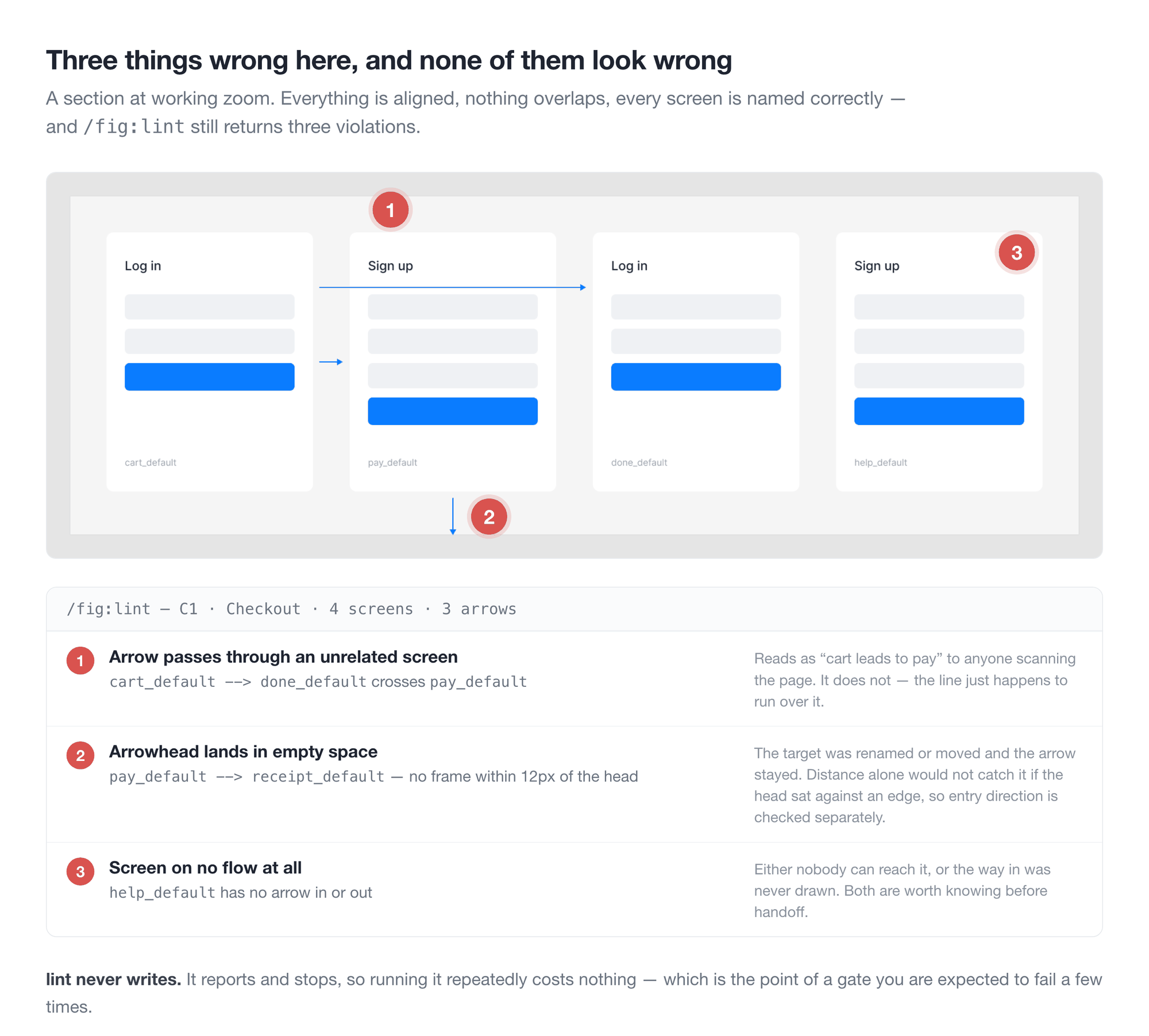
Arrowhead direction isn't catchable by distance alone. An arrow can sit 12px away and still point into empty space if its last segment runs parallel to the target edge. So the audit checks perpendicularity separately.
The component audit works without any written convention. It derives the usage distribution from how other screens in the same file use that component, and compares against it.
pm — product docs
A separate plugin covering the document and the work that comes out of it.
/pm:setup |
Read your tool schemas and draft the config, ids included |
/pm:prd |
Write a requirements doc against a format, verify it before it ships |
/pm:task-draft |
Turn a request thread into a task's context table |
/pm:task-publish |
File that task as a ticket in the engineering tracker |
/pm:task-sync |
Reconcile the planning list against that tracker |
/pm:log |
Record a day's work as a file, unattended, from the same tracker |
/pm:log-review |
Turn a period of those files into accomplishment statements |
The cycle — a request through to a filed ticket
/pm:setup          First time in a workspace, read the schemas and draft a config
/pm:task-draft     Sort a request thread into the task's context rows
/pm:prd            Write the entries the work will be built and judged against
/pm:task-publish   File it as a ticket, once the scope has settled
/pm:task-sync      Every so often, reconcile the whole list against the tracker
task-draft comes before prd because the context table is what tells you whether there is enough here to write a spec at all. The rows that stay empty are the interview you still owe someone.
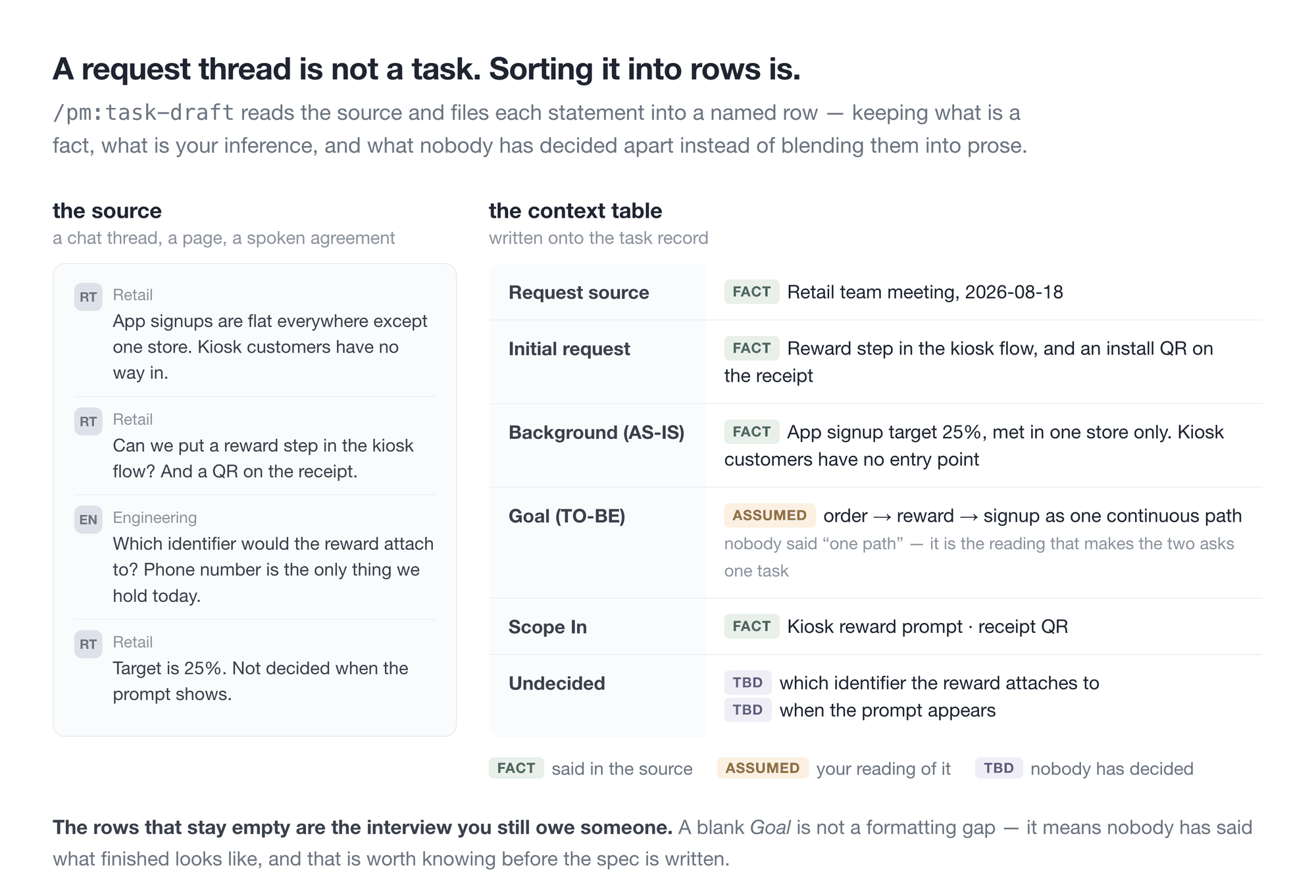
task-publish takes one task and task-sync takes the list, because the two fail differently. One task fails by being filed wrong. A list fails by drifting — unfiled, duplicated, wrong parent, resurrected. Diagnosing drift means reading both sides first, which is why sync shows you the diagnosis and waits rather than writing.
The task side assumes nothing about your tracker. A team that plans and builds in one place sets task.mirror.type: none, and /pm:task-sync says there is nothing to reconcile — which is the right answer, not an error. A team that plans in one tool and builds in another names both, and matching runs on one property holding the ticket's url. A back-link in the ticket body is never trusted for matching: it can point at a source that was already discarded, and that is how duplicates and resurrected tickets happen.
It doesn't care where the doc lives. The structure is the same everywhere; prd.target only changes how it's published.
markdown   local files. the default — no other tooling required
git        writes markdown, then branch and PR
notion     Notion pages. requires the prd.notion section
Three things it holds to.
No leftover vagueness. The unit a decision is made in, what a filter or sort acts on, how a "primary" item is chosen, what a state transition means — a feature doesn't hold together without these, so they get concrete values. If any field could have been settled from the material and was left as TBD, verification fails.
A product doc is not an engineering doc. Anything in forbidden_terms appearing in the body is rejected. It writes what is required and leaves how to engineering or to a TBD.
It stops before writing. Verification is read-only, publishing happens only after a preview and an explicit go, and even then in stages — skeleton, then user groups, then feature entries.
The log side — what you actually did
Two of the skills are not about the spec. They keep a record of your own work, read from the same tracker.
every workday   /pm:log          one file a day — facts, quotes, evidence. unattended
now and then    /pm:log-review   a period of those files → accomplishment statements
They are split on purpose. The daily run records only what happened and never rates it; the review asks you the three things a file cannot know — your role, what the result can be measured by, what you learned. An unattended agent writing daily about the significance of its own work fills a log with claims nobody can check later.
The first run already pays: a day's file is a written end-of-day summary. That it accumulates into review material is the second benefit, not the first one you feel. pm/README.md carries the wrapper script, the scheduling note, and the importer for an existing Notion log.
Configuration lives in pm-conventions.yaml, layered the same way as fig.
Where the two meet
The two plugins never call each other. What they share is two objects, each named twice — once in figma-conventions.yaml and once in pm-conventions.yaml. Install both and you point each pair at the same place.
| The object | fig calls it |
pm calls it |
|---|---|---|
| The requirements doc | qa.baseline.prd |
prd.target, and the prd.notion block |
| The task record | task_tracker.ref |
task.record.ref |
That is the entire contract, and each half of it exists for a reason. /fig:qa needs the spec because a defect report is only worth handing over when it reads this breaks rule X in document Y — and /pm:prd is what wrote document Y. /fig:diff needs the task record because an AS-IS/TO-BE table belongs beside the request that caused it — and /pm:task-draft is what opened that record.
Neither link is required. Leave qa.baseline.prd at null and /fig:qa files everything as needs-checking rather than as a defect. Leave task_tracker.type at none and /fig:diff prints its table as markdown instead. You lose the linkage, not the skill.
Drawn out, one feature goes round like this.
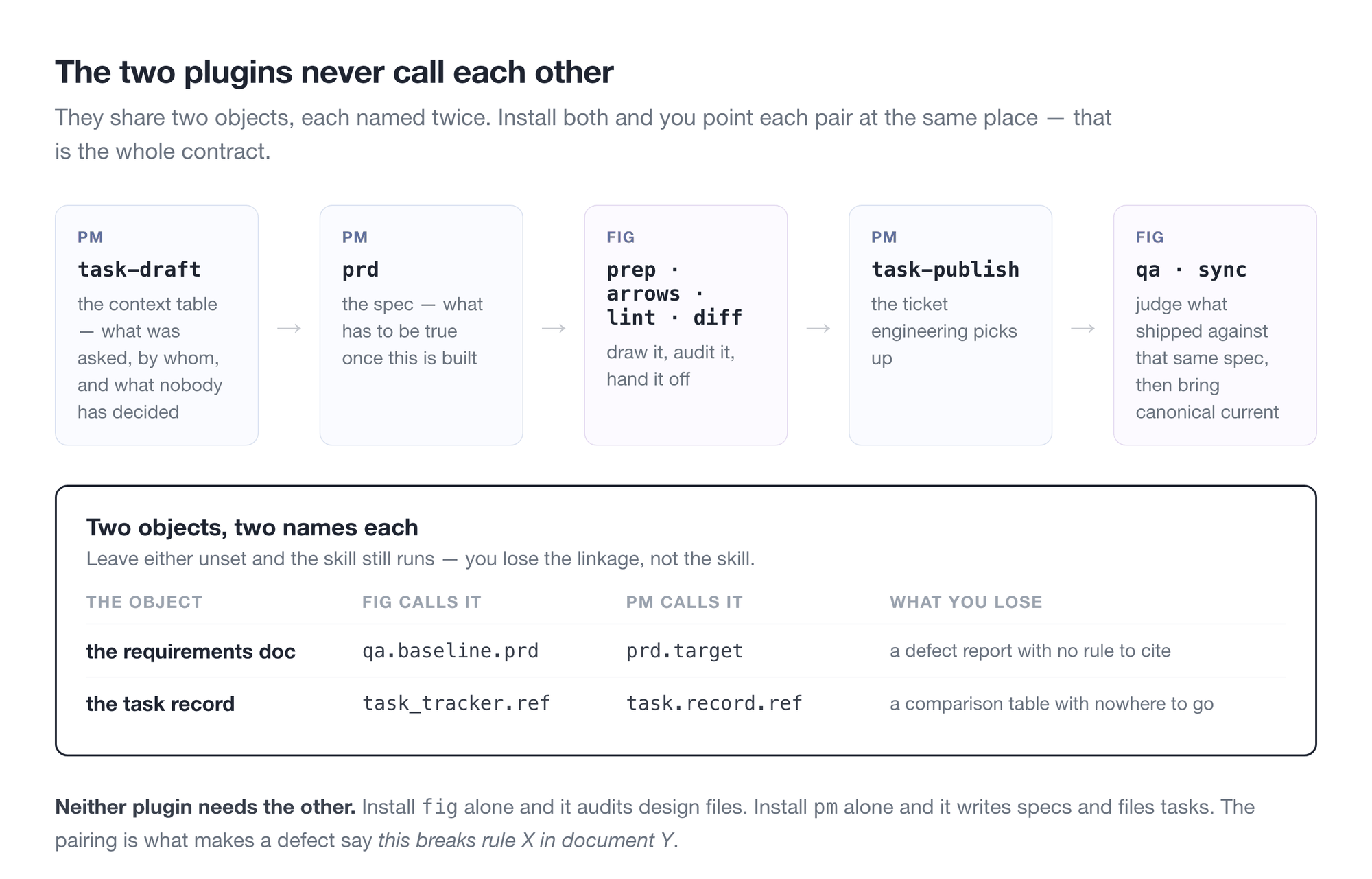
And the next request starts it again, against a canonical page that is now current.
Getting started
Prerequisites
| What | Why |
|---|---|
| Claude Code | These are Claude Code plugins |
The Figma MCP plugin (plugin:figma) |
Every fig skill reads and writes Figma through it. Confirm it answers before going further |
| A Figma file | /fig:setup infers conventions by measuring a file you already work in. An empty one, or a first one, takes the starter path instead — four rules proposed in plain words, then the first skeleton laid on a page |
python3 with PyYAML, and node |
Config resolution runs on the host, and the audit scripts are syntax-checked with node --check |
| A Figma personal access token (optional) | Only /fig:read needs one, to enumerate every page over the REST API. Without it, it falls back to the MCP and may see only some pages |
The gh command (pm, where the tracker is GitHub) |
The GitHub side runs on it, not on Claude's connection. Log in with the account that can see the tracker — a personal account looking at a company repository sees nothing — and give it board access once with gh auth refresh -s read:project |
pm needs none of the Figma side. If you only write specs, install it alone.
You don't have to check any of this by hand. Step 2 tests every row of this table on
your own machine and names whatever is missing.
What each skill needs
Everything under fig runs on plugin:figma. These skills want something more.
| Skill | Also needs |
|---|---|
/fig:proto /fig:code /fig:qa |
Claude in Chrome — they drive a real browser |
/fig:prep /fig:lint /fig:sync /fig:diff /fig:qa |
Notion — only where a config key points at a Notion page |
/fig:diff /pm:setup /pm:task-draft /pm:task-publish /pm:task-sync |
GitHub — only where task_tracker.type / task.mirror.type is github. Two logins are involved: Claude's connection, and the gh command the tracker is read through. The check covers both, and names the account gh is on |
/fig:qa /pm:task-draft |
A chat tool — only where the request source is a thread. For pm, sources.chat_type names it; /fig:qa takes the tool from the link. Slack ships |
/pm:log |
A calendar and a chat tool — both optional, named by sources.calendar_type and sources.chat_type; Google Calendar and Slack ship. Named as none they are skipped and the log says so. A scheduler on your own machine, if you want it unattended |
/pm:prd |
Notion — only where prd.target is notion |
The connection rows are conditional: point the config at none or at markdown and the skill still runs, it just writes somewhere else. The Chrome rows are not — those three open a browser.
Notion, GitHub, markdown, Slack and Google Calendar come with support built in; the rows read the same for any other tool your settings name.
Once a config names a tool, it stops being optional. The same check reads the config: a tracker set to github makes GitHub required, prd.target: notion makes Notion required, and a later run that cannot reach one stops on its name instead of coming back thin. On a machine with no config yet nothing beyond the host can be required — the summary says so, and /pm:setup re-runs the check with the answers it has just been given.
A skill cannot call a tool it was never given. If a connection is missing, the skill does not fail loudly; it simply cannot reach it. That is the most common reason a first run looks like it did nothing.
The built-in support is for the claude.ai connections — Notion, Slack and GitHub as claude.ai connects them. A tool this plugin has never seen — Linear, Jira, Confluence, Teams, a Notion behind your own server — is not a dead end: name it in your settings and /pm:setup writes the support for it from the tools actually connected on your machine, into pm-adapters/ next to your settings, marking what it could not verify. What that support has to cover is written down in trackers/README.md and sources/README.md — for whoever wants to read or edit one.
1. Install
claude plugin marketplace add byjunyoung/claude-product-skills
claude plugin install fig@byjunyoung
claude plugin install pm@byjunyoung      # only if you write specs
claude plugin list should now show fig@byjunyoung. To update later: claude plugin marketplace update byjunyoung.
2. Point it at your work
Which entry point you take depends on what you installed. Each one begins by checking this
machine — python3 and PyYAML, node, and which connections actually answer — and stops
there if something required is absent, rather than running on and coming back thin.
| You installed | Run | What it reads |
|---|---|---|
fig |
/fig:setup <your figma file URL> |
how your file already names frames, spaces sections and draws arrows |
pm |
/pm:setup |
your doc tool's and your tracker's schemas |
fig, and you will use /fig:deck |
/fig:deck-setup |
your team's slide template |
What the first run is like. Each setup opens by saying what it will produce and how long it
takes, shows its steps, and names each one as it begins — read-only until the one file it
writes, which you see first. Questions come in your words, with options and a recommendation,
and "leave it blank" is always one of them: a blank is null, written with the question beside
it for whoever can answer. It ends on a first result rather than a file — pm drafts a context
table from one message you paste, fig audits one page — and names the commands to run next.
fig. Nothing is written to Figma — this step only reads. It counts how the file already
names frames, spaces sections, and styles arrows, takes the dominant value as the convention,
and leaves anything it can't settle as null rather than guessing. A thin sample or a split
vote produces a null, and it asks you about those rather than filling them in.
With nothing to observe — a first file, a team with no conventions yet — it proposes a starter
set instead: four rules in plain words, three questions, a config that says on every line that
it was chosen rather than measured, and then the first section and placeholders laid on a page
with /fig:prep, so the rules are visible on the canvas before anything is drawn.
The draft lands in ~/.claude/figma-conventions.yaml, which survives uninstalling and
reinstalling the plugin. Pass out: ./figma-conventions.yaml instead for a project-local one.
Read the line comments before you accept it. They carry the evidence — 24/69 (35%) means the
value turned up in 24 of 69 observations, which is why that one came back null.
pm. Reads the schemas of your doc tool and your tracker, and asks only what no schema
answers. Property names, select options, labels, board field ids and user mappings are read
from the live schema rather than guessed at. The draft lands in ~/.claude/pm-conventions.yaml.
Where the doc tool and the tracker are reachable from different machines — the doc tool from
home, the tracker only on the office account — run it with side: record on one andside: mirror on the other; each writes only its half of the same file. Anything you cannot
answer is null, and the file keeps the question beside it as a comment for whoever can.
Starting with nothing at all — no doc tool, no tracker — is an answer it takes: it lays out one
markdown repository (specs, tasks, logs) that needs no other tool, and a tracker attaches later
with side: mirror. And a tool it has never seen — Linear, Jira, Teams — is not a dead end:
name it in your settings and it writes the support from what is connected.
deck. /fig:deck-setup measures your team's slide template into ~/.claude/deck-assets.
The plugin ships no template values at all, because deck backgrounds carry company wordmarks
and can't be distributed. Run it once before /fig:deck, and again when the template is revised.
3. Judge the first audit (fig)
/fig:setup finishes by running /fig:lint for you. Read the result by its false-positive rate, not its violation count.
If nearly every frame is flagged, the config is wrong and the file is fine — go loosen whichever pattern is doing the flagging, or set it to null to switch that check off. A handful of violations that you recognise as real means it's calibrated.
That's setup done. How you use it covers the loop from here.
Configuration
Conventions live in one file, figma-conventions.yaml, not in the skill docs. Screen naming, the state list, spacing values, section style, arrow style, sections excluded from audit, and tolerances are all there.
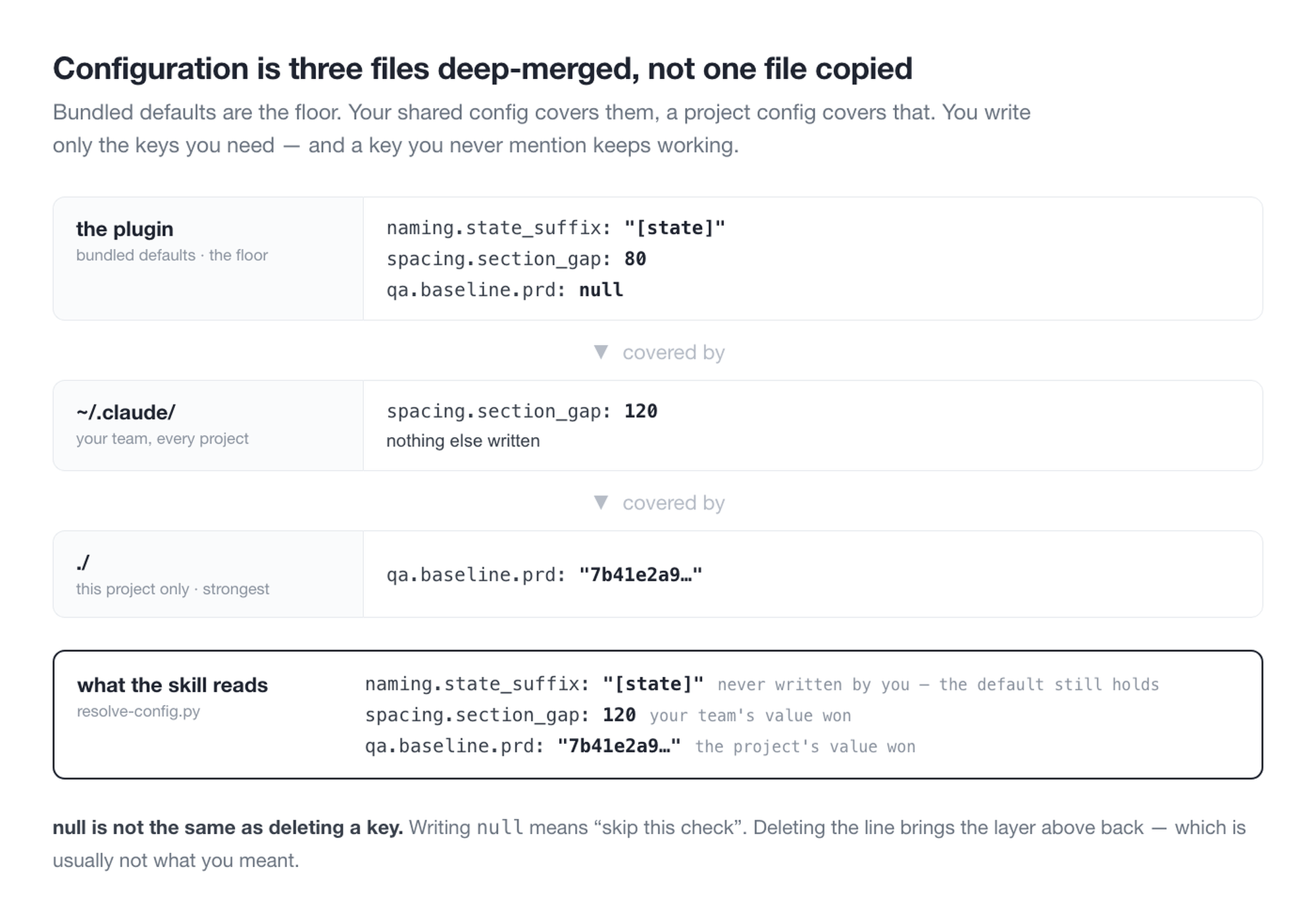
The full schema lives in conventions.example.yaml — every section commented with what it governs, so you can copy it and edit in place. It looks like this:
naming:
  frame: "{screen}-{state}"           # human-readable form
  frame_pattern: '^.+-[^-\s]+$'       # lint uses this as a regex directly
  states: [Default, Empty, Loading, Error, Validation, Selected]
  required_states:
    list: [Default, Empty, Loading, Error]

pages:
  strict:   ['^\[UI\] ']              # full rules apply
  exclude_sections: ['^Template$']    # exempt from audit

layout:
  column_grid: 1560
  frame_gap: 120

arrows:
  color: "#4A5463"
  audit: { edge_tolerance: 2, gap_range: [9, 15] }
- First run —
/fig:setupin the target file observes its conventions and drafts one - Partial configs are fine — the three layers are merged, so keys you omit fall back to defaults and only what you write is overridden
- What
nullmeans — the value wasn't inferred, so that check is skipped. To disable a check, writenullrather than deleting the key — deleting it brings the default back - Settings a skill cannot run without — it checks them first, and stops naming the one that is blank instead of running on nothing. That is a gap in the settings, not a problem with your tool;
/pm:setupfills it in - Tools — how to work with one tool lives in one file, and the tool's name in your settings picks it. Ones you add live in
pm-adapters/next to your settings, so a plugin update never overwrites them. A tool with no file stops the skill, and/pm:setupwrites the file from what is connected on your machine - Per-file settings — things that differ by file, like which pages are canonical vs. archive, go under
files.<fileKey>
Once you have a draft, run /fig:lint once and judge it by the false-positive rate. If nearly everything is flagged, the config is wrong, not the file.
Troubleshooting
Each entry is what you see, what it means, and what to do.
The report says it ran on defaults.
Your settings file was not found, so the built-in defaults ran instead. From your project folder, run python3 plugins/fig/_common/scripts/lib/resolve-config.py --where — it prints the files it actually found. Usually the filename has a typo, or the file is somewhere other than ~/.claude/.
Everything in the file comes back as a violation.
The rule is wrong, not the file. A naming pattern that only accepts Latin letters flags every Korean name, for example. Loosen the pattern in the settings, or set it to null to switch that one check off.
I changed a skill and nothing changed.
Claude Code keeps the installed copy pinned to a version, so editing the source does nothing until the version number goes up. Raise it in plugin.json, then claude plugin marketplace update, then uninstall and reinstall the plugin.
check.sh says Permission denied.
The file arrived without permission to run on its own. Call it as bash <path> instead.
A Figma token request comes back 401.
Figma rejected the token — it exists, but it is expired or wrong. /fig:read checks that the token is set before calling, so a 401 is never "no token". Issue a new one in Figma's Security tab.
/fig:read only returns some of the pages.
Without a token it can only see what the desktop app has open. To list every page it needs a token — see the prerequisites.
/fig:deck says there are no assets.
The slide template has not been measured yet. Run /fig:deck-setup once — it reads your team's template into ~/.claude/deck-assets. The plugin ships no template, because template backgrounds carry company wordmarks.
A deck came out in the wrong font.
Your team's font is not installed on this machine, so the next candidate was used and the line breaks moved. Install the font, or keep the substitute and check where the lines break.
Reports come out in the wrong language.meta.language in the settings decides it. auto follows the language you are talking in; ko or en pins it.
The check passed, but the tracker step came back empty.
GitHub is two logins, and only one of them was checked. Claude's GitHub connection is one; the gh command on your machine is the other, with its own account — and the tracker is read through gh. A personal account looking at a company repository sees nothing, which reads as if the repository did not exist. Run gh auth status to see which account is active, and gh auth switch to change it. To read project boards, the login also needs one extra permission: gh auth refresh -s read:project. The check now prints the account it found and tries to open the tracker with it.
The GitHub connection says "connected, but not responding".
Claude's GitHub connection is set up, but the login token it sends is empty — usually because Claude Code was opened from somewhere that never loaded the token, such as the desktop app. Open Claude Code from the terminal where the token is set, and it comes back. This is a different fix from "not connected".
A fig skill stops before writing and mentions your seat.
Your Figma account can view that file but not edit it, and the skill checked before touching anything. Reading works; every write needs an Edit seat on the file's plan, and retrying will not change that. Either the file moves to a plan where you have one, or someone with a seat runs the write.
A skill stops saying a setting "is not set".
That value is empty in every settings file, and the skill cannot run without it. /pm:setup fills it in — or open the file and write it. An empty list is a value and does not stop a skill; only a missing one does.
A skill stops saying a tool "is not supported yet".
Your settings name a tool nobody has described how to work with. /pm:setup writes that support from the tools actually connected on your machine, into pm-adapters/ next to your settings — and marks what it could not verify. Until then the skill stops rather than guessing how the tool works; a guess is how a ticket lands in the wrong place.
A skill stops saying a tool is "supported as the other side".
A tool can be where tasks are planned, or where engineering tracks them, and the support that ships covers one side each — GitHub as the tracking side, Notion and markdown as the planning side. Your settings put one on the other side. /pm:setup can add that side from what is connected.
A skill wrote something you didn't expect.
Every write to Figma, a spec page or a branch goes through a preview and an explicit go. If one happened without that, it's a bug worth reporting.
Design principles
One place decides. The skills that write to files (prep, arrows, sync) contain no audit code. /fig:lint is the only thing that judges right from wrong; everything else just fixes what it flagged. Spread the checks across skills and you get a gap — "I skipped that skill this time, so the check never ran."
Conventions are observed, not asked. Every team names screens differently, spaces them differently, groups sections differently. /fig:setup doesn't ask — it reads the file and works it out. People get their own team's conventions wrong when answering from memory.
When unsure, leave it empty. If the observation is ambiguous, meaning too few samples or a near-even split, the value stays null instead of being filled in. null means that check is skipped. Not knowing a rule and breaking a rule are different things, and mixing them buries the report in false positives until nobody reads it.
Layout
.claude-plugin/
  marketplace.json             marketplace entry (plugin list)
plugins/
  fig/
    .claude-plugin/plugin.json
    README.md
    skills/
      setup  read  prep  arrows  lint
      tokens sync  diff  proto   code    one SKILL.md each
    _common/
      conventions.example.yaml           config schema + bundled defaults
      scripts/
        audit-struct.js                  membership, bounds, overlap, naming, ordering
        audit-flow.js                    arrow geometry, entry direction, pass-through, labels, coverage
        audit-component.js               component default residue
        arrow-build.js                   arrow construction helper
        prep-ops.js                      page cleanup helper
        probe-page.js                    convention observation
        lib/                             config resolution, preflight, draft generation, syntax check
  pm/
    .claude-plugin/plugin.json
    README.md
    skills/
      setup  prd  task-draft  task-publish
      task-sync  log  log-review          one SKILL.md each
    _common/
      conventions.example.yaml           config schema + bundled defaults
      trackers/                          one file per tracker — notion, github, markdown; the contract and a template
      sources/                           one file per chat or calendar — slack, google-calendar; contract and template
      scripts/lib/                       config resolution, preflight (copies of fig's, held identical), adapter lookup
tools/
  verify.py                    consistency check (repo tool, not shipped)
  test/                        fixtures — arrow geometry, config resolution
One repo holds several plugins. plugins in marketplace.json is an array, so they install separately while sharing one repo and one checker.
Figma plugins have no filesystem access. So config resolution happens locally: resolve-config.py --js <fileKey> emits a single line that gets prepended to the script before it runs. Script paths are relative to ${CLAUDE_PLUGIN_ROOT}, since install locations differ between environments.
After editing a skill, run python3 tools/verify.py from the repo root. It checks every plugin listed in the marketplace, and flags shared files that have drifted apart between them. The same run happens on every push. The one check that needs your team's own names — the leak check — runs there too once a TEAM_STRINGS secret holds the list, one name per line, in the form team-strings.example.txt shows; the names are masked in the log.
Built with
Claude Code skills (Markdown) + the Figma Plugin API (JavaScript) + config resolution and aggregation (Python). PyYAML is the only external dependency.
Author
Junyoung Kim · LinkedIn
License
© 2026 Junyoung Kim · LICENSE
Installing and using it is free. Use it personally or inside your organization, and modify it if you need to.
Redistributing a fork, republishing it under another name, or reselling it commercially requires permission. That's why there's no standard open source license attached. Reach me through Issues or LinkedIn.
Feedback
Bug reports and feature ideas go in Issues.
Yorumlar (0)
Yorum birakmak icin giris yap.
Yorum birakSonuc bulunamadi