devduck
Health Gecti
- License — License: Apache-2.0
- Description — Repository has a description
- Active repo — Last push 0 days ago
- Community trust — 36 GitHub stars
Code Basarisiz
- rm -rf — Recursive force deletion command in action.yml
- eval() — Dynamic code execution via eval() in devduck-chrome-extension/background.js
Permissions Gecti
- Permissions — No dangerous permissions requested
This is a minimalist, self-healing AI agent written in Python. It is designed to dynamically hot-reload its own code, automatically recover from errors, and orchestrate over 60 tools across your terminal, browser, and cloud environments.
Security Assessment
The overall risk is High. This tool is inherently designed to autonomously execute shell commands, make network requests, and interact with your file system. While the scan found no hardcoded secrets or dangerous broad permissions, it flagged two critical code vulnerabilities. First, the presence of a recursive force deletion command (`rm -rf`) in an action file, which poses a severe data loss risk if triggered improperly. Second, the use of dynamic code execution (`eval()`) in the browser extension, which is a classic vector for arbitrary code injection and remote compromise. When combined with its core feature of dynamically modifying and executing its own code at runtime, these flaws make it a highly sensitive application.
Quality Assessment
The project is under active development, with its last push occurring today. It uses the permissive Apache-2.0 license and has a detailed description, indicating good foundational health. However, it has only garnered 36 GitHub stars, suggesting a very small user base and limited community vetting for an agent that requires deep system access.
Verdict
Use with extreme caution.
Minimalist AI agent that fixes itself when things break.

🦆 DevDuck

One file. Self-healing. Builds itself as it runs.
An AI agent that hot-reloads its own code, fixes itself when things break, and expands capabilities at runtime. Terminal, browser, cloud — or all at once.
pipx install devduck && devduck
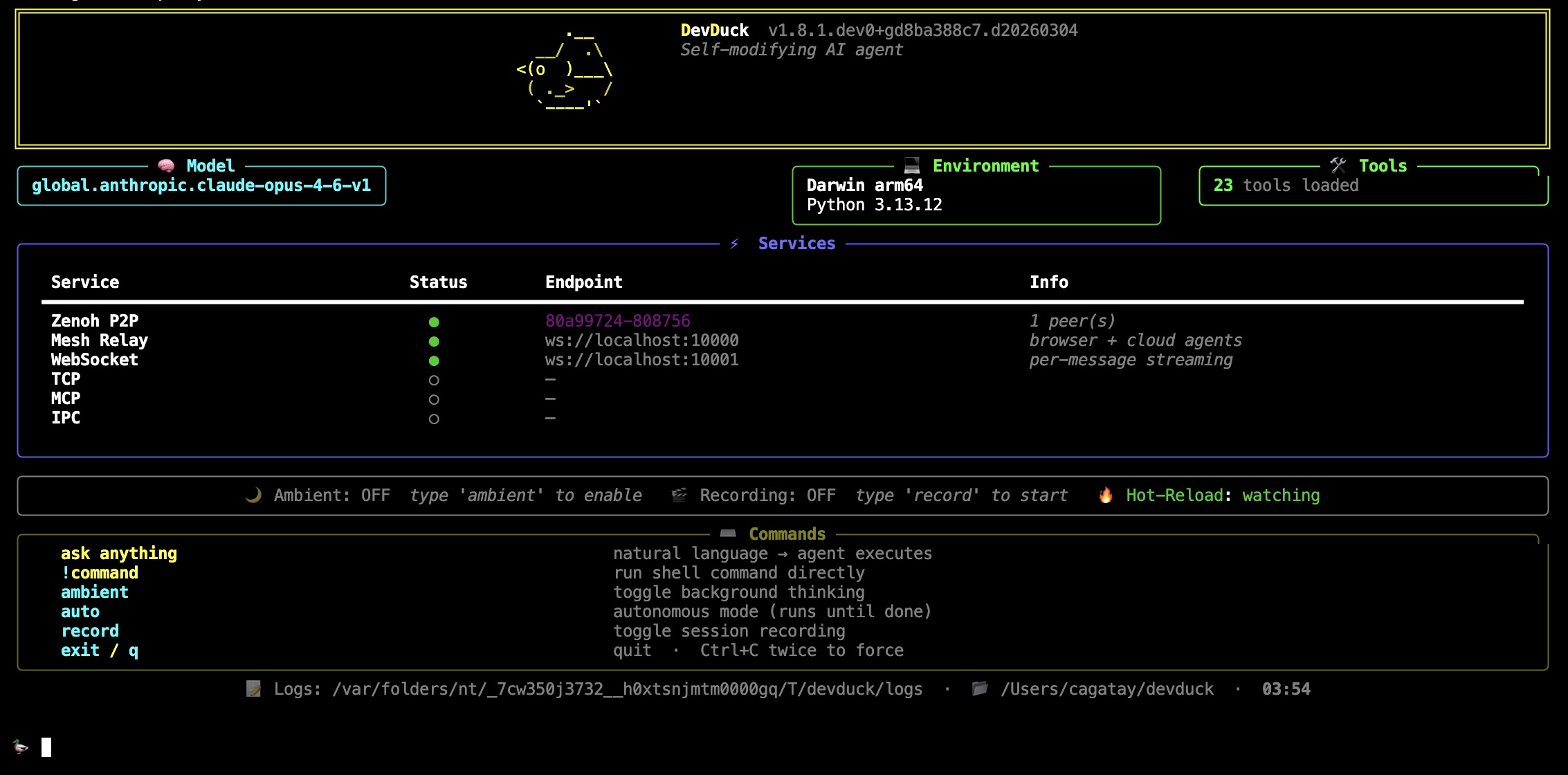
What It Does
- Hot-reloads — edit source, agent restarts instantly
- Self-heals — errors trigger automatic recovery
- 60+ tools — shell, GitHub, browser control, speech, scheduler, ML, messaging
- Multi-protocol — CLI, TUI, WebSocket, TCP, MCP, IPC, Zenoh P2P
- Unified mesh — terminal + browser + cloud agents in one network
- Deploys anywhere —
devduck deploy --launch→ AWS AgentCore
Requirements: Python 3.10–3.13 + any model provider (AWS, Anthropic, OpenAI, Ollama, Gemini, etc.)
Quick Start
devduck                              # interactive REPL
devduck --tui                        # multi-conversation terminal UI
devduck "create a REST API"          # one-shot
devduck --record                     # record session for replay
devduck --resume session.zip         # resume from snapshot
devduck deploy --launch              # ship to AgentCore
import devduck
devduck("analyze this code")
Power User Setup
A real-world .zshrc config for daily driving DevDuck with all the bells and whistles:
# Model — Claude Opus via Bedrock bearer token (fastest auth, no STS calls)
export AWS_BEARER_TOKEN_BEDROCK="ABSK..."
export STRANDS_MODEL_ID="global.anthropic.claude-opus-4-6-v1"
export STRANDS_MAX_TOKENS="64000"

# Tools — curated toolset (loads faster than all 60+)
export DEVDUCK_TOOLS="devduck.tools:use_github,editor,system_prompt,store_in_kb,manage_tools,websocket,zenoh_peer,agentcore_proxy,manage_messages,sqlite_memory,dialog,listen,use_computer,tasks,scheduler,telegram;strands_tools:retrieve,shell,file_read,file_write,use_agent"

# Knowledge Base — automatic RAG (stores & retrieves every conversation)
export STRANDS_KNOWLEDGE_BASE_ID="YOUR_KB_ID"

# MCP — auto-load Strands docs server
export MCP_SERVERS='{"mcpServers":{"strands-docs":{"command":"uvx","args":["strands-agents-mcp-server"]}}}'

# Messaging — Telegram & Slack bots
export TELEGRAM_BOT_TOKEN="your-telegram-bot-token"
export SLACK_BOT_TOKEN="xoxb-your-slack-bot-token"
export SLACK_APP_TOKEN="xapp-your-slack-app-token"

# Spotify control
export SPOTIFY_CLIENT_ID="your-client-id"
export SPOTIFY_CLIENT_SECRET="your-client-secret"
export SPOTIFY_REDIRECT_URI="http://127.0.0.1:8888/callback"

# Gemini as fallback/sub-agent model
export GEMINI_API_KEY="your-gemini-key"
This gives you:
- 🧠 Opus on Bedrock as primary model with bearer token (zero-latency auth)
- 📚 Auto-RAG — every conversation stored in Knowledge Base, context retrieved before each query
- 📖 Strands docs available as MCP tools (search + fetch)
- 📱 Telegram + Slack + WhatsApp — three messaging channels ready
- Telegram & Slack: set tokens above, then
telegram(action="start_listener") - WhatsApp: no token needed — uses local
waclipairing, justwhatsapp(action="start_listener")
- Telegram & Slack: set tokens above, then
- 🎵 Spotify control via
use_spotify - 🔗 Zenoh P2P + mesh auto-enabled (multi-terminal awareness)
- 💬 26 tools loaded on startup, expandable to 60+ on demand via
manage_tools
Model Detection
Set your key. DevDuck figures out the rest.
export ANTHROPIC_API_KEY=sk-ant-...   # → uses Anthropic
export OPENAI_API_KEY=sk-...          # → uses OpenAI
export GOOGLE_API_KEY=...             # → uses Gemini
# or just have AWS credentials        # → uses Bedrock
# or nothing at all                   # → uses Ollama
Priority: Bedrock → Anthropic → OpenAI → GitHub → Gemini → Cohere → Writer → Mistral → LiteLLM → LlamaAPI → MLX → Ollama
Override: MODEL_PROVIDER=bedrock STRANDS_MODEL_ID=us.anthropic.claude-sonnet-4-20250514-v1:0 devduck
Tools
Runtime — no restart needed
manage_tools(action="add", tools="strands_fun_tools.cursor")
manage_tools(action="create", code='...')
manage_tools(action="fetch", url="https://github.com/user/repo/blob/main/tool.py")
Hot-reload from disk
Drop a .py file in ./tools/ → it's available immediately.
# ./tools/weather.py
from strands import tool
import requests

@tool
def weather(city: str) -> str:
    """Get weather for a city."""
    return requests.get(f"https://wttr.in/{city}?format=%C+%t").text
Static config
export DEVDUCK_TOOLS="strands_tools:shell,editor;devduck.tools:use_github,scheduler"
Architecture
devduck/
├── __init__.py       # the whole agent — single file
├── tui.py            # multi-conversation Textual UI
├── tools/            # 60+ built-in tools (hot-reloadable)
└── agentcore_handler.py  # AWS AgentCore deployment handler
graph LR
    User([👤 User]) --> Interface
    subgraph Interface[" "]
        CLI["CLI / REPL"]
        TUI["TUI"]
        WS["WebSocket"]
        TCP["TCP"]
        MCP["MCP"]
    end
    Interface --> Core["🦆 DevDuck Core"]
    Core --> Tools["🔧 Tools"]
    Core <--> Zenoh["🔗 Zenoh P2P"]
    Core <--> KB["📚 Knowledge Base"]
    Core <--> Mesh["🌐 Unified Mesh"]
    Mesh --> Browser["🖥️ Browser"]
    Mesh --> Cloud["☁️ AgentCore"]

    style Core fill:#f5a623,stroke:#333,color:#000
    style Mesh fill:#4a90d9,stroke:#333,color:#fff
    style Zenoh fill:#7ed321,stroke:#333,color:#000
    style KB fill:#9b59b6,stroke:#333,color:#fff
Ports: 10000 (mesh relay) · 10001 (WebSocket) · 10002 (TCP) · 10003 (MCP)
TUI Concurrency Model
The TUI (devduck --tui) supports true concurrent conversations with shared awareness:
graph TB
    subgraph SharedMessages["📋 SharedMessages (thread-safe)"]
        msgs["msg1, msg2, msg3, msg4, ..."]
    end

    SharedMessages --> A1
    SharedMessages --> A2
    SharedMessages --> A3

    subgraph A1["🟦 Agent #1"]
        cb1["callback → panel #1"]
    end
    subgraph A2["🟩 Agent #2"]
        cb2["callback → panel #2"]
    end
    subgraph A3["🟨 Agent #3"]
        cb3["callback → panel #3"]
    end

    style SharedMessages fill:#e74c3c,stroke:#333,color:#fff
    style A1 fill:#3498db,stroke:#333,color:#fff
    style A2 fill:#2ecc71,stroke:#333,color:#fff
    style A3 fill:#f1c40f,stroke:#333,color:#000
Each conversation creates a fresh Agent (like TCP/Telegram tools do), but all agents point their .messages at a single SharedMessages instance — a thread-safe list subclass that serializes all reads and writes via a lock. This gives you:
- True concurrency — separate Agent instances with separate callback handlers, no conflicts
- Real-time shared awareness — when Agent #1 appends a message, Agent #2 sees it immediately on its next loop iteration
- Correct ordering — the lock ensures messages are appended in the order they're produced
- Isolated rendering — each agent's callback handler routes streaming output to its own color-coded TUI panel
The shared history is capped at 100 messages (configurable via DEVDUCK_TUI_MAX_SHARED_MESSAGES) and auto-clears on context window overflow.
Comparison across interfaces:
| Interface | Agent per request | Shared messages | Use case |
|---|---|---|---|
| CLI | No (reuse one) | N/A (single-threaded) | Sequential interactive REPL |
| TUI | Yes (fresh Agent) | Yes (SharedMessages) |
Concurrent conversations with shared context |
| TCP | Yes (fresh DevDuck) | No (fully isolated) | External network clients |
| Telegram | Yes (fresh DevDuck) | No (fully isolated) | Chat bot, each user isolated |
| WebSocket | Yes (fresh DevDuck) | No (fully isolated) | Browser clients |
Multi-Agent Networking
Zenoh P2P — zero config
# Terminal 1
devduck   # → Zenoh peer: hostname-abc123

# Terminal 2
devduck   # auto-discovers Terminal 1
zenoh_peer(action="broadcast", message="git pull && npm test")  # all peers
zenoh_peer(action="send", peer_id="hostname-abc123", message="status?")  # one peer
Cross-network: ZENOH_CONNECT=tcp/remote:7447 devduck
Unified Mesh — everything connected
The mesh is DevDuck's shared nervous system. Every agent — regardless of where it runs — sees what others are doing via a ring context (a shared circular buffer of recent activity).
graph TB
    subgraph Mesh["🌐 Unified Mesh (port 10000)"]
        direction TB

        T1["🖥️ Terminal DevDuck<br/>(Zenoh)"]
        T2["🖥️ Terminal DevDuck<br/>(Zenoh)"]
        B1["🌍 Browser Tab<br/>(WebSocket)"]
        AC["☁️ AgentCore<br/>(AWS Cloud)"]
        GH["🐙 GitHub Actions<br/>(HTTPS)"]

        Ring[("🔄 Ring Context<br/>shared memory<br/>last 100 msgs")]

        T1 <--> Ring
        T2 <--> Ring
        B1 <--> Ring
        AC <--> Ring
        GH <--> Ring
    end

    Registry["📁 mesh_registry.json<br/>(file-based, TTL)"]
    Relay["📡 Relay Server<br/>ws://localhost:10000"]

    Ring --> Registry
    Ring --> Relay

    style Mesh fill:#1a1a2e,stroke:#4a90d9,color:#fff
    style Ring fill:#f5a623,stroke:#333,color:#000
    style T1 fill:#7ed321,stroke:#333,color:#000
    style T2 fill:#7ed321,stroke:#333,color:#000
    style B1 fill:#4a90d9,stroke:#333,color:#fff
    style AC fill:#9b59b6,stroke:#333,color:#fff
    style GH fill:#333,stroke:#fff,color:#fff
    style Registry fill:#e74c3c,stroke:#333,color:#fff
    style Relay fill:#3498db,stroke:#333,color:#fff
Four peer types, one network:
| Peer Type | Discovery | Transport | Example |
|---|---|---|---|
| Zenoh | Multicast scouting (224.0.0.224:7446) | P2P UDP/TCP | Two terminal DevDucks auto-find each other |
| Browser | WebSocket connect to :10000 | WS | mesh.html or custom web UI registers as peer |
| AgentCore | AWS API (ListAgentRuntimes) |
HTTPS | Cloud-deployed agents via devduck deploy |
| GitHub | GitHub Actions API | HTTPS | Workflow-based agents from configured repos |
How it works:
Registry (
mesh_registry.py) — File-based agent registry with TTL. Any process can read/write. Zenoh peers, browser tabs, and local agents all register here.Ring Context (
unified_mesh.py) — In-memory circular buffer (last 100 entries). When any agent does something, it's pushed to the ring. CLI DevDuck injects ring context into every query so it knows what browser/cloud agents are doing.Relay (
agentcore_proxy.py) — WebSocket server on port 10000 that bridges everything:- Browser connects → gets real-time
ring_updateevents - Browser sends
invoke→ routes to Zenoh peer or AgentCore agent - CLI writes to ring → browser gets notified instantly
- Handles
list_peers,invoke,broadcast,get_ring,add_ring
- Browser connects → gets real-time
Zenoh (
zenoh_peer.py) — P2P layer for terminal-to-terminal. Heartbeats every 5s, auto-prune stale peers, command execution on remote peers.
Ring context injection — every CLI query automatically includes recent mesh activity:
[14:20:59] local:devduck-tui (local [tui]): Q: deploy API → Done ✅
[14:21:05] browser:react-app (browser [ws]): Built component library
[14:21:10] agentcore:reviewer (cloud [aws]): PR #42 approved
This means your terminal DevDuck is always aware of what your browser agent and cloud agents just did — no explicit sync needed.
WebSocket protocol (port 10000):
{"type": "list_peers"}                              // all peers across all layers
{"type": "invoke", "peer_id": "...", "prompt": "..."} // invoke any peer
{"type": "broadcast", "message": "..."}              // send to all Zenoh peers
{"type": "get_ring", "max_entries": 20}              // recent activity
{"type": "add_ring", "agent_id": "my-bot", "text": "done"}  // push to ring
{"type": "register_browser_peer", "name": "my-ui", "model": "gpt-4o"}  // join mesh
Deploy
devduck deploy --launch
devduck deploy --name reviewer --tools "strands_tools:shell,editor" --launch
devduck list        # see deployed agents
devduck invoke "analyze code" --name reviewer
Session Recording & Resume
devduck --record                  # captures sys/tool/agent events
devduck --resume session.zip      # restores conversation + state
devduck --resume session.zip "continue where we left off"
from devduck import load_session
session = load_session("session.zip")
session.resume_from_snapshot(2, agent=devduck.agent)
Asciinema: DEVDUCK_ASCIINEMA=true devduck → shareable .cast files.
Background Modes
# Standard ambient — thinks while you're idle
DEVDUCK_AMBIENT_MODE=true devduck

# Autonomous — works until done
🦆 auto
# Agent signals [AMBIENT_DONE] when finished
Messaging
# Telegram
TELEGRAM_BOT_TOKEN=... STRANDS_TELEGRAM_AUTO_REPLY=true devduck
telegram(action="start_listener")

# Slack
SLACK_BOT_TOKEN=xoxb-... SLACK_APP_TOKEN=xapp-... devduck
slack(action="start_listener")

# WhatsApp (via wacli, no Cloud API)
whatsapp(action="start_listener")
Each incoming message spawns a fresh DevDuck with full tool access.
MCP
Expose as server (Claude Desktop):
{"mcpServers": {"devduck": {"command": "uvx", "args": ["devduck", "--mcp"]}}}
Load external servers:
export MCP_SERVERS='{"mcpServers": {"docs": {"command": "uvx", "args": ["strands-agents-mcp-server"]}}}'
OpenAPI Tool — Universal API Client
One tool to rule them all. Load any OpenAPI/Swagger spec (JSON or YAML), authenticate once, and call any endpoint. Tokens persist to disk and auto-refresh — no re-auth needed.
Quick Start
# 1. Load any spec (JSON, YAML, local file, or GitHub URL)
openapi(action="load", spec_url="https://petstore3.swagger.io/api/v3/openapi.json")
openapi(action="load", spec_url="https://raw.githubusercontent.com/sonallux/spotify-web-api/main/fixed-spotify-open-api.yml")
openapi(action="load", spec_url="./my-local-spec.yaml")
openapi(action="load", spec_url="https://github.com/owner/repo/blob/main/openapi.yml")  # auto-converts to raw

# 2. List operations
openapi(action="list", alias="spotify")

# 3. Call endpoints
openapi(action="call", alias="spotify", operation="get-current-users-profile")
openapi(action="call", alias="petstore", operation="findPetsByStatus", params='{"status": "available"}')
Authentication
Supports every auth method you'll encounter in the wild:
# API Key
openapi(action="auth", alias="weather", api_key="sk-xxx")

# Bearer Token
openapi(action="auth", alias="myapi", token="eyJhbG...")

# Basic Auth
openapi(action="auth", alias="jenkins", username="admin", password="secret")

# OAuth2 — Authorization Code (opens browser, waits for callback)
openapi(action="auth", alias="spotify", auth_flow="authorization_code",
        client_id="xxx", client_secret="yyy",
        scopes="user-read-private,playlist-read-private")

# OAuth2 — Client Credentials (server-to-server, no browser)
openapi(action="auth", alias="stripe", auth_flow="client_credentials",
        client_id="xxx", client_secret="yyy")

# OAuth2 — Resource Owner Password
openapi(action="auth", alias="legacy", auth_flow="password",
        client_id="xxx", username="user", password="pass")
Zero-Config Auth via Environment Variables
Set env vars and the tool auto-detects credentials — no need to pass them explicitly:
# Pattern: {ALIAS}_CLIENT_ID, {ALIAS}_CLIENT_SECRET, {ALIAS}_REDIRECT_URI
export SPOTIFY_CLIENT_ID="your-client-id"
export SPOTIFY_CLIENT_SECRET="your-client-secret"
export SPOTIFY_REDIRECT_URI="http://127.0.0.1:8888/callback"
# Just specify the flow — credentials auto-detected from env vars
openapi(action="auth", alias="spotify", auth_flow="authorization_code",
        scopes="user-read-private,user-read-email")
# → 🔍 Auto-detected client_id from $SPOTIFY_CLIENT_ID
# → 🔍 Auto-detected client_secret from $SPOTIFY_CLIENT_SECRET
# → 🔍 Auto-detected redirect_uri from $SPOTIFY_REDIRECT_URI
# → 🌐 Opening browser...
# → ✅ OAuth2 token obtained
Token Persistence & Auto-Refresh
Tokens are stored in ~/.devduck/openapi/ with all metadata needed for silent refresh:
~/.devduck/openapi/
├── token_spotify.json    # access_token + refresh_token + client_id + token_url
├── token_github.json     # bearer token
├── token_weather.json    # API key
└── spec_spotify.json     # cached spec (offline use)
When a token expires, the next API call automatically refreshes it — no browser, no user interaction:
  🔄 Token expired for `spotify`, auto-refreshing...
  ✅ Token refreshed, expires Sat Mar 28 01:53:47 2026
OAuth2 Flow Details
The authorization code flow:
- Spins up a local HTTP server on the redirect URI port
- Opens browser to the provider's auth page
- User approves → provider redirects to local server with auth code
- Tool exchanges code for access + refresh tokens
- Tokens + metadata persisted to disk
Smart token exchange: Tries Authorization: Basic header first (Spotify-style), falls back to body params (GitHub-style) — works with both.
Spec Format Support
| Format | Extensions | Source |
|---|---|---|
| OpenAPI 3.x JSON | .json |
URL, local file |
| OpenAPI 3.x YAML | .yaml, .yml |
URL, local file |
| Swagger 2.0 JSON | .json |
URL, local file |
| Swagger 2.0 YAML | .yaml, .yml |
URL, local file |
| GitHub blob URLs | any | Auto-converts to raw.githubusercontent.com |
All Actions
| Action | What |
|---|---|
load |
Load spec from URL/file (JSON or YAML) |
list |
List loaded APIs and all operations |
call |
Call operation by operationId |
raw |
Raw HTTP request (method + path) |
auth |
Configure authentication |
token |
View/manage stored tokens |
schemas |
Show API data models |
help |
Usage reference |
Real-World Example: Spotify
# Load YAML spec
openapi(action="load",
    spec_url="https://raw.githubusercontent.com/sonallux/spotify-web-api/main/fixed-spotify-open-api.yml",
    alias="spotify")

# Auth (env vars auto-detected)
openapi(action="auth", alias="spotify", auth_flow="authorization_code",
    scopes="user-read-private,user-read-email,user-read-playback-state,playlist-read-private")

# Now just call endpoints — auth applied automatically, refreshes silently
openapi(action="call", alias="spotify", operation="get-current-users-profile")
openapi(action="call", alias="spotify", operation="get-the-users-currently-playing-track")
openapi(action="call", alias="spotify", operation="get-a-list-of-current-users-playlists", params='{"limit": 10}')
Identity — Portable AI Personas
Create, manage, and switch between complete DevDuck configurations. Each identity stores everything: system prompt, model, tools, channels, servers, ambient mode, env vars. SQLite-backed with full-text search.
# Storage location (priority: param → env var → default)
~/.devduck/identities.db          # default (desktop)
DEVDUCK_IDENTITY_DB=/tmp          # Lambda / containers
db_path="/data/agents"            # per-call override
Quick Start
# Create a persona
identity(action="create", name="code-reviewer",
    system_prompt="You are a senior code reviewer...",
    model_provider="bedrock",
    model_id="us.anthropic.claude-sonnet-4-20250514-v1:0",
    tools_config="strands_tools:shell,file_read;devduck:use_github,lsp",
    tags="dev,security,python")

# List all identities
identity(action="list")

# Switch — sets all env vars in one shot
identity(action="activate", name="code-reviewer")
# → Sets MODEL_PROVIDER, STRANDS_MODEL_ID, DEVDUCK_TOOLS, ...
# → 19 env vars applied. Restart to take effect.

# Search across all fields
identity(action="search", query="telegram")

# Compare two personas
identity(action="diff", name="code-reviewer", description="devops-bot")

# Clone and customize
identity(action="clone", name="code-reviewer", description="strict-reviewer")
identity(action="update", name="strict-reviewer", temperature=0)

# Export / import (JSON)
identity(action="export", name="code-reviewer")        # → JSON
identity(action="import", system_knowledge='{"name":"imported", ...}')

# Talk to an identity (spawns a fresh agent with its config)
identity(action="talk", name="code-reviewer", query="Review this function for security issues")

# Fan-out — parallel tasks across multiple identities
identity(action="fan_out", system_knowledge=json.dumps([
    {"identity": "code-reviewer", "task": "Review this PR for security"},
    {"identity": "devops-bot", "task": "Check deployment readiness"},
    {"identity": "strict-reviewer", "task": "Find all code smells",
     "context": "Focus on SOLID violations"}
]))
# → Runs all 3 in parallel, merges results into one output

# Sync to cloud
identity(action="sync", name="code-reviewer")           # → tiny.technology

# Edge / Lambda — custom DB path
identity(action="create", name="edge-bot", db_path="/tmp",
    system_prompt="Minimal agent", enable_ws=0, enable_zenoh=0)
What Each Identity Stores
| Category | Fields |
|---|---|
| Persona | system_prompt, system_knowledge, model_provider, model_id, temperature, max_tokens |
| Tools | tools_config, mcp_servers, load_tools_from_dir |
| Channels | telegram_token/chat_id, slack_token/channel, whatsapp_number |
| Servers | ws, tcp, mcp, zenoh, ipc, agentcore_proxy (all with ports) |
| Ambient | mode, idle_seconds, max_iterations, cooldown, autonomous settings |
| Storage | knowledge_base_id, env_vars (custom JSON), tags |
| Cloud | tiny.technology sync (name, url) |
All Actions
| Action | What |
|---|---|
create |
New identity with any config fields |
get |
Full JSON view (secrets redacted) |
update |
Partial update — only provided fields change |
delete |
Remove identity |
list |
Table of all identities |
search |
Full-text across name, prompt, tags, tools, env_vars |
activate |
Set all env vars for this identity |
export |
Full JSON export |
import |
Import from JSON |
clone |
Copy identity with new name |
diff |
Side-by-side comparison |
talk |
Send a query to an identity (spawns fresh agent) |
fan_out |
Run multiple identities in parallel, merge results |
history |
Audit trail of all changes |
sync |
Push to tiny.technology cloud |
stats |
Database statistics |
macOS
use_mac(action="calendar.events", days=7)
use_mac(action="mail.send", to="[email protected]", subject="Hi", body="Hello")
use_mac(action="safari.read")
use_mac(action="system.screenshot", path="/tmp/shot.png")
use_mac(action="system.dark_mode", enable=True)
use_mac(action="keychain.get", service="MyApp", account="me")

apple_notes(action="list")
use_spotify(action="now_playing")
More Tools
| Tool | What |
|---|---|
shell |
Interactive PTY shell |
editor |
File create/replace/insert/undo |
use_github |
GitHub GraphQL API |
use_computer |
Mouse, keyboard, screenshots |
listen |
Background Whisper transcription |
lsp |
Language server diagnostics |
scheduler |
Cron + one-time jobs |
tasks |
Parallel background agents |
sqlite_memory |
Persistent memory with FTS |
dialog |
Rich terminal UI dialogs |
speech_to_speech |
Nova Sonic / OpenAI / Gemini voice |
rl |
Train RL agents, fine-tune LLMs |
scraper |
HTML/XML parsing |
use_agent |
Nested agents with different models |
openapi |
Universal API client (any OpenAPI/Swagger spec) |
identity |
Portable AI persona manager with fan-out (SQLite, 16 actions) |
retrieve / store_in_kb |
Bedrock Knowledge Base RAG |
Core: system_prompt · manage_tools · manage_messages · identity · tasks · scheduler · sqlite_memory · dialog · notify · use_computer · listen · lsp · tui · session_recorder · view_logs
Network: tcp · websocket · ipc · mcp_server · zenoh_peer · agentcore_proxy · unified_mesh · mesh_registry · jsonrpc
Platform: use_mac · apple_notes · use_spotify · telegram · whatsapp · slack
Cloud: use_github · fetch_github_tool · gist · agentcore_config · agentcore_invoke · agentcore_logs · agentcore_agents · create_subagent · store_in_kb · retrieve
AI/ML: rl · speech_to_speech · use_agent · scraper · openapi
macOS Native: apple_nlp · apple_vision · apple_wifi · apple_sensors · apple_smc
Strands: shell · editor · file_read · file_write · calculator · image_reader · speak
AGENTS.md
Drop an AGENTS.md in your working directory. DevDuck auto-loads it into the system prompt. No config needed.
# AGENTS.md
## Project: My API
- Framework: FastAPI
- Tests: pytest
- Deploy: Docker on ECS
Config Reference
All environment variables| Variable | Default | What |
|---|---|---|
MODEL_PROVIDER |
auto | bedrock anthropic openai github gemini cohere writer mistral litellm llamaapi mlx ollama |
STRANDS_MODEL_ID |
auto | Model name |
DEVDUCK_TOOLS |
60+ tools | package:tool1,tool2;package2:tool3 |
DEVDUCK_LOAD_TOOLS_FROM_DIR |
false |
Auto-load ./tools/*.py |
DEVDUCK_KNOWLEDGE_BASE_ID |
— | Bedrock KB for auto-RAG |
DEVDUCK_IDENTITY_DB |
~/.devduck/identities.db |
Identity database path (use /tmp for Lambda) |
MCP_SERVERS |
— | JSON config for MCP servers |
DEVDUCK_ENABLE_WS |
true |
WebSocket server |
DEVDUCK_ENABLE_ZENOH |
true |
Zenoh P2P |
DEVDUCK_ENABLE_AGENTCORE_PROXY |
true |
Mesh relay |
DEVDUCK_ENABLE_TCP |
false |
TCP server |
DEVDUCK_ENABLE_MCP |
false |
MCP HTTP server |
DEVDUCK_ENABLE_IPC |
false |
IPC socket |
DEVDUCK_WS_PORT |
10001 |
WebSocket port |
DEVDUCK_TCP_PORT |
10002 |
TCP port |
DEVDUCK_MCP_PORT |
10003 |
MCP port |
DEVDUCK_AGENTCORE_PROXY_PORT |
10000 |
Mesh relay port |
DEVDUCK_AMBIENT_MODE |
false |
Background thinking |
DEVDUCK_AMBIENT_IDLE_SECONDS |
30 |
Idle before ambient starts |
DEVDUCK_AMBIENT_MAX_ITERATIONS |
3 |
Max ambient iterations |
DEVDUCK_AUTONOMOUS_MAX_ITERATIONS |
100 |
Max autonomous iterations |
DEVDUCK_ASCIINEMA |
false |
Record .cast files |
DEVDUCK_TUI_MAX_SHARED_MESSAGES |
100 |
Max shared message history in TUI |
DEVDUCK_LSP_AUTO_DIAGNOSTICS |
false |
Auto LSP after edits |
TELEGRAM_BOT_TOKEN |
— | Telegram bot |
SLACK_BOT_TOKEN |
— | Slack bot |
SPOTIFY_CLIENT_ID |
— | Spotify |
Dev Setup
git clone [email protected]:cagataycali/devduck.git && cd devduck
python3.13 -m venv .venv && source .venv/bin/activate
pip install -e . && devduck
GitHub Actions
- uses: cagataycali/devduck@main
  with:
    task: "Review this PR"
    provider: "github"
    model: "gpt-4o"
  env:
    GITHUB_TOKEN: ${{ secrets.GITHUB_TOKEN }}
Citation
@software{devduck2025,
  author = {Cagatay Cali},
  title = {DevDuck: Self-Modifying AI Agent},
  year = {2025},
  url = {https://github.com/cagataycali/devduck}
}
Apache 2.0 · Built with Strands Agents · @cagataycali
Yorumlar (0)
Yorum birakmak icin giris yap.
Yorum birakSonuc bulunamadi