ccLoad
Health Gecti
- License — License: MIT
- Description — Repository has a description
- Active repo — Last push 0 days ago
- Community trust — 320 GitHub stars
Code Uyari
- fs module — File system access in web/assets/js/auto-refresh.test.js
- fs module — File system access in web/assets/js/channels-actions.test.js
- fs module — File system access in web/assets/js/channels-batch-delete.test.js
Permissions Gecti
- Permissions — No dangerous permissions requested
Bu listing icin henuz AI raporu yok.
AI API gateway that ends manual channel switching with smart routing, auto failover, exponential cooldown, multi-URL scheduling, live request monitoring and soft-error detection.
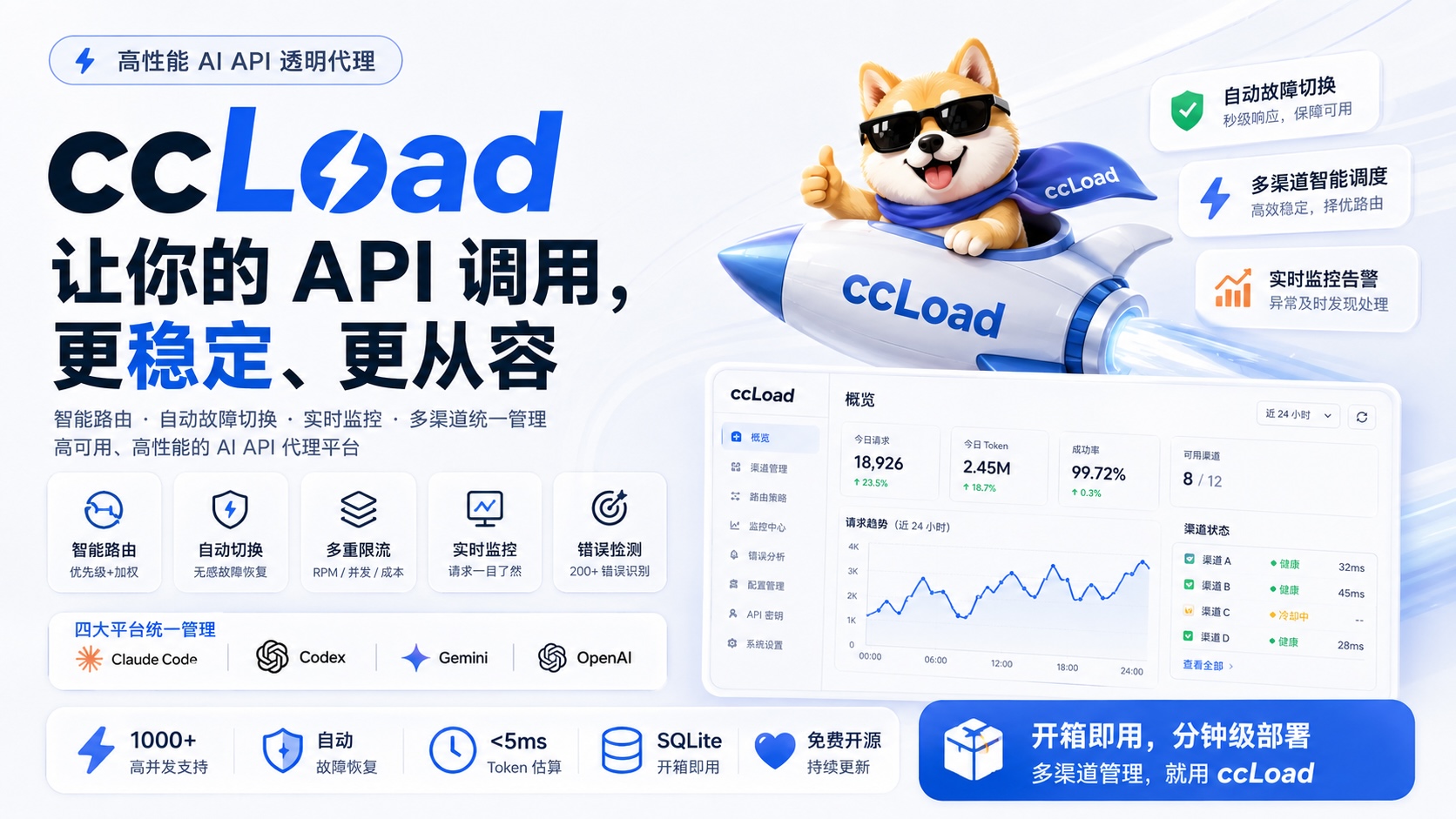
ccLoad
AI API gateway for Claude Code, Codex, Gemini, and OpenAI.
English | 简体中文






Smart routing | Automatic failover | Exponential cooldown | Multi-URL scheduling | Protocol transforms | Live monitoring | Cost control
ccLoad removes the operational mess of running multiple AI API upstreams. It keeps Claude Code, Codex, Gemini, and OpenAI-compatible clients on one stable gateway, then handles upstream selection, failover, cooldown, protocol conversion, request visibility, and cost limits in the service instead of in every client script.
🎯 What ccLoad Solves
Common failure modes when you run several AI API channels:
- Manual channel switching: Different keys, validity windows, quotas, and upstream URLs quickly become hard to manage.
- Rate limits and upstream failures:
429,502,504, expired keys, and overloaded providers should not stop the client workflow. - Opaque request status: Without live request visibility, long streaming requests become guesswork.
- HTTP 200 with error content: Some upstreams return a successful HTTP status while the response body is an actual error.
- Cost drift: Shared gateways need per-channel and per-token limits, not spreadsheet accounting after the bill arrives.
ccLoad handles those cases with:
- Smart routing: High-priority channels are selected first; channels at the same priority use smooth weighted round-robin.
- Automatic failover: Failed keys, channels, and URLs are skipped according to the classified error type.
- Exponential cooldown: Unhealthy upstreams back off automatically instead of being hammered by retries.
- Multi-URL scheduling: A single channel can use multiple upstream URLs, weighted by observed latency and health.
- Protocol transforms: Anthropic, OpenAI, Gemini, and Codex request/response families can be converted at the gateway.
- Live monitoring: Active requests, logs, token usage, TTFB, cost, and upstream details are visible in the web dashboard.
- Soft-error detection: HTTP 200 responses that are actually errors trigger the same failover path as regular upstream failures. Common cases include:
- JSON responses containing
{"error": {...}}structure - Responses with
typefield set to"error" - Explicit rate limits in SSE
errorevents (rate_limit_exceeded/too_many_requests) are handled as429 - Plain text messages like
"当前模型负载过高"/"Current model load too high"(load warnings)
- JSON responses containing
✨ Key Features
- 🚀 High-Performance Architecture - Gin framework, 1000+ concurrent connections, high-performance caching
- 🧮 Local Token Counting - API-compliant local token estimation, <5ms response, 93%+ accuracy, supports large-scale tool scenarios
- 🎯 Smart Error Classification - Distinguishes Key/Channel/Client errors, soft error detection (200 masquerading as error), SSE rate-limit errors as 429, 1308 quota handling
- 🔀 Smart Routing - Priority + smooth weighted round-robin channel selection, pre-filters cooled channels, multi-key load balancing, health-based dynamic sorting (confidence factor prevents small sample over-penalization)
- 🛡️ Failover - Automatic failure detection with exponential backoff cooldown (1s → 2s → 4s → ... → 30min)
- 🔒 Race-Safe - Key selector race condition protection, startup config validation, automatic resource cleanup
- 📊 Real-time Monitoring - Built-in trend analysis, logging, and stats dashboard, Token usage stats with time range selection and per-token classification
- 🎯 Transparent Proxy - Supports Claude Code, Codex, Gemini, and OpenAI compatible APIs with smart auth detection
- 📦 Single Binary Deployment - No external dependencies, embedded SQLite included
- 🔒 Secure Authentication - Token-based admin interface and API access control
- 🏷️ Build Tags - GOTAGS support, high-performance JSON library enabled by default
- 🐳 Docker Support - Multi-arch images (amd64/arm64), automated CI/CD
- ☁️ Cloud Native - Container deployment support, GitHub Actions auto-build
- 🤗 Hugging Face - One-click deployment to Hugging Face Spaces, free hosting
- 💰 Cost Limits - Per-channel daily cost limits, per-token cost limits
- 🚦 Channel RPM Limits - Per-channel rolling 60-second request caps, 0=unlimited
- 🚧 Channel Concurrency Limits - Per-channel in-flight request caps, 0=unlimited
- 🔐 Token Restrictions - API token cost limits + model restrictions for fine-grained access control
- ⏱️ TTFB Monitoring - Streaming request first byte time tracking for upstream latency diagnosis
- 🌐 Multi-URL Load Balancing - Multiple URLs per channel with latency-weighted random selection
- 💵 service_tier Pricing - OpenAI priority/flex/default tier multipliers for accurate cost accounting
- 🖼️ Image Tool Billing - Responses image_generation/gpt-image-2 cost accounting
- 📉 Tiered Pricing - GPT-5.4/Qwen-Plus/Gemini long-context step pricing, auto-applies lower rate at token thresholds
- 🔄 Protocol Transform - Anthropic/OpenAI/Gemini/Codex cross-protocol conversion, preserving sampling and thinking parameters so one channel serves multiple client protocols
- 🔍 Debug Logs - Upstream request/response raw data capture with sensitive header masking, essential for troubleshooting
- 🕐 Scheduled Checks - Background periodic channel availability probing, auto-detect failed channels
- 🧩 Custom Request Rules - Per-channel HTTP header & JSON body rewriting (remove/override/append), with auth header protection, CRLF guard, and capacity caps
- 🎛️ Log Column Customization - Show/hide table columns per preference, settings persist in browser localStorage
🏗️ Architecture Overview
graph TB
    subgraph "Client"
        A[User App] --> B[ccLoad Proxy]
    end

    subgraph "ccLoad Service"
        B --> C[Auth Layer]
        C --> D[Route Dispatcher]
        D --> E[Channel Selector]
        E --> F[Load Balancer]

        subgraph "Core Components"
            F --> G[Channel A<br/>Priority:10]
            F --> H[Channel B<br/>Priority:5]
            F --> I[Channel C<br/>Priority:5]
            G --> G1[URL Selector<br/>Weighted Random]
            H --> H1[URL Selector<br/>Weighted Random]
            I --> I1[URL Selector<br/>Weighted Random]
        end

        subgraph "Storage Layer"
            J[(Storage Factory)]
            J3[Schema Definition]
            J4[Unified SQL Layer]
            J1[(SQLite)]
            J2[(MySQL)]
            J --> J3
            J3 --> J4
            J4 --> J1
            J4 --> J2
        end

        subgraph "Monitoring Layer"
            K[Log System]
            L[Stats Analysis]
            M[Trend Charts]
        end
    end

    subgraph "Upstream Services"
        G1 --> N[Claude API]
        H1 --> O[Claude API]
        I1 --> P[Claude API]
    end

    E <--> J
    F <--> J
    K <--> J
    L <--> J
    M <--> J

    style B fill:#4F46E5,stroke:#000,color:#fff
    style F fill:#059669,stroke:#000,color:#fff
    style E fill:#0EA5E9,stroke:#000,color:#fff
🚀 Quick Start
Choose the deployment method that suits you best:
| Method | Difficulty | Cost | Use Case | HTTPS | Persistence |
|---|---|---|---|---|---|
| 🐳 Docker | ⭐⭐ | VPS required | Production, high performance | Config required | ✅ |
| 🤗 Hugging Face | ⭐ | Free | Personal use, quick trial | ✅ Auto | ✅ |
| 🔧 Source Build | ⭐⭐⭐ | Server required | Development, customization | Config required | ✅ |
| 📦 Binary | ⭐⭐ | Server required | Lightweight, simple setup | Config required | ✅ |
Method 1: Docker Deployment (Recommended)
Using pre-built images (Recommended):
# Option 1: Using docker-compose (Simplest)
curl -o docker-compose.yml https://raw.githubusercontent.com/caidaoli/ccLoad/master/docker-compose.yml
curl -o .env https://raw.githubusercontent.com/caidaoli/ccLoad/master/.env.example
# Edit .env file to set password
docker-compose up -d

# Option 2: Run image directly
docker pull ghcr.io/caidaoli/ccload:latest
docker run -d --name ccload \
  -p 8080:8080 \
  -e CCLOAD_PASS=your_secure_password \
  -v ccload_data:/app/data \
  ghcr.io/caidaoli/ccload:latest
Building from source:
# Clone project
git clone https://github.com/caidaoli/ccLoad.git
cd ccLoad

# Build and run with docker-compose
docker-compose -f docker-compose.build.yml up -d

# Or build manually
docker build -t ccload:local .
docker run -d --name ccload \
  -p 8080:8080 \
  -e CCLOAD_PASS=your_secure_password \
  -v ccload_data:/app/data \
  ccload:local
Method 2: Source Build
# Clone project
git clone https://github.com/caidaoli/ccLoad.git
cd ccLoad

# Build project (uses high-performance JSON library by default)
go build -tags sonic -o ccload .

# Or use Makefile
make build

# Run in development mode
go run -tags sonic .
# Or
make dev
Method 3: Binary Download
# Download binary for your platform from GitHub Releases
wget https://github.com/caidaoli/ccLoad/releases/latest/download/ccload-linux-amd64
chmod +x ccload-linux-amd64
./ccload-linux-amd64
Method 4: Hugging Face Spaces Deployment
Hugging Face Spaces provides free container hosting with Docker support, ideal for personal and small team use.
Deployment Steps
Login to Hugging Face
Visit huggingface.co and log into your account
Create New Space
- Click "New" → "Space" in the top right
- Space name:
ccload(or custom name) - License:
MIT - Select the SDK:
Docker - Visibility:
PublicorPrivate(private requires paid subscription) - Click "Create Space"
Create Dockerfile
Create a
Dockerfilein the Space repository:FROM ghcr.io/caidaoli/ccload:latest ENV TZ=Asia/Shanghai ENV PORT=7860 ENV SQLITE_PATH=/tmp/ccload.db EXPOSE 7860Create via:
Method A - Web Interface (Recommended):
- Click "Files" tab on Space page
- Click "Add file" → "Create a new file"
- Enter
Dockerfileas filename - Paste the content above
- Click "Commit new file to main"
Method B - Git Command Line:
# Clone your Space repository
git clone https://huggingface.co/spaces/YOUR_USERNAME/ccload
cd ccload

# Create Dockerfile
cat > Dockerfile << 'EOF'
FROM ghcr.io/caidaoli/ccload:latest
ENV TZ=Asia/Shanghai
ENV PORT=7860
ENV SQLITE_PATH=/tmp/ccload.db
EXPOSE 7860
EOF

# Commit and push
git add Dockerfile
git commit -m "Add Dockerfile for ccLoad deployment"
git push
Configure Environment Variables (Secrets)
In Space settings (Settings → Variables and secrets → New secret):
Variable Value Required Description CCLOAD_PASSyour_admin_password✅ Required Admin interface password CCLOAD_API_TOKENStoken1|production,token2|developmentOptional Pre-seed API access tokens on startup Note: API access tokens can be pre-seeded with
CCLOAD_API_TOKENSor managed in the Web admin interface/web/tokens.html.Wait for Build and Startup
After pushing Dockerfile, Hugging Face will automatically:
- Pull pre-built image (~30 seconds)
- Start application container (~10 seconds)
- Total time ~1-2 minutes (3-5x faster than source build)
Access Application
After build completes, access via:
- App URL:
https://YOUR_USERNAME-ccload.hf.space - Admin Interface:
https://YOUR_USERNAME-ccload.hf.space/web/ - API Endpoint:
https://YOUR_USERNAME-ccload.hf.space/v1/messages
First Access Note:
- If Space is sleeping, first access takes 20-30 seconds to wake
- Subsequent accesses respond immediately
- App URL:
Hugging Face Deployment Characteristics
Advantages:
- ✅ Completely Free: Public Spaces are permanently free with CPU and storage
- ✅ Fast Deployment: Pre-built image, 1-2 minutes (3-5x faster than source build)
- ✅ Auto HTTPS: No SSL certificate configuration needed
- ✅ Auto Restart: Automatic restart after crashes
- ✅ Version Control: Git-based, easy rollback and collaboration
- ✅ Simple Maintenance: Only 5-line Dockerfile, no source code management
Limitations:
- ⚠️ Resource Limits: Free tier provides 2 CPU + 16GB RAM
- ⚠️ Sleep Policy: 48 hours without access triggers sleep, first access takes ~20-30s to wake
- ⚠️ Fixed Port: Must use port 7860
- ⚠️ Public Access: Spaces are public by default, must configure API tokens via Web admin to access /v1/* APIs (otherwise 401)
Data Persistence
Important: Hugging Face Spaces Storage Policy
Due to Hugging Face Spaces limitations (/tmp directory clears on restart), we strongly recommend using an external MySQL database for complete data persistence:
Option 1: Hybrid Storage Mode (Recommended, Best Performance)
- ✅ Ultra-fast queries: All reads/writes go through local SQLite, latency <1ms (free MySQL has 800ms+ latency)
- ✅ Restart-safe: Async sync to MySQL, auto-restore on startup
- ✅ Stats caching: Smart TTL cache reduces repetitive aggregate queries
- Configuration: Add
CCLOAD_MYSQL+CCLOAD_ENABLE_SQLITE_REPLICA=1in Secrets
Dockerfile Example (Hybrid Mode):
FROM ghcr.io/caidaoli/ccload:latest
ENV TZ=Asia/Shanghai
ENV PORT=7860
# Configure in Secrets: CCLOAD_MYSQL + CCLOAD_ENABLE_SQLITE_REPLICA=1
EXPOSE 7860
Option 2: Pure MySQL Mode
- ✅ Complete Persistence: Channel configs, logs, and stats all preserved
- ✅ Restart-Safe: Data stored externally, unaffected by Space restarts
- ⚠️ Slower Queries: Free MySQL has higher latency, stats pages respond slowly
- Configuration: Add
CCLOAD_MYSQLenvironment variable in Secrets
Recommended Free MySQL Services:
- TiDB Cloud Serverless - Free 5GB storage, MySQL compatible, no connection limits, recommended first choice
- Aiven for MySQL - Free 1GB storage, multi-region support
MySQL Configuration Example (TiDB Cloud):
- Register for TiDB Cloud account
- Create Serverless Cluster (free)
- Get connection info, format:
user:password@tcp(host:4000)/database?tls=true - Add
CCLOAD_MYSQLvariable in Hugging Face Space Secrets - (Optional) Enable Hybrid Mode: Add
CCLOAD_ENABLE_SQLITE_REPLICA=1for best performance - Restart Space, all data will auto-persist to MySQL
Dockerfile Example (Pure MySQL):
FROM ghcr.io/caidaoli/ccload:latest
ENV TZ=Asia/Shanghai
ENV PORT=7860
# No SQLITE_PATH needed, uses CCLOAD_MYSQL environment variable
EXPOSE 7860
Option 3: Local Storage Only (Not Recommended)
- ⚠️ Data Loss:
/tmpclears on Space restart, channel config lost - ⚠️ Manual Recovery: Must re-import via Web interface or CSV
- Use case: Temporary testing only
Update Deployment
With pre-built images, updates are simple:
Auto Update:
- When new version image (
ghcr.io/caidaoli/ccload:latest) is released - Click "Factory rebuild" in Space settings to pull latest image
- Or wait for Hugging Face auto-restart (typically after 48 hours)
Manual Trigger Update:
# Add empty commit to trigger rebuild
git commit --allow-empty -m "Trigger rebuild to pull latest image"
git push
Version Pinning (Optional):
To lock specific version, modify Dockerfile:
FROM ghcr.io/caidaoli/ccload:2.19.0  # Specify version
ENV TZ=Asia/Shanghai
ENV PORT=7860
ENV SQLITE_PATH=/tmp/ccload.db
EXPOSE 7860
Basic Configuration
SQLite Mode (Default):
# Set environment variables
export CCLOAD_PASS=your_admin_password
export PORT=8080
export SQLITE_PATH=./data/ccload.db

# Or use .env file
echo "CCLOAD_PASS=your_admin_password" > .env
echo "PORT=8080" >> .env
echo "SQLITE_PATH=./data/ccload.db" >> .env

# Start service
./ccload
MySQL Mode:
# 1. Create MySQL database
mysql -u root -p -e "CREATE DATABASE ccload CHARACTER SET utf8mb4 COLLATE utf8mb4_unicode_ci;"

# 2. Set environment variables
export CCLOAD_PASS=your_admin_password
export CCLOAD_MYSQL="user:password@tcp(localhost:3306)/ccload?charset=utf8mb4"
export PORT=8080

# Or use .env file
echo "CCLOAD_PASS=your_admin_password" > .env
echo "CCLOAD_MYSQL=user:password@tcp(localhost:3306)/ccload?charset=utf8mb4" >> .env
echo "PORT=8080" >> .env

# 3. Start service (auto-creates tables)
./ccload
Docker + MySQL:
# Option 1: docker-compose (Recommended)
cat > docker-compose.mysql.yml << 'EOF'
version: '3.8'
services:
  mysql:
    image: mysql:8.0
    environment:
      MYSQL_ROOT_PASSWORD: rootpass
      MYSQL_DATABASE: ccload
      MYSQL_USER: ccload
      MYSQL_PASSWORD: ccloadpass
    volumes:
      - mysql_data:/var/lib/mysql
    ports:
      - "3306:3306"
    healthcheck:
      test: ["CMD", "mysqladmin", "ping", "-h", "localhost"]
      interval: 10s
      timeout: 5s
      retries: 5

  ccload:
    image: ghcr.io/caidaoli/ccload:latest
    environment:
      CCLOAD_PASS: your_admin_password
      CCLOAD_MYSQL: "ccload:ccloadpass@tcp(mysql:3306)/ccload?charset=utf8mb4"
      PORT: 8080
    ports:
      - "8080:8080"
    depends_on:
      mysql:
        condition: service_healthy

volumes:
  mysql_data:
EOF

docker-compose -f docker-compose.mysql.yml up -d

# Option 2: Direct run (requires existing MySQL service)
docker run -d --name ccload \
  -p 8080:8080 \
  -e CCLOAD_PASS=your_admin_password \
  -e CCLOAD_MYSQL="user:pass@tcp(mysql_host:3306)/ccload?charset=utf8mb4" \
  ghcr.io/caidaoli/ccload:latest
After service starts, access:
- Admin Interface:
http://localhost:8080/web/ - API Proxy:
POST http://localhost:8080/v1/messages - API Token Management:
http://localhost:8080/web/tokens.html- Configure API access tokens via Web interface
📖 Usage Guide
API Proxy
Claude API Proxy (Requires Auth):
First, configure API access token in Web admin interface http://localhost:8080/web/tokens.html, then use that token to access API:
curl -X POST http://localhost:8080/v1/messages \
  -H "Content-Type: application/json" \
  -H "Authorization: Bearer your-api-token" \
  -H "x-api-key: your-claude-api-key" \
  -H "anthropic-version: 2023-06-01" \
  -d '{
    "model": "claude-sonnet-4-6",
    "max_tokens": 1024,
    "messages": [
      {
        "role": "user",
        "content": "Hello, Claude!"
      }
    ]
  }'
OpenAI Compatible API Proxy (Chat Completions):
curl -X POST http://localhost:8080/v1/chat/completions \
  -H "Content-Type: application/json" \
  -H "Authorization: Bearer your-api-token" \
  -d '{
    "model": "gpt-4o",
    "messages": [
      {
        "role": "user",
        "content": "Hello!"
      }
    ]
  }'
Local Token Counting
Quickly estimate request token consumption (no upstream API call needed):
curl -X POST http://localhost:8080/v1/messages/count_tokens \
  -H "Content-Type: application/json" \
  -d '{
    "model": "claude-sonnet-4-6",
    "messages": [
      {"role": "user", "content": "Hello, how are you?"}
    ],
    "system": "You are a helpful assistant."
  }'

# Response example
# {
#   "input_tokens": 28
# }
Features:
- ✅ Compliant with Anthropic official API spec
- ✅ Local computation, <5ms response, no API quota consumption
- ✅ 93%+ accuracy (compared to official API)
- ✅ Supports system prompts, tool definitions, large-scale tool scenarios
- ✅ Requires auth token (configure at
/web/tokens.html)
Channel Management
Manage channels via Web interface /web/channels.html or API:
# Add channel (supports multiple URLs, comma-separated)
curl -X POST http://localhost:8080/admin/channels \
  -H "Content-Type: application/json" \
  -d '{
    "name": "Claude-API",
    "api_key": "sk-ant-api03-xxx",
    "url": "https://api.anthropic.com,https://api2.anthropic.com",
    "priority": 10,
    "rpm_limit": 0,
    "max_concurrency": 0,
    "models": ["claude-sonnet-4-6", "claude-opus-4-6"],
    "enabled": true
  }'
Multi-URL Note: The
urlfield supports comma-separated multiple URLs. The system uses latency-weighted random selection for optimal URL choice, with automatic cooldown for failed URLs, enabling URL-level load balancing and failover within a single channel.
RPM Limit Note:
rpm_limitis a per-channel request cap over a rolling 60-second window;0means unlimited. Proxy forwarding, manual tests, single-URL tests, and scheduled checks all count toward the cap. Multi-URL failover counts each actual upstream HTTP request. The counter is in-memory: restart clears it, and multiple instances count independently.
Concurrency Limit Note:
max_concurrencyis a per-channel cap on simultaneous in-flight upstream requests;0means unlimited. A slot is acquired before the upstream request starts and released when the response body is closed, so streaming requests hold the slot until the stream ends. Over-limit channels are skipped without cooldown. The counter is in-memory and per instance.
Custom Request Rules (Advanced)
The "Advanced" button in the channel editor opens a secondary modal that lets you rewrite the HTTP headers and JSON request body forwarded upstream at channel granularity. Typical use cases include User-Agent override, forcing API version headers, or tweaking fields like thinking / max_tokens. Rules apply in configured order and take effect for all subsequent requests on that channel as soon as they are saved.
Action matrix:
| Target | remove |
override |
append |
|---|---|---|---|
| HTTP Header | Delete the named header (supports token-level removal on multi-value headers such as Anthropic-Beta) |
Header.Set replaces all values |
Header.Add appends a value (multi-value semantics) |
| JSON Body | Delete a field/array element by dotted path | Set the value at a path, creating intermediate nodes as needed | Not supported (ambiguous in JSON) |
JSON path syntax:
- Dotted path + numeric array index:
thinking.budget_tokens,messages.0.role,generation_config.temperature - Values accept any JSON literal: number
0.7, booleantrue, string"claude-opus-4-6", object{"type":"adaptive"}, array["a","b"]
Safety constraints (hard-enforced server-side even if the frontend is bypassed):
- Auth header blacklist: any rule targeting
Authorization,x-api-key, orx-goog-api-key(case-insensitive) is silently ignored and logged viaslog.Warn - CRLF injection guard: header names/values must not contain
\r\n - Non-JSON body passthrough: requests without
application/jsoncontent type, empty bodies, or bodies that fail to deserialize are forwarded untouched without blocking - Capacity caps: ≤ 32 header rules and ≤ 32 body rules per channel, each value ≤ 8 KB; violations return HTTP 400
Typical example:
{
  "custom_request_rules": {
    "headers": [
      { "action": "override", "name": "User-Agent", "value": "claude-cli/1.0 (custom)" },
      { "action": "remove",   "name": "Anthropic-Beta", "value": "context-1m-2025-08-07" },
      { "action": "append",   "name": "Accept", "value": "application/json" }
    ],
    "body": [
      { "action": "override", "path": "thinking", "value": {"type":"adaptive"} },
      { "action": "override", "path": "max_tokens", "value": 4096 },
      { "action": "remove",   "path": "stop_sequences" }
    ]
  }
}
Interaction with built-in logic: Custom rules run after the anyrouter
anthropic-betainjection, so they can override or remove the beta flag. The anyrouter adaptive-thinking injection detects a user-providedthinkingfield and leaves it untouched. Authentication headers remain unmodifiable at all times.
Batch Data Management
Supports CSV format for channel config import/export:
Export Config:
# Web interface: Visit /web/channels.html, click "Export CSV" button
# API call:
curl -H "Authorization: Bearer your_token" \
  http://localhost:8080/admin/channels/export > channels.csv
Import Config:
# Web interface: Visit /web/channels.html, click "Import CSV" button
# API call:
curl -X POST -H "Authorization: Bearer your_token" \
  -F "[email protected]" \
  http://localhost:8080/admin/channels/import
CSV Format Example:
name,api_key,url,priority,models,enabled
Claude-API-1,sk-ant-xxx,https://api.anthropic.com,10,"[\"claude-sonnet-4-6\"]",true
Claude-API-2,sk-ant-yyy,https://api.anthropic.com,5,"[\"claude-opus-4-6\"]",true
Features:
- Auto column name mapping (Chinese/English)
- Smart data validation with error messages
- Incremental import and overwrite update
- UTF-8 encoding, Excel compatible
📊 Monitoring Metrics
Check out the awesome admin dashboard 👇
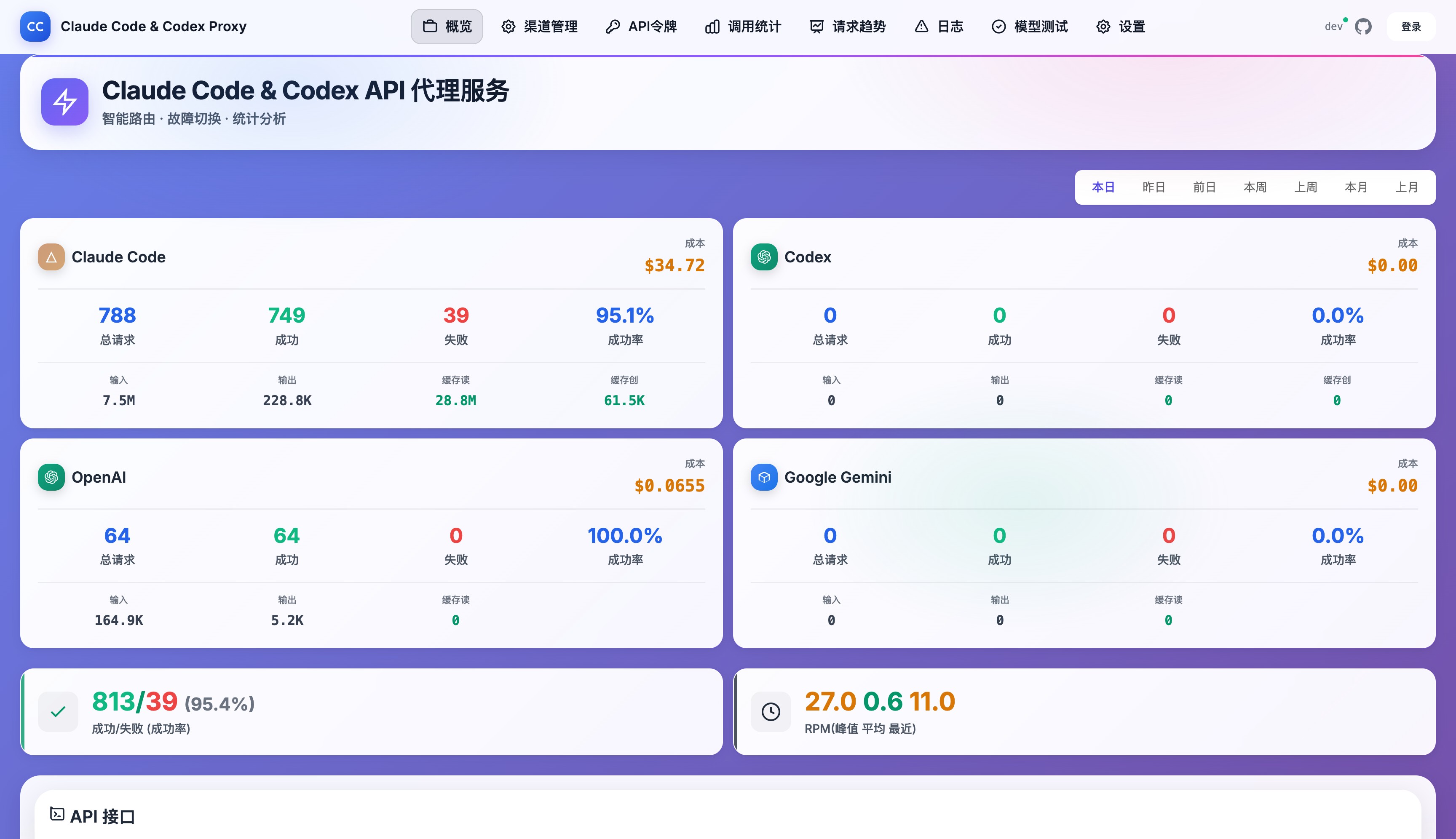
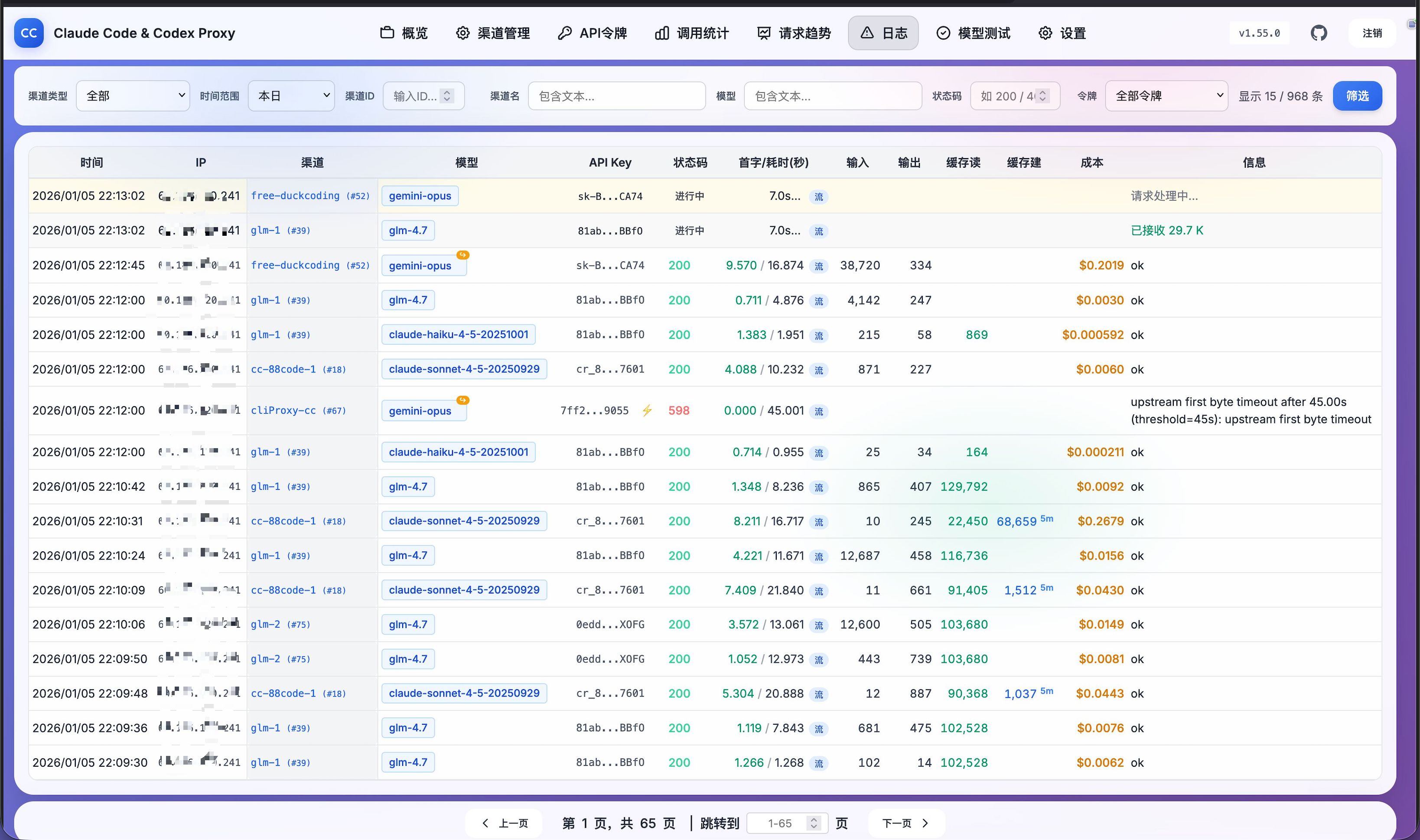
Real-time Monitoring Dashboard: Claude Code, Codex, OpenAI, and Gemini platform metrics at a glance
Core Features:
📈 24-hour Trend Charts - Request volumes clearly visualized with peaks and valleys
🔴 Real-time Error Logs - Instantly detect which channel has issues
📊 Channel Call Statistics - See which channels are performing well with data-backed insights
⚡ Performance Metrics - Latency, success rates, and bottleneck detection
💰 Token Usage Stats - Know exactly where your budget goes:
- Custom time range selector for flexible analysis
- Per API token ID classification for multi-tenant billing
- Supports Gemini/OpenAI cache token visualization
🎛️ Log Column Customization - Click the gear icon to show/hide columns, settings auto-saved to browser
UI Highlights:
- 🎨 Modern gradient purple theme for comfortable viewing
- 📱 Responsive design works great on mobile and desktop
- ⚡ Real-time data refresh without manual page reload
- 📊 Multi-dimensional stat cards show key metrics on one screen
- Cached query optimization
- Gemini/OpenAI Cache Token (Cache Read) display
🔧 Tech Stack
Core Dependencies
| Component | Version | Purpose | Performance Advantage |
|---|---|---|---|
| Go | 1.25.0+ | Runtime | Native concurrency, built-in min function |
| Gin | v1.12.0 | Web Framework | High-performance HTTP routing |
| modernc/sqlite | v1.51.0 | Embedded Database | Pure Go, zero CGO dependency, single file (default) |
| MySQL | v1.10.0 | RDBMS | Optional, for high-concurrency production |
| Sonic | v1.15.1 | JSON Library | 2-3x faster than stdlib |
| godotenv | v1.5.1 | Env Config | Simplified config management |
Architecture Features
Modular Architecture:
- Proxy Module Split (SRP):
proxy_handler.go: HTTP entry, concurrency control, route selectionproxy_forward.go: Core forwarding logic, request building, response handlingproxy_error.go: Error handling, cooldown decisions, retry logicproxy_util.go: Constants, type definitions, utility functionsproxy_stream.go: Streaming responses, first byte detectionproxy_gemini.go: Gemini API special handlingproxy_sse_parser.go: SSE parser (defensive handling, Gemini/OpenAI cache token parsing)proxy_debug.go: Upstream request/response debug capture (with sensitive header masking)
- Admin Module Split (SRP):
admin_channels.go: Channel CRUDadmin_stats.go: Stats analysis APIadmin_cooldown.go: Cooldown management APIadmin_csv.go: CSV import/exportadmin_types.go: Admin API type definitionsadmin_auth_tokens.go: API access token CRUD (with token stats, cost limits, model restrictions)admin_settings.go: System settings managementadmin_models.go: Model list managementadmin_testing.go: Channel testing (with protocol transform testing)admin_debug_log.go: Debug log API (sensitive header masking + base64 binary encoding)channel_check_scheduler.go: Scheduled channel check schedulerdetection_log.go: Detection result to LogEntry builder
- Protocol Transform System (2026-04 new):
protocol/types.go: Four protocol definitions (Anthropic/OpenAI/Gemini/Codex)protocol/registry.go: Request/response transformer registryprotocol/builtin/: 18 built-in transform implementations (streaming and non-streaming)- Preserves sampling/limit/stop/seed parameters; Gemini
thinkingConfig.thinkingLevelmaps to the target protocol's reasoning/thinking config - Two modes:
upstream(default, handled natively by upstream) /local(local translation) - Channel config:
ProtocolTransformMode+ProtocolTransforms
- Cooldown Manager (DRY):
cooldown/manager.go: Unified cooldown decision engine- Eliminates duplicate code, unified cooldown logic
- Distinguishes network vs HTTP error classification
- Recognizes structured quota/model cooldown responses and cools down until the upstream reset time
- Built-in single-key channel auto-upgrade logic
- Multi-URL Selector (URLSelector):
url_selector.go: Smart URL selection within a single channel- Explore-first: Unvisited URLs get priority to collect latency data
- Weighted random: Weight = 1/EWMA latency, lower latency = higher selection probability
- Independent cooldown: Failed URLs cool down independently without affecting other URLs
- BaseURL tracking: Active requests, logs, and UI carry upstream URL throughout
- Storage Layer Refactor (2025-12 optimization, eliminated 467 lines of duplicate code):
storage/schema/: Unified schema definition (supports SQLite/MySQL differences)storage/sql/: Common SQL implementation layer (SQLite/MySQL shared)storage/factory.go: Factory pattern auto-selects database- Composite index optimization, stats query performance improved
- OpenAI service_tier Pricing (2026-03 new):
util.OpenAIServiceTierMultiplier(): Returns multiplier for priority/flex/default tiersLogEntry.ServiceTier: Persisted to database, log cost column shows tier annotation- Supports GPT-5.4, GPT-5.4-pro, and other latest model pricing
- Responses image_generation Tool Billing (2026-05 new):
- Parses Responses API
tool_usage.image_genand theimage_generationtool model - Bills
gpt-image-2by text input, image input, and image output tokens - Streaming/non-streaming proxy paths and channel tests share the same usage parser to keep cost accounting consistent
- Parses Responses API
- Tiered Pricing:
- GPT-5.4: Input price auto-steps down after token threshold
- Qwen-Plus: Lower price tier kicks in after threshold
- Gemini long-context: Price doubles above threshold
- Cache discounts: Claude/Opus independent multipliers, OpenAI cache hit 50% discount
Multi-level Cache System:
- Channel config cache (60s TTL)
- Round-robin pointer cache (in-memory)
- Cooldown state inline (channels/api_keys tables store directly)
- Error classification cache (1000 capacity)
Async Processing Architecture:
- Log system (1000 buffer + single worker, guarantees FIFO order)
- Token/log cleanup (background goroutine, periodic maintenance)
Unified Response System:
StandardResponse[T]generic struct (DRY)ResponseHelperutility class with 9 shortcut methods- Auto-extracts app-level error codes, unified JSON format
Connection Pool Optimization:
- SQLite: 10 connections for memory mode / 5 for file mode, 5-minute lifetime
- HTTP client: 100 max connections, 30s timeout, keepalive optimization
- TLS: Session cache (1024 capacity), reduces handshake latency
🔧 Configuration
Environment Variables
| Variable | Default | Description |
|---|---|---|
CCLOAD_PASS |
None | Admin password (Required, exits if not set) |
CCLOAD_API_TOKENS |
None | Pre-seed API access tokens on startup. Format: token1,token2 or token1|production,token2|development; existing tokens are not overwritten |
API_TOKENS |
None | Compatibility alias for CCLOAD_API_TOKENS; startup fails if both variables are set with different values |
CCLOAD_MYSQL |
None | MySQL DSN (optional, format: user:pass@tcp(host:port)/db?charset=utf8mb4)If set uses MySQL, otherwise SQLite |
CCLOAD_ENABLE_SQLITE_REPLICA |
0 |
Hybrid storage mode switch (1=enable, see below) |
CCLOAD_SQLITE_LOG_DAYS |
7 |
Days of logs to restore from MySQL on startup in hybrid mode (-1=all, 0=no logs) |
CCLOAD_ALLOW_INSECURE_TLS |
0 |
Disable upstream TLS cert validation (1=enable; ⚠️for troubleshooting/controlled intranet only) |
PORT |
8080 |
Service port |
GIN_MODE |
release |
Run mode (debug/release) |
GIN_LOG |
true |
Gin access log switch (false/0/no/off to disable) |
TRUSTED_PROXIES |
Private ranges + Loopback + 100.64.0.0/10 |
Trusted proxy CIDRs (comma-separated); none = trust no proxies |
SQLITE_PATH |
data/ccload.db |
SQLite database file path (SQLite mode only) |
SQLITE_JOURNAL_MODE |
WAL |
SQLite Journal mode (WAL/TRUNCATE/DELETE, recommend TRUNCATE for containers) |
CCLOAD_MAX_CONCURRENCY |
1000 |
Max concurrent requests (limits simultaneous proxy requests) |
CCLOAD_MAX_BODY_BYTES |
10485760 |
Max request body bytes (10MB, Images API auto-expands to 20MB) |
CCLOAD_COOLDOWN_AUTH_SEC |
300 |
Auth error (401/402/403) initial cooldown (seconds) |
CCLOAD_COOLDOWN_SERVER_SEC |
120 |
Server error (5xx) initial cooldown (seconds) |
CCLOAD_COOLDOWN_TIMEOUT_SEC |
60 |
Timeout error (597/598) initial cooldown (seconds) |
CCLOAD_COOLDOWN_RATE_LIMIT_SEC |
60 |
Rate limit error (429) initial cooldown (seconds) |
CCLOAD_COOLDOWN_MAX_SEC |
1800 |
Exponential backoff cooldown max (seconds, 30 minutes) |
CCLOAD_COOLDOWN_MIN_SEC |
10 |
Exponential backoff cooldown min (seconds) |
If the service sits behind a reverse proxy or load balancer, set
TRUSTED_PROXIESexplicitly so spoofedX-Forwarded-Forvalues cannot affect client IP detection or login rate limiting.
Hybrid Storage Mode (MySQL Primary + SQLite Cache)
HuggingFace Spaces and similar environments lose local data on restart, but free MySQL has high query latency (800ms+). Hybrid mode offers the best of both worlds:
- MySQL Primary Storage: Write operations go to MySQL first, ensuring data persistence
- SQLite Local Cache: Read operations go through local SQLite, latency <1ms
- Startup Recovery: Restore data from MySQL to SQLite, supports restoring logs by days
- Log Special Handling: Write to SQLite first (fast), then async sync to MySQL (backup)
# Enable hybrid mode
export CCLOAD_MYSQL="user:pass@tcp(host:3306)/db?charset=utf8mb4"
export CCLOAD_ENABLE_SQLITE_REPLICA=1
export CCLOAD_SQLITE_LOG_DAYS=7  # Restore last 7 days of logs (optional)
Three Storage Modes:
| Mode | Configuration | Use Case |
|---|---|---|
| Pure SQLite | Don't set CCLOAD_MYSQL |
Local dev, single instance |
| Pure MySQL | Set CCLOAD_MYSQL |
Standard production |
| Hybrid Mode | Set CCLOAD_MYSQL + CCLOAD_ENABLE_SQLITE_REPLICA=1 |
HuggingFace Spaces |
Web Admin Configuration (Hot Reload Supported)
These settings have been migrated to database, managed via Web interface /web/settings.html, changes take effect immediately without restart:
| Setting | Default | Description |
|---|---|---|
log_retention_days |
7 |
Log retention days (-1 for permanent, 1-365 days) |
max_key_retries |
3 |
Max key retries within single channel |
upstream_first_byte_timeout |
0 |
Upstream first valid stream content timeout (seconds, 0=disabled, stream only) |
non_stream_timeout |
120 |
Non-stream request timeout (seconds, 0=disabled) |
anthropic_first_byte_timeout |
0 |
Anthropic first valid stream content timeout (seconds, 0=use global upstream_first_byte_timeout) |
anthropic_non_stream_timeout |
0 |
Anthropic non-stream request timeout (seconds, 0=use global non_stream_timeout) |
codex_first_byte_timeout |
0 |
Codex first valid stream content timeout (seconds, 0=use global upstream_first_byte_timeout) |
codex_non_stream_timeout |
0 |
Codex non-stream request timeout (seconds, 0=use global non_stream_timeout) |
openai_first_byte_timeout |
0 |
OpenAI first valid stream content timeout (seconds, 0=use global upstream_first_byte_timeout) |
openai_non_stream_timeout |
0 |
OpenAI non-stream request timeout (seconds, 0=use global non_stream_timeout) |
gemini_first_byte_timeout |
0 |
Gemini first valid stream content timeout (seconds, 0=use global upstream_first_byte_timeout) |
gemini_non_stream_timeout |
0 |
Gemini non-stream request timeout (seconds, 0=use global non_stream_timeout) |
enable_health_score |
false |
Enable health-based dynamic channel sorting |
success_rate_penalty_weight |
100 |
Success rate penalty weight (see below) |
health_score_window_minutes |
30 |
Success rate stats time window (minutes) |
health_score_update_interval |
30 |
Success rate cache update interval (seconds) |
health_min_confident_sample |
20 |
Confidence sample threshold (full penalty at this sample size) |
channel_check_interval_hours |
0 |
Scheduled channel check interval (hours, 0=disabled) |
Per-protocol timeouts apply to the runtime upstream protocol: if a transformed request is forwarded to OpenAI, ccLoad reads openai_*_timeout; when that value is 0, it falls back to the global timeout.
Health Score Sorting
When enable_health_score is enabled, the system dynamically adjusts priority based on channel success rate:
confidence = min(1.0, sample_count / health_min_confident_sample)
effective_priority = base_priority - (failure_rate × success_rate_penalty_weight × confidence)
Confidence Factor: Solves over-penalization of new or low-traffic channels due to small sample sizes. Smaller samples = lower confidence = more penalty discount.
Example (success_rate_penalty_weight = 100, health_min_confident_sample = 20):
| Channel | Base Priority | Success Rate | Samples | Confidence | Penalty | Effective Priority |
|---|---|---|---|---|---|---|
| A | 100 | 95% | 100 | 1.0 | 5 | 95 |
| B | 90 | 70% | 80 | 1.0 | 30 | 60 |
| C | 80 | 60% | 4 | 0.2 | 8 | 72 |
| D | 70 | 100% | 50 | 1.0 | 0 | 70 |
Base priority order: A > B > C > D
Effective priority order: A (95) > C (72) > D (70) > B (60)
API Access Token Configuration
Important: API access tokens are normally managed in the Web admin interface; Docker and CI deployments can pre-seed them with an environment variable.
- Visit
http://localhost:8080/web/tokens.htmlfor token management - Set
CCLOAD_API_TOKENS=token1|production,token2|developmentto create missing tokens on startup - Provisioning is idempotent: existing tokens keep their description, limits, model/channel restrictions, and statistics
- Only missing tokens are created; existing tokens are never modified
- Supports add, delete, view tokens
- All tokens stored in database with persistence
- Without any tokens configured, all
/v1/*and/v1beta/*APIs return401 Unauthorized
⚠️ Security notes:
- In production, prefer Docker Secrets, Kubernetes Secrets, or platform encrypted Secrets over plain environment variables
- In CI/CD, do not print full environment variables to logs
- After provisioning, remove
CCLOAD_API_TOKENSfrom deployment config if automatic recovery is no longer needed - Restrict access to container inspect output, orchestration dashboards, and deployment configuration
Advanced Token Features (2026-01 New):
- Cost Limits: Set cost limits per token (USD), requests rejected with 429 when exceeded
- Model Restrictions: Restrict which models a token can access for fine-grained access control
- First Byte Time: Records streaming request TTFB (milliseconds) for upstream latency diagnosis
Behavior Summary
CCLOAD_PASSnot set: Program fails to start and exits (secure default)- No API access tokens configured: All
/v1/*and/v1beta/*APIs return401 Unauthorized. Configure tokens via Web interface/web/tokens.html - Public endpoints:
GET /health(health check) andGET /public/summary(stats summary) require no auth, all others require auth token
Docker Images
Project supports multi-arch Docker images:
- Supported Architectures:
linux/amd64,linux/arm64 - Image Registry:
ghcr.io/caidaoli/ccload - Available Tags:
latest- Latest stable version2.19.0- Specific version number2.19- Major.minor version2- Major version
Image Tag Guide
# Pull latest version
docker pull ghcr.io/caidaoli/ccload:latest

# Pull specific version
docker pull ghcr.io/caidaoli/ccload:2.19.0

# Specify architecture (Docker usually auto-selects)
docker pull --platform linux/amd64 ghcr.io/caidaoli/ccload:latest
docker pull --platform linux/arm64 ghcr.io/caidaoli/ccload:latest
Database Structure
Storage Architecture (Factory Pattern):
storage/
├── store.go         # Store interface (unified contract)
├── factory.go       # NewStore() auto-selects database
├── schema/          # Unified schema definition layer (2025-12 new)
│   ├── tables.go    # Table definitions (DefineXxxTable functions)
│   └── builder.go   # Schema builder (supports SQLite/MySQL differences)
├── sql/             # Common SQL implementation layer (2025-12 refactor, eliminated 467 lines)
│   ├── store_impl.go      # SQLStore core implementation
│   ├── config.go          # Channel config CRUD
│   ├── apikey.go          # API key CRUD
│   ├── cooldown.go        # Cooldown management
│   ├── log.go             # Log storage
│   ├── metrics.go             # Metrics stats
│   ├── metrics_filter.go      # Filter intersection support
│   ├── metrics_aggregate_rows.go  # Aggregate row processing
│   ├── metrics_finalize.go    # Finalization processing
│   ├── auth_tokens.go         # API access tokens
│   ├── auth_token_stats.go    # Token statistics
│   ├── admin_sessions.go  # Admin sessions
│   ├── system_settings.go # System settings
│   └── helpers.go         # Helper functions
└── sqlite/          # SQLite specific (test files only)
Database Selection Logic:
CCLOAD_MYSQLenvironment variable set → Uses MySQL- Not set → Uses SQLite (default)
Core Table Structure (SQLite and MySQL shared):
channels- Channel config (cooldown data inline, UNIQUE constraint on name, with protocol transform config, scheduled check config, RPM/concurrency limit config)api_keys- API keys (key-level cooldown inline, multi-key strategies)logs- Request logs (with base_url upstream URL tracking)debug_logs- Debug logs (upstream request/response raw data, independent cleanup policy)key_rr- Round-robin pointers (channel_id → idx)auth_tokens- Auth tokens (with cost limits, model restrictions, first byte time tracking)admin_sessions- Admin sessionssystem_settings- System config (hot reload support)
Architecture Features (✅ 2025-12 through 2026-04 continuous improvements):
- ✅ Unified SQL Layer (refactor): SQLite/MySQL share
storage/sql/implementation, eliminated 467 lines of duplicate code - ✅ Unified Schema Definition (new):
storage/schema/defines table structures, supports database differences - ✅ Factory pattern unified interface (OCP, easy to extend new storage)
- ✅ Cooldown data inline (deprecated separate cooldowns table, reduces JOIN overhead)
- ✅ Performance index optimization (channel selection latency ↓30-50%, key lookup latency ↓40-60%)
- ✅ Composite index optimization (stats query performance improved)
- ✅ Foreign key constraints (cascade delete, ensures data consistency)
- ✅ Multi-key support (sequential/round_robin strategies)
- ✅ Auto migration (auto creates/updates table structure on startup)
- ✅ Token stats enhancement (time range selection, per-token ID classification, cache optimization)
- ✅ service_tier cost tracking: Logs persist service_tier field, cost column shows tier label
- ✅ Responses image tool cost tracking:
image_generationtool costs are included in logs, stats, and cost limit accounting - ✅ Tiered pricing engine: GPT-5.4/Qwen-Plus/Gemini long-context step billing
- ✅ Log UX improvements: Cost column formats to 3 decimal places (empty for zero), IP column shows full address on hover
- ✅ Protocol transform system: Anthropic/OpenAI/Gemini/Codex four-protocol cross-conversion, upstream/local modes
- ✅ Debug logs: Upstream request/response raw data capture, sensitive header masking, independent cleanup policy
- ✅ Scheduled channel checks: Background periodic channel availability probing, configurable check model per channel
- ✅ Channel RPM limits: Per-channel rolling 60-second request caps,
0means unlimited, over-limit channels are skipped - ✅ Channel concurrency limits: Per-channel in-flight request caps,
0means unlimited, over-limit channels are skipped
Backward Compatible Migration:
- Auto-detects and fixes duplicate channel names
- Intelligently adds UNIQUE constraints, ensures data integrity
- Runs automatically on startup, no manual intervention needed
- Log database merged into main database (single data source)
🛡️ Security Considerations
- Production must set strong password
CCLOAD_PASS - Configure API access tokens via Web admin
/web/tokens.htmlto protect API endpoint access - API keys used only in memory, not logged
- Tokens stored in client localStorage, 24-hour expiry
- Recommend using HTTPS reverse proxy
- Docker images run as non-root user for enhanced security
Token Authentication System
ccLoad uses token-based authentication for simple and efficient secure access control.
Auth Methods:
- Admin Interface: Login gets 24-hour token, stored in
localStorage - API Endpoints: Support
Authorization: Bearer <token>header auth
Core Features:
- ✅ Stateless Auth: Tokens don't depend on server sessions, naturally supports horizontal scaling
- ✅ Unified Auth System: API and admin interface use same token mechanism
- ✅ Simple Architecture: Pure token auth, simple reliable code (KISS principle)
- ✅ CORS Support: Token stored in localStorage, fully supports cross-origin access
Usage Example:
# 1. Login to get token
curl -X POST http://localhost:8080/login \
  -H "Content-Type: application/json" \
  -d '{"password":"your_admin_password"}' | jq

# Response example:
# {
#   "status": "success",
#   "token": "abc123...",  # 64-char hex token
#   "expiresIn": 86400     # 24 hours (seconds)
# }

# 2. Use token to access admin API
curl http://localhost:8080/admin/channels \
  -H "Authorization: Bearer <your_token>"

# 3. Logout (optional, token auto-expires after 24 hours)
curl -X POST http://localhost:8080/logout \
  -H "Authorization: Bearer <your_token>"
🔄 CI/CD
Project uses GitHub Actions for automated CI/CD:
- Trigger Conditions: Push version tags (
v*) or manual trigger - Build Output: Multi-arch Docker images pushed to GitHub Container Registry
- Version Management: Auto-generates semantic version tags
- Cache Optimization: Uses GitHub Actions cache to accelerate builds
🤝 Contributing
Issues and Pull Requests welcome!
Troubleshooting
Port In Use:
# Find and kill process using port 8080
lsof -i :8080 && kill -9 <PID>
Container Issues:
# View container logs
docker logs ccload -f
# Check container health status
docker inspect ccload --format='{{.State.Health.Status}}'
Config Validation:
# Test service health (lightweight health check, <5ms)
curl -s http://localhost:8080/health
# Or view stats summary (returns business data, 50-200ms)
curl -s http://localhost:8080/public/summary
# Check environment variable config
env | grep CCLOAD
📄 License
MIT License
Yorumlar (0)
Yorum birakmak icin giris yap.
Yorum birakSonuc bulunamadi