claude-kicker
Health Warn
- License — License: MIT
- Description — Repository has a description
- Active repo — Last push 0 days ago
- Low visibility — Only 7 GitHub stars
Code Fail
- network request — Outbound network request in public/app.js
- fs.rmSync — Destructive file system operation in scripts/build-exe.mjs
- fs.rmSync — Destructive file system operation in scripts/e2e-live.js
- os.homedir — User home directory access in scripts/e2e-live.js
- process.env — Environment variable access in scripts/e2e-live.js
- fs module — File system access in scripts/e2e-live.js
- fs.rmSync — Destructive file system operation in scripts/make-icon.mjs
- process.env — Environment variable access in scripts/make-icon.mjs
- os.homedir — User home directory access in src/config.js
- process.env — Environment variable access in src/config.js
- fs module — File system access in src/config.js
- exec() — Shell command execution in src/engine.js
- fs module — File system access in src/engine.js
Permissions Pass
- Permissions — No dangerous permissions requested
No AI report is available for this listing yet.
Restarts Claude Code / Cowork sessions that stopped on a usage limit, once the limit resets. Windows app, pixel-art dashboard.

Claude Kicker
Your Claude session hit a usage limit at 2am and stopped. Claude Kicker waits for the limit to reset, then starts it again.




Install · How it works · Safety · Build from source
The problem
When Claude Code or Claude Cowork is working autonomously and hits a usage limit — the
5-hour session limit or the weekly one — the run stops dead. Hours later the limit
renews, but nothing restarts. You come back the next morning to a session that gave up
before midnight.
Claude Kicker sits in the background, notices when an armed session dies on a limit,
reads the reset time out of Claude's own error message, waits, and then resumes the
session. Work carries on overnight without you.
It only ever touches sessions you explicitly arm. Everything else is ignored.
Install
Option 1 — download the app (no Node.js needed)
- Download ClaudeKicker.exe from the latest release
(~87 MB — Node is bundled inside). It's also committed atdist/ClaudeKicker.exe. - Double-click it. No console window appears; it runs in the background.
- Open http://localhost:4900.
Windows SmartScreen will warn you about an unsigned app. More info → Run anyway.
The executable isn't code-signed — build it yourself from source if you'd rather not
trust a binary.
Option 2 — run from source
git clone https://github.com/calm032019/claude-kicker.git
cd claude-kicker
npm install
npm start
Then: find your session in the list, flip its toggle to arm it, and — when you're
happy with what you see — turn off Dry run in Settings.
Claude Kicker starts in dry run: it logs the exact command it would run without
executing it. That's there so you can watch it make a decision before you let it act.
Start it automatically at login
powershell -ExecutionPolicy Bypass -File scripts\install-startup.ps1
Registers a hidden Scheduled Task. Remove it with the same command plus -Remove.
Claude Kicker has to be running when the limit resets, so if you want overnight cover,
do this.
What it looks like
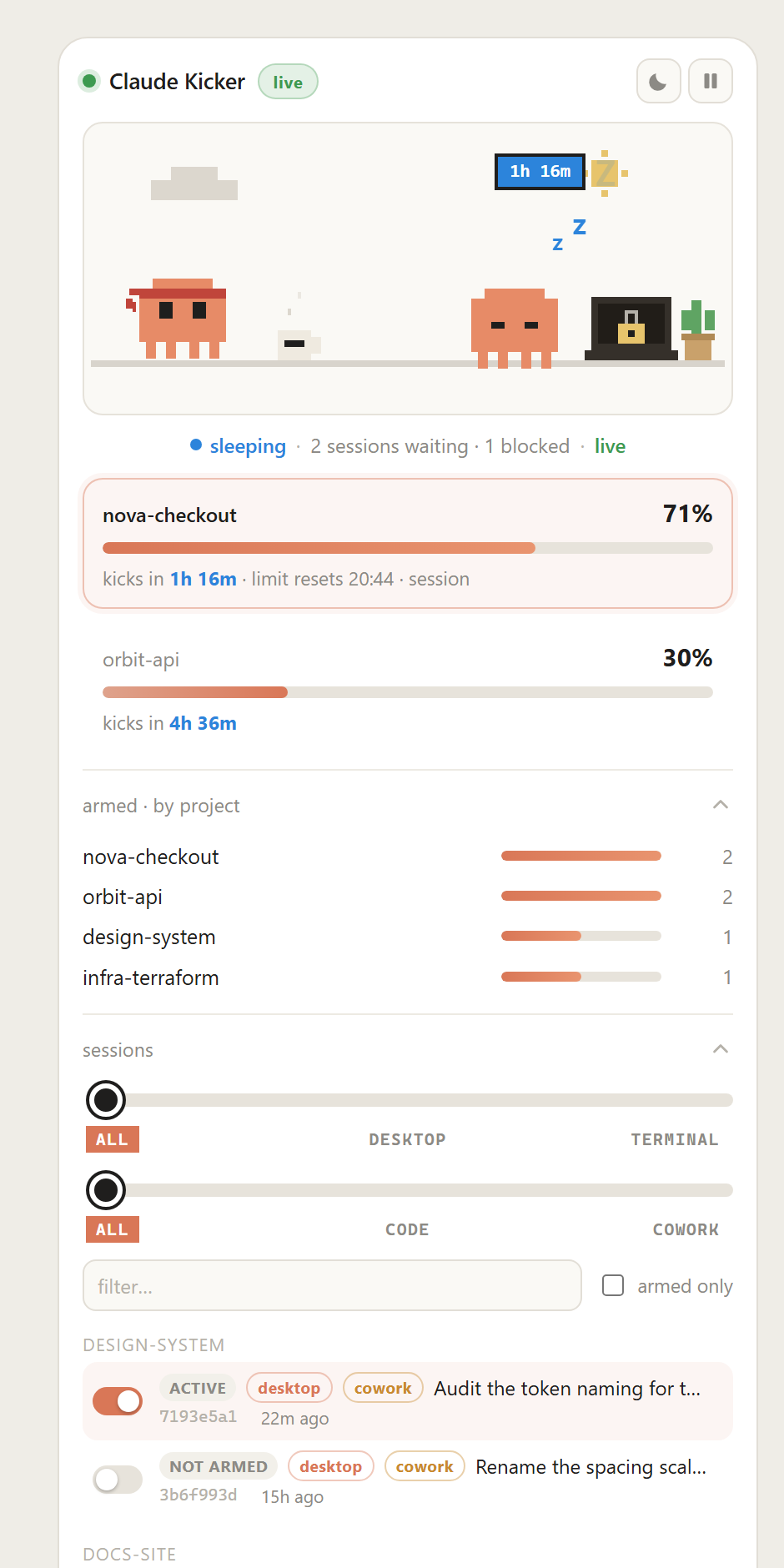
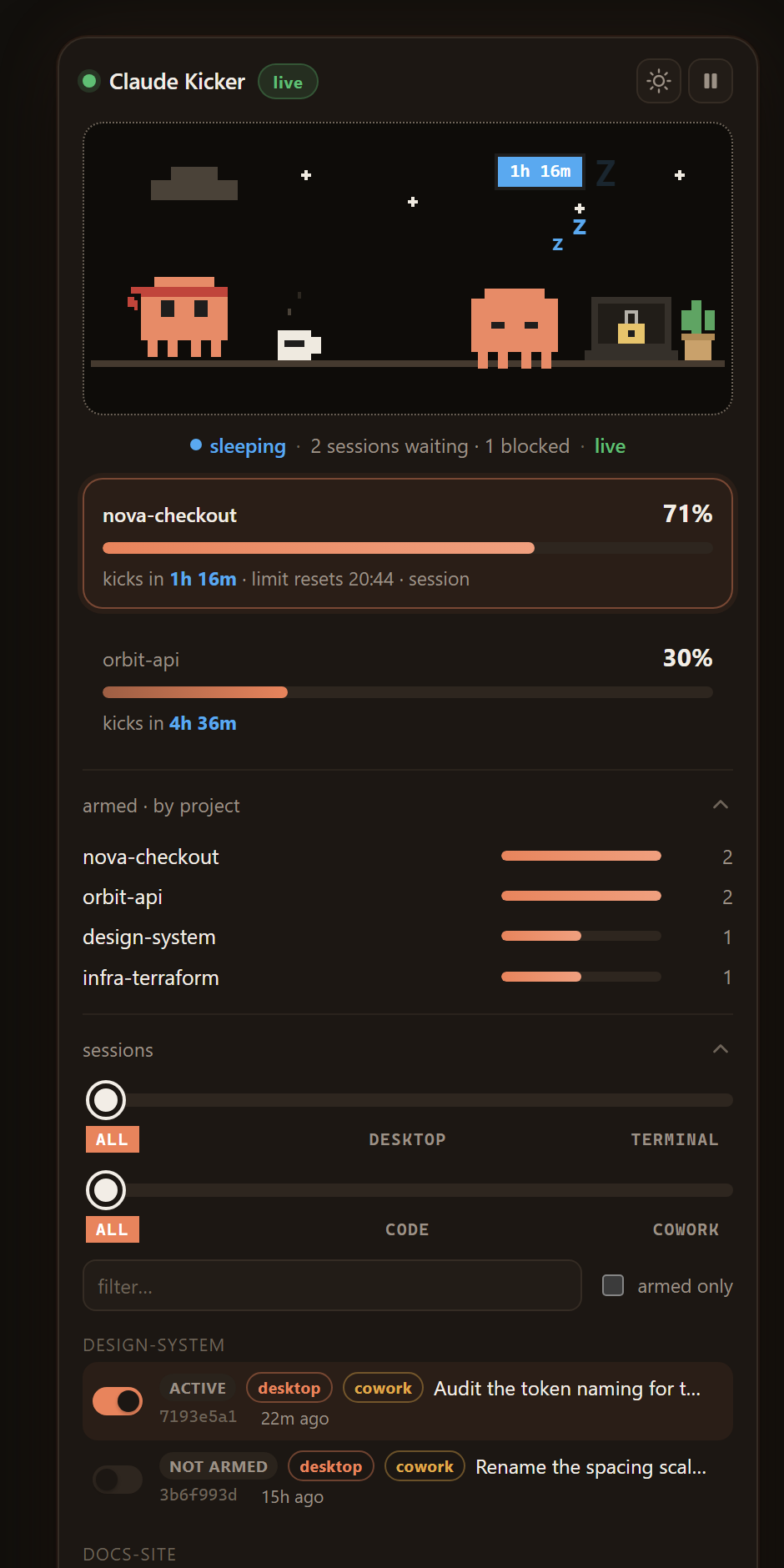
A single compact widget. The top meter is the session closest to being woken up: how far
through the wait it is, and a live countdown. Below that, armed sessions grouped by
project, the session list with arm toggles, a colour-coded strip of recent kicks, and the
activity log. Light theme by default, dark on the moon button.
The scene at the top is the app's status at a glance:
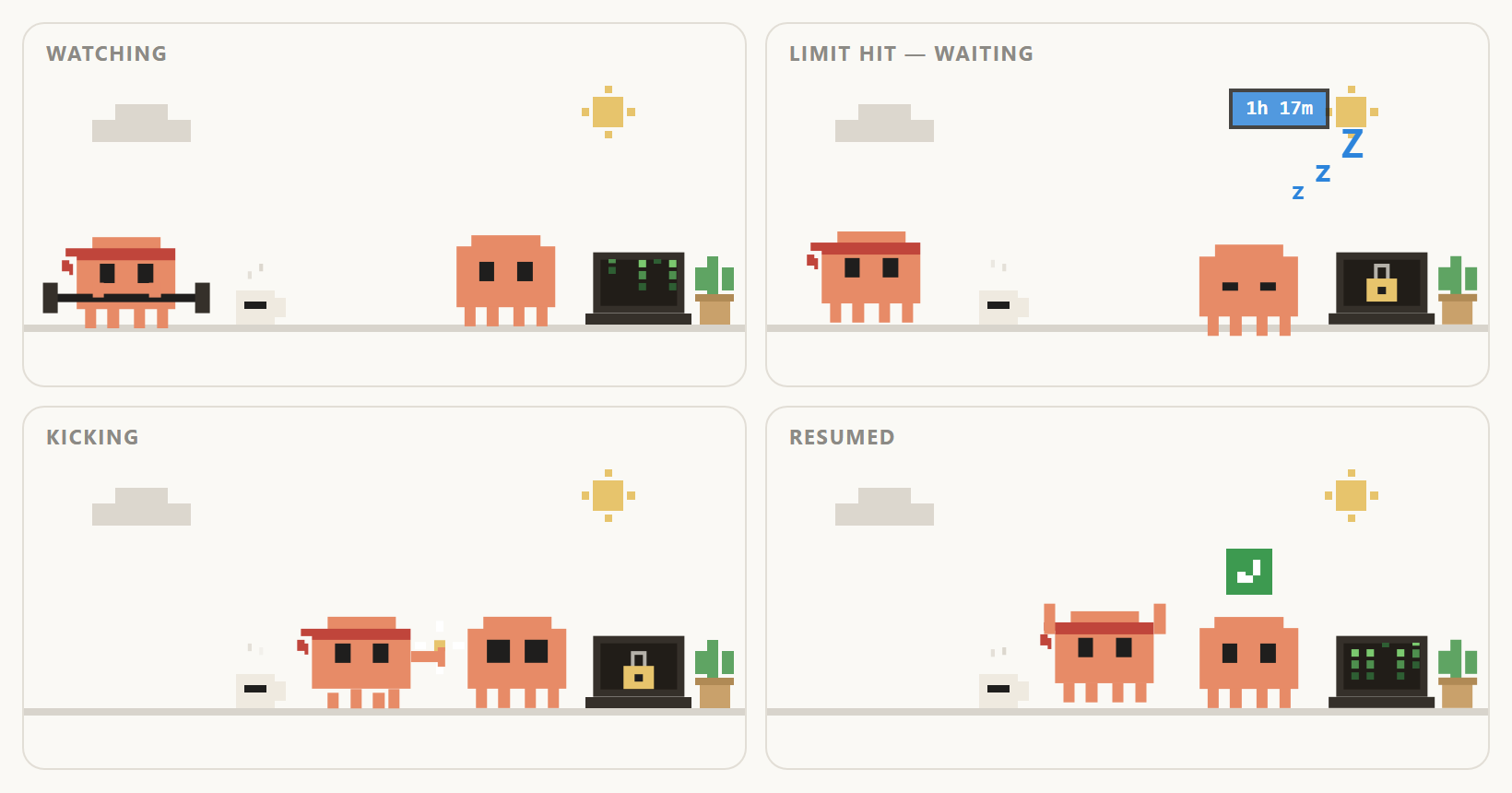
| watching | Armed and nothing wrong. The bot lifts weights while it waits; matrix rain on the laptop means work is happening. |
| limit hit | The other bot is asleep, the laptop is padlocked, and the badge counts down to the reset. |
| kicking | The bot sprints over and prods the sleeper awake. |
| resumed | Green tick, everyone back to work. |
How it works
Claude Code writes every session to a JSONL transcript under%USERPROFILE%\.claude\projects\. When a run dies on a usage limit, it appends an entry
that looks like this:
{
  "type": "assistant",
  "timestamp": "2026-08-06T10:15:54.416Z",
  "message": { "content": [{ "type": "text",
    "text": "You've hit your session limit · resets 1:50pm (Europe/London)" }] },
  "error": "rate_limit",
  "apiErrorStatus": 429,
  "cwd": "C:\\Users\\you\\projects\\nova-checkout",
  "sessionId": "6968e2a7-1d71-41f0-839a-c1ffa2efe080"
}
Everything Claude Kicker needs is in there. So it:
Watches the transcripts of armed sessions.
Detects
"error": "rate_limit"and reads the reset time out of the message,
resolving it to an absolute instant (handling the timezone, and BST vs GMT).Waits until the reset, plus 2–5 minutes of jitter.
Resumes the session in its own working directory:
claude -p --resume <sessionId> --dangerously-skip-permissions "continue"Verifies it worked.
--resumereuses the original session ID and appends to the
same transcript, so confirming success just means watching for new assistant
activity in the file it was already reading.
The three kinds of limit
| Limit | Message | Kicked? |
|---|---|---|
| Session (5-hour) | session limit · resets 1:50pm (Europe/London) |
Yes |
| Weekly | weekly limit · resets 6pm (Europe/London) |
Yes |
| Org monthly spend | run /usage-credits to ask your admin |
No — there's no reset to wait for and only an admin can clear it. Shown as Blocked. |
What it can and can't reach
Sessions are labelled by where they run and what they are:
- desktop / terminal — launched from the Claude desktop app, or from
claudein a terminal. - code / cowork — a Claude Code session, or a Cowork one.
All four combinations are resumable and all are supported. The one exception is plain
chat in the desktop app or on claude.ai: those live server-side with no local
transcript and no resume command, so no local tool can restart them.
Safety rails
Claude Kicker resumes sessions with permission prompts bypassed, so it's deliberately
conservative about when it fires:
- Opt-in only. Every session is disarmed until you arm it.
- Dry run by default.
- Only kicks a session whose transcript ends on the limit event. If anything
happened afterwards, the session is alive or you already resumed it by hand — so it's
left alone. This is the main guard against interrupting live work. - Re-reads the transcript in the moment before it fires. The decision to kick is made
when transcripts are scanned, but kicks run one at a time and one can take minutes, so
that decision may be stale by the time a session's turn comes round. Immediately before
spawning, Claude Kicker re-reads that session's tail from disk and stands down if it was
resumed by hand, disarmed, or hit a newer limit in the meantime. Standing down doesn't
consume a retry attempt. - Idle guard — the transcript must have been untouched for a few minutes first.
- Caps — 3 attempts per limit event, 6 per session per day.
- Jitter — fires 2–5 minutes after the reset, not the instant it rolls over.
- Quiet hours — an optional window where nothing is ever kicked.
- Pause — a global kill switch in the header.
- Won't resume into a missing folder. If the project directory is gone, the session
is blocked rather than resumed somewhere wrong. - Self-healing. A weekly limit's message carries a time but no date, so its reset can
only be estimated. If a kick fires too early, the new limit event's reset time replaces
the schedule instead of burning the retry budget.
Every decision is written to the activity log.
Settings
| Setting | Default | Notes |
|---|---|---|
| Dry run | on | Log the command, don't run it |
| Skip permission prompts | on | Needed for genuinely unattended resumption |
| Kick prompt | continue |
What gets sent to the resumed session |
| Model override | (session default) | |
| Max kicks per event | 3 | |
| Max kicks per day | 6 | Per session |
| Jitter | 2–5 min | Delay after the reset |
| Quiet hours | off |
State lives in %LOCALAPPDATA%\ClaudeKicker\ (state.json, settings.json,activity.log). Environment overrides: CLAUDE_KICKER_PORT, CLAUDE_KICKER_DATA,CLAUDE_KICKER_PROJECTS.
Build from source
npm install
npm start          # run the watcher + dashboard on :4900
npm run scan       # one-shot report of what it can see, no dashboard
npm test           # 62 unit and integration tests
npm run icon       # regenerate assets/icon.ico from assets/icon.svg
npm run build      # produce dist/ClaudeKicker.exe
The executable is built with Node's Single Executable Applications feature: the app and
Node itself are bundled into one file using your local node.exe as the base, so
nothing is downloaded during the build.
Verifying it actually kicks
There's a live end-to-end check. It spends real tokens, so it's kept out of npm test:
npm run test:e2e
It starts a genuine Claude session, stalls it with a real-format limit event whose reset
has already passed, arms it, runs one engine tick, and asserts that the session was
resumed and produced new work. Only the limit event is synthetic — the kick and the
resumed session are real.
Requirements
- Windows 10/11
- Claude Code installed and signed in (
claudeon your PATH) - Node.js 18+ — only if running from source
Limitations
- Windows-only in practice; the startup script and packaging are Windows-specific, though
the engine itself has no Windows-only code. - A session resumed from outside won't live-refresh in the desktop app. The work still
happens and is recorded — reopen the session to see it. - Sessions on other machines and cloud sessions are out of scope.
- The executable isn't code-signed, so SmartScreen will warn on first run.
Licence
MIT — see LICENSE.
Reviews (0)
Sign in to leave a review.
Leave a reviewNo results found