Sundial
Health Uyari
- License — License: MIT
- Description — Repository has a description
- Active repo — Last push 0 days ago
- Low visibility — Only 7 GitHub stars
Code Basarisiz
- rm -rf — Recursive force deletion command in src-windows/build.sh
- rm -rf — Recursive force deletion command in src/build.sh
- rm -rf — Recursive force deletion command in src/icon/make-icons.sh
Permissions Gecti
- Permissions — No dangerous permissions requested
Bu listing icin henuz AI raporu yok.
A small sun on your desktop showing live Claude Code session activity and usage allowance (macOS + Windows)
Sundial · 日晷
English · 简体中文
A small sun that sits on your desktop, showing live Claude Code session activity
and how much of your usage allowance is left. macOS and Windows.
A subscription is not required. The session half reads local files, so it
works the moment you install it; only the two usage dials need Claude Max or Pro.
An unofficial personal project. It is not affiliated with Anthropic, nor
endorsed or supported by them. The usage half depends on an undocumented
endpoint and may stop working at any time — see Please read this first.Written with Claude Code, reviewed and tested by a human.
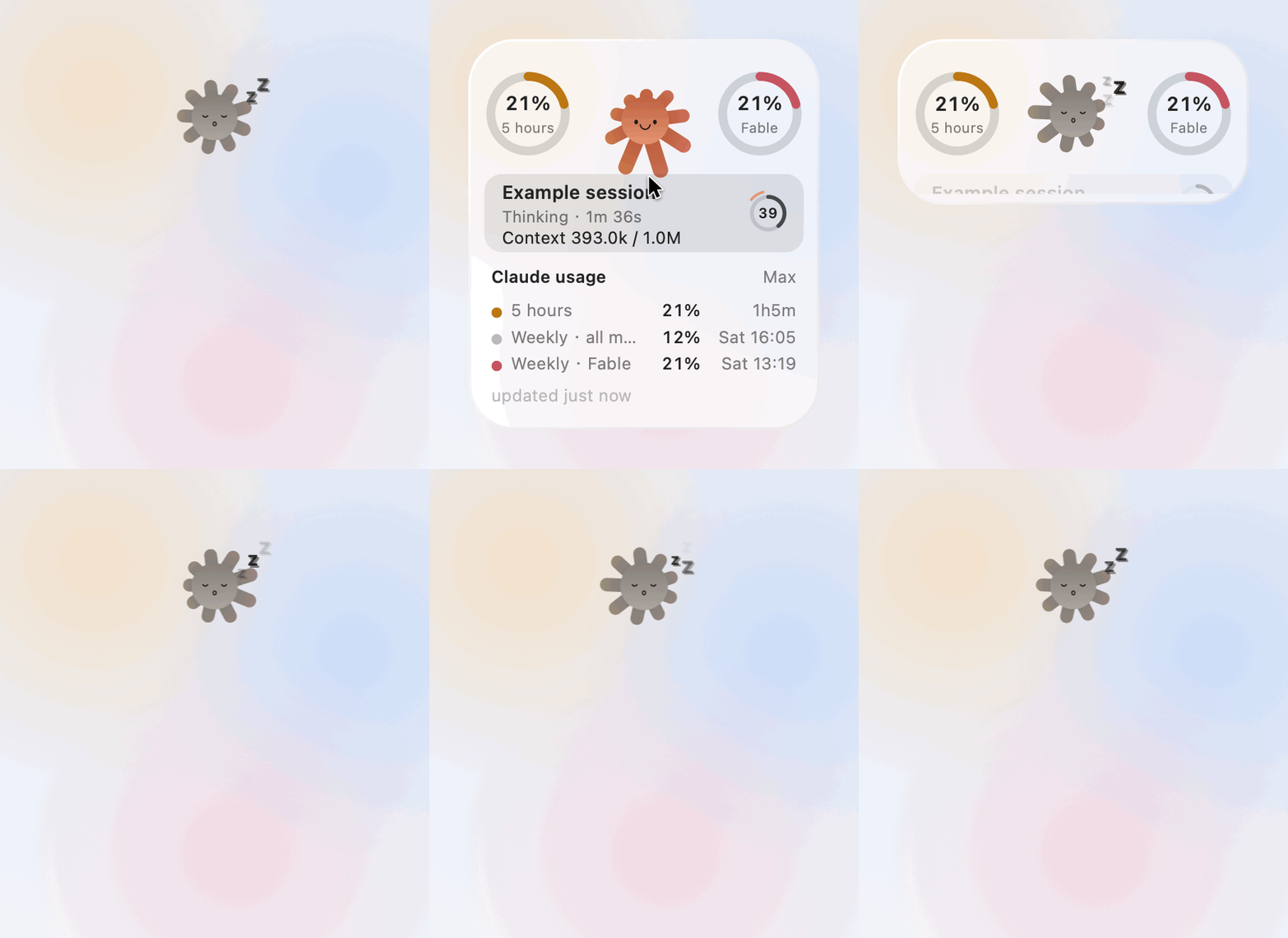
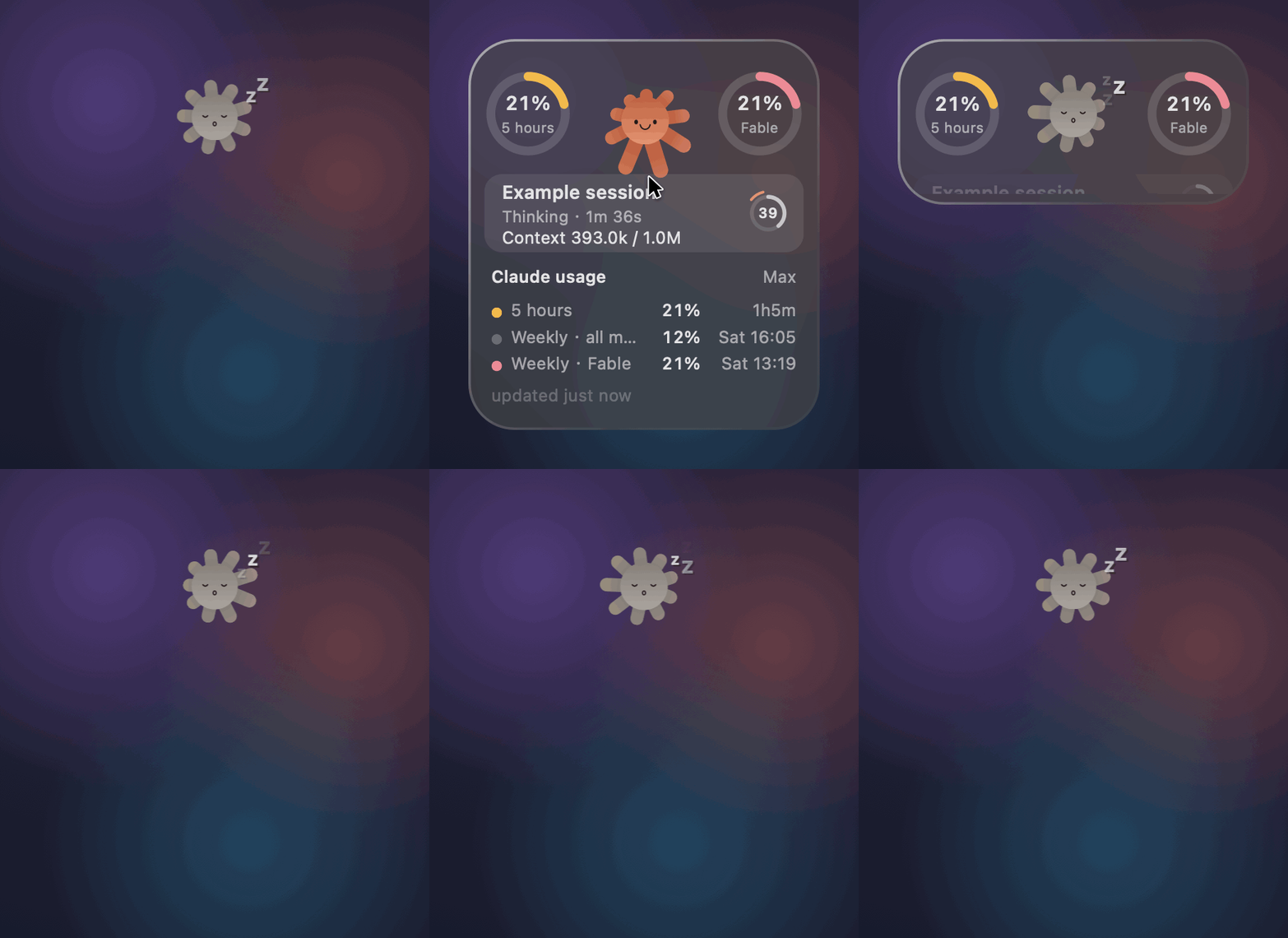
Left: light mode · Right: dark mode (follows the system setting)
Dozing → expand on hover → a session begins → the rays reach towards the cursor →
left alone, the dials pull and push the rays into a slow breath → finished, unread → folded away
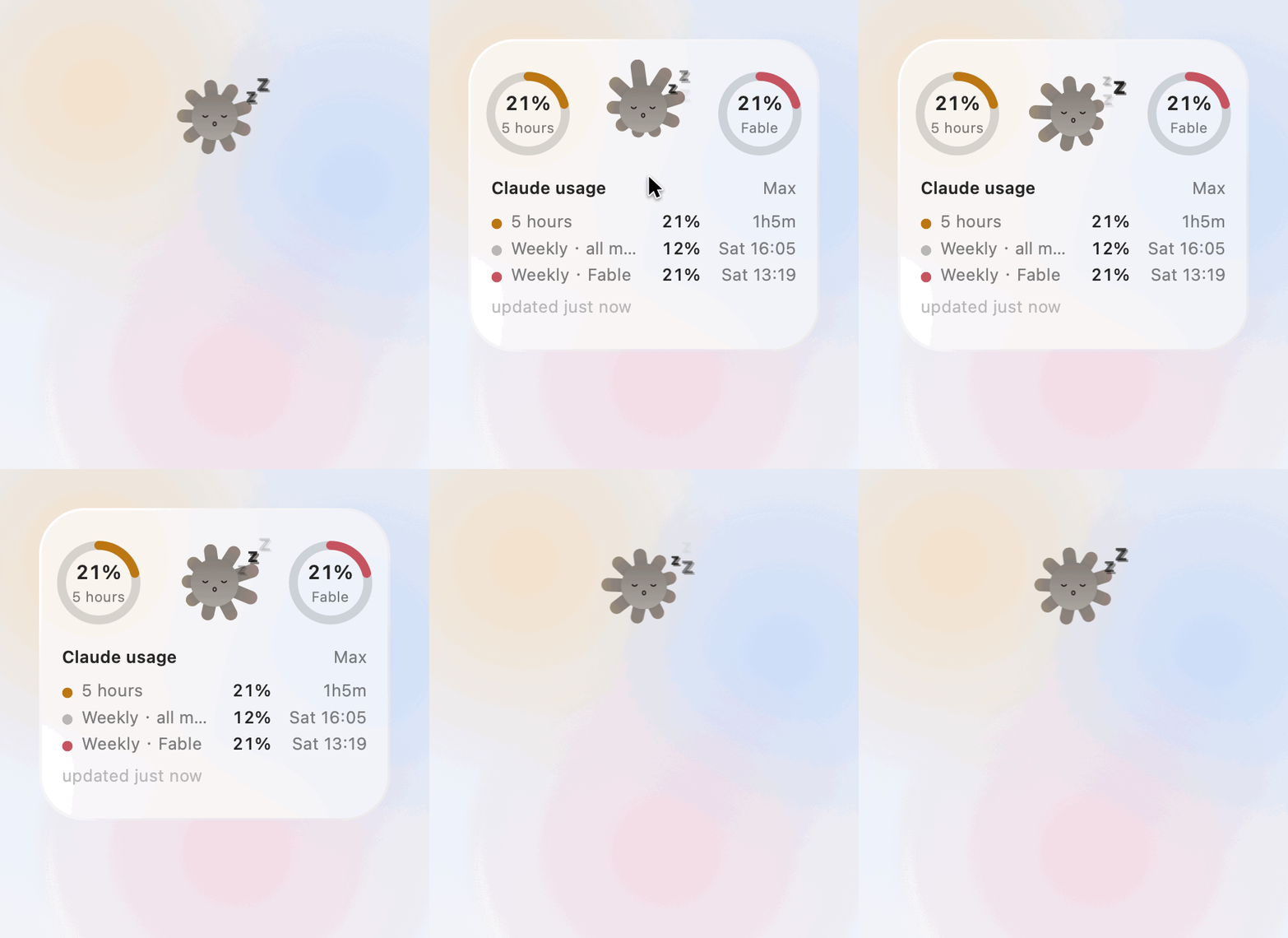
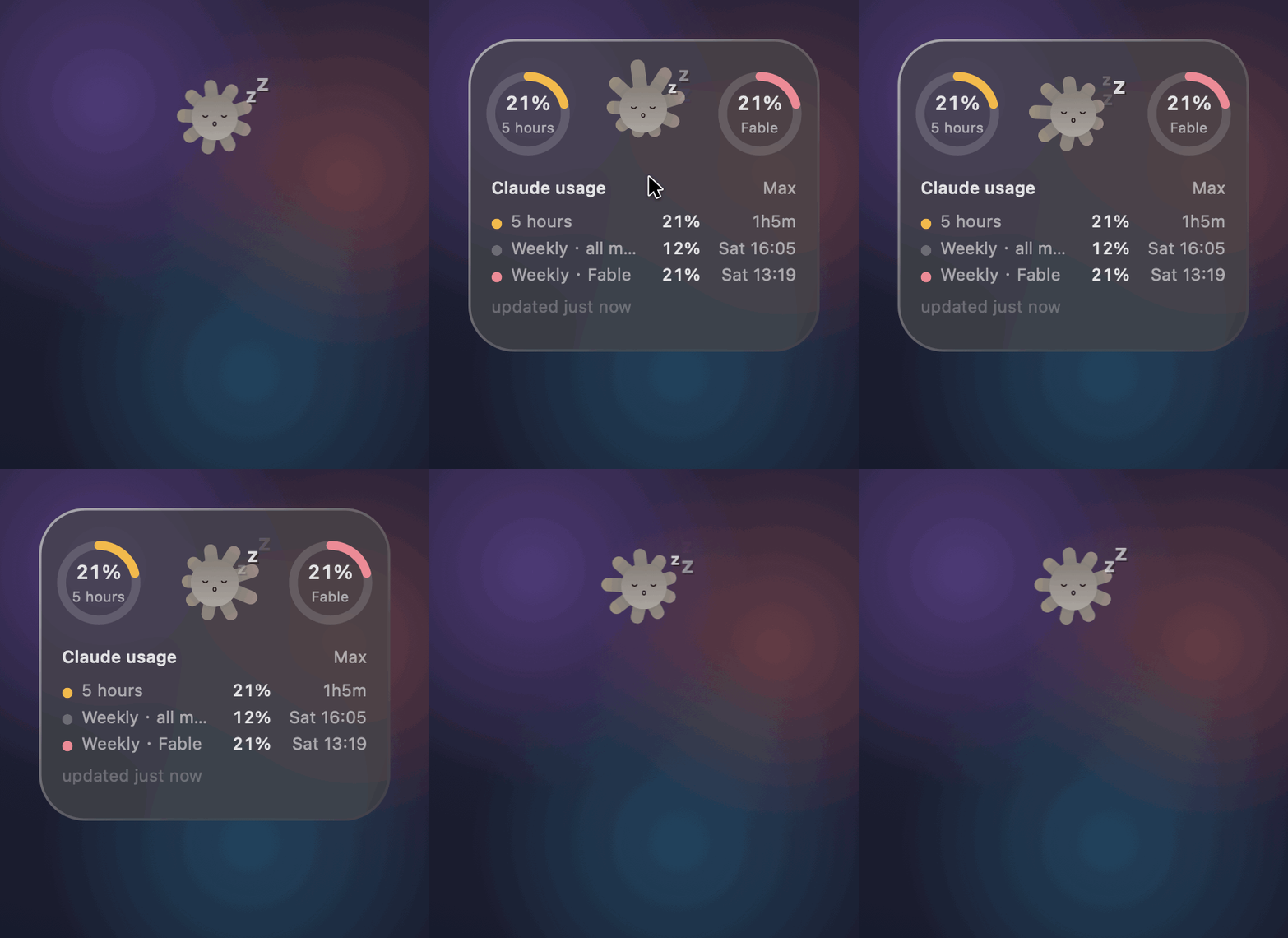
With nothing running, the gravity reverses: the sleeping sun shies away from the cursor rather than reaching for it — rays drawn in on the near side, pushed out on the far side.
Download
Grab the latest build from Releases:
| Platform | File | Notes |
|---|---|---|
| macOS 13+ | Sundial-x.y.z-macOS.zip |
Universal binary; runs on both Intel and Apple silicon |
| Windows 10/11 | Sundial-x.y.z-Windows-x64.exe |
Self-contained; no .NET installation needed |
Opening it for the first time on macOS. The app is not notarised by Apple,
so Gatekeeper will stop it. Either drag it into Applications and run this once
in Terminal:
xattr -dr com.apple.quarantine /Applications/Sundial.app
…or avoid the terminal entirely: double-click, let it be blocked, then open
System Settings › Privacy & Security, scroll down to the notice about
Sundial, and choose Open Anyway.
Opening it for the first time on Windows. SmartScreen will show a blue
warning, because the executable is not signed with a Microsoft code-signing
certificate. Choose More info → Run anyway.
What it does
Two usage dials (Max / Pro only)
A ring sits on either side of the sun, with the percentage in the middle and a
label beneath.
- Left ring (honey gold) — the five-hour allowance.
- Right ring (apricot pink) — whichever weekly allowance is under the most
pressure. That may be Weekly · all models, or a limit belonging to one
particular model. Whichever is tightest is the one shown, and the label
changes with it.
Details worth knowing:
- The arc fills clockwise from the top, easing smoothly as the figure changes.
- Overruns are shown honestly. If the endpoint returns 106%, it says 106%
rather than clamping to 100. Clamping would suggest you had just run out,
hiding how far past the line you actually are. - The easing state is kept per ring position, not per label. The limit shown
on the right changes identity from time to time; keeping state by label means a
newly promoted label has no history and grows from zero, which reads as usage
suddenly collapsing (measured: a jump from 216° to 54° in a single frame).
The sun is itself the indicator
Even folded down to a single sun, a glance tells you where things stand.
- Its expression follows usage: a broad grin when there is room, a flat line
around halfway, a frown as the limit approaches. Eyebrows only appear once
things get tight, angled high on the inside. - Its colour deepens continuously with usage, rather than stepping between bands.
- The ray tips take on the colour of the dial on that side, and glow
brighter the fuller it gets. The gradient sits only at the far end — the
roots keep the body colour, so the colour reads as having been picked up
from the dial. - Ray length is pulled by the dials on either side: whichever allowance is
tightest draws the rays towards it, and it does so as a breath that both
attracts and repels — reaching out on the positive half-cycle, drawing back
on the negative. The fuller the allowance, the faster the breathing. The two
sides run in opposite phase, so the whole corona sways. - Cursor gravity. As the pointer approaches — from outside the window, not
just within it — the rays are drawn towards it, the body leans in slightly, the
eyes follow, and the grin widens. While dozing this reverses: the rays shy away
and the body draws back. - Dozing. With no session running the sun turns grey, closes its eyes and
drifts a few z's. The usage signal survives even then, in the brightness of the
ray tips, so the folded state is never entirely mute.
Session blocks
One block per running Claude Code session, up to four:
- Session title, what it is doing, and how long the current turn has been running.
- Context consumption (for instance
824.8k / 1.0M), read from the ring on
the right of the block. This figure needs no subscription. - Status:
Thinking·Waiting for you(a session asking a question jumps to
the top) ·Background task running·Unread · just finished·Not responding · no update for N min. - Click a block to dismiss the "finished but unread" marker.
- Blocks roll in and out, with the ones below sliding up in step, rather than
appearing and vanishing on the spot.
The dial on the right of each block carries two readings at once, which only
works because they sit on separate tracks. How full the context window is is
a static arc from twelve o'clock, neutral and deepening as it fills, with the
figure in the middle — the one thing on the card with no colour of its own, so
that the two dials and the sun keep theirs. What the session is doing is motion on the track outside it: a
comet travelling round while it thinks, the whole halo pulsing while it waits for
you. A finished turn you have not read yet is marked by a breathing dot in front
of the word Unread instead, next to the thing it qualifies. A spinner could not
have absorbed the context reading — its legibility came from the arc length
itself oscillating, so length was already spoken for.
Working out when things happened turned out to be the fiddly part, and several
faults have been fixed along the way: the turn's start is anchored to the user's
message itself (locating it via last-prompt runs 112 seconds late); pressing
Esc clears the start; placeholder records left by API errors are no longer taken
as the end of a turn; and a timeout reports not responding rather than
pretending the work finished.
The interface
- When idle, only the sun remains, floating on the desktop with no card and
no backing. - Hovering expands it; moving away folds it up. Folding uses an S-curve over
0.62 s, and the dials fade out ahead of the window — otherwise they are cut off
by the window edge and appear to snap out of existence. - On macOS the card is the system's Liquid Glass (
NSGlassEffectView); on
Windows it is a hand-drawn translucent panel (see Known limitations). - It follows the system light / dark setting, and both palettes have had
their contrast measured item by item. - Drag to move it; the position is remembered. The glass takes on a warm tint
while a session waits for your input. - There is a small sun in the menu bar / system tray too, and it turns
while a session is running.
Everything else
- Minimise. A button appears in the top-left corner of the card on hover —
a 14pt disc, the size and glyph proportions AppKit uses for a window's own
miniaturise button. Press it and everything folds down to the sun alone, and
stays there — hovering will not pop it back open. Click the sun to bring the card back. If a session starts
waiting on an answer while you are minimised, the sun pulses rather than
forcing the card open: the reminder still reaches you, without overriding the
decision you just made. - Interface language. English or 简体中文, or follow the system, from the
Language submenu. Following the system is the default; choosing explicitly
sticks, so a later change to the system setting will not override it. - Context menu: sign in / sign out, refresh now, keep the usage breakdown open,
minimise to just the sun, open the web usage page, language, clearer glass,
always on top, launch at login, bring the pet back to the centre of the
screen, quit. - The current version number sits at the top of the menu — worth quoting in any
bug report. - System accessibility settings are respected: Reduce Motion disables the
cursor-following displacement, Reduce Transparency substitutes an opaque panel. - Power: idle drops to 24 fps and disk polling slows down. While a session is
running, however, it does use CPU continuously — full-frame custom drawing
plus a transcript poll every 0.8 s, measured at roughly a third of one core
(28–37% on macOS). On a laptop it will sit fairly high in Activity Monitor.
The macOS build stops entirely when the display sleeps; the Windows build does
not yet manage this.
Using it without a subscription
The two halves of the app are independent:
| Where the data comes from | Account needed? | |
|---|---|---|
| Session state, context consumption | Local transcript files under ~/.claude |
No |
| The two usage dials | Anthropic's endpoint | Max / Pro |
Without a subscription, Claude's authorisation page states plainly that
connecting Claude Code requires Max or Pro, and refuses. That is expected —
simply skip signing in. The sun and the session blocks carry on as usual.
The "or use an API key" option on that page does not help here: it is a
different billing arrangement, with no subscription allowance figure to show.
Even with a subscription, most people never sign in
There are two ways the dials can obtain credentials, and the first is the default:
- Reuse the credentials Claude Code already holds (Keychain, or
~/.claude/.credentials.json). If you have signed in to the command-line
Claude Code, this simply works — the dials are there on first launch, and no
authorisation flow takes place at all. - Have Sundial sign in itself — needed only when the first route finds
nothing. The usual reason is that you are using the desktop Claude Code,
which keeps its sign-in elsewhere.
In other words, Sign in to Claude account in the menu is a fallback rather than
a required step. If the dials are already turning, you can ignore it.
Building it yourself
# macOS (requires the Xcode command line tools)
cd src
./build.sh              # local debug build, installed alongside the repository
./build.sh share        # universal binary (Intel + Apple silicon), packaged into dist/
./build.sh release      # requires a Developer ID certificate; includes notarisation

# Icons (only needed after changing the shape of the sun)
./icon/make-icons.sh          # light background
./icon/make-icons.sh dark     # dark background

# Windows build, cross-compiled on macOS (requires the .NET 10 SDK: brew install dotnet)
cd src-windows
./build.sh x64           # win-x64
./build.sh arm64         # win-arm64 (Snapdragon X and similar)
./build.sh check         # verification only: core logic plus offscreen renders to PNG
The VERSION file at the repository root is the single source of truth for the
version number; both build scripts read it.
Repository layout
VERSION                     single source of truth for the version number
src/                        macOS build (Swift + AppKit)
  ├ PetView.swift           all drawing and animation state
  ├ App.swift               window, menus, tray, power, accessibility
  ├ Activity.swift          reads Claude Code transcripts
  ├ Usage.swift             usage endpoint parsing and fetch scheduling
  ├ Auth.swift              OAuth PKCE and token storage
  ├ Model.swift / Theme.swift / Lang.swift
  └ icon/                   icon generator
src-windows/                Windows build (C# + Avalonia)
  ├ src/Sundial.Core/       pure logic, no UI dependency — testable on macOS
  ├ src/Sundial.App/        Avalonia interface
  └ tests/
     ├ LiveCheck/           runs the core layer against real local transcripts
     └ RenderCheck/         renders offscreen to PNG for frame-by-frame comparison with macOS
dist/                       packaged builds produced by `./build.sh share`
docs/                       images used by this README
  └ make-demo.swift         offscreen frame-by-frame renderer for the demo GIFs
                            (not a screen recording — reruns are identical)
NOTES.md                    maintenance notes: design decisions and the traps hit along the way
Both platforms share the same shape parameters and behavioural logic; fifteen
key constants are compared item by item to keep them in step.
Data and privacy
The session half only reads local files. What it reads is set out below in
some detail, because "it doesn't read your messages" is the sort of claim that
is very easily overstated:
| What is read | What for | Displayed? |
|---|---|---|
| Record type, timestamps | Busy/idle detection, elapsed time for the current turn | No |
custom-title / ai-title |
Session title | Yes — permanently, on your desktop |
| Token counts, model name | Context consumption percentage | Yes (the figures only) |
| The opening characters of user messages | Recognising [Request interrupted (Esc) and <task-notification (background task finished) |
No |
That last row deserves to be spelt out: the parser does read the text of your
messages into memory — Activity.swift assembles it into
a string in order to test its prefix. It is not displayed, not retained and not
sent anywhere, but saying the app "never touches your messages" would not be accurate.
Note also that session titles are shown on your desktop. If a title contains
something sensitive, it is visible in screenshots and while screen-sharing.
- The sign-in token is stored locally only: on macOS in the application support
directory (mode 0600), on Windows encrypted with DPAPI, so only your account
can read it. - Apart from the usage endpoint described below, nothing is sent anywhere. No
analytics, no crash reporting.
⚠️ Please read this first
This is an unofficial personal project with no connection to Anthropic.
Two of its dependencies come with no guarantees whatsoever.
- Usage figures come from an undocumented endpoint,
GET /api/oauth/usage.
Nothing about it is promised to remain stable; it may change or disappear at
any time. When that happens the app will say it received data it could not
make sense of, rather than inventing a figure for you. - The fallback sign-in route reuses Claude Code's own OAuth
client_id
instead of credentials registered for this app. The identifier itself is not a
secret, but putting a third-party program through that authorisation flow
may not be consistent with Anthropic's terms of service, and the route may
well be tightened in future. The default route — reusing credentials that
already exist — is unaffected, as it makes no authorisation request at all.
Realistically the consequence of both is that the dials stop turning one day,
not that something happens to your account: reading usage is a single GET,
writes nothing, and consumes no allowance.
One point does need stating plainly, though: the fallback sign-in requests
broader permissions than reading usage requires. The scope isorg:create_api_key user:profile user:inference
(Auth.swift:14) — Claude Code's own set, carried over
verbatim rather than pared down to what this app needs. Sundial uses it solely to
call the usage endpoint, but the scope you approve on the authorisation page is
genuinely wider than that. If that bothers you, do not take this route; reusing
existing credentials makes no authorisation request.
Both points affect the usage dials only. The session half reads local
transcript files, depends on no endpoint, and needs no account.
Known limitations
- The macOS build is ad-hoc signed and not notarised (only a free Apple
Development certificate is available, which cannot produce a Developer ID
signature), so the quarantine flag has to be cleared by hand on first launch. - The Windows build supports only a natively installed Claude Code; it cannot
see transcripts inside WSL. The usage dials are unaffected. - The Windows card is a hand-drawn translucent panel rather than system acrylic.
Acrylic applies only to a whole rectangular window, and this pet changes shape
every frame, so enabling it exposes a rectangular backing outside the rounded
corners. There is an experimental switch in the menu; either way this aspect
remains a notch behind the macOS build. - The icon does not follow the system light/dark setting — the traditional macOS
.icnsformat cannot express that. A dark version lives atsrc/Sundial-dark.icns; run./icon/make-icons.sh darkto switch. - Not yet verified on real hardware: Intel Macs, macOS 13/14/15, VoiceOver
actually speaking the interface, and on Windows the tray menu, launch at login
and acrylic blur. The Windows sign-in flow has been verified on real hardware.
Supporting this
It is free, MIT-licensed, and built in spare time. If it saves you from
opening /usage for the tenth time today, a small sponsorship is welcome and
entirely optional — nothing is gated behind it, and nothing ever will be.
Bug reports and reproduction steps are worth just as much. The awkward ones —
timing that looks wrong, a session block that says the wrong thing — are
exactly what is hardest to find alone.
Licence
MIT — see LICENSE.
Yorumlar (0)
Yorum birakmak icin giris yap.
Yorum birakSonuc bulunamadi