openboard
Health Warn
- License — License: NOASSERTION
- Description — Repository has a description
- Active repo — Last push 0 days ago
- Low visibility — Only 7 GitHub stars
Code Fail
- rm -rf — Recursive force deletion command in mac/tools/appcast.sh
- rm -rf — Recursive force deletion command in mac/tools/build-app.sh
- rm -rf — Recursive force deletion command in mac/tools/make-signing-cert.sh
- rm -rf — Recursive force deletion command in mac/tools/test-onboarding.sh
- rm -rf — Recursive force deletion command in mac/tools/test-update.sh
- fs module — File system access in the-final-countdown/analyse-audio.cjs
Permissions Pass
- Permissions — No dangerous permissions requested
No AI report is available for this listing yet.
Mac App to use Codex Micro or Creator Micro with Claude, Hermes, and more harnesses. Full customization of lights and actions right in your Menu Bar.
OpenBoard
Drive the six Agent-key LEDs on a Work Louder Codex Micro from your Claude Code
sessions, so you can see at a glance which session is working, which finished, and which
is blocked waiting on you.
By Cam Wilson — openboardapp.com · MIT licensed.
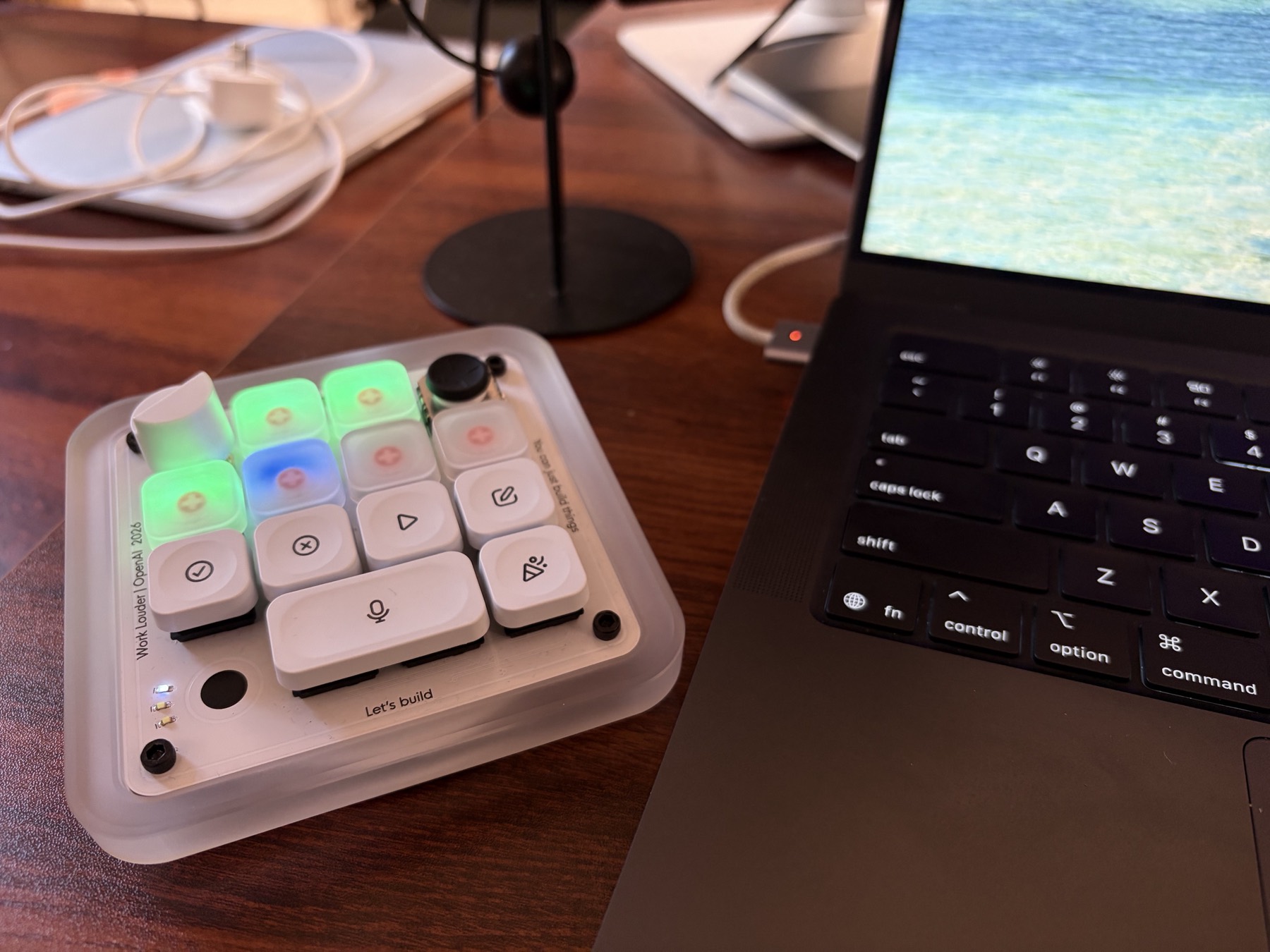
Six sessions, six keys. Blue is thinking, green finished, amber needs you. You find out
which one is blocked by glancing at your desk rather than cycling through tabs.
The same six states sit in the menu bar, so it works with the pad out of sight:

Documentation
| What it does | the states, the ring, how keys are assigned, jumping to a chat |
| Setting up | installing, the five setup steps, and what each permission is for |
| Settings | every pane — key mapping, colours, shows, permissions, updates |
| Other agents | Hermes and Pi, what they cannot do yet, and where help is wanted |
| Troubleshooting | the four things that usually go wrong |
[!NOTE]
Keep the pad on Layer 1. Per-key status renders only there — writes succeed on
other layers and simply do not appear.
[!IMPORTANT]
Unofficial and experimental. This rides a private Codex Micro HID command that can
change with any ChatGPT, Work Louder Input, or firmware update. Not affiliated with or
endorsed by OpenAI, Anthropic, or Work Louder.
Why
Running several Claude Code sessions at once, the expensive question is which one is
blocked on a permission prompt — cheap to answer, costly to miss. That is one bit of
ambient status per session, which is a bad fit for a screen and a good fit for six LEDs
under your hand.
What the colours mean
Hues follow OpenAI's own Codex Micro legend, so a key means the same thing whether Codex
or Claude painted it.
| State | Colour | Meaning |
|---|---|---|
| idle | #2E4A6B dim |
session started, nothing running |
| working | #0C47E9 breathing |
turn in progress |
| awaiting | #FF6A00 breathing |
blocked on a permission prompt — go here |
| stalled | #FF6A00 shallow |
waiting at an idle prompt |
| done | #09B821 |
turn finished, and it holds until you go back |
| error | #D41145 breathing |
turn failed |
done holds. Work that finished while you were elsewhere is still green when you look,
rather than having quietly reverted to idle. It clears when you go back and send that
session something — see What it does.
The ring
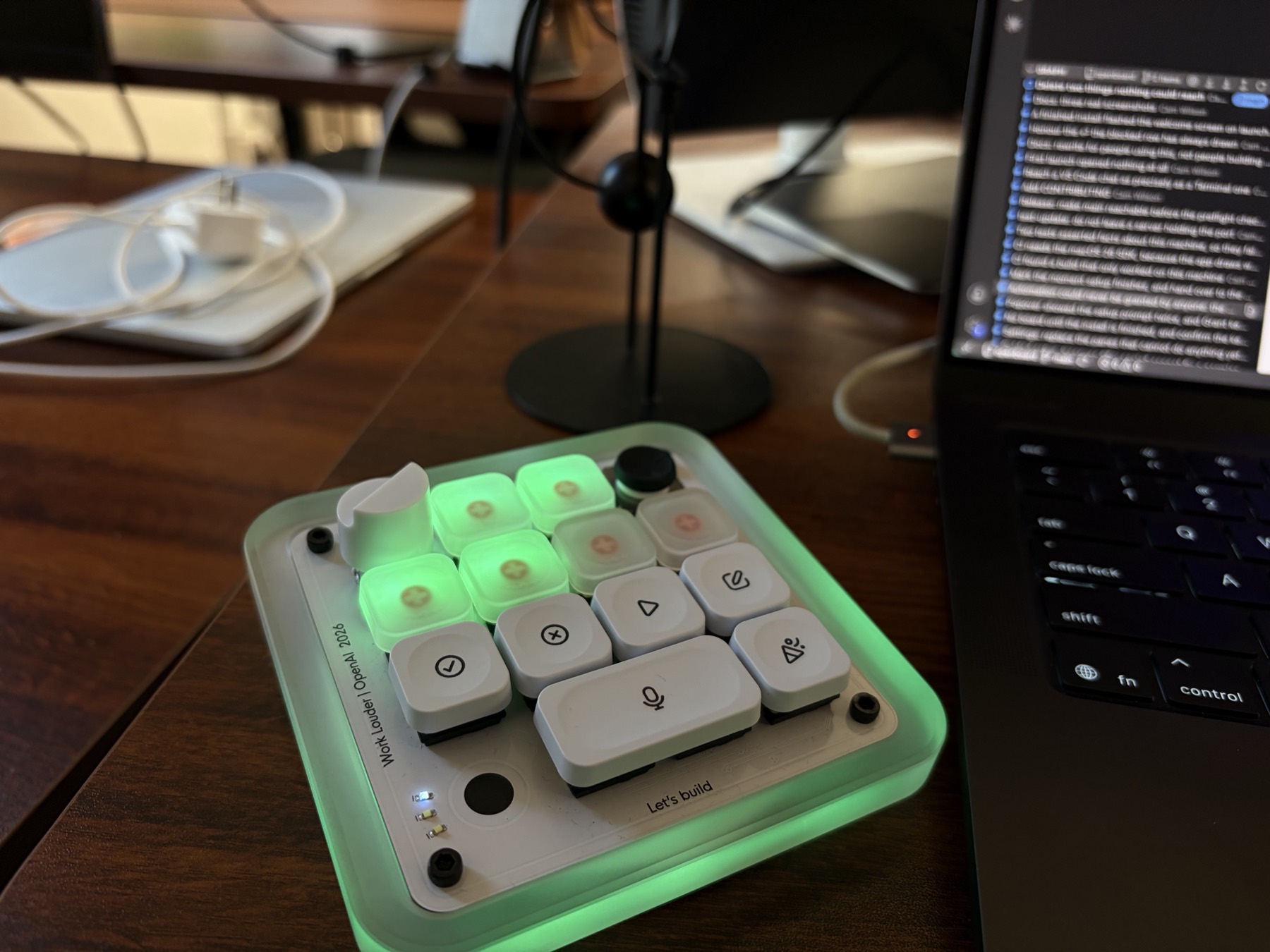
The outer ring summarises the whole board from across the room, where six small keys
cannot be read. It is dark by default and fires only when something changes — a ring
that is always lit is furniture; one that is dark until something happens is a
notification.
| Event | Ring |
|---|---|
| a chat finishes | green, one slow lap |
| a chat stops to ask something | orange, one lap |
| a turn fails | red heartbeat |
Failures get a different shape, not just a different colour: peripheral vision reads
motion before hue, so a failure must never be mistakable for a completion.
How keys are assigned
A session claims a key when it starts and keeps it. Keys are reused only once six
newer sessions have cycled through, and never one that is currently signalling awaiting
input.
This is deliberately unlike Codex's "most recent chats" mode, where a key number is your
rank in a live recency sort — so typing in one chat can repaint four other keys. Status
you cannot trust is worse than no status.
Only sessions running on this Mac get a key, because that is where the hooks execute.
Terminal, iTerm2, cmux and VS Code all work. Subagents deliberately do not — six keys is
a scarce budget — and anything remote is unreachable.
Other agents
Built for Claude Code, and that is the one tested at length — daily, for months,
across Terminal and both VS Code surfaces. Hooks install automatically and every state
works.
Two others are wired, from their documentation rather than from use, and each has a real
gap the app declares rather than hides:
| Claude Code | complete — automatic setup, every state |
| Hermes Agent | no completion event, so a key never turns green |
| Pi | no documented approval event, so a key never turns amber — the state this exists for |
This is where contributions would help most. If you use Hermes or Pi daily and know
whether those signals really are missing, that is worth more than a patch — see
Other agents.
Requirements
- macOS 14 or later, Apple Silicon or Intel
- A Work Louder Codex Micro or Creator Micro 2, paired over Bluetooth or USB
- Claude Code
That is the whole list. Neither the ChatGPT app nor Work Louder's Input app needs to be
installed — OpenBoard talks to the pad directly.
No runtime dependencies. The only network request it makes is the daily update check,
which you can turn off. Nothing about your sessions leaves the machine.
Install
brew install --cask camwilso/tap/openboard
Or download the zip from Releases,
unzip, and drag it to Applications. It is signed and notarized, so it opens normally.
Setting up
Open OpenBoard and it walks you through the rest. It has no Dock icon — it lives in the
menu bar.
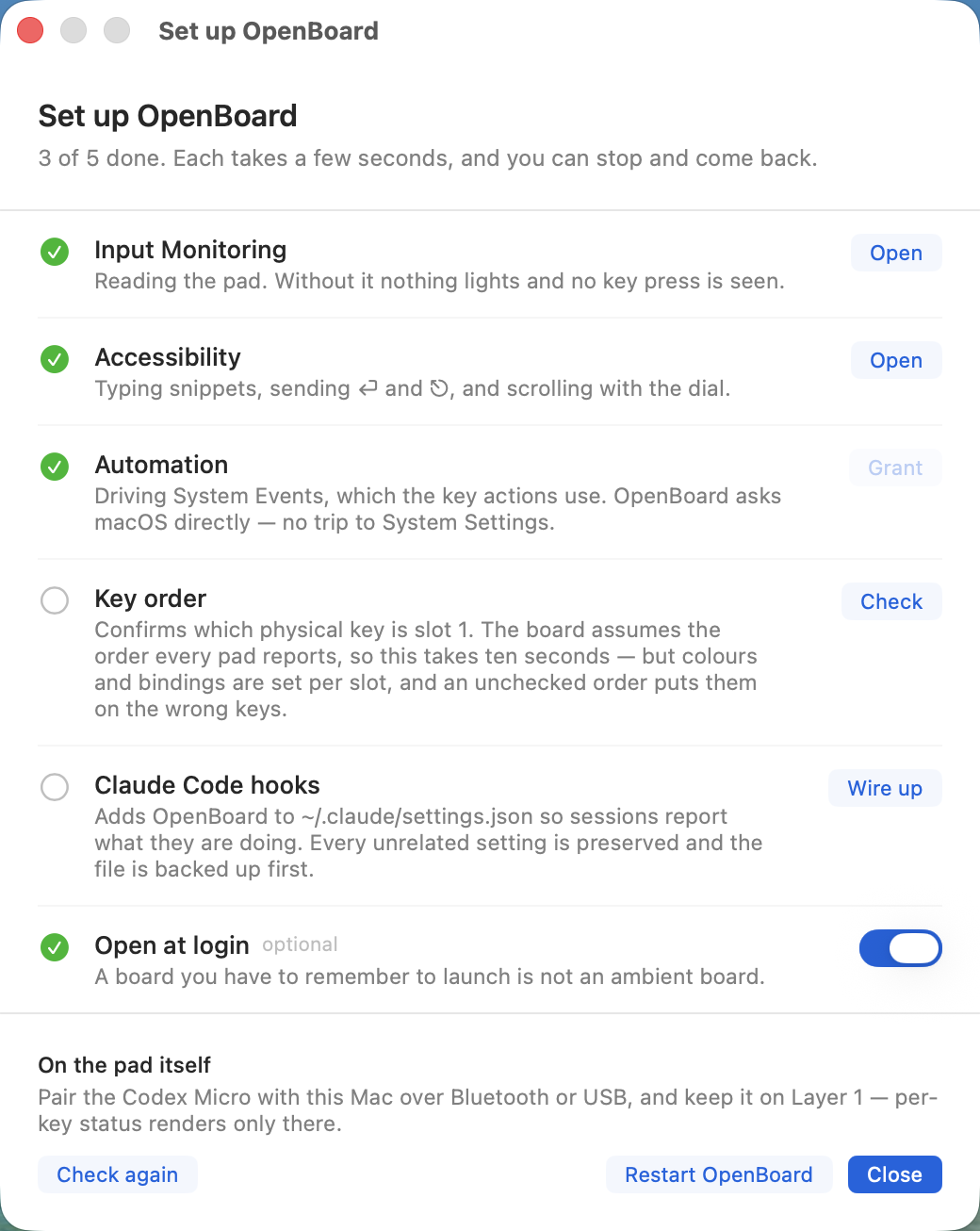
| Input Monitoring | reading the pad — every light and every key press |
| Accessibility | typing snippets, sending ⏎ and ⎋, custom shortcuts, scrolling with the dial |
| Automation | granted in place, without a trip to System Settings |
| Key order | ten seconds, and worth it — colours are set per slot |
| Claude Code hooks | so your sessions report what they are doing |
It is a checklist rather than a wizard, because two of those only take effect after
OpenBoard restarts. Stop and come back whenever; it works out what is left each time.
Setting up covers each step and what it is for.
Two things it cannot do for you, both on the hardware: pair the pad, and keep it on
Layer 1.
Hooks are read when a session starts, so open a new Claude Code session to see the
keys light. Sessions already running get a key immediately but will not report until they
restart.
Using it
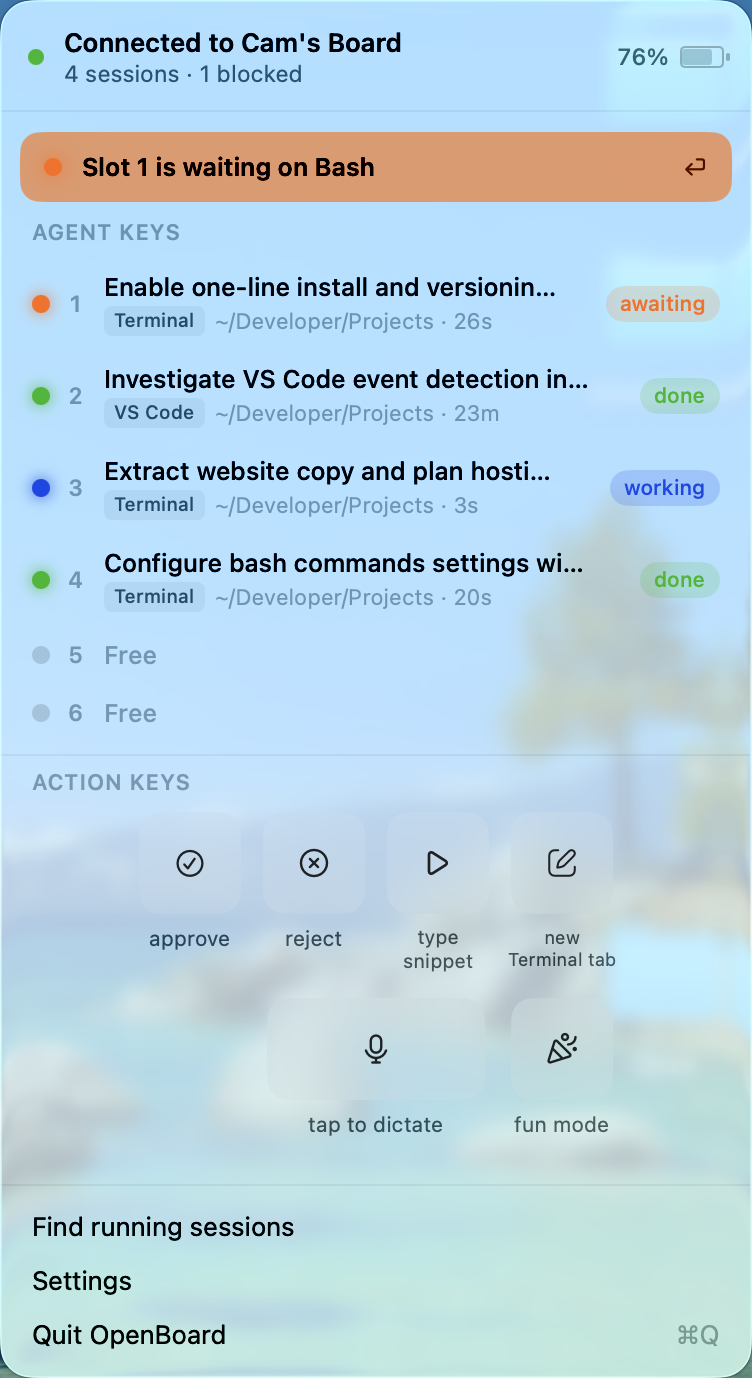
Press an Agent key to jump to that chat. In Terminal and iTerm2 it finds the exact
tab; in cmux it selects the exact surface, in whichever workspace it lives; in VS Code it
reveals the panel already holding that conversation. Nothing is ever opened by a jump —
an approximate jump beats an unrequested one that rearranges your editor.
Where OpenBoard cannot confirm which chat is in front of you, it refuses to answer a
prompt rather than sending ⏎ at whatever happens to be there.
Press the dial for the popover, hold it for Settings. Every other key is yours to
bind.
Every key other than the six Agent keys is yours to bind — pick what it does and which
keycap it wears:
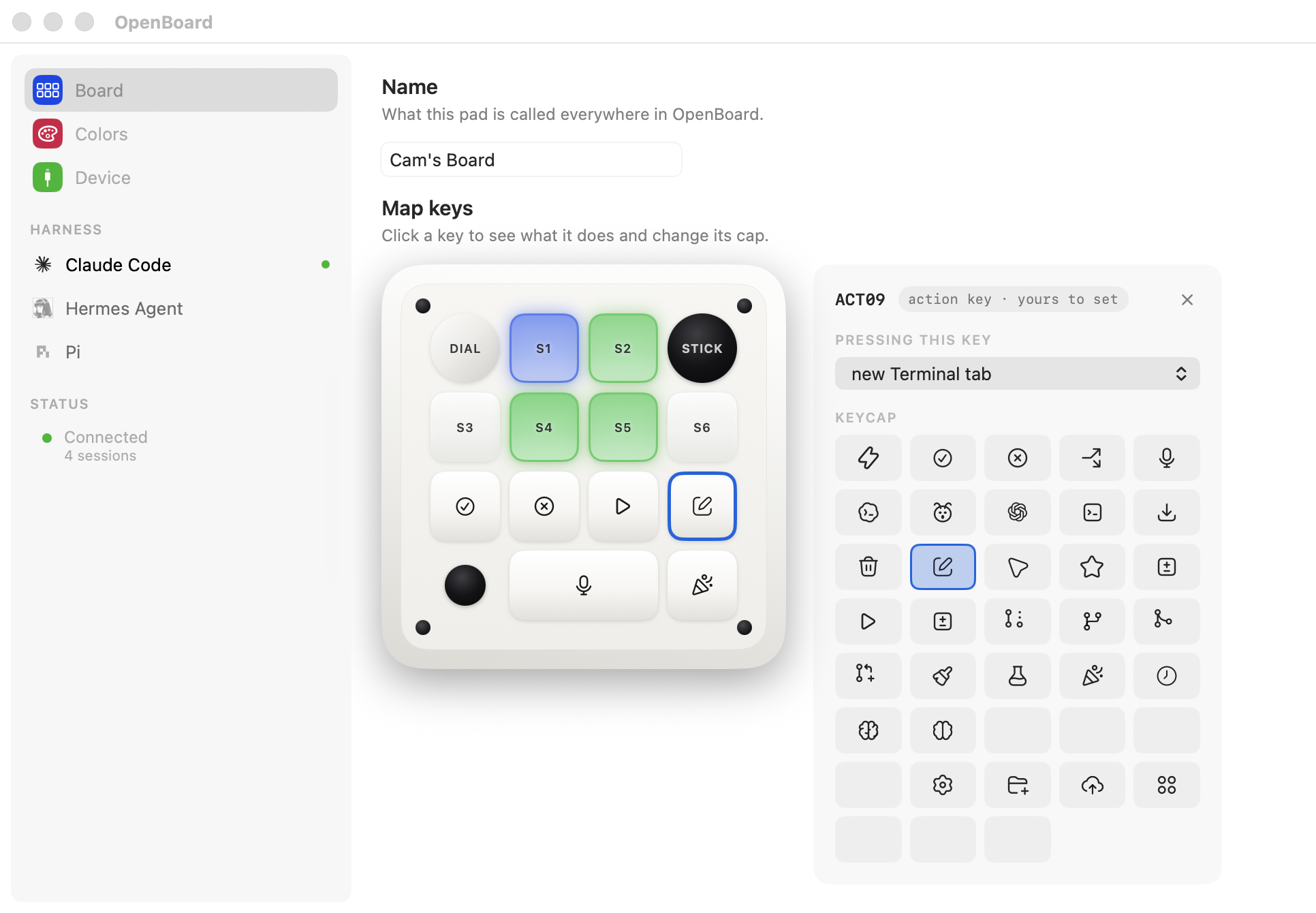
The ring has ten built-in shows beyond the three the board uses on its own, and fun mode
takes over the whole pad for the length of a song. Both live in Settings → Colors —
the full tour.
Updates
OpenBoard checks once a day and installs updates in place, which is what keeps its
permissions and hooks working. Take them.
Check manually or turn the daily check off in Settings → Device → Version.
Uninstall
- Turn the hooks off in Settings → Device — do this first
brew uninstall --zap --cask openboard
Do not skip the first step. Deleting the app without it leaves entries in~/.claude/settings.json pointing at a binary that is gone, and every session will try
to run it. --zap also removes your colours and calibration; without it they survive for
a reinstall.
Coexisting with Codex
The ChatGPT app is not required — without it, OpenBoard is the only thing driving the pad
and none of this applies. The ChatGPT app repaints these LEDs on its own schedule. If you use both, either set
Codex to Custom assignments and give it a subset of keys, or accept periodic repaint.
The two never interleave writes mid-message.
Fun mode
One of the action keys plays a video full-screen and drives the pad in time with it,
overriding live status until it finishes.
The video is not included — it is ~90MB and not mine to redistribute — but the beat map
is. Supply your own .mp4 of Europe – The Final Countdown and the show works with no
further setup:
The grid was built from this upload.
Save it as an .mp4, then:
open ~/Library/Application\ Support/OpenBoard/Media/the-final-countdown/
# drop the .mp4 in there — any filename, the first video found is used
It has to be the same cut. The grid is 4:55.5 long with the music starting 1.03s in,
so a remaster or a version with a different intro will drift. If yours differs, regenerate
the map — it takes one command and no dependencies.
See the-final-countdown for that, and for mapping songs of your
own.
Where things are kept
~/Library/Application Support/OpenBoard/ |
settings and calibration |
~/Library/Logs/OpenBoard/app.log |
what the app saw and did |
Settings are plain JSON and safe to hand-edit. Settings → Device → Files reveals
either in Finder.
The log contains session names — Claude Code's own summaries of what you are working on —
and working directory paths. It never leaves your machine, but it is worth knowing before
pasting it into a bug report.
Building it yourself
The app is a SwiftPM package and needs no Apple Developer account to compile:
git clone https://github.com/camwilso/openboard
cd openboard
mac/tools/bootstrap.sh
A build you signed yourself cannot update itself, so Check for Updates is hidden. See
CONTRIBUTING.md for the development setup and how releases are cut.
Author
OpenBoard is written and maintained by Cam Wilson — the app, the protocol work
against this pad, the session model, and everything in mac/.
License
MIT — Copyright © 2026 Cam Wilson.
Three things come from elsewhere and keep their own notices: the HID transport this is
built on was first published by @pejmanjohn incodex-micro-light (MIT),
Sparkle installs the updates, and three vendor brand marks
identify the harnesses in the sidebar. All are itemised in
THIRD-PARTY-NOTICES.md and VENDORED.md.
Reviews (0)
Sign in to leave a review.
Leave a reviewNo results found