rex-inbox
Health Warn
- License — License: MIT
- Description — Repository has a description
- Active repo — Last push 0 days ago
- Low visibility — Only 6 GitHub stars
Code Fail
- process.env — Environment variable access in scripts/phone-shot.mjs
- network request — Outbound network request in scripts/phone-shot.mjs
- rm -rf — Recursive force deletion command in scripts/screenshots.sh
- exec() — Shell command execution in web/app.js
- network request — Outbound network request in web/app.js
Permissions Pass
- Permissions — No dangerous permissions requested
No AI report is available for this listing yet.
One inbox for your coding agents, on top of Rex: approvals, questions, failures and messages, on your Mac and your phone.
rex-inbox
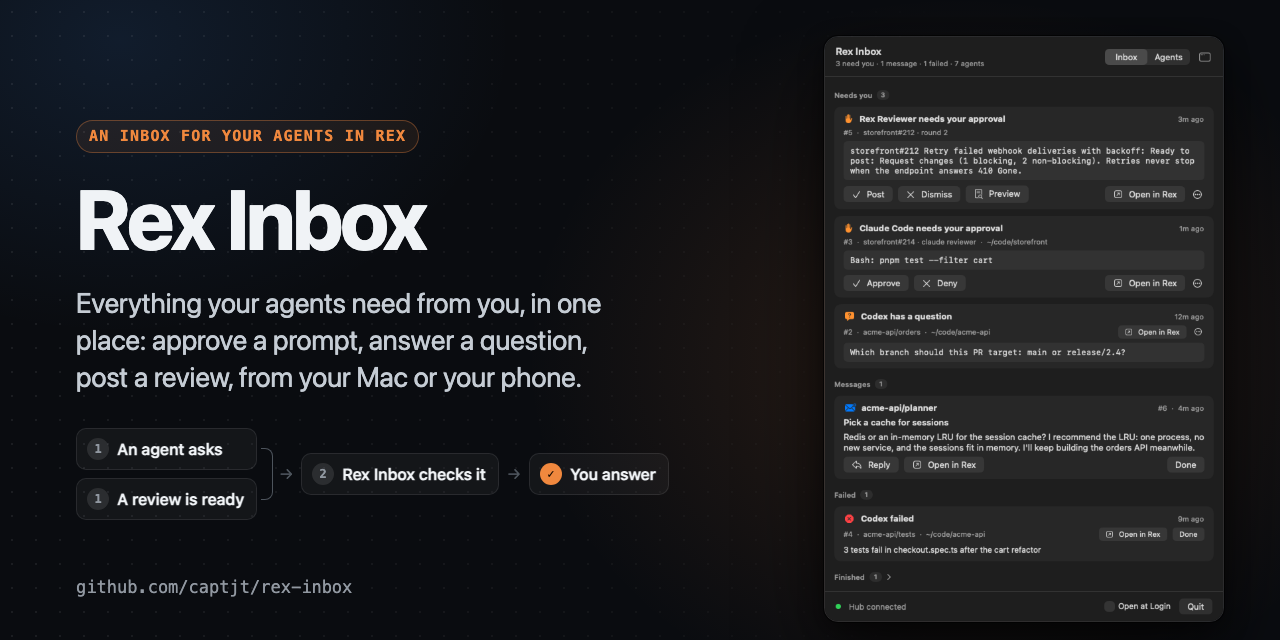
Everything your Rex agents need from you, and messages between them.
Rex already runs your agents' panes and
knows what each one is doing: Claude Code and Codex report working,blocked, done and error on their own (OSC 7501). rex-inbox turns that
into one inbox, lets agents message each other and you, and lets you
answer permission prompts without going to the pane.
The idea comes from Plannotator's
Inbox, by @backnotprop.
See Inspiration.
$ rex-inbox ls
Needs you
  #17  permission  Claude Code  solar-isle/alpha  ~/git/app  12s  approve Bash: rm approved.txt
Finished
  #12              Claude Code  restless-cliff/shell  ~/git/web  4m
Messages
  #7   unread  from solar-isle/planner  1m  Pick a cache

$ rex-inbox approve 17
#17 approved; the pane is now working
Rex is in private beta. rex-inbox needs a Rex build whose agents report
program status: Claude Code and Codex do on their own.
Requirements
- macOS and Rex
- Rust (edition 2024), for the hub and the CLI
- Swift 6 (Xcode or its command line tools), for the Mac app
- Optional:
terminal-notifier, for clickable notifications when the Mac
app isn't running;jqandsqlite3, forscripts/demo.sh; those plus
Node 22 or later and Google Chrome, forscripts/screenshots.sh
Install
git clone https://github.com/captjt/rex-inbox ~/src/rex-inbox
cd ~/src/rex-inbox
cargo install --path .
rex-inbox up          # the hub, as a LaunchAgent (logs: rex-inbox logs)
mac/build.sh          # Rex Inbox.app, in ~/Applications
macOS only for now. The hub talks to Rex only through the rex CLI.
Agents use it through the same CLI: rex-inbox send, inbox, read, andwait.
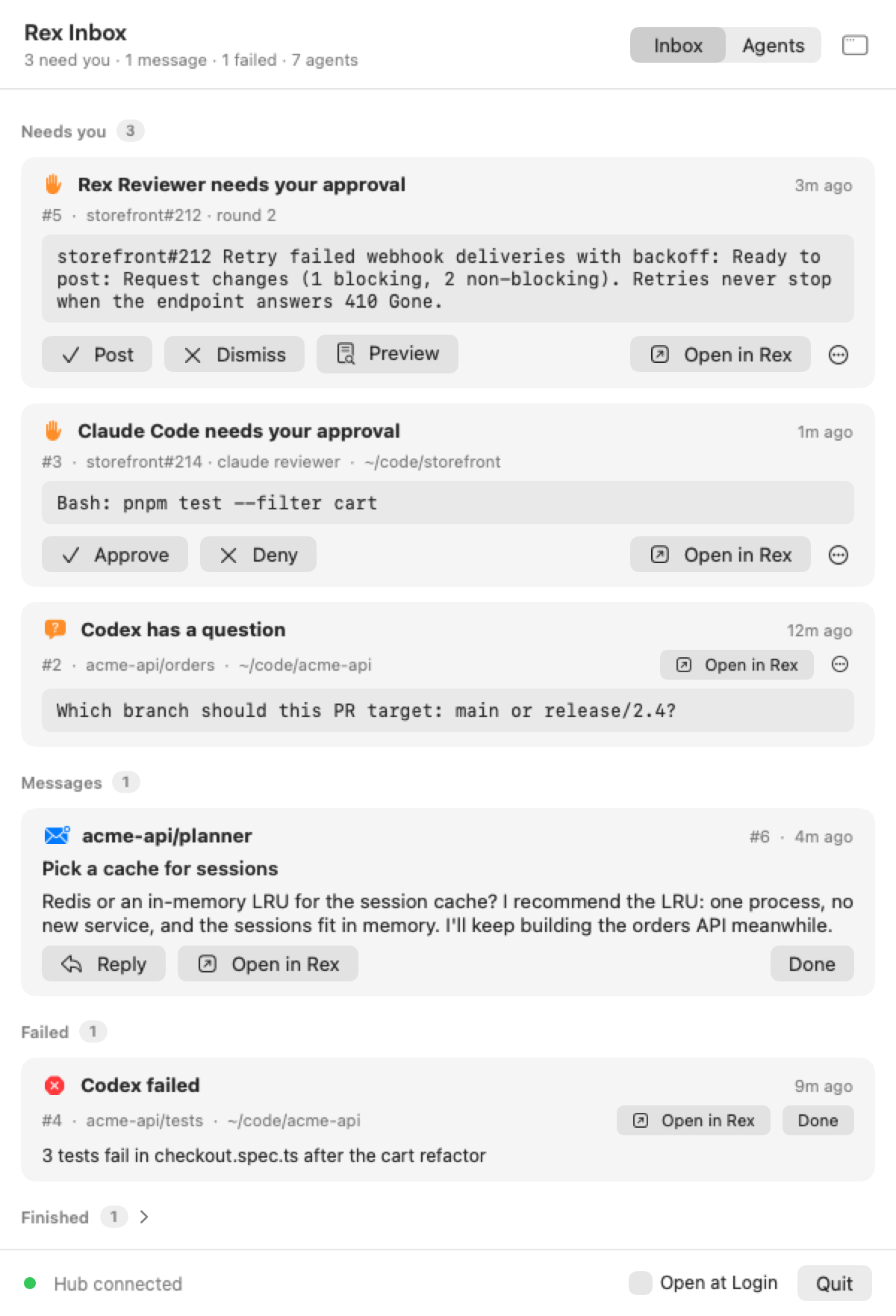
The Mac app
A tray in the menu bar turns orange with a count while something needs
you. Its panel is a quick look; the window button opens a full window with
a sidebar (Everything, Needs You, Messages, Failed, Finished, Agents). The
app shows in the Dock while that window is open.
|
|
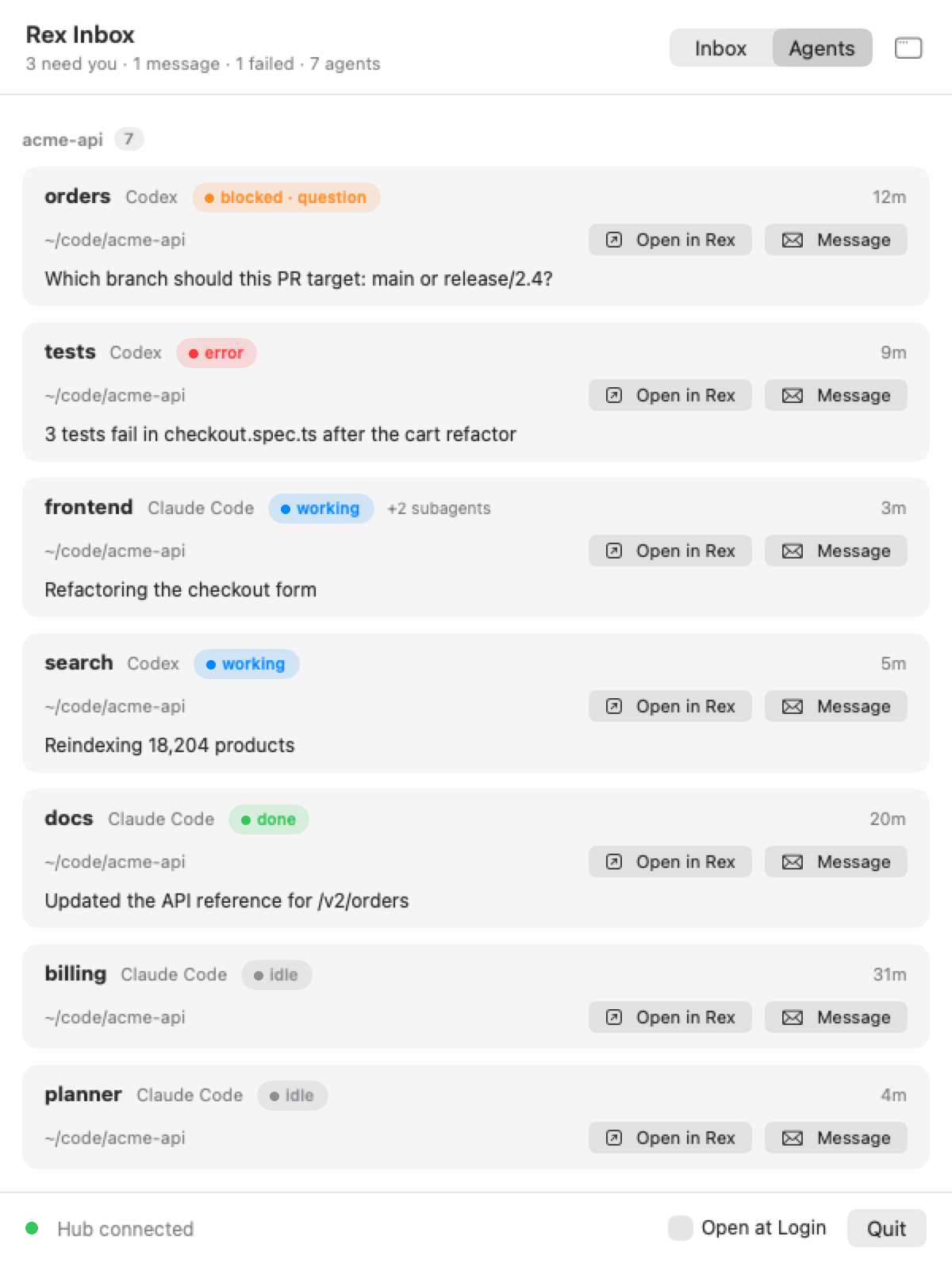
The agents and PRs are made up. scripts/screenshots.sh renders these again from a made-up Rex.
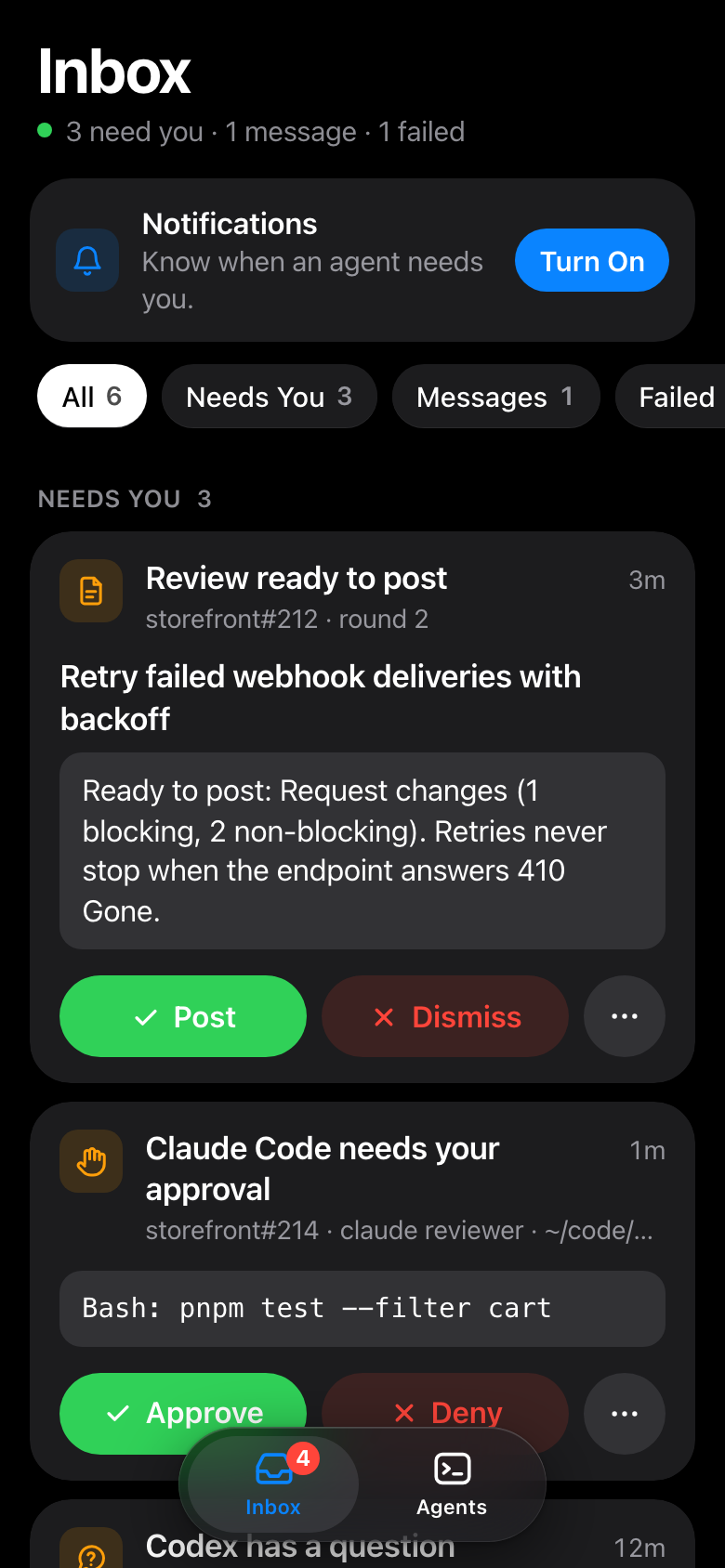
- Inbox: approve or deny a prompt, reply to a message, open the pane in
Rex, snooze, or mark done. - Agents: every agent pane by session; click one to open it, or
message it. - Notifications carry the answer: Approve and Deny, Post and Dismiss
for a review, or Reply.
RexInbox --snapshot out.png [--tab agents] [--window] renders the panel
(or the window) to a PNG without opening anything on screen.
scripts/demo.sh up fills your inbox with a made-up project (a Rex sessionacme-api of stand-in agents, and two messages to you), to try the app
without real agents; scripts/demo.sh down removes it.
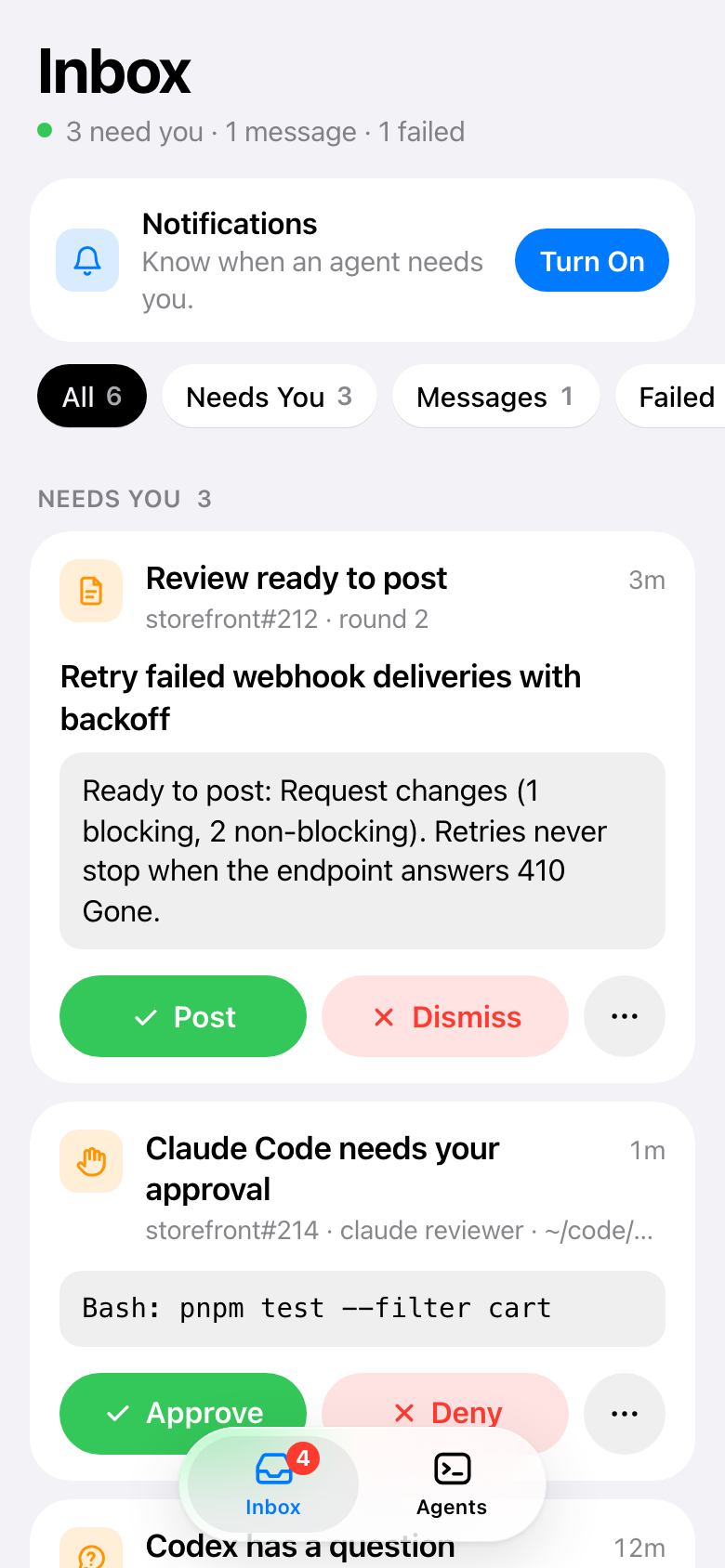
On your phone
The hub also serves a web app. Publish it on your tailnet, then add it to
your Home Screen for notifications. It needs no App Store and no
developer account.
brew install --cask tailscale-app   # sign in; same tailnet as the phone
# Tailscale admin console: turn on MagicDNS and HTTPS certificates
tailscale serve --bg 7430
rex-inbox web                       # prints the phone's address
Open that address in Safari, choose Share › Add to Home Screen, open it
from the Home Screen, and tap Turn On. Only your own Tailscale user gets
in. Web notifications on iOS have no buttons, so tap one, then approve in
the app.
Commands
ls [--all] [--history] |
What needs you: blocked, failed and finished agents, and messages to you. |
agents [--all] |
Every agent pane, where it is, and what it's doing. |
show N [--screen] |
One item; --screen adds the bottom of its pane. |
approve N, deny N |
Answer a permission prompt, only if it's still the one N shows. For a review rex-reviewer has ready: post it, or dismiss it. |
preview N |
A review rex-reviewer has ready, as it would post. |
open N |
Bring the item's pane to the front in Rex. |
done N, snooze N 1h, reopen N |
File an item. |
send --to NAME [--subject S] TEXT|- |
Message an agent's pane (reviewer, session/pane, a block id) or me. |
reply N TEXT|- |
Answer a message; it goes to the other side. |
inbox, read N, wait [--thread N] [--timeout S] |
An agent's own messages. |
name NAME, whoami |
Name this pane so others can reach it. |
web |
The phone web app's address, and how to publish it. |
status, watch, up, down, logs |
The hub. |
How it works
- Alerts mirror program status. A
blockedrecord becomes needs you,errorbecomes failed, and a rootdonebecomes finished. Each
clears itself when the record changes or the pane closes. Rex dropsdone
once you visit the pane. - Messages queue in the hub. A message is pasted into an agent's prompt
(then Enter) once the pane has beenidleordonefor two seconds. Plain
shell panes are never typed into. - Approve and deny re-read the prompt from Rex first. Keys go only if
it's the sameblockedpermission record, with the same message and
report time, and the only prompt in that pane. Claude Code gets1and
Escape. Other agents can only be opened, until their prompts are checked. - Notifications cover needs you, failed, and messages to you. Each
waits two seconds, and is dropped if you already answered.
With rex-reviewer
rex-reviewer runs agent PR
reviews in Rex. rex-inbox doesn't need it, and it doesn't need rex-inbox.
When both run:
- A review ready to post is an item. It has Post, Dismiss, and
Preview, in the app, in its notification, and on the phone. Open
shows the PR's tab. As with prompts, nothing happens unless the item is
still the one you saw, and rex-reviewer refuses once the round has moved on. - Its agents report through it. The reviewer and checker panes add no
Finished items, since the round moves on without you. They aren't listed
under Agents and take no messages. Their prompts and failures name the PR,
such asapi#12 · codex reviewer, and you answer the prompts as usual. - One icon alerts you. rex-reviewer's menu bar app stops badging what
needs you while the hub runs.
It works through what each one already publishes:
- rex-reviewer's watcher reports one program status record per PR
(app=rex-reviewer). - Its Rex actions take a record's id (
rex do reviewer_post item=…). - Its ledger in
~/.local/state/rex-reviewersays which panes are its.
On another host, where the hub can't read that ledger, the agents in a
session with a rex-reviewer pane count as its.
State
State lives in ~/.local/state/rex-inbox (SQLite and the hub's socket).
See DESIGN.md for the decisions and what comes next.
Inspiration
rex-inbox started from Plannotator's
Inbox, by @backnotprop.
There, your agents' questions, blockers, plans and diffs collect in one
place while they keep working. You get to them when you're ready, and each
agent carries on with your answer. rex-inbox brings that idea to agents
running in Rex:
- the inbox fills from what the agents already report to Rex;
- you can answer permission prompts from it;
- it follows you to your phone.
Thanks to @backnotprop for the idea, and for showing how well it works.
License
MIT. See LICENSE.
Reviews (0)
Sign in to leave a review.
Leave a reviewNo results found