gluon-agent
Health Warn
- License — License: MIT
- Description — Repository has a description
- Active repo — Last push 0 days ago
- Low visibility — Only 7 GitHub stars
Code Fail
- rm -rf — Recursive force deletion command in src/gluon/agent.py
Permissions Pass
- Permissions — No dangerous permissions requested
No AI report is available for this listing yet.
AI coding agent orchestrator — run parallel Claude Code tasks in sandboxed Docker containers, monitor from a Kanban board or chat bot.
Gluon Agent


AI orchestrator for managing multiple Claude Code agents across projects. Run AI-powered coding tasks with session persistence, git worktree isolation, and real-time monitoring via web dashboard or chat interface (Telegram, Discord). It runs in a containerized Docker environment each instance of the agent is isolated with bubblewrap sandboxing.
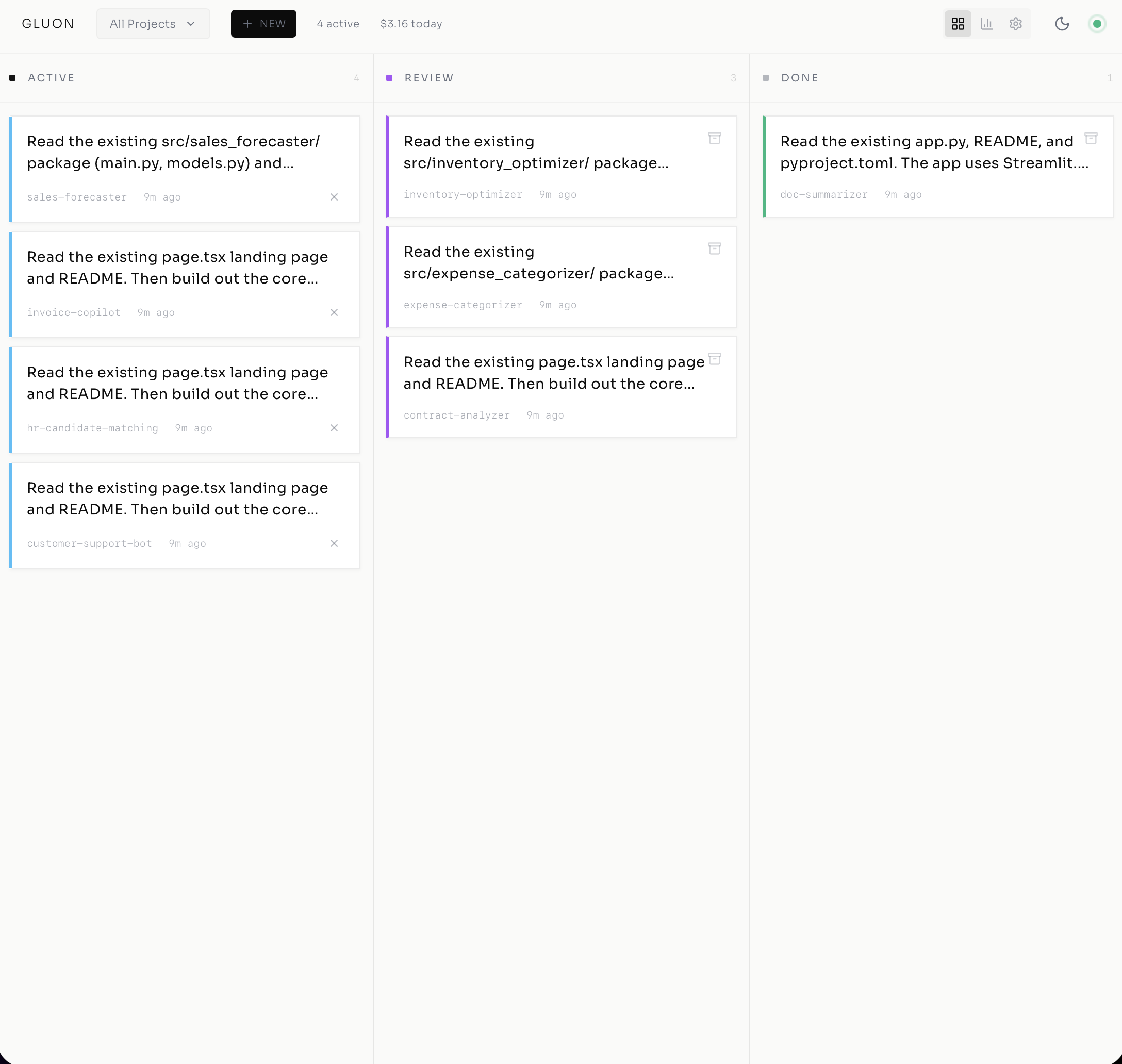
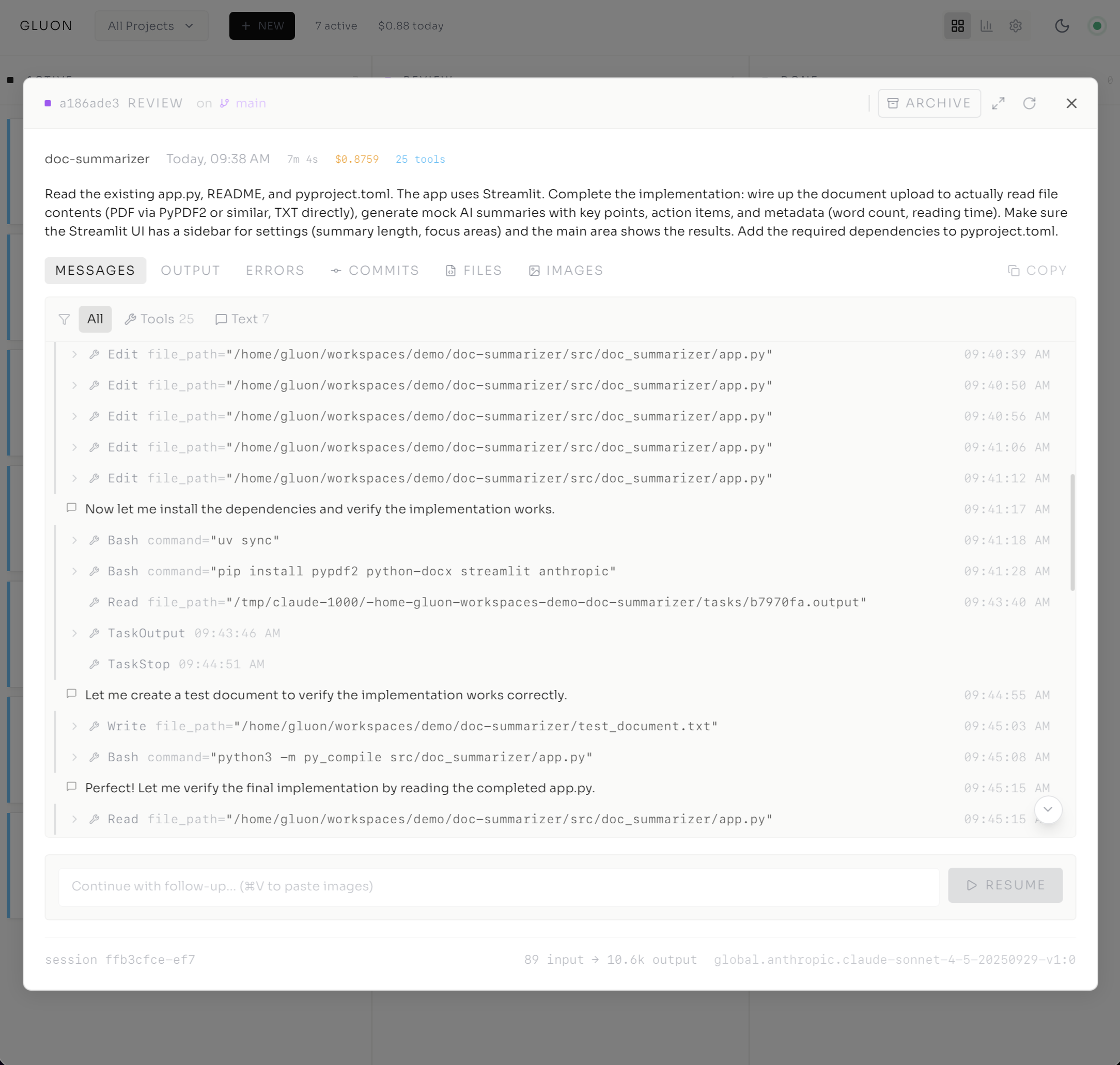
See all screenshots in docs/SCREENSHOTS.md
Table of Contents
- Why Gluon?
- Docker Quickstart
- Installation (from source)
- Quick Start (CLI)
- Features
- Web Dashboard
- Chat Bots
- Architecture
- Model Selection
- Documentation
- Data Storage
- Environment Variables
- Remote Access
- License
Why Gluon?
Run multiple AI coding agents in parallel, each in isolated git branches, while monitoring progress from a single dashboard. Deploy with Docker for containerized execution - AI agents run in isolated environments, keeping your host system secure. Perfect for:
- Running several feature implementations simultaneously
- Delegating bug fixes to AI agents while you focus on architecture
- Managing a backlog of AI-assisted tasks across multiple projects
- Teams wanting visibility into AI-assisted development work
No really, why the name Gluon?
Because every team needs a fundamental force for getting things (and code) to stick together.
In physics, a gluon is a massless, spin-1 gauge boson — in plain speak, it's the subatomic "glue" holding quarks together, keeping protons, neutrons, and the heart of atoms from flying apart like a badly managed project. Gluons do the heavy lifting in quantum chromodynamics, ensuring that the universe, as well as your software, doesn't unravel at the seams.
So, like its namesake, Gluon binds together your scattered projects and tasks, orchestrating collaboration with the (strong) force of a particle accelerator and the finesse of quantum mechanics. Strong interaction? That's our vibe.
Docker Quickstart
Run Gluon from a pre-built image — no clone or build required:
# 1. Download the compose file and env template
curl -fsSL https://raw.githubusercontent.com/carrotly-ai/gluon-agent/main/docker-compose.yml -o docker-compose.yml
curl -fsSL https://raw.githubusercontent.com/carrotly-ai/gluon-agent/main/.env.example -o .env

# 2. Edit .env with your credentials
#    At minimum set: PUID, PGID, GH_TOKEN, GIT_USER_NAME, GIT_USER_EMAIL, AWS_BEARER_TOKEN_BEDROCK
#    Find your UID/GID with: id -u && id -g

# 3. Start the container
docker compose up -d

# 4. Open the dashboard
open http://localhost:45866
The image is published to ghcr.io/carrotly-ai/gluon-agent:latest on every push to main.
Prerequisites: Docker, a Claude Code CLI auth session at
~/.claude, and AWS credentials at~/.awsfor Bedrock access.
Docker Features:
- PUID/PGID Support - Container adapts to any host user's UID/GID — no permission issues with bind mounts
- HTTPS Git Authentication - Uses
GH_TOKENfor GitHub access (no SSH keys needed) - MCP Server Auto-Registration - Mount
.mcp.jsonto auto-register MCP servers on startup - Pre-built Image -
ghcr.io/carrotly-ai/gluon-agent:latestupdated on every push tomain
See DOCKER.md for detailed deployment instructions, building from source, and docker-compose.dev.yml for local development.
Installation (from source)
# Clone the repository
git clone https://github.com/carrotly-ai/gluon-agent.git
cd gluon-agent

# Create virtual environment and install
uv venv
uv pip install -e .

# Or install with bot support
uv pip install -e '.[telegram]'      # Telegram bot
uv pip install -e '.[discord]'       # Discord bot
uv pip install -e '.[all]'           # All features
Requirements: Python 3.12+, Claude Code CLI installed and authenticated, uv package manager, AWS credentials for Bedrock, Git, GitHub CLI (gh) optional.
Quick Start (CLI Reference)
1. Register a Project
gluon project add myapp ~/projects/myapp
2. Run a Task
# Interactive mode (see output in terminal)
gluon run myapp 'Fix the authentication bug in login.py'

# Background mode (monitor via dashboard)
gluon run myapp 'Implement user registration' --background

# Use git worktree for isolated branch
gluon run myapp 'Add dark mode support' --background --worktree
3. Run a Formula (Multi-Step Workflow)
# Full feature lifecycle: Plan → Implement → Test → Review
gluon formula run feature myapp --var description="Add dark mode support"

# Bug diagnosis and fix: Diagnose → Fix → Test
gluon formula run bugfix myapp --var description="Login fails on expired tokens"
4. Resume with Follow-up
# Continue the conversation
gluon resume myapp 'Also add unit tests for the new code'
5. Monitor Progress
# Check all runs
gluon runs

# View specific run logs
gluon logs <run-id>
gluon logs <run-id> -f  # Follow live
Features
Core Capabilities (CLI Reference)
- Multi-Project Management - Register projects and workspaces, run tasks across your entire codebase
- Session Resume - Continue Claude sessions with follow-up prompts, keeping full context
- Unified Task Tracking - All tasks visible across all interfaces (CLI, Web, Telegram, Discord)
- Model Selection - Choose between Haiku (fast), Sonnet (balanced), or Opus (complex tasks)
- Formula Workflows - YAML-defined multi-step pipelines (Plan → Implement → Test → Review) that execute as a single unified run
- Blueprint Validation - Automatic lint auto-fix, lint loop, and test gates after agent completion
- Work Queue - Shared task queue for batching and scheduling work items across projects
- Merge Queue - Sequential PR merge processing with conflict detection and retry
- System Diagnostics - Built-in
doctorcommand for health checks and auto-fix
Security & Isolation (Docker)
- OS-Level Sandboxing - Each agent runs inside a bubblewrap sandbox (Linux) or
sandbox-exec(macOS), restricting filesystem access to the git worktree - Git Worktree Isolation - Every task operates in its own worktree so agents never touch your main branch or other tasks' files
- Minimal Docker Runtime -
python:3.12-slim-bookwormbase with non-rootgluonuser; no full host filesystem access - Scoped Volume Mounts - Only specific directories are mounted into the container (
~/.claude,~/.gluon,~/workspaces), with common credentials (~/.aws,~/.config/gh) mounted read-only - Browser Session Isolation - Each agent run gets its own
agent-browsersession, preventing cross-task cookie/state leakage - Sandbox-Aware Tool Approval - When sandboxed, bash commands are auto-approved (the sandbox enforces boundaries), while git is excluded from the sandbox to allow commits and pushes
- Resource Limits - Docker Compose enforces CPU and memory caps (default 8 CPU / 12 GB) to prevent runaway agents from starving the host
Web Dashboard (docs · screenshots)
- Kanban Board - Drag-and-drop task management with Queue, Running, Review, and Done columns
- Real-Time Log Streaming - WebSocket-powered live log output with collapsible tool call visualization
- Run Details Modal - View messages, tool calls, commits, file diffs, and attachments
- Notification Center - Bell icon with unread count, persistent notification history, mark read/unread
- Global Question Modal - AskUserQuestion prompts appear as modal overlays from any page with run context (project, branch, task prompt), countdown timer, and multi-select/single-select support
- Full-Screen Mode - Expanded view for detailed run analysis
- Message Filtering - Filter by tools, text, or errors with counts
- Toast Notifications - Instant feedback for merge and PR actions
- Browser Notifications - Desktop push notifications for completed/failed runs and pending questions when tab is unfocused
- Recovery UI - Visual indicator when recovering interrupted runs with progress tracking
- Activity Feed - Cross-agent event stream showing run completions, PR actions, and system events
- Work Queue Panel - Queue and schedule tasks across projects from the dashboard
- Merge Queue Panel - Monitor and manage sequential PR merges with conflict status
- Formula Step Progress - Violet progress bar on run cards showing current step in multi-step workflows
- Witness Health Indicators - Real-time health classification dots on running tasks (healthy, slow, looping, stuck)
- Input Required Badges - Visual indicators on run cards when agents are waiting for user input
Progressive Web App (PWA)
- Installable App - Install on mobile/desktop for native-like experience
- Offline Support - Service worker caching with offline state detection
- Pull-to-Refresh - Native mobile gesture for refreshing in PWA mode
- Animated Offline Indicator - Friendly visual feedback when connection lost
- Update Notifications - Banner alerts when new version is available
Git Integration (docs)
- Worktree Isolation - Each task runs in its own git branch without affecting main
- PR Integration - Create PRs directly from the dashboard with one click
- Conflict Detection - Automatic detection of merge conflicts with file-level details
- AI Conflict Resolution - One-click to have Claude rebase and resolve merge conflicts
- Local & Remote Support - Works with both GitHub repos and local-only repositories
Chat Bot Features (Telegram · Discord)
- Natural Language Interface - Chat with Gluon using natural language commands
- 40+ MCP Tools - Comprehensive tools for project, git, branch, and conflict management
- Discord DM Support - Run tasks via direct messages with project specifiers (
project:myapp) - Model Selection via Flags - Use
--model opusin Discord/Telegram to specify models - Channel Topic Config - Configure default project and model via Discord channel topics
- Tool Call Visualization - See agent tool calls in real-time during execution
Ralph Loop (Autonomous Mode) (docs)
- Autonomous Execution - Claude works continuously until task completion
- Completion Detection - RALPH_STATUS blocks, keyword matching, TODO file parsing
- Circuit Breaker - 3-state machine prevents runaway loops (CLOSED → HALF_OPEN → OPEN)
- Rate Limiting - Hourly API call limits and optional cost caps
- Supervision Daemon - Background auto-resume for tasks in REVIEW status
- Session Continuity - Claude maintains context across loop iterations
# Start autonomous ralph run
gluon run myapp "Implement auth system" --ralph --max-loops 50 --max-cost 10

# Monitor progress
gluon ralph status <run_id>

# Start supervisor daemon for auto-resume
gluon supervisor start
Formula Workflows
YAML-defined multi-step pipelines that execute as a single unified run. Each step gets its own Claude session but shares the same git worktree, run ID, and cost tracking.
Built-in formulas:
| Formula | Steps | Description |
|---|---|---|
feature |
Plan → Implement → Test → Review | Full feature development lifecycle |
bugfix |
Diagnose → Fix → Test | Bug diagnosis and resolution |
# List available formulas
gluon formula list

# Run a feature formula
gluon formula run feature myapp --var description="Add user authentication"

# Run a bugfix formula
gluon formula run bugfix myapp --var description="Login fails on expired tokens"

# Validate a custom formula template
gluon formula validate my-formula.yml
How it works:
- The first step creates an
ExecutionRunin a git worktree - Subsequent steps resume the same run with
fresh_session=True— new Claude session, same worktree - The Kanban board shows a single card with a step progress bar (e.g., "Step 2/4 Implement")
- Cost accumulates across all steps on the single run
Custom formulas: Place .yml files in src/gluon/formulas/ or a project-level formulas/ directory.
Blueprint Validation
Automatic code quality gates that run after each agent completion (for standard profile steps):
- Auto-fix — Runs the project's linter with auto-fix (e.g.,
ruff check --fix && ruff format .) - Lint loop — If lint errors remain, the agent is resumed to fix them (up to 3 attempts)
- Test gate — Runs the project's test suite; failures trigger an agent resume to fix
Blueprint validation is enabled by default and can be toggled in the web dashboard Settings. It only runs for standard profile steps — planning and review profiles skip validation.
Work Queue & Merge Queue
Work Queue — Batch and schedule tasks across projects:
gluon queue add myapp "Implement feature X"
gluon queue list
gluon queue cancel <item-id>
Merge Queue — Sequential PR merge processing with conflict detection:
gluon merge list
gluon merge retry <entry-id>
gluon merge cancel <entry-id>
Both queues are accessible from the web dashboard with real-time WebSocket updates.
Witness Health Monitor
Background health classification for running agents. The witness periodically evaluates agent behavior and classifies runs as:
| Classification | Meaning |
|---|---|
healthy |
Normal progress |
slow |
Below expected throughput |
looping |
Repeating similar actions |
stuck |
No meaningful progress |
zombie |
Process alive but unresponsive |
gluon witness <run-id>
Health status appears as colored dots on running task cards in the web dashboard.
System Diagnostics
# Check system health
gluon doctor

# Auto-fix fixable issues
gluon doctor --fix
gluon doctor fix
Checks Claude CLI availability, AWS credentials, database integrity, disk space, and more.
Activity Log
Cross-agent event stream showing run completions, PR actions, merge queue events, and system events:
gluon activity
Also available as a dedicated panel in the web dashboard.
Agent Teams (Experimental)
Leverage Claude Code's Agent Teams capability to have a lead agent coordinate multiple subagents working in parallel on different parts of a task. Gluon tracks subagent lifecycle via SDK hooks and keeps the session alive until all team members finish, then prompts the lead agent to synthesize results.
How it works:
- You submit a prompt that describes a multi-part task
- Claude spawns subagents via the
Tasktool, each working on a portion concurrently - Gluon's
SubagentTrackermonitors start/stop events to know when team members finish - The lead agent synthesizes results from all subagents into a cohesive output
Enable globally via the web dashboard settings, or per-task via the API:
# Per-task via API
curl -X POST http://localhost:45866/api/runs \
  -H 'Content-Type: application/json' \
  -d '{"project_id": "myapp", "prompt": "...", "agent_teams": true}'
Prompt structure for best results:
Agent teams work best when the prompt clearly decomposes into parallel subtasks. Structure prompts with explicit deliverables that subagents can own independently:
Refactor the authentication module:

1. **API layer** — Update route handlers in src/api/auth.py to use the new token format
2. **Database layer** — Migrate the sessions table schema and update the ORM models
3. **Tests** — Add integration tests covering the new token flow and session expiry

Each area can be worked on independently. Coordinate at the end to ensure consistency.
Tips:
- List 2-5 distinct subtasks that can run concurrently without blocking each other
- Mention shared files or interfaces that subagents should be aware of
- End with a synthesis instruction so the lead agent knows to reconcile the work
- Pair with
--model opusfor the lead agent to get better task decomposition
See the Claude Code Agent Teams documentation for full details on how the underlying SDK orchestrates subagents.
Browser Automation & Screenshots
- agent-browser - Pre-installed Chromium for headless browser automation (open, click, type, screenshot)
- Screenshot Interception - Screenshots captured via
agent-browser screenshotare automatically stored as run attachments - Inline Screenshot Messages - Screenshots appear as clickable thumbnails in both the Messages and Images tabs
- System Fonts - Docker image includes Liberation, Noto CJK, DejaVu, and FreeFonts for high-quality screenshot rendering
Additional Features
- Image Attachments - Paste screenshots/diagrams for AI context (Cmd+V in resume prompt)
- Usage Tracking - Monitor costs, tokens, and usage per project
- Docker Deployment - Full containerized deployment with docker-compose
- CI/CD Workflows - GitHub Actions for CI and Docker image publishing
- Log Persistence - Stdout, stderr, and structured message logs for every run
- Mobile Optimized - iOS Safari zoom prevention, touch-friendly interactions
- Context Overflow Recovery - Automatic recovery when agent exceeds context window (
gluon recover) - Log Cleanup - Retention-based cleanup of old log files (
gluon cleanup) - Disk Stats - Monitor
~/.gluondisk usage (gluon stats)
Web Dashboard (docs · API)
gluon web
# Open http://localhost:45866
The dashboard provides:
| View | Description |
|---|---|
| Kanban Board | Queue → Running → Review → Done columns with drag-and-drop |
| Activity Feed | Cross-agent event stream (run completions, PRs, merges) |
| Work Queue | Batch and schedule tasks across projects |
| Merge Queue | Sequential PR merge processing with conflict status |
| Settings | Configure models, blueprints, agent teams, and more |
Run Details include:
- Live message stream with tool call visualization
- Git commits and file diffs
- Image attachments and browser screenshots
- Cost and token usage tracking
- Formula step progress (for multi-step workflows)
- One-click PR creation and merge
- Witness health classification
Chat Bots (Telegram · Discord)
Telegram
export GLUON_TELEGRAM_TOKEN="your-bot-token"
export GLUON_TELEGRAM_USERS="123456789"  # Allowed user IDs
gluon bot
Discord
export GLUON_DISCORD_TOKEN="your-bot-token"
export GLUON_DISCORD_GUILD="your-guild-id"
gluon discord
Natural Language Interface
Chat with Gluon using natural language:
"Run a task on myapp to fix the login bug"
"What's the status of my running tasks?"
"Show me the logs for the last task"
Architecture (docs)
graph TB
    subgraph Interfaces
        CLI[CLI]
        WEB[Web Dashboard]
        TG[Telegram Bot]
        DC[Discord Bot]
        WH[Webhooks]
    end

    subgraph Core
        ORCH[Orchestrator Agent]
        RUNNER[Task Runner Agent]
    end

    subgraph Workers [Execution Workers]
        subgraph Worker1 [Worker 1 - Local]
            AGENT1[Gluon Agent]
            SDK1[Claude Agent SDK]
            CLAUDE1[Claude CLI]
        end

        subgraph WorkerN [Worker n - Remote]
            AGENTN[Gluon Agent]
            SDKN[Claude Agent SDK]
            CLAUDEN[Claude CLI]
        end
    end

    subgraph Services
        STORE[(SQLite)]
        GIT[Git Manager Agent]
        EBUS[Event Bus]
        REDIS[Redis Pub/Sub]
    end

    CLI --> ORCH
    WEB --> ORCH
    TG --> ORCH
    DC --> ORCH
    WH --> ORCH

    ORCH --> RUNNER
    ORCH --> GIT
    RUNNER --> STORE
    RUNNER --> GIT
    RUNNER --> AGENT1
    RUNNER -.-> AGENTN
    RUNNER --> EBUS
    EBUS --> REDIS
    REDIS --> WEB

    AGENT1 --> SDK1
    SDK1 --> CLAUDE1

    AGENTN --> SDKN
    SDKN --> CLAUDEN
Model Selection
| Model | Best For | Flag |
|---|---|---|
| Haiku | Quick fixes, simple tasks | --model haiku |
| Sonnet | Most coding tasks (default) | --model sonnet |
| Opus 4.6 | Complex refactoring, architecture (latest) | --model opus |
| Opus 4.5 | Previous generation Opus | --model opus-4.5 |
gluon run myapp 'Fix typo' --model haiku
gluon run myapp 'Implement OAuth' --model sonnet
gluon run myapp 'Redesign database schema' --model opus
Documentation
| Document | Description |
|---|---|
| CLI Reference | Complete CLI command reference |
| Web Dashboard | Dashboard features and API |
| Ralph Loop | Autonomous execution mode and supervision |
| Agent Teams | Claude Code multi-agent coordination (external) |
| Git Operations | Worktrees, PR integration, conflict resolution |
| Telegram Bot | Telegram setup and commands |
| Discord Bot | Discord setup and commands |
| Docker | Container deployment |
| Architecture | System architecture and data models |
| API Reference | REST and WebSocket API |
| Screenshots | Web UI and mobile PWA gallery |
| Development | Contributing and extending |
Data Storage
~/.gluon/
├── gluon.db          # SQLite database
├── images/           # Image attachments
└── logs/             # Per-run logs
    └── <run_id>/
        ├── stdout.log
        ├── stderr.log
        └── messages.jsonl
Environment Variables
Bot Configuration
| Variable | Description |
|---|---|
GLUON_TELEGRAM_TOKEN |
Telegram bot token |
GLUON_TELEGRAM_USERS |
Allowed Telegram user IDs (comma-separated) |
GLUON_DISCORD_TOKEN |
Discord bot token |
GLUON_DISCORD_GUILD |
Discord guild (server) ID |
GLUON_DISCORD_USERS |
Allowed Discord user IDs (comma-separated) |
Docker-Specific
| Variable | Description |
|---|---|
PUID |
Host user UID — container runs as this user (default 1000, find with id -u) |
PGID |
Host group GID — container runs as this group (default 1000, find with id -g) |
GH_TOKEN |
GitHub token for HTTPS authentication (replaces SSH) |
GIT_USER_NAME |
Git commit author name |
GIT_USER_EMAIL |
Git commit author email |
VERCEL_TOKEN |
Vercel API token (optional, used as fallback when not set in Settings UI) |
Remote Access
Run Gluon on a home server (e.g., Mac mini) and access it securely from anywhere using Tailscale, a zero-config VPN:
- Install Tailscale on your server and devices
- Start Gluon:
gluon webordocker compose up -d - Access the dashboard from any device via your Tailscale IP:
http://your-server:45866
This enables monitoring and managing AI coding tasks from your phone, tablet, or laptop while on the go - with the PWA providing a native app-like experience on mobile.
Credits & Inspiration
I was an early user of Vibe Kanban (https://www.vibekanban.com) and was inspired by the concept of a Kanban board for AI-assisted development. I wanted to create a similar experience for Gluon, but with a focus on multi-project orchestration.
License
MIT License - see LICENSE for details.
Contributing (docs)
Contributions are welcome! Please read DEVELOPMENT.md for guidelines.
Reviews (0)
Sign in to leave a review.
Leave a reviewNo results found