hinoki
Health Uyari
- License — License: MIT
- Description — Repository has a description
- Active repo — Last push 0 days ago
- Low visibility — Only 5 GitHub stars
Code Gecti
- Code scan — Scanned 12 files during light audit, no dangerous patterns found
Permissions Gecti
- Permissions — No dangerous permissions requested
Bu listing icin henuz AI raporu yok.
Pre-alpha Python API framework with a Rust core and native HTTP server (Kiso). High-throughput HTTP & ORM execution, agent-ready (MCP, hinoki llms, llms.txt, AGENTS.md), typed schemas, reviewed SQL migrations, and hinoki check rules.

Typed Python APIs. Architecture rules you can run.
A Python framework for HTTP APIs, with a Rust core and its own Rust server, Kiso.






Documentation · Quick start · Tutorial · Benchmarks · Examples · Status
Real terminal output recorded by scripts/readme_demo.py; waits are shortened, and the posts app's source files and migrations are written off screen.
[!WARNING]
Pre-alpha, not released. In the planned0.1.xline, documented Python, CLI, settings and runtime contracts, plus migration files, stay compatible across patch releases. Additions and fixes for incorrect behavior remain possible and will be described in the changelog. Breaking changes may arrive in a later0.y.0; there is no fixed deprecation period and no compatibility promise for undocumented internals or old framework versions. Review migrations and use disposable data when evaluating Hinoki. The package will be namedhinoki-api; thehinokipackage on PyPI is an unrelated project.
Hinoki is a Python framework for typed HTTP APIs with a Rust core. Apps run on Kiso, Hinoki's own HTTP server, written in Rust on hyper, tokio and rustls: hinoki dev and hinoki serve use it by default, and --server granian runs Granian instead. Routing, schema validation and serialization, and ORM execution run in Rust for high throughput (benchmarks). You declare schemas, access policies and atomic writes in plain Python; hinoki check turns architecture rules into findings with a file, a line and a fix. Projects are agent-ready out of the box, with built-in application and development MCP servers, hinoki llms / llms.txt endpoints, and a generated AGENTS.md.
How it works · Quick start · Write an API · What you get · API docs · Admin · Python and Rust · Status
How it works
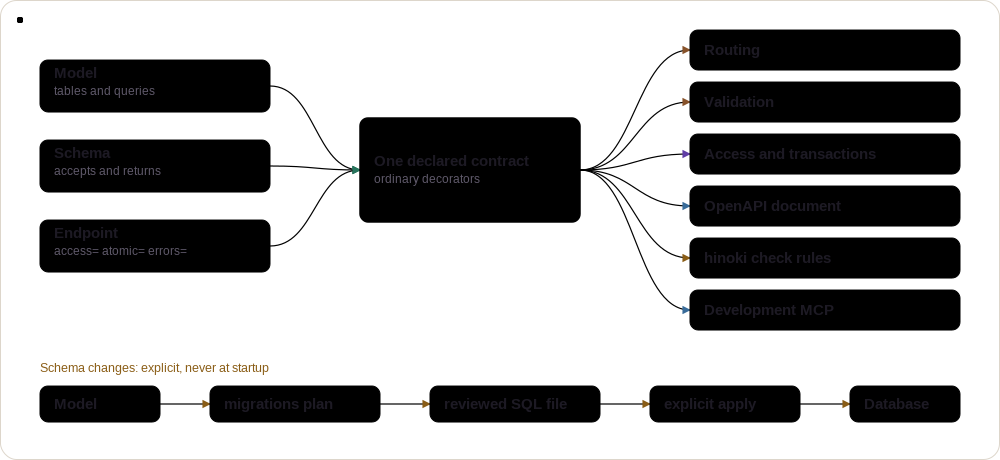
You declare once. Routing, validation, the OpenAPI document, rules and the development tools read the same declaration; schema changes follow a separate, explicit lane.
Every request goes through the same steps, in this order. Validation, access and the transaction fail in different ways, so the order is part of the contract (request lifecycle).
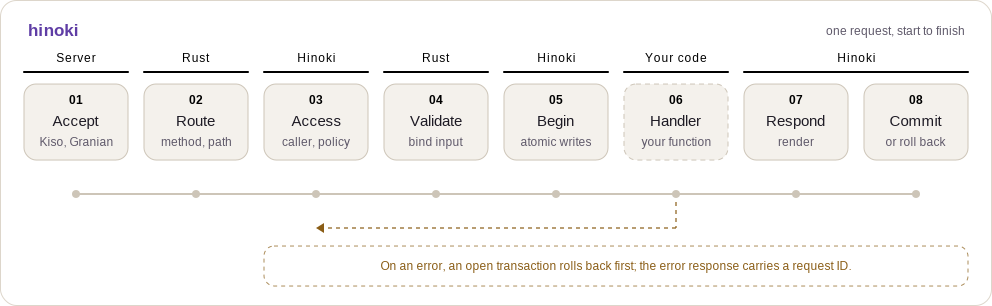
The router, request parsing and schema validation run in the Rust extension; your handler is plain Python. On an error, an open transaction rolls back before the error response is produced, and every response carries a request ID.
Quick start
You need uv and a stable Rust toolchain; the native extension builds from source.
git clone https://github.com/caspel26/hinoki && cd hinoki
uv sync --locked
source .venv/bin/activate
hinoki new notes --dir ..   # asks for the database, the server, the rest and a first app
cd ../notes
hinoki dev                  # API docs at http://127.0.0.1:8000/docs
The Quick start walks through the prompts.
Declare and run an app
hinoki new writes the application as a module-level app in notes/main.py, titled after the project:
from hinoki import Hinoki
from hinoki.project import manifest_routes

from notes.settings import ProjectSettings

app = Hinoki(
    settings=ProjectSettings,  # NOTES_* variables and .env
    include=manifest_routes(),  # notes/routes.py, then each app's routes at its prefix
    title="Notes",
    openapi_url="/openapi.json",
    docs_url="/docs",
)  # the rules come from `rules` in hinoki.toml
hinoki.toml names that application, its routes and its rules, so commands inside the project take no target:
[project]
application = "notes.main:app"
routes = "notes.routes:routes"
rules = ["notes.rules:project_rules"]
A Hinoki(...) built in the module project.application names reads whatever its arguments leave out from this file: routes, each app's events, and the project-wide middleware and rules lists (module:attribute entries you add by hand). So include=manifest_routes() above is the explicit form of the default, and the Tracker example wires everything from hinoki.toml with none of them (middleware, rules).
hinoki dev      # serve on Kiso, reload on changes
hinoki check    # run the project's rules
hinoki routes   # list every route with its access policy
Write an API
The project package holds no models. Answer yes to the last question of hinoki new (or pass --app NAME), or create an app later; it registers its models, migrations and routes in hinoki.toml:
hinoki app create notes
A model, the Schema classes that cross the API boundary, and the client filters of a list:
# notes/apps/notes/models.py
from uuid import UUID, uuid4

from hinoki import db
from hinoki.orm import Model, field, pk


@db.table("notes")
class Note(Model):
    id: UUID = pk(default_factory=uuid4)
    title: str = field(max_length=80, index=True)
    body: str = ""


@db.table("notes_editors")
class Editor(Model):
    id: UUID = pk(default_factory=uuid4)
    token: str = field(unique=True)
# notes/apps/notes/schemas.py
from typing import Annotated
from uuid import UUID

from hinoki import Field, Schema
from hinoki.filters import Eq, FilterSet, Search


class NoteIn(Schema):
    title: Annotated[str, Field(min_length=1, max_length=80)]
    body: Annotated[str, Field(max_length=2000)] = ""


class NoteOut(Schema):
    id: UUID
    title: str
    body: str


class NoteFilters(FilterSet):
    title: Eq[str]
    search = Search("title", "body")
    ordering = ("title",)
An Access policy pairs a token check with the permissions it requires (Authentication); crud generates the actions, applies the policy to each and wraps writes in a transaction:
# notes/apps/notes/security.py
from hinoki import Access, BearerAuth, Caller, Permission

from notes.apps.notes.models import Editor


class NotePermission(Permission):
    WRITE = "notes:write"


class EditorTokens(BearerAuth[Editor]):
    async def resolve_token(self, token: str) -> Caller[Editor] | None:
        editor = await Editor.aget_or_none(token=token)
        if editor is None:
            return None
        return Caller(
            id=str(editor.id), user=editor, permissions={NotePermission.WRITE}
        )


editors = Access(auth=EditorTokens(), permissions=[NotePermission.WRITE])
# notes/apps/notes/api.py
from hinoki import crud

from notes.apps.notes.models import Note
from notes.apps.notes.schemas import NoteFilters, NoteIn, NoteOut
from notes.apps.notes.security import editors

notes = crud(
    Note,
    path="",
    read=NoteOut,
    create=NoteIn,
    access=editors,
    filters=NoteFilters,
)
List notes in notes/apps/notes/routes.py (routes = [notes], imported from notes.apps.notes.api); main.py does not change. The app's routes are mounted at its prefix, /notes here.
$ hinoki routes
GET     /health           public                    notes.api.health
GET     /notes            EditorTokens[notes:write] notes.apps.notes.api.NoteCrud.list
POST    /notes            EditorTokens[notes:write] notes.apps.notes.api.NoteCrud.create
GET     /notes/{item_id}  EditorTokens[notes:write] notes.apps.notes.api.NoteCrud.retrieve
The list accepts ?title=..., ?search=... and ?ordering=title from the FilterSet, and pages by number. Input is validated before the handler runs and a response contains only its declared fields. Tables change only through reviewed SQL: hinoki migrations plan notes writes the migration, hinoki migrations apply runs it. For logic that is not CRUD, write plain functions on a RouteGroup, which shares a path, an access policy and a transaction across its actions, or a class-based API with hooks (function-based APIs, CRUD, class-based APIs).
What you get
| Area | What it gives you |
|---|---|
| Contracts | Schema input and output, access policies, atomic writes and declared errors drive validation, the OpenAPI document and the test client. Generated lists take client filters, ordering and search from a FilterSet. |
| Rules | hinoki check has twelve built-in rules: access, permissions, return types, pagination, transactions, model responses, exposed fields, string limits, pinned tables, foreign-key indexes, import direction and, when you list it, email templates that match their context. A new project turns on eight. Each finding names a file, a line and a fix; a waiver needs an owner and a reason. |
| Data | SQLite, PostgreSQL, MySQL and MariaDB, explicit relation loading, and SQL migration files you review. Importing an app never connects to a database. |
| Tools | Typed settings, generated CRUD, typed events, project-wide middleware, a CLI, MCP servers for the application and for development, hinoki llms / llms.txt and AGENTS.md support for AI agents, and an optional admin. |
Examples
Three self-contained projects in examples/, each with its own hinoki.toml, tests and a README with a reading order:
- Notes (easy): one app, one model and generated CRUD, in five minutes.
- Tracker (medium): several apps with explicit dependencies, access policies, transactions, a filtered list, events, and project-wide middleware and rules.
- Blog (complete): tenant, login, admin, MCP, migrations, streaming, events, a rule waiver and metrics.
- Mailroom (focused): outbound email from templates, an API-key policy and the email-template rule.
Interactive API docs
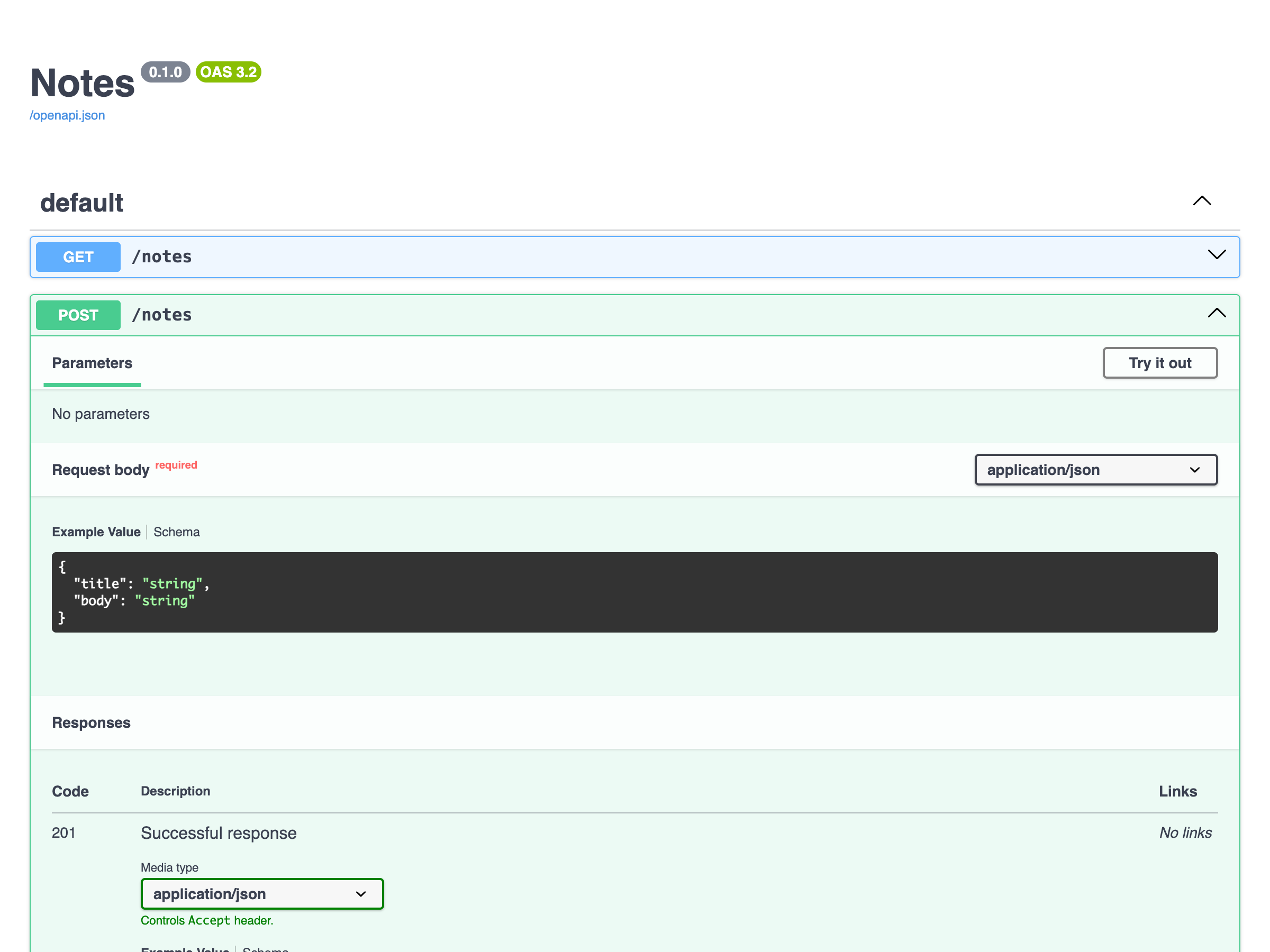
With docs_url="/docs" (set by hinoki new), the app serves interactive API docs generated from the same declarations: paths, request bodies, responses and declared errors. This is the Notes example; see the OpenAPI guide.
Admin
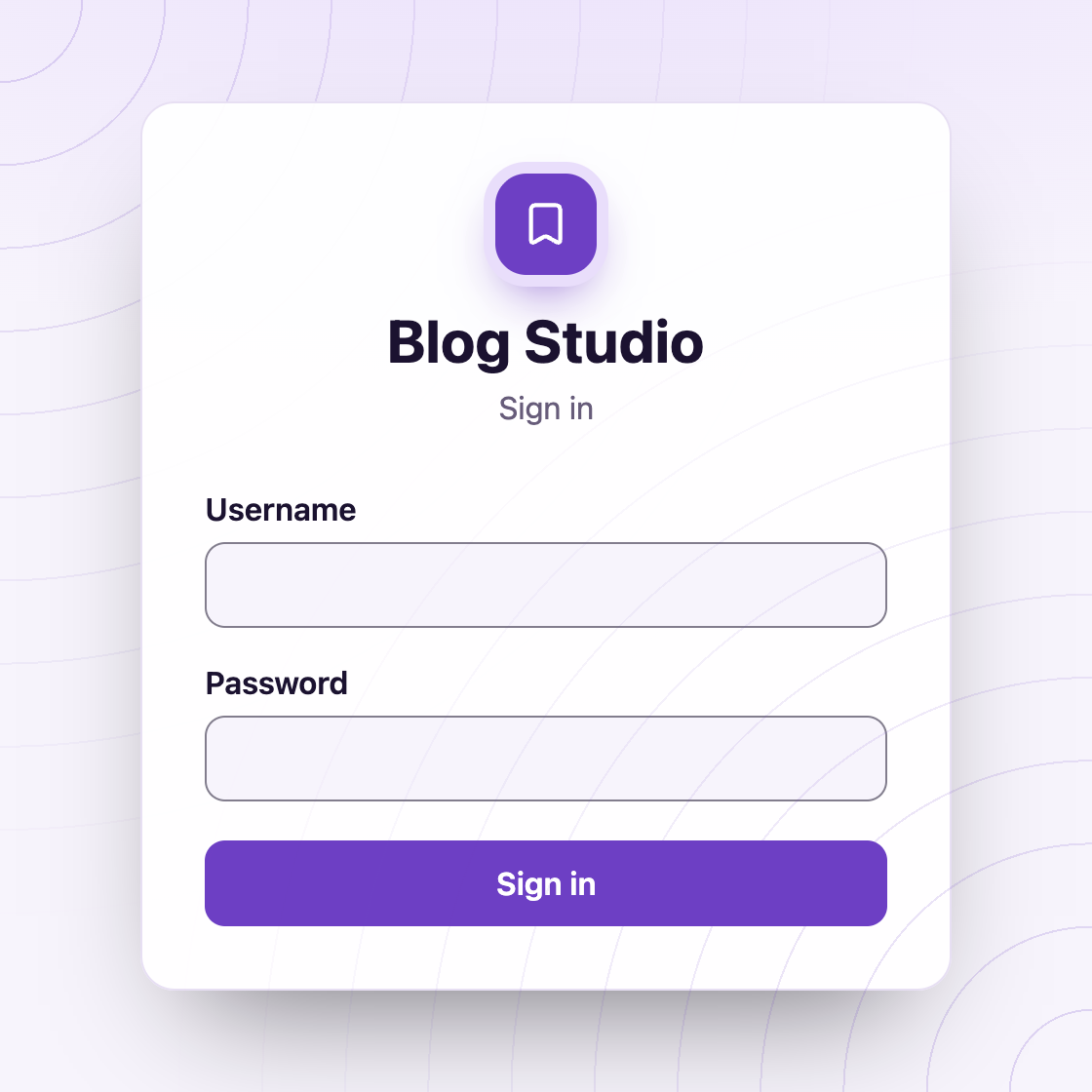
The optional admin is mounted explicitly, and installing or importing it never touches a database. See the admin guide.
- Access: its own users, a sign-in page and per-model permissions by default; it can use your application's access policy instead.
- Look: four themes, each with light and dark modes.
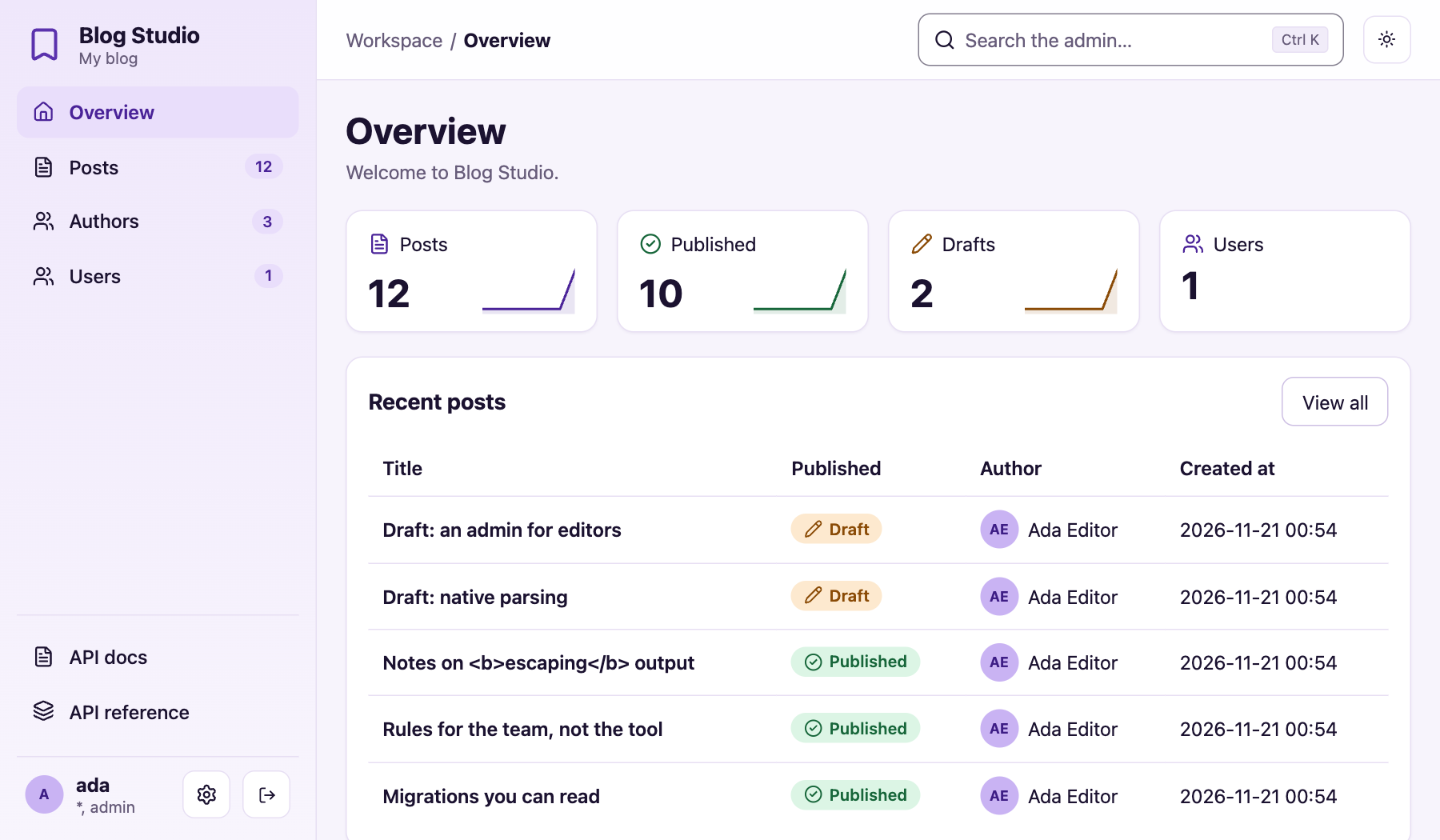
- Overview: stat cards and recent records, as in the Blog example.
Python and Rust
Kiso is part of the native extension and has no ASGI boundary: eligible routes skip Python routing and binding. Granian runs every request through the ASGI pipeline. Path matching, selected request parsing, schema validation and serialization, and ORM SQL compilation and execution run in the extension. Handlers and most of the request pipeline run in Python; on Kiso, an async def handler that only awaits ORM calls is driven from Rust. Serving and Kiso document the boundary.
Status
Pre-alpha, tested in CI on Linux with Python 3.12–3.14. The status page lists what is not available yet. The benchmark report describes retained runs and their limits; it is not a general ranking.
Guides · Reference · Examples · Roadmap · Contributing · MIT license
Yorumlar (0)
Yorum birakmak icin giris yap.
Yorum birakSonuc bulunamadi