dudu
Health Uyari
- License — License: MIT
- Description — Repository has a description
- Active repo — Last push 0 days ago
- Low visibility — Only 7 GitHub stars
Code Basarisiz
- exec() — Shell command execution in mods/pm-dash/main.js
- exec() — Shell command execution in mods/pm-dash/model.js
- exec() — Shell command execution in mods/pm-dash/projects.js
- exec() — Shell command execution in mods/pm-dash/python.js
Permissions Gecti
- Permissions — No dangerous permissions requested
Bu listing icin henuz AI raporu yok.
Manage all your coding agents from one session in the Herdr desktop app: dispatch, review, merge, and see only what is waiting for you.
dudu



Manage all your coding agents from one session. Tell it what you want; it dispatches agents, reviews and merges their work, and shows you only what is waiting for you.
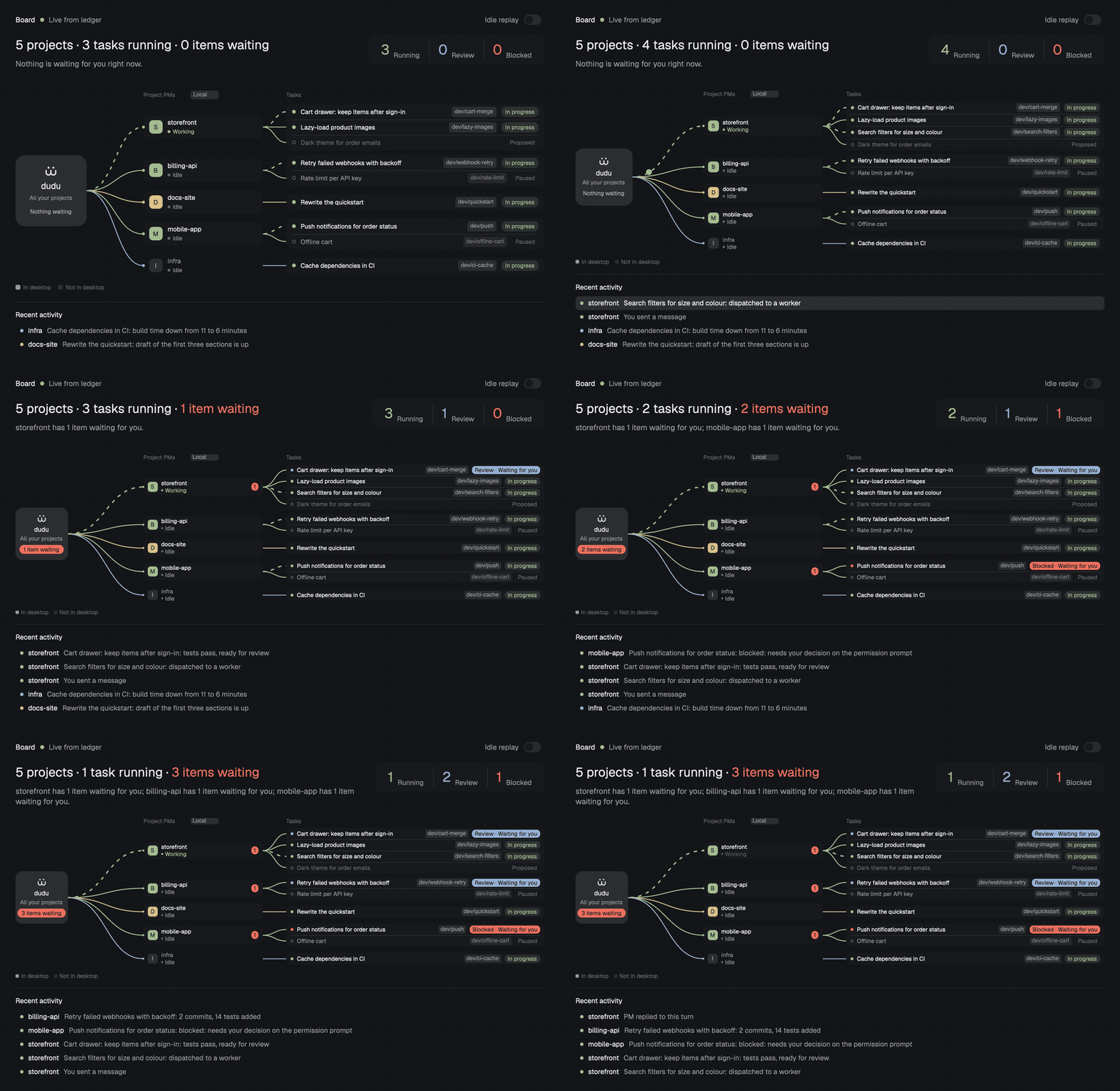
The recording uses invented demo data.
For each project, one agent session in Herdr acts as the manager (any coding agent; Claude Code and Codex are tested): it hands tasks to coding agents in their own worktrees, checks what they bring back, and keeps a persistent task ledger, so progress survives restarts and is visible across projects and machines.
The manager waits for workers on file and terminal events rather than by polling; see PM notifications.
This first version supports the Herdr desktop app. The herdr terminal UI is not supported yet.
Requirements
- A coding agent CLI, installed and authenticated, for both roles: the manager and the workers. Claude Code and Codex are tested; pi, Gemini CLI, opencode and any other can be configured (see Configuration).
- The Herdr desktop app, with
herdr-appandherdr-core(hc) available on your PATH. - Python 3 (3.9+; tested on Python 3.12 and 3.14). The installer uses only Python's standard library (Bash is optional: run
python install.pydirectly on Windows). - Git for repository work and worker worktrees.
Install
Clone or download this repository, then run from its root:
./install.sh          # macOS / Linux (or Git Bash)
python install.py     # Windows (cmd / PowerShell) or any platform without Bash
It copies the skill into each coding agent it finds (Claude Code, Codex, pi), adds their hooks, and installs the desktop mods and a pm layout. Restart running agent sessions afterwards. ./install.sh --dry-run previews without writing files.
The skill's source is this repository (mods/pm-dash/skill). To change the skill on any machine, change it here and run ./install.sh again, or open a pull request; do not edit an installed copy such as ~/.claude/skills/pm, which the next install replaces. When an installed copy has local edits, the installer first copies it to install/backups/ in the ledger home (~/.dudu) and says so.
The ledger (tasks, registrations, conversations, memories, and config.json) lives in ~/.dudu by default (override with PM_HOME). Earlier installs that still keep the ledger in ~/.claude/pm continue to work and can migrate with pm.py home --migrate (backs up first and leaves a ~/.claude/pm -> ~/.dudu symlink — keep that symlink, because existing pms/ and tasks/ records may still reference old absolute paths; see Ledger home and migration).
You can also add it from herdr.dev and click Set up on the board. Both paths, every option and what gets written: Install and Add it from herdr.dev.
Get started
Switch to the installed layout:
herdr-app do layout.switch '{"name":"pm"}'Open an agent session (Claude Code, Codex, pi) in your project directory inside the Herdr desktop app and say “act as PM for this project”. Any other agent can be started as the manager with
pm.py start --kind <agent>; see Get started in the guide.Give it a concrete task, for example: “Ask a worker to add a search filter, run the relevant tests, and bring the result back for review.”
Click Projects in the sidebar to see every project and task, or open a project to talk with its manager.
More
- Configuration: language, default agents and models, adding other agents.
- Alerts: which notifications the
pmlayout shows. - Uninstall:
./install.sh --uninstall, keeping the ledger. - Manual desktop layout fallback: when the layout cannot be generated.
- Repository structure.
Roadmap
Not done yet, roughly in this order:
- Context size for agents other than Claude Code. The warning to hand over is read from Claude Code transcripts only. The conversation log comes from the turn hook, so it needs an agent with hooks; Codex's hooks carry the same fields, but that path has not been run yet.
- Tested agents beyond Claude Code and Codex. pi, Gemini CLI, opencode and others can already be started with
--kind, but only Claude Code and Codex have their startup handled and verified. - The
herdrterminal UI. Code paths exist but are untested. - Upstream: per-terminal or per-sub-agent alert control. Herdr can silence its alert sound only globally, so a dispatched worker shows no toast but is still heard when it finishes (see Alerts). This needs Herdr to let a layout, mod or
hc runoption turn off alerts for one terminal or for sub-agents. - Uninstall from the board. Setup is one click; removal still needs
./install.sh --uninstall.
Requests and reports are welcome in the issues.
License
MIT
Yorumlar (0)
Yorum birakmak icin giris yap.
Yorum birakSonuc bulunamadi