thoth
Health Uyari
- License — License: MIT
- Description — Repository has a description
- Active repo — Last push 0 days ago
- Low visibility — Only 5 GitHub stars
Code Gecti
- Code scan — Scanned 12 files during light audit, no dangerous patterns found
Permissions Gecti
- Permissions — No dangerous permissions requested
Bu listing icin henuz AI raporu yok.
One shared brain for Claude Code, Codex and Hermes: a Hermes Agent plugin that coordinates real coding agents with shared context, progress and versions
Thoth — agents working as one team, each with its own harness
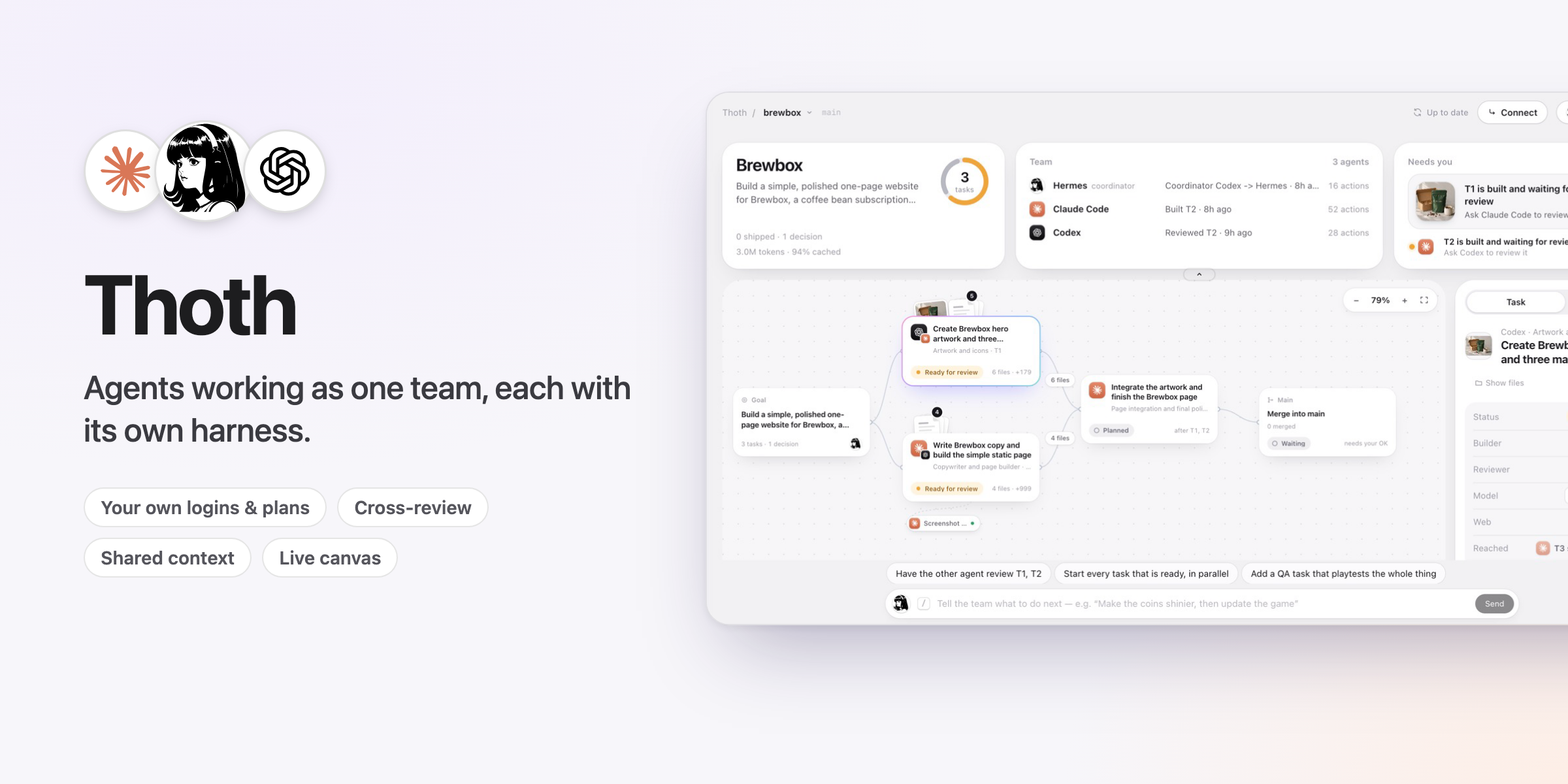
You use Claude Code, Codex and Hermes. Each is good at different things, but on their own they work
alone: you carry context from one to the other by hand, and they overwrite each other's files when
they share a project.
Thoth makes them one team, and each agent keeps its own harness. Hermes plans the work onto a
shared board and gives each task to the agent that suits it. The real Claude Code and Codex build
side by side, each in its own git worktree, on your own logins and plans. Each reviews the other's
work, and Hermes merges what passes. What one agent decides or makes goes into the next one's brief,
so nobody copy-pastes.
Why their own harness. Anthropic, OpenAI and Nous keep making Claude Code, Codex and Hermes
better: new tools, sandboxes, sub-agents and models. Thoth doesn't swap them for one generic wrapper,
so each improvement reaches your team the day it ships. Nothing is locked in either: connect Claude
Code or Codex to the same board (one click on the Thoth page), keep working in it directly, and it
picks up where the team is. It can even take over as coordinator.
Today the team is Claude Code, Codex and Hermes. Next we want to bring more agents that ship their own
harness onto the same board, such as Grok Bot, Muse, Antigravity and DeepSeek Harness.
                ┌──────────────── Hermes (coordinator) ────────────────┐
   you ──▶      │  thoth_plan → thoth_assign → thoth_wait → thoth_review │
                └───────┬──────────────────────────────┬───────────────┘
                        │ brief from the brain          │
             ┌──────────▼─────────┐          ┌──────────▼─────────┐
             │  Claude Code CLI   │          │     Codex CLI      │
             │ worktree T1, branch│          │ worktree T2, branch│
             └──────────┬─────────┘          └──────────┬─────────┘
                        │  decisions, handoffs (MCP)     │
                        └──────────▶  .thoth/brain  ◀────┘
                           goal · board · decisions · notes · runs · versions
What it does
| Problem | What Thoth does |
|---|---|
| Agents don't share context | Every run starts with a brief built from the brain: goal, board, team decisions, handoffs, review comments and what dependencies produced. Agents write decisions back through the bundled MCP server while they work. |
| No shared progress | A task board (todo → running → built → reviewing → approved/changes → merged) with live progress of every running agent. |
| Agents overwrite each other | Each task gets its own git branch and worktree, so Claude Code and Codex can work at the same time. |
| No versions | Every run's result is a commit on its task branch; merges are --no-ff merge commits; the timeline records which agent made which commit. |
| One agent checks its own work | Cross-review: the other agent reviews the diff read-only and returns approve/changes with comments. Re-assigning a task resumes the original agent's session with the review comments in its brief. |
| You babysit every step | Autopilot: approve the plan once. Thoth starts each task when what it builds on is merged, has the other agent review it, merges what passes, and writes to your chat only when something needs you. Any change to the plan pauses it until you approve the new one. |
| Stuck with one coordinator | thoth_coordinator hands the coordinator role to Claude Code or Codex; they drive the same board through the Thoth MCP server. |
| Agents can't look at the web | A task can get a browser: a clean Chrome without your logins, or your own Chrome when it needs your logins. See Looking at the web. |
| The result is hard to get at | Your result: once something is merged, the side window shows it with Open (in your browser), Download (a zip in your Downloads folder) and its folder in Finder. |
| A plan runs out mid-project | Plan relay: the Team card shows how much of your Claude and ChatGPT plans is used and when each resets. When one runs out, the other agent carries on from its work (one click on Give to Codex, or Claude), and Hermes gives new work to the agent with room. |
Not only code
Tasks have a kind (code, asset, doc, research, design, qa) and a role, and depends_on
passes one task's files to the next. Codex can generate and process images (its image tool plus
ImageMagick), Claude Code builds, and Hermes can take a task itself (thoth_assign to hermes,
then thoth_complete). The Thoth page shows what every agent read, changed and produced (images as
thumbnails), which files moved between tasks, and every sub-agent an agent delegated to.
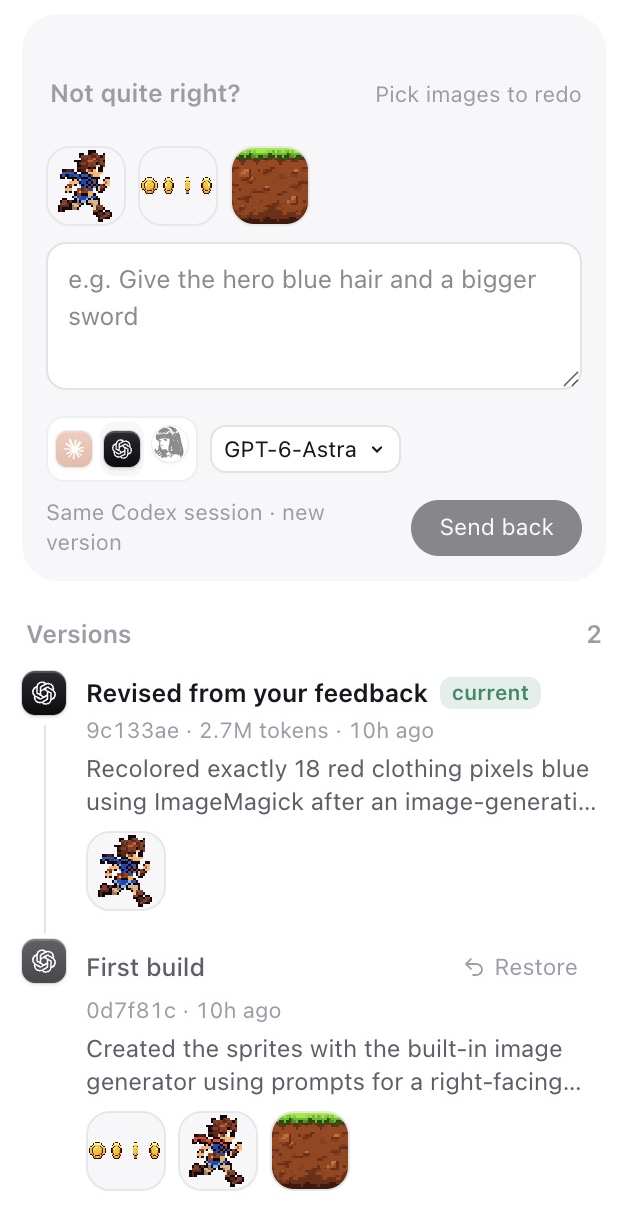
Not happy with a result? Send it back with your words: the same agent continues in its own session
(on another model if you pick one) and makes a new version. Every version stays one click from being
restored.
Looking at the web
The agents' shells have no network. A task that has to look at websites gets a browser instead, through
Google's Chrome DevTools MCP server. Say Codex should study a client's current site before Claude designs
their sales page:
- Clean Chrome (
browser: clean): a fresh headless Chrome without your logins, deleted after the run.
Right for public sites. - Your Chrome (
browser: user): your everyday Chrome with your logins, for pages behind them (your
store's admin, a private dashboard). Turn on remote debugging once atchrome://inspect/#remote-debugging
(Chrome 144 or newer); Chrome then asks you to allow each run's connection. The agent opens its own
tab, is told to only look (no posting, buying or changing settings) and closes the tab when it is done.
It can see the titles of your other tabs, and the approval card says so.
Hermes chooses when it plans, or set it in the task inspector on the Thoth page. Reviews never browse. In
our runs Claude Code studied nousresearch.com in a clean Chrome in 41 s, and Codex did the same in the
user's Chrome in about a minute; both returned a screenshot and the site's real colors and fonts.
One CRM, built two ways
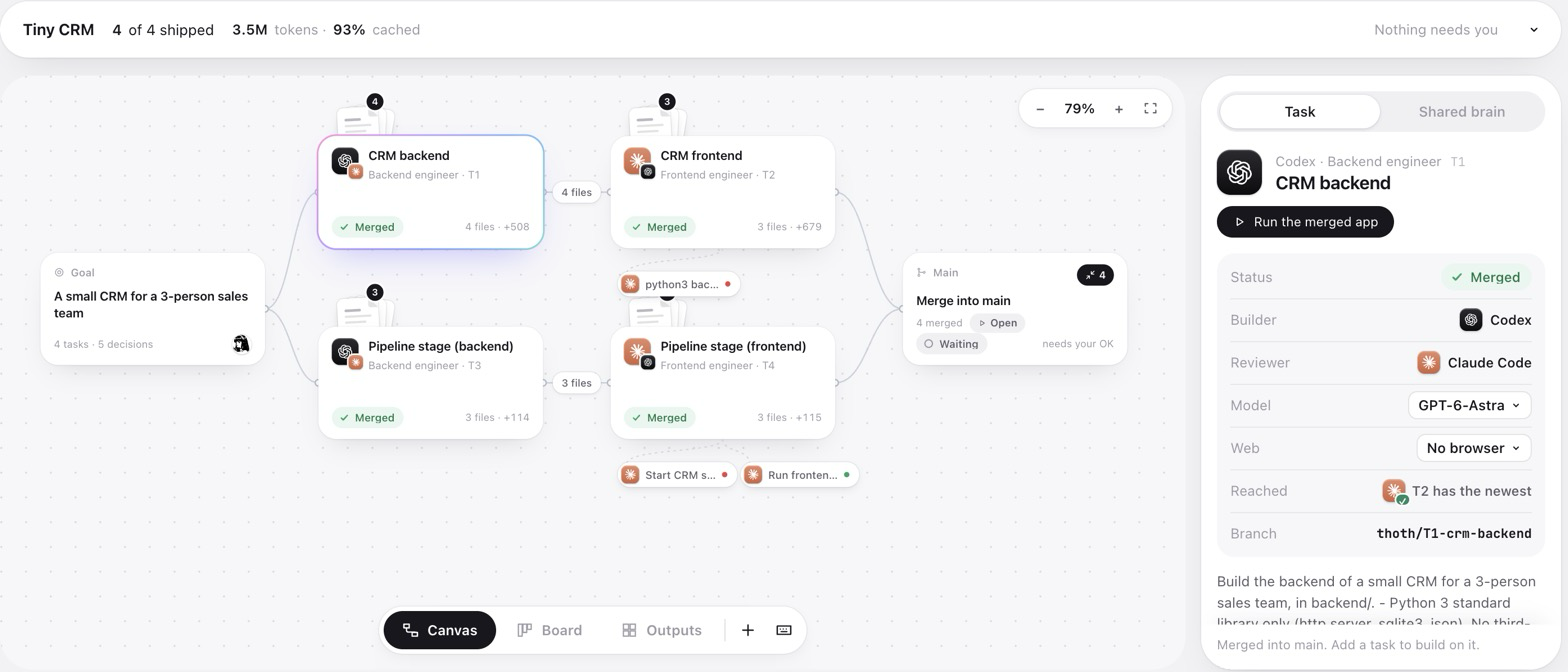
Codex (GPT-6-Astra) builds the backend, Claude Code (Opus 5.5) builds the frontend, then both add a
pipeline stage to contacts. Same specs, same models, no packages; one run of each.
| By hand (you pass work between agents) | Thoth, the four builds | Thoth with two cross-reviews and a fix | |
|---|---|---|---|
| Prompt tokens | 3.27M | 2.41M (−26%) | 3.47M |
| Output tokens | 85k | 52k (−39%) | 66k |
| Agent time | 17.2 min | 11.1 min (−35%) | 15.1 min |
| Frontend calls that work against the backend | 9/9, then 9/9 | 10/10, then 10/10 | |
| Real bugs caught | none (nobody reviewed) | 2, fixed — and both were in the by-hand build too | |
| Messages you have to relay | 2, and you must know what changed | 0 | 0 |
| Shared memory afterwards | none beyond the code | 5 API decisions, in every later brief |
What made the difference: Claude's brief already held Codex's summary, its files and the API decisions
it recorded, so nobody pasted anything; each task ran in its own worktree; and Codex reviewing Claude's
frontend found an overlapping-refresh race and an invalid-number-saved-as-zero bug. What did not change:
a follow-up task starts a fresh session, so Claude re-read the backend about as often as it did by hand.
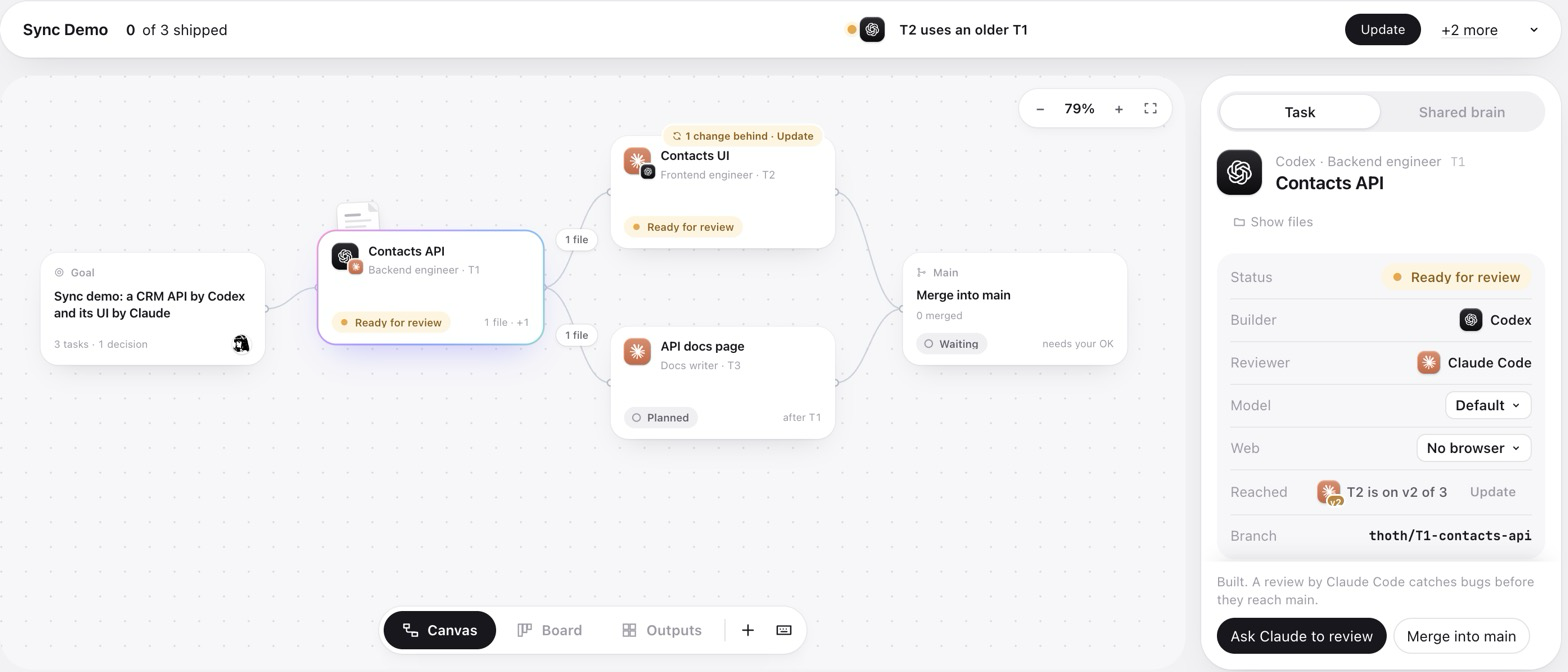
Who has the newest version. A task's Reached row lists the work built on it: a check when that task
has its newest version, otherwise the version it has ("T2 is on v2 of 3"). The task that fell behind says
1 change behind · Update on its card, and Needs you asks for it too; one click (or thoth_sync) brings
the newer version in.
Context, tokens and memory
Measured on real runs (see thoth_status → tokens, or the Team activity card):
- The coordinator stays small. Hermes receives each run's summary, diffstat and verdict, not the
transcript. On the tip-calculator demo the agents' transcripts were 674 KB; Hermes received 9.6 KB
(98.6 % kept out, about 166k tokens). - Every agent starts focused. A run gets a 2–18 KB brief (goal, decisions, handoffs, review
comments, the files its dependencies produced) instead of the whole conversation. - Lean workers (on by default) start agents without your personal plugins, hooks, skills and extra
MCP servers: one call's fixed prompt drops from 46.8k to 25.2k tokens for Claude Code and from 35.7k
to 27.1k for Codex. Every call re-sends that prefix, so a 10–30 call run saves 200k–600k tokens. - Caching does the rest: 82–95 % of prompt tokens in our runs were cache hits.
- Small tool surface: all 19 Thoth tools add about 2.5k tokens to a coordinator call (3 tools,
about 300 tokens, for a worker). - Memory: the brain (
.thoth/brain.db,BRAIN.md) keeps goal, decisions, handoffs, reviews and
versions across sessions and across tools, and re-assigning a task resumes the agent's own session.
What it does not do: total tokens across all agents are not lower than one agent doing everything —
each agent pays its own fixed prompt and cross-review reads the diff again. The gain is that no single
context has to hold everything, the expensive coordinator context stays tiny, and the work is spread
across your Claude and ChatGPT plans.
Requirements
- Hermes Agent ≥ 0.22.5
git- Claude Code (
claude) and/or Codex CLI (codex), installed and logged in. Thoth uses your existing logins and plans; it never handles their credentials. - Only for tasks that browse: Node.js 20.19 or newer (
npx; Hermes's own Node works) and Google Chrome.
Install
hermes plugins install thoth                 # from the plugin catalog
hermes plugins install cayden970207/thoth    # or straight from GitHub
hermes thoth doctor                          # checks claude, codex, git and the browser
Then open the Thoth page in Hermes Desktop's sidebar.
Updates
Hermes checks your plugins for updates once a day. When a new Thoth is ready, Settings → Plugins shows
Update (or run hermes plugins update thoth). Once it is installed, the Thoth page shows what's new, once.
Click the version beside Thoth at the top to read every version's notes; they are also in
CHANGELOG.md.
Use it
Tell Hermes what to build, or click New project in the project menu on the Thoth page:
Start a new Thoth project: a tip calculator web page. Plan it so
Claude builds the UI and Codex writes the calculation logic with tests, run
them in parallel, then have each review the other's work and merge what passes.
Thoth gives a new project its own folder in ~/Thoth (the projects_dir setting) that keeps every version.
To work in a folder you already have, open the chat there or give Hermes its path. If it isn't in git yet,
Thoth makes the repository and saves what is there as the first version; secrets such as .env, system
files, dependency folders and files over 50 MB stay in the folder but out of git. Thoth never turns your home
folder, Desktop, Documents, Downloads, a settings folder or a folder of projects into one project.
Hermes will call the Thoth tools; you approve each agent launch and each merge. An approval covers the plan as
the card showed it: if the task, who does it, what it builds on or the work to merge changes before you answer,
nothing starts and Hermes asks again.
| Tool | What it does |
|---|---|
thoth_init |
Create/reopen the brain (.thoth/, kept out of git) |
thoth_plan |
Add tasks with agent, dependencies and, when they need the web, a browser |
thoth_assign |
Start Claude Code or Codex on a task in the background (needs your approval) |
thoth_wait |
Wait for runs and get summary, commit and diffstat |
thoth_review |
Cross-review by the other agent, read-only (needs your approval) |
thoth_merge |
Merge a task branch into the base branch (needs your approval) |
thoth_status / thoth_context |
Board, live progress, decisions; full brief for a task |
thoth_note |
Record a decision / handoff / risk / question for every agent |
thoth_preview |
Open what a task built (a web page, a browser game) in your browser, served read-only on localhost |
thoth_revise, thoth_restore, thoth_sync |
Send work back with feedback, bring back an earlier version, pull a dependency's newer version |
thoth_cancel, thoth_update_task, thoth_coordinator |
Stop a run, edit a task, hand over coordination |
thoth_autopilot |
Run the whole plan after you approve it once on a plan card (needs your approval); pause, stop or check it |
A task that depends on several unfinished tasks starts with all of their work merged into its branch.
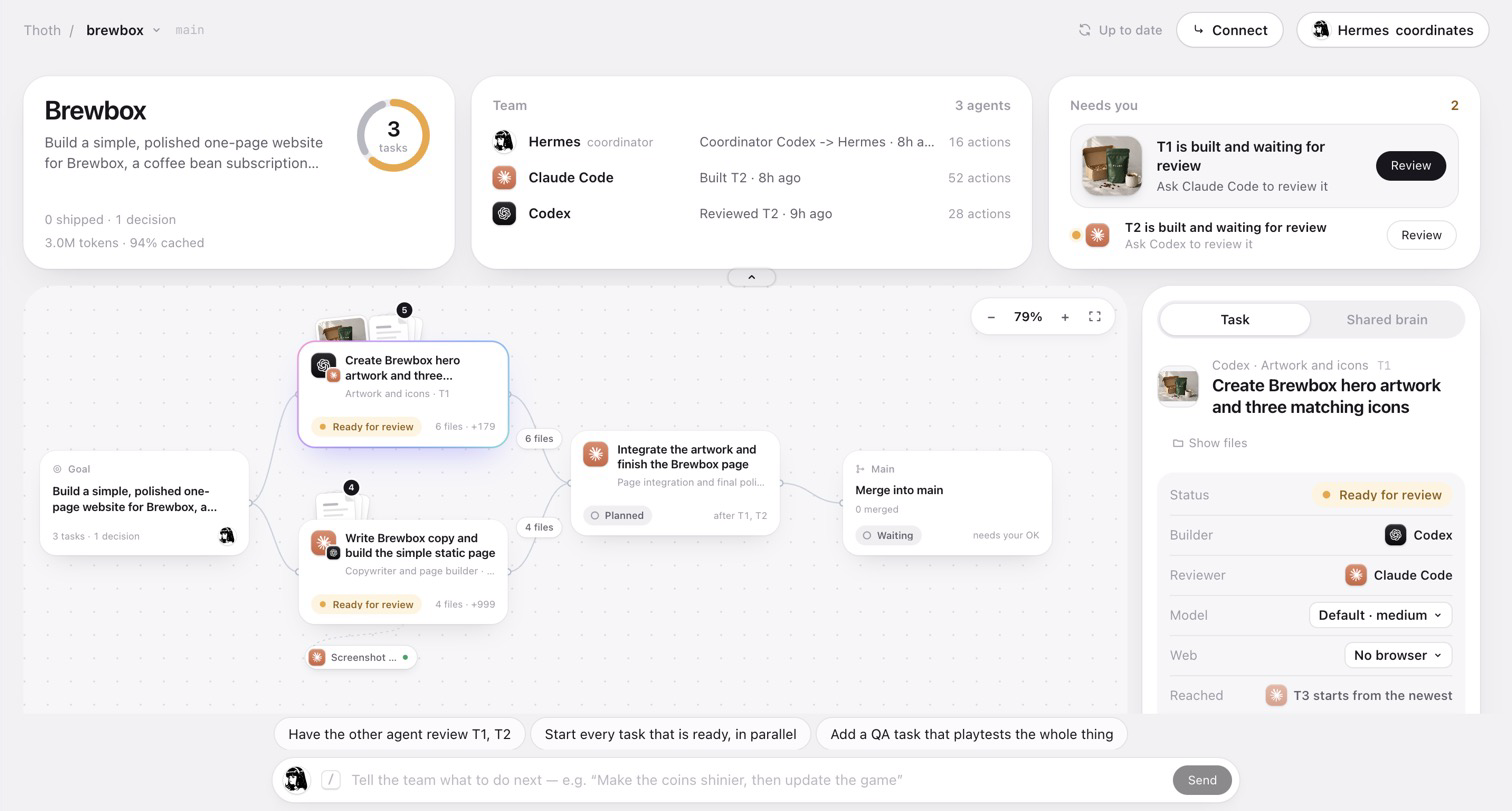
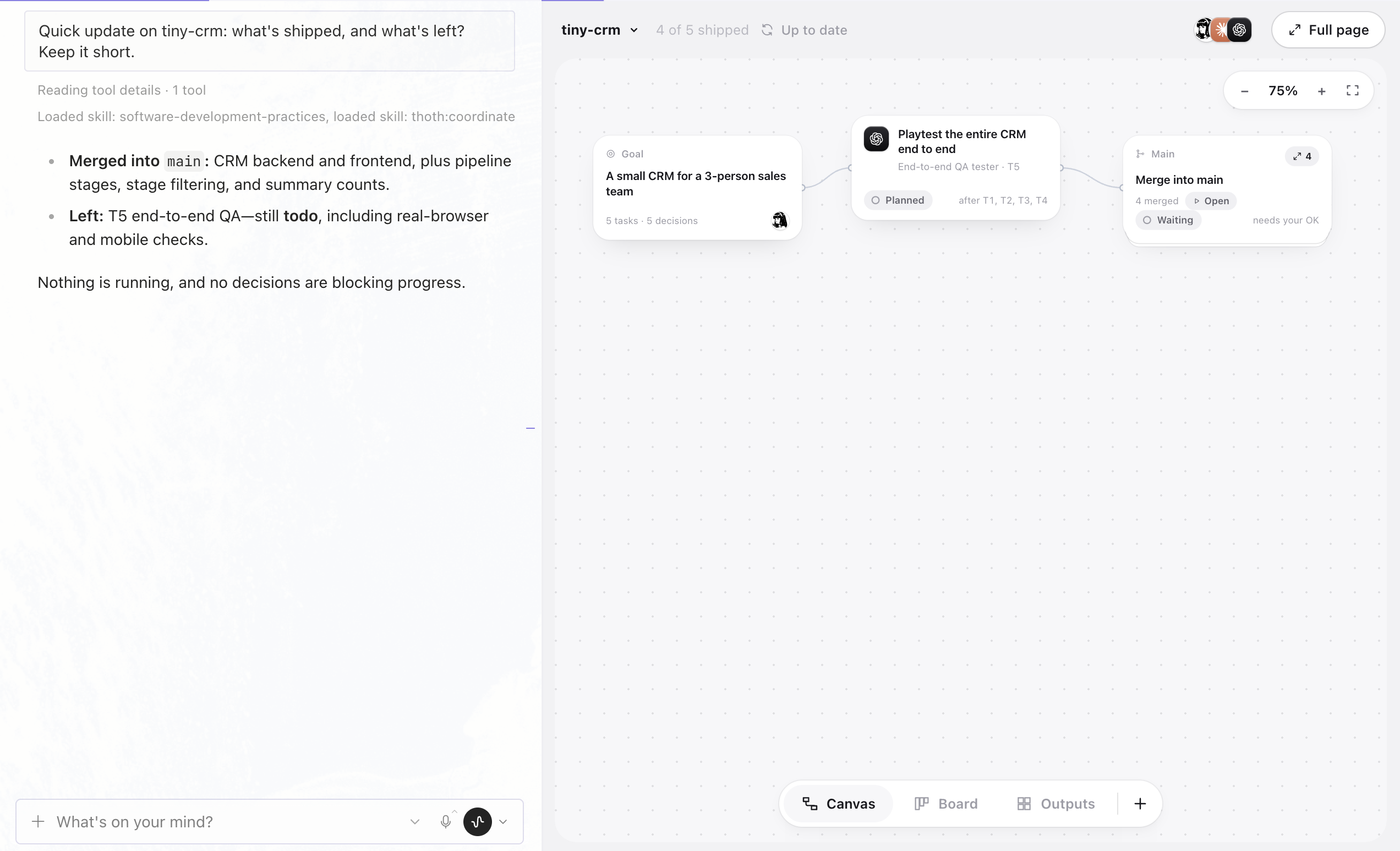
Talk on the left, watch on the right. Each project has one chat with Hermes, pinned in the sidebar in
the project's colour. Beside it, Thoth docks a side window with the whole canvas (drag the divider to
resize; Full page opens the full Thoth page), plus a Team & brain tab: the project in numbers
(shipped, decisions, tokens, cache), what needs you, who is on the team, and the shared brain of decisions,
reviews and versions, where a click on an entry opens its task. The team's faces in the side window's header
show who is working and open that tab. The side window follows the chat you are looking at, and what you say
shows up on the canvas as it happens: new tasks appear, a pill shows what Hermes is doing (Hermes ·
planning tasks), the tasks its answer mentions light up, and approvals still happen right there in the
chat. Typing on the full Thoth page goes to the same project chat and shows Hermes's answer on the page, so
a project never ends up spread over many chats. Beside the chat on the Thoth page opens this layout, and
Hermes's layout picker gets a Chat + Thoth template (sessions, the chat, Thoth) to come back to it any
time. The side window sits with the chat, like Hermes's browser, so folding Hermes's files, review and
terminal never hides it. Click a task and a small card rises from the bottom with its status, next step
and action, while the canvas stays in view; All details grows it in place, and Esc or a click on the
canvas puts it away. Once the window is wide enough, the details open in a column beside the canvas instead.
One project, one place in Hermes. Every Thoth project is also a Hermes project on the same folder. The
first time Thoth shows a project it creates that Hermes project (named after the folder, in the project's
colour, or reuses the one you already have there) and moves the project's chat into the folder, the same as
Hermes's own Move to project. Hermes's sidebar then files the project's chats under it, Hermes works in that
folder, and every chat you open there is about that project. The side window follows whichever project the
chat on screen belongs to, and picking a project in Thoth's switcher opens its chat. If the chat on screen is
about something else, a one-line note offers the project's own chat, or starts one. The switcher shows each
project's progress and what waits on you; rename, recolour or archive projects in Hermes's sidebar (an
archived project drops out of the switcher), and Remove from Thoth takes one off Thoth's list without
touching its folder.
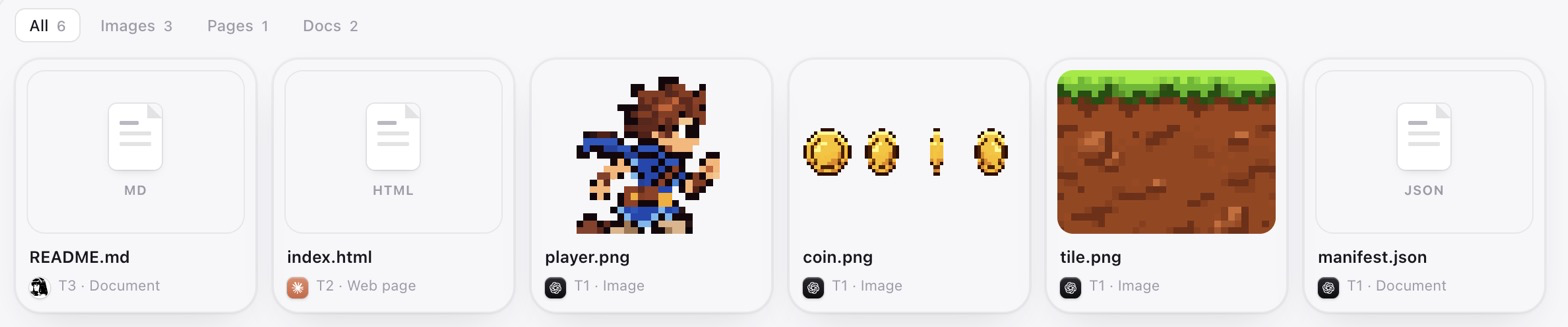
Seeing the result. Every task that made a web page or a browser game gets an Open preview button
on the Thoth page (and Hermes has thoth_preview). Thoth serves that task's folder on 127.0.0.1, read-only, never hidden files such
as .env. The Outputs view collects everything the team made that you can look at — images, video, sound,
web pages and documents — and plays or shows each one in place. On the canvas, shipped work folds into
the Main card once there is more than a little of it (the count in its corner lays it out again), so a long
project stays readable.
For an app with a backend (say a CRM whose server also serves its pages), give the project a run command —thoth_init(run="python3 backend/server.py --port {port}"), approved by you. Run & open then starts the
app for the version you are looking at, in a clean copy under .thoth/previews/, so the database or logs it
writes never end up in an agent's work or your checkout.
Files kept out of git. A task worktree is a clean checkout, so on its own it holds only what git tracks.
Thoth gives each new worktree its own copies of what your project keeps out of git (test builds, game
images, big videos, private inputs), so agents can use them as you do. The copies are copy-on-write clones
(APFS on macOS, reflinks on btrfs or XFS): they appear at once, take no extra disk until something changes,
and changing one never touches your original. Secrets (.env files, keys) and caches are never copied, and a
folder with more than 200,000 files stays behind. On a disk that cannot make such copies, folders are linked
read-only instead. A task that builds on another also gets what that one made outside git. When a task is
merged, the new files it made outside git move into your project folder, never over a file already there.
Copies of your files that it changed stay in its worktree, which is then kept. Turn this off with thecopy_kept_out_files setting.
Dependencies. A task worktree is a clean checkout, and the agents' sandboxes have no network, so they
cannot reinstall packages. Thoth links ignored node_modules, .venv and venv folders from your main
checkout into each new worktree (agents can read them, not change them; the links are excluded from git).
For a full install per task, give the project a setup command — thoth_init(setup="npm ci") — which
Thoth runs in each new worktree before the agent starts, outside the sandbox and only after you approve
it. Thoth never reads or copies .env files or other secrets into a worktree.
Only boards and commands you approved here. A project's board can arrive with its folder (a clone, a
download, a copy), so Thoth uses a board only if it made it on this computer, or you said yes to it once on a
Hermes card. Saying yes keeps the board's plan and history and nothing else: autopilot stays off, tasks start over
in new task folders, and whatever else came in .thoth moves to .thoth/arrived-<time>/. Setup and run commands
run as you, with network access, so Thoth also keeps a record of the commands you approved on Hermes's card for each
board, and runs nothing else: a command that arrives with a project, one set by Claude Code or Codex while
coordinating, or an older project's command waits until Hermes shows it to you. Starting the app for a preview asks
you each time unless you always allow that command. Both records are hashes in Thoth's data folder, never in the
project. Thoth also won't use a project whose .thoth folder is committed to git, won't make a board in a .thoth
folder it didn't make, and its own git commands never run git hooks.
Hearing back in chat. When an agent finishes, Thoth can tell the chat that started it, with one
message for a batch of runs and nothing for results thoth_wait already returned. Hermes keeps this off
until you allow it for Thoth:
plugins:
  entries:
    thoth:
      allow_gateway_injection: true
Without it Hermes learns about finished runs through thoth_wait, and the Thoth page shows them anyway.
Slash command: /thoth [status | task T1 | cancel R1 | coordinator claude|codex|hermes | brain | doctor].
Autopilot: approve the plan once
Ask for the whole job ("build it, and finish it while I'm out"). Hermes plans it and shows one plan card:
every task, who does it, what Thoth will do on its own, when it stops to ask, and its limits. Approve it and
Thoth runs the plan: it starts each task once what it builds on is merged, has the other agent review it,
sends changes back (up to 3 rounds), retries a failed run once, gives a task to the other agent when a plan
runs out, and merges what passes review. The side window shows how far it is, with Pause and Stop.
It writes to the chat that started it, and Hermes asks you, when an agent is stuck, a review keeps asking for
changes, a merge conflicts, the plan changes, or it reaches its time limit (8 hours by default, up to 24). It leaves
20 % of each plan for you. Any change to the plan pauses it until you approve the plan as it is now, and
"always allow" never covers a plan card. For Hermes to hear from it while you are away, setplugins.entries.thoth.allow_gateway_injection: true.
Let Claude Code or Codex coordinate
/thoth coordinator claude
prints a one-time setup command, e.g.
claude mcp add thoth -- <hermes python> -I <plugin dir>/mcp_server.py --as claude
Then in Claude Code: "You are the Thoth coordinator. Call thoth_status and continue the plan."
Claude Code now sees the same board, decisions and history, and can start Codex
(or another Claude Code) through thoth_assign. Claude Code's own permission
prompts decide which Thoth tools it may call. Runs started from Claude Code live
as long as that Claude Code session.
Agents without the MCP server
.thoth/BRAIN.md is a readable snapshot of the whole brain, regenerated on every
change, so any tool can catch up by reading one file.
Settings
Hermes Desktop → Settings → Plugins → Thoth, or plugins.entries.thoth.settings in config.yaml:
the folder for new projects (default ~/Thoth), default worker, Claude Code permission mode and extra
allowed tools, models, CLI paths, run timeout (default 30 min), max parallel runs (default 3), whether agents
get the Thoth MCP tools, session resume, copies of files kept out of git, worktree cleanup, chat notifications,
environment passthrough, plan usage, and autopilot's time limit (default 8 hours, up to 24) and the share of each
plan it leaves you (default 20 %).
What Thoth does on your machine (disclosure)
- Starts agent CLIs as subprocesses:
claude -pandcodex exec(andcodex exec resume), in a
task worktree under<project>/.thoth/worktrees/, only after you approve each launch in Hermes, or a
plan card for autopilot (below).
They run under your Claude Code / Codex login and plan, talk to Anthropic / OpenAI servers,
and use your usage allowance. - Permissions it gives them (never chosen by a model):
build runs — Claude Code--permission-mode acceptEditswith its OS sandbox on
(sandbox.enabled,autoAllowBashIfSandboxed,allowUnsandboxedCommands: false: shell commands such
as tests run without prompts but can only write inside the worktree and temp folders; turn it off
withclaude_sandbox: false, after which shell commands are limited to read-only git commands plus
yourclaude_allowed_tools), Codex--sandbox workspace-write(Codex's OS sandbox: writes only
inside the worktree); review runs — no edit tools for Claude Code,--sandbox read-onlyfor Codex.
Anything a reviewer leaves in the worktree is discarded (git reset --hard+git clean -fdin that
task's worktree only) so it can't slip into the next build commit. Thoth never passes any
"skip permissions" or "bypass sandbox" flag. - Pre-approves its own three worker tools inside Codex runs:
codex execcannot ask anyone, so
the run-scoped Thoth MCP server is started withdefault_tools_approval_mode="approve". In worker
mode that server exposes onlythoth_status,thoth_contextandthoth_note(read the brain,
write a note); it cannot start agents or touch files. - Passes agents and project commands a minimal environment: only
PATH,HOME,USER,SHELL,TMPDIR,TERM,LANG, the standardLC_locale settings,CODEX_HOMEandCLAUDE_CONFIG_DIR(where Codex and Claude Code keep their
logins, when you moved them), plus what you list inenv_passthrough(for example a proxy or a certificate
file your network needs). No API keys, tokens or Hermes settings reach them. - Writes into your project:
.thoth/(SQLite brain,BRAIN.md, run logs with the agents' full
JSON output, worktrees), one line in.git/info/exclude, git branchesthoth/T<n>-…, commits
authoredThoth <thoth@localhost>on those branches, and merge commits on your base branch when
you approve a merge. In a repository with no commits it makes one empty initial commit. In a folder that
isn't in git yet it makes the repository and commits the files there as the first version, keeping
secrets (.env,.env.*,*.pem,.npmrc,.netrc, SSH keys),.DS_Store, dependency folders and
files over 50 MB out of git with lines in.git/info/exclude. It refuses to do that in your home folder,
its Desktop, Documents, Downloads and similar folders, a settings folder or a folder of projects. A new
project named with a short name gets a folder inprojects_dir(~/Thoth). Each worktree gets
copy-on-write copies of what the project keeps out of git (never secrets or caches; exact-path lines in.git/info/excludekeep read-only links out of git where a disk can't copy), and a merge moves the new
files a task made outside git into the project folder without overwriting anything. - Background processes: runs continue after the tool call returns, up to the timeout; they are
killed (whole process group) on cancel, timeout, plugin unload and Hermes exit. - Run previews: with a project run command (approved by you), Thoth exports the version you open to
.thoth/previews/and starts that command there as you, outside the agents' sandbox, on a free localhost
port, after Hermes asks you (the card shows the command). At most 4 apps run at once; they stop when Hermes
exits, and leftovers are stopped on the next start. - What you approved: Thoth uses a board only if it made it on this computer or you said yes to it on a Hermes
card (it then keeps the plan and history, moves everything else in.thothto.thoth/arrived-<time>/and
clears the folders, branches, commits and sessions the board names), and runs a setup or run command only if you
approved that exact command for that board on Hermes's card forthoth_init. A board is known by its folder's
and database file's inode numbers and a random id Thoth writes into it. The records are hashes inapprovals.jsonin Thoth's data folder, never in the project. A project whose.thothfolder is committed to
git is refused, and so is making a board in a.thothfolder Thoth didn't make. A task folder is used only at.thoth/worktrees/<task>and only if git lists it. Thoth's own git commands run without git hooks or a
filesystem monitor. - Previews: when you (or Hermes) open a preview, a static file server listens on
127.0.0.1on a
free port for that task's folder, inside the Hermes process. It only answers GET/HEAD and never serves
hidden paths. At most 8 run at once. - Worktree setup: links ignored dependency folders (
node_modules,.venv,venv) from your main
checkout into new worktrees and adds exact-path lines for them to.git/info/exclude; with a project
setup command (approved by you) it runs that command in the new worktree as you, with network access.
It never reads or copies.envfiles. - Connect buttons on the Thoth page run, only when you click one,
claude mcp add thoth …(this project
only) orcodex mcp add thoth …(Codex's own config, all projects), so that tool can coordinate through
the bundled MCP server. Thoth changes no other setting of Claude Code or Codex, and reads neither one's
login: they sign in on their own. - Hermes Desktop layout and chats: adds two panes (the Thoth side window, docked beside the conversation,
and Team & brain) and one layout template, Chat + Thoth, which changes your layout only when you pick
it. Closing a pane only hides it, and Layout → Reset brings it back. The first time Thoth sends
a project's request it opens a chat for that project, then pins that chat and gives it the project's colour,
once (unpin it and it stays unpinned). For each Thoth project it creates a Hermes project on that project's
folder (or reuses yours) and moves the project's chat into the folder, through Hermes's own project calls;
your other projects and chats are left alone. Which chat belongs to which project, and which projects Thoth
lists, is kept in the plugin's data folder (chats.jsonandprojects.json: session ids and project paths
only). Hermes reopens Team & brain beside the side window once per session. - Web browsing, only for tasks you give a browser: the agent's CLI starts
npx -y [email protected]
(Google's Chrome DevTools MCP server, downloaded from npm on first use and pinned to that exact version,
which has no dependencies of its own) with--no-usage-statistics --no-performance-crux --redactNetworkHeaders.
A clean browser is a headless Chrome with a temporary profile, deleted after the run. "Your Chrome"
(--autoConnect) attaches to the Chrome you are running, only while remote debugging is on and only after
you allow the connection in Chrome; the agent then sees your open tabs' titles and addresses, acts with
your logins, and is told to only look in a tab of its own. The browser tools are pre-approved inside that
run (codex execcannot ask), which the run's approval card covers; an "always allow" for runs without a
browser never covers runs with one. Reviews never get a browser. - Autopilot (only after you approve a plan card): Thoth starts, reviews and merges that plan's tasks
from Hermes's own process, without a card for each step, until the plan is done, you pause or stop it, or
its time limit passes. Any change to the plan pauses it until you approve a new card. While it runs it keeps
the Mac from idle sleep withcaffeinate -i(ended with autopilot or with Hermes), writes to the chat that
started it when it needs you (only withallow_gateway_injection), and keeps its state in the brain and a
lock file (.thoth/autopilot.lock) so only one Hermes process drives a project. - Download: the Download button writes a zip of what is merged (the base branch's committed files, in a
folder named after the project, never.envfiles) to your Downloads folder. It never overwrites a file:
a second download isname 2.zip. - Plan usage (setting
plan_usage, on by default): Thoth reads what Claude Code reports about your plan
in each run's output (how much of the 5-hour or weekly limit is used, and when it resets), and asks
Codex's own app server for Codex's (codex app-server, theaccount/rateLimits/readcall, which uses no
tokens) after Codex runs and at most every ten minutes while the Thoth page is open. Both CLIs answer with
their own logins. The latest numbers are kept in the plugin's data folder (plans.json). While a plan is
out, Thoth won't start that agent and names the other one instead. - What's new: the notes come with the plugin (
CHANGELOG.md), so showing them makes no network call. The
last version whose notes you've seen is kept in the plugin's data folder (whatsnew.json, one version number). - No network calls of its own (the browser package above is fetched by npx when a task first browses), no
telemetry, no credential reads, no self-updating code.
Development
uvx pytest tests            # offline tests (no agent CLIs needed)
hermes plugins validate .   # catalog checks
hermes plugins doctor . --ci
thoth_core/ is plain Python with no third-party dependencies, shared by the Hermes plugin
(__init__.py) and the MCP server (mcp_server.py). How a version is released, from plugin.yaml andCHANGELOG.md to the plugin catalog: docs/releasing.md.
License
Thoth is open source under the MIT License. You can use, change and share it, commercially
too, as long as copies keep the copyright and license notice. The license covers Thoth's own code, not
the Claude, Codex and Hermes marks described next.
Trademarks
The Claude, Codex (OpenAI) and Hermes marks on the Thoth page only identify which tool did what. They come from the
vendors' own packages (Anthropic's Claude Code extension, OpenAI's Codex extension and Hermes Agent's assets) and
remain trademarks of their owners. Thoth is an independent community plugin, not affiliated with Anthropic or OpenAI.
Yorumlar (0)
Yorum birakmak icin giris yap.
Yorum birakSonuc bulunamadi