doover
Health Pass
- License — License: Apache-2.0
- Description — Repository has a description
- Active repo — Last push 0 days ago
- Community trust — 10 GitHub stars
Code Fail
- rm -rf — Recursive force deletion command in bench/hook_latency.py
Permissions Pass
- Permissions — No dangerous permissions requested
No AI report is available for this listing yet.
Undo for AI agent shell commands. Snapshots files before Claude Code runs destructive bash (rm -rf, git reset, rsync), so agent mistakes are reversible, even for files git never tracked.

doover
Every agent deserves a do-over.



Undo for your AI agent's shell commands. doover snapshots files before your
agent's destructive commands run, keeps a journal of everything it did, and
gives you a real undo, including for files your agent touched outside
your project and for everything git never saw.
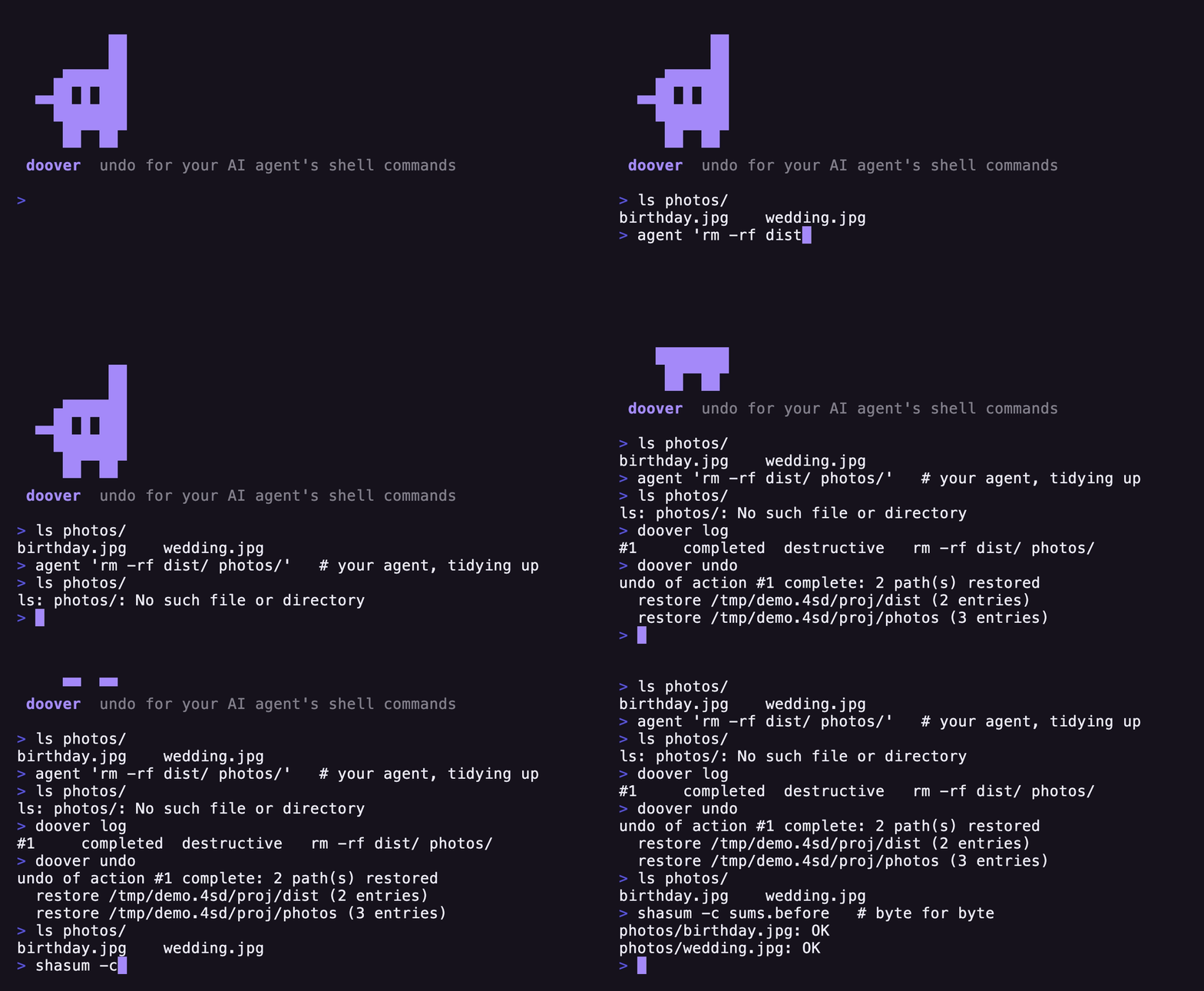
$ claude "clean up the build artifacts"
  ⏺ Bash(rm -rf dist/ photos/)        # ...that second one hurt.

$ doover log
  #42  completed  destructive  rm -rf dist/ photos/

$ doover undo
  undo of action #42 complete: 2 path(s) restored

$ ls photos/
  birthday.jpg  wedding.jpg          # back, byte for byte.
Why this exists
Coding agents run shell commands all day, and shell commands have no undo.
The existing safety mechanisms each stop short of the same spot:
- Claude Code checkpoints rewind edits made through its file tools,
but changes made through the Bash tool aren't checkpointed.rm -rf
is forever. - Sandboxes (Codex-style) confine the blast radius to your workspace.
Useful, but inside the workspace deletion still has no recovery. - git protects what you committed. It does nothing for untracked files,
ignored files (.env, local databases, that folder of test data), or any
directory that isn't a repo. And the agent itself can rungit checkout .orgit clean -fd, which destroy uncommitted work
using git.
doover is the missing layer: a transaction log for agent shell actions.
It doesn't ask for permission and it doesn't block anything. It makes the
dangerous commands reversible instead.
Install
macOS or Linux (WSL works; native Windows doesn't).
Cargo (needs Rust 1.85+; --locked installs the exact audited
dependency set the release was built and tested with):
$ cargo install doover --locked
Homebrew:
$ brew tap caydenchik/doover
$ brew trust caydenchik/doover   # newer Homebrew asks once per third-party tap
$ brew install doover
Prebuilt binaries for every platform are on the
releases page, withSHA256SUMS to verify.
Set up
$ doover init          # adds hooks to ~/.claude/settings.json
$ doover doctor        # verifies everything end to end
Use doover init --project to install for a single project
(./.claude/settings.json) instead of globally. init merges with your
existing settings and never duplicates itself; run doctor any time
something feels off.
To uninstall, remove the two doover hook entries from your settings file.
Your snapshots stay in ~/.doover until you delete that too.
Everyday use
You mostly won't notice doover. It sits behind Claude Code's PreToolUse /PostToolUse hooks, adds a few milliseconds per command, and speaks up only
when it couldn't fully protect something. Then one day:
| Command | What it does |
|---|---|
doover log |
Recent agent actions, most recent first |
doover undo |
Restore the state before the last destructive action |
doover undo 42 |
Undo a specific action from log |
doover redo |
Changed your mind? Re-applies what you undid |
doover show 42 |
One action in detail: command, snapshots, warnings |
doover diff 42 |
What changed since that action's before-state |
doover status |
Store size, session summary, cap headroom |
doover gc |
Prune old history (runs automatically too) |
doover pin 42 |
Keep an action through any cleanup |
doover unpin 42 |
Release it back to normal retention |
A few behaviors worth knowing:
- Undo is conflict-checked. If a file changed after the action you're
undoing (a later command, or you), doover refuses (exit code 3) and tells
you why.--forceproceeds anyway;--dry-runshows the plan first. - Undo is itself journaled. Undoing an undo is how
redoworks. History
is append-only; nothing is ever silently rewritten. doover undotargets the last command that actually changed something.
Read-only commands are skipped, even when doover snapshotted around them.- Undo is idempotent, and it trusts your disk over its own records. Undo
the same action twice and the second is a no-op. But if something puts an
action's effect back (a forced undo of a later action can), doover will
undo it again rather than tell you it already did. Whether your files are
there is a question about your files, not about doover's bookkeeping. - Restoring a whole directory replaces it. If your shell is sitting
inside that directory, runcd .afterwards to refresh it. doover tells
you when this happens. .gitis left to git. Whole-tree snapshots walk past.git(it is
often larger than the working tree, and undo should never rewind
repository history behind git's back); undo leaves it exactly as it is.
Point a command straight at it (rm -rf .git) and it is captured in full.- Build directories are skipped, but only if git agrees. When doover
snapshots a whole tree it walks pasttarget/,node_modules/,.venv/
and friends: a build recreates them, and capturing them would spend the
whole time budget on artifacts instead of your source. A directory is only
skipped when its name is on that list and git already ignores it — so
if you keep real source in a folder calledbuild/and git tracks it, it
is captured like anything else. Point a command straight at one
(rm -rf target) and it is captured in full.doover showlists whatever
was skipped, and undo leaves those folders exactly as they are. - Partial snapshots restore partially, and say so. If a snapshot was cut
short (see limits below),undorefuses by default rather than replace a
full tree with a partial copy.
How it works
agent runs: rm -rf build/
     │
     ▼
PreToolUse hook ── parse the bash ── classify against the registry
     │                                   rm → destructive, scope: build/
     ▼
snapshot build/ into ~/.doover/store   (copy-on-write, content-addressed)
     │
     ▼
journal the action (SQLite) ── then the command actually runs
     │
     ▼                                        later…
PostToolUse hook records the after-state ──── doover undo restores build/
The interesting parts:
- A real bash parser (not regexes) resolves what each command touches,
through&&chains, pipes, redirects, globs, and quoting. Anything it
can't fully account for (command substitution,eval, unknown tools) is
treated as potentially destructive, never assumed safe. - A reversibility registry of 152 CC0-licensed
YAML rules classifying the commands agents actually run, fromsafetoirreversible: whatrm,mv,git checkout,rsync --delete,gzip,wget -Oput at risk, and which paths to capture. Commands proven read-only
are classified as such so they cost nothing; the interesting entries are the
ones that look harmless and aren't, likesort -oquietly truncating its
output file. - Copy-on-write snapshots. On APFS/Btrfs/XFS, "copying" a file before
deletion shares its disk blocks, so snapshotting a 1 GB directory costs
almost nothing until the original actually changes. Files are stored
once, addressed by BLAKE3 hash, verified again before every restore. - Restores are staged. doover builds the restored tree next to the
target and swaps it in whole. A crash mid-restore leaves your files
exactly as they were.
What's protected
Three tiers, depending on what the parser can prove:
| Example | What doover does | |
|---|---|---|
| Known destructive | rm -rf src/, git reset --hard, mv a b, tee f, rsync --delete |
Snapshots the exact affected paths, anywhere on disk, including outside your project |
| Unknown / opaque | ./deploy.sh, eval "$X", python cleanup.py |
Snapshots your working directory as a precaution, and journals that coverage was best-effort |
| Beyond the filesystem | DROP TABLE, kubectl delete, git push --force |
Flags it in the journal as unrecoverable; no local snapshot can bring back remote state |
That middle tier is the one to internalize: for commands doover can't parse,
protection covers your working directory only. A script that deletes~/something-else is outside what static analysis can see.
Performance
Measured on Apple Silicon / APFS (run bench/hook_latency.py yourself):
- ~5–10 ms per command when nothing needs snapshotting, which is most
commands (ls,cat,git status, builds, tests) — re-measured
end-to-end in the 2026-08-15 live-agent trial (~6 ms pre + ~3 ms post,
including process spawn). - Snapshot cost scales with file count, not bytes: ~0.19 ms per file;
a single 100 MB file costs ~70 ms. - Snapshots stop at 5 seconds (configurable) so a huge tree can never
stall your agent. The journal records that the capture was partial.
Tuning
Everything is an environment variable; the defaults are meant to be left
alone.
| Variable | Default | Meaning |
|---|---|---|
DOOVER_HOME |
~/.doover |
Where snapshots and the journal live |
DOOVER_MAX_SNAPSHOT_MS |
5000 |
Per-hook snapshot time limit (0 = unlimited) |
DOOVER_MAX_GLOB_MS |
2000 |
Time limit for resolving one glob's scope (0 = unlimited); past it the command is treated as unknown |
DOOVER_MAX_FILES |
100000 |
Max files per snapshot |
DOOVER_MAX_BYTES |
5 GiB |
Max bytes per snapshot |
DOOVER_MAX_STORE_BYTES |
5 GiB |
Size cap for the store plus journal; oldest history is evicted past it (0 = uncapped) |
DOOVER_KEEP_DAYS |
7 |
How long history is kept (0 = forever) |
DOOVER_GC_EVERY |
50 |
Auto-cleanup every N actions (0 = manual gc only) |
DOOVER_MIN_FREE_BYTES |
1 GiB |
Warn when disk falls below this |
DOOVER_UNKNOWN_POLICY |
snapshot-cwd |
passthrough disables the working-directory fallback |
DOOVER_SKIP_DIRS |
target,node_modules,.venv,dist,… |
Build-dir names; a match is skipped only if git also ignores it (empty = skip nothing) |
Pinned actions (doover pin <id>) survive any cleanup, and the most recent
hour of history is never evicted for space.
What doover is not
Worth being direct about:
- Not a defense against a malicious agent. doover analyzes commands
statically; an adversary who wants to evade it can. It protects against
mistakes, which is what agents actually produce, not against attacks.
Treat it like a seatbelt, not a vault. - Not a backup tool. History is bounded (7 days / 5 GiB by default) and
lives on the same disk. Keep real backups. - Not able to undo remote effects. Dropped databases, deleted pods,
force-pushed branches: doover tells you it happened; it can't reverse it. - Not encrypted at rest. Snapshots are copies of your files, readable only
by your user account (0700/0600). Anyone with your account, or root, can
read them. Commands are redacted before they are written to the journal,
so credentials doover recognizes never reach the disk, but the matching is
pattern-based hygiene, not a DLP engine: an exotic enough secret gets
through. Keep treating your snapshot store as sensitive as the files in it. - File content, not ownership. A snapshot restores a file's contents,
permissions (mode), timestamps, and extended attributes. It does not
capture or restore ownership (uid/gid): undoing achown/chgrpbrings the
data back but not the owner, and an ownership-only change isn't auto-selected
by a baredoover undo(name it explicitly withdoover undo <id>). Your
data is always safe; the owner field is the one thing a restore leaves as it
finds it. - Not a replacement for git, checkpoints, or sandboxes. It's the layer
they all leave open. Keep using all three.
Extending the registry
Drop YAML files in ~/.doover/registry.d/ to teach doover about your own
tools:
rules:
  - id: my.dbtool
    match: { command: dbtool, subcommand: wipe }
    effect: destructive
    scope: { paths: positional }
    undo: snapshot-restore
Overlays can add commands and strengthen classifications. They can't
weaken a shipped one: a rule that says rm is safe is ignored, with a
warning, no matter how it's phrased.
The registry data is CC0 (public domain) precisely so other tools can steal
it. If you map out what some command really destroys, send a PR. That
knowledge is the most reusable part of this project.
FAQ
Does it work with agents other than Claude Code?
The core is agent-agnostic; the hook wiring currently targets Claude Code's
hook events. Adapters for other harnesses are a natural contribution;doover hook pre just reads JSON on stdin.
Multiple agents at once?
Yes. The journal is designed for concurrent sessions writing to one store.
What if doover itself breaks?
It never blocks your agent. Every failure path exits cleanly and lets the
command run; doover being broken means you lose the safety net, not your
workflow. doover doctor tells you if that's happening.
How much disk does it use?
Usually very little. Snapshots share blocks with the originals on modern
filesystems and identical content is stored once. The store is capped at
5 GiB regardless, and doover status shows where you stand.
I undid the wrong thing.doover redo. Undo never destroys information; it's another journaled,
reversible action.
Development
$ make test     # everything: format, lints, unit, end-to-end
$ make e2e      # the bats suite (runs the real binary in throwaway jails)
$ make unit
The test suite is the project's spine: every bug ever found lives on as a
test. Read CLAUDE.md for the working rules if you're contributing.
License
Code: Apache-2.0. Registry data: CC0.
Reviews (0)
Sign in to leave a review.
Leave a reviewNo results found