flexreport-mcp
Health Uyari
- No license — Repository has no license file
- Description — Repository has a description
- Active repo — Last push 0 days ago
- Community trust — 18 GitHub stars
Code Gecti
- Code scan — Scanned 12 files during light audit, no dangerous patterns found
Permissions Gecti
- Permissions — No dangerous permissions requested
Bu listing icin henuz AI raporu yok.
MCP server for real-time equity research: real-time market events, 13F ownership, earnings transcripts, fundamentals, estimates & insider filings on 2,900+ companies for Claude and other AI agents.
flexreport-mcp
A standalone MCP microservice that exposes the FlexReport
equity backend's live events, research-report artifacts, and database of
750M+ datapoints as on-demand tools for Claude (and any MCP client).
It supercharges AI agents with real-time market events and curated, golden-source
data spanning fundamentals, transcripts, filings, insider trades (Forms 3, 4, and 5),
ratios, macro data, IR decks pulled straight from each company's investor relations
site, and more.
Quick Install
Add the connector to Claude Code
claude mcp add --transport http flexreport https://mcp.flexreportfinapi.com/mcp
Or add to Codex
codex mcp add flexreport --url https://mcp.flexreportfinapi.com/mcp
Then start Claude and just ask (e.g. "pull the biggest movers from flexreport").
On the first data call your MCP client runs an OAuth sign-in in your browser —
sign in or register when prompted; you never paste a token. Add --scope user to
make it available in every directory. See Auth for details.
Demo
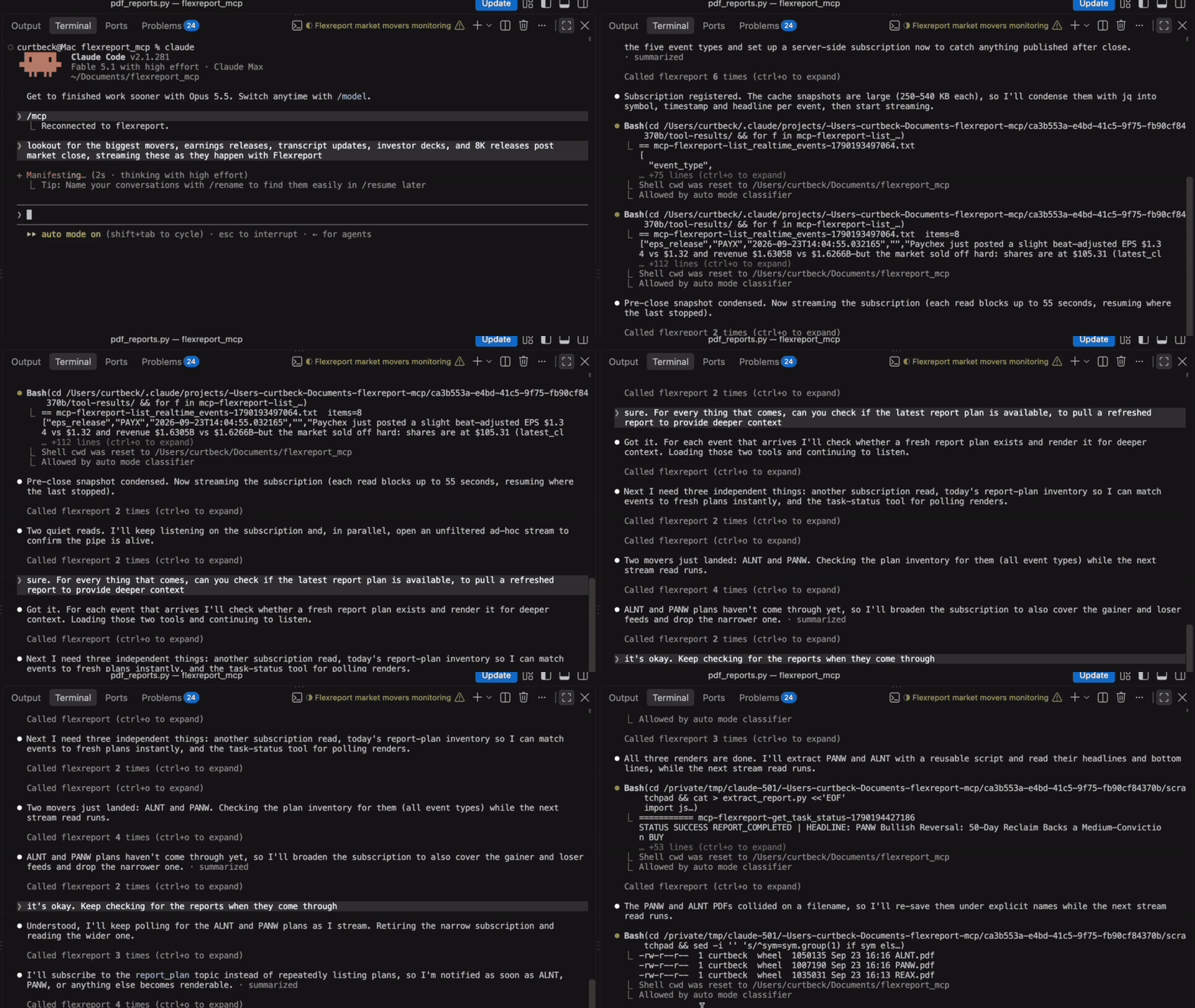
Stream real-time events in the terminal. Ask Claude to watch the market and
events arrive as they land: movers, earnings releases, 8-Ks, IR decks and fresh
report plans. As each report plan saves, Claude renders the refreshed report.
"Look out for the biggest movers, earnings releases, transcript updates, investor
decks, and 8K releases post market close, streaming these as they happen with Flexreport""For every thing that comes, can you check if the latest report plan is available,
to pull a refreshed report to provide deeper context"
Open the research report. Every figure links back to the query that produced
it, and every headline links to its source. Here's a report for AAPL:
"Get me the latest flexreport report for AAPL"
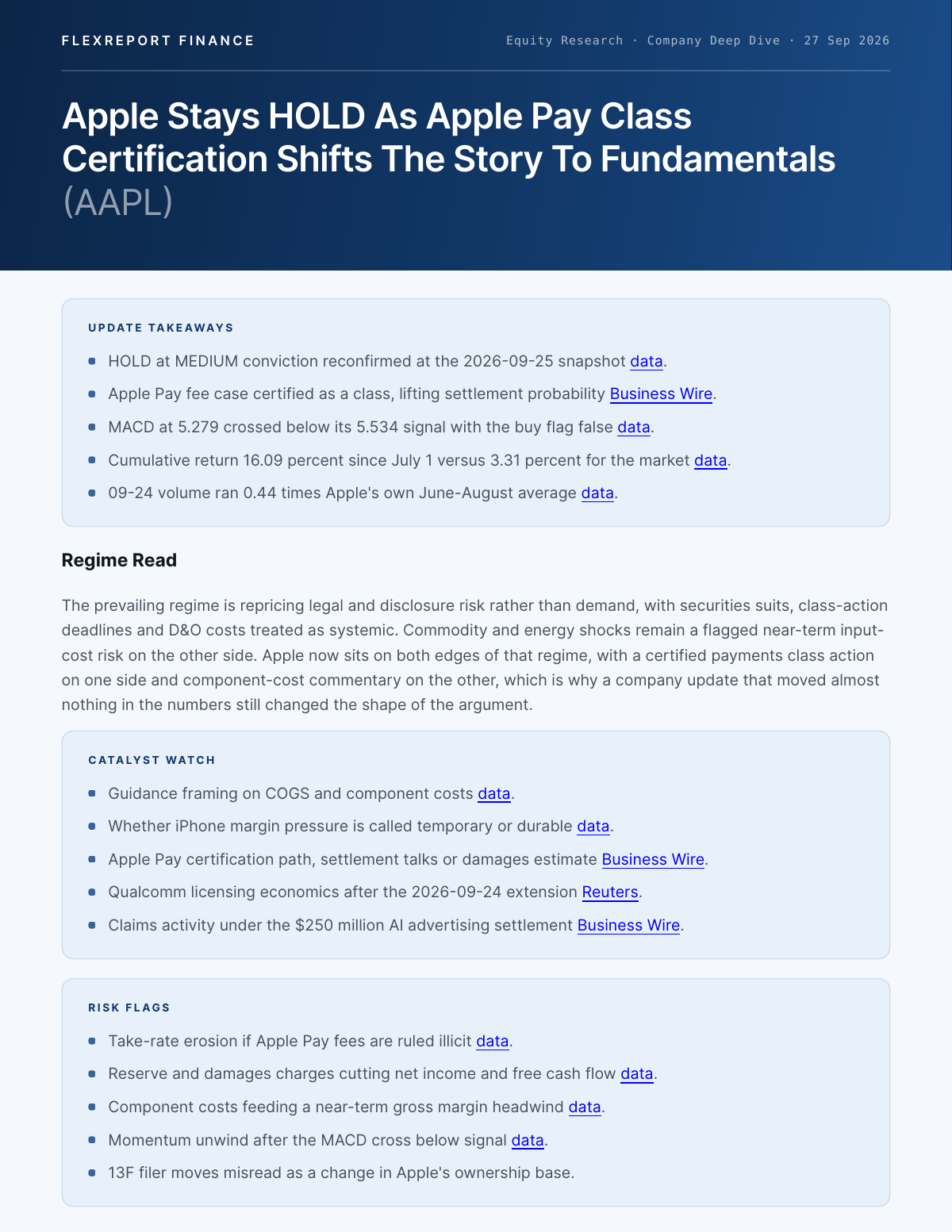
Open the full AAPL report (PDF, 13 pages)
Use-cases
1. Real-time
1a. Streaming (events and real-time reports). Subscribe to events as they publish, including the report_plan topic, which fires each time a report is ready, then pull the rendered report: "Subscribe me to earnings releases, 8-Ks, IR publications and new report plans for NVDA, AVGO, AMD and MU. As each one lands, tell me what happened, check the intraday tape for an abnormal move, and pull the FlexReport report once it's ready."
Tools: register_event_subscription → stream_event_subscription, or ad-hoc stream_events, then detect_intraday_outlier_jumps and get_latest_report.
1b. Events from the past twelve hours. Analyze real-time SEC 8-K filings, while also pulling in investor relations decks and 5-minute bars to quickly identify stocks making meaningful moves: "What are the latest 8-K releases? Highlight the most significant ones, pull the accompanying investor relations releases via FlexReport, chart 5-minute bars for any names making meaningful moves, and tell me how they align with each company's current state. I would like this in tabular format: 8-K summary, company trend, FlexReport 8-K analysis S3 link, IR deck link."
Tools: situate → list_realtime_events, then get_aftermarket_data / detect_intraday_outlier_jumps and get_latest_report.
2. Reports
2a. The latest report for a specific company: "Pull the latest FlexReport report on Snowflake and summarize what changed this quarter: guidance, margins, and anything management flagged on the call."
Tools: get_latest_report(["SNOW"]). A fresh plan renders in ~10-20 s; a stale or missing symbol can be rebuilt with generate_report_for_stock.
2b. The latest reports for a time period: "What reports have come out in the Energy sector over the past three days? Pull the fresh ones and rank them by how significant the underlying event was."
Tools: list_available_reports(report_date=<3 days ago>), filtered to Energy names (list_options("sectors"), get_company_snapshot), then get_latest_report for the fresh ones.
2c. A bespoke report built on your criteria: "Build me a report on large-cap US semiconductors with ROIC above 20% and net debt/EBITDA under 1x, trading above their 200-day SMA with RSI below 60. Show the fundamentals, the technicals and the latest estimate revisions for each, laid out in my saved template."
Tools: screen_stocks, explore_data_catalogue (ratios, fundamentals, estimates), get_technical_indicator_data, and get_user_template. The agent assembles the PDF in your template; set one up with draft_user_template → save_user_template.
3. Predictive analytics
Predict upcoming earnings volatility, pulling in simple and exponential moving averages and Bollinger Bands, and creating a bespoke investment memo: "Predict tomorrow's upcoming earnings volatility, highlighting the stocks slated for the biggest moves; chart their simple and exponential moving averages and Bollinger Bands; and highlight the biggest fundamental drivers right now, putting this all in an investment memo for my team."
Tools: list_earnings_announcements → predict_earnings_move, get_technical_indicator_data, get_company_snapshot.
4. Research and exploration
Run thematic research on a market narrative: "The AI trade has cooled recently, largely due to CapEx concerns and return on investment. I believe this has happened before, in the fall of 2025. Can you confirm, and what were the factors that allayed those concerns? Was it management commentary, continued demand for AI services, robust profitability and higher guidance? Please put together an in-depth report with FlexReport Finance."
Tools: explore_data_catalogue (transcripts, fundamentals, estimates), trace_data_sources / get_document_section for cited quotes, or generate_research_report for the full write-up.
Tools
50 tools, grouped by the module that registers them. Clients see them in tools/__init__.py import order (situate first).
Situate & real-time events (tools/realtime_events.py)
| Tool | Backend endpoint | What it does |
|---|---|---|
situate(symbols, window_days, question) |
GET /get-company-event-web + GET /get-event-ontology + GET /is-market-open |
The first call. Composes the event web (what happened to this company), the ontology (what that kind of event entails, what follows it, where its payload lives after the 12h cache, when each table next refreshes) and market status into what is going on right now plus an ordered plan of exact tool calls, a skip list of calls that would return nothing, and situation-scoped guidance. The plan starts at the realtime event type the question names (EVENT_VOCABULARY in situate.py covers every type in list_options("event_types")); a question naming only a family walks its episode, one naming nothing sweeps every episode — there is no default family, and explore_data_catalogue is never planned for a market-wide "today" question. Composition is in situate.py (pure functions; python tests/test_situate_routing.py); no new backend route. Public, synchronous |
list_realtime_events(event_type, tickers, sector, industry, market_cap) |
POST /get-realtime-events |
Pull live events (EPS updates, transcripts, ratings, …) from the 12h cache |
get_company_snapshot(symbol) |
GET /get-company-snapshot |
Structured snapshot: thesis, fundamentals, technicals, price targets, ownership, grades |
get_company_event_web(symbol, window_days, max_nodes) |
GET /get-company-event-web |
The why behind the snapshot — the company's recent event graph: time-ordered event/data_update nodes with fetch hints and typed edges (same_chain_run / lineage / co_occurrence). Pair it with get_company_snapshot, and call it before chaining a targeted list_realtime_events / explore_data_catalogue / report request at one symbol |
get_event_ontology(event_type, family, relation, format) |
GET /get-event-ontology |
The class-level ontology behind the event web — what an event type entails: the tables written when it fires (by layer), the events that usually follow (observed rate / lag), where the payload lives after the 12h realtime cache (persisted_in), which workflow refreshes each relation and its next_run_at (the freshness check), and which tool reads it. Symbol-independent, public, cacheable — call it first on any event-driven request and join it to a web node's type / relation / family |
Event streaming (tools/event_subscriptions.py)
| Tool | Backend endpoint | What it does |
|---|---|---|
stream_events(topics, symbols, cursor, max_events, max_wait_seconds) |
GET /events (SSE) |
Push delivery, ad-hoc. A bounded read of the realtime-event stream: returns after max_events matched events or max_wait_seconds (cap 55 s) with {events, cursor, closed} — each event is the same object list_realtime_events returns, the moment it publishes. Filter inline by topics (event types or families from list_options("event_types"), plus the stream-only report_plan topic — a frame each time a report plan is saved) and symbols. No server-side state: always pass the returned cursor back in or the next call starts at "now" (authed) |
register_event_subscription(topics, symbols) |
POST /register-subscription |
Save a filter server-side → {subscription_id, filter, cursor, created_at}. Only events published after registration are delivered; keep the id (no list endpoint yet). 30/hour (authed) |
stream_event_subscription(subscription_id, cursor, max_events, max_wait_seconds) |
GET /event-subscription/{id} (SSE) |
Push delivery, resumable. Same bounded-read shape as stream_events, but the API saves the cursor when the read closes, so repeated calls see every matching event exactly once with no cursor bookkeeping; cursor only overrides the saved position for one connection. closed: "subscription deleted" means stop reconnecting; 404 covers a missing id and another user's id alike (authed) |
delete_event_subscription(subscription_id) |
DELETE /event-subscription/{id} |
Remove a saved subscription; any open stream on it ends with a closed frame within one read cycle (authed) |
Reports & PDF templates (tools/pdf_reports.py)
| Tool | Backend endpoint | What it does |
|---|---|---|
get_latest_report(symbols) |
POST /get-cached-reports |
The fast path for one or more named tickers. A symbol with a fresh saved plan lands in rendering ({task_id, status, symbol}): the backend pulls the plan JSON and renders it into the user's template in ~10-20 s — poll get_task_status for {"pdf": ...}. Every other symbol comes back as its cached PDF (presigned URL + inline base64, with generated_at, age_hours, latest_event_at, stale) or in missing. stale: true means the plan itself is out of date — only a generate_report_for_stock(ticker) rebuild (~10 min) refreshes it. 500/hour |
list_available_reports(event_types, report_date) |
POST /list-available-reports |
Inventory of saved report plans built on or after report_date (YYYY-MM-DD, default today; plans stay renderable for 7 days, so pass an earlier date for the running inventory — an empty list means nothing was planned in the window, not that there is no research) — every symbol whose material event (eps_update, eps_release, 8k_release, financials_release, ir_publication, transcript_update; company_update nightly) saved a plan, newest first, each with event_type, planned_at, queued_at, source and a fresh flag that applies the same rule /get-cached-reports uses: true → get_latest_report([ticker]) renders it in ~10-20 s, false → only a generate_report_for_stock rebuild (~10 min) refreshes it. Filter by event_types; widen with report_date (a malformed date is a 422). The check between list_realtime_events (what just published) and get_latest_report (pull it), or the direct way to see what real-time research is available now |
generate_report_for_stock(ticker, user_override, financial_items, as_reported_financial_items, ratios, revenue_segment, technical_analysis_items, estimate_items, institutional_ownership, include_as_report_financials, as_reported_periods) |
POST /create-full-report |
Full rebuild only (~10 min) — use sparingly. Standard (ticker only): rebuilds and saves the symbol's report plan; the call to make only when get_latest_report returned the ticker stale or missing and the user wants to wait — never for a symbol in rendering. Custom (user_override=true + shaping lists): a full build (~10 min, not saved) around the line items, ratios, as-reported concepts, segments, indicators, estimates, or manager CIKs the user named; the tool sets the switch whenever a shaping field is non-empty. Bespoke asks are normally explore → ideate → overlay into the template instead. Async → {ticker: {task_id, status}} |
generate_research_report(query, delivery) |
POST /generate-research-report |
Deep dive (~10-12 min, async) — analyst-grade writeup, only when the user explicitly asks for a full report → {task_id, status} |
download_pdf_from_url(url, file_name) |
POST /download-pdf-from-url |
Fetch a presigned S3 PDF URL server-side (SSRF-guarded) and return it inline as base64 — e.g. a get_latest_report url on clients that can't open the link (authed) |
draft_user_template(template, template_type, anchor) |
POST /draft-user-template |
Step 1 of 2 for a user's own PDF format: compiles an HTML page into a blueprint under several treatments and renders each as presigned PNG previews of the platform's specimen document — one of every content kind (title, lead, sections, bullets, KPI cards, tables, charts, figure, source line, footnote); an add_on at its in-report column width, a bespoke as full pages — plus a draft_id. The user signs off on how the design treats each kind of content, not on sample text. Nothing is stored — the draft lives 24h (authed, 30/min) |
save_user_template(draft_id, variant_id, template, template_type, anchor) |
POST /save-user-template |
Step 2 of 2: pass draft_id + the chosen variant_id and the reviewed treatment is saved; or pass template + template_type (+ anchor) directly to skip the previews (HTML only — markdown is a 422). One template per user — upsert, saving replaces the previous one. Returns {status: "SAVED", template_type, anchor, bytes, patterns, tones, warnings} — the content kinds the design styles and its tone classes (authed, 100/min) |
update_user_template(template, template_type, anchor, draft_id, variant_id) |
PUT /update-user-template |
Change the saved template — any field (omitted fields keep their stored values), or no fields to recompile it as stored with the current compiler. Async: {task_id, status: "PENDING", changed, next_step} → poll get_task_status for {status: "SAVED", patterns, tones, warnings}. 404 = nothing saved yet (save first); 422 = validation errors (authed) |
get_user_template() |
GET /get-user-template |
The caller's saved template (template_type, template_format, anchor, sanitized template, timestamps). 404 = none saved; a 503 means the backend table isn't created yet, not "nothing saved". Also the markup to lay an agent-composed PDF out in |
delete_user_template() |
DELETE /delete-user-template |
Delete the saved template — permanent, PDFs revert to the standard layouts; ownership enforced in the WHERE clause |
Data exploration, citations & saved queries (tools/data_exploration.py)
| Tool | Backend endpoint | What it does |
|---|---|---|
explore_data_catalogue(query) |
POST /data-catalogue-exploration |
Default route — fast, interactive EDA against the data platform → result sets to render as charts/tables (dashboard only, 20/hour) → {task_id, status} |
explore_data_coverage(query) |
POST /data-coverage-exploration |
Coverage counts and breakdowns — how many symbols carry a dataset (IR decks, transcripts, 13F, insider, estimates…), by sector / industry / country / market cap / year, and how far history goes. Public: no account needed, so prospects can ask what the platform covers |
get_signed_sql_drilldown(encrypted_query_token, prompt, values, max_rows) |
GET /query-data |
Follow a get_company_event_web node's signed_query_url (or its bare t token) to the rows behind it — new record flagged is_new_record: true, plus context rows; tokens are server-minted only, never constructed. Optional values (typed slot fill, no LLM) and prompt (natural language, fills what values left out) re-aim a token that is a placeholder twin at other entities; max_rows caps the payload, and a sliced reply carries row_count + truncated: true (authed) |
trace_data_sources(relation, keys, column, encrypted_query_token, prompt, values, max_documents, resolve_passages) |
GET /trace-sources |
Citations — resolve numbers from explore_data_catalogue / run_saved_query / get_signed_sql_drilldown rows back to the filing, section, or verified quote they were read from. Prefer relation + keys (every identifying column, incl. the period) over a token |
get_document_section(symbol, year, quarter, n, name) |
GET /query-section |
Open one numbered section of a source document — the exact earnings-call speaker turn a trace_data_sources citation points at. Read the four values off the citation URL; year / quarter are the fiscal period of the call, not the calendar quarter |
save_user_query(user_request, query_tokens) |
POST /save-user-query |
Save an explore_data_catalogue result's opaque query_tokens under the user's own wording, so the request can be replayed without re-planning it. Returns {msg, id, placeholder_status} — id is the delete key; PENDING means the backend is authoring a placeholder twin of each query plus the row's metadata slot schema (~10 s to 5 min) so the request can later be re-asked for other entities; NOT_DISPATCHED means exact replay only (authed, owner-scoped; no upsert — saving twice creates two rows, 100/min) |
list_saved_queries(limit) |
GET /get-saved-queries |
The caller's saved requests, newest first — id (what delete takes), queries (the tokens for an exact replay), query_placeholder (the twin tokens, index-aligned with queries), user_request (the user's own label), and metadata: the row's summary (one line, slots in braces), parameters slot schema ({name, type, description, example} — the keys of run_saved_query(values=…)), entities, datasets, topics, per-query result_schema, stale, run_count, last_run_at. Match a question on metadata, not on the label, and skip stale rows; metadata and query_placeholder are null until the placeholder task has run. A 503 means the backend table isn't created yet, not "nothing saved" |
run_saved_query(query_tokens, prompt, values, max_rows) |
GET /query-data |
Replay a saved request: each token runs against live data, synchronously, in the order given (max 25) — rows only, never SQL; seconds instead of a ~1-5 min planning job, and no draw on the 20/hour exploration budget. With query_placeholder tokens, values (keyed by metadata.parameters, filled deterministically with no LLM — entity-set slots take [{id, name}] rows and a name with no id resolves server-side) re-aims the saved queries; prompt ("the past 8 quarters of sales for KSS") fills only what values left out, and a slot neither covers keeps its saved example. The reply carries parameters, defaulted_parameters and ignored_values; a 422 means the request could not be mapped — fall back to explore_data_catalogue. Always pass max_rows (e.g. 500): a row's _constituents companion returns 7,000–35,000 rows uncapped |
delete_saved_query(query_id) |
DELETE /delete-saved-query |
Delete one saved request by id — permanent, and the tokens go with it; the 404 deliberately covers both "no such id" and "not yours" |
Market data (tools/market_data.py)
| Tool | Backend endpoint | What it does |
|---|---|---|
get_technical_indicator_data(symbol, indicator, start_date, end_date) |
GET /technical-indicator-endpoint |
Daily history of one technical indicator (from list_options("technical_indicators")) over an inclusive YYYY-MM-DD range (authed) |
detect_intraday_outlier_jumps(symbol, frequency, zscore_threshold) |
GET /detect-intraday-outlier-jumps |
Live look at today's 1-min tape; at frequency (from list_options("intraday_frequency")); flags bars whose move is a daily-sigma outlier (synchronous, authed) |
get_aftermarket_data(symbols, start_datetime, end_datetime) |
POST /get-aftermarket-data |
Query stored after-hours 15-minute bars (open/high/low/close/volume, 16:00-20:00 ET) for symbols over an ET datetime range; rows ordered symbol, bar time DESC (defaults to today, authed, 300/min) |
predict_earnings_move(symbols) |
POST /predict-earnings-announcement-move |
Predicted post-earnings move magnitude under each scenario (e.g. beat-and-raise → ~6%) |
list_earnings_announcements(start_date, end_date, symbols, industry, sector, market_cap) |
POST /list-upcoming-earnings-announcements |
Scheduled earnings announcements in a date window (both default to today), covered names only; sector / industry / market_cap validated server-side (422 on a bad value) |
is_market_open(exchange) |
GET /is-market-open |
Is an exchange open now (case-sensitive code, default NYSE) — routes between detect_intraday_outlier_jumps (open) and get_aftermarket_data (closed). Public |
Screening, portfolios & strategies (tools/strategies.py)
| Tool | Backend endpoint | What it does |
|---|---|---|
screen_stocks(metrics, sectors, sub_sectors, market_cap, analyst_ratings, institutional_ownership, countries, price_performance) |
POST /screen-stocks |
Screen the universe by growth metrics, sector / sub-industry, market cap, analyst ratings, institutional ownership, country, and price performance. Async → {task_id} (10/hour) |
optimize_portfolio_default(symbols, risk_tolerance) |
POST /optimize-symbols-non-llm |
Default optimizer — risk-optimized weights for a ticker list, synchronous, no LLM; unsupported tickers in missing, short-history ones in dropped. Public |
optimize_portfolio(symbols, risk_tolerance, delivery) |
POST /optimize-symbols |
Slower LLM-curated variant: multi-signal scoring + LLM curation + risk optimization. Async → {task_id} (10/hour) |
get_stock_picks(strategy_name) |
GET /get-stock-picks |
Latest LLM-selected stock picks for the current rebalance (optionally one strategy) |
get_strategy_performance_summary(amount) |
GET /get-strategy-performance-summary |
Leaderboard of every strategy book vs the S&P 500 since inception (return, excess, Sharpe, drawdown, YTD, growth of amount) — the first stop for "how are the picks doing?" |
get_strategy_track_record(strategy_name, book, amount) |
GET /get-strategy-track-record |
One book's daily since-inception series vs the S&P 500 plus headline stats; book = llm (default) or mechanical, strategy_name may be pooled |
get_strategy_swaps(strategy_name) |
GET /get-strategy-swaps |
Per-trade ledger of weekly adds / drops, each measured against the S&P 500 (drops as foregone return) |
Scheduling (tools/scheduling.py)
| Tool | Backend endpoint | What it does |
|---|---|---|
schedule_task(name, steps, regular_cron, delivery, description) |
POST /save-user-workflow |
Save a 1-8 step workflow (fetch allowlisted endpoints + transform steps) and attach a recurring cron delivery; upsert by lowercase-slug name |
list_scheduled_tasks() |
GET /get-scheduled-tasks |
The caller's cron jobs (name, schedule, enabled, last_run_at, total_run_count); workflow jobs are named wf:{email}:{workflow-name} |
delete_scheduled_task(task_name) |
DELETE /delete-scheduled-task |
Remove a cron job by the full name from list_scheduled_tasks; the saved workflow definition is kept |
Utility & billing (tools/utility.py)
| Tool | Backend endpoint | What it does |
|---|---|---|
get_task_status(task_id) |
GET /task-status |
Poll an async job to SUCCESS and read its result |
list_options(kind, ticker, q, cik) |
GET /list-realtime-event-options, /list-financial-items, /list-financial-ratios, /list-as-reported-items?ticker=, /list-revenue-segments?ticker=, /list-institutional-managers?q=&cik=, /get-sectors, /list-institutional-investor-types, /list-countries, /get-fiscal-quarter, /list-marketcap-options, /list-intraday-chart-options, /list-technical-indicators, /list-tickers, /list-symbols-with-names |
One catalogue tool: enumerate valid values for a parameter (event types, line items, ratios, a filer's own as-reported XBRL concepts and revenue segments (ticker), institutional managers by name fragment / CIK (q / cik), sectors, investor types, countries, fiscal quarter, market-cap buckets, intraday frequencies, technical indicators, and the ticker universe with or without company names) |
list_sub_industries(sectors) |
GET /get-sub-industries |
Distinct industries within the given sector(s) |
onboard_symbol(symbol) |
POST /onboard-symbol |
Request onboarding of an uncovered ticker (async, authed, 5/hour) |
upgrade_plan() |
GET /payment/upgrade-link |
Checkout link to upgrade or change the user's plan (e.g. after hitting a quota); payment completes in the browser |
manage_billing() |
GET /payment/portal-link |
Stripe billing-portal link — invoices, card, cancellation |
For a single named company, get_company_snapshot and get_company_event_web are the standard pair — the two halves of the same question, usually called together. The snapshot is the what (where the company stands now: thesis, fundamentals, technicals, ownership, grades); the event web is the why (the episode behind it: earnings print → 8-K → transcript update → IR publication → analyst reaction, with edges saying how each relates). A snapshot on its own is a verdict with no evidence; the web is the evidence. The web is also the cheap grounding call that makes the rest of the loop precise — each node carries the exact follow-up call, so the next list_realtime_events, explore_data_catalogue, or report request carries real event types and dates instead of guessed ones.
Typical agent loop: default to explore_data_catalogue(query) for open-ended/exploratory questions (fast, interactive charts/tables). Escalate only on a crystal-clear intent — get_latest_report(symbols) for the existing report on a named ticker, screen_stocks(...) to filter the universe, or generate_research_report(query) for an explicit deep dive (~10-12 min, async — poll with get_task_status).
Asked the same question twice — or the same question about a different company? explore_data_catalogue re-plans its SQL every time, so once an exploration is done the agent offers to save it: save_user_query stores its query_tokens, and the backend authors a placeholder twin of each query — lifting the ticker, CIK list, date, interval, and count into typed slots — alongside the row's metadata, which names those slots and summarises what the row asks. run_saved_query then replays the row's queries exactly (the same queries against live data, in seconds, no planning step, no polling), or takes the row's query_placeholder tokens plus typed values to re-aim the request at other entities — "TGT's last 8 quarters of sales" saved yesterday answers "KSS's last 8 quarters of sales" today, deterministically and with no language model in the fill, the substituted parameters (and any defaulted_parameters / ignored_values) returned beside the rows; a prompt still covers what the agent cannot type. list_saved_queries is the thing to check before any exploration, matching the question against each row's metadata — summary, parameters, datasets — rather than its user_request label, and skipping rows marked stale; delete_saved_query clears one out. Pass max_rows on every replay, and pick the queries to run from metadata.result_schema so the _constituents companion (7,000–35,000 rows) stays out of the call. The tokens are opaque ciphertext the backend minted: pass them through unchanged, never construct or edit one, and never show one to the user.
Want reports in your own format? A user supplies an HTML page — masthead, colours, layout, branding — and it is saved as a blueprint: the author's stylesheet and page chrome plus one markup pattern per content kind, which the backend applies automatically to every PDF it renders for that user (get_latest_report renders of fresh plans, generate_report_for_stock rebuilds, standard and custom, and scheduled reports). A template is structure and style applied to the document's own content: nobody fills template markup, and no other call changes. It is a visual choice, so it is approved by looking: draft_user_template compiles the page under several treatments and renders each as PNG previews of the platform's specimen document (an add_on restyles one section of the standard layout, named by anchor; a bespoke drives the whole document), the user picks one, and save_user_template(draft_id, variant_id) stores that treatment — one template per user, upserted. update_user_template changes any field later, or recompiles the stored design when called with no arguments; get_user_template shows what is in force; delete_user_template returns the user to the standard layouts.
There is no agent-driven PDF builder: the build_pdf_full_width / build_pdf_sidebar tools (backend /create-pdf and /create-pdf-sidebar) and the pdf_options catalogue were retired in favour of templates. When a user wants a document composed from Flexreport data that no backend report covers — including a bespoke take on a company report ("the SNOW report, built around product revenue and RPO") — the agent explores the items they named, ideates with them over the result sets, and builds the PDF with its own document tooling, overlaying the agreed results in the user's saved template (get_user_template) when one exists — and offering to draft one (draft → preview → save, then update) when none does.
Reports are on-demand: nothing regenerates until someone asks. The two report endpoints are strictly separate:
get_latest_report→/get-cached-reportsis the fast path. A saved report plan is JSON — brief, queries, results, format map — built the moment a material event publishes for a symbol (or by a rebuild) and refreshed nightly while its inputs keep changing. When a symbol's plan is fresh (has a format map, under 7 days old, not older than the symbol's latest report inputs, reads the right side of the EDGAR/FMP split), the endpoint does not return a pre-built PDF: it renders that plan into the user's template in ~10-20 s and lists the symbol underrenderingwith atask_idto poll. Every other symbol comes back as its cached PDF taggedstale(true= the plan itself is out of date — a print, a filing, a 13F refresh landed after it) or lands inmissing.generate_report_for_stock→/create-full-reportis a full rebuild (~10 min), used sparingly. The agent calls it with the ticker alone only whenget_latest_reportreturned the symbolstaleormissingand the user wants to wait; the rebuilt plan is saved, so laterget_latest_reportcalls render it in seconds. Never for a symbol inrendering, and never fanned out across a list.- Bespoke requests go through exploration, not a rebuild. The agent explores the items the user named (
list_saved_queries, thenexplore_data_catalogue), ideates with them over the result sets, and overlays the agreed results into their template (get_user_template) with its own document tooling.
list_available_reports(event_types, report_date) is the inventory of those saved plans, scoped to plans built on or after report_date (default today) — which symbols have real-time research ready and whether each is fresh (get_latest_report renders it in seconds) or would rebuild (minutes) — so the agent can go from list_realtime_events (an event published) to a fresh report without guessing, or skip the events step and list what is available outright. For "pull the most relevant reports today" the events are the filter and the plans are the availability check, in that order: pull the material types (transcript_update, 8k_release, ir_publication, eps_release, financials_release) and the tape (biggest_mover, biggest_loser), read the content, confirm significance against intraday price action (detect_intraday_outlier_jumps), match the survivors to plans with list_available_reports(event_types=[...]), and pull only those with get_latest_report. situate surfaces this as a suggestion on every market-wide plan, carrying report_date when the 12h realtime window opened on an earlier UTC date. Only an explicit ask for the pipeline's own report rebuilt around named items makes it a custom report — user_override=true plus the shaping lists (financial_items, ratios, as_reported_financial_items, revenue_segment, technical_analysis_items, estimate_items, institutional_ownership CIKs, include_as_report_financials / as_reported_periods) — which is a full build (~10 min) that is never saved. The backend rejects shaping lists without the switch (422), so the tool sets it whenever a shaping field is non-empty. Vocabularies come from list_options: financial_items, financial_ratios, technical_indicators, and the ticker-scoped as_reported_items / revenue_segments and the q-scoped institutional_managers (returns CIKs). Event context is server-owned — the request carries no thesis, change-summary, include_*, or price-date fields.
Code layout
server.py            entrypoint: imports the tools package, adds /health, runs the transport
core.py              the FastMCP instance, server instructions and `_send` (backend forwarding)
client.py            shared httpx client + inbound-bearer forwarding
auth_verifier.py     OAuth resource-server token validation (RS256 via the backend JWKS)
situate.py           pure composition logic behind the `situate` tool
instructions.json    server instructions (non-code copy)
tools/
  realtime_events.py     situate, list_realtime_events, company snapshot / event web, event ontology
  event_subscriptions.py stream_events, register / stream / delete_event_subscription (SSE bounded reads)
  pdf_reports.py         get_latest_report, list_available_reports, generate_*, download_pdf_from_url, PDF templates
  data_exploration.py    explore_data_*, signed drilldowns, trace_data_sources, document sections, saved queries
  utility.py             get_task_status, list_options, list_sub_industries, onboard_symbol, billing
  market_data.py         technical indicators, intraday outliers, after-hours bars, earnings calendar + move prediction, market status
  strategies.py          screen_stocks, portfolio optimization, stock picks, strategy track records
  scheduling.py          schedule / list / delete scheduled tasks
Each module does from core import mcp, _send and registers with @mcp.tool(...);
importing tools registers everything. tools/__init__.py fixes the import order,
which is the order tools are advertised to clients (situate first).
Run locally
python -m venv .venv && source .venv/bin/activate
pip install -r requirements.txt
cp .env.example .env          # set API_BASE_URL, MCP_HOST, MCP_PORT
set -a && source .env && set +a
python server.py              # serves streamable-http on http://MCP_HOST:MCP_PORT/mcp
Auth
The server is an OAuth 2.0 Resource Server and stateless (load-balancer
friendly), so auth rides each call. It holds no credentials and no signing
secret — it validates the inbound bearer token and forwards it to the backend,
which enforces scope, plan, and quota.
How it works
Sign-in is a standard browser authorization-code + PKCE flow, run by your MCP
client (e.g. Claude) against the FlexReport backend, which is the Authorization
Server. Register or sign in with an email + password, or use Google
Sign-In — you never paste or type a token:
- On a request without a valid token the server returns
401with aWWW-Authenticatechallenge and serves Protected Resource Metadata at/.well-known/oauth-protected-resource, pointing the client at the backend AS. - The client opens your browser; you sign in / consent and it receives an RS256
access token issued by the backend. - The server validates that token on every call — signature via the
backend's JWKS (RS256 public key) plusaud,iss, andexp— then
forwards it to the backend. Invalid or expired → a clean401and the client
re-runs the flow.
The server never sees your password and never holds the signing key — it stays a
credential-free proxy. Only valid RS256 OAuth tokens are accepted; there is no
password or static-JWT fallback.
Config (env)
| Var | Default | Purpose |
|---|---|---|
OAUTH_ISSUER |
https://app.flexreportfinapi.com |
Expected token iss + advertised authorization server. Must match the backend's iss — prod uses the root domain https://flexreportfinapi.com. |
OAUTH_AUDIENCE |
= OAUTH_ISSUER |
Expected token aud. Set both sides to the canonical MCP URL for true audience binding. |
OAUTH_JWKS_URL |
{issuer}/.well-known/jwks.json |
Where public keys are fetched (decoupled from issuer for container networking). |
MCP_RESOURCE_URL |
https://mcp.flexreportfinapi.com/mcp |
This server's canonical resource identifier (the PRM resource). |
Static header
Configure Authorization: Bearer <OAuth access token> in your MCP client and the
server validates and forwards it like any other call — useful for testing with a
token minted elsewhere. Nothing is stored at rest; tokens are forwarded per-call.
Wire into an MCP client
.mcp.json (Claude Code):
{
  "mcpServers": {
    "flexreport": {
      "type": "http",
      "url": "http://localhost:8000/mcp",
      "headers": { "Authorization": "Bearer <YOUR_OAUTH_ACCESS_TOKEN>" }
    }
  }
}
Verify with MCP Inspector
npx @modelcontextprotocol/inspector
# Connect to http://localhost:8000/mcp with header Authorization: Bearer <OAuth access token>
# Confirm the tools list loads (46 tools), then exercise:
#   list_realtime_events("eps_update")        -> events (or [])
#   get_company_event_web("NVDA")             -> event graph (or an empty/degraded web)
#   get_latest_report(["AAPL"])               -> rendering task_id, cached PDF url, or missing  [named-ticker report; max 100 symbols]
#   list_available_reports(["eps_release"])   -> plans built today with `fresh` flags (or []); report_date="YYYY-MM-DD" widens
#   explore_data_catalogue("MU EPS growth last 8 quarters")  -> task_id  [default exploratory route]
#   get_task_status(task_id)                  -> eventually SUCCESS
# Negative: connect with no/invalid token     -> 401 + WWW-Authenticate challenge
Deploy
Build the image and run it as its own container (e.g. a separate ECS service with
its own task definition), independent of the API and Celery workers. SetAPI_BASE_URL to the deployed backend URL.
docker build -t flexreport-mcp .
docker run -p 8000:8000 -e API_BASE_URL=https://flexreportfinapi.com flexreport-mcp
Privacy
FlexReport's privacy policy — what's collected, retention windows, and the
third parties involved — is published at
app.flexreportfinapi.com/privacy
(source: PRIVACY.md).
Yorumlar (0)
Yorum birakmak icin giris yap.
Yorum birakSonuc bulunamadi