moos-ivp-skills
Health Gecti
- License — License: GPL-3.0
- Description — Repository has a description
- Active repo — Last push 0 days ago
- Community trust — 13 GitHub stars
Code Basarisiz
- rm -rf — Recursive force deletion command in docs/skill-graph-options/render_readme_graph.sh
- process.env — Environment variable access in docs/skill-graph-options/render_readme_graph.sh
Permissions Gecti
- Permissions — No dangerous permissions requested
Bu listing icin henuz AI raporu yok.
Portable agent skills for building, testing, and analyzing MOOS-IvP autonomy software.
MOOS-IvP Skills
Articles: Benchmarking MOOS-IvP Skills
· Agentic Coding × MOOS-IvP
Portable SKILL.md workflows for MOOS-IvP development: apps, behaviors,
missions, self-evaluating scenarios, test harnesses, documentation lookup, and
post-mission analysis.
The skills are intentionally interwoven. For example, moos-ivp-mission-builder
can use moos-ivp-docs to confirm behavior or app parameters in the initial
construction process, then use moos-alog-analysis to inspect runtime evidence.
Likewise, moos-ivp-eval-mission-builder explicitly starts withmoos-ivp-mission-builder for ordinary mission layout before adding
eval-specific headless launch, grading, results.txt, and completion
functionality.
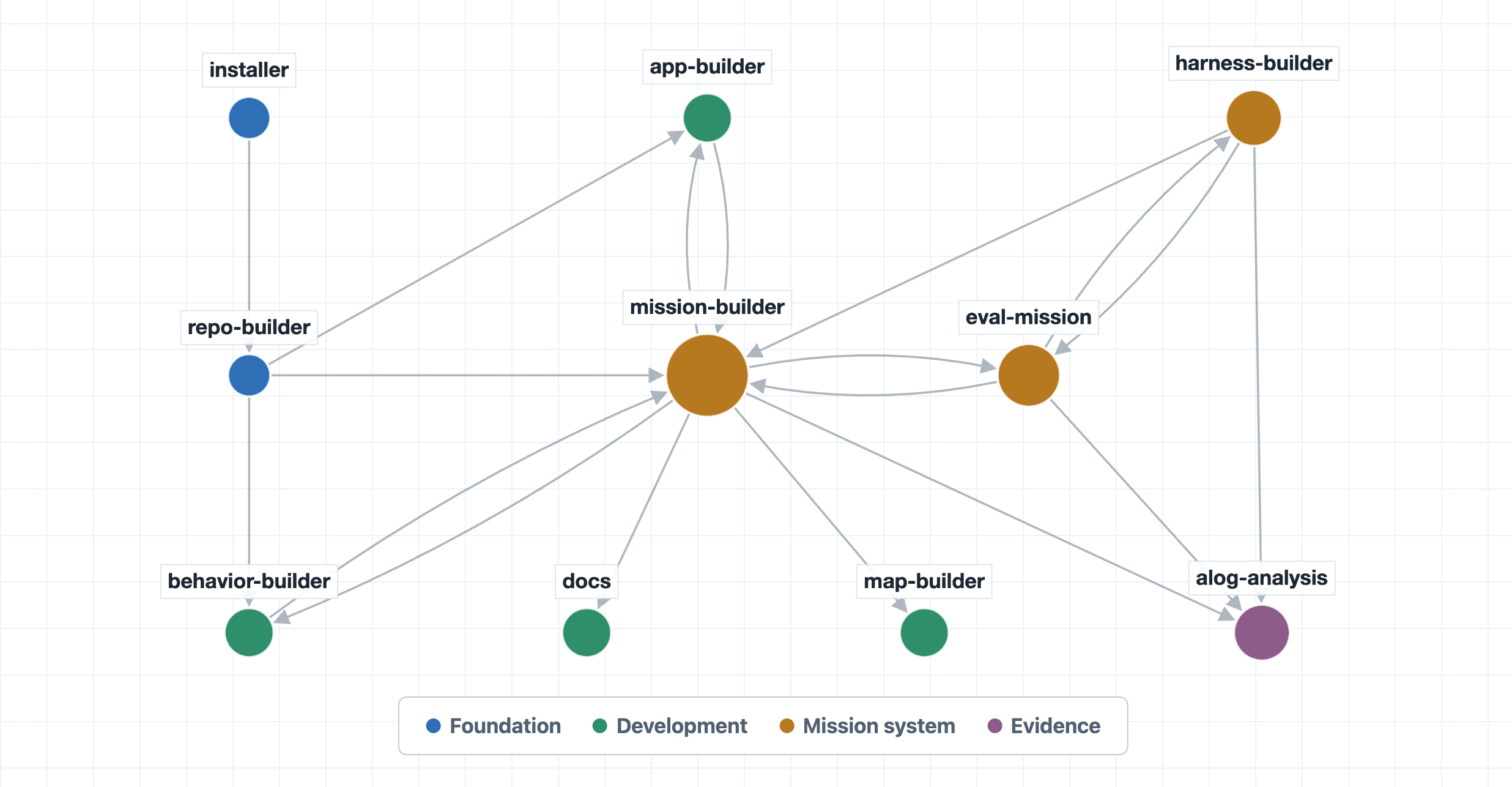
The canonical skill source lives under skills/. Codex and Claude Code adapters
carry self-contained copies generated from that source for distribution.
Skills
moos-ivp-mission-builder- build and test ordinary MOOS-IvP mission folders.moos-app-builder- build or modify user-owned MOOS apps.ivp-behavior-builder- build or modify user-owned IvP helm behaviors.moos-ivp-docs- consult upstream MOOS-IvP docs and local source.moos-alog-analysis- analyze existing.alogfiles with MOOS log tools.moos-ivp-installer- install or repair an upstream MOOS-IvP checkout.moos-ivp-repo-builder- create and validate a MOOS-IvP extension repository.moos-ivp-eval-mission-builder- build self-evaluating test missions.moos-ivp-harness-builder- build multi-case test harnesses, includingnspatchvariants.moos-map-builder- create and verify TIFF background maps through a GUI or CLI.
Install
For Codex or Claude Code, copy the GitHub link:
https://github.com/cbenjamin23/moos-ivp-skills
Then add it as a plugin marketplace in the Codex or Claude Code GUI, or ask the
agent to install the moos-ivp-skills plugin from that link.
For agents supported by the open skills CLI, run:
npx skills add https://github.com/cbenjamin23/moos-ivp-skills
The command discovers all ten skills and lets you choose which skills and agent
installations to configure. New installations fetch the current repository
contents. To update skills installed through the CLI later, run:
npx skills update
For other agents, use the canonical skills/ directory directly and copy or
load the skill folders into the place the agent expects skill-style
instructions.
For more detailed instructions, see INSTALL.md.
Support and policies
Report plugin issues through GitHub Issues.
See the privacy policy and terms of use
for the plugin's data handling and license.
Repository Layout
skills/                  Canonical, agent-neutral skill folders.
plugins/codex/...        Codex plugin adapter.
plugins/claude/...       Claude Code plugin adapter.
INSTALL.md               Install commands and MOOS-IvP path setup.
docs/                    User and maintainer documentation.
scripts/                 Maintainer sync, validation, and release helpers.
Customize a Skill
You can keep the plugin installed while providing your own local version of a
skill. Give the local skill the same unqualified name, such asmoos-app-builder, and explicitly describe it as the preferred local
replacement.
Unqualified references and automatic selection will then favor the local
workflow, while the original plugin skill remains available through its
plugin-qualified name.
See Customizing Skills for locations, examples,
explicit invocation syntax, update considerations, and the differences between
Codex and Claude Code.
Yorumlar (0)
Yorum birakmak icin giris yap.
Yorum birakSonuc bulunamadi