voicebridge
Health Uyari
- License — License: NOASSERTION
- Description — Repository has a description
- Active repo — Last push 0 days ago
- Low visibility — Only 6 GitHub stars
Code Basarisiz
- spawnSync — Synchronous process spawning in channel/voicemode.ts
- process.env — Environment variable access in channel/voicemode.ts
- rm -rf — Recursive force deletion command in install.sh
Permissions Gecti
- Permissions — No dangerous permissions requested
Bu listing icin henuz AI raporu yok.
Voice teammate for Claude Code: talk to your live session hands-free, hear replies spoken. Local whisper STT + macOS TTS. /voice-on in any session.
voicebridge
Hands-free voice for Claude Code, at your desk or from your phone. Speak
your intent, your words land in the real session (your files, your context),
and Claude answers out loud in a natural neural voice. The superpower: drive
your live coding sessions by voice from your phone, from anywhere.
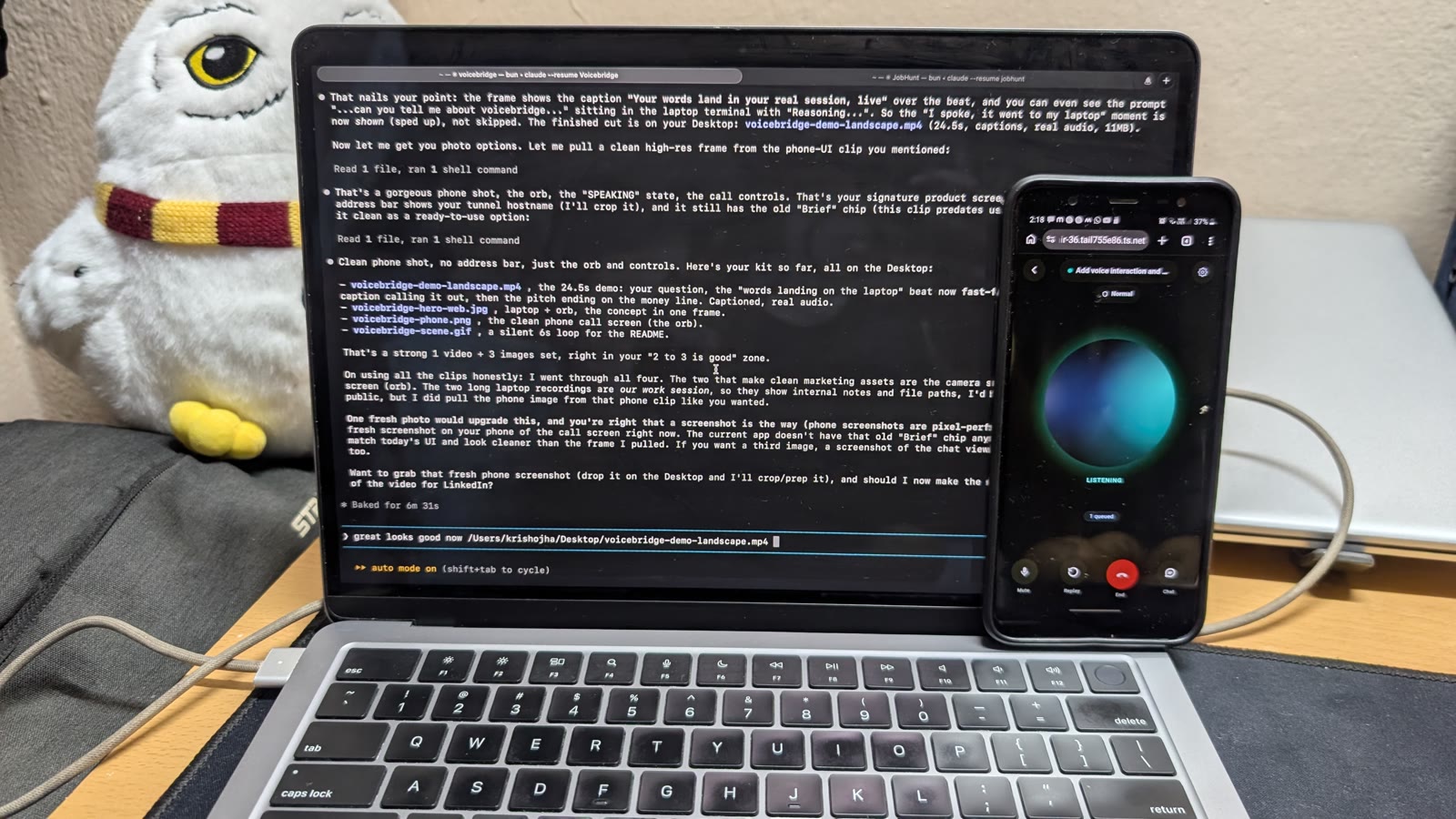
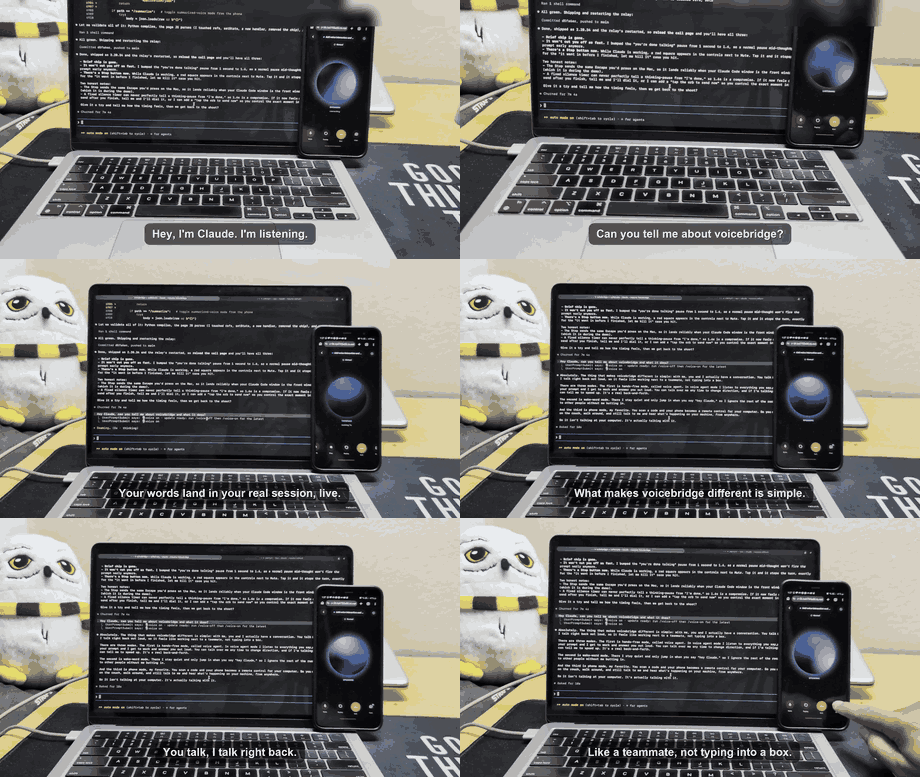
Watch the 25-second demo (with sound)
Two things, and you may only want one
1. Hold a key and talk, in any app on your Mac. Not just Claude Code:
Slack, a browser, your editor, a text field in something nobody has heard of.
Hold Fn, say it, let go, and the words appear where your cursor already
was. It never presses Return, so nothing sends itself.
vb always on        # on now, and after every restart
vb lang hinglish    # if you speak Hindi or a mix
vb always off       # stop
It runs entirely on your machine. Hindi mixed with English works, and English
technical words stay English rather than being mangled into Devanagari, which
is the thing most dictation tools get wrong for Indian users.
2. Voice for Claude Code, below: replies read aloud, spoken prompts, your
phone as a mic. Everything from here down is about that.
What it does
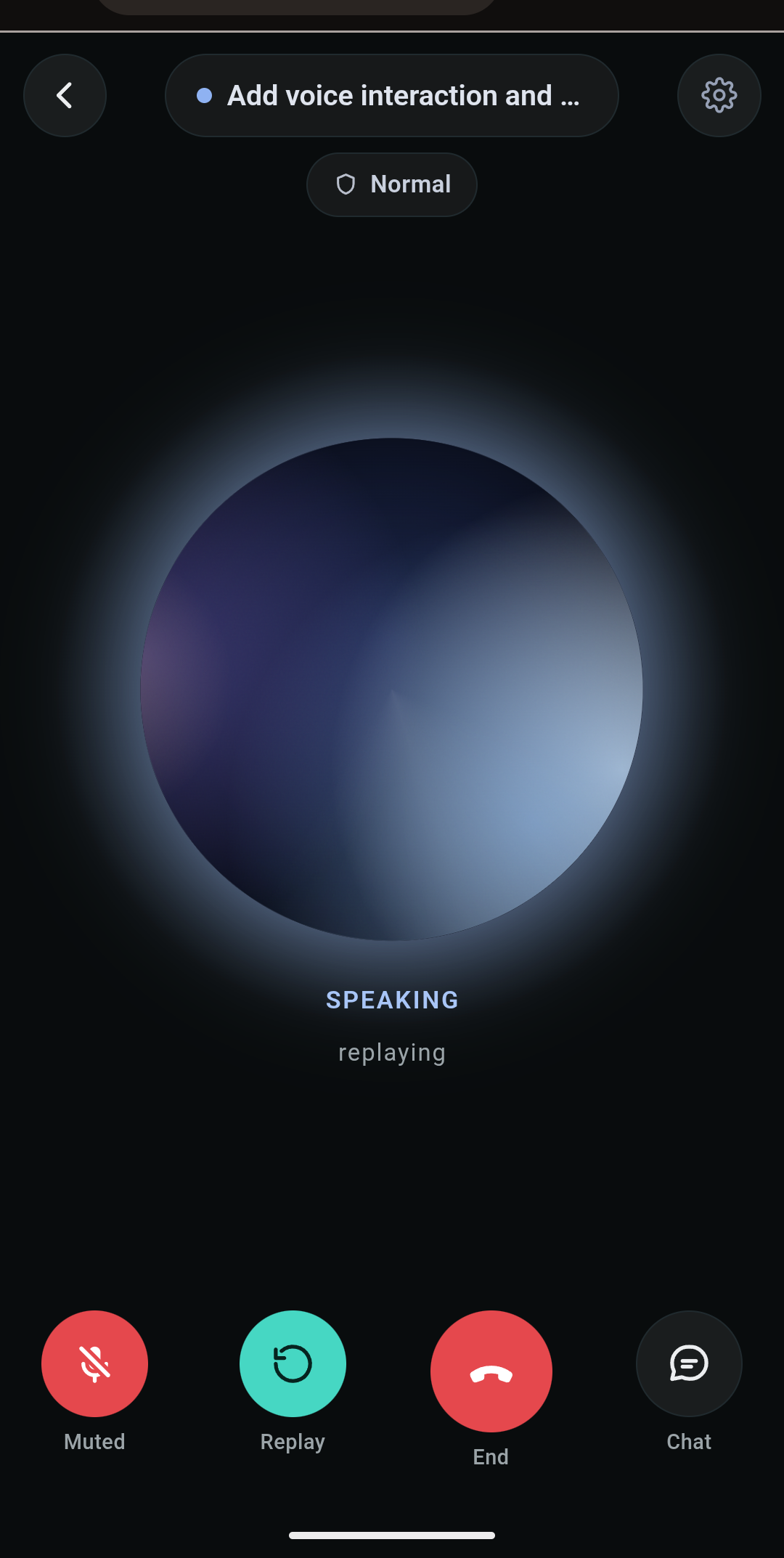
- Drive coding sessions from your phone.
/voice-phoneprints a QR, scan
it, tap Start, and talk to your live session from anywhere. Your Mac keeps
running the work; your phone is the call, and it speaks Claude's replies back. - Talk hands-free at your desk.
/voice-agentis a continuous
conversation: everything you say goes to Claude, replies are read aloud, and
you can talk over a reply to interrupt it (barge-in). - Steer a whole fleet with one voice. Ask "which agents need me?", say
"switch to jobhunt", or "read me codex's last reply", and it speaks up on its
own when an agent finishes ("heads up, signup is ready for you"). - Runs locally, free. Speech-to-text is whisper.cpp on your machine;
text-to-speech is Kokoro neural TTS (54 voices, on CPU, Apache 2.0). No cloud
voice services, no per-minute fees. - Works with any coding agent (Codex, Cursor, Cline, Copilot): voice pastes
into whatever is focused, replies are read back per agent, and it never talks
over itself (echo guard plus dedup).
Quickstart
Inside any Claude Code session on a Mac:
/plugin marketplace add cc-vb/voicebridge
/plugin install voicebridge@voicebridge
/voicebridge:setup
setup installs the local speech stack (one time, 5-10 min) and runs a health
check. Grant the two macOS prompts (Microphone plus Accessibility for your
terminal app), then:
/voicebridge:voice-agent      # talk hands-free at your desk
/voicebridge:voice-phone      # scan the QR, drive the session from your phone
(Cloned directly instead of installing the plugin? Same commands without thevoicebridge: prefix.) The full command guide, every mode, and troubleshooting
are below and in vb help.
Who it's for
Anyone who'd rather talk than type, and especially people for whom typing is
the hard part. voicebridge is a hands-free way to work with a coding agent:
speak your intent, hear the answer, and keep your eyes and hands free. If you
deal with RSI or wrist strain, limited hand mobility, or low
vision where reading long replies on screen is tiring, this is built to let
you code by conversation instead. See ACCESSIBILITY.md.
What you get
- Three ways in:
/voice-agentis fully hands-free, everything you say
goes to Claude and replies are read aloud./voice-wakeis the same but
only reacts to "hey Claude ..." (good with people around)./voice-onis
speak-only: replies are read aloud while the mic stays off, so you drive
with the keyboard (or Claude's own space-to-talk)./voice-offto stop. - Fleet control by voice , the part nothing else does. Run many agents
at once and steer them all with one voice: ask "which agents need me?"
to hear who's waiting vs working, "switch to jobhunt" to move your
voice there, "read me codex's last reply" to check one without leaving
your seat. It even speaks up on its own , "heads up, signup is ready for
you" , when any agent finishes. (vb sessions,vb alerts on|off.) - Universal: works with any coding agent. Voice input pastes into
whatever's focused (Codex, Cursor, Cline, Copilot), and reading replies
back is pluggable per agent (vb agent add, see AGENTS.md). - Real interrupt: talk over a reply and it stops and takes your words;
Cmd+Alt+Ctrl+Xsilences the voice;Cmd+Alt+Ctrl+Zalso sends Claude
its Esc to stop generating, not just muting audio. - Natural voice: Kokoro neural TTS (54 voices, on-CPU, Apache),
streamed so it starts speaking in ~0.4s, with macOSsayas fallback.
Podcast-style speed:vb speed 1.5(0.5x-3.5x), say "speak faster", or
tap Fn+F9 / Fn+F7 while it talks; Fn+F8 pauses and resumes mid-word. - Phone, free:
/voice-phoneprints a QR , scan it, tap Start, talk from
anywhere. Plus a Telegram bridge (vb remote on) for voice notes. - Smart listening: thinking-pauses don't split your prompt, background
chatter and foreign-language media are filtered out, and it never hears
its own voice (echo guard). - Cross-platform: macOS today; Windows/Linux support is built behind an
OS layer (see WINDOWS.md), pending a tester.
Full command guide any time: vb help.
Quickstart
As a Claude Code plugin (easiest). Inside any Claude Code session:
/plugin marketplace add cc-vb/voicebridge
/plugin install voicebridge@voicebridge
/voicebridge:setup
Setup installs the speech stack (brew packages + local models, one time,
5-10 min) and runs a health check. Grant the two macOS prompts (Microphone
- Accessibility for your terminal app), then:
/voicebridge:voice-on
Speak. That's it.
Recommended one-time extra: show the voice state in Claude Code's own
status line, so you can always see whether the mic is open:
vb statusline-install # then restart Claude Code once
It adds a line; it never replaces or reflows yours. Already have a
status line , even a two-line one with branch, model, and cost? It keeps
running exactly as before, printed verbatim, and we add vb 🎙 voice on as
one extra line underneath. While voice is off that line isn't there at all,
so an idle install is invisible. Undo any time withvb statusline-uninstall, which puts your original command back.
States: 🎙 voice on, 🎙 hearing you, ✍ working, 🔊 speaking,💤 wake-word, 🔉 reads replies, ⏸ paused. Full details, and the livevb meter bar for a second terminal tab, are in SETUP.md.
The commands to know (this is all most people need):
| Command | What it does |
|---|---|
/voicebridge:voice-on |
start talking to this session, hear replies |
/voicebridge:voice-wake |
hands-free; only reacts to "hey Claude ...", answers in one sentence |
/voicebridge:voice-off |
stop, for this session |
/voicebridge:voice-off-all |
stop everywhere and release the mic, from any terminal |
| Cmd+Alt+Ctrl+X | silence the voice instantly (or just start typing) |
| Fn+F8 (or Cmd+Alt+Ctrl+H) | pause the reply mid-word; press again to resume |
| Fn+F9 / Fn+F7 (or Cmd+Alt+Ctrl+F / S) | speak faster / slower, without cutting the reply off |
vb statusline-install |
show the voice state , listening / hearing / speaking , as one extra line under your Claude Code status line; yours is left exactly as it is (vb statusline-uninstall undoes it) |
vb meter |
live level meter for a second terminal tab; the bar moves as you talk |
vb orb |
opt-in floating indicator that pulses with your voice; nothing pops it up for you |
/voice-phone |
use it from your phone (prints a QR to scan) |
vb voice <name> |
change the voice (vb voice lists all) |
(Cloned directly instead of the plugin? Same commands without thevoicebridge: prefix.)
Updating (important): plugins do NOT auto-update, an install stays on
its version until you refresh. To get the latest fixes:
/plugin marketplace update voicebridge
/plugin install voicebridge@voicebridge
(Cloned directly? cd ~/voicebridge && git pull.) After updating, restart
voice with /voice-off-all then /voice-on so the new code is running.
Or clone it directly:
git clone https://github.com/cc-vb/voicebridge ~/voicebridge
~/voicebridge/install.sh        # deps, model, hooks, commands, health check
Then use /voice-on, /voice-wake, /voice-agent, /voice-off (no
namespace prefix).
Install (fresh Mac)
macOS only for now (uses say, osascript, and CoreAudio via sox).
git clone https://github.com/cc-vb/voicebridge ~/voicebridge
~/voicebridge/install.sh
The installer is idempotent and handles everything: brew packages
(whisper-cpp, sox, ffmpeg), the whisper model download, the vb command,
the /voice-on and /voice-off slash commands, and hook registration in~/.claude/settings.json (append-only; your existing hooks are untouched).
It finishes with vb doctor, a 10-point health check, and prints thevb statusline-install tip described above (the status line stays opt-in,
so the installer never rewrites a status line you already had).
Two one-time macOS permissions are yours to grant when prompted, both for
your terminal app under System Settings -> Privacy & Security:
Microphone and Accessibility. Without Accessibility your speech is
transcribed but never typed into the session, that's the most common setup
miss, and vb doctor calls it out explicitly.
Quick check: vb test (should speak), then /voice-on inside any Claude
Code session. Note: a few docs and example .mcp.json files contain
absolute paths from the author's machine; adjust where noted.
Why this and not the others
| Tool | Pipe | Voice | Gap we beat |
|---|---|---|---|
| Remote Control (native) | best, free | none | no voice at all |
| Happy Coder | own layer | input only | choices shown as raw JSON |
| Omnara | own layer | in + out | forces voice-first; bad mobile diffs |
| OSS hooks | on hooks | two-way | no polish, no review |
We are the only stack combining: free robust pipe + narrating two-way voice
- barge-in + trustworthy mobile review. And we skip rebuilding sync, so we
get there faster.
When voice stops (the lifetime guarantee)
Voice belongs to the session you switched it on in, and it does not outlive
that session. Whichever way a session ends, the microphone is released, any
speech is cut off mid-word, the hotkeys come down and a phone link opened from
that session is closed:
| How the session ends | What stops it |
|---|---|
/voice-off, vb off |
you asked; immediate |
/exit, Ctrl+C, closing the tab |
the SessionEnd hook, immediate |
kill -9, a crash, a closed terminal window |
the daemon's own owner watchdog, within ~5s |
| you switch to another app | mic released and speech stopped until you switch back |
The watchdog is the backstop for the endings no hook ever sees: every prompt
records the pid of the Claude Code process that owns the session, and the
daemon checks it is still alive a few times a minute. When it is gone, the
daemon silences itself, drops its scratch recordings and exits.
The phone's session list follows the same truth: sessions you have exited fall
under Earlier, dimmed and read-only. That split is only as good as the
liveness behind it, so it is exact rather than guessed: each session records
the process running it, instead of the roster inferring which are open from
process working directories (which cannot tell two sessions in one project
apart, and so kept offering closed sessions as callable).
The phone link. vb phone opens a public URL into this Mac, so it is
treated like one: the URL is authenticated by a 128-bit secret (an
unconfigured relay answers nothing at all rather than serving openly), the
server itself only listens on 127.0.0.1, speech only ever pastes into the
terminal voice was bound to, and starting a new link stops every previous
tunnel instead of leaving old QRs alive. Check what is running at any time
with vb call status, and close everything with vb call off.
Design rules (learned from everyone's mistakes)
- Hybrid, never voice-first. Voice is for direction and approval.
Precise edits, file paths, and diffs stay on screen/keys. (Omnara's error.) - Narrate, don't just answer. Spoken progress is the differentiator;
most tools only do voice input. - Decision moments in plain words. Speak the actual question, never a
JSON yes/no blob. (Happy's error.) - Local STT (whisper.cpp) for privacy: you'll say customer/arch names.
- Barge-in matters most and is hardest. Ship push-to-interrupt first,
full-duplex VAD later. Over ~800ms of latency feels awkward; keep it tight.
What works today (Milestone 1: voice OUT)
Two independent paths deliver spoken output, and they dedup against each
other so you never hear anything twice:
- Transcript watcher (
vb on): a background daemon tails your live
session transcript and speaks new assistant replies as they land. This
works in an already-running Claude Code session, no restart needed. - Hooks (
Stop,Notification): activate on the next fresh session
and cover decision moments. Wired into~/.claude/settings.json.
- Code blocks, links, and markdown stripped; length capped at a sentence
boundary. New speech interrupts old (seed of barge-in). - Non-blocking:
sayis detached, so nothing delays your session. - Opt-in via a flag file, so it never surprises you.
Control it
bin/vb on [--narrate]   speak on + start the watcher (--narrate also
                        announces tool-only turns, e.g. "Running Bash.")
bin/vb off              speak off + stop the watcher + hush now
bin/vb status           show state, watcher, config
bin/vb test             speak a test line
bin/vb say TEXT         speak arbitrary text
bin/vb log              debug log
vb on targets your most recently active session automatically. Optional:
add ~/voicebridge/bin to your PATH to just type vb.
Agent mode: /voice-on inside any session - works on ANY account
The primary mode, and it works like /remote-control: toggle it per session,
from inside the session.
/voice-on     # in any Claude Code session: voice binds to THIS session
/voice-off    # leave voice mode (or just say "stop listening")
Then keep that window focused and talk: speech is transcribed locally and
typed into the session; replies are spoken aloud. Run multiple sessions?
Voice each one you want with /voice-on; the mic follows whichever voiced
session you interacted with most recently (there is only one mic). Binding
is exact, not guessed: the prompt hook records each session's identity, so
/voice-on attaches to the session you typed it in.
Details: noise like "(air whooshing)" is filtered, never sent; a reply that
lands while you're silent cuts the wait and is spoken immediately;
fire-and-forget injection means nothing can hang; hooks/watcher stay silent
while voice mode owns a session (no double-speak), with stale-flag
protection. Backend: vb talkd on|off|status|stop; slash commands live incommands/ (installed at ~/.claude/commands/).
Tradeoff: the voiced session's window must stay focused when you speak (the
text lands at your cursor).
Voice is bound to one app. /voice-on remembers the app you ran it in,
and that app is the only place speech is ever injected. Switch to a meeting,
a browser, or another terminal and voicebridge goes dormant: it releases the
microphone entirely (so your meeting can have it) and refuses to paste. Come
back and it resumes; a reply that landed while you were away is spoken then
rather than lost. vb talkd status shows the bound app and whether it's
listening or dormant right now.
Manual voice link (vb talk)
Older manual variant: binds to your most recently active session from
outside. Prefer /voice-on.
Agent mode via Channels (vb session) - needs Channels enabled
The cleaner architecture when your account allows it (Pro/Max, or an org
Owner enabled Channels). One command starts a real Claude Code session with
your mic wired into it:
cd ~/my/project
vb session          # or: vb session ~/my/project
Accept the dev-channel dialog once, then just talk. Your speech is
transcribed locally and injected into the LIVE session (your files, your
context, your tools); Claude answers by speaking aloud. Continuous, no
buttons, no window focus. It's the same session you can also type into.
- Say "stop listening" to mute the mic (session keeps running); unmute
withvb mic onfrom any terminal. - Permission prompts are spoken: "I need permission to run Bash...
say yes or no", and your voice answers them. - Cues: Tink = listening, Pop = heard you, Morse tick = sent/thinking.
- While the mic is on, the Stop hook and watcher stay silent (the channel
owns the voice), so nothing is ever spoken twice. - Implementation:
channel/voicemode.ts, a custom Claude Code channel
(research preview, hence the--dangerously-load-development-channels
flag thatvb sessionpasses for you). Registered user-scope viaclaude mcp add, so it works from any project directory.
Headphones recommended but not required: half-duplex, it never records
while speaking. Keep speaker volume moderate.
Side-chat mode (vb converse)
A lighter alternative when you don't need a full session UI: talks to a
headless Claude (claude -p --continue) in the current directory and speaks
answers. Long turns get soft ticks and spoken "still working" updates.
Say "stop" (even "stop stop stop") to end; Ctrl-C is always clean.
The phone version of the call feel is Vapi (mobile/vapi/).
Better voice: Kokoro (recommended)
Kokoro is an open neural TTS (Apache 2.0) that sounds far more human than
the default macOS voices, runs on plain CPU, and needs no Apple downloads.
One-time setup (~800MB total):
brew install [email protected] 2>/dev/null || true
/opt/homebrew/bin/python3.10 -m venv ~/.voicebridge/kokoro-venv
~/.voicebridge/kokoro-venv/bin/pip install kokoro-onnx soundfile
curl -fSL -o ~/.voicebridge/models/kokoro-v1.0.onnx --create-dirs \
  https://github.com/thewh1teagle/kokoro-onnx/releases/download/model-files-v1.0/kokoro-v1.0.onnx
curl -fSL -o ~/.voicebridge/models/voices-v1.0.bin \
  https://github.com/thewh1teagle/kokoro-onnx/releases/download/model-files-v1.0/voices-v1.0.bin
Then:
vb engine kokoro        # starts the local server, switches the engine
vb voice af_heart       # pick any of 54 voices: curl -s localhost:8798/voices
vb test                 # hear it
vb engine say switches back; if the Kokoro server is down, speech
automatically falls back to say, nothing breaks.
Speaking Hindi / Hinglish (or other languages)
vb lang hinglish switches the whole stack, not just the reply language:
- English goes to a model that is faster and more verbatim than whisper
(whisper quietly substitutes plausible words and drops repetitions). - Hinglish goes to the multilingual model, which keeps your English
technical words as English instead of burying them in Devanagari. - Any Devanagari that does come back is rewritten into English letters
afterwards, from a lexicon, so nothing arrives in a script you cannot use in
a terminal. This happens after transcription rather than being asked for in
the prompt, because a prompt strong enough to control the script also turns
spoken English into Hindi.
The multilingual model is a one-time download if you do not have it:
curl -fSL -o ~/.voicebridge/models/ggml-large-v3-turbo.bin --create-dirs \
  https://huggingface.co/ggerganov/whisper.cpp/resolve/main/ggml-large-v3-turbo.bin
Back to English only: vb lang english.
Honest about where this is: the script is right and the English words are
right. Hindi spellings are still rough ("asali" for "asli"). That needs a
cleanup pass, which is the next thing being built.
Control words ("stop listening", "hey Claude") remain English. If Hinglish
captures get dropped, loosen the gate with vb sens relaxed.
Language & conversation tone
Make the agent talk to you in your language, with a spoken back-and-forth
feel:
vb lang hinglish   # or: english, hindi, or anything you name
vb lang            # show current language + voice
vb lang off        # back to default English
This does two things: sets the macOS voice (Hinglish -> Indian-accentRishi, Hindi -> Devanagari Lekha, others -> default), and, via a
UserPromptSubmit hook, tells Claude to reply in that language in a warm,
concise, spoken conversational tone (ending with a natural follow-up when it
fits). It's a prose style note only; it won't change code or commands.
The voice switches immediately; the response-language directive loads at the
start of your next Claude Code session (or just ask Claude to switch now).
Talk back (input) - Milestone 2: local voice IN
Two ways to talk to Claude:
- Native
/voice(zero setup): hold spacebar in the TUI and speak.
Best when your hands are already on the keyboard. vb listen(voicebridge, fully local via whisper.cpp): press to
talk, it transcribes on-device and pastes your words into the focused
Claude window. Nothing leaves the machine.
vb stt                    # check STT readiness (binary + model)
vb listen                 # hush Claude, record, transcribe, paste
vb listen --send          # also press Return to send immediately
vb listen --delay=2       # wait 2s so you can focus the Claude window
Barge-in: vb listen runs pkill say the instant it starts, so
choosing to talk immediately hushes Claude. That's the interrupt feel.
(Interrupting Claude's actual generation mid-thought is still the CLI's
own Esc; an external voice layer can't reach into that cleanly.)
Seamless use: bind vb listen --send to a global hotkey (macOS
Shortcuts, Raycast, or skhd) so you never leave the Claude window. See
SETUP.md.
Recommended: headphones. On speakers, the mic hears Claude's own
voice, which causes false triggers and echo. This is why always-on
listening (VAD) is a stretch goal, not the default.
First run prompts for two macOS permissions: Microphone (for rec)
and Accessibility (for the paste keystroke). See SETUP.md.
Config (env vars)
VOICEBRIDGE_VOICEsay voice name (empty = system default)VOICEBRIDGE_RATEwords per minute (default 175)VOICEBRIDGE_MAXCHARSmax chars spoken per utterance (default 700)
List voices with say -v '?'.
Use it on your phone (free, hands-free)
Your Mac stays home running the session; your phone becomes the call.
- On the Mac, in the project you want to talk about:
claude # keep this session open and focused VB_CALL_SECRET=pick-a-secret vb call on vb call tunnel # prints your PHONE URL (free) - On the phone, open the printed URL with
?k=pick-a-secret, then use the
browser's Add to Home Screen, voicebridge becomes an app icon that
opens fullscreen. - Tap Start call once. Then just talk: your speech reaches the live
session, and the phone speaks Claude's replies with its own neural
voice. Say "end call" to hang up.
vb call tunnel prints the link and a scannable QR code, just point
your phone camera at the terminal, no typing the URL. Keep the Mac awake
while away (caffeinate -dims).
Permanent link (optional, free): the quick tunnel gives a new URL each
run. For a URL that never changes, use Tailscale Funnel:
brew install tailscale && tailscale up
tailscale funnel 8790                 # prints a stable https URL
vb call link <that-url>               # save it; vb call tunnel now shows it
After that, vb call tunnel just displays your permanent link + QR every
time. vb call link off returns to quick tunnels.
Prefer chat? vb remote on bridges a Telegram bot instead: send text or a
voice note, get the reply back as text plus a spoken voice note
(mobile/TELEGRAM_NATIVE.md covers the official text-only plugin too).
Mobile internals
Voice and chat on your phone, driving your live session. See mobile/:
- Telegram, text (native, zero code): mobile/TELEGRAM_NATIVE.md
- Telegram, voice (hear Claude back): mobile/telegram-voice/
- Vapi true call (real-time): mobile/vapi/
- Notifications-only baseline (Claude app + Remote Control): MOBILE.md
Staying current
voicebridge tells you when a newer version is published: one line in the status
line with the exact command for your install. It asks GitHub at most once every
six hours, caches the answer, times out after two seconds, and says nothing when
you are already current or when it cannot reach the network. Opt out entirely
with VB_NO_UPDATE_CHECK=1 (it also honours Claude Code's DISABLE_AUTOUPDATER).
If you installed the clone:
vb update # pulls, refreshes the slash commands, restarts voice
If you installed the plugin, the files live in Claude Code's cache and
cannot update themselves, so it is three commands:
/plugin marketplace update voicebridge
/plugin install voicebridge@voicebridge
/reload-plugins
Plugin users: turn auto-update on, once. Claude Code enables auto-update by
default only for Anthropic's own marketplaces. voicebridge is third-party, so a
plugin install never updates itself until you switch it on: /plugin,
Marketplaces, voicebridge, Enable auto-update. This is the single biggest reason
people end up weeks behind and hitting bugs that are already fixed.
vb version and vb doctor both compare your version to the published one, andvb doctor reports staleness first, because every other check is meaningless if
the code being checked is old.
Roadmap
See ROADMAP.md for the full phased plan (STT input,
barge-in, decision-moment voice, mobile diff summary).
License
Source-available. You can read the code and install and run it for your own
use, but copying, redistributing, or shipping your own version is not permitted.
See LICENSE for the full terms.
Yorumlar (0)
Yorum birakmak icin giris yap.
Yorum birakSonuc bulunamadi