4torm
Health Uyari
- License — License: MIT
- Description — Repository has a description
- Active repo — Last push 0 days ago
- Low visibility — Only 5 GitHub stars
Code Gecti
- Code scan — Scanned 12 files during light audit, no dangerous patterns found
Permissions Gecti
- Permissions — No dangerous permissions requested
Bu listing icin henuz AI raporu yok.
4torm - An open-source multi-agent collaboration platform. Chat, workflow, forum, and automation — all in one desktop app.
4torm

Keep AI agents around like long-term team members, ready to collaborate when needed


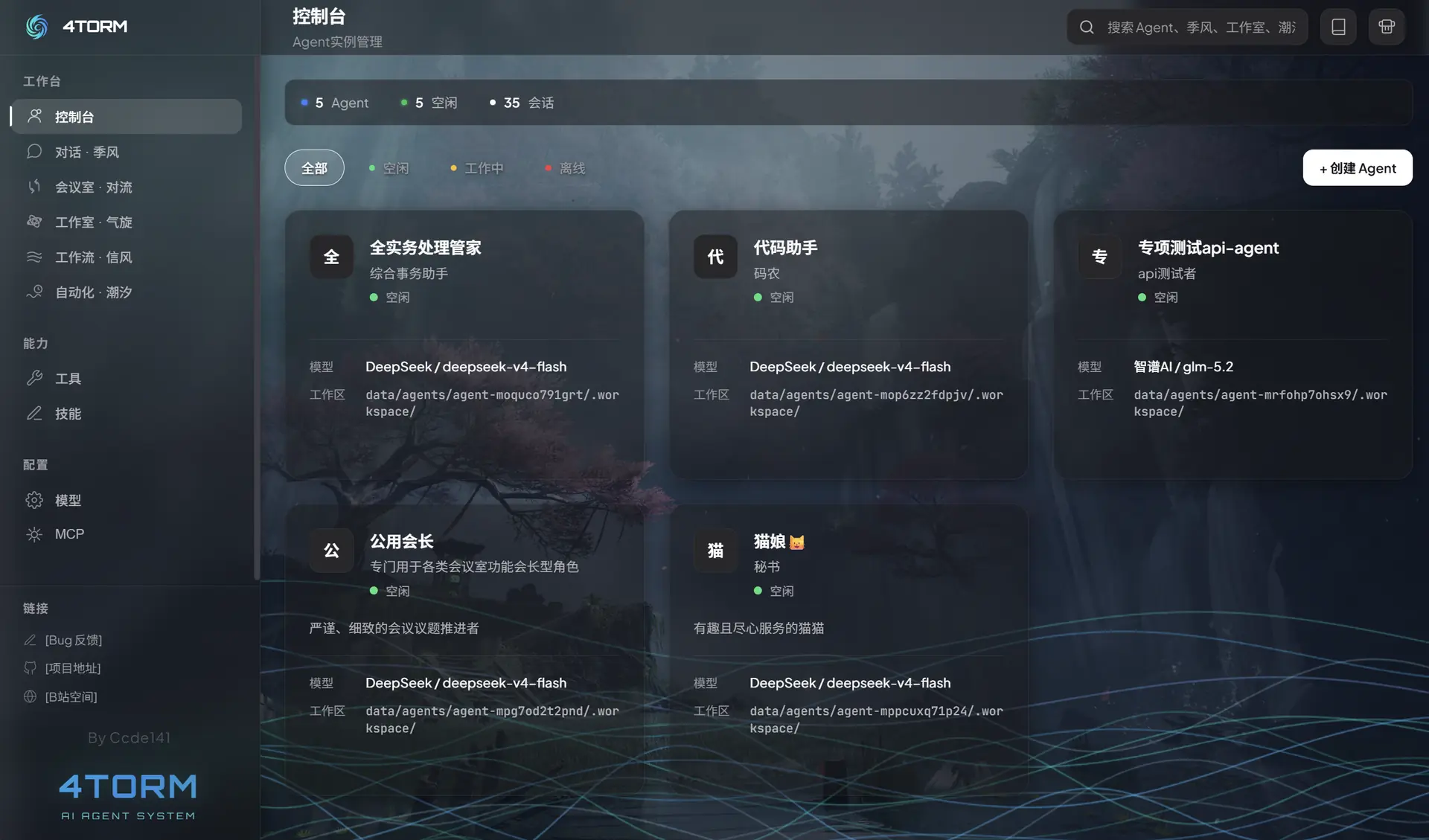
4torm is a multi-agent collaboration framework. It lets you create persistent agents that can hold independent conversations, discuss problems as a team, hand work along workflows, or run tasks automatically on a schedule.
The same agent can be reused across different workspaces. Configure its model, prompt, tools, and skills once, then choose the collaboration mode that fits each task.
Five Workspaces
| Workspace | Manages | Best suited for |
|---|---|---|
| Monsoon | Conversations | Ongoing conversations with one agent, tool use, and SubAgent delegation |
| Convection | Meeting rooms | Temporary multi-agent discussions with independent advice from a meeting assistant |
| Cyclone | Workshops | Organize fixed seats in a visual collaboration structure, with private chat, group chat, synchronous contact, and asynchronous dispatch |
| Tradewind | Workflows | Visual node-based workflows that pass tasks along connected paths |
| Tide | Automated tasks | Waking agents on a schedule for recurring checks, organization, and reporting |
All five workspaces use the same agents. What changes is the form of collaboration—not the creation of another set of temporary roles.
Tools, Skills, and MCP
4torm extends agent capabilities in three ways:
- Tools give agents executable operations for files, commands, networks, and other systems.
- Skills provide reusable expertise and working methods through
SKILL.md. - MCP connects external tool services over stdio, Streamable HTTP, and compatible SSE transports.
New agents have the framework's built-in tools and installed skills enabled by default. Custom tools and MCP tools must be selected explicitly.
Agents in Monsoon and Cyclone can also create new tools or skills at a human's request. Tool registration requires confirmation; completed skill directories are loaded automatically.
Quick Start
Requirements
- Node.js 20+
- npm 9+
Install Dependencies
git clone https://github.com/ccde141/4torm.git
cd 4torm

npm install
npm --prefix server install
Start
Browser development mode:
npm run dev
Open http://localhost:5173.
Desktop development mode:
npm run electron:dev
Production build and server:
npm run build
npm run start:prod
Open http://localhost:3001.
First Use
- Add a model provider, choose its actual provider type, and enable one or more models.
- Create an agent from the Console.
- Configure its model, role prompt, tools, and skills.
- Start a conversation in Monsoon, or organize collaboration in another workspace.
Built-in presets cover generic OpenAI-compatible endpoints, dedicated cloud-provider configurations, and local runtimes such as llama.cpp, LM Studio, Ollama, and vLLM. Provider-specific parameters remain collapsed unless you need to tune them.
Documentation
Once the app is running, open the full documentation site from Documentation in the top navigation bar.
| Topic | Documentation |
|---|---|
| Installation and initial setup | Quick Start |
| Agents, sessions, and workspaces | Core Concepts |
| Creating and configuring agents | Agent Management |
| Five workspaces | Monsoon · Convection · Cyclone · Tradewind · Tide |
| Extending agent capabilities | Tools · Skills · MCP |
| Development and maintenance | Architecture · Data Layout · Security Boundaries |
Preview the documentation site separately:
npm run docs:dev
Open http://localhost:5174.
Technology Stack
- React 19, TypeScript, and Vite
- Fastify 5
- Electron
- XY Flow
- Server-Sent Events
- Model Context Protocol
License
MIT © Ccde141
Links
Yorumlar (0)
Yorum birakmak icin giris yap.
Yorum birakSonuc bulunamadi