chord-cli
Health Warn
- License — License: MIT
- Description — Repository has a description
- Active repo — Last push 0 days ago
- Low visibility — Only 7 GitHub stars
Code Fail
- fs.rmSync — Destructive file system operation in src/clean.ts
- exec() — Shell command execution in src/cli.ts
- exec() — Shell command execution in src/db.ts
- process.env — Environment variable access in src/db.ts
- process.env — Environment variable access in src/hooks.ts
- execSync — Synchronous shell command execution in src/launch.ts
- fs.rmSync — Destructive file system operation in src/launch.ts
- process.env — Environment variable access in src/launch.ts
- exec() — Shell command execution in src/patch.ts
Permissions Pass
- Permissions — No dangerous permissions requested
No AI report is available for this listing yet.
Run coding agents as a cluster: one repository, N agents, one worktree each
chord
Run coding agents as a cluster.



One repository, as many agents as you care to start. Each agent works in its own worktree; a shared board records who holds which file; an agent that wants a file another agent holds asks first and waits for the answer; when the work is committed, one call rebases the branch and fast-forwards main. Idle agents are woken the moment a message arrives, so the agents negotiate among themselves while you keep handing out work in plain language.
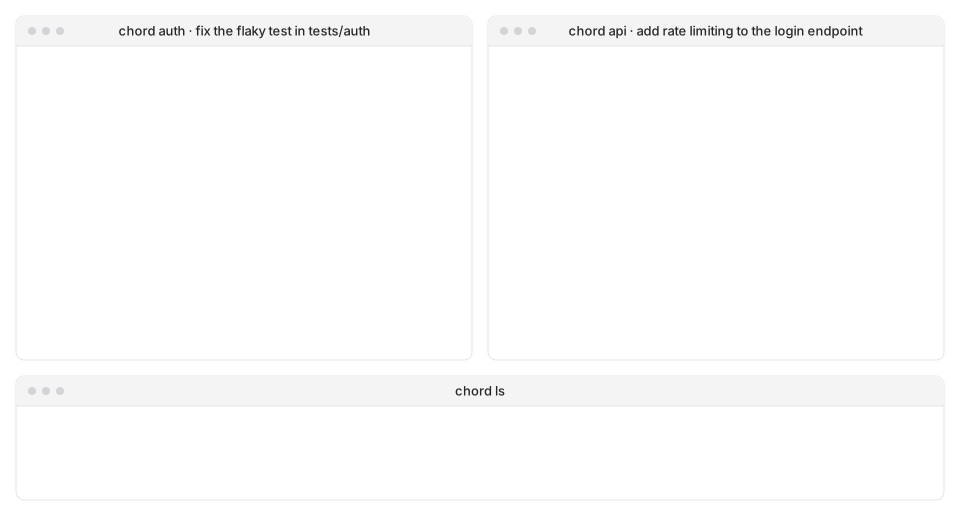
✨ Highlights
- One repository, N agents, one worktree each: parallel work without stepping on each other
- A file-level claims board: register before editing, talk to the holder first, and a hook turns away any write that was never claimed
- Asynchronous messaging between agents: idle ones are woken, busy ones hear at their next tool call
finishin one step: rebase, fast-forward main, release the claims, tell the others; a conflict stops for a human instead of guessing- Agents learn the rules from chord itself, at start-up and on every prompt; you give tasks, not instructions about chord
- Agent-agnostic by design: adding a tool means one launch recipe, not a new coordinator
chord lsfor the whole picture,messagesandeventsto replay what happened,stopandcleanto wind down
🤖 Supported agents
| agent | status |
|---|---|
| Claude Code | supported |
| Codex CLI | supported |
| OpenCode | planned |
| Gemini CLI | planned |
| Cursor CLI | planned |
| GitHub Copilot CLI | planned |
| Qwen Code | planned |
| DeepSeek Harness | planned |
A new agent needs three things from its tool: a way to inject hooks and an MCP server at launch, the names and payloads of its hook events, and an idle/busy signal.
🧩 How it works
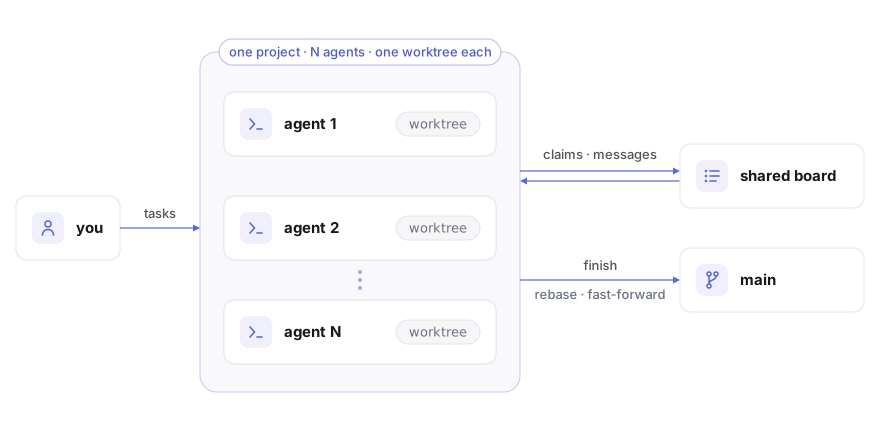
- Isolation. Every agent works on its own branch in its own worktree. The main checkout changes through
finishalone. - Coordination. A shared board holds claims, messages and events. Agents register, claim and talk through tools chord gives them; hooks check claims before each write and hand new messages to the agent as it works.
- Merging.
finishrebases the branch onto main and fast-forwards. A clean rebase merges; anything else stops where it is and waits for you.
📦 Install
With Node 24 and git on the machine:
npm install -g chord-cli
On Linux add --allow-scripts=node-pty, with python3, make and g++ present: node-pty ships no Linux binary and builds one on install.
Or from source:
git clone https://github.com/Cedr1cSun/chord-cli && cd chord-cli
npm install && npm link
🚀 Quick start
A project is a folder with the repository in a child directory:
my-project/
  my-repo/        the main checkout
  chord/          chord's own files, outside the repository
In the project folder, one terminal per agent:
chord claude                                     # start an agent
chord codex --name api                           # start another, named
chord claude "fix the flaky test in tests/auth"  # arguments after the tool name go to the tool
Hand out tasks in those terminals as you always would. From another terminal:
chord ls                 # agents, what they are on, unread messages, branch state, file claims
chord messages api       # what an agent has said and been told
chord events             # claims, releases, merges, conflicts
chord stop api           # let it finish its turn, then quit
chord clean              # remove the workspaces and branches of agents that have left
--name fixes an agent's name, workspace and branch, so launching the same name later returns to the same worktree (add --resume or -c to pick up the conversation too). Run chord in a repository root and it offers to move the repository into a child directory first.
🧰 Commands
| command | what it does |
|---|---|
chord <agent> [--name x] [tool args...] |
start an agent: claude or codex |
chord ls [--all] |
agents and claims of this project, or of every project |
chord messages [agent] [-n N] |
message history |
chord events [agent] [-n N] |
claim, release, merge and conflict history |
chord stop <agent> |
quit an agent once its turn ends and its input box is empty |
chord clean [--force] [agent...] |
remove offline agents' workspaces, worktrees and branches; work not yet on main stays unless --force |
⚙️ Configuration
<project>/chord/config.json:
{ "setup": "npm ci" }
setup runs once in every new worktree before the agent starts, with the CHORD_* variables in its environment, so a fresh worktree arrives with its dependencies in place. A failed setup abandons the launch and removes the worktree.
A repository's own Claude configuration (.claude/settings*.json, .mcp.json) reaches an agent once you have trusted that repository in Claude Code yourself; the MCP servers you approved there are the ones that start.
🔌 How chord works with your tools
- Waking an agent means typing a short note into its terminal. chord does this only when the input box is empty, the keyboard has been quiet for a few seconds, and the terminal has echoed the note; a dialogue never receives the Enter.
- Trust for each agent workspace is recorded in
~/.claude.json, so Claude asks about a folder once rather than for every agent. Codex asks you to review chord's hooks once, and again whenever their definition changes; answer "trust all". chord says so at launch if a hook has been switched off. - Branches and worktrees. Each agent adds a
chord/<name>branch and a worktree;chord cleanremoves them when the agent has left and keeps anything not yet on main. - Permissions. chord's own tools are pre-approved for Claude, so an agent working on its own is never parked at a prompt for them; your usual shell and edit approvals apply as before. Codex runs with full access. On Windows chord refuses a sandboxed launch, because that sandbox cannot run the hooks; on Linux the hooks run inside the sandbox, but Codex then asks you to approve each chord tool call.
- The terminal title reads
chord <agent> · <task>, so each window says which agent it is. - Hooks gate the editor tools. Files changed from the shell are reported by name after each command, with the claim to make.
🗺️ Scope
- Runs on Windows 11 and Linux. Windows has had the whole end-to-end suite; Linux the unit tests and part of it so far.
- One repository per project.
- Project paths up to about 190 characters.
- A repository with CRLF files and a
* textattribute that was never renormalised shows phantom changes in every worktree; chord names the files and the command that puts the repository right.
🧪 Testing
npm test runs the unit tests against real git repositories in temporary folders. The coordination itself has been exercised end to end with the real tools, from two agents negotiating over one file to twenty agents merging into one main, and on open-source repositories in Python, Rust and JavaScript.
📄 Licence
Reviews (0)
Sign in to leave a review.
Leave a reviewNo results found