lazybackup
Health Uyari
- License — License: MIT
- Description — Repository has a description
- Active repo — Last push 0 days ago
- Low visibility — Only 5 GitHub stars
Code Basarisiz
- spawnSync — Synchronous process spawning in bro/src/autostart.ts
- fs.rmSync — Destructive file system operation in bro/src/autostart.ts
- os.homedir — User home directory access in bro/src/autostart.ts
- process.env — Environment variable access in bro/src/autostart.ts
Permissions Gecti
- Permissions — No dangerous permissions requested
Bu listing icin henuz AI raporu yok.
Self-hosted From→To backup manager for paths, Docker volumes, and database dumps between local, SSH, and S3.
LazyBackup — From → To backups





LazyBackup is a self-hosted web app for From → To backups between endpoints: this host (local), any configured Server, S3-compatible storage, or a Git remote (source only). Connect over SSH, schedule jobs with cron, and transfer filesystem paths, Docker volumes, logical database dumps, or Git bare mirrors—including server→server (ephemeral direct or relay) and landings on S3.
Why not just rsync/cron? UI, schedules, retention, restore, and encryption without a pile of scripts — lazy.zic.ar/compare.
Getting started
Prerequisites
- Bun 1.0+ (or Node.js 18+)
- SSH access to your servers
- SSH key authentication on each server endpoint used in a backup transfer (rsync/scp run from the LazyBackup host and need a key). Password auth still works for Test connection and other
node-sshoperations (list volumes/containers, etc.) rsync,openssh-client, andgiton the host running LazyBackup (Git repository sources clone a bare mirror on this host)
Docker (recommended)
docker run -d \
  --name lazybackup \
  --restart unless-stopped \
  -p 3000:3000 \
  -v lazybackup_data:/app/data \
  -v ./backups:/backups \
  -v ~/.ssh:/root/.ssh:ro \
  -e DATABASE_URL=file:/app/data/data.db \
  -e BACKUP_STORAGE_PATH=/backups \
  ghcr.io/ceneka/lazybackup:latest
The image is multi-arch (linux/amd64 and linux/arm64).
Or with Docker Compose (pulls ghcr.io/ceneka/lazybackup:latest, persists the database volume). No .env is required — defaults are port 3000 and ./backups on the host. Copy .env.example to .env only if you want to change PORT, BACKUP_STORAGE_PATH, or SSH_KEYS_PATH.
docker compose up -d
To build a local image instead of pulling GHCR:
docker compose -f docker-compose.yml -f docker-compose.dev.yml up --build
Open http://localhost:3000 (or http://<lan-ip>:3000 on your network).
HTTP vs HTTPS: On plain HTTP (typical LAN), leave
AUTH_COOKIE_SECUREunset so the app password session cookie works. SetAUTH_COOKIE_SECURE=trueonly when the UI is served over HTTPS.
Install catalogs
- Unraid — Community Applications XML:
deploy/unraid/lazybackup.xml(ghcr.io/ceneka/lazybackup:latest, port 3000, data / backups / SSH mounts). - TrueNAS SCALE — Compose:
deploy/truenas/compose.yml(same mounts as the rootdocker-compose.yml). - awesome-selfhosted — ready-to-paste listing:
deploy/awesome-selfhosted.md.
Manual install
git clone https://github.com/Ceneka/lazybackup.git
cd lazybackup
cp .env.example .env   # optional
bun install
bun run db:migrate
bun run dev        # development
# bun run build && bun run start   # production
Set DATABASE_URL if you want a custom SQLite path (default: file:./data.db).
Features
- From → To — Endpoints: this host, SSH servers, S3-compatible storage (MinIO, R2, B2, AWS, …), or Git remotes (source only)
- Server → Server — Ephemeral SSH key for direct rsync, or relay via the LazyBackup host when peers can’t reach each other
- Server management — Add, edit, and test VPS connections (password or SSH key auth)
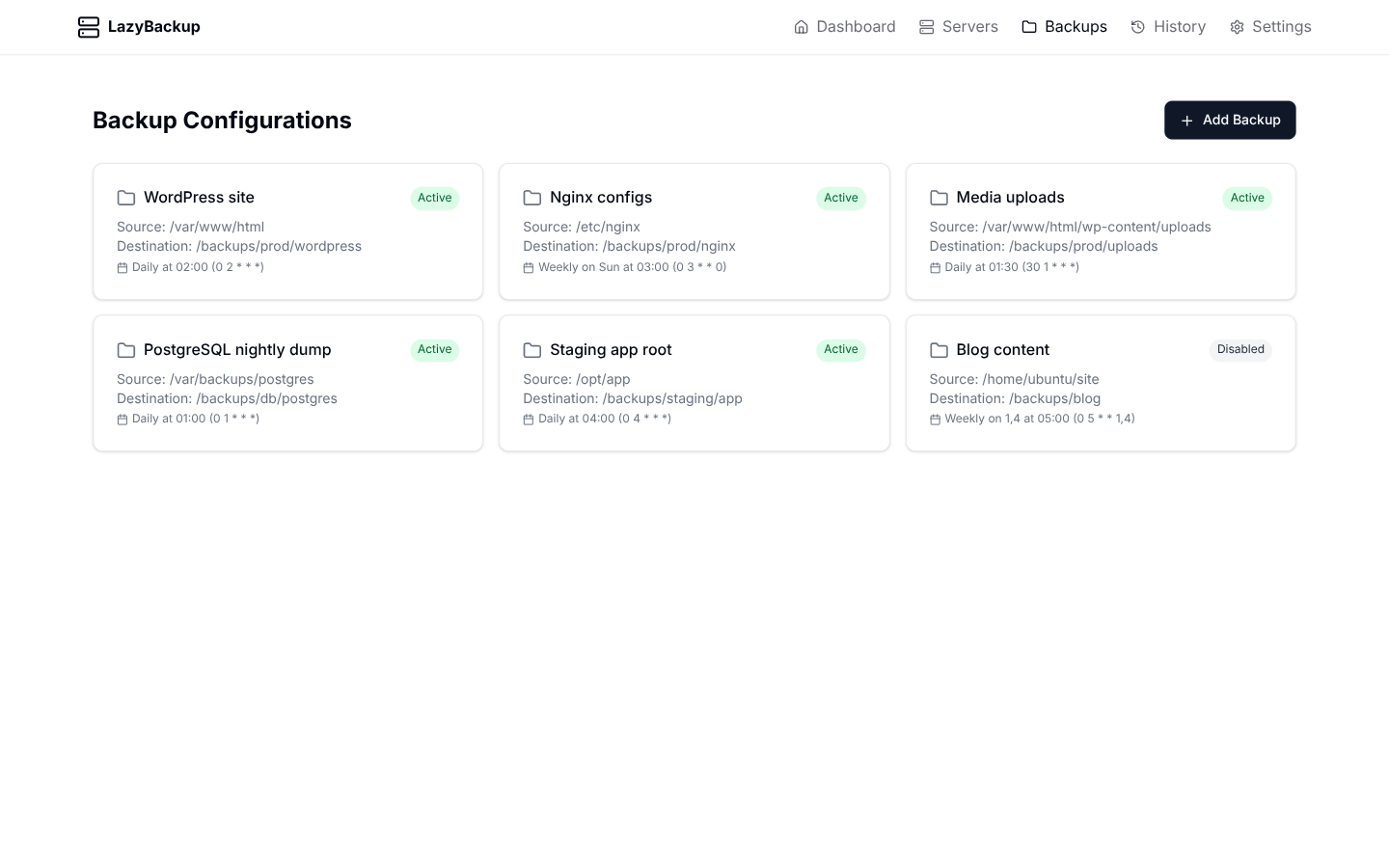
- Backup jobs — Paths, Docker volumes, database dumps, or Git bare mirrors; cron schedules; exclude patterns; pre-backup shell commands
- Docker volumes — Discover named volumes on this host or a source server, pack as
.tar.gzto a destination path/prefix, restore from History - Database dumps — Postgres / MySQL / MariaDB →
.sql.gz(native client ordocker exec); SQLite →.sqlite.gz(native file copy /.backup); restore from History - S3 profiles — Source prefixes and destination prefixes for path trees and archives
- Git repositories — Connections → Git; clone
--mirrorwith a vault SSH key (or public HTTPS) and land.tar.gzanywhere - Versioned backups — Optional timestamped snapshots with automatic count-based retention
- File retention — Optional age-based cleanup for dump-style destinations (keep a minimum number of files)
- Automated scheduling — In-process cron scheduler; set an app timezone so schedules run when you expect
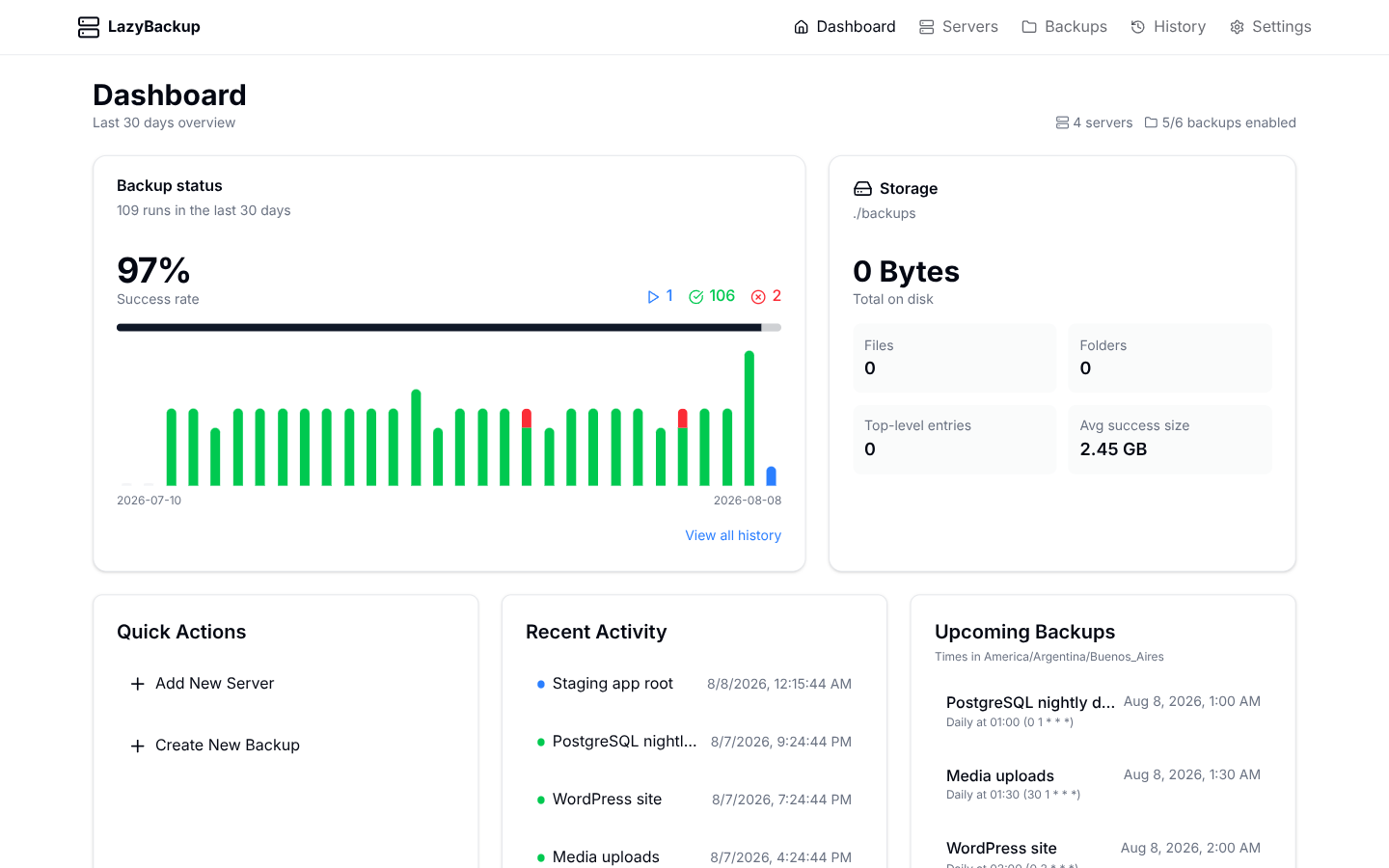
- History & dashboard — Track runs, view logs, next run times, storage usage, and success rates
- Path restore — One-click restore of path trees from History (local / S3 / Bro artifacts) back to the source path, SSH host, or S3 prefix
- Validate before run — Probe SSH/S3/paths/DB without transferring (backup detail → Validate); last result is stored with a timestamp so you can see status without re-running
- Failure webhooks — Customizable HTTPS webhook on backup failure (method, headers,
{{tag}}body/URL templates; Discord / Telegram / Kuma / ntfy / Slack presets) - Success pings — Optional Healthchecks.io / Uptime Kuma-style GET (or POST) when a backup succeeds
- Optional app password — Single-operator lock (set on first run or later in Settings); session cookie lasts 30 days
- MCP / API tokens — Let Cursor, Claude, or other agents manage backups via Streamable HTTP MCP at
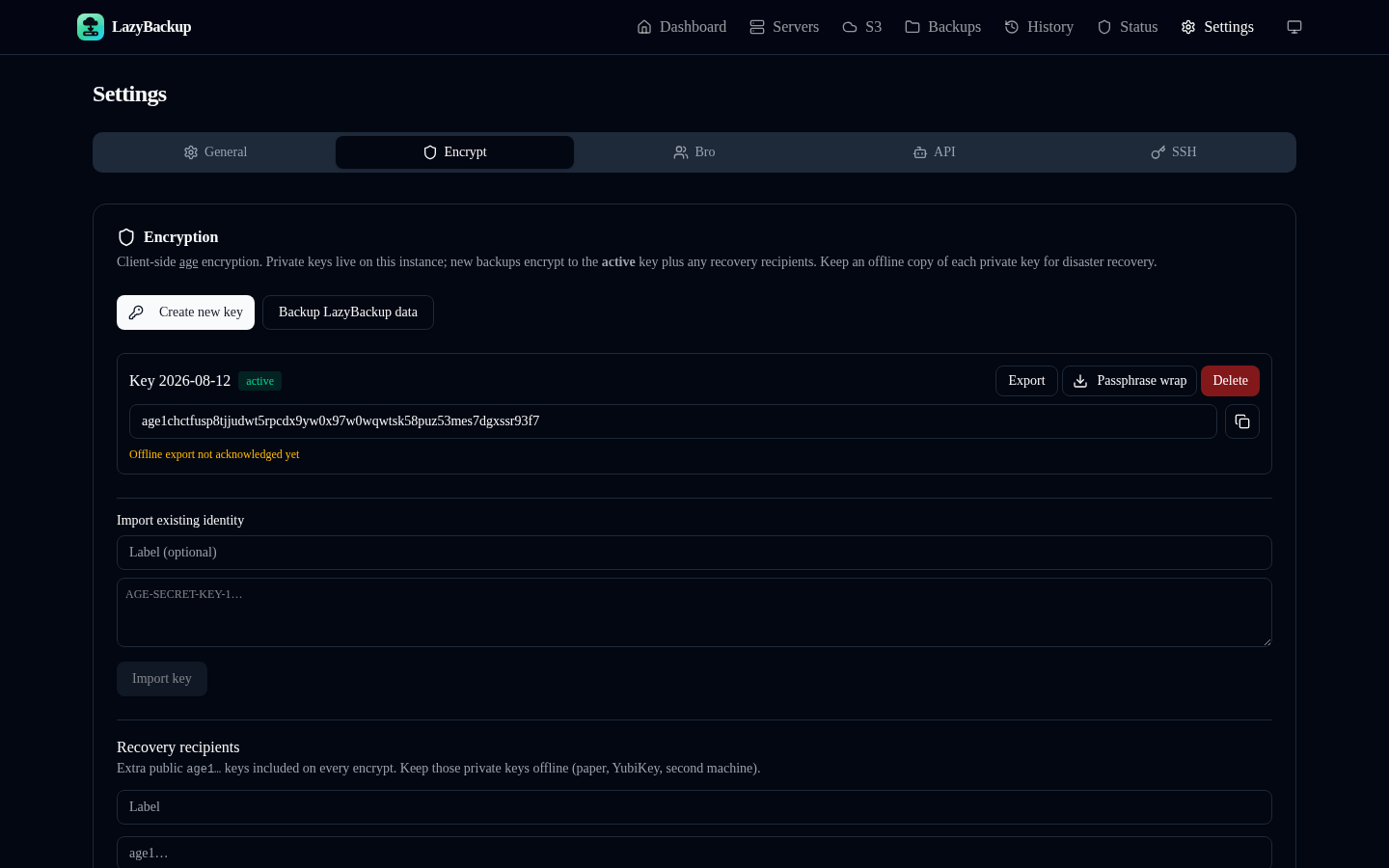
/mcp(Settings → API / MCP) - Encryption — Age vault (active / retired / compromised keys), recovery recipients, passphrase-wrapped export (Settings → Encryption); works with local, server, and S3 destinations
- Instance backup — Backup LazyBackup itself (SQLite + keys) as a schedulable job; optional archive passphrase
- Passkeys — WebAuthn login alongside or instead of the app password
- Bro Space — share encrypted backup space with a friend (Settings → Bro Space). Invite them to install LazyBro, or pair with another LazyBackup.
Docs: Features · Compare · Changelog · CONTRIBUTING · SECURITY · CHANGELOG · static site landing/
Tech stack
- Frontend: Next.js 15, React 19, Tailwind CSS, shadcn/ui
- Backend: Next.js API routes
- Database: SQLite (libSQL) with Drizzle ORM
- Transfer: rsync (preferred) with scp fallback; S3 via AWS SDK
- Runtime: Bun
Usage
- Optional password — On first visit, set an app password or skip. Change or remove it later under Settings.
- Add a server — Connections → Servers → add host, user, and SSH credentials. Use Test connection to verify rsync/scp (and Docker) availability. Prefer an SSH key for any server you will back up from or to.
- (Optional) S3 profile — Connections → S3 → endpoint, bucket, and keys (path-style for MinIO/R2/B2 as needed).
- (Optional) Git repository — Connections → Git → remote URL and an SSH key from Settings for private remotes. Backups clone a bare mirror on this host and store
.tar.gzat the destination. - Create a backup — Backups → pick From and To (local, server, S3, or Git as source), then filesystem path, Docker volume, database, or Git repository. Default dest is still
/backups/<server>/<name>on this host when To is local (Git sources default to/backups/git/<repo>). Optionally enable versioning and/or age-based file retention. - Timezone — Settings → choose the timezone used for cron schedules and “next run” times.
- Encryption (optional) — Settings → Encryption → generate an age key (export and acknowledge a copy), optionally add recovery recipients, then enable “Encrypt before storing” on a backup (or use a Bro destination). Create new keys instead of overwriting; old keys stay for decrypt.
- Backup this instance — Settings → Encryption → “Backup LazyBackup data”, or New Backup → local source → LazyBackup instance data. Restore is manual (replace DB / import keys).
- Passkeys (optional) — Settings → Passkeys to register; use “Sign in with passkey” on
/login. - Bro Space (optional) — Settings → Bro Space → save your address, create an invite, and send it to your friend. They install LazyBro and paste the invite (or Accept below if they also run LazyBackup).
- Run or schedule — Trigger a manual run or rely on the cron schedule. View results, logs, and storage under History and each backup’s detail page.
- Restore — On a successful path, volume, database, or Git backup in History, restore back to the source (local path, SSH path, S3 prefix, named volume, DB, or a directory for the Git mirror), or onto a different host (History server picker). Artifacts on S3, Bro, or an SSH destination (key auth) are pulled onto this host first. Password-only SSH destinations cannot pull for restore. Download the artifact from History without restoring in place.
LazyBro
See bro/README.md. Your friend installs LazyBro, pastes your invite, picks a folder, and leaves it running. If they’re offline for a bit, that’s fine — backups still succeed and catch up later.
Bro Space + Tailscale (CGNAT)
If friends can’t reach your LazyBackup from outside your network, Tailscale on your host is a common fix. LazyBackup does not ship Tailscale in the image (~50MB+). Use one of:
- Host Tailscale (keeps LAN
:3000) — install Tailscale on the machine, uncomment the/var/run/tailscalevolume indocker-compose.yml, open Settings → Bro Space → Use as LazyBackup address. - Compose overlay — create an auth key, set
TS_AUTHKEYin.env, then:
docker compose -f docker-compose.yml -f docker-compose.tailscale.yml up -d
The app shares the Tailscale network namespace (http://100.x.x.x:3000). Host port publish is disabled in that mode.
MCP (agent access)
Connect Cursor, Claude, VS Code, or other MCP clients to this instance:
- Enable an app password (recommended) under Settings.
- Open Settings → API / MCP, create a token, and copy it immediately (shown once).
- Use Add to Cursor / Add to VS Code, or copy
mcp.json/ Claude config / Claude Code CLI.
Example mcp.json (replace host and token):
{
  "mcpServers": {
    "lazybackup": {
      "url": "https://your-host/mcp",
      "headers": {
        "Authorization": "Bearer lb_…"
      }
    }
  }
}
Tokens can manage backups and servers. Remote shell (exec_command / POST /api/servers/:id/exec) and setting or changing pre-backup commands require the opt-in Allow remote command execution permission when creating the token (browser sessions always have it). Prefer HTTPS or a trusted LAN. Revoke tokens anytime from the same Settings tab. Destructive MCP tools (delete_*, restore_history, exec_command) require confirm: true.
Failure notifications
Under Settings → General, configure a failure webhook:
- Method —
GET,POST, orPUT - URL / headers / body — support
{{tags}}({{event}},{{backupName}},{{configId}},{{historyId}},{{errorMessage}},{{endedAt}}) - Presets — Default JSON, Discord, Telegram, Uptime Kuma (push), ntfy, Slack
Empty body (POST/PUT) sends the built-in JSON:
{
  "event": "backup.failed",
  "backupName": "Daily DB",
  "configId": "…",
  "historyId": "…",
  "errorMessage": "…",
  "endedAt": "2026-08-10T12:00:00.000Z"
}
HTTPS is required (http:// only for localhost/LAN). Empty URL disables notifications. Use Send test notification to verify.
Success pings
Also under Settings → General, optionally configure a success ping (Healthchecks.io / Uptime Kuma style):
- Defaults to GET (paste your check’s ping URL)
- Same URL rules and optional
{{tags}}({{event}},{{backupName}},{{configId}},{{historyId}},{{endedAt}}) - Presets — Healthchecks.io, Uptime Kuma (up), Default JSON (POST)
- Empty URL disables pings; failures never fail the backup (fire-and-forget)
- Use Send test ping to verify
POST/PUT with an empty body sends {"event":"backup.succeeded",…}.
Secrets in the API
GET responses for servers, S3 profiles, and backups never include passwords, SSH private keys, S3 secret keys, or DB passwords. Flags such as hasPassword / hasPrivateKey / hasSecretAccessKey / hasDbPassword tell the UI a secret is stored. On edit, leave those fields blank to keep the existing value.
Docker volume notes
- Volume sources are a source server (SSH) or this host (optional
/var/run/docker.sockmount — that is root-equivalent on the daemon). - The Docker user needs permission to run
docker(typically membership in thedockergroup, or the socket mount). - Packing uses a temporary
alpinehelper container; the host must be able to pull/run that image. - Live database volumes can be inconsistent if written during backup — prefer the database source type for logical dumps, or stop the service first via pre-backup commands when you need a consistent filesystem snapshot.
Environment variables
| Variable | Default | Description |
|---|---|---|
DATABASE_URL |
file:./data.db |
SQLite database location (file:/app/data/data.db in Docker) |
PORT |
3000 |
HTTP port |
BACKUP_STORAGE_PATH |
./backups |
Host directory for backup files (Compose mounts this at /backups and /app/backups) |
SSH_KEYS_PATH |
~/.ssh |
System SSH keys (Docker mount, read-only) |
AUTH_SECRET |
(auto in settings) | HMAC secret for session cookies; auto-generated in SQLite if unset |
AUTH_COOKIE_SECURE |
unset (false) |
Set true only behind HTTPS; Secure cookies are dropped on plain HTTP |
ENABLE_HSTS |
unset (false) |
Set true only when every request is HTTPS; prefer HSTS on the reverse proxy. Leave unset for HTTP/LAN. |
AUTH_TRUST_PROXY |
unset (false) |
Trust X-Forwarded-Host / X-Forwarded-Proto / X-Forwarded-For for WebAuthn RP ID and login backoff. Set true only behind a reverse proxy that overwrites these headers. |
AUTH_PUBLIC_URL |
unset | Public origin for WebAuthn (overrides Host / forwarded headers), e.g. https://backup.example.com |
ALLOW_ARBITRARY_LOCAL_PATHS |
unset (false) |
Allow local backup destinations outside BACKUP_STORAGE_PATH. Default denies paths outside the storage root. |
ALLOW_PRIVATE_S3_ENDPOINTS |
unset (false) |
Allow S3-compatible endpoints on loopback/private IPs (LAN MinIO). Default denies loopback, RFC1918, link-local, and cloud metadata addresses. |
ALLOW_PRIVATE_PEER_URLS |
unset (false) |
Allow Bro Space pairing/sync to RFC1918 and loopback URLs. Default allows public http(s) and Tailscale only. IMDS/link-local are always blocked. |
ALLOW_LAN_WEBHOOKS |
unset (true) |
Allow HTTP webhooks/pings to localhost and RFC1918 (LAN ntfy/Kuma). IMDS/link-local are always blocked. Set false for public HTTPS only. |
See .env.example for a copy-paste template.
Development
bun run dev         # Start dev server
bun run lint        # ESLint
bun test            # Unit tests on the host
bun run test:docker # Alpine unit tests + production image smoke (musl / GHCR parity)
test:docker builds the Alpine image, runs bun test inside it, then starts the production image and hits /api/health (migrations + @libsql natives). Use this when changing Docker/native deps so host bun run dev success doesn’t hide Alpine failures.
See AGENTS.md for architecture details aimed at contributors and AI agents.
License
MIT — see LICENSE. Anyone may use, modify, and redistribute LazyBackup.
Contributing · Security · Changelog
Acknowledgements
Yorumlar (0)
Yorum birakmak icin giris yap.
Yorum birakSonuc bulunamadi