lmstudio-agent-toolkit
Health Warn
- License — License: MIT
- Description — Repository has a description
- Active repo — Last push 0 days ago
- Low visibility — Only 5 GitHub stars
Code Warn
- process.env — Environment variable access in evals/run.ts
- process.env — Environment variable access in evals/tasks/add-cli-flag/project/bin/todo.js
- fs module — File system access in evals/tasks/add-cli-flag/project/lib/store.js
Permissions Pass
- Permissions — No dangerous permissions requested
No AI report is available for this listing yet.
An LM Studio plugin that turns a local model into a coding agent: files and shell, memory, git and GitHub, web search and a real browser. No API keys, nothing leaves your machine.
🧰 LM Studio Agent Toolkit
Turn a local model in LM Studio into a working coding agent.
It reads and edits your code, runs your tests, remembers your project, uses git, searches the web and reads your documents.
No API keys. No cloud. Nothing leaves your machine.





Quickstart · What's new · What it can do · Tips & tricks · Safety · Full reference
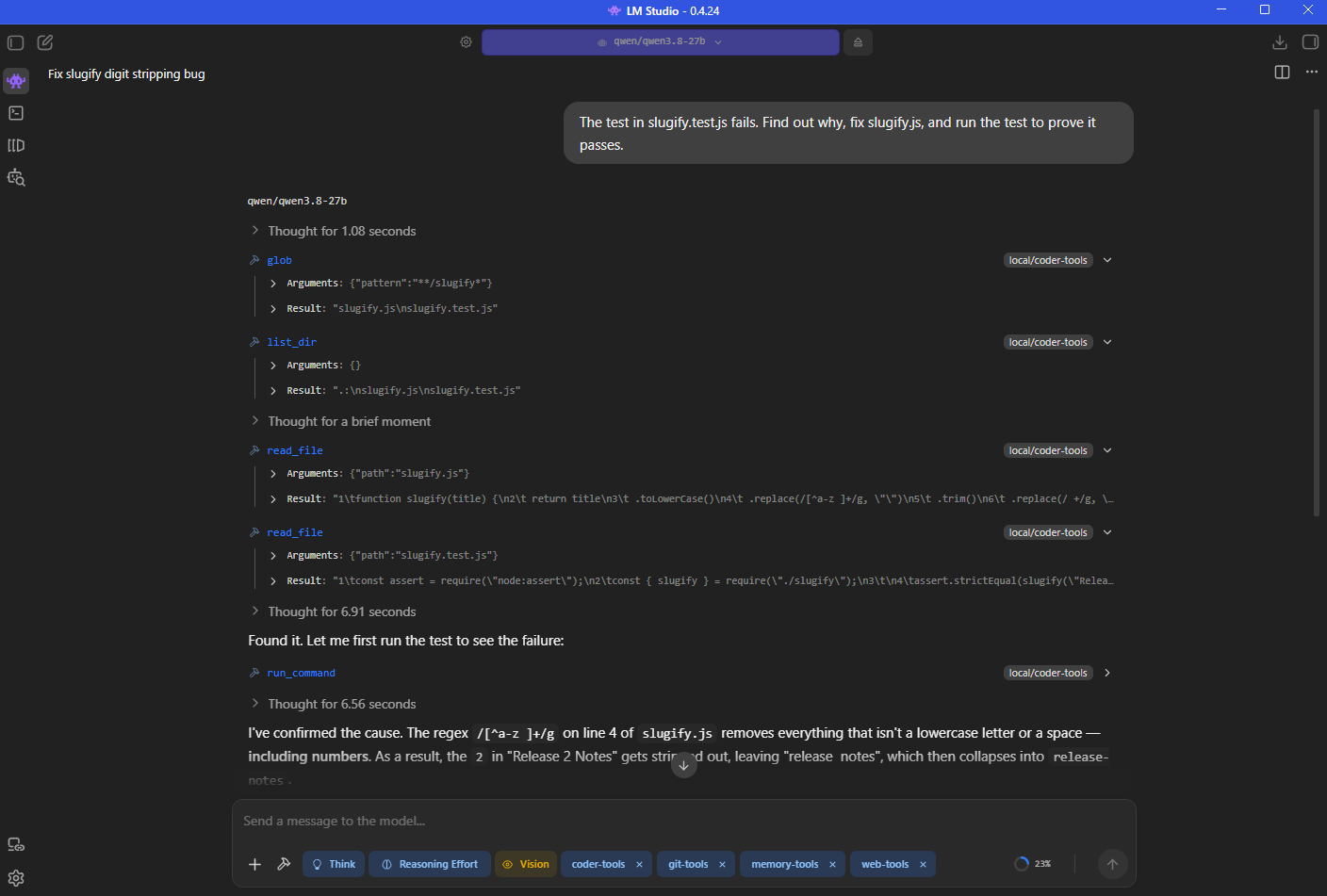
A real session in LM Studio. The model goes on to fix the regex and re-run the test to exit_code: 0. Every call was shown for approval before it ran.
⚡ Quickstart
lms get cervezagua/agent-toolkit
For long chats, also get its companion: lms get cervezagua/agent-toolkit-loop.
Then, in LM Studio:
- Load a tool-capable model — LM Studio marks these "Tool use". Give it 32k context or more.
- Enable
agent-toolkit— it appears as a chip under the message box. - Click the chip and set Project Folder to the folder you want the model to work in.
- Ask for work: "explain this project", "fix the failing test", "what changed since last week?"
That's it. Keep LM Studio's tool call confirmation on, and approve calls as they come.
Install from source instead (for hacking on it)Needs Node.js 22+ and git.
git clone https://github.com/cervezagua/lmstudio-agent-toolkit.git
cd lmstudio-agent-toolkit
npm run setup
LM Studio fetches the dependencies itself. Re-run npm run setup after git pull to update.
[!IMPORTANT]
Upgrading from the five separate plugins? Removecoder-tools,memory-tools,git-tools,web-toolsandocr-toolsfrom your chats — enabling them next toagent-toolkitgives the model two copies of every tool. Then set Project Folder once, and if you usedweb-toolsorocr-tools, switch on Web or Documents: they start off.
🆕 What's new
| Version | What changed |
|---|---|
| 0.8.3 | /doctor checks the chat's setup and says what to fix: how much of the context the tools take, tools offered twice, whether agent-toolkit-loop runs the reply, the Project Folder, and the programs the enabled groups need. |
| 0.8.2 | On a small context, agent-toolkit-loop summarizes earlier messages only when that makes the prompt smaller; otherwise it just hides old tool output. |
| 0.8.1 | Long tasks fit a small context better: agent-toolkit-loop leaves the model's earlier thinking out of the prompt, asks a reply cut off by a full context to go on in smaller steps, and keeps one big tool result (a web page, say) from overflowing the context. write_file can append, to write a long file in parts. |
| 0.8.0 | /handoff writes down where the work stands, and /resume carries it into a new chat, for when a long chat gets slow. |
| 0.7.3 | agent-toolkit-loop follows LM Studio's Always allow, carries on a reply that a full context cut off, and follows up a reply that ended inside the model's thinking. The file tools can no longer change LM Studio's own settings, and errors from the toolkit's tools are checked for secrets before the model sees them. |
| 0.7.2 | With agent-toolkit-loop on, a tool that fails (a script in js-code-sandbox, say) gives the model its error to work with, instead of freezing the chat. If a reply does fail, it ends cleanly with the reason, so Stop is never left greyed out. |
| 0.7.1 | With agent-toolkit-loop on, a tool call that needs your approval shows its Approve and Deny buttons again. In 0.7.0 the reply waited for an approval that couldn't be given. |
| 0.7.0 | New companion plugin, agent-toolkit-loop: long chats keep going at small contexts (old tool output is hidden, then summarized), /btw side questions, and a model stuck repeating a call is stopped. Commands: /review, /test, /commit, /init, /help and your project's own. /rewind puts back the files a message changed. Edits get a syntax check, task_wait waits out a download or build without spending tokens, and skills load when your message names their trigger. Multi-line commands no longer hang in the PowerShell session. |
| 0.6.0 | Runs on LM Studio SDK 2.1, which fixes a hang with newer LM Studio: model lists in the settings are filled again, and the vision tools no longer wait forever when no vision model is loaded. Brave Search API Key moved under Search Backend and is now set per chat: enter your key again there. |
| 0.5.2 | When an edit can't find the text it should replace, the error shows the closest lines in the file, so the model can copy them instead of reading the whole file again. |
| 0.5.1 | A command that prints without end can no longer crash the plugin: output is capped at its first and last 2 million characters. |
| 0.5.0 | research: answers from several web pages, with a source for each claim. grep on a single file works with ripgrep installed. Lines grep shows can be edited directly. A missing file says where it probably is. |
| 0.4.1 | Files you attach to a message are read: "summarize this" now means the PDF you attached. |
The fixes in 0.5 were found by evals: real tasks given to local models, checked by their outcome. All releases are on the releases page.
🧩 What your model can do
One plugin, six groups. Each group is a switch in the plugin's settings, because a long tool list makes small models choose worse.
| Group | Default | What the model can do | Highlights | |
|---|---|---|---|---|
| 📁 | Files & Shell | on | Read, write and edit files, search, run commands | Locked to your project folder · read-before-edit · undo · background tasks · project diagnostics |
| 🧠 | Memory & Context | on | Remember things between chats, keep a todo list, follow skills | Opens each chat with your AGENTS.md, today's date and git status · plan mode · can save its own skills and search past chats, if you switch those on |
| 🌿 | Git & GitHub | on | Status, diff, commit, branch, pull requests and issues | Runs git/gh directly, never through a shell · push is opt-in, never forced |
| 🌐 | Web | off | Search, read pages as markdown, drive a real browser, read feeds, Wikipedia and video transcripts, research with sources | Private SearXNG search · read just part of a page · reads PDFs · RSS/Atom · Wikipedia in any language · YouTube transcripts via yt-dlp · Edge or Chrome via Playwright · cited answers from several pages |
| 📄 | Documents | off | Read PDFs, scans and images from your folder, look at pictures, and write Word and PDF files | Text layer first, free and exact · OCR only when needed · questions about a screenshot or a picture on the web · reports saved as .docx or .pdf · your chat model needs no vision |
| 🧮 | Utilities | off | Do arithmetic exactly, and know today's date and time | Percentages, powers and functions without guessing · any time zone |
Every tool and setting is in the full reference.
More plugins
For long chats: agent-toolkit-loop. Enable it next to agent-toolkit, and a chat keeps going past the model's context limit in the same window:
- It hides old tool output first, and summarizes the earlier conversation only when that isn't enough.
- It keeps your own words and a list of what was done, and the model can search the full transcript.
/btwside questions are answered without derailing the task.
lms get cervezagua/agent-toolkit-loop
It takes over LM Studio's reply loop for the chats it's enabled in; switch it off and LM Studio's own loop is back.
Just one tool? Three of the Web tools also come as small plugins of their own:
| Plugin | What it adds | Install |
|---|---|---|
| feed-reader | read_feed: the latest items of any RSS or Atom feed |
lms get cervezagua/feed-reader |
| video-transcripts | video_transcript: what's said in a YouTube or other video (needs yt-dlp) |
lms get cervezagua/video-transcripts |
| page-reader | fetch_url: a web page or PDF as clean markdown, or just one part of it |
lms get cervezagua/page-reader |
They're the same code as agent-toolkit's, so don't enable one alongside agent-toolkit with Web on, or the model sees the tool twice.
A system prompt to go with it
Small models often know how to call a tool but not when to stop. agent-toolkit-prompt is a preset that tells the model to look before editing, keep a task list, check its work, and never repeat a call that already failed. It sets the system prompt and nothing else. Get it from the Hub.
💡 Tips & tricks
Get better results
- Write an
AGENTS.mdin your project: how to run the tests, which folders matter, what not to touch. It's loaded into every new chat automatically, so you stop repeating yourself.CLAUDE.mdworks too. - Ask for plan mode on anything big. "Enter plan mode and plan how you'd add X": while planning, the file-changing tools disappear until the model presents its plan with
exit_plan_mode. - Point at the file when you know it. "The bug is in
src/parse.ts" saves a model several searches and a lot of context. - Tell it to prove its work. "…and run the tests to show it passes" turns a guess into a checked result. Or type
/test. - Use the commands.
/reviewchecks your uncommitted changes without touching them./commitwrites the message for you./initwrites anAGENTS.md.- Add your own as
.agent-toolkit/commands/<name>.md.
- Undo a whole message's work with
/rewind. It lists your messages that changed files;/rewind 3puts the files back to how they were before message 3. - Give skills
triggers:. A skill withtriggers: [deploy]is loaded whenever your message says "deploy". Small models rarely load skills on their own. - Read only the part of a page you need. "Fetch the pricing page, just the table" lets the model pass a CSS selector to
fetch_urlinstead of reading the whole page into its context. - Summarise a video instead of watching it. With yt-dlp installed: "What does this talk say about caching? ".
- Ask for research, not a single search. With Web and Research on: "Research what changed in Node 24, with sources". It reads several pages and answers with a numbered source after each claim. It works best with SearXNG.
- Follow a blog or a project's releases. "What's new on https://example.com/blog?" reads its feed, even from the home page.
- Ask for file names before contents. A model can
grepfor just the files that match, or just the counts, which costs a fraction of the context of full results. - Made a mistake? Ask for
undo_edit. It restores a file to how it was before the chat's last change to it. - Start dev servers in the background. "Start the dev server in the background and check it came up" uses the task tools, so the chat isn't stuck waiting on a process that never exits.
Long chats
- Enable agent-toolkit-loop for chats that run long. It keeps the chat going past the context limit, and you can ask
/btwside questions without derailing the task. If you'd rather start fresh, have the model callsave_session_summary, then start a new chat that picks it up from the memory index. - Tell it what to remember. "Remember that we deploy from the
releasebranch" saves a memory, which every future chat sees in its memory index and can read in full. - Let it search your earlier chats. Switch on Search Past Chats and ask "what was the command we used to deploy last week?". It's off by default, because those chats hold everything you've typed in LM Studio.
- Turn a solved problem into a skill. Switch on Let the Model Save Skills, and after a task say "save what you just did as a skill". You see the whole skill before it's written, and future chats can load it.
Choose and tune the model
- Bigger tool-use models plan multi-step work far better than small ones. Checked end to end with a 27B tool-use model.
- Switch off the groups you don't need. Fewer tools means better choices, especially on small models.
- Models with their safety training stripped out ("uncensored", "abliterated") are often worse at following tool formats and may drift between languages. If one starts answering in the wrong language, add "Always reply in English." to the chat's system prompt.
- Pick the models for OCR, the sub-agent and
researchfrom a dropdown in the Documents, Files and Web settings. It lists the models you have; after downloading a new one, turn the plugin off and on to refresh the list.
Make the tools faster
- Install ripgrep and searches get much faster. Results are identical either way.
- Install the GitHub CLI and run
gh auth login, and the pull request and issue tools appear. - Run SearXNG for web search. Without it, search falls back to DuckDuckGo, which often answers automated requests with a bot check.
searxng/sets one up in WSL on Windows; on macOS or Linux, any SearXNG with the JSON format enabled works. - Reuse your skills. Skills are the standard
<skill>/SKILL.mdlayout, so pointing Skills Directory at~/.lmstudio/skills(LM Studio Bionic's folder) or~/.claude/skillsgives your local model the skills you already have.
When something looks wrong
| You see | What's going on | Fix |
|---|---|---|
| The model keeps calling the wrong tool, insisting another one is "available" | It remembers a tool from earlier in the chat that isn't switched on now — often web_search, since Web starts off |
Switch the group on in the plugin's settings, or start a new chat |
| The model says your project is empty | No Project Folder is set, so it's in the chat's own empty scratch folder. The model is told this, but small ones may miss it | Set Project Folder |
| "Read the file first" on a file the model already read | Changing settings restarts the plugin, which forgets what was read. It's a safety check, not an error | Let the model read it again |
| "is not a git repository" | Project Folder isn't a git repo, or isn't set | Point Project Folder at the repo, or ask for git_init |
| "SearXNG unavailable, used DuckDuckGo" | Your SearXNG isn't running | Start it (searxng/start-searxng.cmd on Windows) |
| "DuckDuckGo is refusing automated searches" | DuckDuckGo answers a couple of searches, then turns the rest away for a while. The toolkit spaces its requests and stops asking for two minutes once refused | Wait, or set up SearXNG or a Brave API key for search that doesn't run out |
A web tool fails, or video_transcript is missing |
Something the Web group needs isn't set up | Ask the model to run web_doctor: it checks SearXNG, the browser and yt-dlp, and says how to fix each |
| "agent-toolkit did not load AGENTS.md…" | The file contains a line that looks written to steer the model, such as "ignore previous instructions" | Read the quoted line. Fix the file, or switch off Scan Loaded Files if it's a false alarm |
"agent-toolkit hid 2 secrets from the model", or the model sees [redacted: …] |
A tool's result contained something that looks like an API key, token or private key. Your file is untouched; only what the model sees is masked | Nothing, usually. If the model really needs the value, switch off Redact Secrets |
| The model ignores a file you attached, or summarises something else | Nothing turned the file into text. LM Studio leaves that to a plugin | Keep Read Attached Files on (the default), or LM Studio's RAG plugin. A scanned PDF needs the Documents group for ocr_document |
| A model you just downloaded is missing from a dropdown | The list is read when the plugin starts | Turn the plugin off and on |
Platform notes
- Windows: commands run in PowerShell, with real exit codes. The toolkit repairs a missing
PATHEXTin LM Studio's plugin host, sonode,pythonandgitresolve as they do in your terminal. - macOS: apps started from the Dock don't see Homebrew's folders, so the toolkit adds
/opt/homebrew/binand/usr/local/binback itself. The browser defaults to Chrome. - Linux: works out of the box; the browser defaults to Chrome.
🛡️ Safety
[!WARNING]
This plugin lets a model act on your computer. Approving a tool call is the same as running that command yourself.
| Guard | What it does |
|---|---|
| Project Folder | File tools resolve every path inside your project folder, after following symlinks and junctions, so a link can't lead out of it. |
| Read before edit | A file must be read in this chat before it can be edited (lines grep showed count), and the edit is refused if the file changed since. The model can't overwrite what it never saw. |
| Atomic writes | Files are written to a temporary file and renamed, so an interrupted write can't truncate your work. |
| Blocked commands | Catastrophic ones (rm -rf /, format C:, diskpart…) are refused. A seatbelt, not a sandbox: a shell command can still do anything your account can. |
| Opt-in danger | git_push is off by default and never force-pushes; the shell can be switched off entirely. |
| Plan mode | While planning, every tool that changes a file is withheld until the model presents a plan. run_command stays, so it can still look around, with a reminder that planning is on. |
| Scan loaded files | An AGENTS.md or skill that tells the model to ignore its instructions, hides text in invisible characters, or sends your keys somewhere is not loaded. You're shown the line that tripped it. Simple pattern checks: they catch blunt attempts, not subtle ones. |
For untrusted projects, switch off Allow Shell Commands or run LM Studio in a virtual machine. More in SECURITY.md.
⚙️ Why it behaves well with small models
Design decisions that matter in practice (click to expand)- Mistakes come back as text, not failures. A bad path, ambiguous edit or git error returns
Error: …, so the model can correct itself instead of the chat dying. - Edits are exact replacements that must match once, so a model never rewrites a whole file to change one line. LF text matches CRLF files, and any edit can be previewed as a diff or undone.
- Nothing is silently lost. Long command output is written to a file and its path returned; long documents and search results page with
offset. A command that floods output keeps its first and last 2 million characters, instead of crashing the plugin. - Near misses point the way. A missing file comes back as "signup.js does not exist. Did you mean: src/signup.js?", and an edit whose text isn't found shows the closest lines in the file, so the next try can copy them.
- Cheap answers first.
grepcan return just file names or counts,read_document_textreads a PDF's text layer without a model, and fetched pages are cached for a few minutes. - The same answers on every machine.
grepreturns identical lines with or without ripgrep. - Skills are read whole. A description that wraps, is quoted across lines, or uses YAML's
>or|blocks keeps the part that says when to use the skill. - The model starts informed. Each chat opens with today's date, your
AGENTS.md, the memory index and, in a git repo, the branch, uncommitted changes and recent commits. - It knows when it's in the wrong place. Without a Project Folder the model is told it's in an empty scratch folder, instead of concluding your project is empty.
- Real exit codes. PowerShell's
-Commandcollapses every failure to1;run_commandreports what actually happened. - No shell in the middle of git. git tools run
gitandghdirectly, reject refs that look like options, and never open an editor or a credential prompt. - The browser is navigable by number. A snapshot lists
[3] link "Docs" -> /docs, and the model clicks or types by that number.
🚧 Limitations
- LM Studio plugins can't rewrite earlier chat history. agent-toolkit-loop works around that by sending the model a compacted prompt, so the chat on screen stays complete, and LM Studio's context meter still counts all of it.
- A plugin can't add its own button to the chat, so the project folder is set in the plugin's settings rather than with a folder picker.
- All chats share one browser.
- Results depend on the model.
🤝 Contributing
Issues and pull requests are welcome. CONTRIBUTING.md covers the layout, the tests and how to add a tool. CI runs the tests on Windows, macOS and Linux. To see whether a change helps real use, run the evals it affects against a local model before and after.
📜 License
Reviews (0)
Sign in to leave a review.
Leave a reviewNo results found