carryover
Health Uyari
- License — License: MIT
- Description — Repository has a description
- Active repo — Last push 0 days ago
- Low visibility — Only 5 GitHub stars
Code Gecti
- Code scan — Scanned 12 files during light audit, no dangerous patterns found
Permissions Gecti
- Permissions — No dangerous permissions requested
Bu listing icin henuz AI raporu yok.
💼 The portable memory layer for AI coding tools — one shared brain that follows you across Claude Code, Cursor, Windsurf & Conductor. Install once, never re-explain your project again.
  ██████     ██████  █████  ██████  ██████  ██    ██  ██████  ██    ██ ███████ ██████
 ██    ██   ██      ██   ██ ██   ██ ██   ██  ██  ██  ██    ██ ██    ██ ██      ██   ██
 ████████   ██      ███████ ██████  ██████    ████   ██    ██ ██    ██ █████   ██████
 ██ ██ ██   ██      ██   ██ ██   ██ ██   ██    ██    ██    ██  ██  ██  ██      ██   ██
 ████████    ██████ ██   ██ ██   ██ ██   ██    ██     ██████    ████   ███████ ██   ██
The memory your AI takes everywhere.
one brain, every tool — packed in a carry-on 💼
shared persistent memory · 60–95% fewer tokens · auto-wiki · Obsidian vault · cross-workspace messaging · playbooks · save-to-memory
Claude Code · Cursor · Windsurf · Conductor — one install · 100% local




The problem
You don't work in a single AI tool anymore — Claude Code one day, Cursor or Windsurf
the next, Conductor for parallel work. But context doesn't travel with you: every
tool, project and session starts from zero, so you re‑explain the same codebase over and
over. On top of that each agent burns tokens on bloated context, forgets
everything between sessions, and tends to over‑engineer — and the few things worth
remembering never get captured. Wiring up the fix by hand is fiddly and has to be redone
on every machine.
The fix
A local layer that makes your context carry over across tools, projects and sessions:
- 🧠 Persistent, shared memory across tools, repos and sessions — a local store you own,
with semantic recall (by meaning) scoped to each repo or a group of related repos. - 🕸 Structured knowledge — saved as facts + typed entities + relationships (a queryable
graph), indexed by the repo it came from. - 🔁 Auto‑recall — when you start a session in a repo, what carryover knows about it is
injected as context (~0.5s, ~500 tokens, compressed). Plus/recall/co-recallon demand
(current repo by default;--allfor every repo). - 📊 Local dashboard (
co-dash) — browse, search, filter and manage (delete/clear)
your knowledge and your project wikis. (The knowledge graph lives in the Obsidian vault,co-vault.) - 📄 Auto‑wiki — an LLM writes docs + mermaid diagrams (overview, architecture, flows + a
Features catalog) and updates them incrementally (preserves existing pages, adds only
what changed) on push to master/main. - 📖 Obsidian vault (
co-vault) — one command materializes your whole knowledge base and
every repo wiki into a single Obsidian vault, no plugins: memories become notes, entities become
nodes (name variants merged, and tags/attachments/noise hidden, so the graph is connected,
not fragmented) so Obsidian's native graph view — colour‑coded by folder — reproduces your
knowledge graph. Ships a Home page + per‑repo indexes and a Bases table (needs Obsidian
1.9+). It's two‑way and that's the point: edit a note's text or raise its importance in
Obsidian and it syncs back on the nextco-vault— so future sessions recall it, ranked higher.
(Content and importance round‑trip; facts, entities and relationships are derived and read‑only.)co-vault-describeadds one‑line LLM blurbs to the most‑connected entities. - 🤝 Cross‑workspace coordination (Conductor) — leave notes,
/handoffor/handovera task,
and group workspaces into role‑based teams, all over the shared store. Delivery is automatic on
a workspace's next turn — it's coordination between separate, persistent workspaces, not an
autonomous swarm (for parallel agents inside one session, use Claude Code subagents/Workflows). - 📓 Playbooks — reusable
!macroprocedures (Devin‑style) you trigger in any prompt; authored
and managed in the dashboard. Ships with!grill(plan interrogation). - 💾 Save‑what‑mattered prompt at session end · 🩺
carryover doctorhealth check ·
routing on/off toggle ·carryover wrap <tool>for Cursor/Codex/… - Status bar 🐴/🧠, slash commands, terminal aliases.
One idempotent install, 100% local, standalone by default — with optional headroom
(shared store + token compression) and ponytail integrations — so your context follows you
instead of resetting.
Works with
The shared memory + compression work with any agent that routes through the local proxy:
| Tool | Compression + shared memory | Agent extras |
|---|---|---|
| Claude Code | ✅ auto (installer) | ✅ |
| Conductor | ✅ Claude auto · Codex via carryover wrap codex |
✅ Claude extras / Codex plugin |
| Cursor | ✅ headroom wrap cursor (paste config) |
— |
| Windsurf / Devin | ✅ OpenAI‑compatible → base URL http://127.0.0.1:8787/v1 |
— |
| Codex | ✅ headroom wrap codex |
✅ plugin: auto-recall, inbox, playbooks, save-to-memory prompt |
| Copilot / Aider / Cline / Continue / Goose | ✅ headroom wrap <tool> |
— |
Set it up in each tool (the cross-tool part)
The memory and compression are shared through the local proxy — each tool just needs to be
pointed at it once. (The proxy must be running: check with carryover doctor or hr-status.)
- Claude Code / Conductor (Claude agent) — automatic.
install.shalready wired the routing;
nothing to do. - Cursor — run
carryover wrap cursor(delegates toheadroom wrap cursor). It prints the
exact config to paste into Cursor's model settings (points its API base at the proxy). From
then on, Cursor's AI shares the same memory + compression as Claude. - Windsurf / Devin — in its AI/model settings, set a custom OpenAI base URL to
http://127.0.0.1:8787/v1. (carryover wrap windsurfprints this reminder.) - Codex — install the Carryover plugin for auto-recall, workspace inbox,
!playbooks, and the
end-of-turn save-to-memory prompt. Runcarryover wrap codexas well when you want Headroom's
proxy compression and shared backend. - Aider / Cline / Continue / Goose / Copilot —
carryover wrap <tool>. - Any other OpenAI/Anthropic-compatible tool — point its base URL at the proxy:
http://127.0.0.1:8787(Anthropic-style) orhttp://127.0.0.1:8787/v1(OpenAI-style).
Two things to keep in mind:
- Terminal commands (
co-dash,mem-save,co-recall,carryover …) work in any
tool's integrated terminal — they live in your shell (~/.zshrc), not in a specific app. - Slash commands (
/headroom,/recall,/carryover,/wiki-enable,/vault) and the 🐴/🧠 status
bar are Claude Code only. Codex gets the Carryover lifecycle features through its plugin, not
Claude's slash-command UI. - A tool is not auto-detected — it shares everything only after you point it at the proxy once.
Install
git clone https://github.com/Cfvillarroel/carryover.git ~/carryover
bash ~/carryover/install.sh
That installs carryover standalone — memory, recall, wikis and the dashboard, backed by a
built-in local store (~/.carryover/memory.db). Open a new terminal (or source ~/.zshrc) and
restart Claude. Requirements: macOS · Python 3 · Claude Code (claude) on PATH.
Optional integrations (opt-in):
bash ~/carryover/install.sh --with-headroom   # + headroom: compression proxy + shared memory backend
bash ~/carryover/install.sh --with-ponytail   # + ponytail: a lazy-dev Claude plugin
bash ~/carryover/install.sh --full            # carryover + headroom + ponytail
- headroom upgrades carryover's memory to a shared store across tools and adds the
compression proxy (routing for Claude / Cursor / Codex…). When installed, carryover uses it
automatically; otherwise it uses the built-in store. Needsbrew install [email protected]
(headroom's Rust/PyO3 extension doesn't build on 3.14). - ponytail is an independent third-party plugin — purely optional.
The installer is idempotent: it symlinks the hooks, dashboard, status bar and /headroom
command, and adds aliases to ~/.zshrc.
Not on Claude Code? With headroom the proxy is shared, so memory + compression apply to
any tool (Cursor, Windsurf, Codex, Aider…) — point each at the proxy (see Works with).
Install just the Claude plugin (optional)
Only want the Claude-side commands + the save-to-memory prompt, without the full installer?
claude plugin marketplace add Cfvillarroel/carryover
claude plugin install carryover@carryover
You still need the headroom proxy for memory/compression:pip install "headroom-ai[all]" && headroom install apply --memory.
Install the Codex plugin (optional)
The same repository is a Codex-compatible plugin marketplace. Install it once, then start a new
Codex session and review/trust its hooks with /hooks:
codex plugin marketplace add Cfvillarroel/carryover
codex plugin add carryover@carryover
The plugin provides automatic recall, inbox delivery, playbook expansion, and the save-to-memory
continuation prompt. It does not replace the Headroom proxy; run carryover wrap codex after
installing Headroom when you also want compression and a shared backend.
Scope: global vs per‑repo
- Global (once per Mac): headroom proxy + memory + Claude config. Global by
design — that's what makes context shared across all repos and tools. - Per repo / a set of repos: the wiki capability — run
co-wiki-enablein each repo
you want (one, several or all). It installs apre-pushhook there only. - Memory is global but scoped by repo: recall returns the current repo's memories by
default. Group related repos (e.g. the front + back of one product) so they share recall by
listing them on one line of~/.carryover/groups.conf(space/comma-separated).
Easy commands
| Command | Does |
|---|---|
hr |
headroom CLI |
hr-status |
proxy up / healthy? |
hr-on / hr-off |
start / stop the proxy |
hr-save |
tokens saved |
hr-mem |
stored memories |
hr-stats |
memory summary |
hr-prune … |
prune memories (e.g. --older-than 30d --dry-run) |
mem-save "text" |
save a memory by hand (or structured --json) |
co-recall [--all] <query> |
recall knowledge by meaning (semantic with headroom, keyword otherwise) — this repo's group; --all for every repo (alias: hr-recall) |
co-forget <query> |
delete memories by keyword, with confirm (alias: hr-forget) |
co-supersede <old> <new> |
mark an old memory as replaced by a newer one so recall skips it |
co-send <ws> <msg> |
leave a note for another Conductor workspace (all = broadcast) |
co-inbox [--peek] |
read notes addressed to this workspace (reading consumes them; --peek doesn't) |
co-wiki-enable |
enable the auto-wiki in the current repo, generates the first one (alias: wiki-enable) |
co-wiki-gen |
update the current repo's wiki on demand, incrementally (alias: wiki-gen) |
co-wiki-prune |
drop dead entries from the wiki registry (alias: wiki-prune) |
co-vault [dir] |
build/refresh a unified Obsidian vault (knowledge notes + entity graph + every repo wiki), two‑way sync, and register it with Obsidian. Lands in ~/Documents/carryover-vault unless you pass dir |
co-vault clean | remove | prune |
clean = rebuild derived config/hubs fresh (re‑imports first; your synced‑back edits and LLM blurbs are kept, the store is never touched) · remove = delete the vault + unregister it from Obsidian (--yes skips the prompt) · prune = re‑import edits, then drop orphaned generated notes only |
co-vault merge |
LLM‑group synonymous entities (carryover‑dash.py = carryover dashboard) into a hand‑editable map (~/.carryover/entity-merges.json), then rebuild. Conservative and reversible |
co-vault insights |
LLM synthesis pass — per repo, one claude -p generates grounded insights (contradictions / stale facts, unresolved open threads, cross‑memory connections), each self‑verified and citing the notes it's built from, into INSIGHTS.md. A deterministic guard drops any hallucinated citation. Cached by a corpus hash; --force to refresh |
co-vault-open |
open the vault in Obsidian |
co-vault-describe |
refresh the vault and write 1‑line LLM blurbs for the most‑connected entities |
co-dash |
local dashboard (overview, knowledge + wikis) |
co-backup / co-restore <file> |
snapshot / restore all memories (carry them to another machine) |
co-mcp |
run carryover's MCP server (use the memory from Cursor, Claude Desktop, any MCP client) |
hr-dash |
headroom's savings dashboard |
carryover status |
is routing on? |
carryover on / off |
turn proxy routing on / off (--session = this shell only) |
carryover doctor [--fix] |
health-check the whole setup (and auto-repair with --fix) |
carryover update |
pull the latest carryover + re-sync this machine (and upgrade headroom if installed) |
carryover version |
show installed version + whether updates are pending |
carryover persist |
make the proxy survive reboot (bootstrap its launchd service) |
carryover wrap <tool> |
route another tool (Cursor, Codex…) through the proxy |
carryover uninstall |
remove carryover (keeps headroom + ponytail) |
Auto-recall: when you start a session in a repo, carryover injects what it already
knows about that repo as context — so the knowledge actually comes back, not just gets stored.
Every recall (auto at session start or via /recall) is counted per memory, so co-dash shows
which memories actually get reused (the ♻ badge).
Inside Claude (any workspace): /headroom (proxy + memory + savings), /carryover (routing on/off/status), /recall [--all] <query>, /wiki-enable, /vault (Obsidian vault).
Status bar: 🐴 ponytail active, 🧠 headroom active.
Messages between workspaces
Running several Conductor workspaces at once? They share one memory store, so they can leave notes
for each other — "merged X, rebase", "build's broken, don't pull". Each workspace answers to several
names: its codename (the worktree folder, e.g. paris, sarajevo) — the stable, durable
address; its workspace name (the label Conductor shows, which it rewrites to the branch/task
name once you first interact with it); and its project name (the heading it lives under, e.g.proyectate-back). Send to a project name to reach any workspace of that project — ideal for a
frontend↔backend pair across repos — or to a codename for one specific workspace. All are global,
not scoped to a repo. Address by codename or project name (both stable across renames); a
title Conductor already renamed may no longer resolve.
co-send <name> <message>— leave a note for another workspace or whole project.allbroadcasts.co-inbox— read the notes addressed to this workspace (plus broadcasts). Reading consumes
them so they don't repeat;co-inbox --peekreads without consuming.co-connect <name>— link two workspaces/projects two-way (persistent). Thenco-say <message>
sends to all connected ones without retyping names;co-connectionslists them andco-disconnect <name>unlinks. Handy for a frontend/backend pair across repos./handoff <name>(in chat) — hand off a task: the agent writes a summary (what's done, what's
left, key files) and sends it to that workspace/project. It's also nudged automatically when a
turn references a connected workspace./handover <name>(in chat; shellco-handover) — like/handoff, but an active transfer:
the target also gets a desktop notification and, when its inbox is delivered, its agent is told to
execute the task now, not just read it. Conductor can't wake an idle workspace, so the
notification is your cue to open it; the task then runs on its first turn.- Automatic delivery: pending notes are injected into a workspace's context when its session
starts, before each of your turns (UserPromptSubmit), and when the agent finishes a
turn (Stop) — so a note that arrives while it's working gets picked up the moment it's free,
without interrupting it mid-task. Delivered once, then marked read. TheStopdelivery has an
anti-loop guard (stop_hook_active) so two connected workspaces can't ping-pong forever. (Still
pull: a fully idle agent — one that already handed control back to you — receives on its next turn.)
Pull-only by design: a running agent isn't interrupted — notes arrive when its session next
starts, or when you run co-inbox. Messages live in their own @<workspace> mailbox, so they
never appear in normal recall or pollute a repo's knowledge.
Every workspace gets this automatically. The commands, the delivery hooks and the shared mailbox
are installed once at the user level (by install.sh, or by the Claude plugin), so any new Conductor
workspace — including a fresh worktree — can send and receive with no per-workspace setup; its
address is derived from Conductor's environment. The one exception is co-connect/co-say: a new
workspace has no links until you connect it once (directed co-send//handoff//handover need none).
Try it — two workspaces of the same project, paris and surabaya:
# in workspace 'paris' — leave notes for another workspace
$ co-send surabaya "endpoint /v2 is merged, rebase"
$ co-send all       "build broken on master, don't pull"

# in workspace 'surabaya' — read them
$ co-inbox --peek                 # look without consuming
📬 from paris: endpoint /v2 is merged, rebase
📬 from paris: build broken on master, don't pull
$ co-inbox                        # read + consume (they won't repeat)
📬 from paris: endpoint /v2 is merged, rebase
📬 from paris: build broken on master, don't pull
$ co-inbox
(no messages)
Or just start a new session in surabaya — the pending notes appear in its opening context
automatically:
## 📬 messages for this workspace
- **from paris:** endpoint /v2 is merged, rebase
- **from paris:** build broken on master, don't pull
Connecting workspaces (e.g. frontend ↔ backend, even across repos)
Link two workspaces once, then talk without retyping long names:
# in the frontend workspace
co-connect proyectate-back-main      # 🔗 two-way, persistent link
co-say "the /users contract changed: email is now required"   # → every connected workspace
co-connections                       # 🔗 connected to: proyectate-back-main
The backend workspace receives it like any other note (at session start, on its next turn, or viaco-inbox). co-disconnect proyectate-back-main unlinks.
(New commands ship via carryover update; until then a workspace can run them straight from its
checkout: python3 claude/hooks/co-mem send <ws> "<msg>".)
Teams
A team is a named roster of workspaces with roles (lead, frontend, backend, reviewer, …) —
a coordination layer on top of the messaging above. Define a team once, then dispatch to the whole
team or to a single role.
| Command | What it does |
|---|---|
co-team · co-team list |
Show teams and their rosters |
co-team add <team> <ws> <role> |
Add/update a member (creates the team) |
co-team rm <team> [<ws>] |
Remove a member, or the whole team |
co-team send <team> [@role] "<msg>" |
Notify the team (or one role) — passive |
co-team assign <team> [@role] "<task>" |
Handover to each member: notify + "execute now" |
Manage teams visually in the dashboard (co-dash → 👥 Teams) — pick members from a dropdown of
your existing Conductor workspaces instead of typing codenames — or drive them in chat with /team.
As the lead, decompose the goal and assign each role its own slice. Same honest limit as handover:assign notifies idle workspaces but can't wake them — each teammate picks up its task when next opened.
Playbooks (!macros)
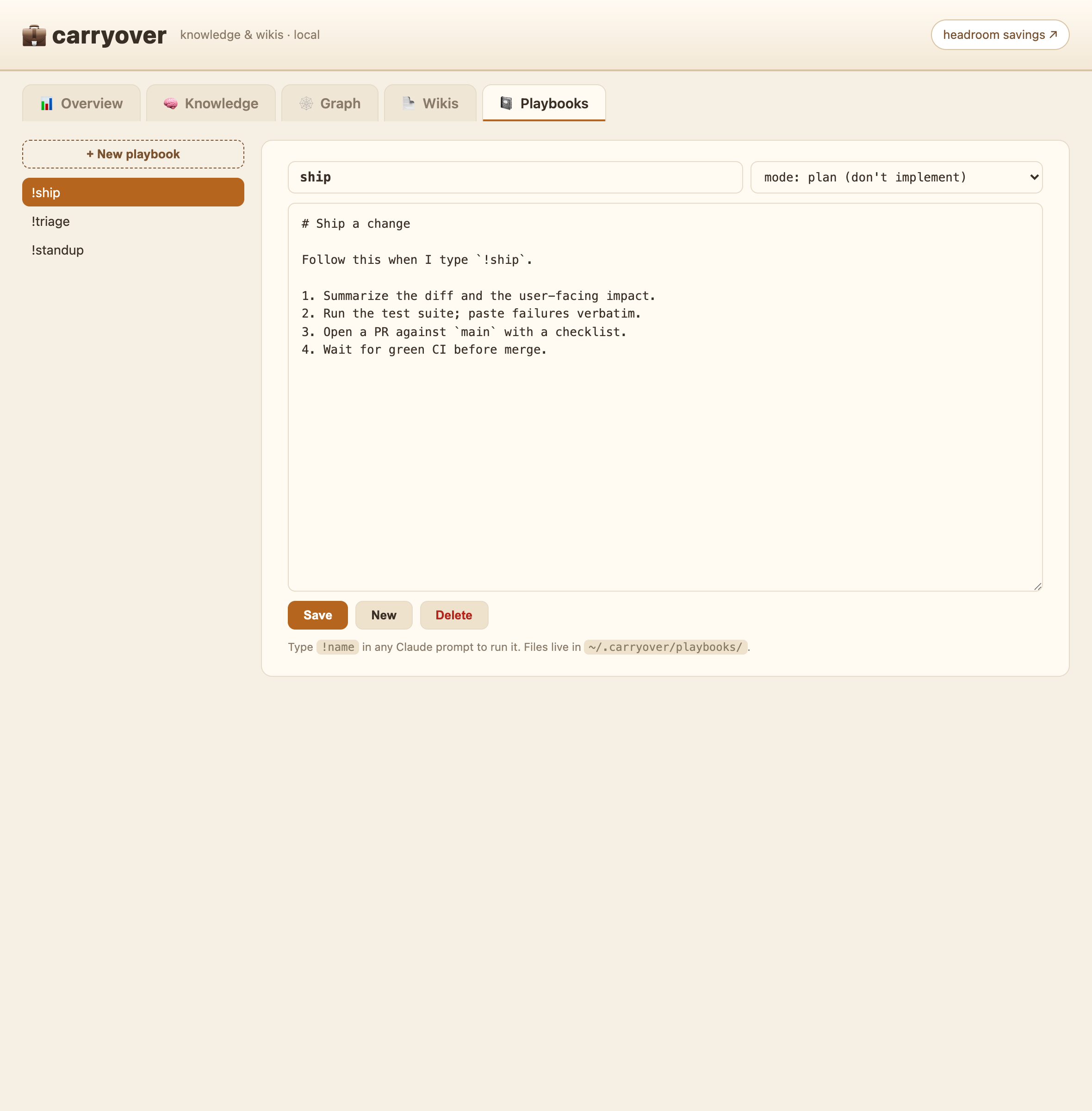
Reusable procedures you trigger by typing !name in any Claude prompt — like Devin's playbooks. A
playbook is just a markdown file in ~/.carryover/playbooks/; when your prompt contains !grill, aUserPromptSubmit hook injects that file so the agent follows the procedure.
!grill add Google login to the checkout flow
- Run: type
!<name>anywhere in a prompt. - List:
/playbooks(in chat) orco-playbooks(shell). - Manage: the 📓 Playbooks tab in the dashboard (
co-dash) — create, edit, delete — or drop a.mdinto~/.carryover/playbooks/. Dashboard edits survivecarryover update. - Mode (optional): a
mode:line in the playbook's frontmatter —plan(investigate, don't
implement) orinterrogate(one question at a time) — prepends that directive when the macro runs.
Ships with grill (a plan-interrogation playbook). Playbooks can chain — !grill can hand off to!feature, !bugfix, … once you add them.
Dashboards (local)
Two local web dashboards — nothing leaves your machine:
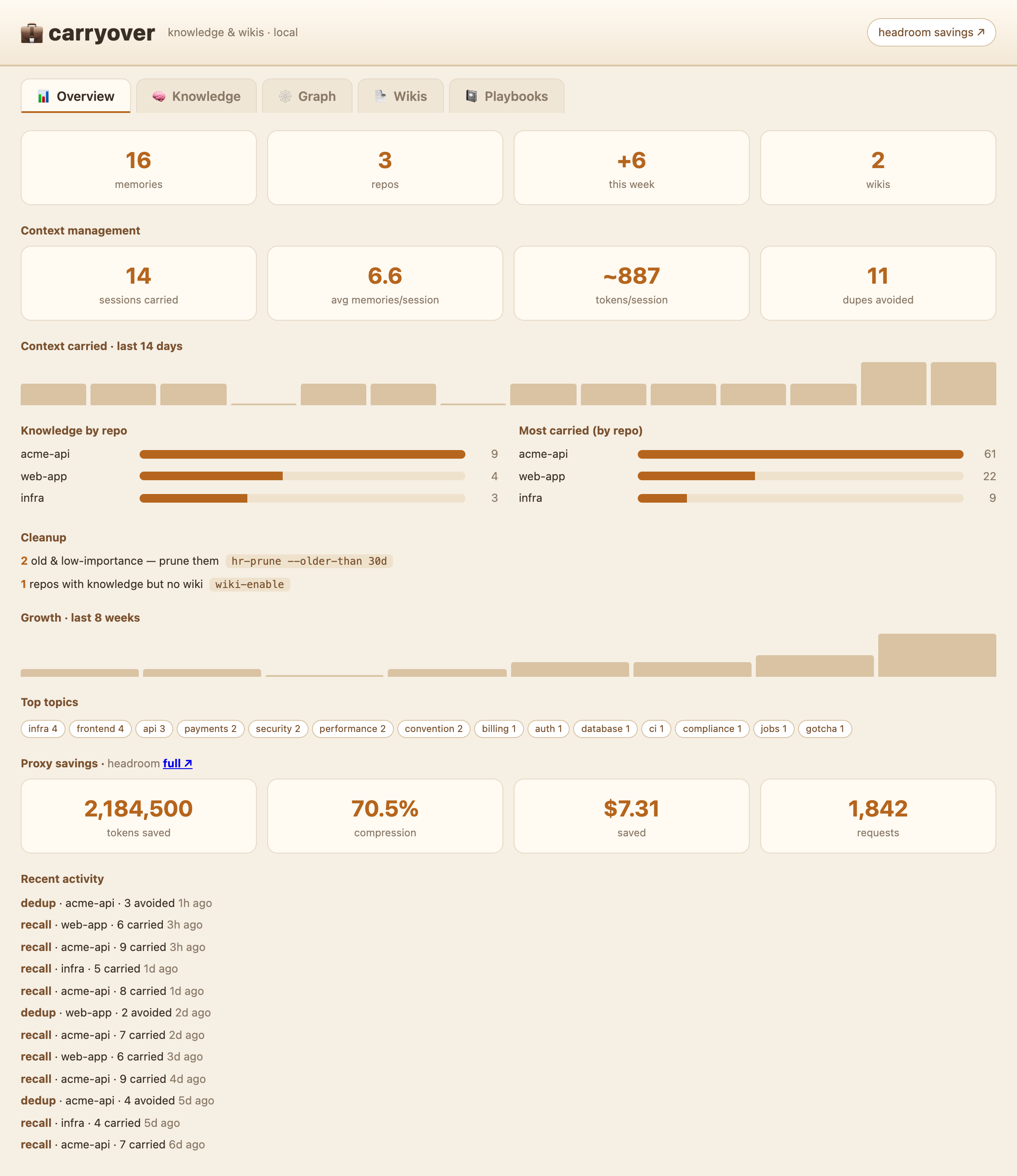
co-dash→ carryover's own dashboard athttp://127.0.0.1:8788. Opens on an
Overview — memories, repos, context carried per session, token savings, and cleanup
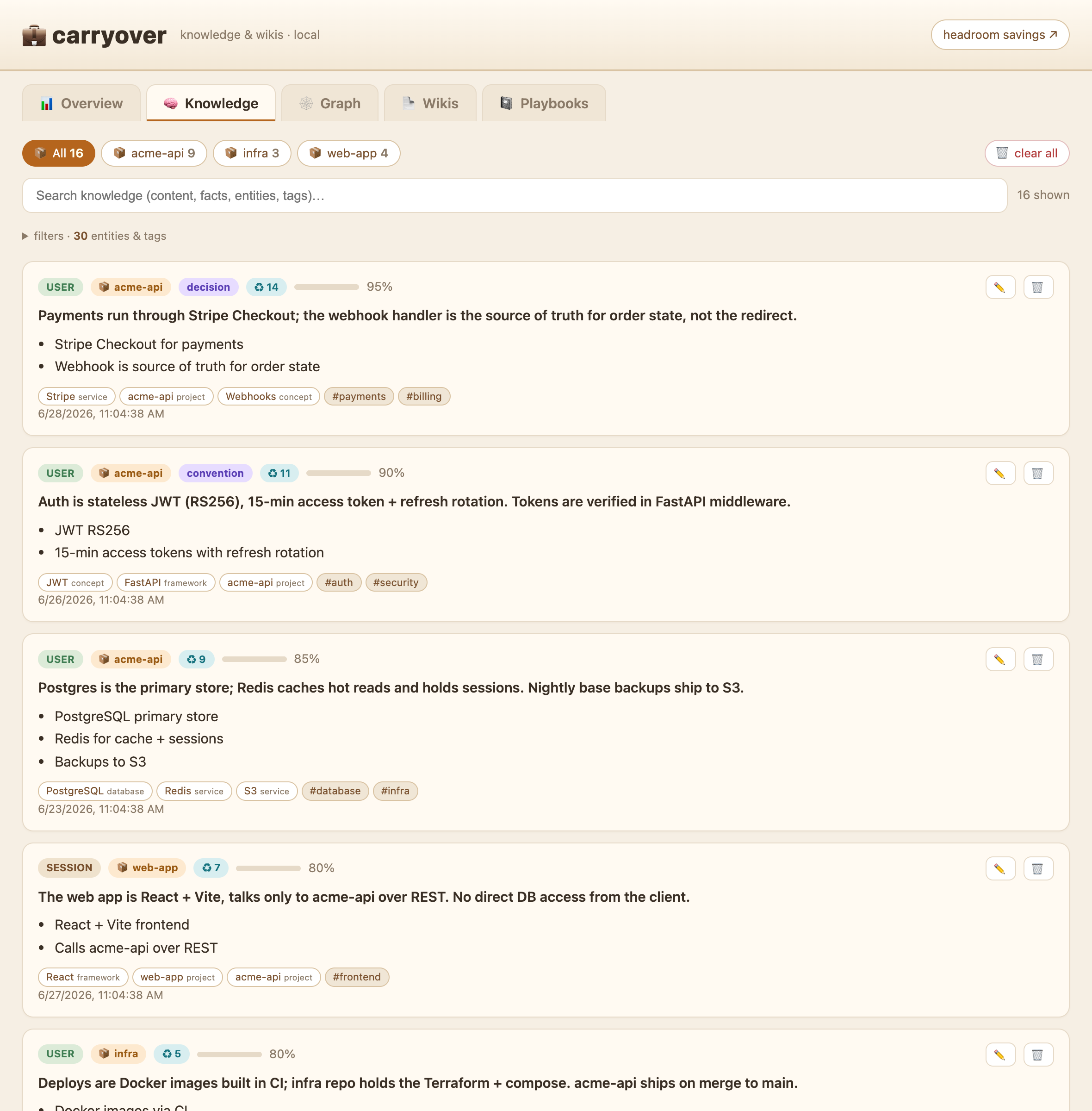
nudges — then tabs for your knowledge (facts, typed entities, tags, with search +
entity/tag filters; each memory shows a reuse badge ♻ N = times recalled, grouped by
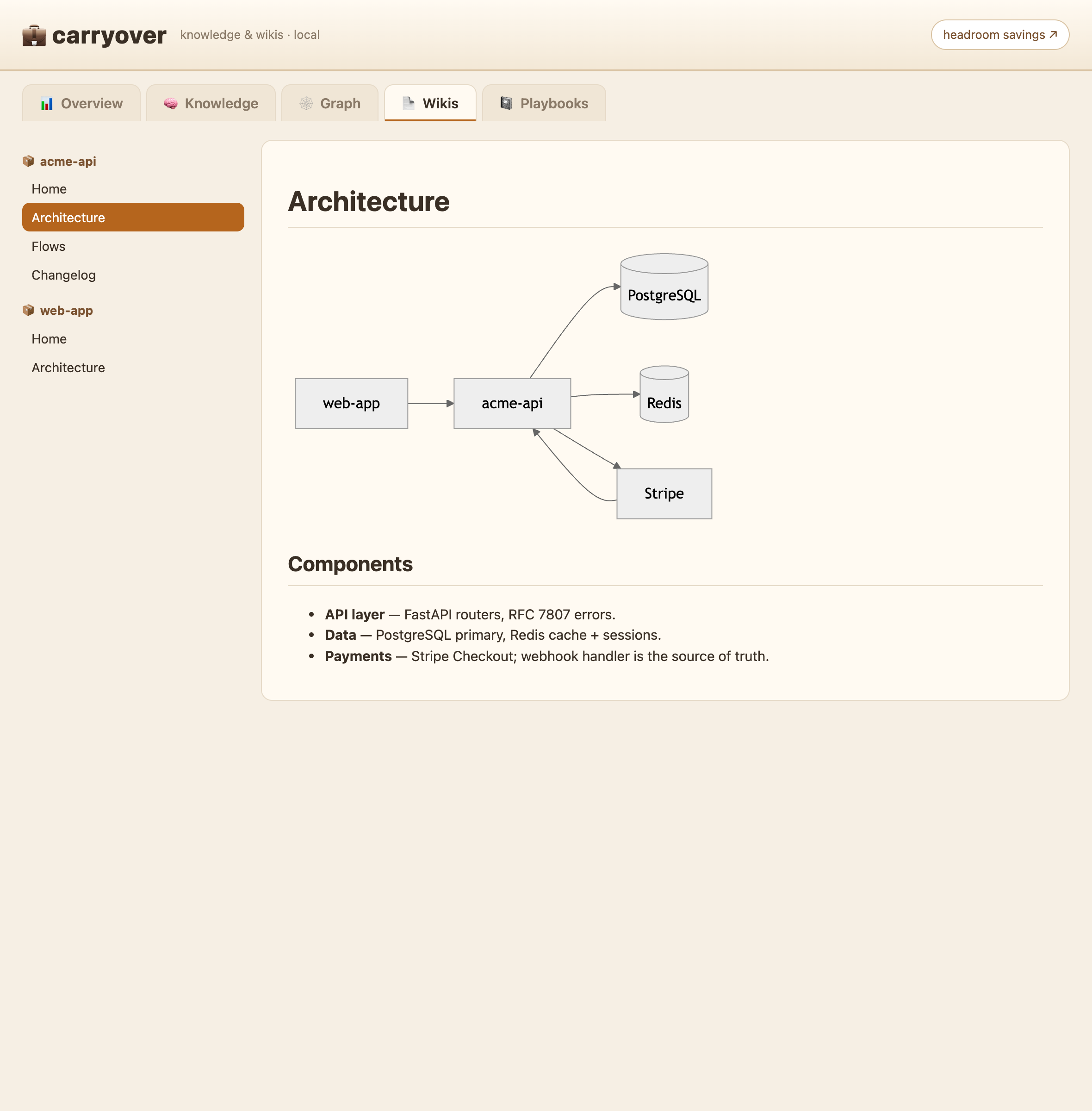
the repo it came from), your project wikis (Markdown + mermaid), and playbooks
(the!macroeditor) — for the interactive knowledge graph, generate the Obsidian vault withco-vault. It's also a manager:
delete a single memory or clear a whole repo with one click. Reads/writes your DB live; Ctrl-C to stop.hr-dash→ headroom's savings dashboard athttp://127.0.0.1:8787/dashboard—
tokens saved, compression, cache hit rate.
(Screenshots below use fictitious data. Wikis appear in co-dash after you runco-wiki-enable in a repo and push to master/main.)
The Overview tab — your whole memory at a glance:
| Knowledge | Wikis | Playbooks |
|---|---|---|
 |
 |
 |
Enable / disable routing
Routing is ON by default for every new session. Toggle it without uninstalling (the
proxy keeps running):
carryover off            # new sessions go straight to Anthropic (global)
carryover on             # route through headroom again (global)
carryover off --session  # only the current terminal
carryover status         # show state
off is surgical and reversible: it drops the routing env and guards headroom's
SessionStart hook so it won't re‑add it; on reverts.
Memory
hr memory stats --db-path ~/.headroom/memory.db    # (the hr-* aliases already pass this)
hr memory list  --db-path ~/.headroom/memory.db --scope USER
mem-save "what you want to remember"
The
headroom memoryCLI defaults to./headroom_memory.dbin the current dir, not
the proxy store — that's why the aliases pass--db-path ~/.headroom/memory.db.
Recall is semantic (by meaning, via headroom's embedder) and scoped to the current
repo's group; co-recall --all searches everything. co-backup / co-restore move the
whole store to another machine. co-supersede <old> <new> hides a stale memory so an updated
fact wins.
Use the memory from other tools (MCP)
carryover's memory is also an MCP server, so any MCP client — Cursor, Claude Desktop,
Windsurf — can recall and remember against the same store, not just Claude Code:
{ "mcpServers": {
    "carryover": { "command": "~/.headroom/venv/bin/python", "args": ["~/.carryover/co-mcp.py"] }
} }
No headroom? Use python3 as the command (recall falls back to keyword). Tools exposed:recall (semantic, repo-scoped) and remember. Most clients don't expand ~ — use absolute
paths.
It runs entirely on your machine: the client launches it as a local subprocess and talks
over stdio — no network, no port, no telemetry. Your knowledge never leaves your computer.
📖 Full setup per client (Claude Desktop / Cursor / Windsurf), repo scoping, examples and
troubleshooting: docs/MCP.md.
Auto‑wiki (local, GitHub‑Wiki format)
Generates a project wiki with headless Claude (claude -p) — overview, architecture, flows
and a Features catalog, with mermaid diagrams. It updates incrementally: each run
preserves existing pages and complements them with what changed, so the wiki grows over
time instead of being rewritten from scratch. co-wiki-enable generates the first wiki
immediately (so it's never empty), then it stays current via co-wiki-gen and the
end-of-session prompt. (A pre-push hook on master/main also folds in changes, though in
Conductor worktrees you'll mostly use co-wiki-gen.) Local by default; publishing to the
GitHub wiki is optional.
cd /path/to/your/repo && co-wiki-enable   # enable + generate the first wiki now (background)
co-wiki-gen                               # update the wiki incrementally on demand (no push needed)
WIKI_PUBLISH=1 co-wiki-gen                # also push to the GitHub wiki
Obsidian vault (knowledge + wikis, two‑way)
co-vault materializes your whole knowledge base and every repo wiki into a single
Obsidian vault — no plugins. Memories become notes, entities become nodes,
and Obsidian's native graph view (colour‑coded by folder) reproduces your knowledge graph.
co-vault            # build/refresh → ~/Documents/carryover-vault (and register it with Obsidian)
co-vault-open       # open it in Obsidian
co-vault-describe   # refresh + 1‑line LLM blurbs for the most‑connected entities (one claude -p call)
co-vault clean      # rebuild config/hubs fresh — keeps your edits + blurbs, never touches the store
co-vault prune      # drop orphaned generated notes
co-vault merge      # LLM‑group synonymous entities into a hand‑editable map, then rebuild
co-vault insights   # grounded, self-verified insights across memories → INSIGHTS.md (cached; --force to refresh)
co-vault remove     # delete the vault + unregister it from Obsidian (--yes skips the prompt)
What's in it
| Path | What |
|---|---|
knowledge/ |
one note per memory — named by its content 1‑liner (with an aliases field so Obsidian's quick switcher finds it by full text), plus facts, [[entity]] links, relationships |
entities/ |
one node per entity, name variants merged (HarrySchool = harry-school) so the graph is connected, not fragmented — and co-vault merge also folds synonyms (carryover-dash.py = carryover dashboard) via a hand-editable map |
indexes/ + Home.md |
a home page and a per‑repo index (memories grouped by category, top entities) — hundreds of flat notes made navigable |
wikis/<repo>/ |
a symlink to each registered repo's auto‑wiki, so docs sit beside the knowledge |
knowledge.base |
an Obsidian Bases table (needs Obsidian 1.9+) to browse memories by repo / importance / reuse |
Why it's two‑way — and why that's the point. For plain recall a Claude session reads the
store, not the vault (semantic search, auto‑injected each session). The vault is where you
curate that store: fix a memory's wording, or raise its importance, and it syncs back on the
next co-vault — so future sessions recall it, ranked higher. (Only the first paragraph +
importance round‑trip; facts, entities and relationships are derived and read‑only.) The loop:
a session writes memories → you curate them in Obsidian (correct, prioritize, explore the
graph) → they sync back → the next session recalls better, better‑ranked knowledge.
Structural questions read the graph. For "what links to X", hub entities, or notes that mention
both X and Y — questions the flat recall can't answer — the SessionStart recall hook now points
Claude straight at the vault to grep knowledge/ and entities/ on demand. Automatic once the
vault exists (nothing to enable); set CARRYOVER_VAULT to override the default ~/Documents/carryover-vault.
Everything under knowledge/, entities/, indexes/ and Home.md is regenerated on each run
(stale notes pruned); your wikis/ symlinks and any notes you add yourself are left untouched. The
vault lives in a visible folder and is registered with Obsidian, so it shows up in the vault switcher.
hr install status | start | stop | restart
hr install remove        # remove service + routing (back to direct Anthropic)
⚠️ If the proxy is down, Claude sessions fail until hr-on (or hr install remove).
pip install "headroom-ai[all]" && headroom install apply --memory
claude plugin marketplace add DietrichGebert/ponytail && claude plugin install ponytail@ponytail
carryover is more than a bundle: on top of a one‑command idempotent install, it adds its
own layer — cross‑tool memory wiring, the 🐴/🧠 status bar, the /headroom command, the
save‑to‑memory system (Stop hook + mem-save, since headroom has no memory add CLI),
the auto‑wiki (claude -p → GitHub‑Wiki docs with mermaid), and the carryover
routing toggle.
- Claude hangs / fails → proxy down?
hr-status; if so,hr-on. - No compression in a session →
echo $ANTHROPIC_BASE_URLempty = old session, restart it. pip installfails → use Python 3.13 (not 3.14):brew install [email protected].headroom install applyfails with alaunchctlerror → runinstall.shfrom your
real Terminal app, not an SSH/automation/agent shell — macOS launchd (GUI domain) needs
an interactive session. The installer keeps going regardless; just re-run apply in Terminal.- Don't delete
~/.headroom/venvbeforehr install remove— it backs the service.
Credits · Créditos
carryover adds its own layer (cross‑tool memory wiring, the 🐴/🧠 status bar, /headroom,
the save‑to‑memory system, the auto‑wiki and the routing toggle) on top of two excellent
tools. Full credit to their creators — carryover construye encima de dos herramientas
excelentes; todo el crédito a sus creadores:
- headroom — @chopratejas
- ponytail — @DietrichGebert
Yorumlar (0)
Yorum birakmak icin giris yap.
Yorum birakSonuc bulunamadi