AgentEd
Health Pass
- License — License: MIT
- Description — Repository has a description
- Active repo — Last push 0 days ago
- Community trust — 17 GitHub stars
Code Fail
- rm -rf — Recursive force deletion command in .github/workflows/ci.yml
- exec() — Shell command execution in .github/workflows/npm-advisories.mjs
Permissions Pass
- Permissions — No dangerous permissions requested
No AI report is available for this listing yet.
A visual Markdown editor for AI instructions and knowledge files, with YAML frontmatter, links between files, and live token estimates. Local files, no account.

A visual Markdown editor with YAML frontmatter editing and live token estimates.
Create and refine notes, AI instructions, project context, and knowledge documents with visual editing. Open and save ordinary .md files in your own folders — no vault to set up, no account required. It works fully offline, and a guide covers installing it in closed or offline networks.
Free · Open source · Local files · Works offline · No account · No telemetry · Installer under 5 MB



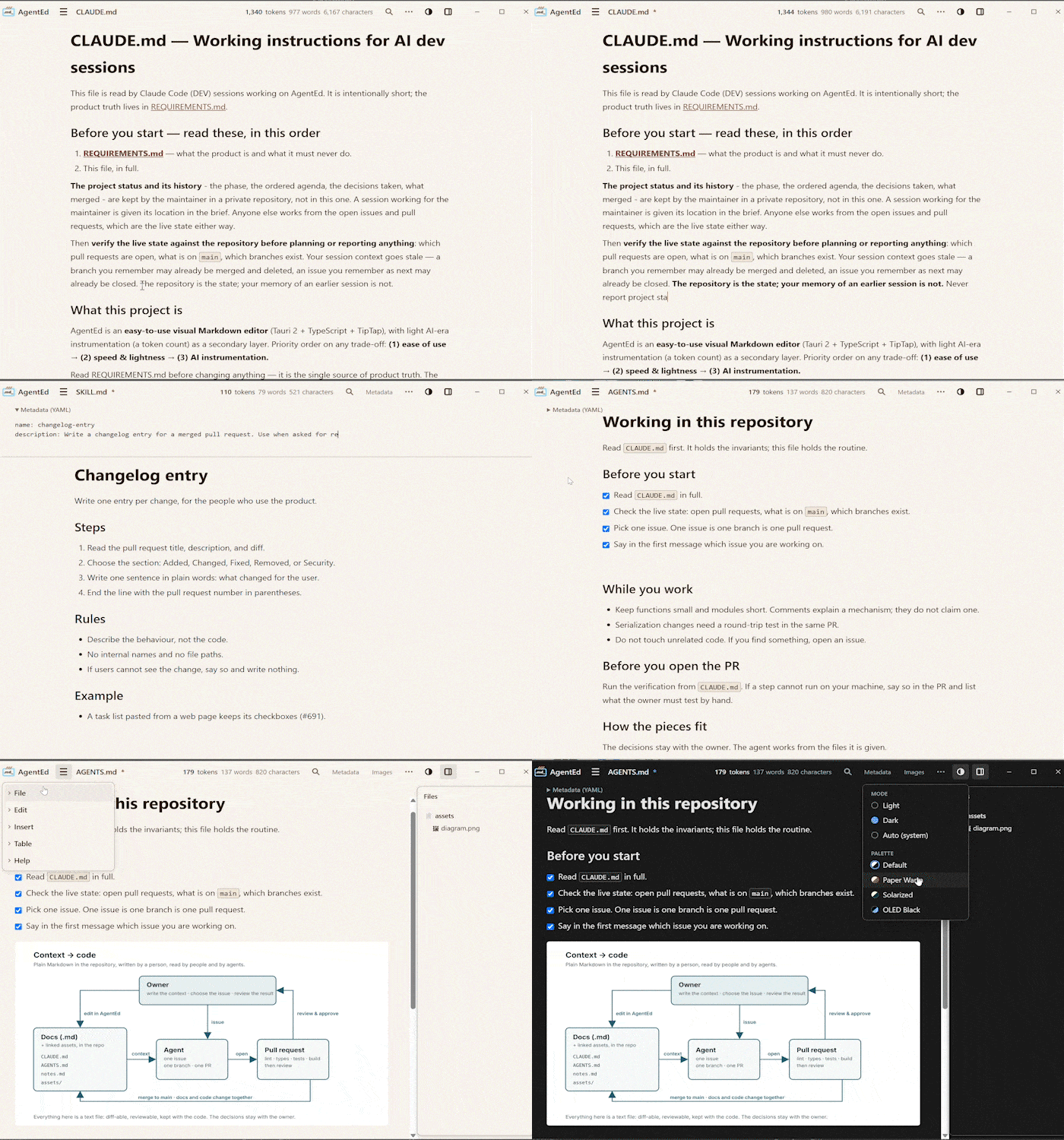
See AgentEd in action · 1 minute
Download · Features · Installation · Keyboard shortcuts · Known limitations · Build from source · Contributing
Why AgentEd?
Markdown is a plain-text format for headings, lists, links, and more. You may have encountered it while working with AI assistants. AgentEd lets you edit these files visually, without memorising the formatting syntax.
- Edit AI instructions as documents. Write and revise
CLAUDE.md,AGENTS.md, and project notes with visual formatting, YAML frontmatter editing, and a live token estimate. - Keep local Markdown files. Open and save ordinary
.mdfiles in folders you choose, without setting up a vault. - Choose what to do with external changes. If another program changes a file while it is open, AgentEd checks when you save and asks whether to reload, overwrite, or save elsewhere.
- Work offline. No account, no telemetry, and no built-in cloud service. Every feature works offline, and AgentEd makes no network calls of its own. On Windows, the underlying web runtime makes some connections independently; SECURITY.md explains when.
- Read and write without the syntax. Open any Markdown file to read it as a formatted document; format with visual controls or Markdown shortcuts and see the result as you write.
AgentEd helps you prepare documents for use with AI tools. It does not include an AI chat or run agents.
Download and get started
AgentEd 1.0.2 is available for Windows x64 and macOS on Apple Silicon, with an experimental package for Linux x86-64.
Download the latest release for installers, release notes, and SHA-256 checksums. Earlier versions are on the releases page.
| Platform | Installer for 1.0.2 | Status |
|---|---|---|
| Windows x64 | AgentEd_1.0.2_x64-setup.exe |
Release |
| macOS, Apple Silicon | AgentEd_1.0.2_aarch64.dmg |
Release |
| Linux x86-64 | AgentEd_1.0.2_amd64.deb |
Experimental |
The Windows installer is not digitally signed, and the macOS app is not notarized by Apple. Security warnings may appear during installation or first launch.
First launch
- macOS: macOS shows “AgentEd” Not Opened. Click Done, open System Settings → Privacy & Security, and click Open Anyway — available for about an hour after the blocked attempt. Do not choose Move to Trash.
- Windows: if SmartScreen shows Windows protected your PC and you have verified the source, select More info → Run anyway.
Full steps: Installation, or the illustrated installation guide.
Windows is the primary development and testing platform. The macOS build is for Apple Silicon Macs; Intel-based Macs are not supported. The Linux package has been tested on Ubuntu 24.04 with GNOME and Wayland.
Each installer is under 5 MB. This refers to the installer download, not the total installed footprint or any required runtime.
- Download the installer for your platform.
- Install AgentEd using the instructions below.
- Open an existing Markdown file or create a new document.
- Save it to a folder on your computer.
AgentEd is free and open source. If it makes your work easier, support its development on Ko-fi — see Support AgentEd below.
Features
- Visual formatting: headings, lists, checklists, links, and tables, with a floating toolbar and Markdown input shortcuts. Add or remove table rows and columns from the menu.
- Portable Markdown and explicit saving: work with ordinary
.mdfiles and choose when to save. If a file changes on disk, choose whether to reload, overwrite, or save elsewhere. Documented format exceptions are listed in REQUIREMENTS.md. - Images: paste, drop, or insert images into a local
assets/folder beside your document; add image descriptions for accessibility. - Code blocks: select a language, copy a block with its Copy button, or use a plain-text block with soft wrapping.
- Footnotes: insert a reference and its note together, then hover over the reference to read it.
- YAML frontmatter and templates: edit document metadata in the Metadata panel; start with a blank document, a file of agent instructions with a name and a description, or a document with metadata.
- Live estimates and counts: see a token estimate alongside word and character counts. Token counting runs offline using
gpt-tokenizerwithcl100k_base; other models, chat formatting, and attachments can produce different totals. - Find and replace: match case, whole words, or regular expressions.
- Links between documents:
Ctrl+click (Cmdon macOS) a relative link to open a Markdown file in AgentEd, or in a window of its own withShiftheld too; a Links badge lists the links of the document that point to a file that is not there. - Files panel: browse the Markdown files around the document and its
assets/folder in a side panel you can widen, which stays open once you open it; check the links of the whole folder for broken ones, and see which files the open document links to and which link to it (desktop). - Rename, print, and export to PDF: rename a document in its folder from the File menu, print it, or save it as a PDF.
- Appearance: light, dark, automatic mode, and curated palettes.
- Multiple windows: work with one document in each independent window; AgentEd opens at the size you left it.
- Spell check: optional and off by default.
For AI instructions and everyday notes
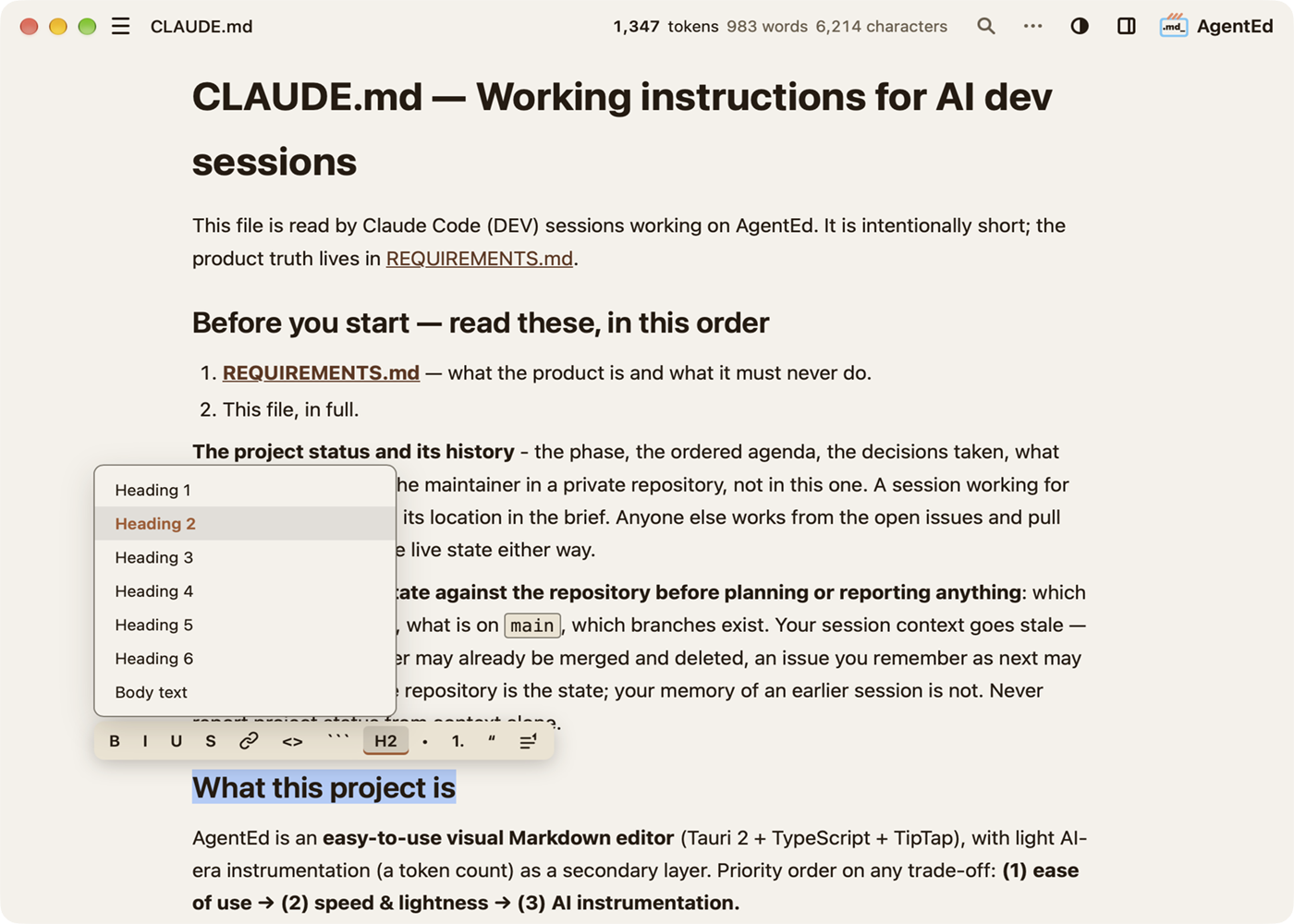
Edit AI instructions as documents
Open CLAUDE.md, AGENTS.md, and project notes as formatted documents. Select text to format headings, lists, and inline code with the floating toolbar. Save the result as ordinary Markdown.
Keep checklists and images together
Tick tasks in AGENTS.md and add a diagram for the people who read the file alongside the agent. Pasted images are written to the adjacent assets/ folder when you save.
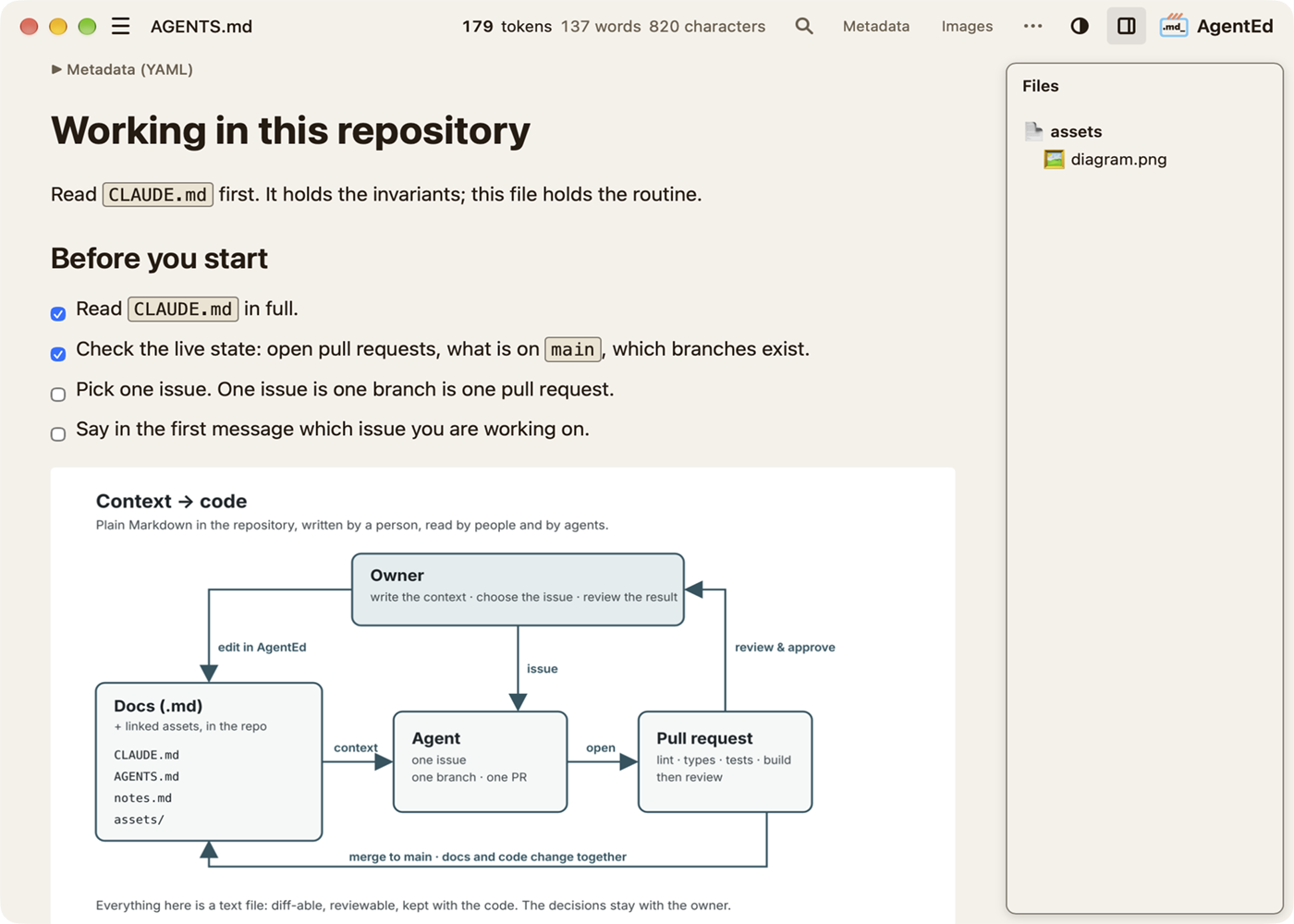
When sharing a document that uses local images, include its referenced assets/ folder so the images remain available.
Installation
Download from the official release linked above and check the filename and version. Each release provides SHA-256 checksums for verifying that your download matches the published file. A matching checksum does not by itself establish that software is safe.
Installing in a closed network, with no internet or behind a strict firewall, is described in Installing in restricted and offline networks: what to bring in, in what order, what the installer writes and what stays after.
The steps below apply to warnings about an unrecognised or unverified application. If your security software identifies a specific threat, stop and report the exact message and release version.
Windows installation
Show Windows installation stepsRun AgentEd_1.0.2_x64-setup.exe.
The installer is not digitally signed. If Microsoft Defender SmartScreen displays Windows protected your PC, and you have verified the source and choose to continue, select More info → Run anyway, if that option is available.
Unknown publisher may also appear in a separate Windows permission prompt, including User Account Control (UAC). This is not the SmartScreen dialog and does not have the same buttons. It means Windows cannot verify the publisher’s identity.
Managed computers or other Windows security settings may prevent installation. Do not disable antivirus protection or SmartScreen to proceed.
See the illustrated installation guide.
macOS installation
Show macOS installation stepsThe macOS build is for Apple Silicon Macs (M1 and later). It is not notarized by Apple, so macOS blocks it the first time it opens. These steps were checked with AgentEd 1.0.0 on macOS 26.6 and 27, and with AgentEd 1.0.1 on 2026-11-06 and AgentEd 1.0.2 on 2026-11-14, each on macOS 27 on an Apple M2.
- Open
AgentEd_1.0.2_aarch64.dmgand drag AgentEd into Applications. Launch it from Applications, not from the disk image. - macOS displays “AgentEd” Not Opened because it cannot verify the app. Click Done.
- Open System Settings → Privacy & Security, then scroll to Security. Find the message saying AgentEd was blocked and click Open Anyway.
- In the dialog that follows, click Open Anyway. Do not choose Move to Trash (Move to Bin in British English), the highlighted button, which removes the application.
- Enter your password. After approval, this copy of AgentEd opens without repeating these steps.
macOS asks again after replacing or reinstalling AgentEd, every time, with the same steps.
The Open Anyway option is available for about an hour after the blocked attempt.
These instructions apply to the unverified-app warning, not to a warning that identifies malware or says the app will damage your computer.
On macOS, a document opened from Finder opens in a window of its own. File → New Window (Cmd+Shift+N) opens an empty window.
See the illustrated installation guide.
Linux installation
Show Linux installation and removal stepsLinux builds are experimental. They have been tested on Ubuntu 24.04 with GNOME and Wayland in a VirtualBox virtual machine, and on no other distribution.
The .deb package is for x86-64 systems. It requires glibc 2.34 or later and WebKitGTK 4.1. APT checks the declared dependencies and installs missing packages when they are available from your configured repositories.
Download the package, check its SHA-256 checksum, then run this command from the folder containing it:
sudo apt install ./AgentEd_1.0.2_amd64.deb
AgentEd then appears among your applications. On the tested stock Ubuntu setup, it also becomes the application used to open Markdown files. You can choose another application using Open With in Files.
Each file you open gets a window of its own. If AgentEd cannot open a file type, such as .txt, it explains why.
To remove AgentEd:
sudo apt remove agent-ed
Your documents are not touched. AgentEd’s settings remain in:
~/.local/share/com.agentedapp.editor~/.config/com.agentedapp.editor
You can remove those folders separately if you also want to delete the application’s saved settings.
Keyboard shortcuts
| Windows | macOS | Action |
|---|---|---|
Ctrl+B / Ctrl+I / Ctrl+U |
Cmd+B / Cmd+I / Cmd+U |
Bold / Italic / Underline |
Ctrl+K |
Cmd+K |
Insert link, or edit/remove the link at the caret |
Ctrl + click |
Cmd + click |
Open a web link in the browser, a linked markdown file in AgentEd, or a linked file of another kind in the application of the system |
Ctrl+Shift + click |
Cmd+Shift + click |
Open a linked markdown file in a window of its own |
Ctrl+E |
Cmd+E |
Inline code |
Ctrl+Shift+K |
Cmd+Shift+K |
Code block |
Ctrl+Alt+1 … Ctrl+Alt+6 |
Cmd+Option+1 … Cmd+Option+6 |
Heading level 1–6 |
Ctrl+Alt+0 |
Cmd+Option+0 |
Body text |
Ctrl+Shift+S |
Cmd+Shift+S |
Strikethrough |
Ctrl+Shift+B |
Cmd+Shift+B |
Blockquote |
Ctrl+Shift+8 |
Cmd+Shift+8 |
Bullet list |
Ctrl+Shift+7 |
Cmd+Shift+7 |
Numbered list |
Ctrl+Z / Ctrl+Y or Ctrl+Shift+Z |
Cmd+Z / Cmd+Y or Cmd+Shift+Z |
Undo / Redo |
Ctrl+A |
Cmd+A |
Select all |
Ctrl+S |
Cmd+S |
Save; Save As is in the File menu |
Ctrl+O |
Cmd+O |
Open |
Ctrl+P |
Cmd+P |
Print; Export to PDF is in the File menu |
Ctrl+C / Ctrl+X |
Cmd+C / Cmd+X |
Copy / Cut |
Ctrl+V / Ctrl+Shift+V |
Cmd+V / Cmd+Shift+V |
Paste, interpreting Markdown / Paste as plain text |
Ctrl+F / Ctrl+H |
Cmd+F / Cmd+Option+F |
Find / Replace |
Ctrl+Enter in the Replace field |
Cmd+Enter in the Replace field |
Replace All |
Ctrl+Alt+F |
Cmd+Option+R |
Insert footnote |
Ctrl+Shift+E |
Cmd+Shift+E |
Open/close the Files panel |
F3 |
Fn+F3 |
Find next |
Shift+F3 |
Fn+Shift+F3 |
Find previous |
Shift+Enter or Ctrl+Enter |
Shift+Enter or Cmd+Enter |
Line break inside a paragraph |
Tab / Shift+Tab |
Tab / Shift+Tab |
Indent/dedent in lists; move between table cells |
On macOS, Cmd+H hides AgentEd rather than opening Replace.
The same list opens inside AgentEd from Help → Keyboard Shortcuts, in a window of its own, written for the keys of your platform.
Known limitations
Known limitations in this release:
- Line breaks inside a paragraph: use
Shift+Enter. There is no toolbar button or menu entry for this action. - Opening
---delimiters: when a file starts with---and contains another such line later, AgentEd interprets the content between them as metadata. Some files created by hand or other tools may therefore display incorrectly, including when the closing delimiter is inside a code block. See REQUIREMENTS.md for the documented cases. - Windows right-click paste: Paste as plain text in the context menu behaves like an ordinary paste. Use
Ctrl+Shift+Vfor a literal plain-text paste. - Spell check: one language at a time. On Windows, it uses the first preferred language for which a dictionary is available, or falls back to the Windows display language. Changes to the preferred language list take effect after all AgentEd windows have been closed and the application restarted.
- Linux coverage: testing was limited to Ubuntu 24.04 with GNOME on Wayland in a virtual machine with 3D acceleration off. Other distributions, desktop environments, X11, and configurations with 3D acceleration have not been tested. No
.rpmpackage is published. - Inserting metadata: Insert → Metadata is not part of undo. Deleting every field in the panel removes the metadata block.
Further format behaviour and exceptions are documented in REQUIREMENTS.md.
Project status
AgentEd is in active development. The 1.0 line focuses on visual editing of local Markdown files.
Windows and macOS releases are available, with Windows as the primary development and testing platform. Linux builds remain experimental.
What comes next is listed in #674, the candidates for 1.1.
The product definition and documented exceptions live in REQUIREMENTS.md.
Building from source
Node.js 24 is recommended and is used in CI. See the engines field in package.json for the accepted version range.
You also need the Rust toolchain, available through rustup, and the Tauri platform prerequisites.
git clone https://github.com/cgxopen/AgentEd.git
cd AgentEd
npm install
npm run tauri dev
The Tauri CLI is included in the project’s development dependencies.
For a production build:
npm run tauri build
Before opening a pull request, run the verification checklist: the linters, type check, tests, and web build.
Contributing
Contributions are welcome — please read CONTRIBUTING.md first. For larger changes, open an issue to discuss the direction before starting work.
Everything in this repository — code, documentation, commits, pull requests, and issues — is in English.
Support AgentEd
AgentEd is free and open source. If it makes your work easier, you can support its development on Ko-fi.
Support goes to the author, who publishes AgentEd in his own name, and helps fund ongoing development and maintenance, including:
- fixing bugs and improving the editing experience;
- developing new features while keeping the editor simple;
- testing and maintaining releases across supported platforms, and the signing of installers where a platform offers it;
- writing clearer documentation and practical examples;
- covering hosting, infrastructure, and development tools.
Contributions are optional. How money given to the project is handled is described in CONTRIBUTING.md.
The AgentEd application does not collect or process payment information. Contributions are processed through Ko-fi and its payment providers under their applicable policies. See Ko-fi’s privacy policy.
License
MIT — see LICENSE.
The MIT license covers the code, not the AgentEd name or logo: a fork is welcome, under a name of its own.
Author and contact
Built by Cătălin Vasile using Claude Code.
For bugs and feature requests, open an issue. For security vulnerabilities, follow SECURITY.md rather than opening a public issue.
For other enquiries, email [email protected].
History
AgentEd began on 29 March 2026. This repository opened a new phase in August 2026.
Reviews (0)
Sign in to leave a review.
Leave a reviewNo results found