compabob
Health Gecti
- License — License: MIT
- Description — Repository has a description
- Active repo — Last push 0 days ago
- Community trust — 20 GitHub stars
Code Gecti
- Code scan — Scanned 12 files during light audit, no dangerous patterns found
Permissions Gecti
- Permissions — No dangerous permissions requested
Bu listing icin henuz AI raporu yok.
A customizable Claude Code setup for knowledge workers: agents, safety hooks, skills, memory, and an Obsidian knowledge base. Clone, run setup, make it yours.
Compabob



A customizable Claude Code setup for knowledge workers. Clone it, run ./setup.sh, name your assistant, and in about ten minutes you have a working AI work partner: it knows your role, remembers what you tell it, routes work to specialized agents, and never sends anything without your sign-off.
Why
A fresh Claude Code session is a strong generalist with no memory of you. Every time, you re-explain who you are, how you want answers, and what you are working on. It has no sense of your priorities, no guardrails on what gets sent, and no place to keep what it learns.
Compabob is the missing structure. The core loop, on day one:
You ask it to take notes from today's planning meeting. It files them into your knowledge base. Next week, before the follow-up, you type
/meeting-prepand it hands back the attendees, what was decided, and the open items, without you searching for anything.
That second-brain loop is the value you get immediately. Compabob is scaffolding, not a finished assistant: everything else compounds as you make it yours.
What this is (and is not)
- Is: an opinionated, single-user template. Architecture, conventions, and a set of agents/hooks/skills that took real iteration to get right, packaged so you do not start from zero.
- Is not: a product, a SaaS, or a no-config magic box. There is no signup, no telemetry, no upsell. It runs entirely on your machine under your own Claude Code subscription.
How this differs from the other Claude Code things you have seen
- vs. raw Claude Code. Claude Code is the harness. Compabob is the opinionated scaffolding on top: a constitution, an agent fleet, safety hooks, a memory system, and a knowledge base, all wired together. Without that scaffolding, every new session starts from zero.
- vs. "awesome" lists (curated link directories). Those tell you what exists. Compabob is a working kit you clone and run.
- vs. multi-agent dev-team frameworks. Frameworks oriented at orchestrating software-engineering crews assume you are building software with AI. Compabob is built for a single knowledge worker doing their actual job: meetings, notes, research, comms, decisions.
- vs. building your own from scratch. That is the alternative most people pick, and most never finish. The structure here took real iteration; you skip that part.
Maintenance posture
Actively maintained. This kit is updated over time as its maintainers learn what works and as Claude Code evolves, so expect it to keep improving. You still own your copy outright: fork it, change anything, diverge as far as you like. Issues and PRs are welcome; reviews are best-effort, since the kit is maintained alongside other work.
See it
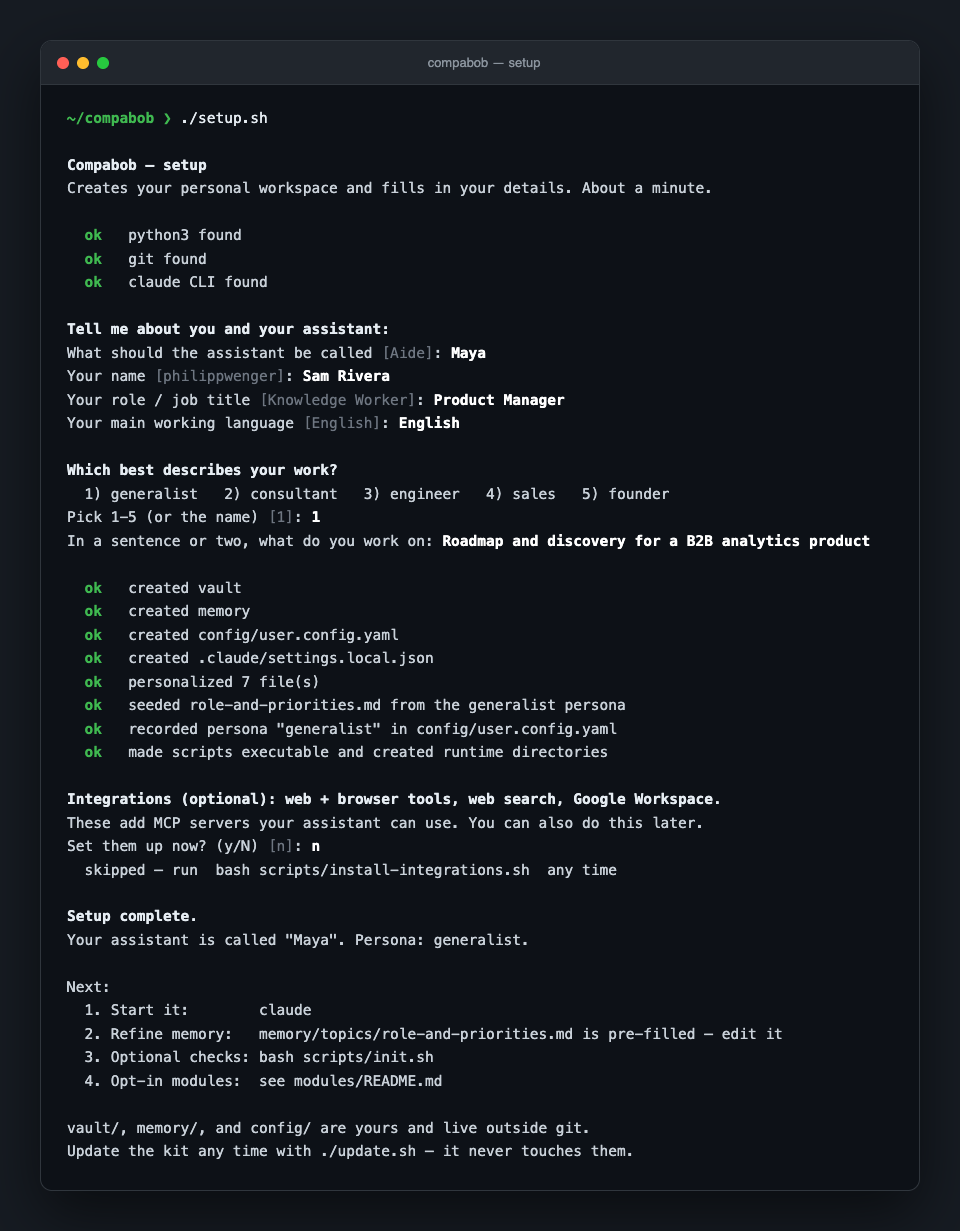
One script. It asks who you are and what you do, scaffolds your vault, memory, and config from the shipped seeds, applies a persona preset, and you are ready to start.
Quickstart
Comfortable with a terminal? Three commands:
git clone https://github.com/chacosoldier/compabob.git
cd compabob
./setup.sh
Then run claude. You need the Claude Code CLI, git, bash, python3 (3.10+), and a paid Claude plan. Optional but recommended: VS Code with the Claude Code extension (see Recommended setup below). Optional: Obsidian to browse the knowledge base as a graph. Never used a terminal? Use the walkthrough below instead.
Recommended setup
Compabob runs fine in a plain terminal, but two upgrades make daily use noticeably better. Both are optional.
- VS Code with the Claude Code extension. A cleaner UI than a raw terminal, and it lets you run several sessions side by side, one per task, instead of working one at a time. Install VS Code, then add the Claude Code extension from the Extensions marketplace.
- A Claude Max plan. Compabob works on Claude Pro. But long sessions, and especially several running at once, use up Pro's limits quickly. Max costs more and removes that ceiling. If you use the assistant every day, it is worth it.
Full walkthrough (no terminal experience needed)
If you have never opened a terminal, follow this. It takes about 15 minutes, most of it waiting for installers. You copy and paste a few commands. That is all.
Before you start: you need a Claude account on a paid plan (Claude Pro or Max), or API credits. Compabob runs on your own Claude subscription and has no cost of its own. Sign up at claude.ai if you have not.
These steps are for a Mac. Linux and Windows are at the end.
1. Open the Terminal
Press Cmd + Space, type Terminal, press Enter. A window with a text prompt opens. Every step below is the same: paste the command, press Enter, wait for it to finish.
2. Install Homebrew
Homebrew installs the other tools for you. Paste this one line and press Enter:
/bin/bash -c "$(curl -fsSL https://raw.githubusercontent.com/Homebrew/install/HEAD/install.sh)"
It asks for your Mac password (as you type it, nothing appears on screen, that is normal) and takes a few minutes. When it finishes it prints a short "Next steps" block with two lines to run. Paste and run those two lines too: they add Homebrew to your path.
3. Install git, Node, and Python
brew install git node python
The three tools Compabob is built on. One command, a few minutes.
4. Install Claude Code
npm install -g @anthropic-ai/claude-code
This is the assistant itself. If anything goes wrong here, the official install guide is at docs.anthropic.com/en/docs/claude-code.
5. Download Compabob
git clone https://github.com/chacosoldier/compabob.git
cd compabob
From here on, every command runs inside this compabob folder. If you open a fresh terminal later, run cd compabob first.
6. Run setup
./setup.sh
It asks a few friendly questions: what to name your assistant, your name, your role, your language, and which kind of work you do. Answer them. It takes about a minute.
7. Start your assistant
claude
The very first time, it opens your browser to sign in to your Claude account. Sign in, return to the terminal, and your assistant introduces itself by the name you chose. You are done.
Try asking it to take notes from a meeting, or type /morning-brief.
If something looks wrong
Run bash scripts/init.sh. It checks your setup and tells you, in plain language, what (if anything) is missing. A "warning" is an optional item, not a breakage.
Linux and Windows
- Linux: skip Homebrew. Install the tools with your package manager, for example
sudo apt install git nodejs npm python3, then do steps 4 to 7. - Windows: install WSL first (in PowerShell:
wsl --install, then restart). Open the Ubuntu terminal it gives you and follow the Linux steps. Native Windows (PowerShell/cmd) is not supported.
Updating
./update.sh
Pulls the latest version of the kit. Your vault/, memory/, and config/ are git-ignored and are never touched by an update, so you can personalize the kit freely and still stay current. See the customization guide for how that works.
First hour
Do not configure everything at once. Get one loop working end to end:
- Ask your assistant to take notes from a real meeting or document into
vault/. - Ask it to find and summarize what it stored.
- Ask it to draft something using that context.
That second-brain loop is the core value. Once it feels useful, expand from there using the customization guide.
What is inside
CONSTITUTION.md      The rules every session loads. How your assistant behaves.
.claude/agents/      Specialized agents (analyst, comms, CRM, strategy, ...).
.claude/skills/      Slash-command workflows (/morning-brief, /meeting-prep, ...).
.claude/output-styles/  The answer-first response style.
hooks/               Safety guards and lifecycle automation.
memory/              The assistant's memory (yours, created by setup, git-ignored).
vault/               Your Obsidian knowledge base (yours, created by setup, git-ignored).
config/              Your settings (yours, git-ignored).
modules/             Opt-in extensions (see below).
docs/                Architecture, onboarding, and customization guides.
*.example/           Seeds that setup copies into vault/ and memory/.
Core agents
| Agent | What it does |
|---|---|
daily-copilot |
Your everyday partner: prioritization, sparring, the daily brief |
second-brain |
Knowledge base operations: notes, meeting records, research synthesis |
analyst |
Metrics, KPIs, dashboards, data-backed reporting |
crm-relationships |
Contact, pipeline, and relationship tracking (works with or without a CRM) |
comms-meetings |
Email triage, meeting prep, briefings, follow-up tracking |
strategy-advisor |
Assumption testing, pre-mortems, second-order effects (advice only) |
principal-engineer |
Architecture and code review for technical work |
first-principles |
Rigorous reasoning under uncertainty |
Requests route automatically. You do not pick an agent.
Skills
Skills are slash-command workflows. Type the command; the assistant runs the procedure.
| Skill | What it does |
|---|---|
/morning-brief |
Start-of-day briefing: priorities, what is due, what is owed |
/meeting-prep |
Assemble attendees, history, and open items before a meeting |
/post-call |
Capture decisions and commitments right after a call |
/handover |
Write a handover note so the next session has full context |
/log-decision |
Record a decision, its reasoning, and a date to review it |
/tasks |
One aggregated view of open tasks from across the vault |
/reflect |
End-of-session reflection; proposes memory updates |
/index-memory |
Build the memory-search index for relevance-ranked retrieval |
/add-agent |
Scaffold a new specialized agent interactively |
/system-audit |
Health-check the assistant's own setup |
/visual-explainer |
Turn a system, plan, or dataset into a self-contained HTML page |
/document-export |
Create a PDF, Excel, or Word file from your content |
Modules (opt-in)
The core runs with zero external services. Modules add capability when you want it:
| Module | Status | What it adds |
|---|---|---|
proactive |
Available | Scheduled automation: a morning brief and weekly review on a timer |
telegram |
Available | A Telegram bot: inbound messages drafted for your approval, never auto-sent |
integrations |
Available | MCP tools: browser automation, web search, Gmail, Calendar, utilities |
linkedin-outreach |
Available | Drafts one LinkedIn connection-invitation card a day from a queue, for your review and manual send |
memory-search |
Available | Real index over memory/ and vault/ so retrieval ranks by relevance (FTS5 by default; semantic via Ollama if installed) |
extra-agents |
Roadmap | An agent gallery: designer, evaluator, sales coach, project manager |
whatsapp |
Roadmap | WhatsApp channel — not built (account-ban risk); use Telegram instead |
See modules/README.md to enable one.
Feedback
Found a bug or a rough edge? Open an issue. For questions, setup help, or general discussion, use GitHub Discussions. Improvements are welcome as pull requests, see CONTRIBUTING.md.
Lineage
This kit is distilled from a personal Claude Code setup the author refined over a year of daily use: the constitution, the agent fleet, the safety hooks, the memory system. The personal-life domains were stripped out and the patterns generalized into a clean starting point, and the result is what you are reading. Credit to the Claude Code team for the harness this builds on.
Author
Built by Philipp Wenger Lebron. Issues and pull requests are welcome.
License
MIT. See LICENSE. Use it, change it, ship it.
Yorumlar (0)
Yorum birakmak icin giris yap.
Yorum birakSonuc bulunamadi