assessor-lookup-public
Health Uyari
- License — License: MIT
- Description — Repository has a description
- Active repo — Last push 0 days ago
- Low visibility — Only 5 GitHub stars
Code Gecti
- Code scan — Scanned 12 files during light audit, no dangerous patterns found
Permissions Gecti
- Permissions — No dangerous permissions requested
Bu listing icin henuz AI raporu yok.
API-first county assessor record lookup, MLS discrepancy checks, and a local MCP server for appraisers.
assessor-lookup
Automated county assessor public-records search for real-estate appraisers.



Look up a property's public record — owner of record, legal description,
above/below-grade square footage, beds/baths, year built, taxes, assessed and
market value, lat/lon, and a link to the assessor card — straight from the
county assessor. Then diff those records against your MLS data to flag
discrepancies before the report goes out.
Built from an appraiser's workflow, for appraisers: the check command takes
your MLS export (subject + comps) and prints a field-by-field discrepancy
report (GLA, beds, baths, year built, basement sqft) in seconds instead of a
county-website tab per property.
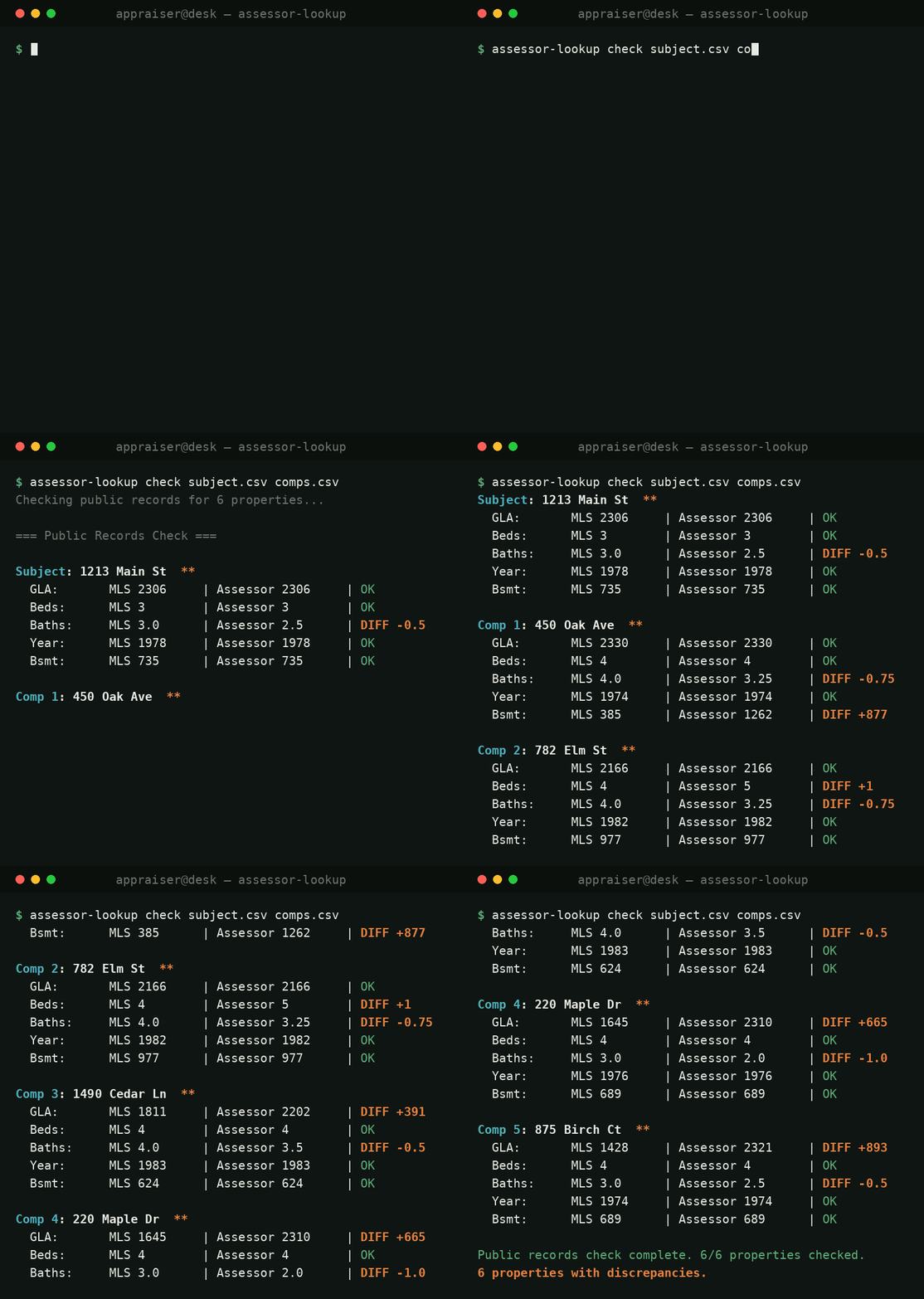
The numbers are from a real run against live El Paso County records
(addresses fictionalized). That +893 GLA flag is a tri-level whose lower level
the MLS counted as basement — the kind of miss that walks straight into your
adjustment grid.
Features
- One record model, many counties — Spatialest, Tyler EagleWeb, Aumentum,
and ArcGIS platforms all normalize to the same dict. - MLS discrepancy check — reads standard MLS CSV exports (PPMLS and
RESO/REColorado column names both understood) and flags GLA/beds/baths/year/
basement differences. - Auto-discovery — point it at a county it doesn't know and it maps the
county for you, API-first, then caches the result. - No API keys — these are the same public endpoints the county's own
property-search website uses. - Agent-ready — ships an MCP server so an AI
agent can drive the whole thing. - Regression + benchmark harness — pins golden records per county and
catches the day a county website changes. Packaged live fixtures use only
government or institutional properties; user-onboarded records stay in the
user's local config directory and are never added to the package.
Requirements
- Python 3.9+ (the MCP server needs 3.10+).
- Standard library only for the core — no runtime dependencies. Optional extras
pull in Playwright ([card]) and the MCP SDK ([mcp]).
Installation
pip install assessor-lookup

# optional extras
pip install "assessor-lookup[card]"   # print an assessor card to PDF (Playwright)
pip install "assessor-lookup[mcp]"    # run the MCP server for AI agents

# one-time browser install for the card/PDF feature
playwright install chromium
Or from source:
git clone https://github.com/chadru/assessor-lookup-public && cd assessor-lookup-public
pip install -e ".[dev]"
Quick start (CLI)
# Single property
assessor-lookup lookup "123 Main St" --county "El Paso"
assessor-lookup lookup --parcel 0156931101001 --county Adams --json

# List supported counties
assessor-lookup counties

# Auto-detect + cache an assessor source for a new county
assessor-lookup discover "Clear Creek"

# Diff your MLS export against public records (subject + comps)
assessor-lookup check subject.csv comps.csv --county "El Paso"

# Save the assessor property card as a PDF (needs the [card] extra)
assessor-lookup card "https://property.spatialest.com/co/elpaso/#/property/..." card.pdf
Quick start (Python)
from assessor_lookup import lookup, check_public_records

rec = lookup("123 Main St", county="El Paso")
if rec["status"] == "success":
    print(rec["owner"], rec["above_grade_sqft"], rec["year_built"])

results = check_public_records(subject_row, comp_rows, county="Adams")
flagged = [r for r in results if r["has_any_discrepancy"]]
Every lookup returns a dict with a status key (success, not_found,ambiguous, timeout, api_error, parse_error, …). On success it carries
the standard record fields:owner, legal, parcel_number, above_grade_sqft, basement_sqft, beds,baths, year_built, tax_amount, assessed_value, market_value,latitude, longitude, assessor_url, and more (availability varies by
platform).
County coverage
| County (CO) | Platform | Notes |
|---|---|---|
| El Paso | Spatialest | |
| Denver | Spatialest | |
| Douglas | Spatialest | |
| Jefferson | Aumentum (jeffco.us) | |
| Arapahoe | ArcGIS MapServer | multi-layer lookup; use responsibly |
| Adams | ArcGIS FeatureServer | |
| Clear Creek | Tyler EagleWeb | scraped; full building data |
| ~40 more CO counties | statewide parcel API | baseline via auto-discovery (no building data) |
Auto-discovery (new counties)
Point the tool at a county it doesn't know and it tries to map it for you,
API-first, best-data-first:
- Spatialest (JSON, national) or EagleWeb (Tyler's JSP app, scraped) —
full building data (GLA, beds, baths, year built). - Colorado statewide parcel API (ArcGIS) — a baseline for any of ~40 CO
counties: owner, legal, land, assessed/market value. This layer has no
building characteristics, so GLA/beds/baths/year come back as N/A until a
real county client is added.
assessor-lookup discover "Gilpin" # probe, then cache the hit
Discovered counties are cached in ~/.config/assessor-lookup/county_registry.json
(override with ASSESSOR_LOOKUP_HOME) and reused automatically. A lookup orcheck for an unknown county runs the same discovery inline. Counties still not
matched fall back to Spatialest using the county name as the slug.
MCP server (agent-ready)
The repo ships an all-inclusive MCP server so an AI agent can pull down the
repo, spin it up, and use county records with zero extra glue. It exposes the
lookup/check/discover/harness functionality as tools, the repo's architecture
and registry as resources, ready-made workflows as prompts, and a coordinator
operating manual as the server instructions.
git clone https://github.com/chadru/assessor-lookup-public && cd assessor-lookup-public
pip install -e ".[mcp]"          # needs Python 3.10+ (lookup core is 3.9+)

assessor-lookup-mcp              # run the server (stdio)
The MCP is a trusted local stdio service, not an authenticated network
server. check_mls_csv can read only .csv files beneath the directory where
the server starts. To use a different MLS folder, opt in explicitly:
ASSESSOR_LOOKUP_MCP_DATA_DIR=/path/to/mls assessor-lookup-mcp
Resolved paths and symlinks are kept inside that directory. Do not expose the
stdio server through an unauthenticated HTTP/SSE bridge.
Register it with Claude Code (or drop the bundled .mcp.json into your project
— Claude Code auto-discovers it):
claude mcp add assessor-lookup -- assessor-lookup-mcp
What the agent gets on connect:
| Kind | Name | Purpose |
|---|---|---|
| tool | lookup_property |
one property's record by address or parcel |
| tool | check_mls_csv |
diff an MLS subject+comps export vs public records |
| tool | list_counties |
current coverage (defaults + discovered) |
| tool | discover_county |
auto-map an unknown county (API-first) |
| tool | probe_county |
ping a county live; report field coverage + check-readiness |
| tool | onboard_county |
configure a county for repeated use (discover, probe, pin golden) |
| tool | run_regression |
golden-record regression + latency benchmark |
| tool | benchmark |
offline parser micro-benchmark |
| resource | assessor://operating-manual |
coordinator role, agent topology, data policy |
| resource | assessor://architecture |
live architecture (CLAUDE.md + README) |
| resource | assessor://counties |
the registry as JSON |
| resource | assessor://golden-records |
pinned records the harness checks |
| resource | assessor://harness-guide |
how to run/read the harness |
| prompt | appraisal_check |
run a discrepancy check end-to-end |
| prompt | onboard_locale |
configure all the counties in the user's area |
| prompt | add_new_county |
coordinator workflow to add a county, verified |
The server instructions double as the agent's playbook: act as coordinator,
read the architecture, and follow the one rule — API-first, scrape only when
the API lacks building data (GLA/beds/baths/year).
Predefined agents & skills
The source repository ships auto-discovered definitions for both Claude Code
and Codex, so an agent that opens the clone picks up named roles and workflows
instead of improvising:
- Agents (
.claude/agents/):coordinator(entry point — routes the work),explorer(maps a new county's site, API-first),reviewer(verifies a new
client against the live site + golden),county-onboarder(probes and
onboards your counties). - Skills (
.claude/skills/):onboard-locale,appraisal-check,add-county. - Codex agents (
.codex/agents/) and shared skills (.agents/skills/):
the equivalent coordinator, explorer, reviewer, county-onboarder, and three
county/appraisal workflows.
Clone the repo, open it in Claude Code, and say what you want ("set up my
counties", "check these comps", "add Teller County") — the coordinator picks up
the ball and drives it with the MCP tools.
Development
git clone https://github.com/chadru/assessor-lookup-public && cd assessor-lookup-public
python -m venv .venv && source .venv/bin/activate
pip install -e ".[dev]"

pytest -m "not network"      # fast unit tests (no network)
pytest -m network            # live integration tests (hit real county sites)
Regression + benchmark harness
The operational risk of this project is county websites changing silently. The
harness pins known properties per county as golden records and re-checks them.
python tests/harness.py            # full: regression + latency + discovery + parser bench
python tests/harness.py --offline  # parser micro-bench only (no network)
python tests/harness.py --capture  # (re)pin golden records after legitimate data changes
Stable fields (parcel, GLA, basement, beds, baths, year) fail on drift;
volatile fields (owner, values, taxes) only warn. Exit codes: 0 pass /1 hard regression / 2 warnings only.
Point it at your own counties
Working in a different area? Probe a county to see how it reacts and what it
returns, then onboard it so it's configured once and re-checked every run:
# See the platform, latency, and exactly which fields a county returns
python tests/harness.py --probe "El Paso" --address "1675 W Garden of the Gods Rd"

# Configure a county for repeated use (discover, probe, pin a golden record)
python tests/harness.py --onboard "El Paso" --parcel 0000000001
--probe reports a coverage line like building 5/5 | check-ready: YES — a
county is check-ready when the building fields (GLA/beds/baths/year) come
through, which is what the discrepancy check needs. Onboarded counties are
saved to ~/.config/assessor-lookup/ (user_cases.json + user_golden.json)
and run alongside the packaged defaults on every python tests/harness.py.
An AI agent driving the MCP server does the same via
the probe_county / onboard_county tools and the onboard_locale prompt —
point it at your area and it configures everything for you.
Contributing
New counties and platforms are welcome. To add a county:
- Check whether auto-discovery already resolves it:
assessor-lookup discover "Your County" --state xx. - If not, look for a JSON API first (county/state ArcGIS, or a vendor JSON
platform). Confirm it carries the building fields (GLA/beds/baths/year) — if
it doesn't, scrape the assessor's HTML front-end instead. - Add a client
assessor_<county>.pywhoselookup(address)(and ideallylookup_by_parcel(parcel_id)) returns the standard record dict with astatuskey.assessor_adams.pyis a compact ArcGIS example;assessor_eagleweb.pyis the reference for a scraped platform. - Wire the platform into
checker._get_clientand add acounty_registry.jsonentry. - Add a golden case in
assessor_lookup/harness.pyand capture it
(python tests/harness.py --capture --filter <id>), then confirmpytest -m "not network"is green.
Open an issue if a county breaks — include the address you searched and the
error output. See CLAUDE.md for the full architecture.
Disclaimers
- Public data only. This tool reads the same public endpoints the county's
own property-search website uses. Respect each county's terms of use and rate
limits; the regression harness spaces live cases, but individual platform
clients do not promise automatic retry or throttling. - Records can lag reality (recent sales, new construction). Verify anything
material — this is a time-saver, not a substitute for appraiser diligence. - Not affiliated with any county government, MLS, or a la mode/CoreLogic.
License
Yorumlar (0)
Yorum birakmak icin giris yap.
Yorum birakSonuc bulunamadi