purffle-shorts
Health Gecti
- License — License: MIT
- Description — Repository has a description
- Active repo — Last push 0 days ago
- Community trust — 21 GitHub stars
Code Gecti
- Code scan — Scanned 12 files during light audit, no dangerous patterns found
Permissions Gecti
- Permissions — No dangerous permissions requested
Bu listing icin henuz AI raporu yok.
Free open-source AI YouTube Shorts generator and faceless video maker in Python. Any LLM (GPT, Claude, Gemini, Ollama) writes scripts; text-to-speech, stock footage or AI images, word-synced captions, text-message chat and Reddit story videos, podcast and long video clipping, YouTube auto-upload and scheduling. TikTok and Reels ready. MCP server.
PurffleShorts — Free AI YouTube Shorts Generator & Upload Autopilot
English · 简体中文 · Español · Português · हिन्दी · 日本語
An open-source AI video generator for YouTube Shorts, TikTok and Instagram Reels. Give it a topic, a web page, a Reddit post or a long podcast, and it makes finished vertical videos (script, voiceover, footage, captions), then uploads or schedules them on YouTube.
It writes with the AI model you choose (GPT, Claude, Gemini, Llama through Ollama, DeepSeek, Grok, Mistral or any OpenAI-compatible API) and has a second AI pass grade and rewrite the script. Free neural voices read it (one or two speakers), stock footage or AI images illustrate every sentence, and the words appear as animated captions, a text-message screen or a Reddit-style post card. It renders with ffmpeg in 9:16, 16:9, 1:1 or 4:5, runs on your own computer, and also works from Claude Desktop, Claude Code and Cursor through MCP.









Features · Use cases · Compare · Quick start · Formats · Clip long videos · AI models · Voices · Publishing · Studio · MCP · FAQ
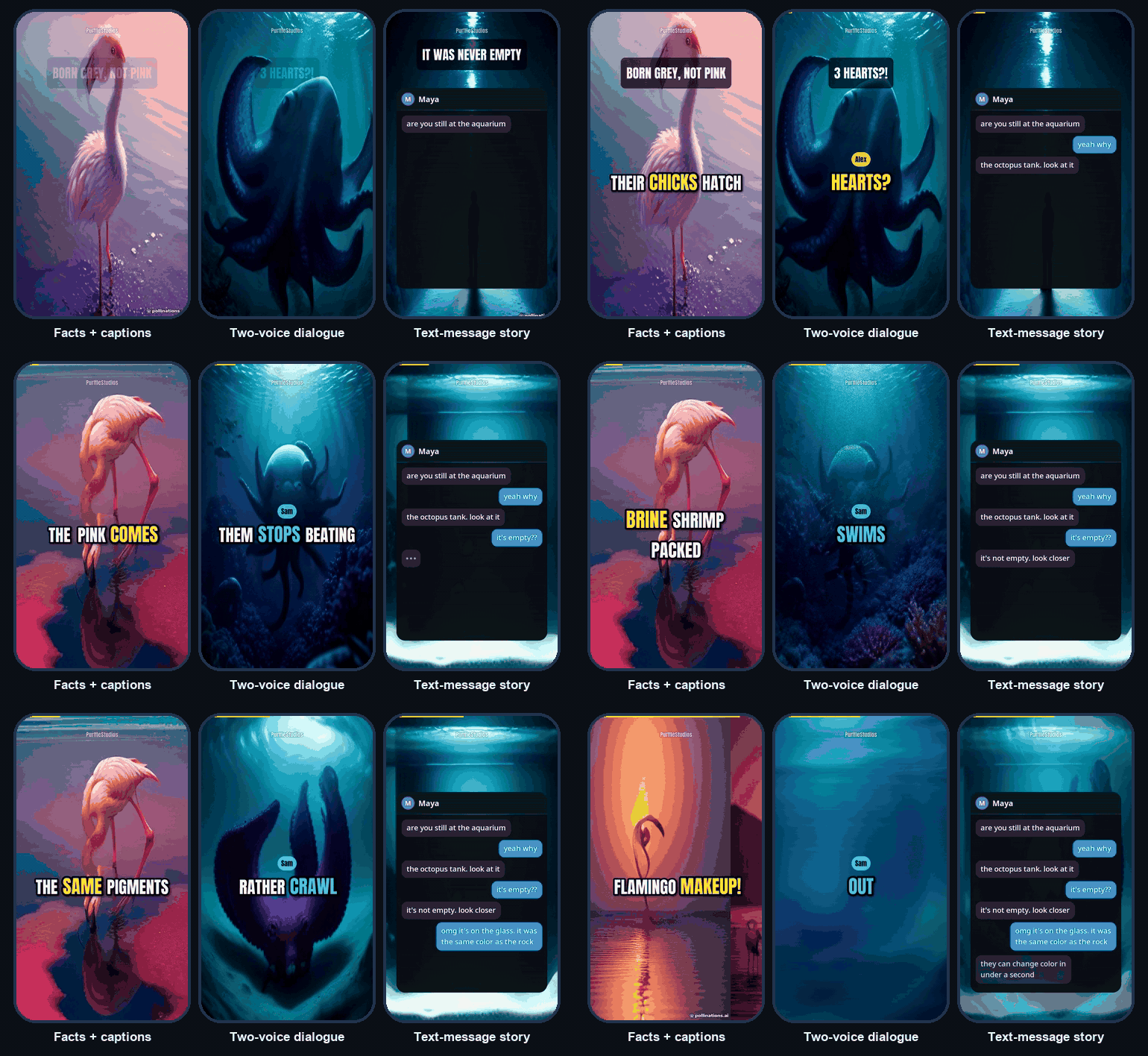
Real output, no editing: examples/flamingos.json, examples/dialogue.json and examples/chat-story.json rendered with make --script.
Free Microsoft neural voices, AI images from Pollinations (for the octopus videos they were downloaded one by one into a local folder first, because keyless Pollinations now allows about one image every few minutes). GIFs have no sound.
Try it with no API keys and no sign-up (needs uv):
uvx --from git+https://github.com/Chamanrajragu/purffle-shorts purffle-shorts demo --style chat
⭐ If PurffleShorts saves you time, a star helps other creators find it. · 🌐 purffle.com/purffle-shorts
🤖 What is PurffleShorts?
PurffleShorts is a YouTube Shorts automation tool for faceless channels. Start it and it keeps going: fresh topic, retention-focused script that a second AI pass reviews and tightens, natural AI voiceover, relevant footage, captions synced to each spoken word, a polished render, and an upload or scheduled release. It stays inside YouTube's daily API quota.
Beyond the autopilot, it is a small studio: draft a script and edit any line before rendering, make two-voice dialogues, text-message stories and Reddit-style stories, turn an article or a Reddit post into a Short, clip a podcast into Shorts (an Opus Clip-style workflow that runs on your computer), publish the same video in several languages, plan a week of ideas in one go, and let the channel's own view counts steer new scripts.
It is made for content creators, faceless YouTube channels, educators and marketers who want short-form video at volume without editing by hand. It runs on your own computer (macOS, Windows, Linux or Docker), you pick every model, and the vertical 9:16 MP4s work for TikTok and Instagram Reels too.
🎯 Use cases
- A faceless channel on autopilot. Pick a niche (space, history, animals, money tips), set three publish times a day and leave it running. Ideas from Trends, Wikipedia, Reddit, RSS or your list are never reused, the AI is told to avoid your recent titles, and every script is reviewed before it is voiced.
- Text-message and Reddit-style story videos for Shorts, TikTok and Reels: the AI writes a fictional chat or a first-person post, two voices or one narrator read it, and the chat screen or post card is animated for you. A Reddit post link works as the source too.
- Podcast, interview and stream clips.
clip episode.mp4 --count 5transcribes the video, lets the AI pick the moments that stand on their own and returns captioned vertical clips, with no per-minute fees. - Articles, blog posts and notes into video.
make --url https://…or--from-file notes.mdturns your own writing into a Short. - One idea, many languages.
--also-lang es,hi,ptpublishes the same video with native voices in each language, reusing the footage. - Education and explainers. Quiz, myth-vs-fact, explainer and dialogue formats, in 9:16 for Shorts or 16:9 for regular YouTube.
- An AI assistant that makes videos. Through MCP, ask Claude or Cursor to draft, render, clip or upload videos from a chat.
✨ Features
AI scriptwriting
- One structured LLM call returns the whole Short: hook, scenes, a footage search and an image prompt per scene, title, description, hashtags, tags and YouTube category.
- Script Doctor: a second AI pass scores the draft 0–100 for retention (hook, pacing, payoff, accuracy risk), lists what is weak and rewrites it. The score is stored with every video.
- 12 providers: OpenAI, Anthropic Claude, Google Gemini, Groq, OpenRouter, DeepSeek, Mistral, Together AI, xAI Grok, Ollama, LM Studio, or any OpenAI-compatible URL. List backups in
LLM_FALLBACKSand they are tried in order if the main one fails. - 11 formats: facts, story, listicle, myth-busting, quiz, explainer, motivational, news, two-voice dialogue, text-message story and Reddit-style story (a post card while the title is read, then the story with captions).
- Draft first and edit any line in the Studio, or write a script yourself and render it with
--script, with no LLM call.
Sources
- Your niches, Google Trends, Wikipedia "On this day", Reddit TIL, RSS feeds, your own list, any web page or Reddit post (
--url) or document (--from-file). - Content planner: the AI brainstorms a batch of specific, non-repeating ideas into a queue that the autopilot uses first.
- Clip long videos: transcribe a podcast, interview or talk, let the AI pick the moments that stand alone, and get captioned vertical clips.
Voiceover
- 320+ free Microsoft neural voices in 75 languages, with word-level timestamps. No key needed.
- Two speakers for dialogues and chat stories, each with their own voice, joined with natural pauses.
- One video, many languages:
--also-lang es,hiadds translated copies that reuse the same footage. - Also OpenAI TTS, ElevenLabs, Kokoro-82M, Coqui and the operating-system voice. Falls back to the free voice if a paid engine fails.
Footage & images
- A separate stock-footage search for every scene (Pexels, Pixabay), portrait clips preferred, smart 9:16 crop, never reused across videos.
- AI images per scene from OpenAI (gpt-image-1 / DALL·E 3) or Pollinations, or your own
media/folder. - Ken Burns motion on photos, colour grades, transitions.
Captions & editing
- Captions appear exactly when each word is spoken, with the current word highlighted. 6 styles; Latin, Indic, Arabic, Thai and CJK scripts.
- Dialogues get speaker name tags and a colour per speaker; chat stories get an animated phone screen with typing indicators; Reddit-style stories open on a post card (community, poster, title, votes).
- 9:16, 16:9, 1:1 or 4:5 output (
--aspect), with captions and overlays sized for each shape. - Hook title, watermark, progress bar, end call-to-action, background music that ducks under the voice, loudness normalised to −14 LUFS.
- Plain ffmpeg: each scene is prepared as a short segment, then one final encode joins them and adds everything above. No MoviePy, no ImageMagick, no GPU.
Publishing
- Uploads to YouTube, or schedules each video into your next free time slot.
- Quota-aware queue, AI-content disclosure, playlists, privacy, made-for-kids flag.
- Every video also gets a cover image, SRT subtitles and a metadata file for cross-posting.
Workflow
- Autopilot loop, one-off videos, bulk batches with parallel workers, several channels from separate settings files.
- Studio web app: create, draft and edit, watch every stage live, browse and play the library, plan ideas, clip videos, read channel stats.
- MCP server: ask Claude Desktop, Claude Code or Cursor to make, clip or upload videos.
- Learns from your channel (opt-in): view counts of your uploads show the AI what works for your audience.
- Discord / Slack / webhook notifications, a
doctorself-check, SQLite history, Docker, and CI that renders real videos on every pull request.
⚖️ How it compares
Open-source Shorts tools each cover part of the job: some write videos from a topic, some clip long videos, some make Reddit stories. PurffleShorts does all three, and it is the only one we found with text-message stories, two-voice dialogues, a script review pass and an MCP server that covers writing, clipping and uploading.
| PurffleShorts | MoneyPrinterTurbo | ShortGPT | RedditVideoMakerBot | AI-Youtube-Shorts-Generator | OpenShorts | |
|---|---|---|---|---|---|---|
| Writes the video from a topic | ✅ | ✅ | ✅ | ❌ Reddit threads | ❌ clipper | ➖ paid APIs |
| Any LLM, including local Ollama | ✅ | ✅ | ➖ OpenAI, Gemini | ❌ no LLM | ➖ OpenAI, Gemini | ✅ |
| Free voices, no key | ✅ | ✅ | ✅ | ✅ | ❌ no voice | ➖ ElevenLabs |
| Word-by-word highlighted captions | ✅ | ➖ | ❔ | ❌ | ❌ | ✅ |
| Script review and rewrite pass | ✅ | ❌ | ❌ | ❌ | ❌ | ❌ |
| Text-message chat stories | ✅ | ❌ | ❌ | ❌ | ❌ | ❌ |
| Two-voice dialogues | ✅ | ❔ | ❔ | ❌ | ❌ | ❌ |
| Reddit-style stories | ✅ | ❌ | ✅ | ✅ | ❌ | ❌ |
| Clip long videos into Shorts | ✅ | ❌ | ❌ | ❌ | ✅ | ✅ |
| Videos in other languages | ✅ | ✅ | ✅ | ✅ | ➖ | ✅ paid dubbing |
| YouTube upload and scheduling | ✅ official API | ➖ via Upload-Post, no scheduling | ❌ | ❌ by design | ❌ | ✅ via Upload-Post |
| TikTok / Instagram upload | ❌ files only | ✅ via Upload-Post | ❌ | ❌ | ❌ | ✅ via Upload-Post |
| MCP server | ✅ | ❌ | ❌ | ❌ | ❌ | ✅ clipping |
| Web app | ✅ | ✅ | ✅ | ➖ settings only | ❌ | ✅ |
| Tests and CI | ✅ | ✅ | ❌ | ➖ lint only | ❌ | ✅ |
| License | MIT | MIT | MIT | GPL-3.0 | MIT | MIT |
✅ yes · ➖ partly · ❌ no · ❔ not stated. Compiled on 29 September 2026 from each project's README and code. Projects change quickly: if a cell is wrong, please open an issue and it will be fixed. Where others are ahead: MoneyPrinterTurbo and OpenShorts can post to TikTok and Instagram through the Upload-Post service, and MoneyPrinterTurbo has a one-click Windows package and a Colab notebook.
📸 Screenshots
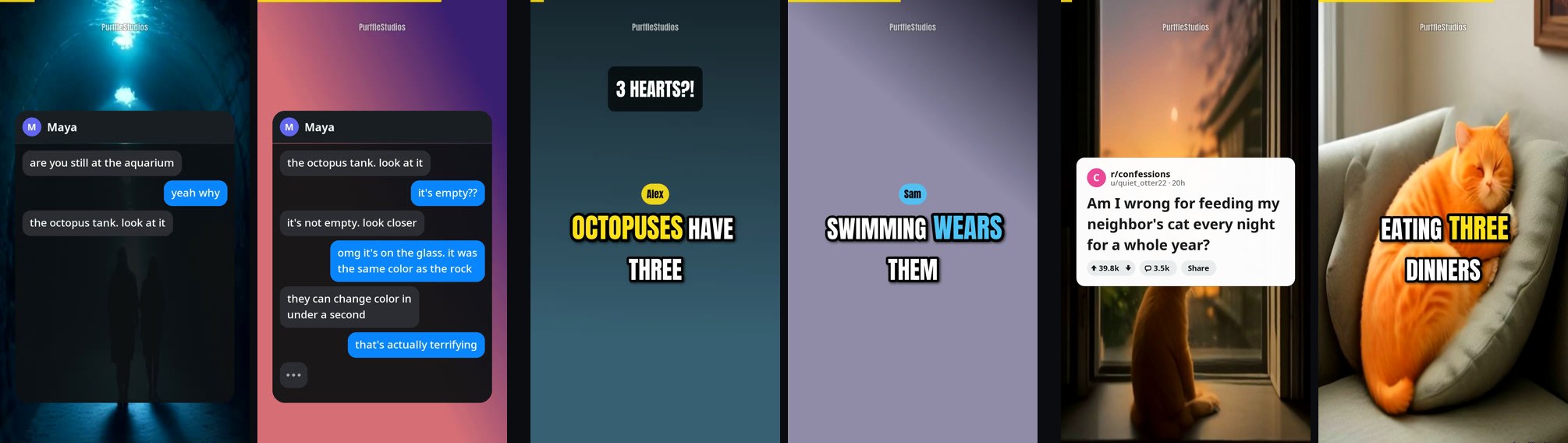
New in 3.0: text-message stories, two-voice dialogues and Reddit-style stories. Rendered from examples/chat-story.json, examples/dialogue.json and examples/reddit-story.json.
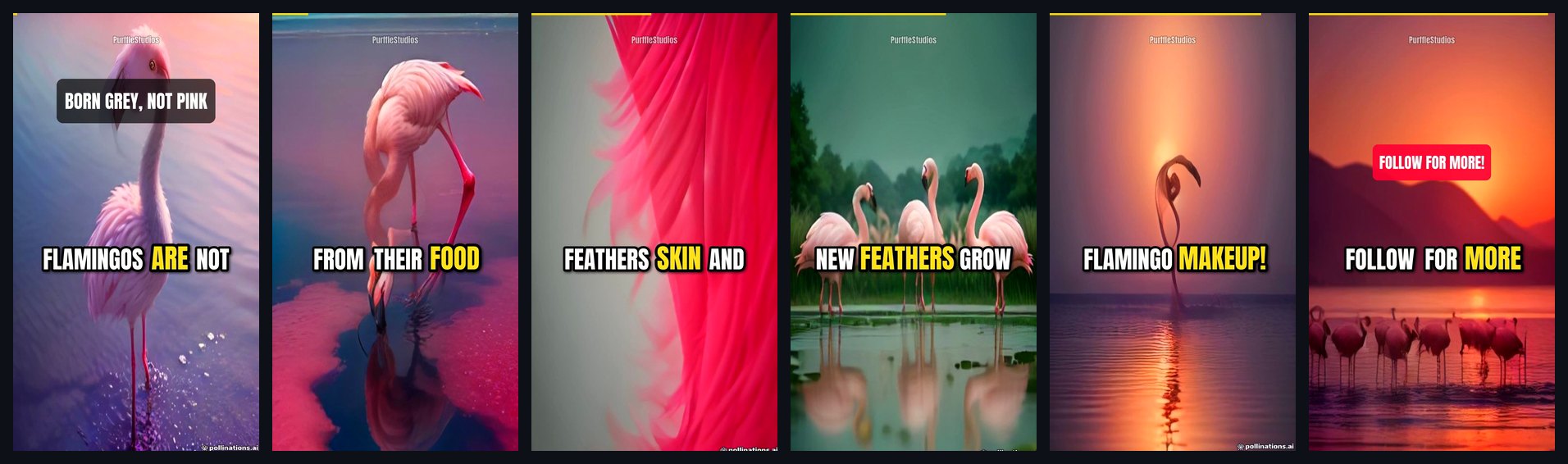
Frames from the flamingo Short above: hook title, word-highlighted captions, progress bar, end call-to-action.
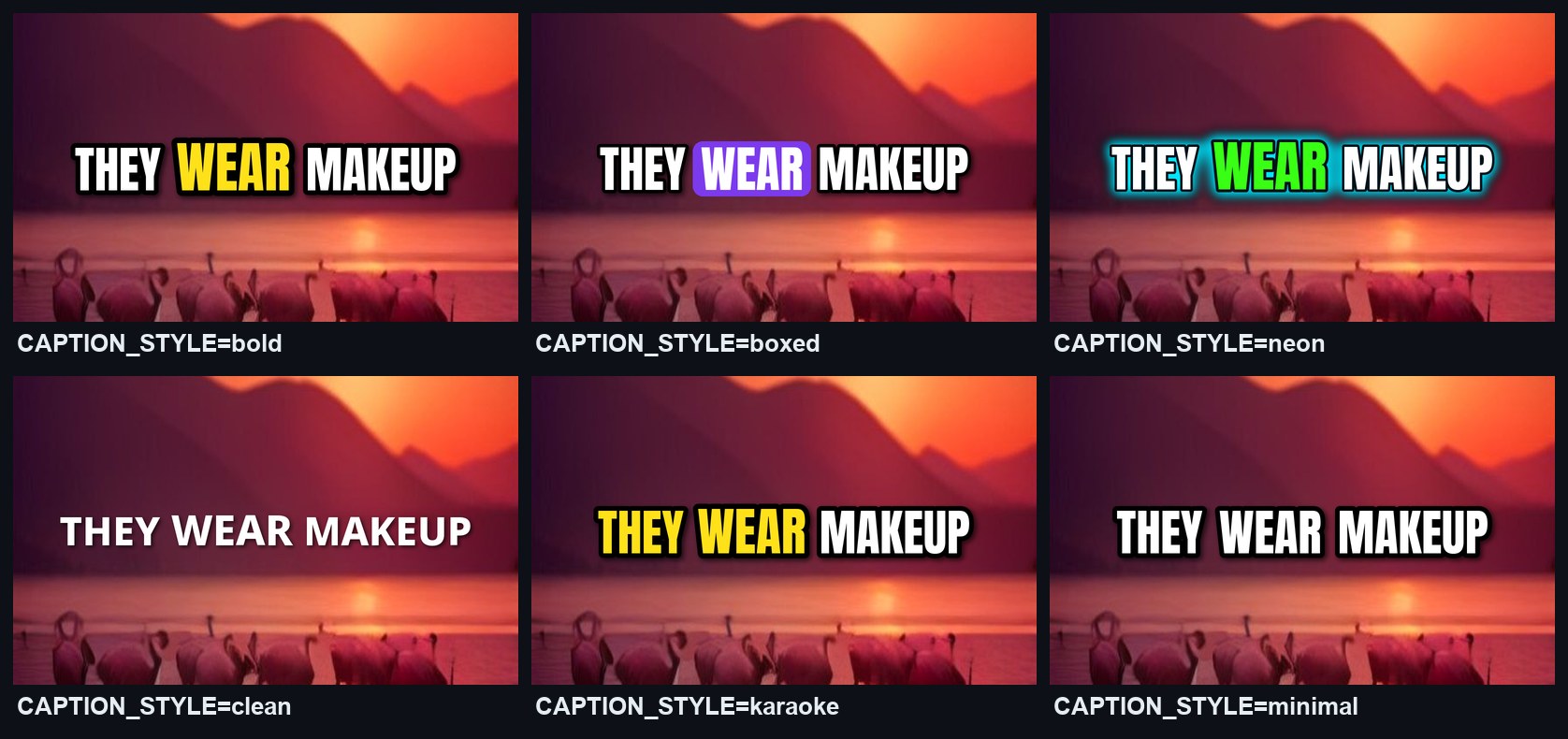
Six caption styles, drawn by the same renderer the videos use:
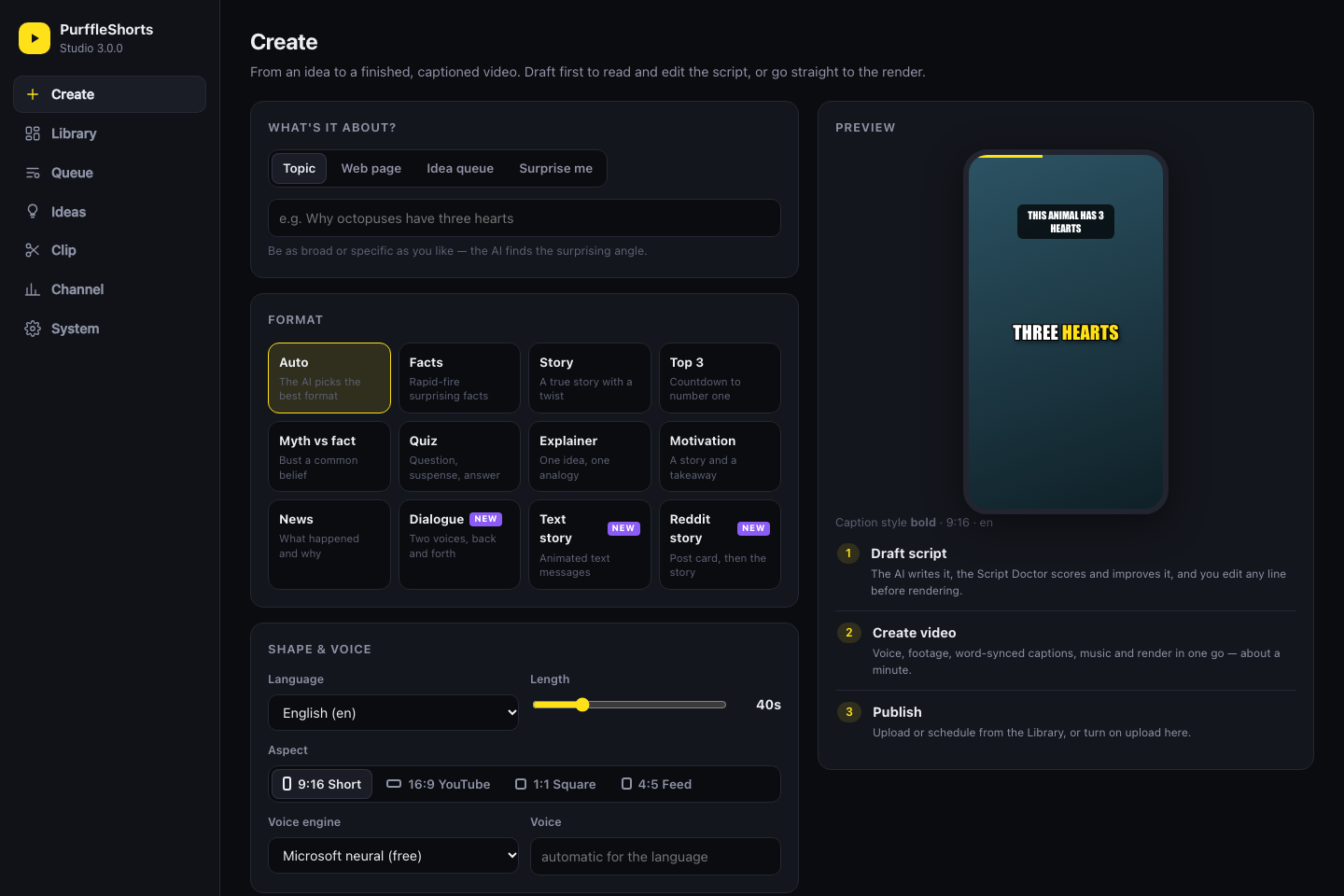
Studio, the local web app: pick a format, shape and look, then draft the script or create the video.
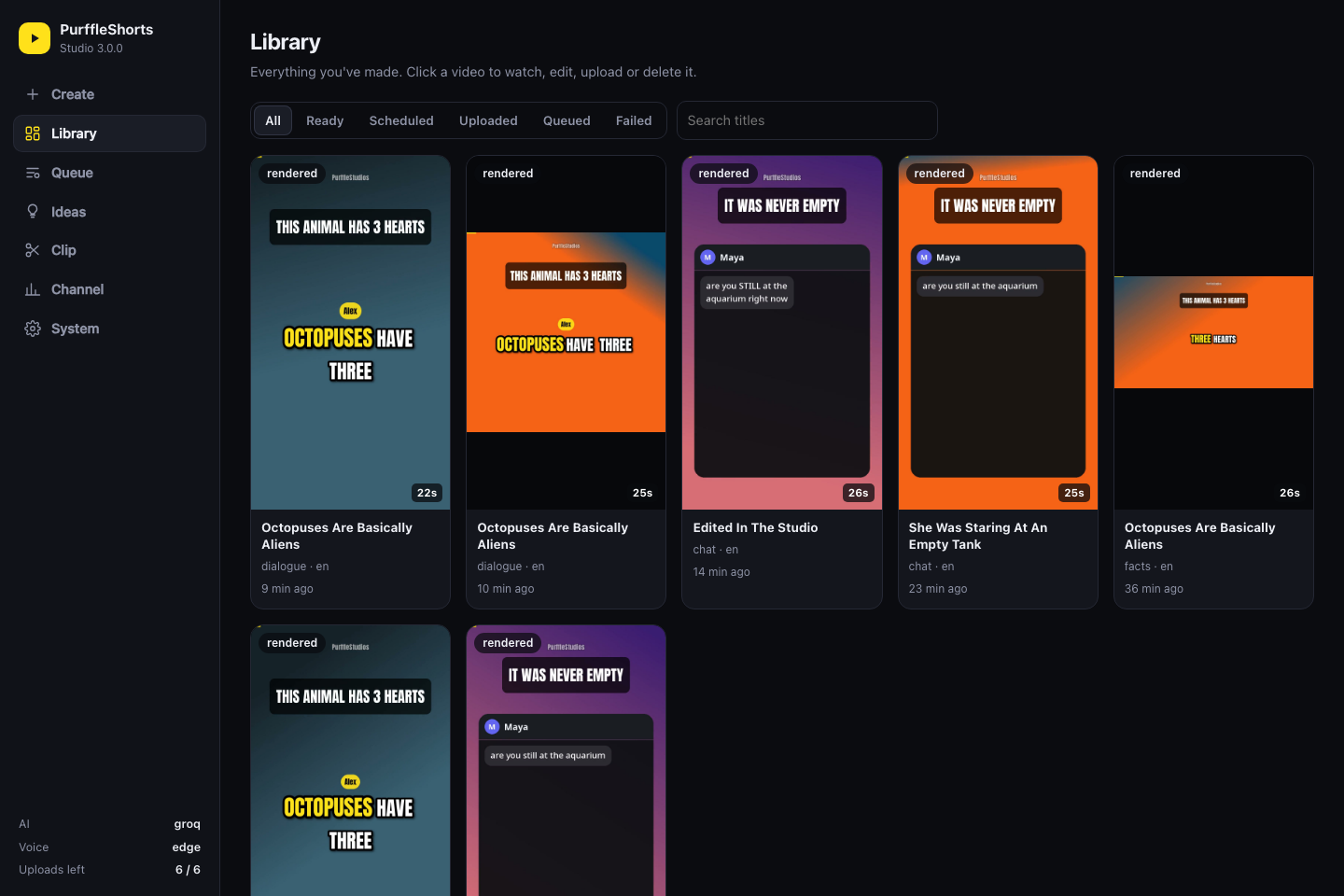
The library: every video with its format, language, length and status. Open one to play it, edit and re-render it, upload or delete it.
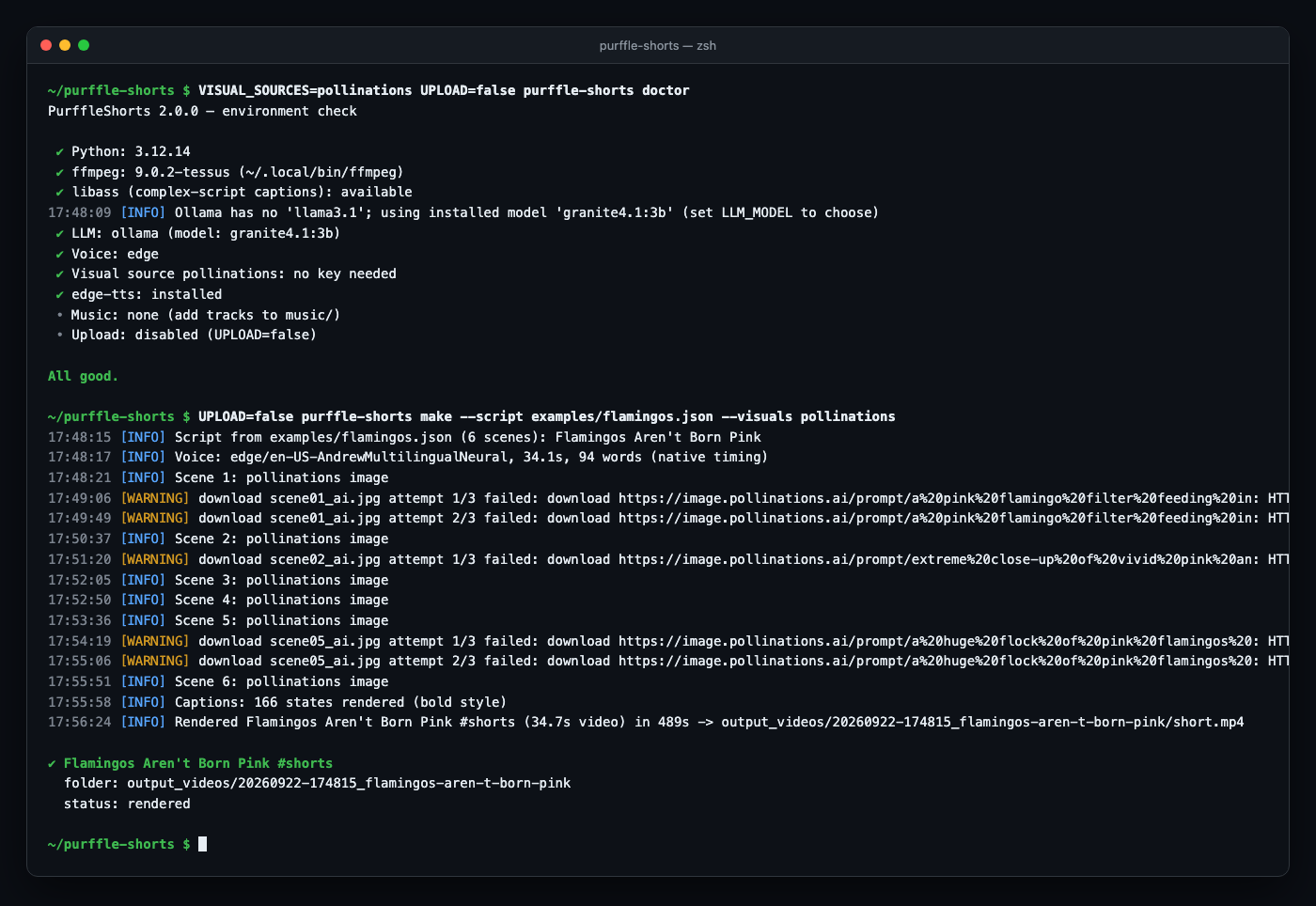
Command line: doctor checks the setup, make renders a Short.
🆕 What's new in 3.0
| 2.0 | 3.0 | |
|---|---|---|
| Script quality | One LLM call | Script Doctor: a second pass scores retention 0–100, lists the problems and rewrites weak lines. You can also draft first and edit every line in the Studio |
| Formats | 8, one narrator | 11, including two-voice dialogues (name tags, colour per speaker), text-message stories (animated phone screen, typing indicator) and Reddit-style stories (post card, then captions) |
| Sources | Niches, Trends, Wikipedia, Reddit, your list | Also any web page or Reddit post (--url), documents (--from-file), RSS feeds, and an AI content planner with an idea queue |
| Long videos | — | clip: transcribe a podcast or talk, the AI picks self-contained moments, vertical crop or blurred fit, word captions |
| Languages | One per video | --also-lang es,hi: translated copies of the same video that reuse its footage |
| Shapes | 9:16 | 9:16, 16:9, 1:1, 4:5 with sizes that adapt (--aspect) |
| Channel feedback | — | Learns from stats (opt-in): the best and worst performers are shown to the AI when it writes |
| Web app | A form and a list | New Studio: live stage progress, script editor, library with player and actions, ideas, clipping, channel stats, setup checks. Works on phones |
| Integrations | — | MCP server for Claude Desktop, Claude Code and Cursor; Discord / Slack / webhook notifications |
| Reliability | Clear errors for bad settings, hardware-encoder fallback to libx264, failed videos return their idea to the queue, database migrates itself, installs cleanly on Intel Macs, 120+ tests, Docker build checked in CI |
Version 2 is a rewrite. The 1.x pipeline had problems: the pinned openai SDK no longer had the API the code called, landscape footage was stretched into portrait, captions were evenly spaced rather than following the voice, the title and description were generated separately from the script, and every video went through six MoviePy re-encodes.
| 1.x | 2.0 | |
|---|---|---|
| Script | GPT-3.5, 4 separate calls, title unrelated to script | One structured call: hook, scenes, per-scene footage queries, title, description, hashtags, tags, category |
| Models | OpenAI only | OpenAI, Claude, Gemini, Groq, OpenRouter, DeepSeek, Mistral, Together, xAI, Ollama, LM Studio, any OpenAI-compatible URL, with optional fallbacks |
| Voice | Coqui Tacotron2 (robotic, heavy) | Free Microsoft neural voices (320+, 75 languages) + OpenAI, ElevenLabs, Kokoro, Coqui, system voice |
| Captions | Even time slices, no sync | Word-accurate timing, active-word highlight, pop-in animation, 6 styles |
| Footage | Same query for every clip, landscape stretched to 9:16 | A search per scene, portrait-first, smart 9:16 crop, never reused across videos, Ken Burns on photos, AI images optional |
| Render | MoviePy + ImageMagick, 6 encodes at 60 fps | ffmpeg only, one final encode, transitions, colour grades, progress bar. A 25 s Short rendered in 30–40 s on an Intel Mac in testing |
| Audio | Music at a fixed volume | Music auto-ducks under the voice, loudness normalised to −14 LUFS |
| Publishing | Always public, burns quota | Schedule into time slots, privacy options, AI-content disclosure, playlists, quota-aware queue |
| Ideas | 22 hard-coded categories, repeats | Niches, Google Trends, Wikipedia "On this day", Reddit TIL, your own list, with repeats prevented |
| Extras | — | Web dashboard, doctor self-check, history DB, SRT subtitles, cover image, --script for your own scripts, Docker, CI with an offline end-to-end render test |
🔄 How it works
flowchart LR
    A["Topic<br/>idea queue · niches · Trends ·<br/>Wikipedia · Reddit · RSS · web page"] --> B["AI script<br/>any LLM, one JSON reply"]
    B --> R["Script Doctor<br/>score · rewrite"]
    R --> C["Neural voice<br/>one or two speakers"]
    C --> D["Footage per scene<br/>stock video · photos · AI images"]
    D --> E["Captions & overlays<br/>hook · progress bar · CTA"]
    E --> F["ffmpeg render<br/>9:16 · 16:9 · 1:1 · 4:5 · −14 LUFS"]
    F --> G["Upload or schedule<br/>on YouTube"]
    F -. also-lang .-> T["Translated copies<br/>same footage"]
    G -. next video .-> A
| Step | What happens |
|---|---|
| 1. Topic | Queued ideas first, then your niches, today's Google Trends, Wikipedia "On this day", Reddit TIL (best-effort, since Reddit rate-limits anonymous requests) or topics.txt, skipping anything already made and news about deaths, violence or elections |
| 2. Script | The LLM writes a hook-first script split into scenes, each with its own stock-footage query and AI-image prompt, plus title, description, hashtags, tags and category, all in one JSON reply. With LEARN_FROM_STATS, your best and worst performers are part of the prompt |
| 3. Review | The Script Doctor scores it for retention and rewrites weak lines (SCRIPT_REVIEW=rewrite, the default). A rewrite that misses the target length is ignored, and a failed review never fails the video |
| 4. Voice | Neural TTS speaks the script and returns per-word timestamps (or they are aligned/estimated). Dialogues and chats are voiced line by line with two voices |
| 5. Footage | Each scene gets its own clip: Pexels / Pixabay video (portrait preferred), photos with Ken Burns motion, your own media/ folder, or AI images, with an animated gradient as the last resort |
| 6. Captions | 2–3-word captions appear exactly when spoken, with the current word highlighted; chat stories show messages popping in on a phone screen instead, and Reddit-style stories open on a post card |
| 7. Render | Scenes are cover-cropped to the output shape, colour-graded and joined with transitions; hook title, watermark, progress bar, end CTA, ducked music and −14 LUFS loudness are added in one final ffmpeg encode |
| 8. Publish | Uploaded now, or scheduled into your next free time slot, with the synthetic-media disclosure set; queued automatically when the daily quota is used up |
🚀 Quick start
Needs: Python 3.10+. ffmpeg is used if installed; if not, the bundled imageio-ffmpeg binary is used. ImageMagick is no longer needed.
Fastest: with uv installed, run it straight from GitHub without cloning anything:
uvx --from git+https://github.com/Chamanrajragu/purffle-shorts purffle-shorts demo
To keep it and configure it, clone and install:
git clone https://github.com/Chamanrajragu/purffle-shorts.git
cd purffle-shorts
python -m venv venv && source venv/bin/activate      # Windows: venv\Scripts\activate
pip install -e .                                     # or: pip install -r requirements.txt
1. See it work with no keys at all. This renders a sample Short with a built-in script, a free neural voice and generated backgrounds:
python -m purffle_shorts demo
python -m purffle_shorts demo --style chat        # text-message story
python -m purffle_shorts demo --style dialogue    # two voices
python -m purffle_shorts demo --style reddit      # Reddit-style story with a post card
Or open the web app and click through it (demo mode is on until you add a key):
python -m purffle_shorts studio
2. Configure. Copy .env.example to .env, add one LLM key (or run Ollama) and a Pexels and/or Pixabay key (both free), then run the self-check:
python -m purffle_shorts doctor
3. Make one video (kept locally, not uploaded):
python -m purffle_shorts make --topic "why octopuses have three hearts" --no-upload
4. Connect YouTube once. Create an OAuth client of type Desktop app in Google Cloud Console with the YouTube Data API v3 enabled, save it as credentials.json, then:
python -m purffle_shorts auth
5. Autopilot:
python -m purffle_shorts plan --count 14   # optional: queue two weeks of ideas first
python -m purffle_shorts run               # or the old way:  python YT.py
Optional extras: pip install -e ".[clip]" adds faster-whisper and yt-dlp for clipping long videos.
💬 Formats
Pick one with SCRIPT_STYLE / --style, or leave it on auto.
| Format | What you get |
|---|---|
facts · story · listicle · myth · quiz · explainer · motivational · news |
One narrator, footage per scene, word-highlighted captions |
dialogue |
Two people talking: A asks or doubts, B answers with specifics. Each line is voiced with its own voice (TTS_VOICE and TTS_VOICE_B, or automatic), captions carry the speaker's name and colour |
chat |
A text-message story: messages pop into a phone screen as they are read aloud, the contact's replies get a typing indicator, the chat scrolls when it fills up. Each side has its own voice |
reddit |
A first-person story told like a Reddit post: a post card (community, poster, title, votes) is shown while the title is read, then the story plays with word captions. Written by the AI as fiction, or adapted from a post you link with --url |
purffle-shorts make --style chat --topic "a babysitter gets texts from an unknown number"
purffle-shorts make --style dialogue --topic "why the sky is blue"
purffle-shorts make --style reddit --topic "a neighbour who keeps borrowing my ladder"
purffle-shorts make --url "https://www.reddit.com/r/tifu/comments/…"   # a real post as the source
Scripts from the LLM are fiction for chat and reddit (the prompt forbids real people). Reddit story videos usually play over gameplay or "satisfying" clips: put yours in media/ and set VISUAL_SOURCES=local. Reddit post links are read through the post's public feed; only reuse posts when you have the author's permission. As with every format, read before you publish.
✂️ Clip long videos into Shorts
pip install faster-whisper                          # free, local transcription (or set OPENAI_API_KEY)
purffle-shorts clip podcast.mp4 --count 3           # fill the frame
purffle-shorts clip talk.mp4 --count 5 --crop blur  # whole picture over a blurred copy
purffle-shorts clip "https://…" --count 3           # URLs need: pip install yt-dlp
It works like Opus Clip or Vidyo.ai, but locally and without per-minute fees. The video is transcribed with word timings, and the LLM reads the timestamped transcript and picks moments of 20–58 s (--min-seconds, --max-seconds) that open with a hook and end on a complete thought, with a title, hashtags and a retention score for each. Each clip is cut on sentence boundaries, cropped to 9:16, captioned word by word with a hook title, and loudness-normalised. Without an LLM it still works, with moments spread evenly over the video instead. Clips upload like any other video when UPLOAD=true; add --no-upload to only cut them. Only clip videos you own or have permission to reuse.
🗓️ Ideas, sources and languages
- Plan ahead:
purffle-shorts plan --count 14 --niche "space"asks the AI for specific, non-repeating ideas with a format and an angle each.ideaslists the queue (--add,--remove,--clear). Queued ideas are always made first; if a video fails, its idea goes back in the queue. - From a web page, a Reddit post or a document:
make --url https://…ormake --from-file notes.mduses the text as the script's source material. A Reddit post link picks the Reddit story format automatically. - RSS:
RSS_FEEDS=https://…/feed.xml,https://…andTOPIC_SOURCES=niche:3,rss:1. - Many languages:
ALSO_LANGUAGES=es,hi(or--also-lang) makes a translated copy of every video with a native voice, reusing the original's footage. Each copy is its own upload, linked to the original in the library.
📊 Learn from your channel
LEARN_FROM_STATS=true
YOUTUBE_API_KEY=...        # optional: reads public stats without asking for more OAuth access
purffle-shorts stats (and the Studio's Channel page) reads view, like and comment counts of the videos PurffleShorts uploaded: one API unit per 50 videos. With LEARN_FROM_STATS=true the autopilot refreshes them twice a day and shows the LLM your best and worst performers (public for 48 hours or more) when it writes and plans. Without YOUTUBE_API_KEY, run auth once more to grant read access.
🧠 AI models
Set LLM_PROVIDER and LLM_MODEL in .env, or pass --provider / --model. With LLM_PROVIDER=auto the first key found is used, and a running Ollama is used when there is no key. LLM_FALLBACKS=anthropic,gemini retries with other providers when the main one fails. Any model a provider offers works; the defaults are only starting points.
| Provider | LLM_PROVIDER |
Key | Default model |
|---|---|---|---|
| OpenAI | openai |
OPENAI_API_KEY |
gpt-4o-mini (GPT-5 / o-series supported) |
| Anthropic Claude | anthropic |
ANTHROPIC_API_KEY |
claude-opus-5 (structured JSON output) |
| Google Gemini | gemini |
GEMINI_API_KEY |
gemini-2.5-flash |
| Groq | groq |
GROQ_API_KEY |
llama-3.3-70b-versatile |
| OpenRouter | openrouter |
OPENROUTER_API_KEY |
openai/gpt-4o-mini, or any of its hundreds of models |
| DeepSeek | deepseek |
DEEPSEEK_API_KEY |
deepseek-chat |
| Mistral | mistral |
MISTRAL_API_KEY |
mistral-small-latest |
| Together AI | together |
TOGETHER_API_KEY |
meta-llama/Llama-3.3-70B-Instruct-Turbo |
| xAI | xai |
XAI_API_KEY |
grok-3-mini |
| Ollama (local, free) | ollama |
— | llama3.1, or the first model you have pulled |
| LM Studio (local, free) | lmstudio |
— | whatever is loaded |
| Anything OpenAI-compatible | custom |
LLM_API_KEY + LLM_BASE_URL |
LLM_MODEL |
python -m purffle_shorts providers shows which providers have a key and whether Ollama / LM Studio are running.
Script Doctor (SCRIPT_REVIEW): rewrite (default) scores every script and uses the improved version, score only records the score and the problems, off skips the extra call (--no-review). It adds one LLM call per video.
Facts need a capable model. In testing, a 3B local model wrote a confident but wrong claim ("flamingos get their colour from carrots"). Use a larger model for fact-based formats, or check
script.json, fix it, and re-render with--script.
🎙️ Voices
| Engine | TTS_ENGINE |
Cost | Word timing |
|---|---|---|---|
| Microsoft neural voices (edge-tts) | edge (default) |
Free, no key | Native |
OpenAI gpt-4o-mini-tts / tts-1-hd |
openai |
Paid | Aligned or estimated |
| ElevenLabs | elevenlabs |
Paid | Native |
| Kokoro-82M (open weights, local) | kokoro |
Free, pip install kokoro soundfile |
Aligned or estimated |
| Coqui TTS (local) | coqui |
Free, pip install coqui-tts |
Aligned or estimated |
OS voice (say / espeak-ng / SAPI) |
system |
Free, offline | Estimated |
python -m purffle_shorts voices --lang enlists the free voices for a language (322 voices in 75 languages when checked; try--lang es,--lang hiand so on). SetTTS_VOICE=en-US-GuyNeural, or a comma list to rotate voices between videos.LANGUAGE=es(orhi,ta,fr,pt,ja, …) switches the script, the voice and the caption font together. Tamil, Hindi, Arabic, Thai and similar scripts are rendered through libass so they are shaped correctly.pip install faster-whispergives precise word timing for engines without native timestamps (ALIGN=auto).- The second speaker in dialogues and chats uses
TTS_VOICE_B, or a contrasting voice picked for the language. - If the chosen engine fails, the video falls back to the free edge voice instead of failing.
🎨 Captions & look
| Setting | Options |
|---|---|
CAPTION_STYLE |
bold (yellow active word) · boxed (active word in a colour box) · neon (glow) · clean · karaoke · minimal |
CAPTION_POSITION |
upper · center · lower |
COLOR_GRADE |
none · vivid · cinematic · warm · cool · bw |
TRANSITION |
random · none · fade · slideup · smoothleft · circleopen · zoomin · … |
| Overlays | Hook title (HOOK_OVERLAY), watermark (WATERMARK, defaults to CHANNEL_NAME, which is PurffleStudios until you change it; none hides it), progress bar (PROGRESS_BAR), end call-to-action (END_CTA) |
| Music | Drop tracks in music/ (a random one is picked per video; back.mp3 still works); MUSIC_VOLUME, MUSIC_DUCKING |
| Shape | ASPECT=9:16 (Shorts, Reels, TikTok) · 16:9 (regular YouTube video, no #shorts) · 1:1 · 4:5, or an exact RESOLUTION=1080x1920 |
| Output | FPS=30, VIDEO_ENCODER=libx264 · h264_videotoolbox (Mac) · h264_nvenc (NVIDIA) · auto (a hardware encoder that fails falls back to libx264) |
The caption font is downloaded once from Google Fonts (Anton for Latin scripts, Noto Sans for other scripts). Set CAPTION_FONT=/path/font.ttf to use your own.
Visual sources (VISUAL_SOURCES, tried in order per scene): pexels, pixabay, local (your media/ folder, matched by filename keywords), openai-images (gpt-image-1 / DALL·E 3), pollinations (AI images). Searches and AI images follow the output shape (portrait, landscape or square).
Pollinations without a key is no longer practical for whole videos. Tested on 29 September 2026: the first request returned an image, the next ones answered HTTP 402 "payment required", roughly one image every few minutes. When that happens PurffleShorts stops asking for the rest of that video and those scenes fall back to the next source.
POLLINATIONS_API_KEYis sent as a Bearer token for keyed access; that path has not been tested here. Pexels and Pixabay keys are free and are the dependable choice.
📅 Publishing & scheduling
YT_PRIVACY=public|unlisted|private.PUBLISH_TIMES=09:00,14:00,19:00withTIMEZONE=Asia/Kolkatauploads each video as private and schedules it into the next free slot. Render in bulk, release on schedule.- Paced and quota-aware.
YT_DAILY_LIMIT=6uploads a day by default. That is a pace you choose, not the API's ceiling: uploads now have their own API bucket of 100 a day at 1 unit each (Google's quota table, updated 15 September 2026). Extra videos are queued, and so are videos YouTube refuses because the project or the channel hit a limit (quotaExceeded,uploadLimitExceeded); after a refusal nothing else is tried that day. On autopilot the queue is uploaded first after the reset at midnight Pacific time, and production waits instead of piling up. Without autopilot, runupload --pendingafter the reset. SYNTHETIC_MEDIA=truesets YouTube's altered or synthetic content disclosure.MADE_FOR_KIDS,PLAYLIST_IDand category (chosen by the AI) are set too.- Each video's folder holds
short.mp4(video.mp4for 16:9),cover.jpg,captions.srt,script.jsonandmetadata.json(including the retention score), ready to cross-post to TikTok or Reels.KEEP_VIDEOS=falsedeletes the MP4 after a successful upload. - Notifications:
NOTIFY_WEBHOOK=https://discord.com/api/webhooks/…(or a Slack incoming webhook, or any URL for JSON) posts a message when a video is rendered, uploaded, scheduled, queued or fails.
💻 Command line
python -m purffle_shorts <command> [options] # or `purffle-shorts <command>` after pip install
| Command | What it does |
|---|---|
run |
Autopilot loop. --count N, --once, --batch, --workers, --delay |
make |
Make one video now. --topic "…", --url https://… (web page or Reddit post), --from-file notes.md, --count N, --script file.json (your own script, no LLM) |
demo |
Render a sample with no API keys (--style chat, dialogue or reddit for the story formats) |
clip |
Cut a long video into Shorts: clip talk.mp4 --count 3 --crop center|blur |
plan / ideas |
Let the AI plan ideas into the queue / list, add or remove queued ideas |
stats |
Refresh and show view counts of your uploads |
mcp |
Run as an MCP server for Claude Desktop, Claude Code, Cursor… |
upload |
--pending uploads rendered and queued videos, up to today's YT_DAILY_LIMIT; --id N uploads one |
auth |
Connect your YouTube channel |
doctor |
Check ffmpeg and libass, LLM (including whether the Ollama model is pulled), voices, keys, footage sources, YouTube setup |
providers / voices |
List LLM providers / free voices |
history |
Everything made so far, with links |
studio |
Local web app |
Common options: --source queue|trending|wikipedia|reddit|rss|file|niche, --niche "space", --style facts|story|listicle|myth|quiz|explainer|motivational|news|dialogue|chat|reddit, --lang, --duration 45, --aspect 9:16|16:9|1:1|4:5, --also-lang es,hi, --provider, --model, --no-review, --tts, --voice, --voice-b, --visuals, --caption-style, --grade, --transition, --resolution, --no-music, --no-upload, --privacy, --publish-times, --env-file.
Your own script: every video folder has a script.json. Edit the narration, title or image prompts and render it again with make --script path/to/script.json. The files in examples/ show the format.
Several channels: keep one settings file per channel (niche, voice, YT_TOKEN_FILE, DATA_DIR) and run python -m purffle_shorts run --env-file .env.channel2.
Upgrading from 1.x: python YT.py, --once, --no-upload, --count N and the old SHORTS_* variables still work, and token.pickle is migrated to token.json automatically. Install the new requirements first.
🖥️ Studio (web app)
python -m purffle_shorts studio # opens http://127.0.0.1:8765
- Create: topic, web page, idea queue or "surprise me"; eleven formats; language, length, aspect, voices, caption style (with a preview), grade, transitions, footage sources, model, Script Doctor mode, extra languages, upload.
- Draft, then edit: the AI writes and reviews the script, you see the retention score and the problems it found, change any line, reorder or add scenes, switch speakers, then render exactly that script.
- Live progress through topic, script, review, voice, footage, captions, render and upload, with the log.
- Library: thumbnails with status, format, language and score; open one to play it, download the MP4 or captions, upload it, edit and re-render it, or delete it.
- Ideas, Clip, Channel and System pages: plan and queue ideas, clip long videos, see views per video and per format, run the setup checks and copy the MCP config.
It needs no build step or internet connection (no CDN), listens on localhost only, refuses requests for any other host name, sends a strict Content-Security-Policy, and every action needs a per-session token.
🤖 Use it from Claude and other AI apps (MCP)
PurffleShorts is an MCP server too. Add it to Claude Desktop, Claude Code, Cursor or any MCP client:
{
  "mcpServers": {
    "purffle-shorts": {
      "command": "purffle-shorts",
      "args": ["mcp"],
      "env": { "PURFFLE_HOME": "/path/to/your/purffle/folder" }
    }
  }
}
Without installing anything, uv can run it straight from GitHub: use "command": "uvx" with "args": ["--from", "git+https://github.com/Chamanrajragu/purffle-shorts", "purffle-shorts", "mcp"].
PURFFLE_HOME is the folder with your .env. Then ask things like "make a 30-second text story about a haunted smart speaker, in Spanish", "draft a dialogue about black holes and show me the script first", "clip my interview.mp4 into three Shorts" or "plan ten ideas about ancient Rome". Tools: make_short, draft_script, clip_video, plan_ideas, list_videos, upload_video. Nothing is uploaded unless the request says so (upload: true); demo: true works without any keys.
🐳 Docker
docker build -t purffle-shorts .
docker run --rm -it --env-file .env -v "$PWD:/work" purffle-shorts run
Run auth once on your own computer so token.json exists in the mounted folder. For the Studio in Docker, publish the port on localhost only: docker run --rm -it --env-file .env -v "$PWD:/work" -p 127.0.0.1:8765:8765 purffle-shorts studio --host 0.0.0.0 --no-browser. Keep comments in .env on their own lines: --env-file reads a comment after a value as part of the value.
❓ FAQ
Is PurffleShorts free?
Yes. It is MIT-licensed and runs on your own computer. The default voices, Ollama models, faster-whisper and the Pexels and Pixabay APIs cost nothing. You only pay for paid APIs you choose to use, such as OpenAI, Claude or ElevenLabs. The Script Doctor adds one LLM call per video (SCRIPT_REVIEW=off to skip it).
Can it make text-message stories, Reddit story videos or two-person conversations?
Yes: --style chat renders an animated phone screen with messages popping in as each side's voice reads them, --style reddit opens on a Reddit-style post card and then tells the story with captions, and --style dialogue voices two people with name tags on the captions.
Is there a free, open-source alternative to Opus Clip?purffle-shorts clip does the same job on your own computer: it transcribes a podcast, interview or stream, lets an LLM (a local Ollama model works) pick self-contained moments, and cuts captioned 9:16 clips. There are no per-minute credits, and the only watermark is your channel name from CHANNEL_NAME (it reads PurffleStudios until you set it; WATERMARK=none removes it). It crops to the centre (or fits the whole picture over a blurred copy); it does not track faces.
How is it different from MoneyPrinterTurbo or ShortGPT?
All three turn a topic into a Short. PurffleShorts adds a script review pass, text-message, dialogue and Reddit-style formats, long-video clipping, scheduled uploads through the official YouTube API, and an MCP server. See the comparison table for the details and where the others are ahead.
Can Claude or another AI assistant make YouTube Shorts with this?
Yes, through MCP: add PurffleShorts to an MCP client that runs local servers, such as Claude Desktop, Claude Code or Cursor (setup). Ask for a video in plain words and it writes, renders and, only if you ask, uploads it.
Can it turn my podcast or stream into Shorts?
Yes: purffle-shorts clip episode.mp4 --count 5 --no-upload (leave out --no-upload to upload the clips too). It needs faster-whisper (free, local) or an OpenAI key for the transcript.
Can I try it without an API key?
Yes. python -m purffle_shorts demo renders a sample Short with no keys. With Ollama installed, make writes scripts with a local model, also without a key.
Does it work with ChatGPT, Claude, Gemini, DeepSeek or Llama?
Yes: OpenAI GPT models (including GPT-5 and the o-series), Anthropic Claude, Google Gemini, DeepSeek, Mistral, xAI Grok, Llama through Groq, Together AI, Ollama or LM Studio, hundreds more through OpenRouter, and any OpenAI-compatible endpoint.
Can it post to TikTok or Instagram Reels?
It uploads to YouTube only. Every video is a standard MP4 (9:16, or 1:1 / 4:5 for feeds) with a cover image, subtitles and metadata, so you can post the same file to TikTok and Reels yourself.
How many Shorts can it upload per day?
Six by default (YT_DAILY_LIMIT). You can raise it: the YouTube API now gives uploads their own bucket of 100 a day. Posting many videos at once rarely helps a channel, so the default stays modest. Anything over the limit waits in a queue and uploads after the daily reset.
Can I write or fix the script myself?
Yes. Edit any video's script.json (or write one like examples/flamingos.json) and run make --script file.json.
Which languages are supported?
Set LANGUAGE (for example es, hi, ta, ar, ja) and the script, voice and caption font follow. The free voices cover 75 languages. ALSO_LANGUAGES=es,hi publishes every video in those languages too.
Do I need a GPU?
No. Rendering uses ffmpeg on the CPU. A GPU only speeds up optional local models (Ollama, Kokoro, faster-whisper).
Is automated uploading allowed?
It uses the official YouTube Data API with your own Google sign-in, and sets YouTube's synthetic-content disclosure for you. You are responsible for what you publish: review the videos and follow YouTube's policies, including its monetisation rules on mass-produced, repetitive content.
🏗️ Tech stack
| Component | Technology |
|---|---|
| Script | Any LLM: OpenAI-compatible HTTP, plus the Anthropic SDK with structured outputs; a review pass and translation on the same providers |
| Voice | edge-tts, OpenAI, ElevenLabs, Kokoro, Coqui, OS voices; multi-speaker joining; optional faster-whisper alignment |
| Video | ffmpeg (xfade, zoompan, sidechaincompress, loudnorm, libass), Pillow caption, chat and post-card renderers |
| Media | Pexels, Pixabay, local files, OpenAI Images, Pollinations; yt-dlp for clipping from URLs |
| Upload | YouTube Data API v3, OAuth 2.0, resumable uploads, view statistics |
| Studio | Python standard-library HTTP server, vanilla JS/CSS, no build step |
| Agents | MCP over stdio (standard library, no SDK) |
| State | SQLite history (videos, topics, clips, uploads, schedule, idea queue, stats), migrated automatically |
📁 Project structure
purffle-shorts/
├── YT.py                    # 1.x-compatible entry point (python YT.py)
├── purffle_shorts/
│   ├── cli.py               # commands: run, make, demo, clip, plan, ideas, stats, upload, auth, doctor, studio, mcp
│   ├── pipeline.py          # topic → script → review → voice → footage → render → upload → translations
│   ├── llm.py               # 12 LLM providers + fallback chain
│   ├── script.py            # prompt, JSON schema, Script Doctor, translation, clean-up, offline writer
│   ├── planner.py           # AI content planner → idea queue
│   ├── clipper.py           # long video → transcript → best moments → captioned clips
│   ├── tts.py               # voice engines, two-speaker joining, word alignment
│   ├── timing.py            # word timing, scene timeline, caption chunks, SRT
│   ├── media.py             # Pexels / Pixabay / local / AI images, de-duplication
│   ├── overlays.py          # captions (Pillow + libass), chat screen, post card, hook, watermark, CTA, fonts
│   ├── render.py            # ffmpeg segments, transitions, grading, audio mix
│   ├── youtube.py           # OAuth, upload, scheduling, quota
│   ├── analytics.py         # view counts → what the LLM learns from
│   ├── notify.py            # Discord / Slack / webhook messages
│   ├── topics.py            # idea queue, niches, Trends, Wikipedia, Reddit, RSS, web pages, Reddit posts, documents
│   ├── history.py           # SQLite history + migrations
│   ├── doctor.py            # setup checks (CLI and Studio)
│   ├── mcp_server.py        # MCP server over stdio
│   ├── studio.py            # local web app server + JSON API
│   └── web/                 # the Studio's HTML, CSS and JS
├── examples/                # ready-to-render scripts (make --script examples/flamingos.json)
├── tests/                   # unit + offline end-to-end render tests
├── docs/                    # screenshots
├── .env.example             # the main settings, documented
├── Dockerfile
└── output_videos/           # renders (gitignored)
🛠️ Troubleshooting
| Problem | Fix |
|---|---|
No LLM is configured |
Add one key to .env (or start Ollama), then run doctor |
ollama model '…' is not pulled |
ollama pull <model>, or leave LLM_MODEL empty to use a model you already have |
| Every scene is a gradient | Add PEXELS_API_KEY / PIXABAY_API_KEY (both free) or put clips in media/ |
| Pollinations returns HTTP 402 | Keyless use is now limited to about one image every few minutes. PurffleShorts skips it for the rest of that video; set POLLINATIONS_API_KEY or use Pexels/Pixabay |
clip says it needs a transcript |
pip install faster-whisper (or set OPENAI_API_KEY); URLs also need pip install yt-dlp |
Setting problem: X='…' |
A number setting in .env has a typo; the message names it and its default |
YouTube is not authorized |
Run python -m purffle_shorts auth |
Videos stay queued |
Your YT_DAILY_LIMIT or one of YouTube's limits was reached. Autopilot uploads them after midnight Pacific; otherwise run upload --pending after the reset (or raise YT_DAILY_LIMIT) |
| A video failed and the log is too short | Run with -v for full tracebacks (also written to data/logs/purffle.log) |
| Wrong-looking non-Latin captions | Install an ffmpeg with libass (Homebrew and apt builds include it); doctor shows whether yours has it |
🤝 Contributing
Bug reports, ideas and pull requests are welcome. See CONTRIBUTING.md for the dev setup (tests run offline and render a real video), and CHANGELOG.md for what changed. Questions and ideas are welcome in Discussions once they are enabled, or as an issue.
⚠️ Disclaimer
This is an open-source automation tool for educational purposes. It needs your own API keys. Review AI-generated content before publishing, keep the synthetic-media disclosure on, and follow YouTube's Terms of Service and Community Guidelines. Not affiliated with YouTube, OpenAI, Anthropic, Google, Microsoft, Pexels, Pixabay, Pollinations or Reddit.
Built by Chaman Raj
Part of the Purffle ecosystem — PurffleTools · PurffleAI · Purffle.com
🧩 The Purffle toolset
PurffleShorts is part of Purffle — a growing set of free, open-source tools built in the open. If this saved you time, please drop a ⭐ — it genuinely helps the project reach more people!
| Tool | What it does |
|---|---|
| 🔄 Claude Multi | Run Claude Code with multiple accounts — auto-switch on the 5-hour limit |
| 📐 Purffle Chartwright | Desktop chart analysis where the AI cannot invent a price |
| 🎵 PurffleGrab | Free Spotify & YouTube downloader — MP3, MP4, 4K |
| 🎥 PurffleVision | AI video creation — any topic to a finished video |
| ⚡ PurffleShorts 👈 | Autonomous YouTube Shorts generator |
| 📈 PurffleTrader | Crypto paper-trading bot — Binance, EMA + RSI |
| 🤖 PurffleCopyBot | Copy-trading bot — mirror top Hyperliquid traders |
🌐 purffle.com · 💼 by Chaman Raj · ⭐ Star to support open-source
Need Something Like This Built for You?
I wrote this. I also write Python for other people — fixed price, agreed before I start.
- Python automation — batch file processing, Excel/CSV cleaning, API pulls, scheduled reports, packaged as a
.exeif you do not use Python · 1–5 days - Web scraping — clean data as Excel, CSV, JSON or Sheets, plus the reusable scraper · 1–4 days
- Custom AI chatbots — trained on your own docs, full source code, no monthly fee · 2–7 days
- Excel and Google Sheets — formulas, dashboards, macros, Apps Script · 1–4 days
I only take work I can verify myself before delivering it — I run it on your real data first.


More of what I have built: purffle.com · purffle.tools · purffleai.com · purfflestudios.com
Yorumlar (0)
Yorum birakmak icin giris yap.
Yorum birakSonuc bulunamadi