chrome-live-for-antigravity
Health Warn
- License — License: GPL-3.0
- Description — Repository has a description
- Active repo — Last push 0 days ago
- Low visibility — Only 8 GitHub stars
Code Fail
- os.homedir — User home directory access in bin/chrome-live.mjs
- network request — Outbound network request in bin/chrome-live.mjs
- os.homedir — User home directory access in plugin-template/sidecars/live_view/main.mjs
- process.env — Environment variable access in plugin-template/sidecars/live_view/main.mjs
- network request — Outbound network request in plugin-template/sidecars/live_view/main.mjs
Permissions Pass
- Permissions — No dangerous permissions requested
No AI report is available for this listing yet.
Zero-dependency Chrome MV3 bridge & native SEP-1865 0-token live preview MCP App for Google Antigravity, Antigravity IDE & the official VS Code extension.

chrome-live-for-antigravity
Zero-dependency Chrome MV3 bridge and native Antigravity MCP App (SEP-1865) for Windows, macOS, and Linux.
Connect Google Antigravity (Stable, Insiders, IDE & Official VS Code Extension) directly to your everyday signed-in Chrome or Edge browser — 0-token live preview in chat, concentric optical reticle, 3s anti-misclick lock, auto-collapsed tab groups, standalone human-relay popout, and single-roundtrip batch automation (-83.9% tokens) with zero third-party npm packages.
Google Antigravity Browser Bridge · SEP-1865 Live Monitor · Signed-In Chrome Reuse · Anti-Misclick Shield · Human Relay 2FA · Local Payment Guardrails
English · 简体中文






Independent community project. Not affiliated with or endorsed by Google LLC.
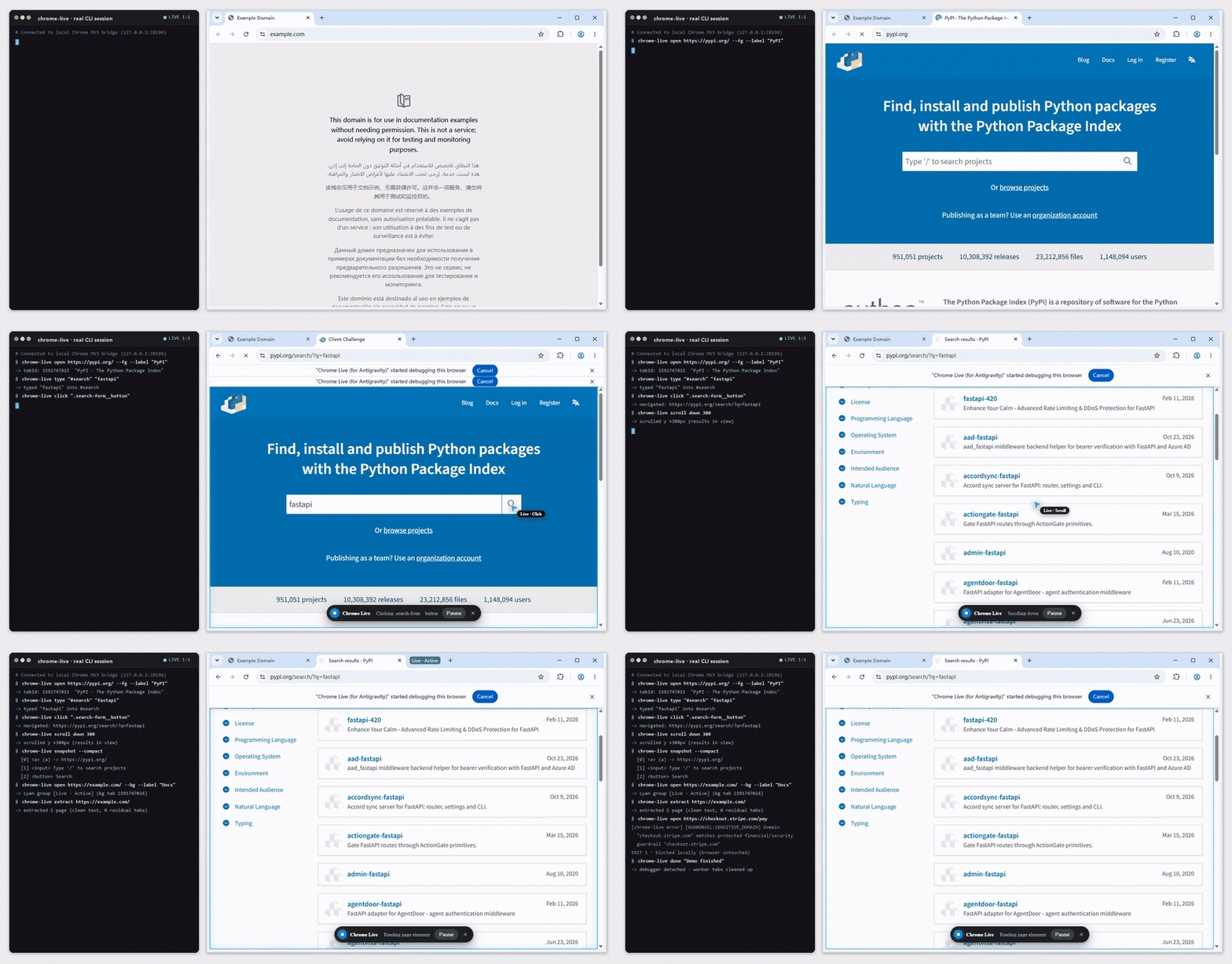
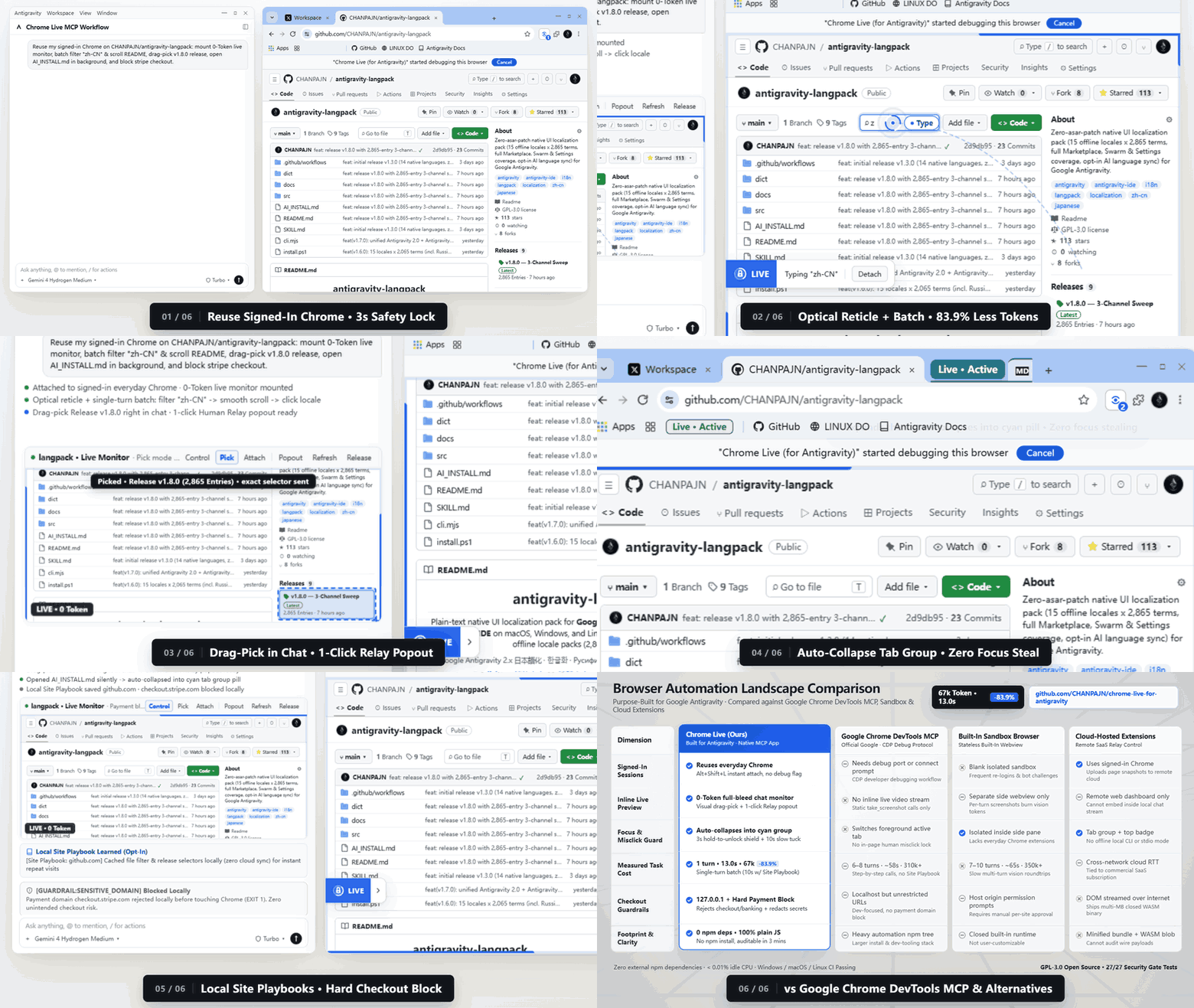
Visual Overview
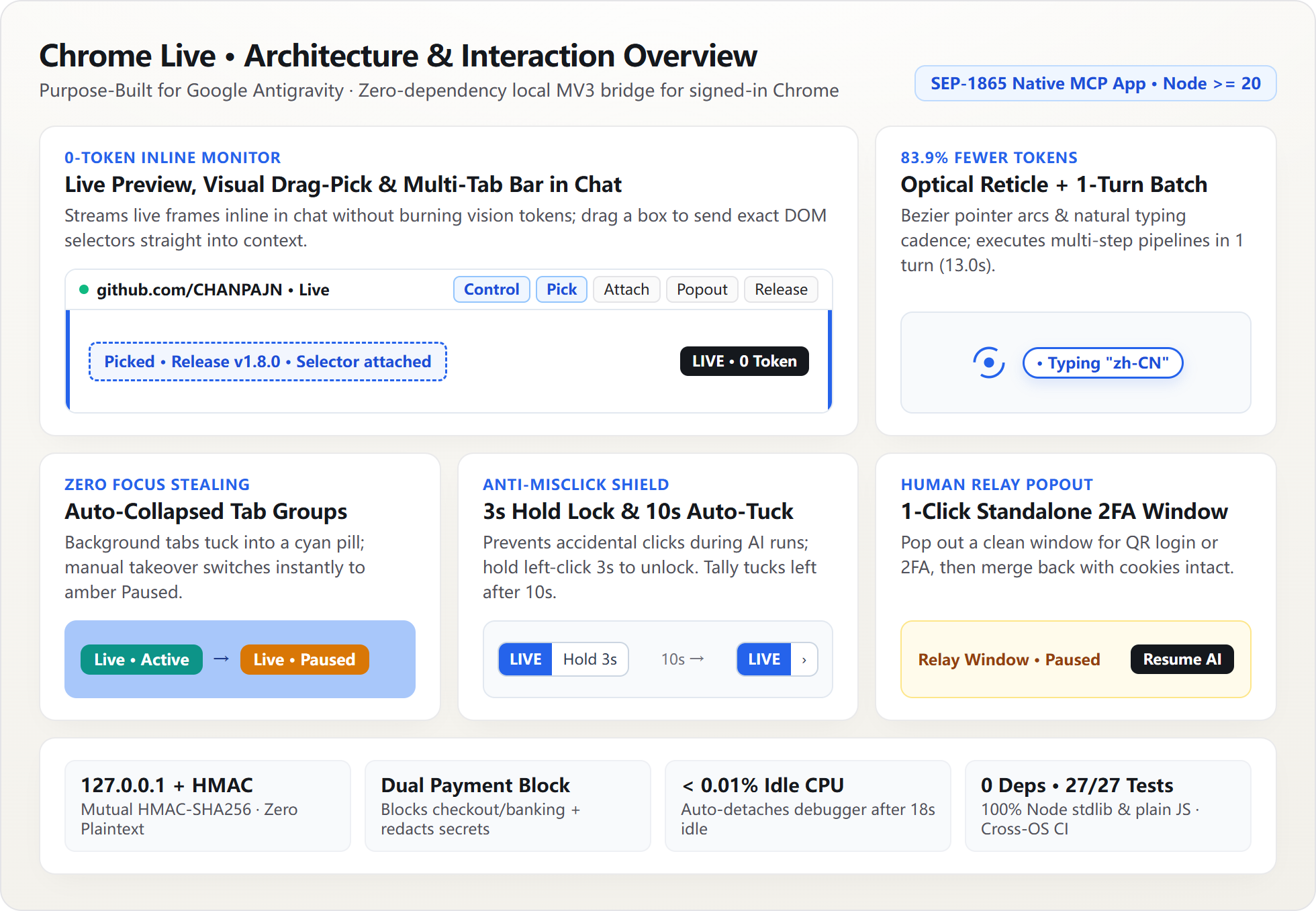
Architecture
flowchart LR
  AG["Google Antigravity\nChat / MCP Host"] <-->|"stdio JSON-RPC\n+ SEP-1865 ui://"| MCP["Local MCP Server\n& Inline Monitor UI"]
  CLI["Local CLI\nchrome-live.mjs"] <-->|"127.0.0.1:28196\nMutual HMAC-SHA256"| DMN["Local Bridge Daemon\nZero npm Dependencies"]
  MCP <-->|"127.0.0.1:28196\nMutual HMAC-SHA256"| DMN
  DMN <-->|"Loopback WS + Nonce\nPayment & Upload Guardrails"| EXT["Chrome MV3 Extension\nSigned-In Tabs & Tab Groups"]
Features
- Signed-In Tab Reuse, Anti-Misclick Lock & Bottom-Left Tally Badge: Press
Alt+Shift+L(Option+Shift+Lon macOS) or use the extension Side Panel console (click the toolbar icon to open the Side Panel, or right-click the icon for a standalone window) to share the active tab. A transparent anti-misclick lock shield (not-allowedcircle-slash cursor) protects controlled pages while a high-visibility two-cellLIVE/HOLDtally badge with an enlarged circle-lock icon sits in the bottom-left corner (gently tucks its text drawer to the left edge after 10s in the foreground while keeping the bold circle-lockLIVEtab & expand chevron clearly visible; slides open on hover/click); hold left-click for 3 seconds (circular progress ring), click theLIVElock cell, or pressEscto unlock manual control anytime. Runningdonedetaches the debugger without closing your shared tab. - Color-Coded Tab Groups &
3.5pxDual-Beam Perimeter Orbit: Active AI tabs sit inside a cyanLive · Activetab group with a crisp3.5pxdual-beam 360° clockwise perimeter orbit (synced with the rotating lock ring), while background research tabs auto-collapse into a compact pill without stealing window focus. Holding left-click for 3 seconds, clickingLIVE, pressingEsc, or popping out a relay window immediately freezes and switches the tab group and perimeter frame to amberLive · Paused(HOLD) so control state is unmistakable. - 0-Token Live Preview & Multi-Tab Switching (
SEP-1865): Streams live frames inline in chat (chrome_live_monitor), docked in the side pane, or full-page in the sidebar (chrome_live_workspace) without burning model tokens. Supports managing multiple controlled tabs simultaneously with per-tabIdisolated frame caches and a top tab switcher inside the live monitor, plus 6 direct controls:- Control: Click, scroll, and type directly on the live frame;
- Pick: Drag a box on the stream to extract real DOM selectors (traversing open Shadow DOM) straight into chat;
- Attach: Push the current tab's title, URL, and
tabIdinto the next prompt viaui/update-model-context; - Popout / Merge: Pop a controlled tab out into a standalone window for manual QR login, 2FA, or verification; click Resume inside Chrome to merge and continue automation, or click Merge / close the popout window to return the tab to your main window in Paused state (preserving cookies; closing the window reloads the tab URL);
- Refresh / Release: Pull a fresh frame immediately or detach control on demand.
- Human-Like Motion, Single-Roundtrip
batch& Clean Extraction: Pointer movements follow quadratic Bezier curves with approach deceleration and staggered typing cadence. Pipeopen -> type -> click -> wait -> snapshot -> donethrough stdin in a single turn, extract clean text and full-res image URLs across multiple background tabs viaextract, and inspect{DISABLED},{checked},{selected},{expanded}, and validation alerts through open Shadow DOM. - Opt-In Local Site Playbooks (
playbook on, Off by Default): Disabled (false) out of the box. When enabled in the extension side panel or via CLI, stores sanitized deep-link routes, stable CSS selectors, and widget tips locally in~/.chrome-live-antigravity/site-playbooks.json(protected via0700/0600on POSIX and current-usericaclsACLs on Windows) so repeat visits skip landing-page discovery.
Benchmarks
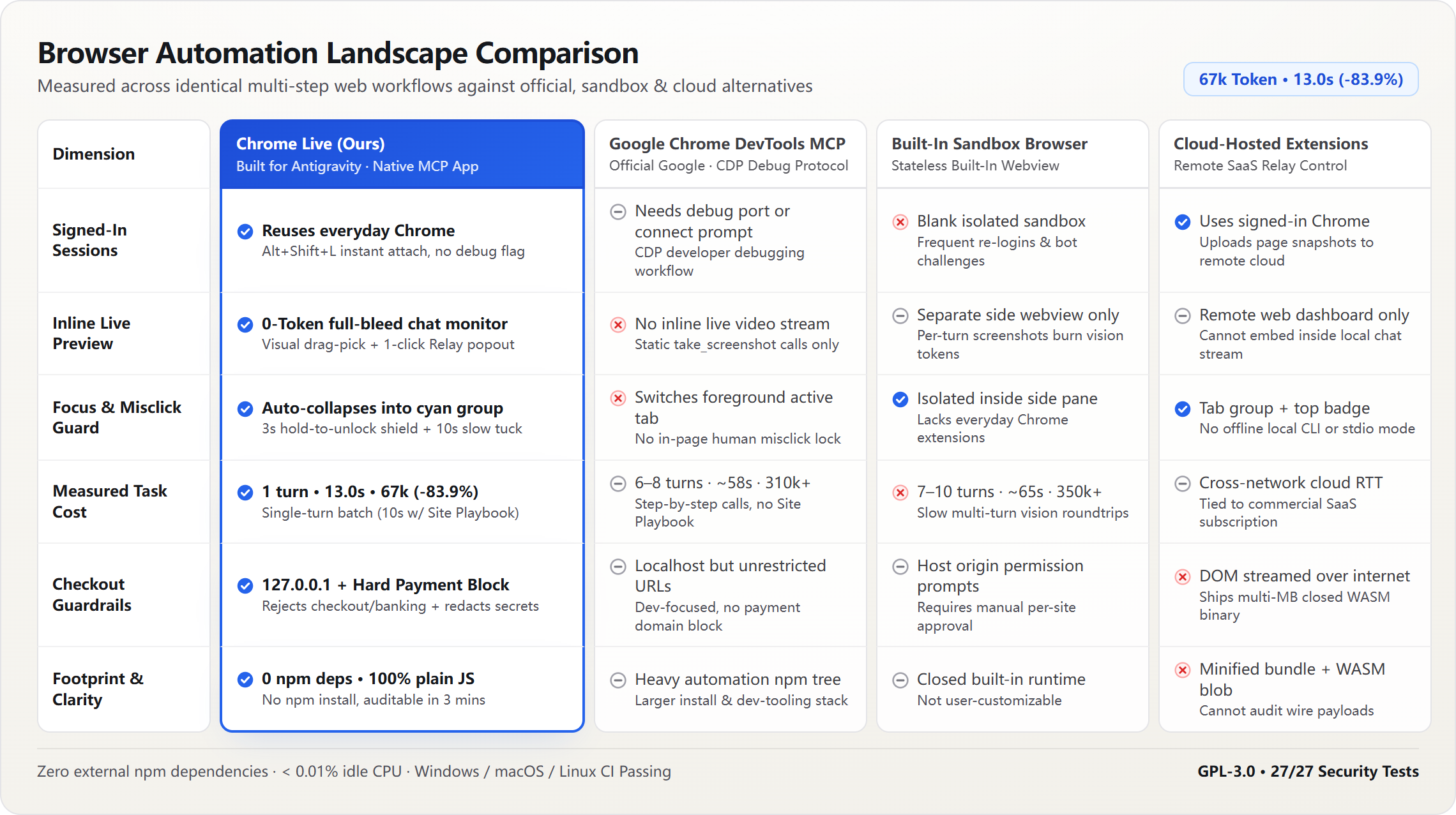
Measured on a real multi-step pypi.org search workflow (open -> type -> submit -> wait -> extract -> cleanup) from underlying session token logs:
| Mode | Agent Turns | Wall Time | Total Token Throughput | Non-Cached Tokens |
|---|---|---|---|---|
Classic step-by-step loop (open → snapshot → type → click → wait → snapshot → done) |
7 | 71.0s | 419,162 | 20,360 |
Single-roundtrip batch --compact |
1 (-85.7%) | 13.0s (5.5× faster) | 67,365 (-83.9%) | 2,445 (-88.0%) |
Repeat visit with playbook on |
1 (-85.7%) | 10.0s | Skips landing page discovery | — |
Background footprint: < 0.01% idle CPU (0.0096% measured), ~30–34 MB private memory, ~3s automatic extension reconnect after daemon restart, < 100ms local guardrail checks.
Install
Requires Node.js >= 20 and zero third-party npm packages.
AI Agent Setup (paste into Antigravity; see AI_INSTALL.md)
Read https://github.com/CHANPAJN/chrome-live-for-antigravity/blob/main/AI_INSTALL.md and follow it step by step to clone and configure chrome-live-for-antigravity, generate the local pairing token, start the bridge daemon, and return the local extension/ folder path for me to load in chrome://extensions.
Manual Setup (3 Steps)
Step 1 — Clone & generate local pairing token (~/.chrome-live-antigravity/auth.token, POSIX 0600 / Windows user-only icacls + gitignored extension/.local-runtime.json)
git clone https://github.com/CHANPAJN/chrome-live-for-antigravity.git
cd chrome-live-for-antigravity
node ./bin/chrome-live.mjs setup
Step 2 — Load the unpacked extension (Chrome / Edge / Brave)
Chrome 137+ removed --load-extension, so load it once from chrome://extensions (or edge://extensions): enable Developer mode, click Load unpacked, select this repository's extension/ directory, then verify the handshake:
node ./bin/chrome-live.mjs health
Step 3 — Connect to Antigravity (nothing is written to ~/.gemini/config/ until you opt in)
# Option A: Install Antigravity plugin (SKILL.md + Live Monitor Sidecar)
node ./bin/chrome-live.mjs install --with-plugin
Updating an existing checkout: Run
git pull && node ./bin/chrome-live.mjs reload(orgit pull && node ./bin/chrome-live.mjs install --with-pluginif using the plugin) to seamlessly restart the local daemon and hot-reload the unpacked Chrome extension in background.
Or mount manually as a standard stdio MCP server:
{
  "mcpServers": {
    "chrome-live": {
      "command": "node",
      "args": ["/absolute/path/to/chrome-live-for-antigravity/bin/chrome-live.mjs", "mcp"]
    }
  }
}
Usage & CLI
node ./bin/chrome-live.mjs health                           # Inspect daemon & extension connection status
node ./bin/chrome-live.mjs reload                           # Hot-reload unpacked extension (also auto-runs when local extension files update)
node ./bin/chrome-live.mjs open "https://example.com"       # Open URL inside collapsed background tab group
node ./bin/chrome-live.mjs snapshot                         # Capture indexed elements [0],[1] & page text
node ./bin/chrome-live.mjs click 0                          # Click by index, CSS selector, or visible label
node ./bin/chrome-live.mjs type "Search" "query" --submit   # Type into input field and submit
node ./bin/chrome-live.mjs upload "~/.chrome-live-antigravity/uploads/demo.png" # Attach staged file via native CDP
node ./bin/chrome-live.mjs batch - --compact                # Run multi-step stdin pipeline in 1 turn
node ./bin/chrome-live.mjs extract "https://a.com"          # Extract clean text & image URLs in parallel
node ./bin/chrome-live.mjs relay popout                     # Pop tab into standalone window for manual login/2FA
node ./bin/chrome-live.mjs relay merge                      # Merge popout back to main window (stays Paused until Resume in Chrome)
node ./bin/chrome-live.mjs release                          # Detach control without closing the tab
node ./bin/chrome-live.mjs done "Task complete"             # Detach debugger & close temporary worker tabs
Hiding the Chrome "started debugging this browser" Banner
Chrome displays a top infobar whenever an extension attaches chrome.debugger (clicking Cancel detaches AI control immediately):
- Auto-dismiss by default: You do not need to click Cancel — the extension detaches automatically on
doneor after 18 seconds of idle time, and the bar disappears on its own. - Suppress permanently (optional): Fully quit Chrome and launch it with Chromium's built-in
--silent-debugger-extension-apiflag:- Windows: Right-click your Chrome shortcut (Desktop / Taskbar) → Properties → append a space and
--silent-debugger-extension-apioutside the closing quote in Target, then restart Chrome:"C:\Program Files\Google\Chrome\Application\chrome.exe" --silent-debugger-extension-api - macOS: Quit Chrome completely (
Cmd + Q) and launch via Terminal:open -b com.google.Chrome --args --silent-debugger-extension-api - Linux: Run
google-chrome --silent-debugger-extension-api, or append the flag to theExec=line in your.desktoplauncher under~/.local/share/applications/.
- Windows: Right-click your Chrome shortcut (Desktop / Taskbar) → Properties → append a space and
Multi-Tab Concurrency & Model Recommendations
- Multi-tab scope: Monitoring multiple controlled tabs simultaneously in the live preview tab bar and running parallel read-only
extractjobs work cleanly with stricttabIdisolation. For multi-site rich-text posting or complex forms that share system clipboard / window focus, run one site serially at a time rather than firing parallel writes. - Recommended models for efficiency:
- Everyday lookup, extraction & single-roundtrip
batch: Fast / Flash-tier models respond quickly and pair best withbatch --compactand opt-in local Site Playbooks (playbook on). - Complex admin forms, Shadow DOM widgets & debugging: Switch to a higher-reasoning Pro-tier model for reliable ARIA alert handling and multi-step planning.
- Everyday lookup, extraction & single-roundtrip
How It Works & Operational Transparency
- On-Demand Debugger Attachment & Hard Pause/Cancel:
chrome.debugger(1.3) attaches only during active commands or live streaming and auto-detaches after 18 seconds of idle time (< 0.01%idle CPU). Holding left-click for 3s to unlock, toggling the edgeLIVEtally, pressingEsc, or popping out a relay window immediately stops screencasting, detaches the debugger, purges cached frames, and aborts in-flight click/typing/wait steps without allowing late updates to re-lock the page. Interactive UI callbacks require a per-process 256-bit capability token delivered exclusively viaCallToolResult._metato the isolatedui://iframe (omitted fromresources/readHTML,content, andstructuredContent), and only a user gesture inside Chrome can lift a pause. (Note: mounting the optional local CLISKILL.mdgrants shell-capable coding agents direct local CLI access; for strict MCP-only tool isolation, register only the stdio MCP server.) Clicking Cancel on Chrome's native debugging banner fully revokes tab control instead of silently reattaching, and sharing an existing signed-in tab requires explicit user action in Chrome (Alt+Shift+Lor extension UI). - Loopback Isolation & Full-Stack Mutual HMAC Auth: The daemon binds strictly to
127.0.0.1:28196(override withCHROME_LIVE_PORT), validates theHostheader, rejects webOriginheaders with403, cryptographically verifies a dedicatedX-Chrome-Live-Hdr-SigHMAC (withContent-Length, timestamp, and hex nonce) before buffering a single byte of POST body, enforces RFC 6455 client frame masking, evicts active WebSocket sessions immediately ifauth.tokenrotates, and authenticates every local client (MV3 extension WebSocket + HTTP, CLI, MCP server, and sidecar) via collision-free JSON-tuple HMAC-SHA256 request/response signatures—zero plaintext tokens ever traverse loopback sockets. State directories use POSIX0700/0600modes and Windows current-usericaclsACLs; the one-timeextension/.local-runtime.jsonbootstrap is excluded fromnpm packand shredded on first handshake. Whether to type into login/OTP forms or click verification widgets is left to the user and their chosen model's own safety policies, while read-side credential values are strictly redacted: snapshots, container labels, and click receipts never read back existing.valuefields, password inputs,-webkit-text-securitymasked text, or editor drafts, CSS attribute-substring selector probing is blocked, and outgoing URLs/excerpts apply multi-layer heuristic scrubbing for common sensitive query and#hashtokens. - Dual-Layer Financial & Staged Upload Guardrails (and Honest Scope): Both the daemon and the extension block major payment gateways (Stripe, PayPal, Alipay, WeChat Pay, retail banking portals),
chrome:///edge://, and common/checkout,/pay,/payment,/cashier,/billingroutes (with multi-pass percent-decoding, matrix-param and trailing-dot normalization,.html/.php/.htmsuffix matching, SPA hash parsing, andwebNavigationsub-frame URL inspection) acrossopen,navigate,batch, andextract. By default, CDP file uploads are confined to~/.chrome-live-antigravity/uploads(override viaCHROME_LIVE_UPLOAD_DIR), verifylstat/realpath+nlink === 1(O_NOFOLLOWon POSIX plus post-openrealpathSync.nativeverification on Windows) before freezing an immutable private snapshot directly from the open file descriptor to defeat cross-step TOCTOU swaps, and reject symlinks, directory junctions, hardlinks, and credential stores (.ssh,.env,.aws,Local State,key4.db,.pem,.tfstate). When multiple tabs are controlled simultaneously, mutating commands require an explicittabId. Note that heuristic route/token guardrails cannot cover arbitrary non-standard application routing or interpret business actions inside normal admin portals (such as editing prices, shipping, or refunds), and while DOM scripts do not traverse cross-origin iframes, browser-level screenshots and coordinate clicks cover the visible viewport on allowed pages—for high-risk accounts, use a dedicated Chrome profile. - Zero Host Patching & Clean Uninstall: Built purely on Node.js
>= 20standard modules and plain MV3 JavaScript — zero npm packages, zero prebuilt binaries, and zero edits to Antigravity binaries. Closed Shadow DOM and native OS file dialogs remain isolated by the browser sandbox. To verify or uninstall:
npm test                                                    # Run security, guardrail & protocol test suite
node ./bin/chrome-live.mjs stop                             # Stop daemon, then remove extension & ~/.chrome-live-antigravity
License
Released under the GNU General Public License v3.0 (GPL-3.0). Community discussion & feedback: LINUX DO.
Reviews (0)
Sign in to leave a review.
Leave a reviewNo results found