pappardelle
Health Gecti
- License — License: MIT
- Description — Repository has a description
- Active repo — Last push 0 days ago
- Community trust — 14 GitHub stars
Code Gecti
- Code scan — Scanned 12 files during light audit, no dangerous patterns found
Permissions Gecti
- Permissions — No dangerous permissions requested
This is a terminal user interface (TUI) that helps developers manage multiple AI coding sessions simultaneously. It automates the workflow of creating issue tickets, spawning git worktrees, and launching parallel Claude Code and lazygit sessions in a unified tmux layout.
Security Assessment
Risk Rating: Medium. The tool inherently operates as a local task automator and shell orchestrator, meaning it directly executes local commands to manage tmux sessions, git worktrees, and invoke the Claude CLI. While the automated code scan (12 files) found no dangerous patterns, hardcoded secrets, or requests for overly sensitive permissions, the tool's core function requires extensive local system access. Additionally, it interacts with external services like GitHub, Linear, or Jira via API integrations, requiring you to provide those access tokens. You are trusting the tool to handle those credentials safely.
Quality Assessment
The project appears to be actively maintained, with its last code push occurring today. It uses the highly permissive MIT license and has passing automated tests. However, it is a very niche and early-stage project with only 14 GitHub stars. The community trust level is currently minimal, meaning the tool has not been widely vetted by a large audience of security researchers or developers.
Verdict
Use with caution. The code is clean, but its deep system access and requirement for external API tokens mean you should review how it stores your credentials before integrating it into your daily workflow.
A TUI for multi-clauding without losing your marbles
🦀🍝🦀 Pappardelle 🦀🍝🦀


A TUI for multi-clauding without losing your marbles.
You type a description, it reads or creates an issue in Linear/Jira, spawns a configured git worktree, builds a PR/MR, and starts a Claude Code session alongside a lazygit session — all wired together in a 3-pane tmux layout you can navigate with simple, customizable keystrokes.
Video:
https://github.com/user-attachments/assets/abeaf413-5a1e-448a-ac53-2956a8ada5bf
Table of Contents
- Installation and Getting Started
- Understanding tmux in Pappardelle
- Spawning New Sessions
- Spec-Driven Development Mindset
- Customizing Your Configuration
- Advanced: Doom-coding with Pappardelle
- Advanced: Wrangling Multi-Repo Changes
- Reference
1. Installation and Getting Started
The fastest way to get set up is with /init-pappardelle.
Add the marketplace:
claude plugin marketplace add chardigio/pappardelle
Install the plugin. This installs four skills — /init-pappardelle (setup wizard), /update-pappardelle (update to latest), /configure-pappardelle (interactive config editor), and /sous-chef (optional workspace coordinator):
claude plugin install pappardelle@pappardelle-marketplace
Run the setup wizard from any repo where you want to use Pappardelle. This installs pappardelle configures your .pappardelle.yml:
claude /init-pappardelle
For manual installation, see Section 8: Reference. For the full config format, see the configuration reference.
Launch Pappardelle:
pappardelle
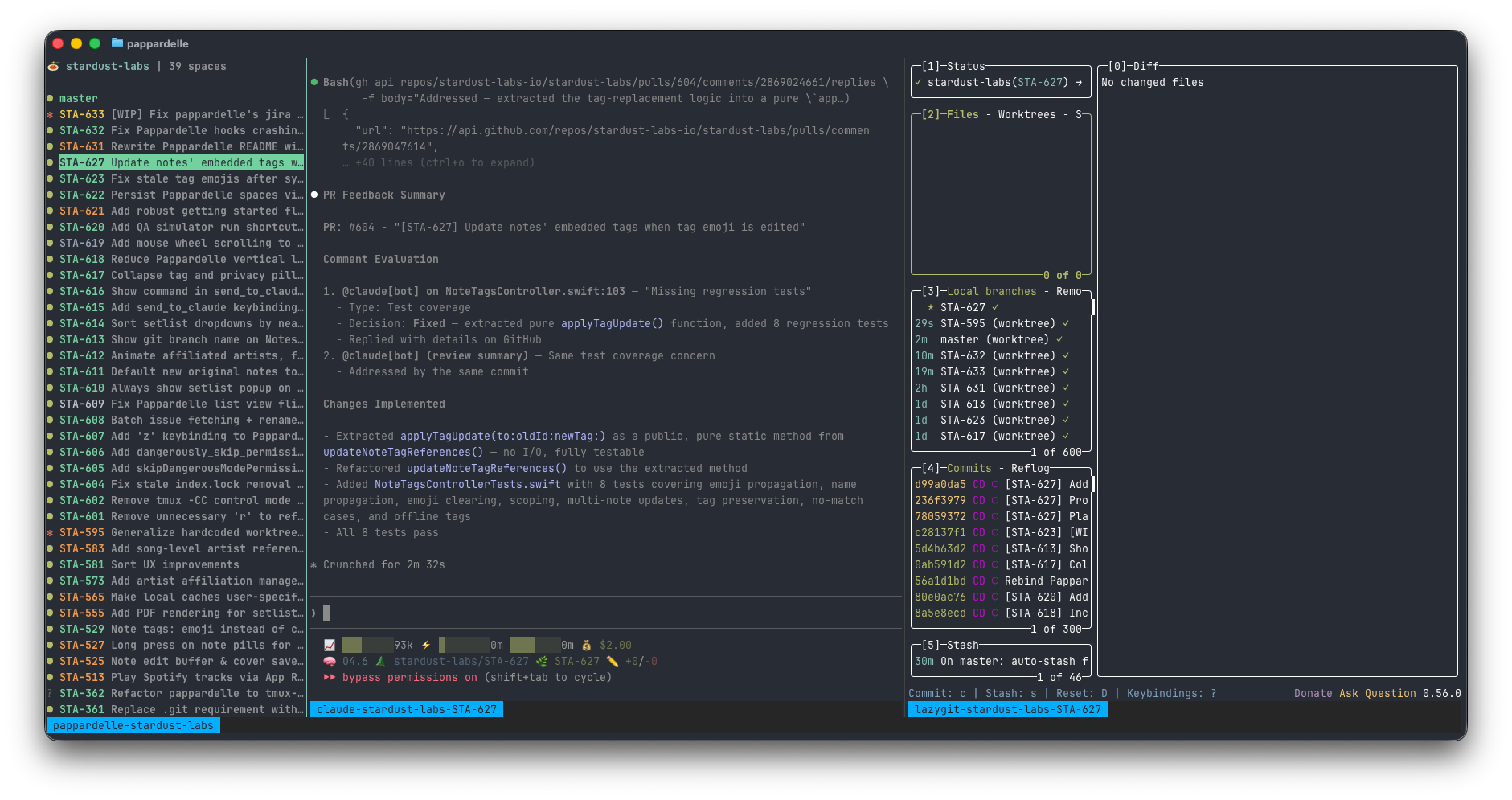
2. Understanding tmux in Pappardelle
The 3-pane layout
When you launch pappardelle, it creates a tmux session with three panes:
- Left pane shows the ticket rail. This is where you navigate workspaces, create new ones, and trigger actions.
- Center pane shows the Claude Code session for whichever workspace is highlighted.
- Right pane shows lazygit for the highlighted workspace's worktree.
How nested sessions work
Each workspace creates two independent tmux sessions:
claude-{repo}-{issue-key}— runs Claude Codelazygit-{repo}-{issue-key}— runs lazygit
The center and right panes in the Pappardelle session are "viewers" — they run nested tmux clients that attach to these independent sessions. When you highlight a different workspace in the list, Pappardelle uses tmux switch-client to instantly swap which session the viewer pane displays.
This means:
- Workspaces are independent. Each Claude session runs in its own tmux session. If Pappardelle crashes, your Claude sessions keep running.
- Attach from anywhere. You can attach to any workspace's Claude session from a separate terminal:
tmux attach -t claude-stardust-labs-STA-631. - Switching is instant. After the first attachment, switching between workspaces uses tmux's fast
switch-clientpath — no process restart, no visible flash.
Recommended tmux config
Pappardelle works with any tmux configuration, but these settings improve the experience — mouse support, Ctrl+Shift+arrow pane navigation, and a clean status bar. See examples/tmux.conf and append to your ~/.tmux.conf. If you don't have one yet:
curl -fsSL https://raw.githubusercontent.com/chardigio/pappardelle/main/examples/tmux.conf -o ~/.tmux.conf
Exiting Pappardelle
Press q in the workspace list pane to quit. This kills the Pappardelle tmux session and all its viewer panes, returning you to your original terminal. Your Claude and lazygit workspace sessions are not affected — they run in independent tmux sessions and will keep going after Pappardelle exits. To reattach, just run pappardelle again.
To also kill all workspace sessions, use Delete on each workspace from the TUI before quitting, or nuke everything with:
tmux kill-server
3. Spawning New Sessions
From the TUI
Press n in the workspace list to open the prompt dialog.
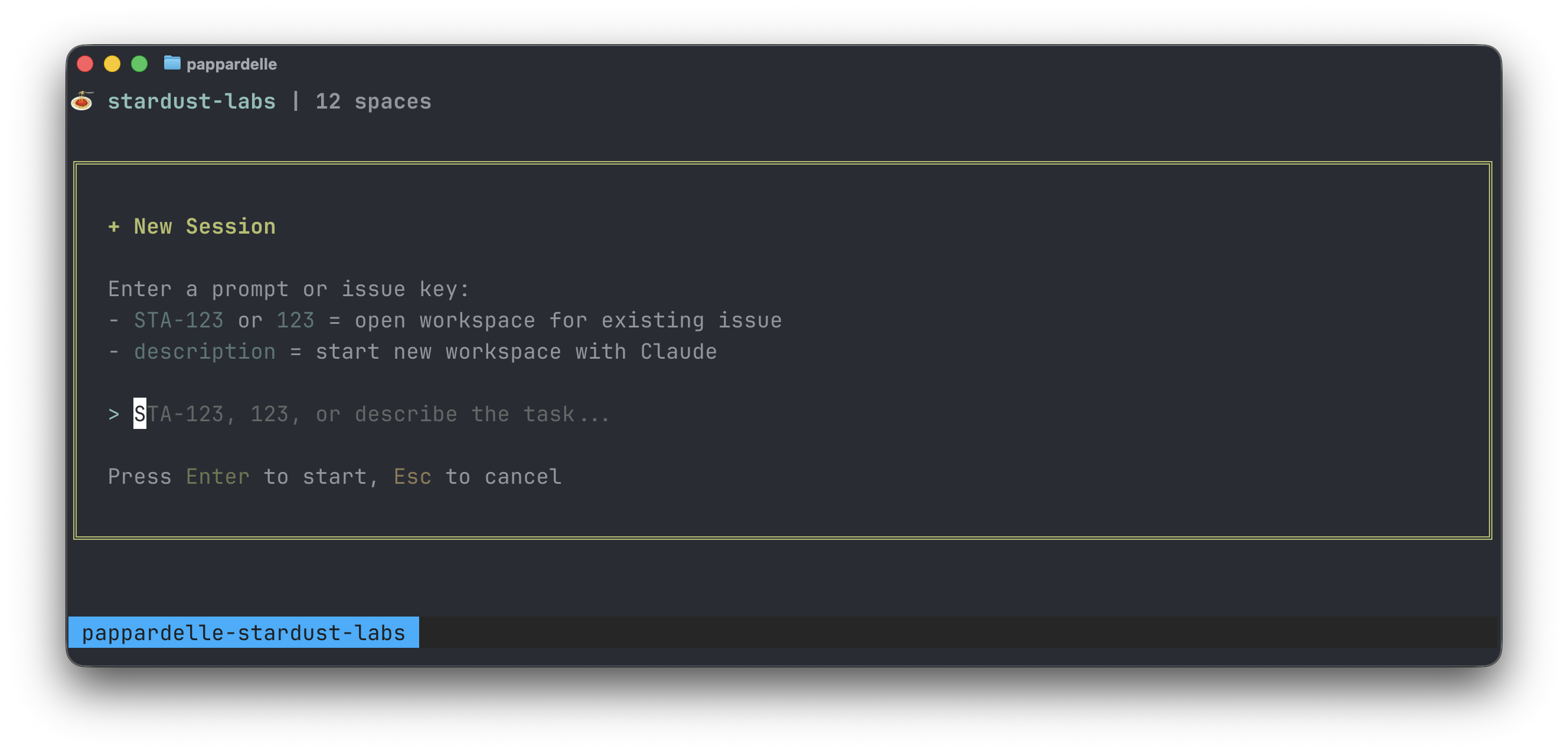
What gets provisioned
When you create a workspace, Pappardelle runs through these steps:
Profile selection — Your input is keyword-matched against a profile in
.pappardelle.yml.Issue creation/fetch — For new descriptions, a Linear (or Jira) issue is created with a WIP title. For existing issue keys, the issue is fetched.
Git worktree — An isolated worktree is created at
~/.worktrees/{repo-name}/{issue-key}/. This is a full working copy of your repo on a new branch, completely isolated from your main checkout.PR/MR creation — A placeholder PR (GitHub) or MR (GitLab) is created from the new branch.
Project setup — Profile
commandsare executed (e.g.,xcodegen generate, dependency installs). Top-levelpost_workspace_initcommands also run after the worktree is created (e.g., copying.envfiles).Claude & lazygit sessions spawned — A named tmux session is created and Claude Code is launched inside it. If
claude.initialization_commandis set in.pappardelle.yml(e.g.,/do), that command is passed to Claude along with the issue key. A lazygit session rooted at the worktree dir is also spawned.
4. Spec-Driven Development Mindset
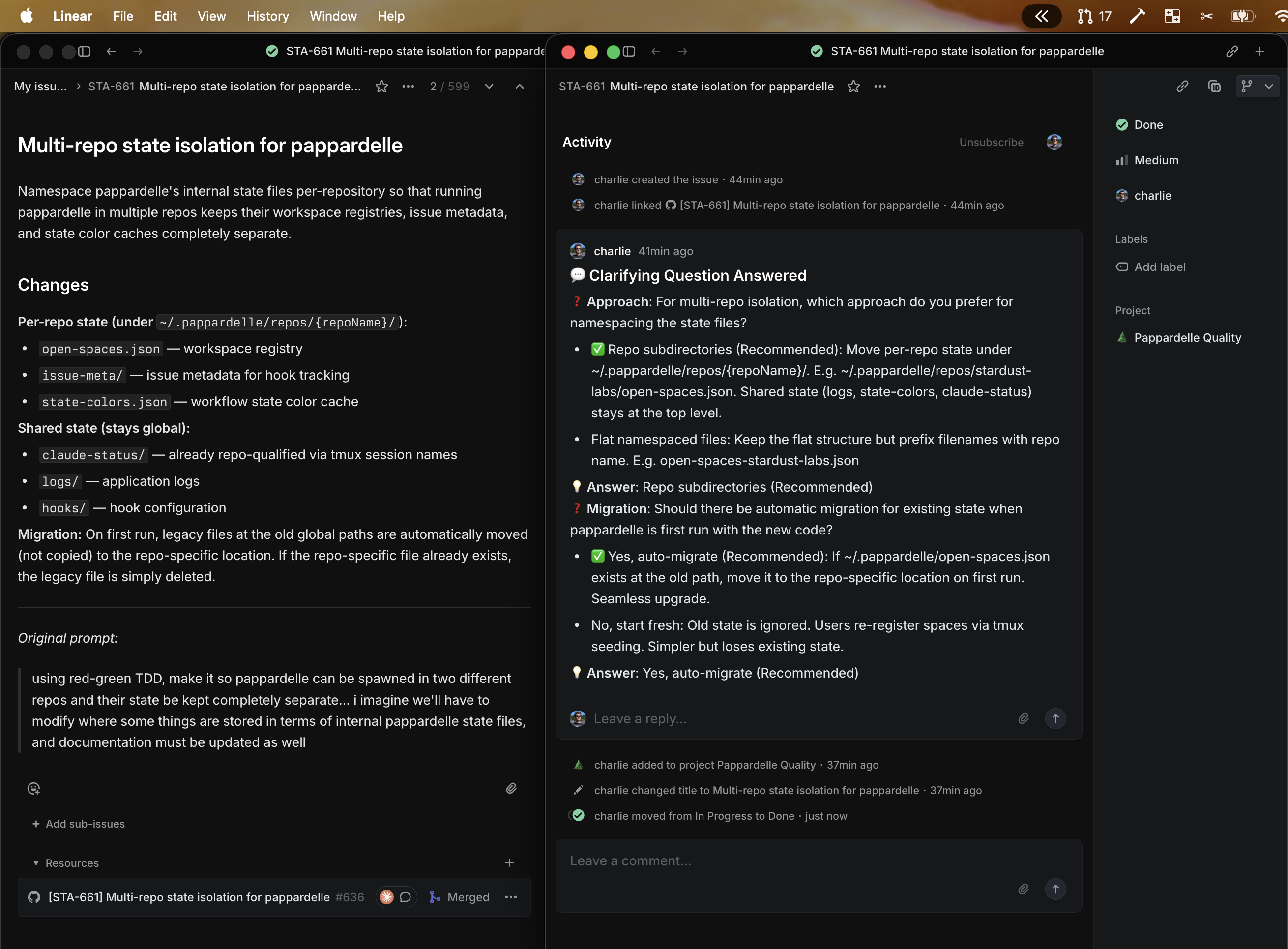
Pappardelle's recommended /do skill (set via claude.initialization_command in .pappardelle.yml) starts every Claude session with a planning-first workflow. Before writing any code, the agent researches and uses Claude Code's AskUserQuestion tool to clarify requirements — asking about ambiguous scope, confirming design decisions, and validating edge cases. The goal is to turn a rough prompt into a detailed, unambiguous spec — written back to the issue description — before the first line of code is written.
Why this matters
A one-line prompt like "add dark mode to settings" leaves a lot of questions open: which settings screen? System preference or manual toggle? What colors? The /do skill instructs the agent to surface these questions upfront rather than guessing. This front-loaded clarification produces better code on the first pass and fewer revision cycles.
Automatic Q&A documentation
Every AskUserQuestion exchange is automatically posted as a comment on the Linear or Jira issue by the comment-question-answered.py hook. This means:
- The issue becomes the single source of truth. The original prompt, every clarifying question, and every answer are all captured in one place — not scattered across chat windows or terminal scrollback.
- Anyone reviewing the PR can see the full context. The issue thread shows exactly what the agent asked, what the developer decided, and why.
- Record-keeping is automatic. You don't need to manually document decisions or copy-paste from the terminal. The hook handles it silently in the background.
5. Customizing Your Configuration
Use /configure-pappardelle to interactively edit your config — it walks you through adding profiles, keybindings, hooks, and more using AskUserQuestion. Available via the plugin marketplace or by asking Claude directly (it's model-invocable).
Pappardelle is configured via a .pappardelle.yml file at your repo root. The key concepts:
- Issue watchlist — Auto-discover issues assigned to you and spawn workspaces for them. Pappardelle polls your issue tracker and creates workspaces for new matching issues.
- Profiles — Per-project-type config (keywords, setup commands, VCS labels). Pappardelle keyword-matches your input to auto-select the right profile.
- Template variables — All string values support
${VAR_NAME}expansion (${ISSUE_KEY},${WORKTREE_PATH},${PR_URL}, profilevars, env vars, etc.). - Custom keybindings — Bind single keys to bash commands (
run) or Claude directives (send_to_claude). - Providers — Pluggable issue trackers (Linear, Jira) and VCS hosts (GitHub, GitLab). Defaults to Linear + GitHub.
- Built-in file copies —
.pappardelle.local.ymland.claude/settings.local.jsonare automatically copied from the main repo to new worktrees (if they exist). - Workspace lifecycle hooks —
post_workspace_initcommands run after worktree creation (e.g., copying.envfiles, installing dependencies).pre_workspace_deinitcommands run before workspace deletion (e.g., closing issues, removing worktrees).
For the full schema, all fields, and examples, see the configuration reference.
For a production .pappardelle.yml used across a polyglot monorepo (Python backends + Swift iOS apps), see examples/monorepo-pappardelle.yml.
6. Advanced: Doom-coding with Pappardelle
Video:
https://github.com/user-attachments/assets/824307b7-73a6-48d2-918f-4a2d75fcb39b
Because Pappardelle runs entirely inside tmux, you can access your full workspace setup from anywhere — all you need is an SSH connection to the machine running it.
What you need
- A machine that stays on — I'm not a Mac Mini guy (yet), I just keep my MacBook plugged in. macOS won't sleep with the lid closed as long as it has power and an active SSH session.
- Tailscale — A mesh VPN that makes your dev machine accessible from any network without port forwarding or firewall configuration. Install on both your dev machine and your mobile device.
- Termius (iOS) — A full-featured SSH client for iPhone and iPad with good tmux support, copy/paste, and keyboard shortcuts.
Nice-to-haves
- ntfy — Push notifications to your phone when Claude needs input. Pappardelle ships with a
zap-notification.pyhook that sends a push via ntfy whenever Claude asks a question or hits a permission prompt. To get it working, set thePAPPARDELLE_NTFY_TOPICenvironment variable and subscribe to the same topic in the ntfy app on your phone — the hook only fires when an Tailscale SSH session is active. This way you don't have to babysit the terminal — just wait for the buzz. - Wispr Flow — Voice-to-text dictation that works system-wide, including inside Termius. Lets you talk to Claude instead of thumb-typing on a phone keyboard.
Recommended Termius keyboard shortcuts
Termius lets you customize the shortcut bar above the on-screen keyboard — these are my favorite groups for Pappardelle:
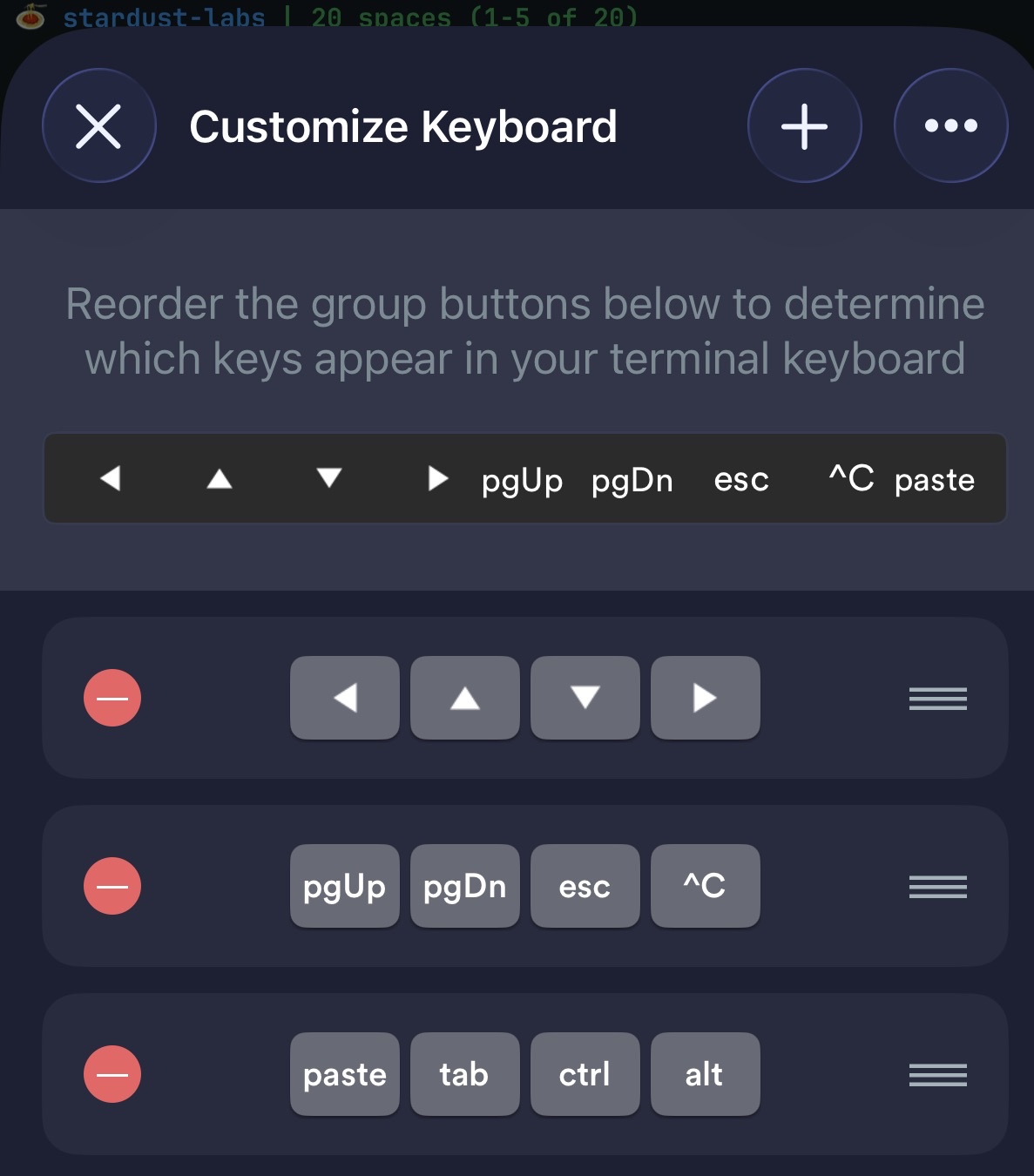
- Arrow keys — scroll through Claude output and navigate the workspace list
- pgUp / pgDn — cycle between tmux panes (requires the
PageUp/PageDownbindings fromexamples/tmux.conf) - esc / ^C — cancel prompts, exit modes
- paste / tab / ctrl / alt — general terminal essentials
Also recommended: toggle on Settings > Hide the AI widget in Termius for extra screen real estate.
Useful keybindings
When you're doom-coding from your phone, you want one-tap access to open the PR on the device in your hand. Bind a key that sends an ntfy notification with a clickable link:
keybindings:
  - key: 'z'
    name: 'Zap PR'
    run: >
      PR_NUM=$(gh pr list --head ${ISSUE_KEY} --json number -q '.[0].number' 2>/dev/null);
      if [ -n "$PR_NUM" ]; then
        curl -d "${ISSUE_KEY} GitHub PR #$PR_NUM"
          -H "Click: $(gh pr list --head ${ISSUE_KEY} --json url -q '.[0].url')"
          ntfy.sh/${PAPPARDELLE_NTFY_TOPIC};
      fi
Press z on a workspace and your phone buzzes with a notification — tap it and the PR opens in the GitHub app.
7. Advanced: Wrangling Multi-Repo Changes
Pappardelle is designed for single-repo workflows, but (experimentally) you can extend it to orchestrate changes across multiple repositories using a parent (pappa) repo.
The setup
Create a parent repository that serves as the orchestration hub:
my-workspace/
├── .pappardelle.yml
├── .claude/
│   ├── settings.json         # shared settings + plugins
│   └── skills/
│       ├── do/
│       │   └── SKILL.md      # initialization skill
│       └── address-mr-feedbacks/
│           └── SKILL.md      # orchestration skill
└── CLAUDE.md
The parent repo's primary purpose is to share settings, context, and orchestration skills to coordinate work across child repos. Child repos are not committed to the parent — they're shallow-cloned on demand during workspace setup.
Spawning agents in child repos
Multi-repo work has been an achilles heel for Claude Code in the past, but I'm hoping Agent Teams can help solve this. One key unlock with agent teams is that teammates can be spawned in separate directories, meaning we can have a parent repo, but then spawn an agent per relevant child repo, which is nice because it automatically loads that repo's CLAUDE.md, skills, settings, etc.
On-demand shallow cloning
Repos are pulled down as needed, not upfront. During the planning phase, use a search tool like SourceBot's codesearch MCP to identify which repos are relevant, then shallow-clone only what you need:
git clone --depth 1 https://github.com/org/repo-a.git
This keeps initialization fast and reduces noise for the agent while it greps and globs. Because we use --depth 1, only the latest commit is fetched — no full history.
Plugin skills vs. parent repo skills
One key distinction for multi-repo work is between plugin skills and parent repo skills:
Plugin skills (added in the parent repo's
settings.jsonbut defined elsewhere) are skills that can be used by any repo / agent teammate receives automatically. These handle single-repo concerns.Example: An
/address-mr-feedbackplugin that lets any agent look at its own repo's MR and address reviewer comments.Parent repo skills (in the parent repo's
.claude/skills/) are orchestration skills that spawn agent teams across child repos.Example: An
/address-mr-feedbacks(plural) skill that spins up an agent team, spawning one agent per relevant child repo — each agent calls the plugin's singular skill for its own MR.
Example /do skill for multi-repo
A starter /do skill tailored for multi-repo workflows is available at examples/skills/do-multi-repo/SKILL.md. It covers shallow cloning, agent team spin-up, per-repo QA, and coordinated PR creation. Install it into your parent repo with:
mkdir -p .claude/skills/do && curl -fsSL https://raw.githubusercontent.com/chardigio/pappardelle/main/examples/skills/do-multi-repo/SKILL.md -o .claude/skills/do/SKILL.md
Useful keybindings
Bind keys to open specific child repos in your editor for quick navigation:
keybindings:
  - key: 's'
    name: 'Open repo-a in Cursor'
    run: 'open -a "Cursor" "${WORKTREE_PATH}/repo-a" 2>/dev/null || open -a "Cursor" "${REPO_ROOT}/repo-a"'
Note the fallback to ${REPO_ROOT}/repo-a here ensures this shortcut works in the master/main space.
8. Reference
Prerequisites
| Tool | Required | Install |
|---|---|---|
| Node.js >= 18 | Yes | brew install node |
| npm | Yes | Comes with Node.js |
| git | Yes | brew install git |
| tmux | Yes | brew install tmux |
| jq | Yes | brew install jq |
| Claude Code | Yes | curl -fsSL https://claude.ai/install.sh | bash |
| linctl | Optional | brew tap raegislabs/linctl && brew install linctl (for Linear) |
| gh | Optional | brew install gh (for GitHub) |
| glab | Optional | brew install glab (for GitLab) |
| acli | Optional | brew tap atlassian/homebrew-acli && brew install acli (for Jira) |
Manual installation
If you prefer to install without the /init-pappardelle skill:
One-line install:
curl -fsSL https://raw.githubusercontent.com/chardigio/pappardelle/main/install.sh | bash
From a local clone:
git clone https://github.com/chardigio/pappardelle.git
cd pappardelle
./install.sh
Manual install:
git clone https://github.com/chardigio/pappardelle.git
cd pappardelle
npm install
npm run build
npm link                # makes `pappardelle` available globally
./hooks/install.sh      # installs Claude Code hooks for status tracking
Directories created by the installer:
| Directory / File | Purpose |
|---|---|
~/.pappardelle/ |
Config, hooks, logs, and Claude status files |
~/.pappardelle/repos/{repoName}/open-spaces.json |
Persisted workspace registry (per-repo, survives reboots) |
~/.pappardelle/repos/{repoName}/issue-meta/ |
Issue metadata for hook tracking (per-repo) |
~/.pappardelle/claude-status/ |
Real-time status JSON files from Claude hooks |
~/.pappardelle/logs/ |
Daily log files (7-day retention) |
~/.worktrees/ |
Git worktrees for all your workspaces |
Multi-repo support: State is namespaced per repository under
~/.pappardelle/repos/{repoName}/.
Running pappardelle in two different repos keeps their workspace registries completely separate.
On first run, existing state is automatically migrated from the legacy global location.
Creating workspaces from the command line
You can create workspaces without launching the TUI using the idow ("interactively do on worktree") command:
# Create a workspace from a description
idow "add dark mode to settings"

# Create a workspace for an existing issue
idow STA-123
Claude Code hooks
Pappardelle installs three Claude Code hooks that provide integration between Claude sessions and the TUI:
| Hook | Trigger | What it does |
|---|---|---|
update-status.py |
PreToolUse, PostToolUse, Stop |
Writes session status to ~/.pappardelle/claude-status/ for live TUI updates |
comment-question-answered.py |
PostToolUse (AskUserQuestion) |
Posts Q&A exchanges as comments on the issue (Linear or Jira) |
zap-notification.py |
PreToolUse, PermissionRequest |
Sends push notifications via ntfy when Claude needs user input |
Logging
Logs are written to ~/.pappardelle/logs/ with daily rotation (7-day retention):
# View today's log
cat ~/.pappardelle/logs/pappardelle-$(date +%Y-%m-%d).log

# Tail logs in real-time
tail -f ~/.pappardelle/logs/pappardelle-*.log

# View errors only
grep '\[ERROR\]' ~/.pappardelle/logs/*.log
Warnings and errors also appear in a red box at the bottom of the TUI. Press e to view them.
Development
npm run dev      # Watch mode (auto-rebuild on changes)
npm run build    # Build once
npm start        # Run without building
npm test         # Lint + format check + tests
Integration tests
Standalone scripts in integration-tests/ verify providers against real instances. They are not ava tests and are never run in CI — use them for local verification after making provider changes.
npx tsx integration-tests/verify-linear.ts     # Linear provider (linctl)
npx tsx integration-tests/verify-jira.ts       # Jira provider (acli)
npx tsx integration-tests/verify-github.ts     # GitHub PR detection (gh)
npx tsx integration-tests/verify-gitlab.ts     # GitLab MR detection (glab)
npx tsx integration-tests/verify-config.ts     # Config loading + validation
npx tsx integration-tests/verify-watchlist.ts  # Full watchlist pipeline end-to-end
npx tsx integration-tests/verify-comments.ts   # Comment posting (creates real comments)
See integration-tests/README.md for env vars and prerequisites.
Plugin Marketplace
Pappardelle ships a Claude Code plugin marketplace with a single pappardelle plugin containing four skills:
| Skill | Description | Model-invocable |
|---|---|---|
/init-pappardelle |
Interactive setup wizard — installs Pappardelle, checks prerequisites, generates .pappardelle.yml |
No |
/update-pappardelle |
Re-runs the install script to update Pappardelle to the latest version | No |
/configure-pappardelle |
Interactive config editor for .pappardelle.yml and .pappardelle.local.yml — profiles, keybindings, hooks, watchlists, and more |
Yes |
/sous-chef |
Kitchen-style coordinator — quick overview of active spaces, drill into any space for a sitrep, relay instructions to running Claude sessions via tmux | No |
Install the plugin:
claude /plugin marketplace add chardigio/pappardelle
claude /plugin install pappardelle@pappardelle-marketplace
Because /configure-pappardelle is model-invocable, Claude will automatically offer to use it when you ask about configuring Pappardelle — no need to invoke it explicitly.
Dependencies
- Ink — React for CLIs
- tmux — Terminal multiplexer
- lazygit — Terminal git UI
- Claude Code — AI coding assistant
Yorumlar (0)
Yorum birakmak icin giris yap.
Yorum birakSonuc bulunamadi