opencode-sidecar
Health Uyari
- License — License: MIT
- Description — Repository has a description
- Active repo — Last push 0 days ago
- Low visibility — Only 5 GitHub stars
Code Basarisiz
- fs module — File system access in package.json
- process.env — Environment variable access in scripts/hero.mjs
- process.env — Environment variable access in scripts/icons.mjs
- eval() — Dynamic code execution via eval() in scripts/screenshots.mjs
- fs.rmSync — Destructive file system operation in scripts/screenshots.mjs
- process.env — Environment variable access in scripts/screenshots.mjs
Permissions Gecti
- Permissions — No dangerous permissions requested
Bu listing icin henuz AI raporu yok.
OpenCode chat sidebar and GUI for VS Code, Cursor and VSCodium: every agent step on one timeline, live subagents, diffs, @ mentions, permissions, fork and rewind. Unofficial, open source.
Sidecar for OpenCode
An OpenCode chat sidebar and GUI for VS Code. Sidecar for OpenCode is a free, open-source extension that puts the OpenCode coding agent in a chat panel beside your code, in VS Code, Cursor, Windsurf and VSCodium: every step on one timeline, live subagents you can open and stop, Keep or Undo for each change the agent made, approval modes, permission requests and questions answered where you type, several sessions at once, @ mentions, images, fork and rewind, and panels for providers, agents, MCP servers and project instructions.




Free and open source. An independent community project, not affiliated with OpenCode; the official OpenCode extension is sst-dev.opencode.
Why Sidecar
OpenCode is a capable agent. Sidecar is built so you can see and steer everything it does without leaving the editor.
- Built on OpenCode's own API. Sidecar talks to the OpenCode 2 service on your machine through its v2 HTTP API. Your sessions, models, providers, agents, commands, skills and permission rules are OpenCode's, so nothing is locked in: open the same session in OpenCode's terminal UI and Sidecar follows along, including rewinds and model changes made there.
- Nothing hidden. Each prompt gets a timeline of what the agent did: thinking time, every tool call with its input and output, diffs with your theme's syntax colors, and each subagent with its exact prompt, live activity and report.
- You stay in control. Sidecar approves nothing on its own. Permission requests, including those raised deep inside a subagent, wait in place of the message box until you answer, and you can tell the agent what to do instead; an approval mode you choose (Ask, Balanced or Auto) decides what may run without asking. Every change the agent makes can be kept or undone hunk by hunk, and Budget Guard stops a runaway task at a cost or step limit you choose.
- Made for VS Code. Theme colors only (dark, light and high contrast), a layout that works from a 300 px side bar to a wide editor tab, keyboard access throughout, native notifications, and editor tabs for long output.
- Private by design. Sidecar connects only to your local OpenCode service, sends nothing anywhere else and collects no telemetry. It is tested with hundreds of unit tests, a headless-browser suite, live tests of its OpenCode calls against a real OpenCode 2 service, and end-to-end runs in VS Code with a real model.
OpenCode coverage
| OpenCode | In Sidecar |
|---|---|
| Sessions | History with search, rename, fork from any prompt, archive and restore, new session |
| Several sessions at once | A strip of open sessions with their status; a notice when one you're not looking at needs you |
| Prompts and delivery | Send, steer the running task or queue the next message; switch, edit or remove pending ones |
| Agents and models | Agent switch (Shift+Tab), models by provider, variants, defaults per workspace |
| Project instructions | Which AGENTS.md / CLAUDE.md files OpenCode reads here; create one, /init, Remember this on a reply |
| Custom agents | Create and edit agents (prompt, model, permissions) as OpenCode's Markdown files; import Roo/Kilo modes |
| Providers | Connect, sign in again or disconnect through OpenCode's sign-in, with each one's state |
| Setup check | One report: the opencode program, service, sign-in, models, providers and Windows PATH |
| MCP servers | Each server's state; Connect, Disconnect, Retry, sign in with OAuth, add one for this run, reload |
| Tools | A timeline row per call: shell IN/OUT, reads, edits with diffs, writes, searches, and the rest |
| Subagents | Live rows with prompt, activity, Stop and Open; their requests and reports come back to you |
| Permissions | Yes, Always allow (when offered), No, or No with an instruction for the agent |
| Permission rules | Approval modes (Ask, Balanced, Auto) as session rules, a rules editor, "always allow like this" |
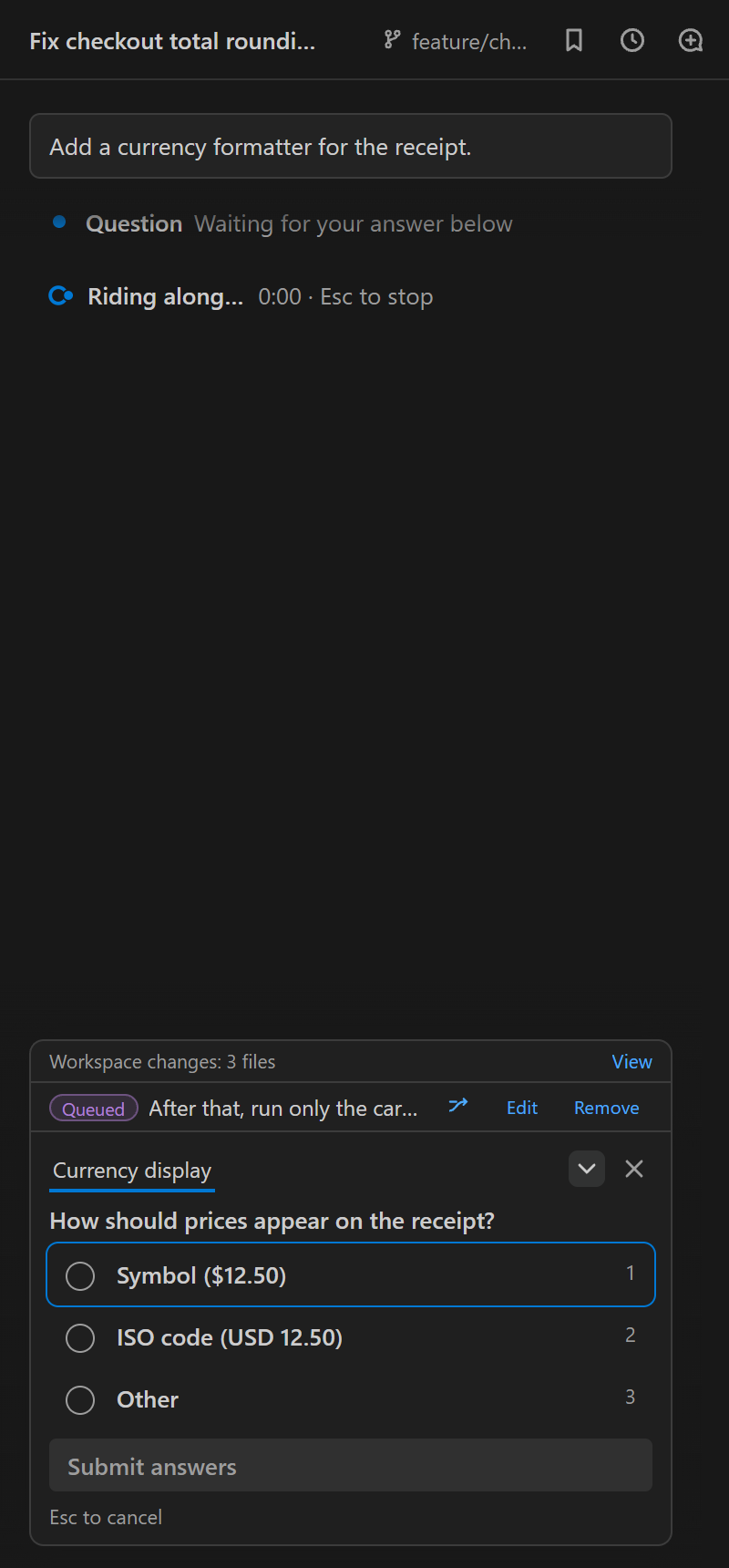
| Questions | A tabbed form with options, an Other answer and descriptions |
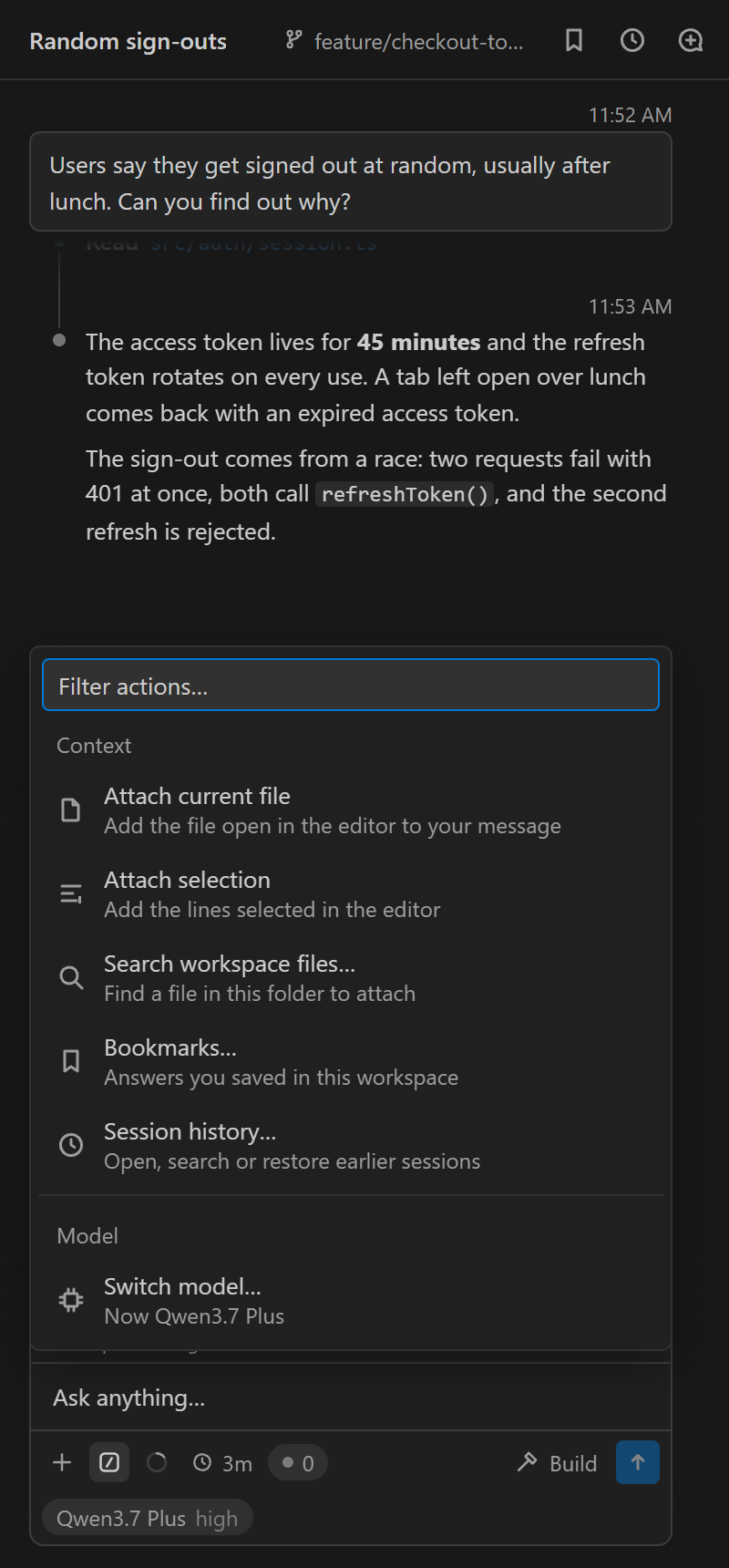
| Commands and skills | The / palette with OpenCode's commands (yours too), @skill and @agent mentions |
| Context | Files, folders and selections, @ mentions found by OpenCode's search, pasted images and text |
| Problems | Fix with OpenCode on errors and warnings; a file's or the whole folder's problems as one chip |
| Source Control | Write commit message with OpenCode for the staged changes, into the commit box (never commits) |
| Rewind | Rewind with or without code, and Restore or Apply a rewind staged in another client |
| Commands, shell, compaction | Type / for OpenCode's commands, !command, /compact |
| Side questions | /btw: ask in a hidden fork while the agent works, then add the answer to the session or close it |
| Goals | /goal: a header with the objective, in progress / achieved / stopped, its round; Pause, Resume, End |
| Todos | The agent's todo list as a checklist (OpenCode's experimental todowrite tool) |
| Background jobs | A row when a background shell, image or video job finishes, with its result or file |
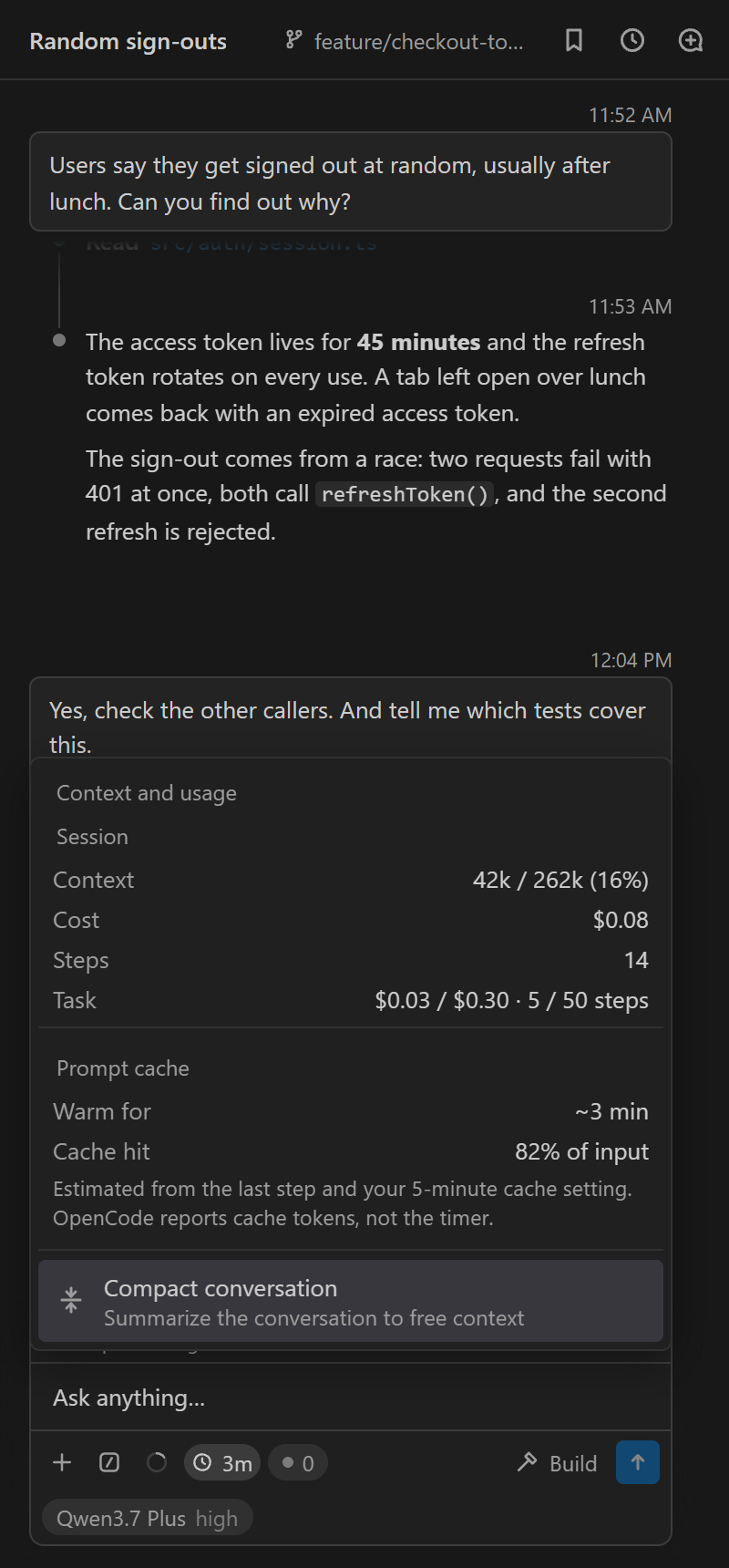
| Usage | Context, cost, steps, cache hits and a prompt-cache estimate |
| Costs and limits | Cost by model and agent, what fills the context, tokens a second, OpenCode Go and Console limits |
| Agent changes | Kept apart from your own edits, in VS Code's diff editor |
| Review | Keep or Undo each agent change in the editor, remembered per session; stage the kept ones |
| Other clients (terminal UI, other windows) | Followed live: new sessions, renames, rewinds, agent and model choices |
A tour
- One timeline per prompt. A dot per step: text, thinking time, every tool call and every subagent. The prompt you're reading stays pinned while you scroll, and Rewind ↺ takes the session back to just before it.
- Readable tool calls. Shell commands as IN/OUT boxes, reads as file links, edits as changed lines with your theme's syntax colors, old beside new in a wide panel with a divider you can drag (click for the diff editor). Click IN, OUT or a subagent's prompt to open it in full in an editor tab. Prefer it compact? Set
opencodeSidecar.activitytogrouped. - Live subagents. Each one shows its task, prompt, current activity, tool count and time, with Stop and Open › into its own conversation. Its report comes back as one line you can expand.
- Answer where you type. Permission requests and questions replace the message box until answered: 1 Yes, 2 Yes, always allow (when OpenCode offers it), 3 No, or type what the agent should do instead. Sidecar approves nothing on its own (only an approval mode or rule you set lets something run without asking), and sensitive paths get a warning. Always allow commands like this… turns
npm test -- --grep foointonpm test *for you to edit, so near-identical commands stop asking. - Approval modes. A badge in the header always shows how much the agent may do without asking, as OpenCode reports it: Ask, Balanced or Auto (in the theme's warning color), or just a shield until you pick one. Click it to switch, for this session or for new sessions in the folder.
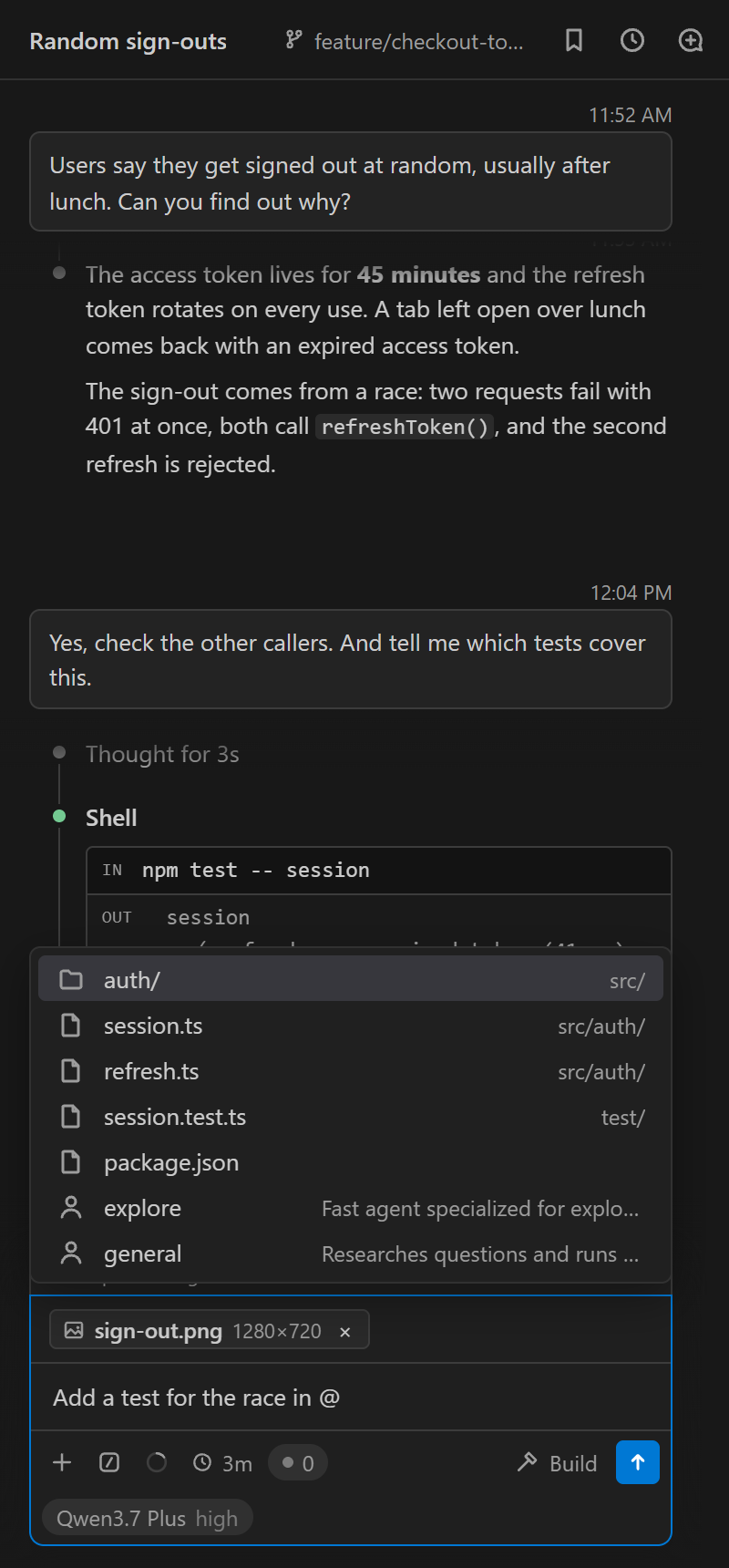
- A message box with everything at hand. Type @ to mention a file, folder, subagent or skill. Paste or drop a screenshot; a long paste of text becomes a chip you can open, edit or remove. Use + for a file, the selection, a workspace search or an image. Type / at the start of a message for OpenCode's commands and
/models,/new,/sessions,/export,/agents,/providers,/mcpand/permissions, filtered as you type; the / button opens the action palette: OpenCode's commands,/compact,!command, model, session and settings. A ring fills with the context in use (click it for context, cost, steps, the task budget and Compact), and the ◷ clock estimates the prompt cache for models that use one. The model pill has variant and Budget Guard sliders. Shift+Tab switches the agent. While the agent works you can steer it or queue your next message, or ask a quick side question with /btw that never touches its context. - Review hunk by hunk. Every change the agent made is marked in the editor with Keep | Undo above it (and Keep file | Undo file at the top). Undo puts back just that change, also after you edited elsewhere in the file, and Ctrl+Z brings it back. Review all lists every file with what is left; Alt+] / Alt+[ jump between changes; Stage kept changes stages exactly what you kept. Your decisions stay with the session through switches and restarts.
- Guard rails. Budget Guard stops runaway tasks at a local cost or step limit. When the agent seems stuck, repeating the same tool call with the same result, going back and forth between two, or sending nothing for minutes while it runs, a card says so with Stop, Steer… (a suggested message in steer mode) and Dismiss; it never stops anything for you, and a subagent shows it on its row. Agent changes are kept apart from your workspace changes. Native notifications tell you when a task completes, needs input (saying what it asks), fails or is stopped; a count on Sidecar's icon shows answers that are waiting, even with the panel hidden.
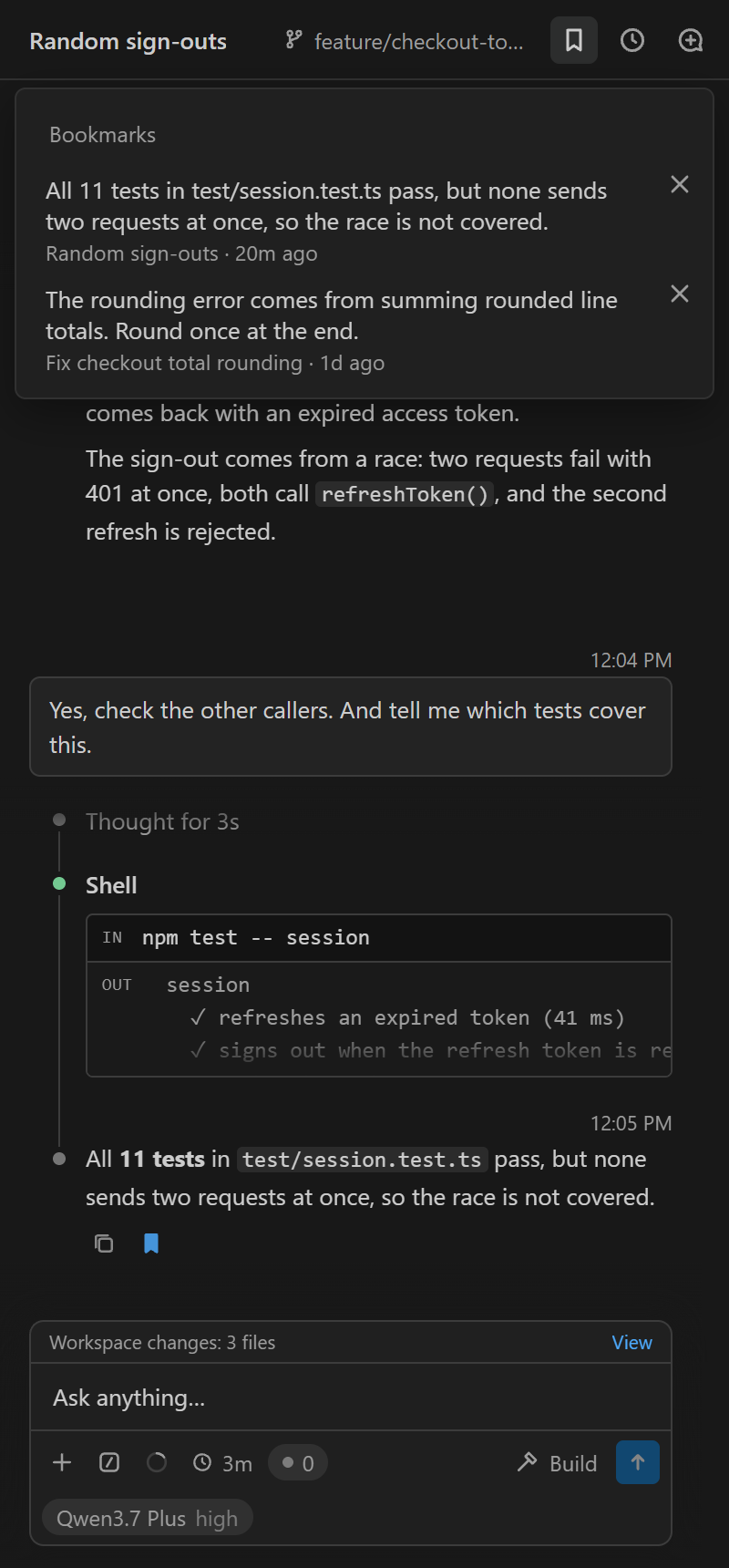
- Sessions. Fork a conversation from any prompt into a new session, archive sessions you are done with, and search History. Copy and Bookmark sit under every final answer. A long session opens with its newest messages and Load earlier messages above them; a message Sidecar cannot read shows as a row with Open raw JSON instead of breaking the session, and a session whose messages do not load stays open read-only with Retry.
- Several sessions at once. A strip under the header keeps the sessions you opened lately, and any that are working, as tabs with their status: working, waiting for you, finished or failed since you last looked. Switch with a click; when one you're not looking at finishes, fails or asks for something, a notification says so with Open.
| Timeline | Tool calls | Subagents |
|---|---|---|
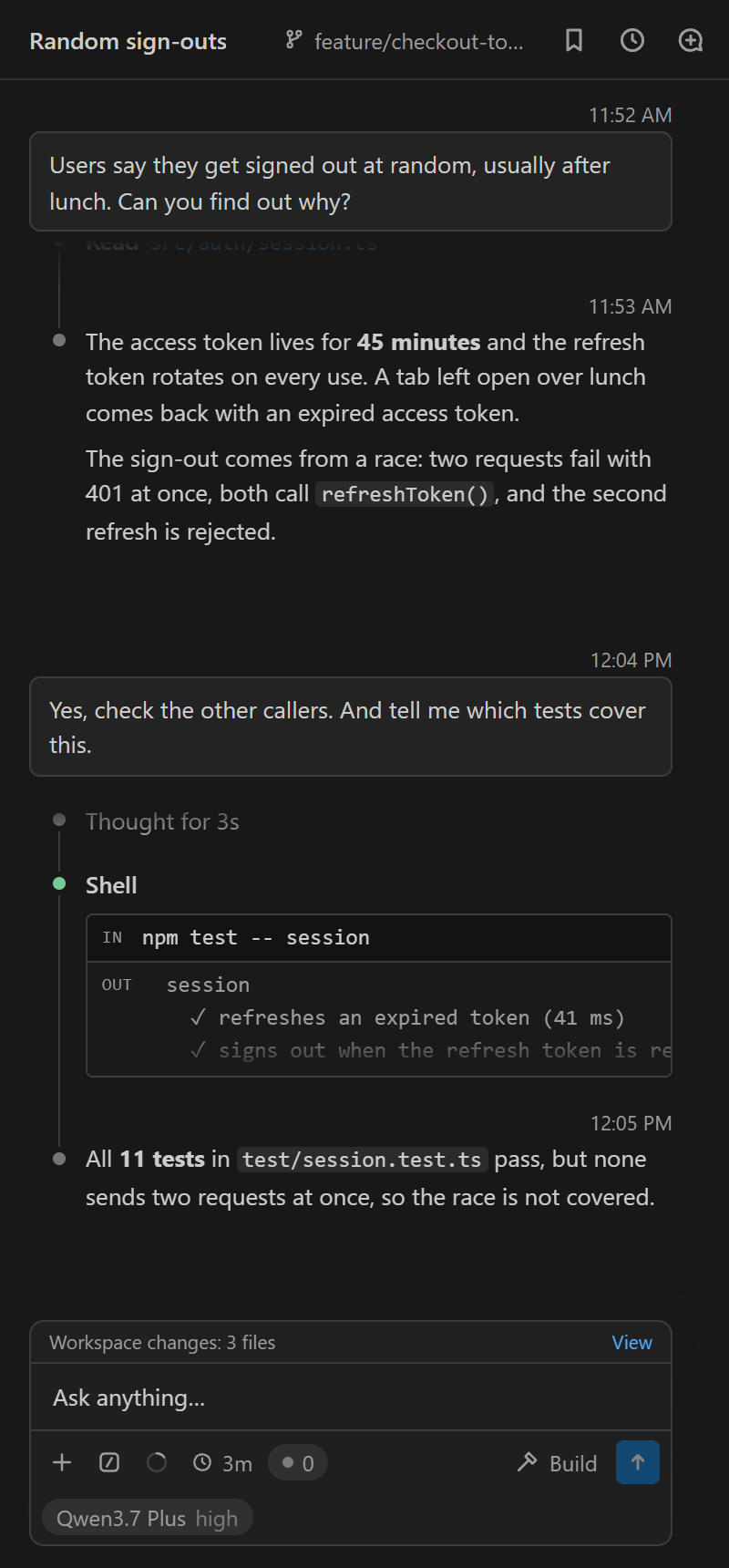 |
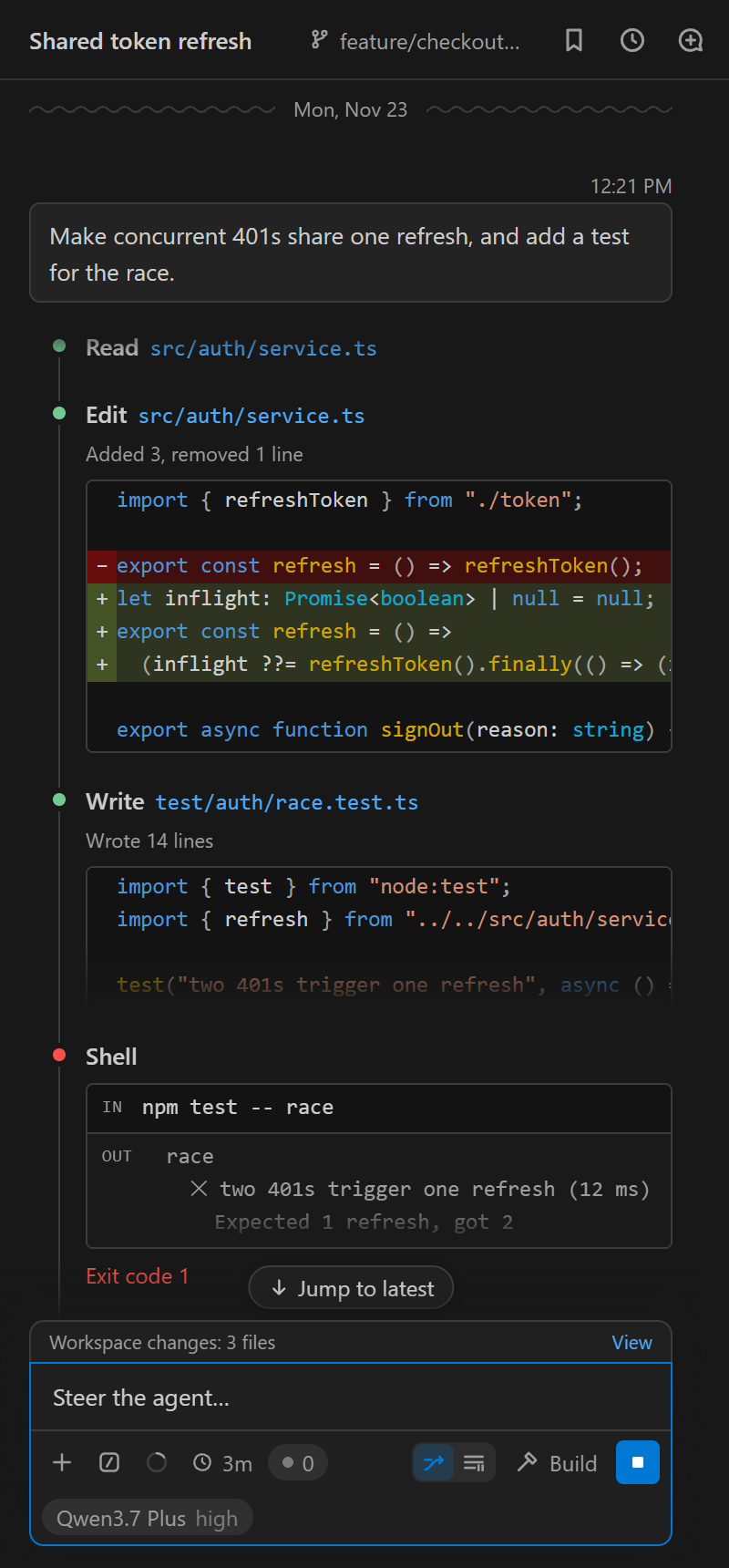 |
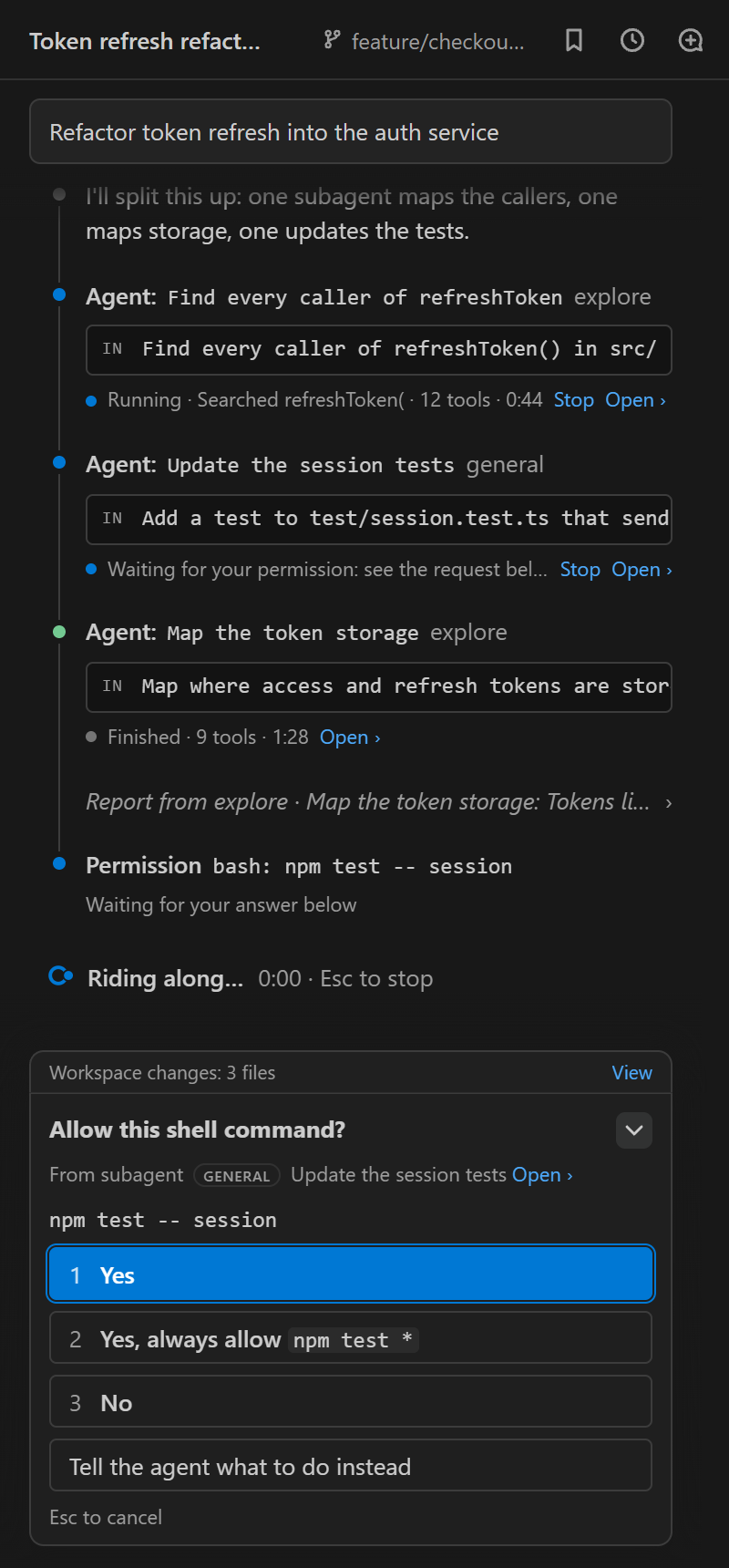 |
| A subagent's view | Question | Action palette |
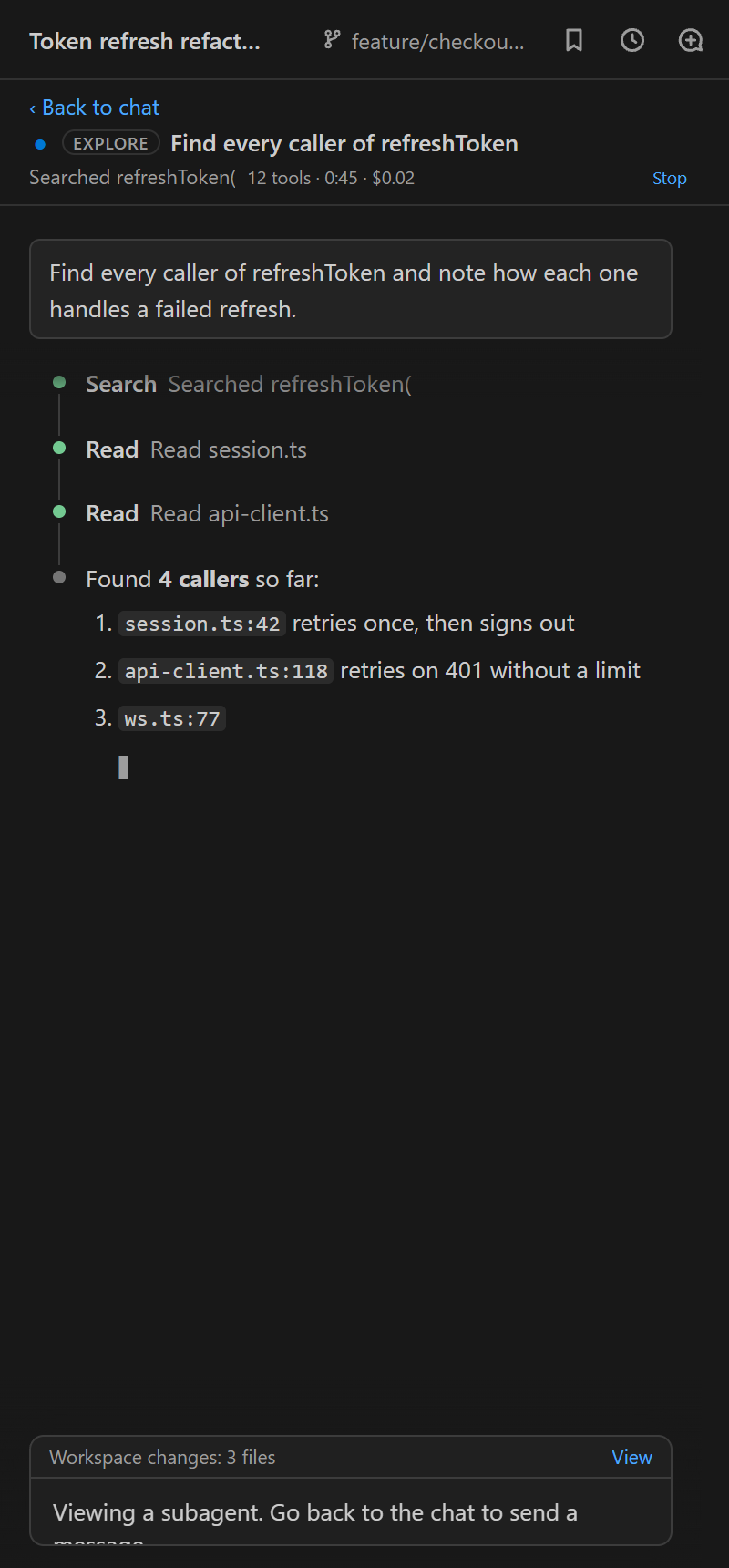 |
 |
 |
| Cache and usage | Bookmarks | @ mentions |
 |
 |
 |
| Budget Guard | Agent changes | First run |
 |
 |
 |
Requirements
- VS Code 1.95 or newer, in a trusted workspace (Sidecar is disabled in Restricted Mode).
- OpenCode 2.x with its background service (Sidecar is tested against OpenCode 2.4.2). OpenCode 1.x is not supported.
- A model in OpenCode: its free models, your OpenCode account, or another provider connected in OpenCode. Usage and costs are between you and your provider.
Getting started
- Install Sidecar for OpenCode (
cadogy.opencode-sidecar):- VS Code: search for it in the Extensions view, or get it from the Visual Studio Marketplace.
- Cursor, Windsurf, VSCodium and other VS Code-based editors: install it from Open VSX, which their Extensions view uses.
- Offline: download the
.vsixfrom Releases and run Extensions: Install from VSIX….
- Click the Sidecar icon in the Activity Bar or the Status Bar.
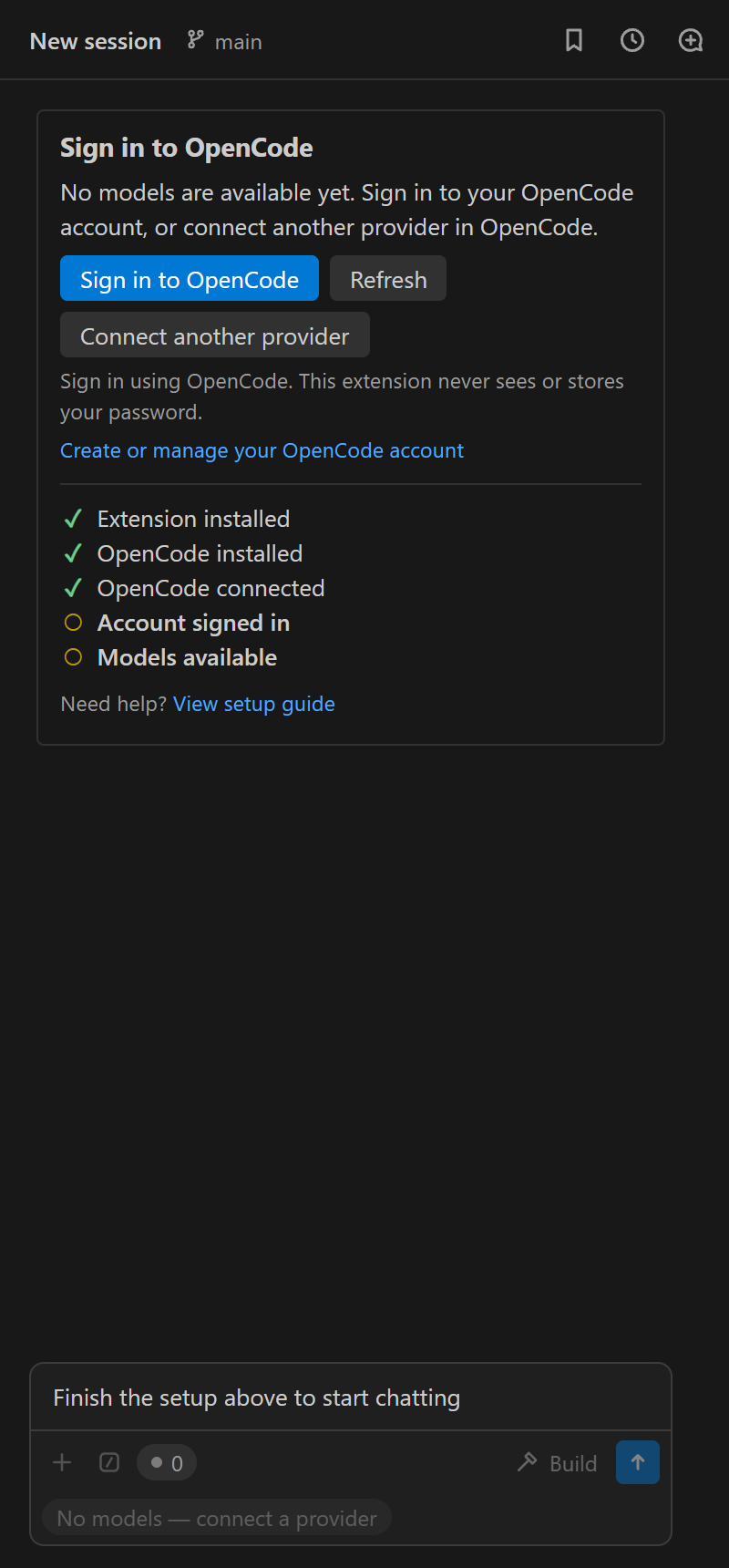
- Follow the setup card if something is missing. Install OpenCode opens the official install guide, Start OpenCode runs
opencode service start, and Sign in to OpenCode runs OpenCode's own sign-in in a terminal. The card disappears once everything is ready, so if you already use OpenCode you won't see it. - Pick a model in the model pill and start chatting.
Tip: drag the Sidecar icon to the Secondary Side Bar so the chat sits beside your editor. The panel works from about 300 px wide.
Using Sidecar
| Key | Where | What it does |
|---|---|---|
| Enter / Shift+Enter | Message box | Send / new line |
| Alt+Enter | Message box, while the agent works | Send this one the other way (steer ↔ queue) |
| ↑/↓ | Empty message box | Recall this session's earlier prompts |
| @, ↑/↓, Enter or Tab | Message box | Mention: open the list, move, pick |
| Esc | Message box | Stop the running task |
| Shift+Tab | Message box | Switch the agent (Build ↔ Plan) |
| 1, 2, 3 / Esc | Permission request | Pick an answer by its number / No |
| 1–9, ←/→, Esc | Question | Pick an option, switch questions, cancel |
| ←/→ | Slider in a menu | Change the variant or Budget Guard level |
| Ctrl/Cmd+F | The chat | Find in the conversation (Enter / Shift+Enter, Esc) |
| Cmd+Alt+O (macOS) | Anywhere | Focus the chat |
On Windows and Linux, add your own shortcut for opencodeSidecar.focusChat (Ctrl+Alt types characters on many keyboard layouts). Sidecar binds no other key in VS Code: the keys above work inside the chat only, so Ctrl+P, Ctrl+K, Ctrl+Escape and the rest stay VS Code's. The Command Palette also has Sidecar: New Session, Stop, Show History, Export Session to Markdown, the problem fixes and the commit message; bind any of them in Keyboard Shortcuts.
Fix with OpenCode. On an error or warning, the light bulb (Ctrl+. / Cmd+.) and the Problems view's quick fixes offer Fix with OpenCode: the problem goes into the message box as a chip, with Fix these problems. typed for you if the box is empty, so you can add to it before sending. The prompt names the file relative to the folder, the line and column, the severity, the source and code (
ts(2322)), the message and a few lines of code around it. + → Fix problems in this file (or Sidecar: Fix Problems in This File) takes every error and warning of the editor's file; Fix all problems in the workspace takes the open folder's, grouped by file, errors first, up to 50, and the chip and the prompt say when there were more (50 of 73 problems). Files that look sensitive (.env, keys) are left out of the folder-wide list. VS Code offers extensions no menu in the Problems view itself, so it is the quick fix there.Follow the editor. With
opencodeSidecar.autoContexton (off by default; also / → Follow the editor), the active editor's selection, or its file when nothing is selected, sits in the message box as a dashed chip marked editor that follows you from file to file. It is sent only if the chip is still there when you send; × leaves it out until you move to another file or select other lines. Only the active editor counts, never your other tabs, and files outside the folder or that look sensitive are skipped.Commit messages. Write commit message with OpenCode (the sparkle in the Source Control title bar, Commit message in the agent changes strip, or the palette) writes a message for the staged changes, or for the agent's changes when nothing is staged, into the Git commit box. It follows your repository's style (the last ten subjects are shown to the model as examples) and uses the model selected in the chat through OpenCode's one-off generation, so nothing is added to the conversation. Large diffs are trimmed (lockfiles left out, at most about 12,000 characters). A message already in the box is only replaced after you agree, and nothing is ever committed. If the model's free limit is reached, the message says so.
Approval modes. The badge in the header (Ask, Balanced or Auto; just a shield in Default, with no Sidecar rules) opens a menu with one line per mode. Ask asks before every edit, command and web request. Balanced lets reads, searches and edits in the folder run, and asks for commands, web requests and files outside the folder. Auto lets everything run but blocks destructive commands (
rm -rf,git push --force,git reset --hard,git clean -f,Remove-Item -Recurse,rmdir /s); switching to it asks once, with Don't ask again. Apply to picks this session or this folder (new sessions in the folder start in the mode). Modes are OpenCode permission rules on the session, after the agent's own: an agent's blocks stay (Plan still never edits), as do its exceptions such as asking before reading.envfiles, and subagents started afterwards inherit them. The badge reads the rules back from OpenCode, so a change made in another client shows too. OpenCode's config files are never changed.Permission rules. Permission rules… (in the badge's menu and the / palette) lists the session's rules, the mode's read-only and your own (action, pattern and Allow, Ask or Deny) to add, edit or remove, and the folder's always allowed rules OpenCode saved, to edit or remove. Patterns are OpenCode's:
*matches anything andnpm test *also matchesnpm test. In a permission request, Always allow commands like this… suggests a pattern (npm test -- --grep foo→npm test *,Get-ChildItem -Path src→Get-ChildItem *), shows whether it covers the request, and saves it for the session or, when OpenCode offers always, for the folder.Providers. / → Providers… (or Manage providers… under the model list) lists the providers OpenCode is connected to: connected, needs sign-in or the last error in plain English, how each is connected (OAuth, API key, an environment variable or OpenCode's config; never the secret) and how many models it offers. Connect searches every provider OpenCode knows; Sign in again runs OpenCode's own sign-in again: the browser page OpenCode returns, a masked box whose key goes straight to OpenCode, or OpenCode's terminal flow. Disconnect asks first. Reload config has OpenCode read its config again, for example after adding an OpenAI-compatible endpoint to
opencode.json(OpenCode only takes custom providers from its config). When a run fails because a key was rejected, a sign-in expired or the model is gone, the error card offers Sign in to Provider again and Choose another model.Custom agents. / → Agents… (or Manage agents… under the agent switcher, or Sidecar: Manage Agents) lists the folder's agents: built-in ones read-only, your own with their mode (primary, subagent or both), model and file. New agent and Edit open a form for the name, description, mode, model and variant, temperature, permission switches (read, edit, commands, web fetch and search, subagents, skills: inherit, allow, ask or deny) and the system prompt, saved as OpenCode's own Markdown file in
.opencode/agents/or, after asking, in OpenCode's global config folder. Saving changes only the fields you changed, so your comments and any frontmatter Sidecar doesn't know stay; Save and open in editor opens the file itself. The agent is ready at once (a new primary agent is selected), and Delete asks first. Naming an agent after a built-in one (build,plan,general,explore) overrides it for this folder (or, saved globally, every folder) after a warning: OpenCode applies the file on top of the built-in, so the fields and permissions you set win and the rest stays the built-in's. The panel then shows Built-in, overridden by the file, with Remove override. Coming from Roo Code or Kilo Code? A banner (and Sidecar: Import Roo Code Modes as Agents) finds.roomodes,.kilocodemodesand the global custom modes, previews each mode as an agent with what does not carry over exactly (a mode named after a built-in agent starts unchecked and warns once checked; importing asks once for all of them), and writes the ones you check: the role and instructions (and.roo/rules-<slug>/) become the prompt, tool groups become permissions (an editfileRegexbecomes globs where it can), and an orchestrator becomes a primary agent that starts the others as subagents.Check OpenCode setup. Sidecar: Check OpenCode Setup (also in the
/palette and the Providers panel) opens one Markdown report, with Copy Report: theopencodeprogram and its version, the background service (registered, reachable, the same process and version), sign-in, the default model, providers with problems, and on Windows PATH and the folder's drive letter. A local server such as Ollama or LM Studio gets a warning when a model's context is under 16k tokens, too small for OpenCode's instructions and tools (Ollama's defaultnum_ctxis 2048–4096).Jump to latest. Scroll up while the agent works and a ↓ Jump to latest pill (with how many steps are new) takes you back to the end.
Mentions. Type
@and pick from the list, or keep typing to search: files and folders (found by OpenCode), subagents such as@explore, and OpenCode's skills. OpenCode reads mentioned files itself, and a mentioned subagent or skill is passed to the agent as such.Pasted text. A paste of more than 8 lines or 800 characters becomes a chip, Pasted text #1 · 120 lines · ~3.1k tokens, with
[Pasted text #1]in the box where you pasted it. Click the chip to read it, the pencil to put the text back in the box, or × to remove it. It is sent exactly as pasted (line endings as\n, as in the box), in its place, and the prompt in the chat folds it into a chip you can open. Chips survive the view being hidden or reloaded, and ↑ brings a prompt back with its chips.Images. Paste or drop a PNG, JPEG, GIF or WebP into the message box, or pick image files with + → Attach image…. Very large screenshots are scaled down. Sidecar tells you when the selected model doesn't list image input in OpenCode.
Commands. Type
/for the palette, or type/name argumentsdirectly. OpenCode's built-in commands (such as/initand/review) and any you define are listed for the folder.!git statusruns a shell command through OpenCode.Rewind. Hover a prompt for ↺ (and Fork). Rewind asks first in a dialog, then removes that prompt and everything after it from the session. Rewind conversation and code also undoes OpenCode's file changes since then: the dialog lists the files that revert. OpenCode reverts what its snapshots recorded during the agent's steps, so the dialog warns when shell commands ran since (changes outside the folder or in ignored files stay), names changed files no edit tool reported, and lists files that changed outside the agent's steps (commands you ran with
!, your edits between prompts), which stay as they are. Rewind cannot be undone and is available while the agent is idle.Ask aside. Type
/btw <question>(or pick Ask aside… in the/palette) to ask something without derailing the agent or adding to its context. The question runs in a hidden copy of the session (OpenCode's fork, so it knows the conversation) with the Plan agent, which cannot edit files, and any permission it asks for is declined. The answer streams into a card above the chat while the main task carries on, steering, queue and requests included. Ask follows up in the same side thread, Add to session adds the latest answer to the session as a message (queued while the agent works), and Close deletes the copy. The card folds to one line (the question and how it stands) with its arrow, and by itself once the answer is done and you go on in the session; a click opens it again. Copies never show in History, and one left behind when VS Code closed is deleted at the next start.Session strip. Under the header, the sessions you opened lately in this folder (up to six, most recent first) and any that are working or waiting for you. Each tab has a status dot: working, waiting for your answer, finished or failed since you last looked. Click a tab to switch, or use ←/→ once a tab has the focus; × (or Delete) only takes it off the strip, and it stays in History. The strip shows once two or more sessions are on it, and
opencodeSidecar.sessionStriphides it. When a session you're not looking at finishes, fails or asks for a permission or an answer, you get a notification (whatever is on screen, following thenotifications.*settings) with Open, and the count on Sidecar's icon and in the Status Bar includes its waiting requests. Side questions and subagents never get a tab of their own: a subagent's request shows on its session's tab.Fork and archive. Hover a prompt and click Fork to continue in a new session that has the conversation before that prompt (the prompt goes into the message box). Fork session in the
/palette copies the whole conversation. The original stays as it was. Archive a session from History or the palette; History's Archived sessions lists them with Restore and Delete permanently. Delete session… in the palette removes the open one. Deleting always asks first.Code blocks. Besides Copy code, a finished block can be inserted at the cursor of your editor (an ordinary edit, so Undo reverts it) or opened in a new editor in its language.
Export. / → Export to Markdown (or the command) opens the session as a Markdown document: prompts, answers, tool calls with their commands, decisions and subagent reports, without thinking or long output.
Branch. The header shows the Git branch the agent works on (from VS Code's Git).
Goals. While a session has a goal (
/goal <objective>), a one-line header above the conversation shows the objective and whether it is in progress, achieved or stopped; click it for OpenCode's reason (such as the free limit or your interrupt), its round out of OpenCode's 50 and the actions. Rounds steps through the goal's notices in the conversation; Pause, Resume and End goal (which asks first) run OpenCode's own/goal pause,/goal resumeand/goal clear, and Clear removes an achieved one. A goal changed in the terminal UI or another window shows too.Project instructions. / → Project instructions… (also in the Agents panel) lists the instruction files OpenCode reads for the folder: the global
~/.config/opencode/AGENTS.md(or~/.claude/CLAUDE.mdwithout it), each folder'sAGENTS.mdfrom this one up to your home folder (itsCLAUDE.mdwhen it has none), and the config'sinstructionsentries, each marked In use, Not used or Not created, with Open. Create AGENTS.md starts one at the project root from a short template; the global one is created only after asking; Set up with /init runs OpenCode's guided setup. Remember this under a reply takes the text you selected in it (or its first line), lets you edit it, shows the change to the project'sAGENTS.mdas a diff and adds it as one line once you confirm. When the project has aCLAUDE.mdbut noAGENTS.md, both first warn that OpenCode stops readingCLAUDE.mdonceAGENTS.mdexists, and offer Create AGENTS.md and copy CLAUDE.md into it (so no instruction is lost), Create AGENTS.md or Cancel.MCP servers. / → MCP servers… opens a panel with the folder's MCP servers as OpenCode reports them: connected, connecting, disabled, failed with the reason, or needing a sign-in. Disconnect, Connect and Retry apply until OpenCode restarts; Sign in runs OpenCode's OAuth sign-in for a remote server (the browser page OpenCode returns, then Sidecar waits until the server is connected). Add a server for this OpenCode run takes a name and a command line or an
http(s)://URL and never touches OpenCode's config (a config reload or a restart drops it; Remove asks first). Reload config has OpenCode read its config and skills again. OpenCode does not report a server's tools, so the panel shows no tool count or context cost.Steer and queue. While the agent works, a switch in the message box's footer chooses what Enter does: steer (the agent reads your message at its next step; blue) or queue (it is sent when the task ends; purple, and the box border follows). In a narrow panel the switch shows only the chosen mode, and a click flips it. Alt+Enter sends one message the other way. Messages not yet delivered are listed above the box, each with a button to switch it between steer and queue, Edit and Remove.
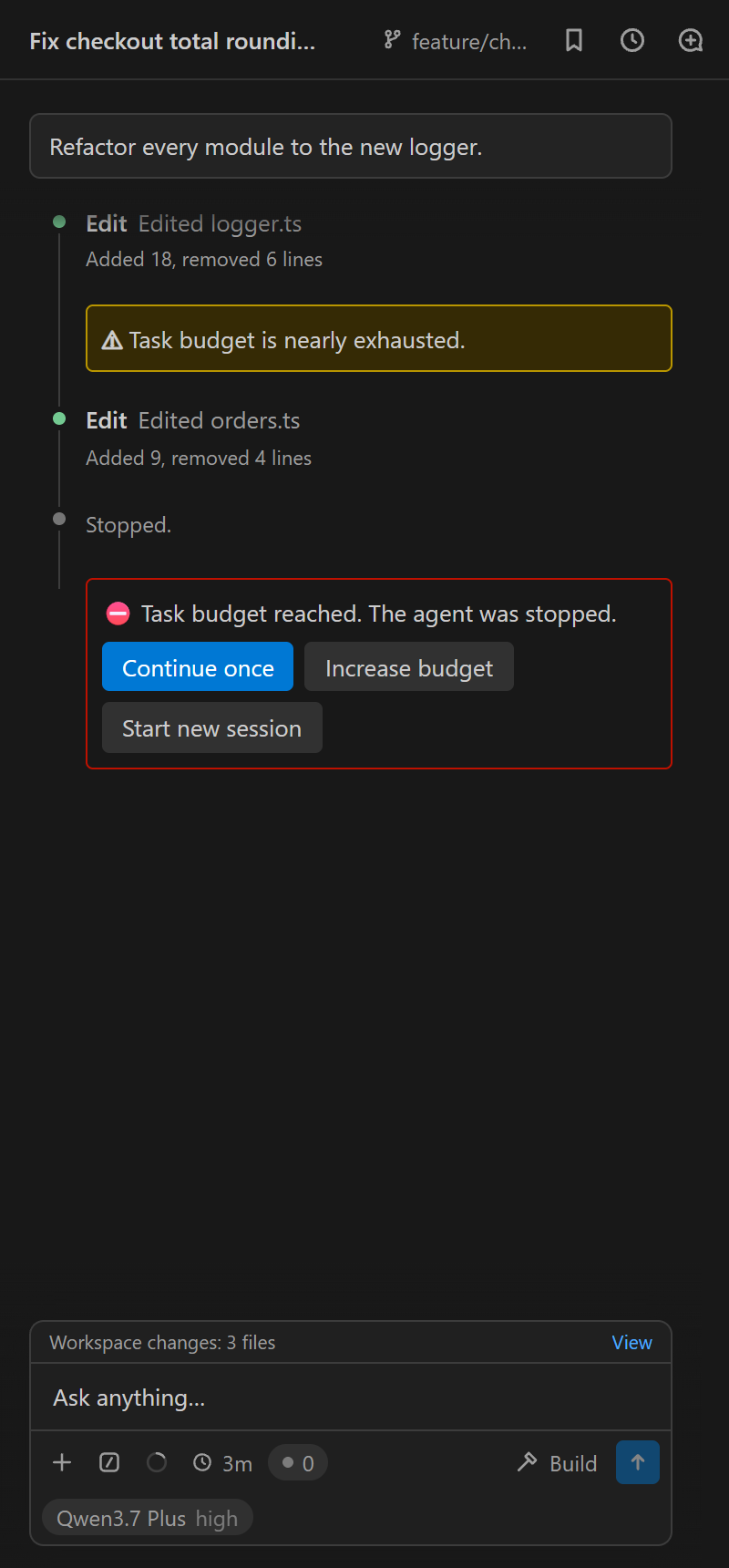
Budget Guard is a local per-task limit on cost and steps, set in the model menu. It warns at 80% and then stops the agent through OpenCode's own cancellation, offering Continue once, Increase budget or Start new session. It stops before the step that would go over the cost limit (judged by the task's average step), and never in the middle of an edit: a file being written is finished first ("Stopped after finishing src/a.ts"). Defaults: Small $0.10 / 20 steps, Medium $0.30 / 50, Large $1.00 / 120, Custom $0.50 / 80. If OpenCode reports no cost, only steps count.
Context ring. It fills as the context window does, from the tokens OpenCode reports after each step and the model's context limit, and turns to your theme's warning colour from 70% and its error colour from 90%. Hover it for the numbers; click it for the session's usage, what fills the context (your messages, replies, tool calls and results, attached files and a summary, estimated from their text, and the rest: the system prompt, tool definitions and instructions OpenCode adds but does not list), cost by model and by agent (subagents nested under the agent that started them, with their own subagents' costs added), today's cost in the project and Compact conversation.
Speed and model per turn. While a reply streams, the Working line shows an estimate of tokens a second from the streamed text. Each turn ends with a quiet line naming the model it ran on, its steps, tokens, speed (as OpenCode timed it) and cost.
Provider limits. When OpenCode is signed in to an OpenCode workspace, the usage menu shows its OpenCode Go allowance (rolling, weekly and monthly) and Console budgets as meters with when each resets, and a small warning chip appears beside the ring once one is 80% used. Other providers report no limits through OpenCode, so nothing is shown for them.
Prompt cache clock. It counts down
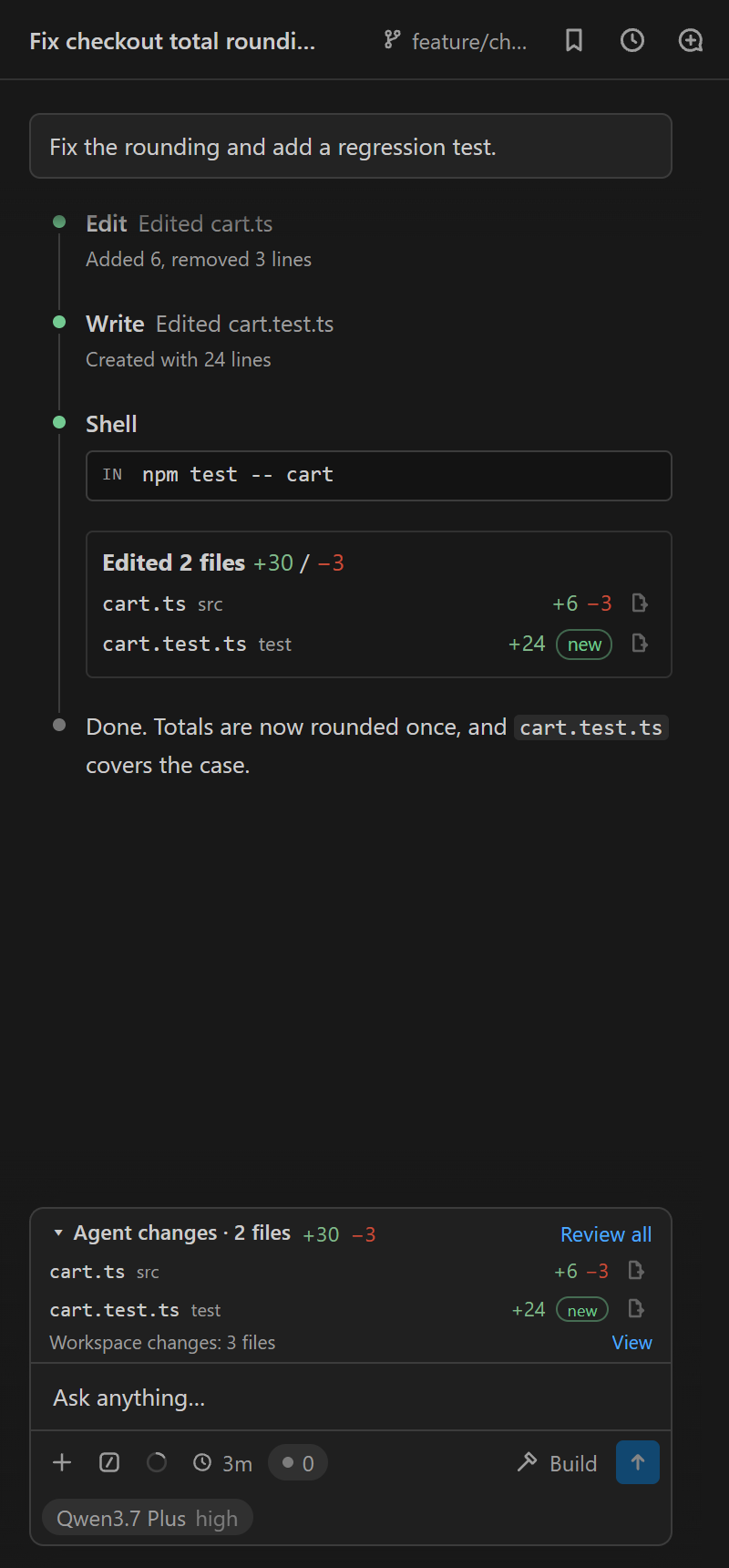
opencodeSidecar.cacheWarmMinutes(default 5) from the last step, and shows only when that step reported prompt-cache tokens, so a model without a prompt cache (such as most local ones) never shows it. It is an estimate: OpenCode reports cache tokens, not your provider's timer. Set it to0to hide the clock.Reviewing agent changes. Open a file the agent changed (or Review all in the agent changes strip, or Sidecar: Review Agent Changes): each change has Keep | Undo above it, added lines are shaded and removed lines are marked with what was there in the hover. Undo puts back exactly that change with a normal editor edit (Ctrl+Z works, and the file is left unsaved for you to save); if you edited that change since, it says You edited this since — compare instead of guessing, and changes you made yourself are never touched. Keep marks a change reviewed. Keep file and Undo file do the rest of a file; a file the agent created is deleted after asking, a deleted one is restored. Binary files, incomplete snapshots and very large files are reviewed as a whole file, with the diff editor. Review all lists every file with its changes to review, kept and undone, plus Keep all and Undo all (both ask first), Next change and Open all diffs; Alt+] and Alt+[ go to the next and previous change while a review is active (VS Code's inline suggestions keep those keys while one shows). Decisions are saved per session in the workspace, so switching sessions, reloading the window or restarting VS Code keeps them; a later agent edit to the same file adds only the new changes. Stage kept changes stages exactly the kept changes in Git (also when your staged version differs elsewhere), so you can commit what you reviewed.
Agent changes come from OpenCode's session snapshots, so edits you already had are not counted. Workspace changes is the usual HEAD ↔ working tree; beside the agent's changes it is in the strip's opened list, so the strip stays one line. When the agent's changes can't be told apart, Sidecar says so instead of guessing.
Other clients. Rewinds, agent and model choices, and session changes made in OpenCode's TUI or other clients show up in Sidecar. A rewind another client has staged but not applied (such as
/undo) hides the messages it removes, with Restore to bring them back or Apply to remove them for good. Restoring them lets OpenCode carry on with anything still queued for the session.
Commands
| Command | What it does |
|---|---|
| Sidecar: Focus Chat | Reveal the chat and focus the message box |
| Sidecar: Refresh Connection | Re-check OpenCode, account, providers, models and agents |
| Sidecar: Sign in to OpenCode | Run OpenCode's own sign-in in a terminal |
| Sidecar: Manage Agents | Open the Agents panel |
| Sidecar: Import Roo Code Modes as Agents | Preview the folder's and global Roo Code / Kilo Code modes |
| Sidecar: Manage Providers | Open the Providers panel |
| Sidecar: Check OpenCode Setup | Check the program, service, sign-in, models and providers |
| Sidecar: New Session | Start a fresh conversation |
| Sidecar: Add Current File | Attach the active editor's file |
| Sidecar: Add Selection | Attach the selected lines; also in the editor's right-click menu |
| Sidecar: Fix Problems in This File | Attach the editor's file's errors and warnings |
| Sidecar: Fix All Problems in the Workspace | Attach the folder's errors and warnings (up to 50) |
| Sidecar: Write Commit Message with OpenCode | Fill the Git commit box for the staged changes |
| Sidecar: Review Agent Changes | List the agent's changes by file, with Keep all and Undo all |
| Sidecar: Next / Previous Agent Change | Go to the next or previous change to review (Alt+] / Alt+[) |
| Sidecar: Keep / Undo Agent Change | Keep or undo the change at the cursor |
| Sidecar: Keep / Undo Agent Changes in File | Keep or undo what is left in the editor's file |
| Sidecar: Keep All / Undo All Agent Changes | Decide every change left (asks first) |
| Sidecar: Stage Kept Agent Changes | Stage only the changes you kept |
| Sidecar: Show History | Open the session history |
| Sidecar: Export Session to Markdown | Open the session as a Markdown document |
| Sidecar: Stop | Cancel the running task |
Settings
| Setting | Default | Description |
|---|---|---|
opencodeSidecar.executablePath |
empty | Path to opencode; empty searches PATH and common install locations. |
opencodeSidecar.serverUrl |
empty | Use a specific OpenCode server instead of the local background service. |
opencodeSidecar.allowRemoteServer |
false |
Allow serverUrl to point at a non-loopback host. |
opencodeSidecar.defaultModel |
empty | providerID/modelID to preselect for new workspaces. |
opencodeSidecar.defaultAgent |
empty | Agent to preselect, such as build or plan. |
opencodeSidecar.autoStart |
false |
Start the OpenCode background service when the view opens. |
opencodeSidecar.stickyPrompt |
true |
Keep the prompt of the turn you're reading pinned. |
opencodeSidecar.statusWords |
true |
Playful words (such as Riding along…), a new one every few seconds, next to the turning mark while the agent works; off shows Working…. |
opencodeSidecar.activity |
detailed |
detailed shows every tool call; grouped folds runs of calls into a line. |
opencodeSidecar.cacheWarmMinutes |
5 |
Your provider's prompt-cache lifetime for the clock; 0 hides it. |
opencodeSidecar.showUsage |
true |
Show context, cost and step figures. |
opencodeSidecar.sessionStrip |
true |
Show the strip of open sessions under the header (once two or more sessions are on it). |
opencodeSidecar.autoContext |
false |
Show the active editor's selection (or file) as a chip that follows the editor; sent only while the chip is there. Never other tabs. |
opencodeSidecar.showStatusBarItem |
true |
Show the Sidecar item in the Status Bar. |
opencodeSidecar.budget.default |
medium |
Budget level for workspaces without a saved choice. |
opencodeSidecar.budget.small/medium/large/custom |
see above | { "maxCost": USD, "maxSteps": n }; 0 disables that metric. |
opencodeSidecar.budget.warnPercent |
80 |
Warn at this share of the budget. |
opencodeSidecar.budget.contextWarnPercent |
80 |
Warn when the context window is this full; 0 turns it off. |
opencodeSidecar.stuckDetection |
true |
Say when the agent seems stuck (the same call three times, two taking turns, or no progress); it only suggests. |
opencodeSidecar.stuckMinutes |
3 |
Minutes a running task may send nothing before that; not while a shell command runs or a request waits for you. 0 checks only for loops. |
opencodeSidecar.notifications.* |
true |
taskComplete, needsInput, taskFailed and budgetStopped notifications (the first two not while you watch the open session). |
Privacy and security
- Sidecar talks only to your local OpenCode service (loopback unless you allow a remote server). It has no telemetry and no service of its own.
- Sidecar stores no credentials. Sign-in and providers are handled by OpenCode: a key you type in the Providers panel's masked box goes straight to OpenCode and is never kept or logged by Sidecar. The local service password stays in memory.
- Workspace content is sent only when you attach or
@-mention it, or when the agent reads it through OpenCode's tools under OpenCode's permission rules. Pasted images go to OpenCode with the prompt and nowhere else. - Sidecar approves nothing by itself: only an approval mode or permission rule you set lets an action run without asking, and Auto still blocks destructive commands. The view runs under a strict content security policy, and every message from it is validated. Logs leave out prompts and file contents and redact secrets.
- Bookmarks (a short excerpt and its session title) are stored locally in VS Code's workspace storage.
Details are in SECURITY.md.
Known limitations
- Requires OpenCode 2.x and its background service.
- OpenCode reads attached files from disk, so unsaved editor changes are not included (you'll get a reminder).
- The prompt cache clock and the live tokens-a-second figure are estimates. Provider limits are shown only for OpenCode Go and OpenCode Console budgets, the only ones OpenCode reports.
- Agent files are read with a YAML subset (block and flow mappings and lists, quoted and block strings, comments); a file using anchors, aliases or tags opens in the editor instead of the form. OpenCode 2.4 stores an agent's temperature but does not send it to the model yet.
- OpenCode's auto-compaction threshold is set in its config (
compaction) and cannot be changed through its API, so Sidecar does not offer it. - No voice input: VS Code does not let webviews use the microphone, and OpenCode's voice needs a paid OpenAI, Google or xAI key on the server (details).
- In a long session, Find searches what shows: a large output or diff folded under Show all is searched once shown (its full text is a click away in an editor tab).
- Reopening a session loads its newest 400 messages; Load earlier messages brings in more, up to 2,000.
- The review knows the agent's changes from OpenCode's snapshots, which exist only in a Git repository. Edits made between two prompts (yours, or a
!command's) are counted with the agent's, as OpenCode's session diff counts them. Files outside the folder are not reviewed. A change the agent made right next to one you already decided comes back as one new change to review. - An approval mode reaches subagents started after it is set; one already running keeps its rules. In Ask, a read-only subagent such as Explore asks before editing instead of being blocked.
- The interface is in English, with a few strings in Arabic.
Sidecar or the official OpenCode extension?
The official extension, sst-dev.opencode, opens OpenCode's terminal UI in a split terminal and passes it your selection and file references. Sidecar is a graphical chat panel instead. Both use the same OpenCode, so you can install both and move between them: a session started in one shows up in the other.
Official extension (sst-dev.opencode) |
Sidecar for OpenCode | |
|---|---|---|
| Interface | OpenCode's terminal UI in a split terminal (Ctrl+Esc / Cmd+Esc) | A chat panel in the side bar, secondary side bar or an editor tab |
| Context from the editor | Shares your selection or tab; inserts file references like @File#L37-42 |
@ mentions of files, folders, subagents and skills; the selection, files and images from + |
| The agent's work | In the terminal UI | A timeline per prompt with every tool call, diffs in VS Code's diff editor, live subagents, permission requests in place of the message box |
| Editors | VS Code and VS Code-based editors | VS Code, and Cursor, Windsurf and VSCodium via Open VSX |
| Reviewing changes | In the terminal UI and your Git tools | Keep or Undo each change in the editor, kept apart from your edits; stage only what you kept |
| Setup and panels | OpenCode's terminal UI and config files | Panels for providers, custom agents, MCP servers, project instructions and permission rules, and a setup check |
FAQ
What is Sidecar for OpenCode?
A free, open-source VS Code extension that gives the OpenCode coding agent a full chat interface inside the editor. It works with the OpenCode 2 service already on your machine.
Is there an OpenCode GUI or chat sidebar for VS Code?
Yes: Sidecar is one. Install it from the Extensions view (search "OpenCode Sidecar"), click the Sidecar icon, and chat with OpenCode in a panel beside your code. It needs the OpenCode 2 service on your machine; the setup card helps install and start it.
Does it work in Cursor, Windsurf or VSCodium?
Yes. Those editors install extensions from Open VSX, where Sidecar is published as cadogy.opencode-sidecar.
Which OpenCode versions does it support?
OpenCode 2.x, with its background service running. OpenCode 1.x is not supported.
Can I use local models, such as Ollama or LM Studio?
Yes, if they are set up as a provider in OpenCode. Sidecar uses whatever models OpenCode offers, so any provider OpenCode supports works here too.
Is it official?
No. It is an independent community project and is not affiliated with OpenCode. The official OpenCode extension is sst-dev.opencode.
Do I need an API key, and what does it cost?
Sidecar is free and needs no key of its own. It uses the models you have in OpenCode: OpenCode's free models, your OpenCode account, or any provider you connect in OpenCode. Model costs are between you and your provider.
Can I undo what the agent changed?
Yes. Every change the agent made shows Keep | Undo in the editor. Undo puts back just that change with an ordinary edit (Ctrl+Z brings it back), never touches your own edits, and Stage kept changes stages only what you kept. You can also rewind the conversation and its code to before any prompt.
Can the agent run without asking every time?
If you choose. The badge in the header switches between Ask, Balanced (edits in the folder run, commands ask) and Auto (everything runs; destructive commands such as rm -rf or force pushes are blocked), for one session or the folder. Modes are OpenCode's own permission rules, and OpenCode's config is never changed.
Does it work with my existing OpenCode sessions?
Yes. Sessions are OpenCode's, so the ones you started in the terminal UI appear in History, and changes made in either place show up in the other.
Does my code leave my machine?
Sidecar sends your prompts and the files you attach only to your local OpenCode service. What OpenCode then sends to a model provider is decided by OpenCode and your configuration.
Which platforms does it run on?
Wherever VS Code 1.95+ and OpenCode 2.x run: Windows, macOS and Linux. It needs a trusted workspace.
Like it?
If Sidecar is useful to you, a rating on the Visual Studio Marketplace or Open VSX, or a star on GitHub, helps other OpenCode users find it. Bugs and ideas are welcome in Issues.
About
Sidecar for OpenCode is an independent, community-built extension. It is not affiliated with, sponsored by or endorsed by OpenCode or its authors; "OpenCode" is used only to say which agent it works with.
License
MIT. See LICENSE. Source, issues and releases: https://github.com/charlesknapp/opencode-sidecar
Yorumlar (0)
Yorum birakmak icin giris yap.
Yorum birakSonuc bulunamadi