wizard
Health Uyari
- License — License: MIT
- Description — Repository has a description
- Active repo — Last push 0 days ago
- Low visibility — Only 5 GitHub stars
Code Gecti
- Code scan — Scanned 12 files during light audit, no dangerous patterns found
Permissions Gecti
- Permissions — No dangerous permissions requested
Bu listing icin henuz AI raporu yok.
Build on your own AI agent platform in one command. Pick the modules you want and get an app of your own — running on Chatfuel's infrastructure, with the skills your coding agent needs to keep building it.

Chatfuel Wizard
Build on your own AI agent platform in one command
Pick the pieces you want. Get a working React app wired to your bot,
and the skills your coding agent needs to keep building it.


npx @chatfuel/wizard

What you end up with
A React + Vite project you own outright. No framework of ours between you and your code, no
runtime dependency on this repository, and a Chatfuel token that stays on the server. It stays
there in every mode. Whether somebody who reaches the proxy gets to spend it is a separate
question, and the one the optional auth module answers — see
docs/deployment.md.
What that module fences is which bots a request may touch — not who, inside a bot, is touching
them. Upstream there is one master token, and Chatfuel applies the role of whoever owns it, so any
operation the app sends for even one role is reachable by every signed-in user. The per-moduleuseMyRole hooks decide what the interface offers; they are not an authorization boundary, andcontent/api-client/src/roles.ts says so at length. If one
person needs to be able to do less than the token can, that boundary is yours to add.
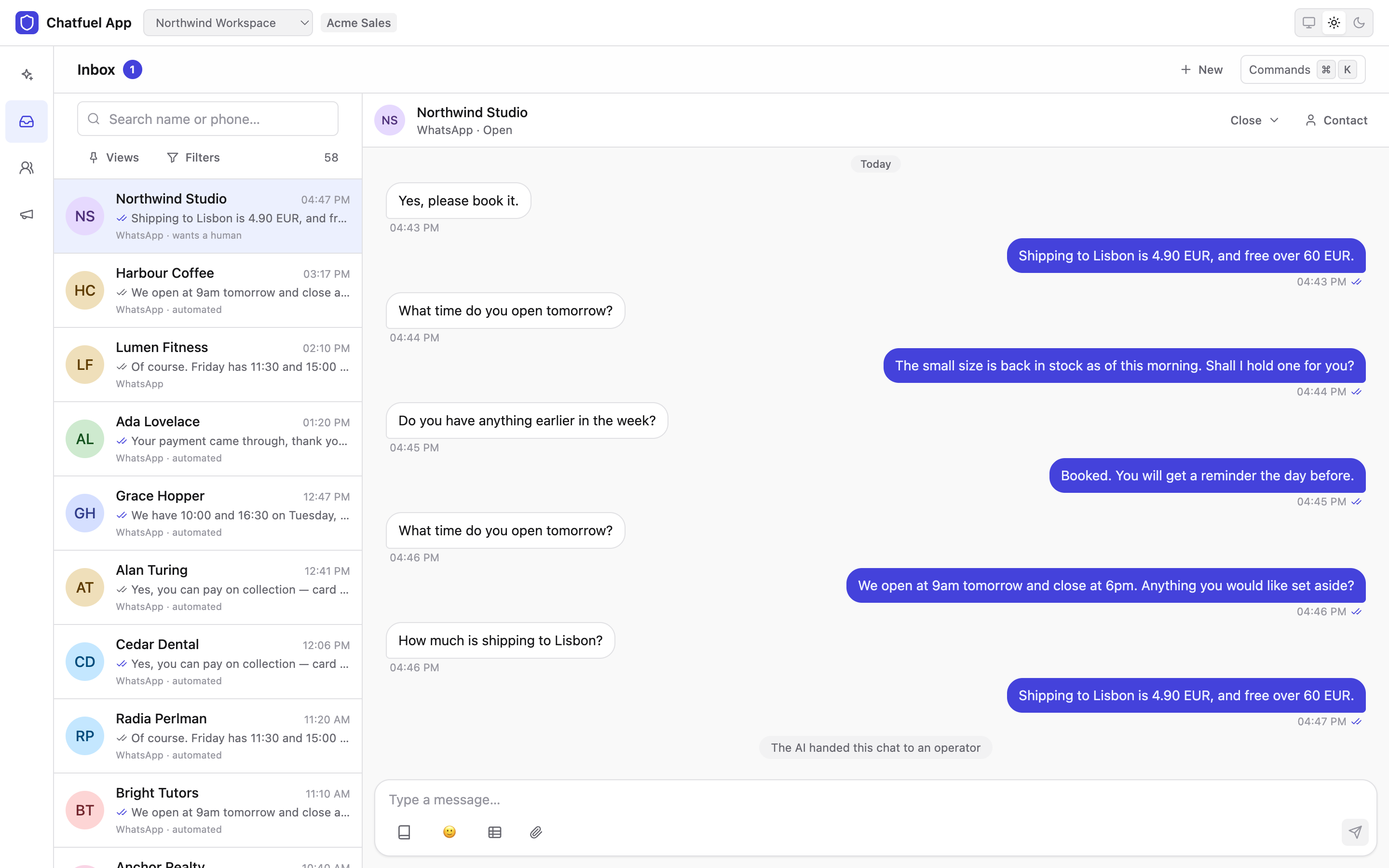
Two things people build with it:
- A tool for your own bot — an inbox, a CRM, a booking calendar, a catalog, whatever your
team actually needs, on your own data, with your own workflow in it instead of somebody else's. - A product of your own. Add the
authmodule and the app becomes multi-tenant: anyone can
sign up, and their account gets an AI agent of its own, created inside your workspace and
running on your plan. Your branding, your pricing, your customers — Chatfuel is the
infrastructure underneath.
Modules
Fifteen. core is installed with everything; the rest each add a surface. Pick them in the
wizard, or add them later with --embed.
|
Talk to people
|
Run the business
|
Run the platform
|
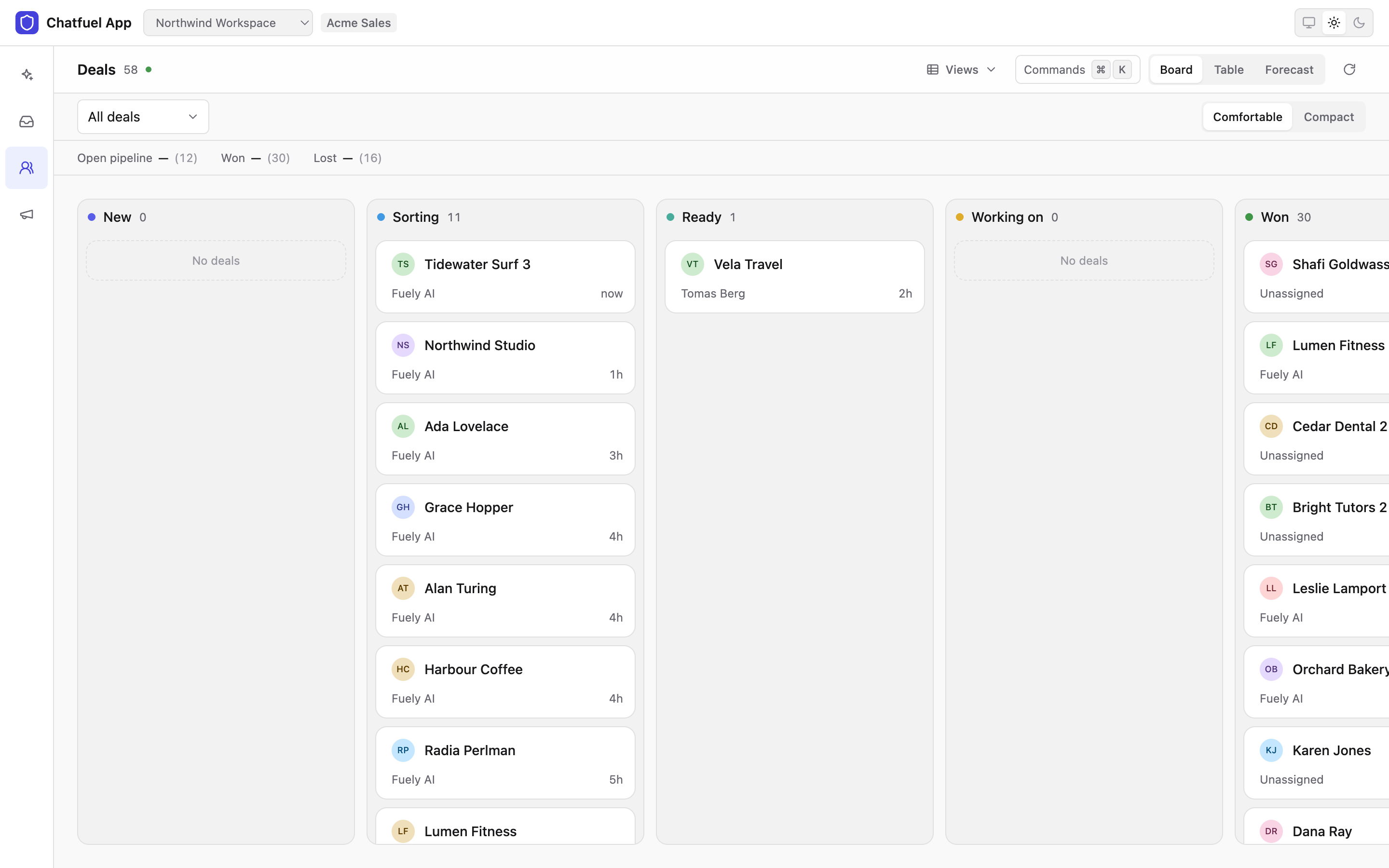
docs/modules.md has what each one gives you.
Try it
npx @chatfuel/wizard            # scaffold a new app
npx @chatfuel/wizard --embed    # add the modules to a project you already have
npx @chatfuel/wizard doctor     # what the wizard can see before it asks anything
npx @chatfuel/wizard update     # bring an app it made up to this wizard's content
You do not need this repository to use the wizard — npx @chatfuel/wizard is the whole
install, and Node 22.19.0 or newer is the only prerequisite. The full user guide ispackages/wizard/README.md, which is also the npm page.
The wizard sends no telemetry. capture() in src/telemetry.ts is an empty function and
there is no backend behind it; the capture(...) calls scattered through the run exist so that
the event vocabulary is settled if one is ever added. Nothing about a run leaves your machine
except the content fetch from GitHub and the calls you asked for.
What you are trusting when you run it
The wizard ships as a small CLI and fetches the content it installs from this repository at run
time, so it is worth being exact about what stands behind those bytes.
content.lock is a floor, not a pin. The name invites the npm-lockfile reading, and that
reading is wrong. The file records a commit that the content must descend from, and the wizard
then follows a branch — main unless CHATFUEL_CONTENT_REF says otherwise. It refuses a commit
that is not a descendant of the floor, which is what stops a downgrade, but it does not pin you
to the bytes the tarball was published against.
On that path the digests travel with the bytes. Every file is checked against a SHA-256 incontent.index.json — but that index is fetched from the same commit, over the same connection,
at the same moment. It proves the download was not corrupted or tampered with in transit; it
cannot prove the commit itself is one you would have chosen. So the trust root for a default run
is TLS to raw.githubusercontent.com and api.github.com, plus whoever can push to main
of this repository — the same shape as any dependency you install from a registry. The
tarball's own floor digests are enforced end-to-end only on the offline and mirror paths, where
nothing newer is being followed.
The content is code twice over. It becomes your app's source, which is the obvious half. The
less obvious half: a module's handoff.md, and a catalog's playbook.md when you pass --app,
are written verbatim into CLAUDE.md / AGENTS.md and then handed to a coding agent that runs
with shell access. Treat a non-default content origin or apps catalog exactly as you would treat
a dependency you are about to install — which is why --apps-repo asks before it fetches, and
why --yes refuses a catalog that only an environment variable named.
Pinning harder is supported: CHATFUEL_CONTENT_REF takes a full 40-character commit SHA, and a
run given one follows nothing. docs/configuration.md has that and the
mirror settings beside it.
Documentation
Everything is under docs/, which starts with the two READMEs that come before
it — the CLI's user guide and the one that ships inside the app you get — and then covers the
architecture, every flag and variable, deployment, the fifteen modules, the --app presets,
and the errors this stack actually produces.
Repository map
The top-level directories split on one question: does this end up on a user's disk?
content/— everything that does: the app template (shell), the three source-only trees
vendored into a scaffold (ui,api-client,vite-plugin-proxy), the shared codegen body,
the modules, the schema snapshot, and the skills that belong to no module.packages/— everything that does not: the published CLI, the manifest schema, and the
dev-only gallery for the design system.scripts/— the gates, andcontent-trees.ts, which is the exact list of what travels rather
than a description of one.content/ui/srcis a content tree;content/uiis not.
CONTRIBUTING.md has the rules that follow from
that split, and docs/architecture.md has what each tree turns into.
Working on this repo
pnpm install
Node 22.19.0 or newer and pnpm 10.x — the same floor the published CLI runs on. Then the seven
gates, which CI runs exactly.
CONTRIBUTING.md has the rest, including the one rule that is easy to trip:
everything the wizard packs is copied onto somebody else's disk.
Releases
A commit on main reaches users on their next run. The content is fetched from the branch,
not from the tarball, so a fix to a module needs no release; a release moves the CLI itself.
CONTRIBUTING.md has the whole table,
including how to pin a run to one commit.
Community
- Discussions — questions, ideas,
and what you built - Discord — the faster route for "how do I…"
- Issues — something is broken
- SECURITY.md — vulnerabilities, privately
License
MIT — see LICENSE. The apps the wizard generates are yours, under the same license.
Yorumlar (0)
Yorum birakmak icin giris yap.
Yorum birakSonuc bulunamadi