Interactive-Map-Builder
Health Warn
- License — License: MIT
- Description — Repository has a description
- Active repo — Last push 0 days ago
- Low visibility — Only 5 GitHub stars
Code Fail
- rm -rf — Recursive force deletion command in app/package.json
- network request — Outbound network request in app/src/main.js
Permissions Pass
- Permissions — No dangerous permissions requested
No AI report is available for this listing yet.
Understand unfamiliar codebases. Explore the architecture, follow execution flows, and drill down to the source - all in interactive map.
Interactive Map Builder






Deep dives into how a system works: from the big picture down to a line of code, as one interactive map.
This skill is for understanding: it gives the agent a method for studying a repository and a ready-made viewer built for going deep.
Levels you drill into, animated flows, step-by-step code walkthroughs, a guided tour, and every claim linked to its source. The agent spends its effort on the explanation instead of building the page.
Live demo · Features · Examples · Install · How it works
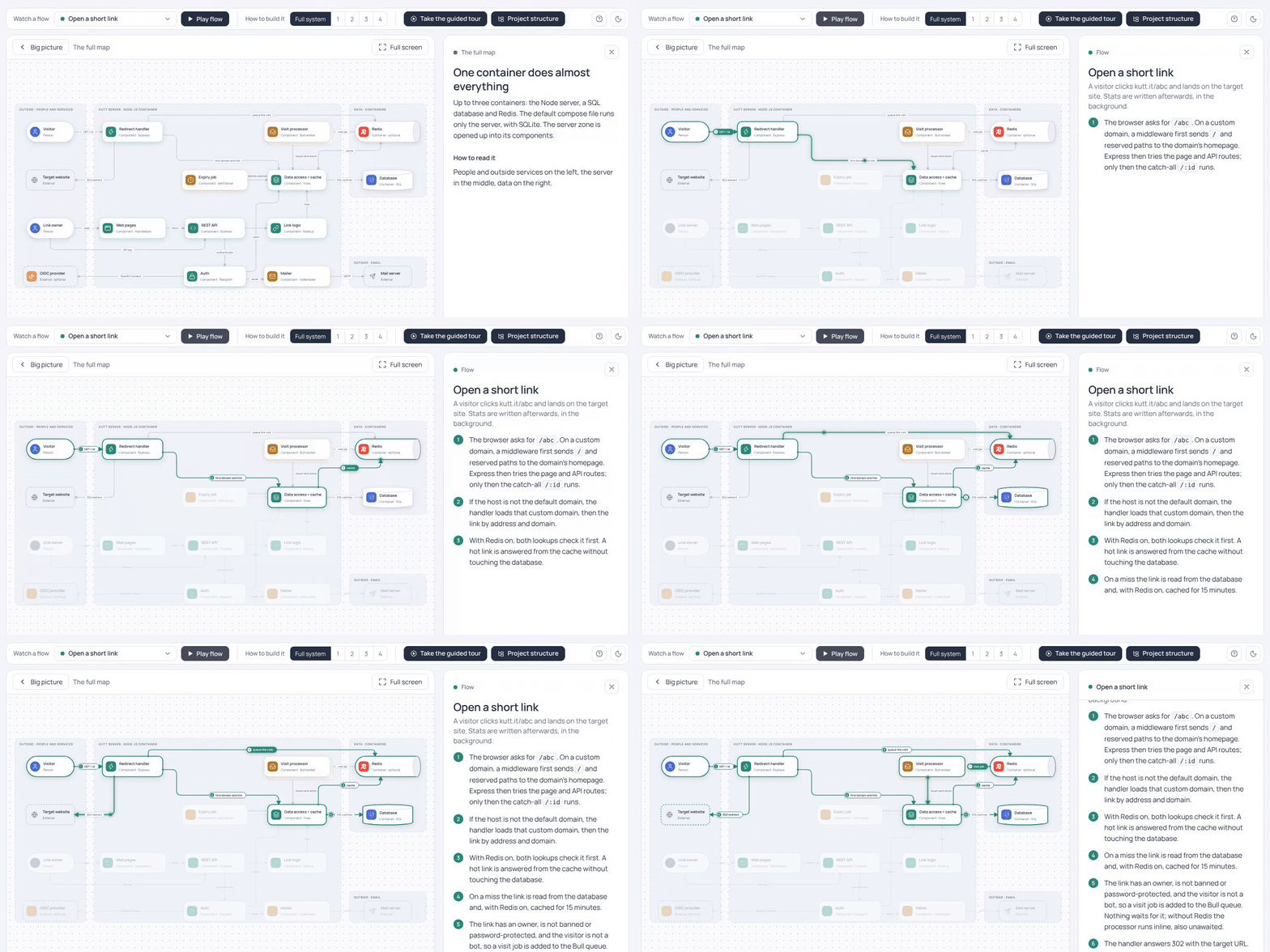
One of the flows on a map of the Kutt URL shortener, made by the skill. Open this map and try it yourself.
Features
- Overview: the whole system in a few cards.
- Full map: every part and how they connect.
- Flows: watch a request or a process move through the system.
- Look inside: open one component and see how it works step by step.
- Guided tour: a short walk through the map, good for a first visit.
- How to build it: the system assembled from scratch, piece by piece.
- Project structure: the repository's folders and files, each tied to its part of the map.
Every map is one HTML file. It opens offline, in light or dark, and every claim points to its source. A ? button beside the theme switch says which view answers which question.
Overview
The first screen. Who uses the system, what it is made of and what it depends on, in a handful of cards. It is the picture you would draw on a whiteboard before going into details. Click a card to open that part.
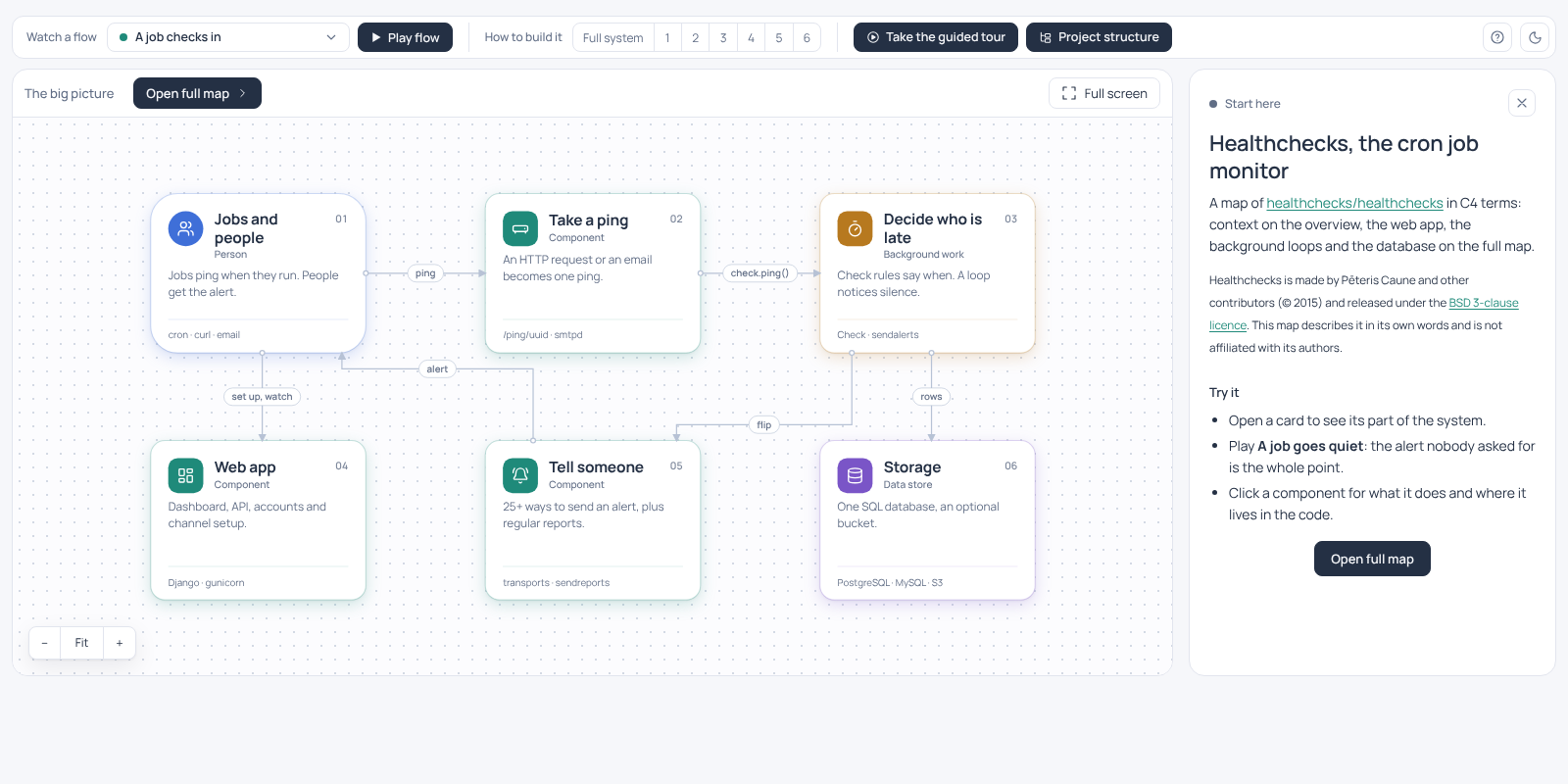
Overview of the Healthchecks cron job monitor.
Full map
All the parts of the system and the connections between them, grouped into zones. Click any of them to see what it does, why it matters and which files it lives in.
For a repository the map follows the C4 model: containers are the pieces that run separately (a server, a database, a queue), components are the main parts inside them. You do not need to know C4 to read the map.
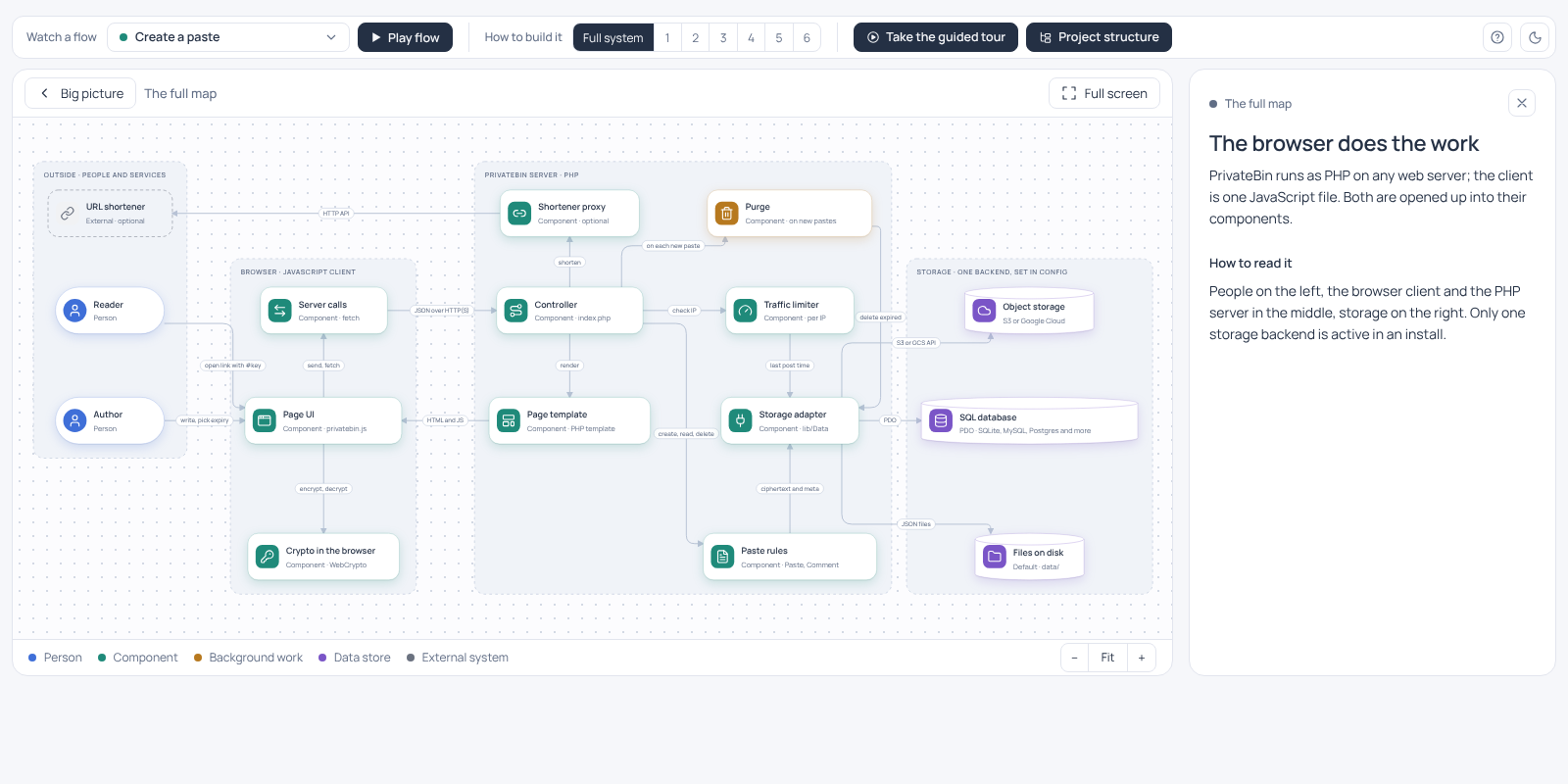
Full map of the PrivateBin pastebin, laid out automatically.
Flows
A diagram shows what is connected; a flow shows what actually happens. Pick a scenario, such as "a visitor opens a link", and press Play flow: the path lights up hop by hop while the panel explains each step. The GIF at the top is one of them.
Look inside
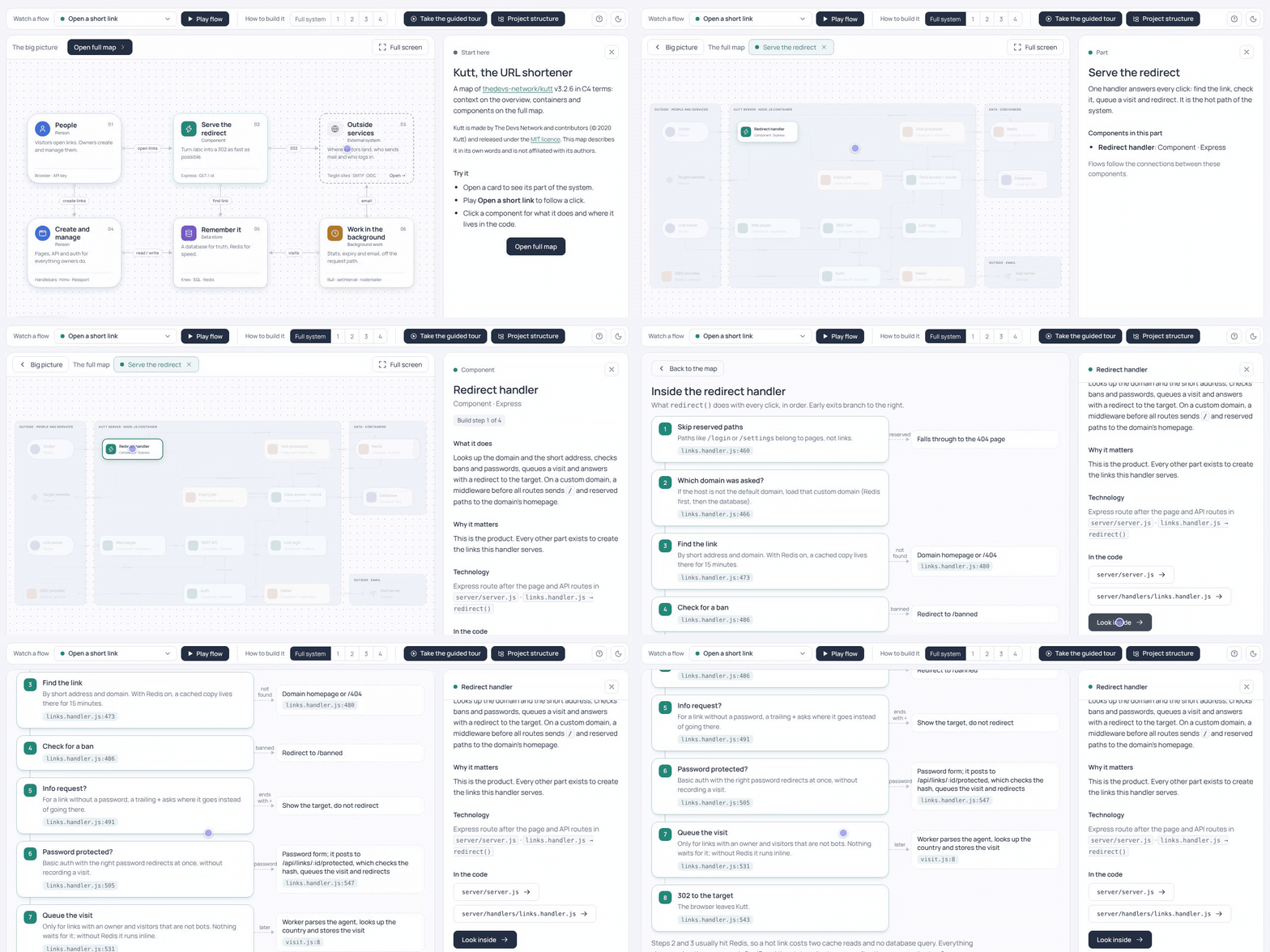
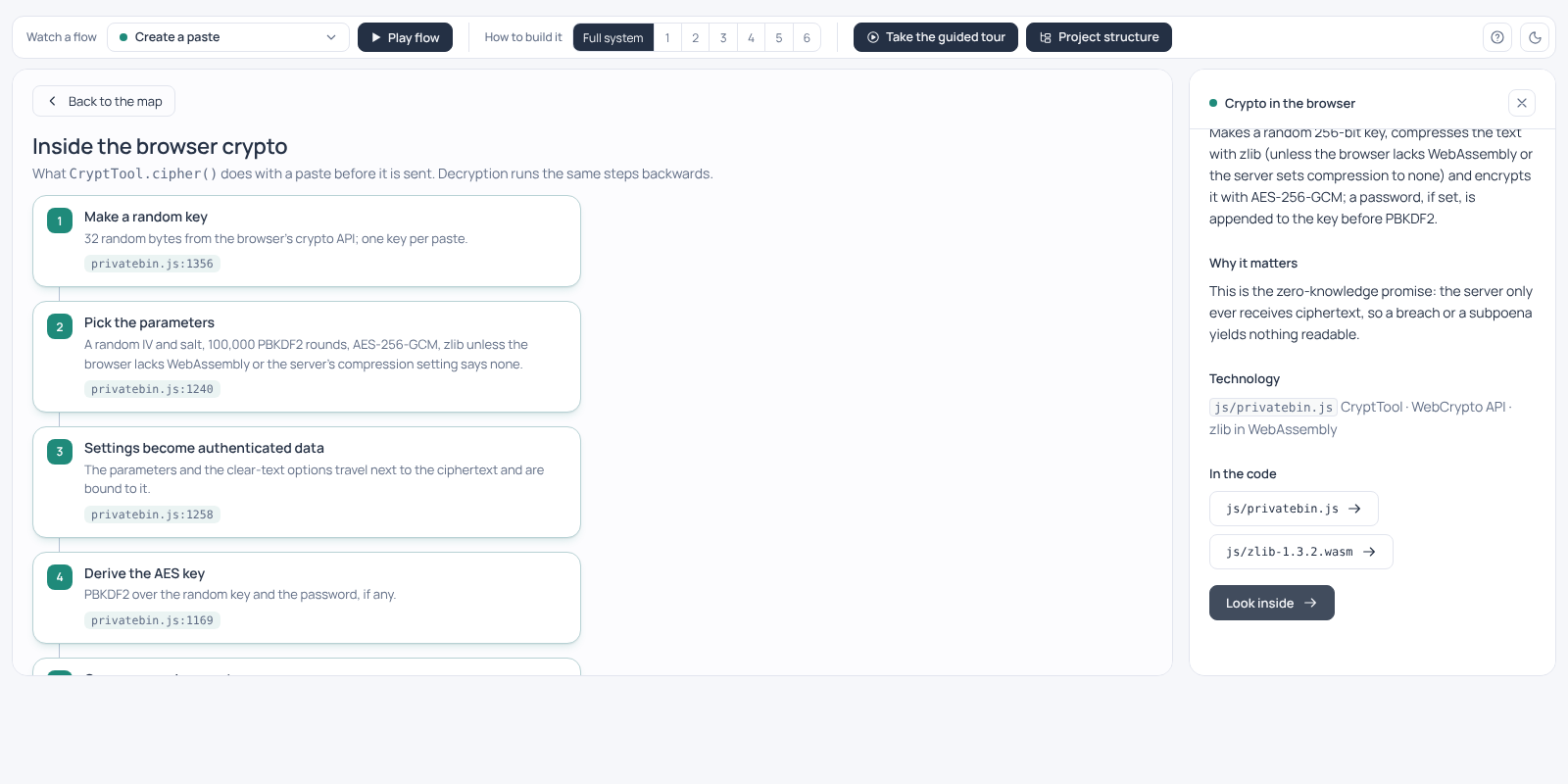
Some components deserve a closer look. Look inside opens a close-up: a code walkthrough in the order the code runs, with the early exits and links to exact lines, or the tables of a database and how they relate.
 |
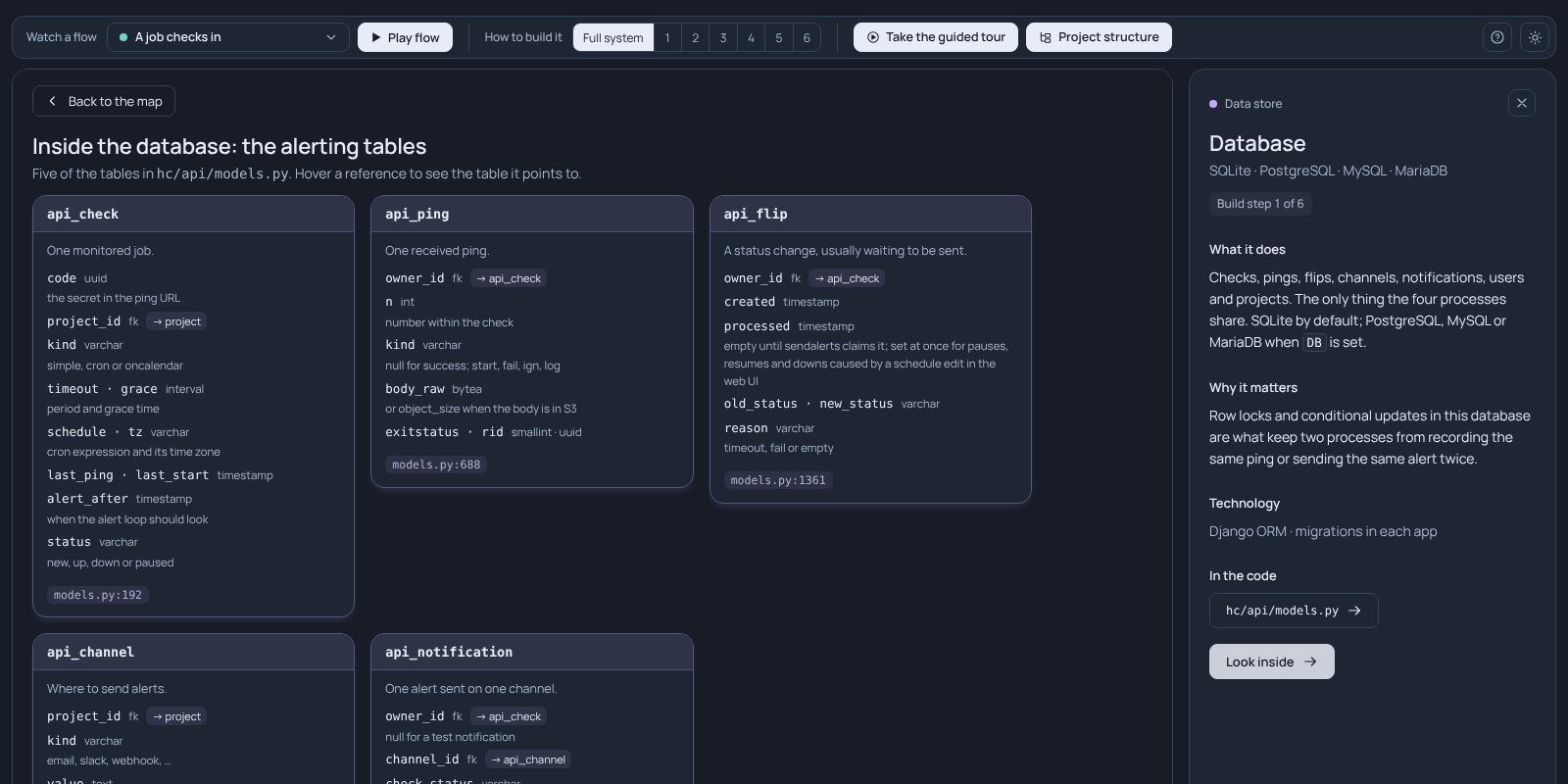 |
| PrivateBin: how a paste is encrypted in the browser, step by step. | Healthchecks: the tables behind the alerts. |
Guided tour
For someone who opens the map for the first time and does not know where to start. A few minutes in short chapters: the context, a click, a new link, the background work, a recap. Next moves the map and explains what you are looking at.
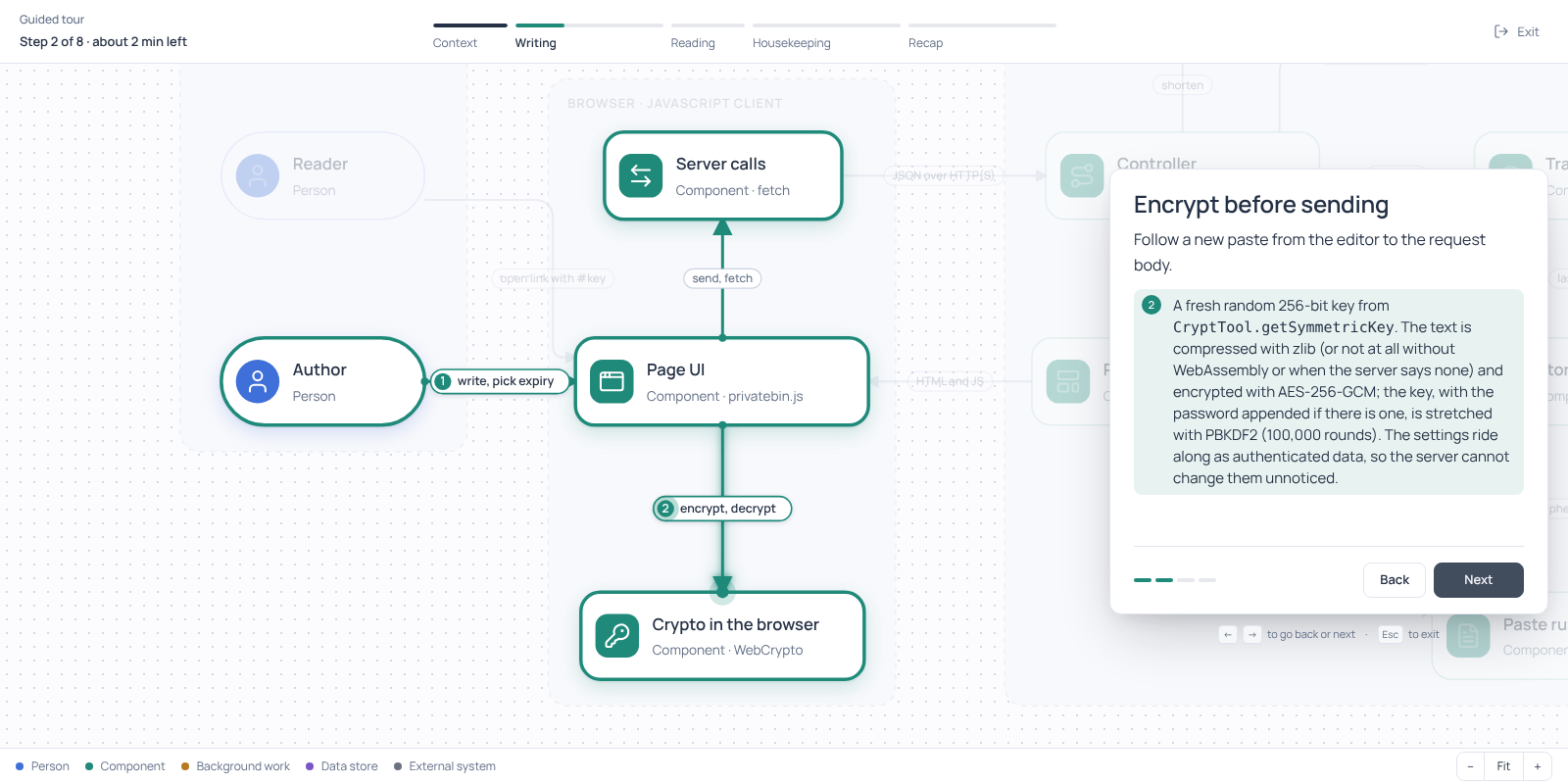
The tour of PrivateBin, at the chapter on writing a paste.
How to build it
How you would build the system from scratch. Switch from Full system to step 1, 2, 3: each step adds a few components and says why they come now. Good for seeing what is the core and what was added on top. It is one sensible order for understanding the system, not a history of the project.
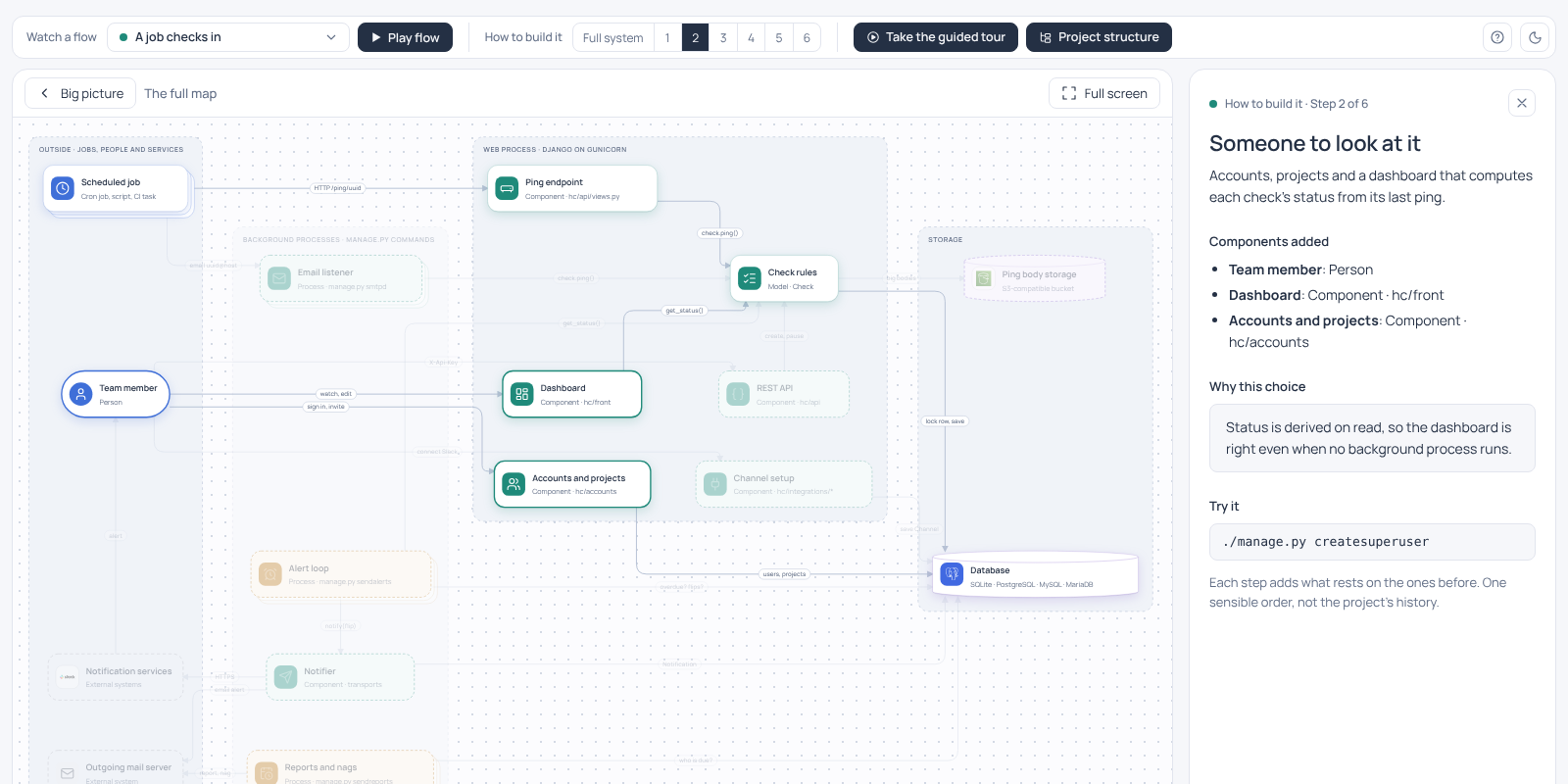
Healthchecks, step 2 of 6: the team member, the dashboard and accounts join the ping endpoint and the database.
Project structure
What the repository is made of. The folders and files that matter, each with a line on what lives there and why it exists, coloured by the part of the map it belongs to. Tags on a row jump to the component on the map, and a component's panel leads back to its folders.
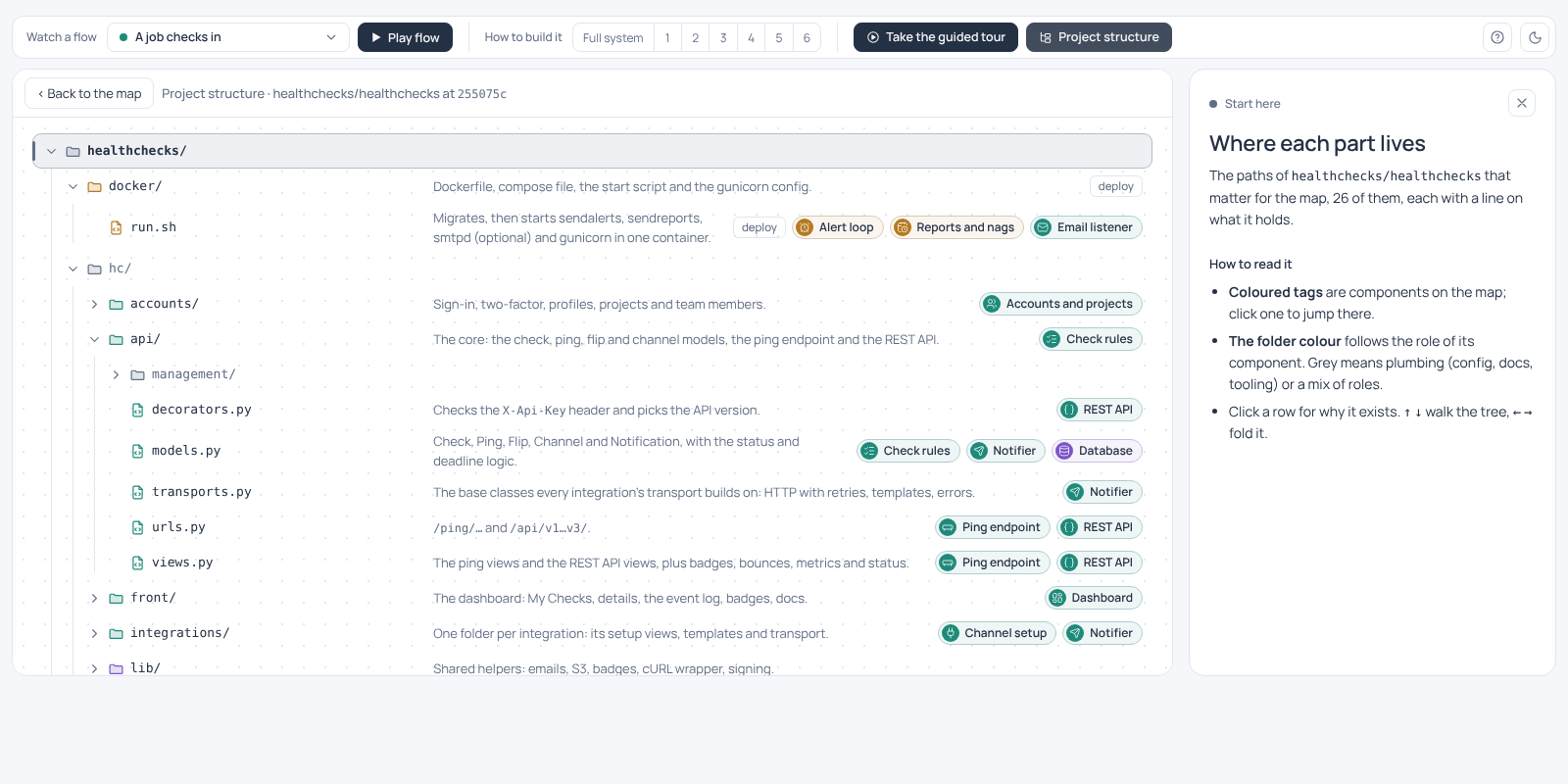
The Healthchecks repository, folder by folder.
Example maps
Eight real open-source projects, mapped by the skill. Open any of them in the browser.
| Map | What it shows best | |
|---|---|---|
| Kutt, a URL shortener | A hand-tuned layout, a request path with a cache, background jobs | Open |
| PrivateBin, a zero-knowledge pastebin | A fully automatic layout; the work done in the browser, not on the server | Open |
| Healthchecks, a cron job monitor | A web app and background loops that share one database | Open |
| Rivet, a production-database extractor | A command line tool with no services: batch and change-data paths, a commit protocol | Open |
| Miniflux, a feed reader | One Go binary and PostgreSQL: a scheduler, a worker pool, three APIs | Open |
| Umami, web analytics | A Next.js app with a tracker script, cookie-free visit counting, PostgreSQL with optional ClickHouse, Kafka and Redis | Open |
| nanoGPT, a small GPT trainer | Machine-learning scripts: data preparation, the training loop, the model | Open |
| Lobsters, a link aggregator | A Rails monolith behind a bot filter, a full-page cache on disk, jobs and cron scripts | Open |
All eight were checked against the code with the extra check. The map files are in examples/, with the credits and the commit each one was written from.
Install
npx skills add chekrizh/Interactive-Map-Builder --skill '*' -g
This uses the skills CLI and works with Claude Code, Codex, Cursor, Gemini CLI and other agents that read skills (-a claude-code picks one). --skill '*' installs both skills (interactive-map-repo reads the repository, interactive-map renders the map), and -g makes them available in every project. Updates are manual: npx skills check shows whether a newer version is out, npx skills update installs it.
Then just ask, for example:
Draw an interactive map of how this repository works.
The skill triggers on its own.
Claude Code plugin (updates through the plugin marketplace)/plugin marketplace add chekrizh/Interactive-Map-Builder
/plugin install interactive-map@interactive-map-builder
The skills are then also available as /interactive-map:interactive-map and /interactive-map:interactive-map-repo.
- Update on request:
/plugin marketplace update interactive-map-builder, orclaude plugin update interactive-map@interactive-map-builderin a shell. - Update automatically:
/plugin→ Marketplaces → interactive-map-builder → Enable auto-update. It is off by default for marketplaces like this one.
- Claude apps (desktop, web): download
interactive-map.zipandinteractive-map-repo.zipfrom the latest release, then upload each under Settings → Capabilities → Skills. Code execution must be on. To update, upload the zips of a newer release. - ChatGPT: upload the same zips where your workspace allows custom skills. This path has not been checked here.
- By hand: the skills are the folders in
plugins/interactive-map/skills/; copy both into the skills folder your agent reads.
How it works
 repository ──► agent designs the map ──► map.json ──► render.py ──► map.html
                  (skills decide what      (nodes, flows,   (checks it, fills    (viewer + map,
                  goes on the map)         tour, layout)    icons and logos)     works offline)
- Two skills.
interactive-map-repois the method for repositories: find the evidence (deployment files, entry points, contracts), model it in C4 terms (context on the overview, containers and components on the full map) and pick the flows worth animating.interactive-mapis the format: how to write the map JSON and render it. - The agent never writes HTML. It writes one JSON definition.
render.py(Python 3, standard library only) validates it with the same checks the page runs, lists every problem at once, sanitises its text, and puts it into the prebuilt viewer. - An optional extra check. Before it starts, the agent asks whether to run it. Once the map is drafted, an independent reviewer (the agent itself where it cannot start one) checks every component, connection and step against the source code, and the agent writes up its mistakes, fixes them and has the fixes checked again, up to three rounds. It builds on software reflexion models (Murphy, Notkin and Sullivan, 1995) and Reflexion (Shinn et al., 2023). On five repositories the skill had not seen before, it cut wrong statements from 2.7% to 0.2% and roughly doubled the time (the experiment).
- An asset library is built in. About 2,300 Lucide icons, about 3,500 brand logos from Simple Icons and gilbarbara/logos, and role presets with tested light and dark colours. A map only names them.
- The output is self-contained. Each HTML file carries its own copy of the viewer, the map and the font, so it keeps working when the skill changes.
Render the bundled example yourself:
python3 plugins/interactive-map/skills/interactive-map/scripts/render.py \
  plugins/interactive-map/skills/interactive-map/examples/kutt-url-shortener.json /tmp/map.html
open /tmp/map.html
What the plugin does on your machine
- Only instructions and scripts. The plugin adds two skills. It has no hooks, no MCP servers and no settings changes.
- Python scripts, standard library only.
render.pyreads the map JSON, the viewer inassets/viewer/and the asset library, lays the map out (auto_layout.py) and checks the layout (layout_check.py), strips any HTML outside a small allowlist from the map's text (contract.py), and writes one HTML file to the path you give it. With--repo-dirit also reads the repository checkout you name, to check that code references and paths exist.find_asset.pysearches the asset library and prints names.claims.pyreads a map and lists its statements for the extra check. None of them makes network requests, runs other programs or reads anything outside the skill folder, the map and the checkout you pass. - One optional script opens a browser.
preview.pyscreenshots a rendered map so the agent can check it by eye. It uses Playwright with Chromium if they are already installed (it looks for them withnpm root -gand startsnodewithpreview.js), opens only the local HTML file and saves PNG files next to it. It installs nothing; without Playwright it exits and the agent relies on the layout check alone. - The generated page works offline. Its script, styles, font, icons and logos are inlined; it makes no network requests and sends nothing anywhere.
- Everything shipped is readable. The viewer is committed unminified (built from
app/), and the icon and logo library is split into JSON files with one item per line (built bytools/build_library.py), so every file stays under 256 KB and can be reviewed.
Feedback
A map got something wrong, the viewer misbehaved, or you made a map you like? Open an issue: one field is enough. Changes are listed in the changelog.
License
MIT. Bundled assets keep their own licenses: Lucide icons (ISC), Simple Icons and gilbarbara/logos (CC0; brand marks remain trademarks of their owners), the Manrope font (SIL Open Font License). The example maps describe Kutt (The Devs Network and contributors, MIT), PrivateBin (Sébastien Sauvage and the PrivateBin contributors, zlib/libpng) and Healthchecks (Pēteris Caune and other contributors, BSD 3-clause), Rivet (Rivet Contributors, MIT), Miniflux (The Miniflux Authors, Apache 2.0), Umami (Umami Software, Inc., MIT), nanoGPT (Andrej Karpathy, MIT) and Lobsters (joshua stein and contributors, BSD 3-clause); they copy none of their code, and the examples README links each licence and mapped commit.
Reviews (0)
Sign in to leave a review.
Leave a reviewNo results found