crewdesk
Health Gecti
- License — License: MIT
- Description — Repository has a description
- Active repo — Last push 0 days ago
- Community trust — 32 GitHub stars
Code Uyari
- fs module — File system access in .github/workflows/artifact-probe.yml
- fs module — File system access in .github/workflows/publish.yml
Permissions Gecti
- Permissions — No dangerous permissions requested
Bu listing icin henuz AI raporu yok.
Self-hosted AI engineering team on Bun + SQLite: Super Assistant + specialist coding agents across 4 ACP harnesses (oma, Claude Code, pi, omp), Git Wiki & Web/Lark sync.
CrewDesk
Run a self-hosted AI engineering team — one Super Assistant, specialist coding agents across 4 harnesses (oma · Claude Code · pi · omp), a git-backed Wiki, and real-time Web + Lark sync.
English · 简体中文








Why CrewDesk · Quick Start · Screenshots · Architecture · Security · Docs

End-to-end walkthrough: Today → Chat & Artifacts → Tracked Requirements → 4-Harness Team → Workflow DAG → Git Wiki · Download full HD MP4
Most coding agents live in an isolated terminal tab. CrewDesk turns them into a coordinated, self-hosted team on a single Bun + SQLite stack:
- Talk to a Personal Assistant (PA) from Web or Lark/Feishu.
- The PA tracks goals as Requirements, dispatches specialist workers (Coder, Researcher, Reviewer) into isolated git workspaces, and compiles long-term knowledge into a git-backed Wiki.
- Mix
oma, Claude Code,pi, andompon the same team over one Agent Client Protocol (ACP) rail — with fail-closed approvals, sandboxed workflows, and zero external database infrastructure.
✨ Why CrewDesk
| Capability | What you get |
|---|---|
| Super Assistant + Specialist Team | Clean separation of roles: the PA triages, plans, dispatches, and coordinates — it has no direct code-write or shell access. Workers operate in isolated project copies, push only to agent/<runId> branches (never main/master), and pass a Delivery Gate that marks output unverified until a second agent checks it. |
| One ACP Rail, Four Coding Harnesses | Assign oma (built-in CLI/TUI runtime), Claude Code, pi, or omp per agent. Each harness keeps its own native session continuity behind one unified ACP child-process boundary — swap engines without changing your console, Lark bot, or approval flow. |
| Workspace-as-Config & Git Wiki | Every agent's identity (SOUL.md, USER.md), skills, MCP servers, and memory are plain files in its workspace. Durable knowledge lives in a product-level git-backed Wiki (raw/ references + compiled topic pages), rather than decaying inside chat history. |
| One Ledger, Every Surface in Sync | Web Console, Lark/Feishu IM bot, Oma TUI, and in-browser Coding worktree terminals all project the same SQLite conversation ledger. Start a task in Lark on mobile, approve a tool call or inspect artifacts in Web, and jump into the agent's worktree terminal in one click. |
| Fail-Closed Approvals & Guardrails | Per-agent tool policies (ask / auto / deny), path & command fences (deny_write_paths, allow_write_paths, deny_commands), and persistent HITL prompts (pending_action) that deny on timeout. |
| Declarative Agentic Workflows | Visual DAG orchestrator with agent, script (bubblewrap-sandboxed), and human nodes, JSON-Logic conditional routing, cron triggers, and typed artifacts:// passed between stages. |
| Zero-Infra Self-Hosting | Single Bun + SQLite runtime. No Docker Compose sprawl, no Postgres, no Redis. |
🔄 How a Task Flows
- Ask your Personal Assistant in the Web console or a Lark/Feishu chat.
- Track & Dispatch — The PA records non-trivial goals as a Requirement and dispatches specialist workers with scoped briefs.
- Execute Safely — Workers run on
oma,claude,pi, orompinside isolated project copies; high-risk actions pause on fail-closed approval cards. - Verify & Deliver — Workers push commits only to
agent/<runId>branches and emitartifacts://; a second agent reviews the diff before the Delivery Gate clears. Humans decide whether to merge. - Compound Knowledge — Decisions, lessons, and project notes are committed into the shared Git Wiki with source references.
📸 Screenshots
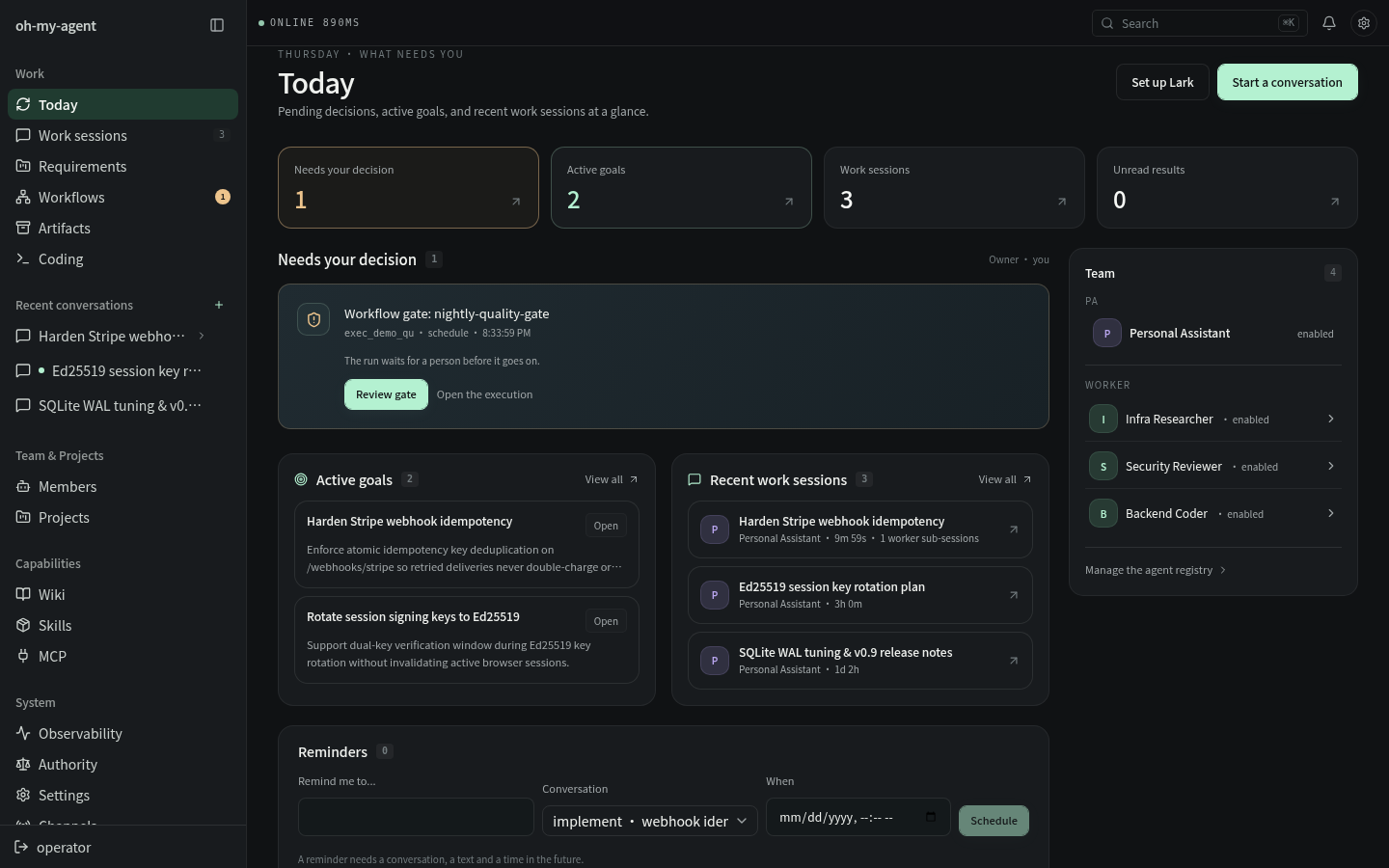
Today Inbox — pending human gates, active goals, work sessions & team roster |
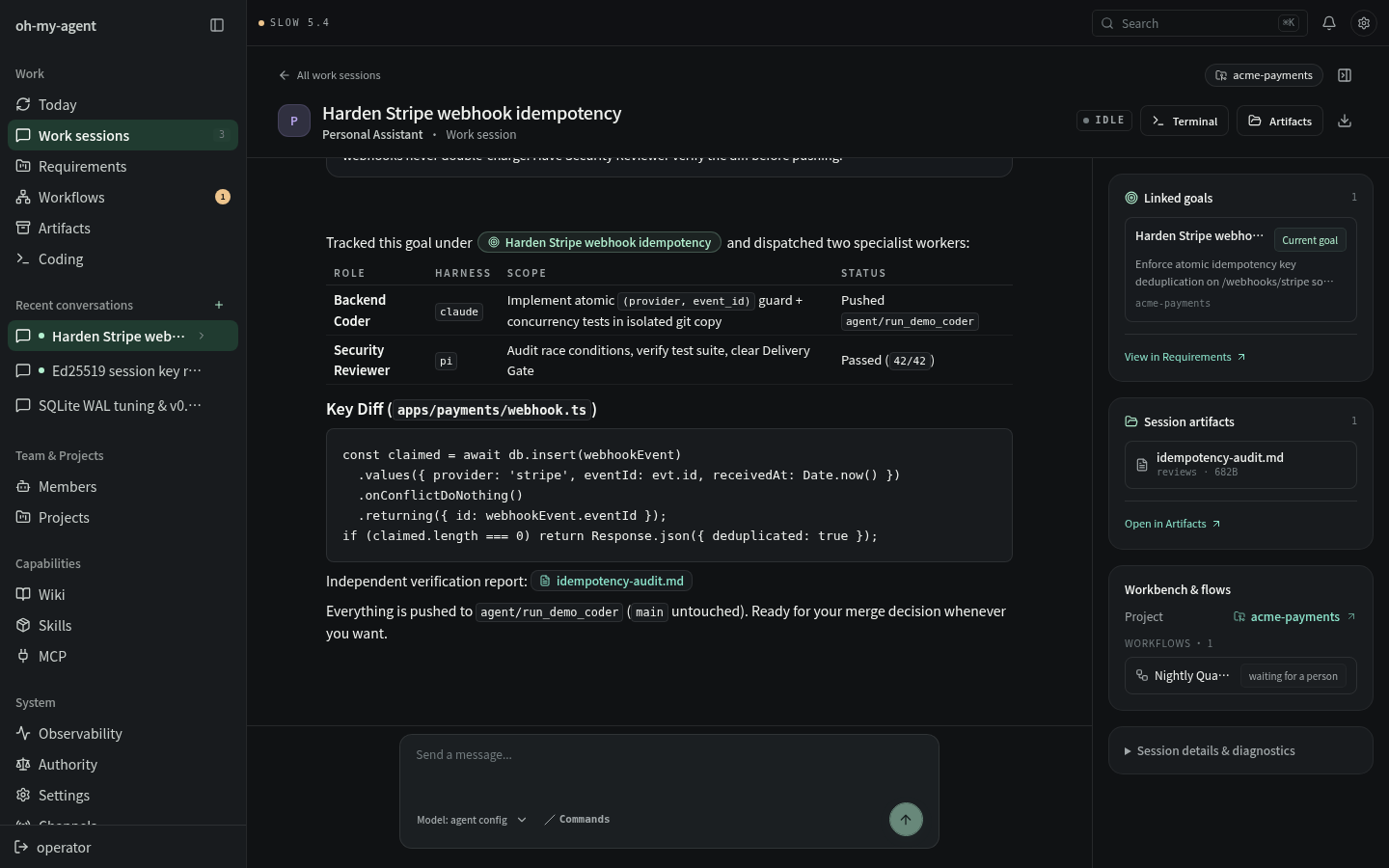
Chat Console — PA dispatch table, inline Requirement & Artifact chips, right-rail inspector |
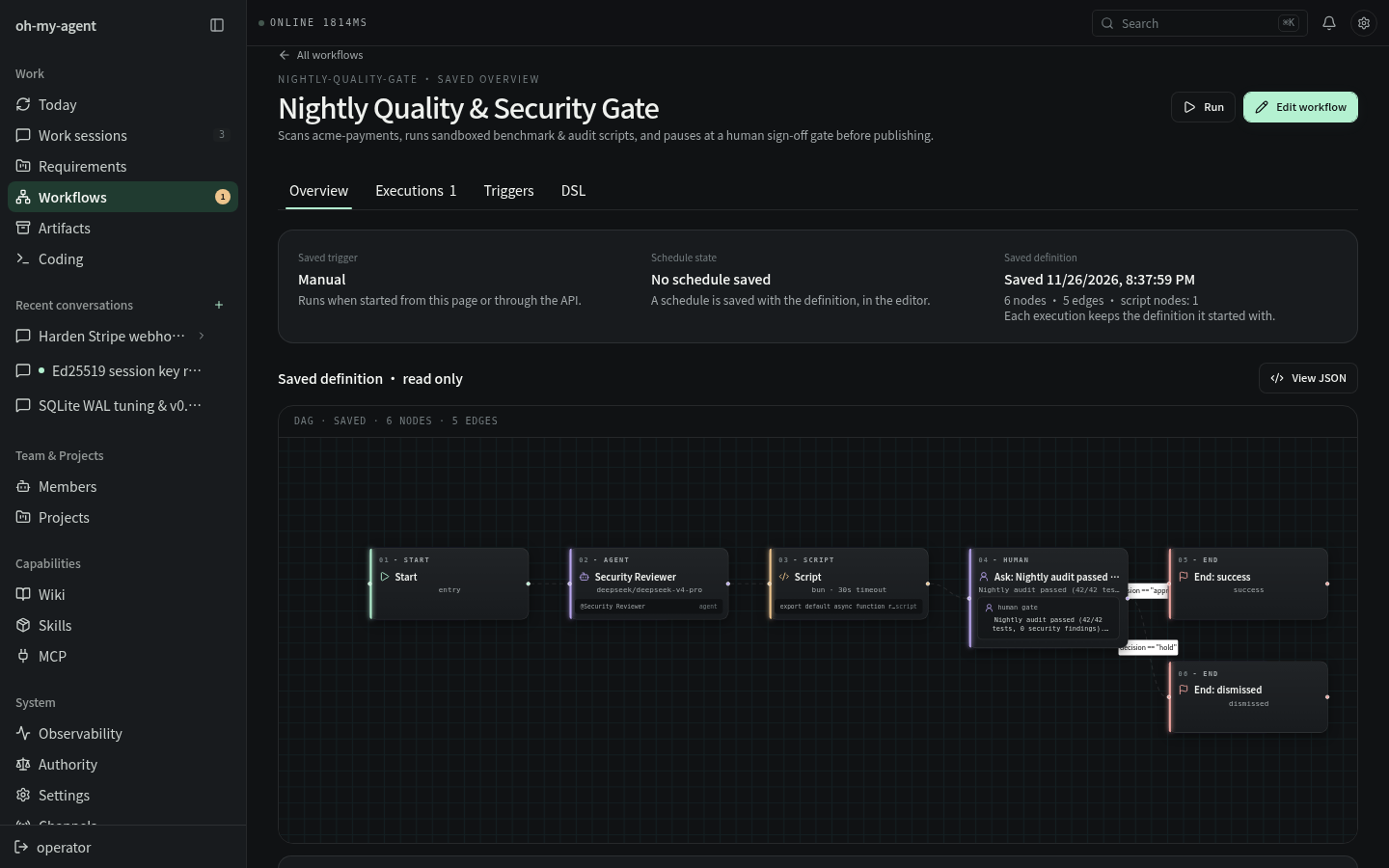
Agentic Workflow DAG — agent, sandboxed script, and human-in-the-loop gate nodes |
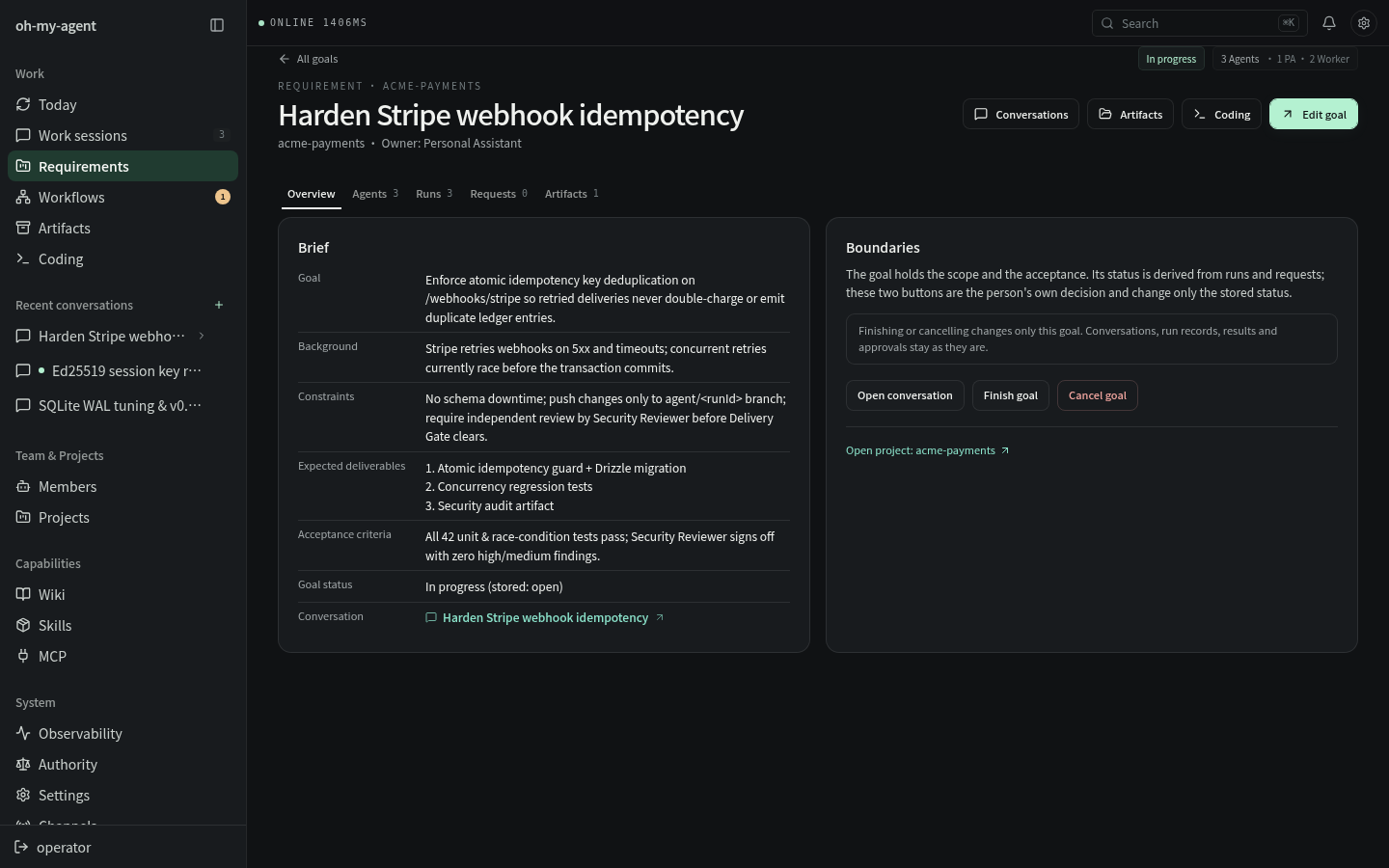
Tracked Requirements — goals, constraints, acceptance criteria & linked runs/artifacts |
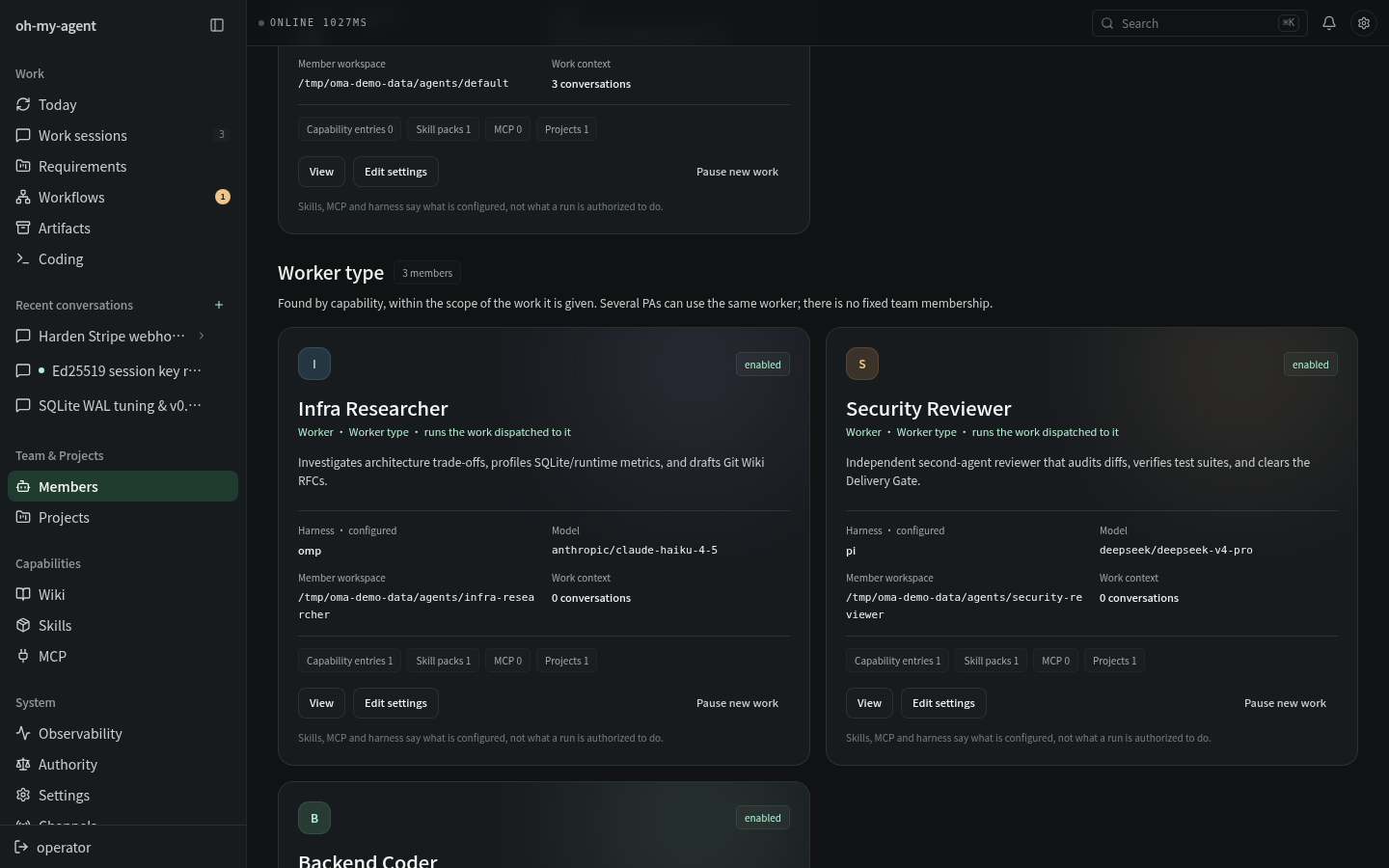
Multi-Harness Team (oma · claude · pi · omp) |
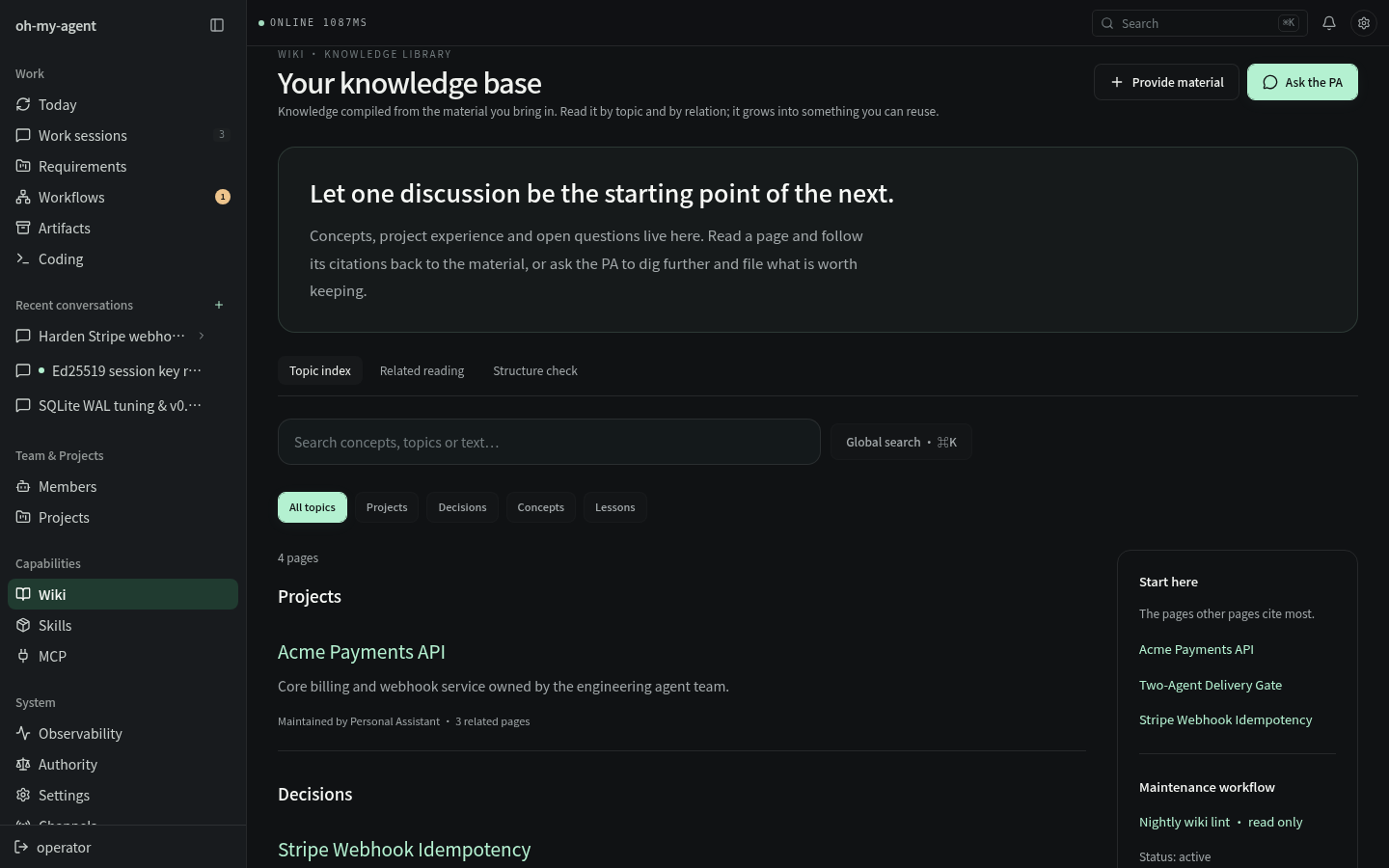
Git-Backed LLM Wiki |
|---|---|
 |
 |
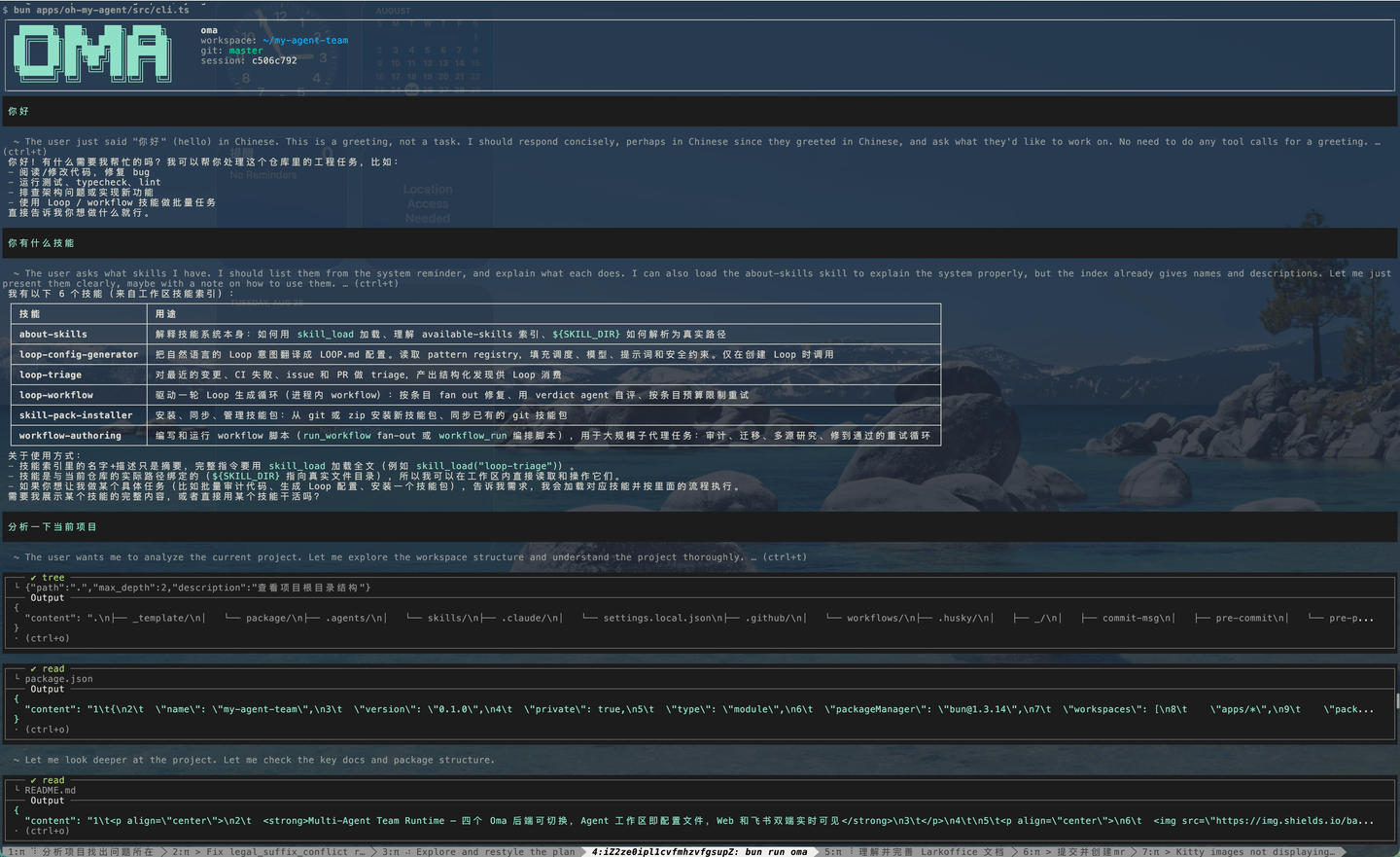
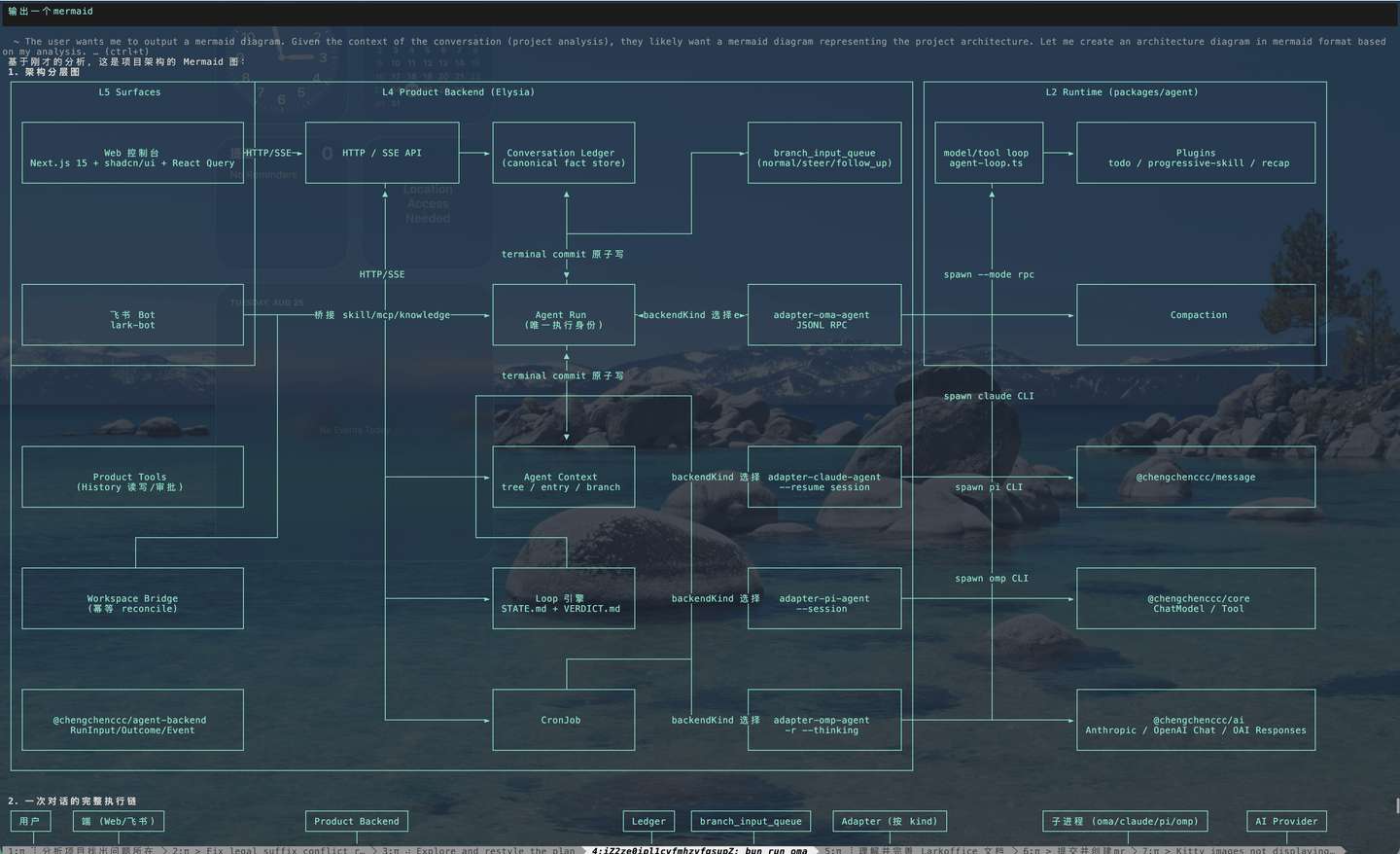
| Oma TUI — Interactive Session | Oma TUI — Tool Calls & Mermaid |
|---|---|
 |
 |
🚀 Quick Start
Option 1: Prebuilt CLI + Gateway (Fastest)
Install oma together with the prebuilt backend + web gateway bundle (requires tar and zstd; Bun is installed automatically if missing):
curl -fsSL https://raw.githubusercontent.com/Chengchcc/crewdesk/master/scripts/install.sh | OMA_VERSION=rc sh
oma gateway up        # foreground; use `oma gateway up -d` for background
OMA_VERSION=rcpulls the npmrcchannel whileoma gatewayis in release candidate. The installer downloads the bundle to~/.oma/gateway/and never auto-starts services.
Open http://127.0.0.1:3001/login and sign in with the password printed by oma gateway up (stored with 0600 permissions in ~/.oma/gateway-secrets.json). You can change it in Settings → Login password or via oma gateway passwd.
Common commands:
| Command | Action |
|---|---|
oma gateway up / up -d |
Start backend + web (foreground / background, returns once healthy) |
oma gateway status |
Show installed version, process health, and login password |
oma gateway down |
Stop background gateway |
oma update |
Upgrade CLI and gateway bundle together (--check to inspect only) |
oma -p "Summarize docs/architecture/README.md in 3 bullets" |
Run a one-shot CLI prompt with oma |
Manual install: bun add -g @chengchenccc/oh-my-agent@rc && oma gateway fetch && oma gateway up (fetch is required because Bun skips dependency postinstall scripts by default). Code (~/.oma/gateway/) and state (~/.oma/gateway-data/) are stored separately so upgrades preserve your data.
Option 2: Run from Source
1. Prerequisites
- Bun
>= 1.3.14(package.jsonpins1.3.14; CI & releases run1.4.4) - System tools:
ripgrep,bubblewrap, andopenssl(used byscripts/predev.shto generate local secrets) - Anthropic API key:
ANTHROPIC_API_KEYorANTHROPIC_AUTH_TOKEN(for other providers, see below)
2. Install dependencies
bun install
3. Start backend + web
export ANTHROPIC_API_KEY=sk-ant-...   # or ANTHROPIC_AUTH_TOKEN=...
bun run dev
bun run dev automatically runs scripts/predev.sh (generates .env files with random BACKEND_AUTH_TOKEN, SESSION_SECRET, and MOCK_PASSWORD, runs Drizzle migrations, and prepares Monaco assets) and then scripts/dev.sh (starts backend on :3000 and web on :3001).
4. Verify
- Backend health:
curl -s http://127.0.0.1:3000/health→{"status":"ok"} - Web console: open
http://localhost:3001/loginwithMOCK_PASSWORDfrom the generated.envinsideapps/web
scripts/dev.sh checks for an Anthropic key, but the backend runtime supports any configured provider. To run without an Anthropic key, start backend and web in two terminals:
bun run predev       # generate .env & secrets once

# Terminal 1
export OPENAI_API_KEY=sk-...
bun run dev:backend  # http://127.0.0.1:3000

# Terminal 2
bun run dev:web      # http://localhost:3001
Supported built-in provider environment variables:
| Provider | Environment Variable |
|---|---|
| Anthropic | ANTHROPIC_API_KEY |
| OpenAI | OPENAI_API_KEY |
| DeepSeek | DEEPSEEK_API_KEY |
| Groq | GROQ_API_KEY |
| OpenRouter | OPENROUTER_API_KEY |
Custom providers and model overrides are configured in ~/.oma/models.yml (see Security Model for gateway path isolation).
- Reset login password:
MOCK_PASSWORDis only adopted on the first boot of a fresh data directory. Runbash scripts/reset-login-password.shand restart the backend to reset it. - Dev database upgrades: migrations target fresh-boot paths. If a schema change breaks an old local dev DB, delete
apps/backend/.backend-data/and restart.
🏗 Architecture
flowchart TB
    subgraph Surfaces["Surfaces"]
        WEB["Web Console (Next.js 15)"]
        LARK["Lark / Feishu Bot"]
        TUI["Oma TUI & Coding Terminals"]
    end

    subgraph Backend["Product Backend (Elysia + SQLite)"]
        LEDGER["Conversation Ledger · Agent Context · Requirements · Wiki"]
        CTRL["Run Dispatcher · Workflow Engine · Artifacts · Approvals"]
    end

    subgraph ACP["ACP Child-Process Boundary (One Rail, Four Harnesses)"]
        OMA["oma (built-in runtime)"]
        CLAUDE["Claude Code"]
        PI["pi"]
        OMP["omp"]
    end

    PROTO["Shared Protocols: Message · ChatModel · Tool · ContentBlock · Workflow DSL"]

    WEB -->|HTTP / SSE / WS| LEDGER
    LARK -->|HTTP / SSE| LEDGER
    TUI -->|RPC / PTY| CTRL
    LEDGER <--> CTRL
    CTRL -->|spawn per Run via ACP| OMA
    CTRL -->|spawn per Run via ACP| CLAUDE
    CTRL -->|spawn per Run via ACP| PI
    CTRL -->|spawn per Run via ACP| OMP
    OMA --- PROTO
    CLAUDE --- PROTO
    PI --- PROTO
    OMP --- PROTO
Engineering Invariants
- Single source of truth: the backend owns
conversation_ledger; Web, Lark, and TUI are pure projections of the same canonical facts. - Atomic terminal commits: every Run settles into one
BackendRunOutcomeand commits History + Context in a single SQLite transaction. Streaming output never pollutes canonical facts. - One-shot isolated processes: each Run spawns one child process over ACP; cross-run context continuity uses each harness's native session reference without long-lived daemon drift.
- Fail-closed HITL: approvals and user questions persist in
pending_action; timeouts default to deny. - Frozen workflow routing: conditional edges evaluate at node completion and freeze into
CompletionRecord.routedTo(join semantics =any-of). - Config as files: agent definitions live in workspace files and freeze once per Run.
🔐 Security Model
CrewDesk is built for a single-operator, local/self-hosted threat model. Web login, the BFF, and the backend share one operator identity — there is no multi-tenant isolation. Do not expose this stack directly to the public internet as a multi-user service.
Concrete security boundaries enforced by the runtime:
- Localhost by default: services bind to
127.0.0.1only. - Worker repo isolation: workers operate in isolated project copies and
project_pushonly pushes toagent/<runId>branches (pushingmain/masteris rejected); per-agentdeny_write_paths,allow_write_paths, anddeny_commandsblock path escape and cross-repo git writes. - Sandboxed workflow scripts: disabled by default (
WORKFLOW_SCRIPTS_ENABLED=1required); when enabled, scripts run insidebwrap/sandbox-execwith no network access, an isolated PID namespace, and no read access todataDiror.env. - Lark sender allowlist: inbound Lark messages are restricted to
agent.lark.allowed_sendersopen_ids; bot-authored messages are dropped. - Server-side secret masking: provider keys and MCP headers stay on the backend and are masked on every HTTP read.
- Provider config isolation: spawned agent subprocesses read model config strictly from
$OMA_HOME/models.ymlrather than agent-writable workspaces, preventing a Run from hijacking the next Run's providerbaseUrlor API key.
📦 Repository Structure
apps/
  backend/       Elysia backend — HTTP/SSE, ledger, runs, workflows, wiki, artifacts, product MCP tools
  oh-my-agent/   Oma CLI & runtime — print / json / tui / acp modes, agent loop, plugins, compaction
  web/           Next.js 15 console — Today, Chat, Requirements, Team, Workflows, Coding, Wiki, Channels
  lark-bot/      Lark / Feishu IM bot adapter

packages/
  message/       Core protocol: Message, ChatModel, Tool, ContentBlock, stream utilities
  ai/            Multi-provider model registry & protocol adapters (Anthropic, OpenAI, DeepSeek, etc.)
  workflow/      Pure Agentic Workflow DSL: node graph, JSON-Logic routing, computeNext engine
  sandbox/       Process sandbox for workflow script nodes and oma eval tool
  adapter-mcp/   External MCP client mount
  ahp-client/    WebSocket transport & state mirror for Agent Host Protocol surfaces
  api-contract/  Cross-process type contracts (SSE events, Eden Treaty)
  embedding/     Local embedding support
  source-fetch/  Git / archive source materializer
  tui/           Terminal UI toolkit (editor, markdown, mermaid)
  config/        Configuration loader
  test-helpers/  Deterministic test doubles (echoModel)
Development commands:
bun run format          # Biome format
bun run lint            # Biome + ESLint
bun run typecheck       # tsc --noEmit across all workspaces
bun run test            # Full test suite (turbo)
bun run build           # Full build (turbo)
bun run audit           # Fast contract / workspace / docs / UI gates
bun run audit:coverage  # Coverage floors for oma runtime & backend semantics
bun run quality:mutate  # On-demand mutation testing probe
📚 Documentation
| Document | Contents |
|---|---|
| Project Wiki | Current-state architecture, ADRs, guides, and roadmap |
| System Overview | Execution pipeline, ownership boundaries, and invariants |
| Design Philosophy | 8 architectural principles behind the codebase |
| Development Guide | Local development workflow, testing, and pre-commit gates |
| Contributing | Contribution & pre-commit checklist |
📄 License
Licensed under the MIT License.
Yorumlar (0)
Yorum birakmak icin giris yap.
Yorum birakSonuc bulunamadi