AI-PCB-layout
Health Gecti
- License — License: CC-BY-4.0
- Description — Repository has a description
- Active repo — Last push 0 days ago
- Community trust — 22 GitHub stars
Code Uyari
- Code scan incomplete — No supported source files were scanned during light audit
Permissions Gecti
- Permissions — No dangerous permissions requested
Bu listing icin henuz AI raporu yok.
AI agent skill for designing and reviewing power-electronics PCBs, with a human review gate after every step
AI PCB Layout

A gift for hardware engineer.
An AI agent skill for designing, reviewing, and improving power-electronics PCBs. This skill does not produce a PCB at the first try, instead it provides a way of how to collobrate with the AI agents to boost the productivity of PCB layout. I expect that the user has at least midlevel hardware experience, thus can provide engineering judgement to review the results.
The skill teaches an AI coding agent (Cursor, Claude Code, Codex, or any agent that supports SKILL.md skills) to work like a careful power-electronics layout engineer: it traces commutation and gate loops from the switching states, derives clearance and copper limits from standards and design currents, and stops for your approval after every step, so you stay in control of every design decision.
Note: The skill helps you reach a well-reasoned design and tells you which evidence is still missing. It does not certify safety or EMC compliance. Measurements and the applicable standards remain the final authority.
What it covers
- Electrical net table: worst-case peak voltage, dv/dt, RMS current, and di/dt for each key node and current path, taken from simulation or calculation, and turned into layout constraints
- Switching loops: commutation cells, gate charge and discharge loops, Kelvin connections, and common-mode paths, derived per switching transition
- Insulation: clearance, creepage, and solid insulation derived from the applicable standard and its inputs, never copied from example values
- Copper capability: conductor and via sizing from worst-case RMS current and permitted temperature rise
- Placement and routing: functional block floorplans, routability checks, and a routing plan you approve before any copper is drawn
- Verification: DRC, insulation geometry, parasitic extraction, re-simulation, and thermal checks, each recorded with its evidence type (CAD check, estimate, simulation, or measurement)
- Delivery: fabrication and assembly outputs, and a BOM with verified datasheet and order links
It works with any topology, device technology (Si, IGBT, SiC, GaN), and CAD tool. KiCad 9 is covered in the most detail; concept mappings are included for Altium Designer, Allegro/OrCAD, Xpedition/PADS, and Fusion.
How it works
The agent works in nine steps. After each step it delivers a short report and waits for you to reply approve, approve with changes, redo, or stop.
flowchart TD
    S1["1. Requirements and inputs"] -- gate --> S2["2. Architecture and limits"]
    S2 -- gate --> S3["3. Circuit and models<br/>(end-to-end only)"]
    S3 -- gate --> S4["4. Schematic, footprints, and 3D"]
    S4 -- gate --> S5["5. Design rules and stack-up"]
    S5 -- gate --> S6["6. Placement"]
    S6 -- gate --> S7["7. Routing<br/>(plan first, then block by block)"]
    S7 -- gate --> S8["8. Verification and optimization"]
    S8 -- gate --> S9["9. Delivery"]
You don't always need all nine steps. In step 1 you agree on a scope:
| Scope | What happens |
|---|---|
| Review an existing design | Reads your files and reports prioritized findings. No files are changed. |
| Small revision (label, footprint swap, local reroute) | Proposes the change for approval, then edits and rechecks only what it affects. |
| Create or revise a layout for an approved circuit | Footprints, rules, placement, routing, verification, and delivery. |
| End-to-end design | All nine steps, from requirements to fabrication files. |
For routing you choose who draws the copper: the agent routes everything, you route and the agent verifies, or a hybrid where the agent routes the critical nets and the rest is autorouted.
Quick start
1. Install the skill
Copy the power-pcb-design folder into your agent's skills folder:
| Agent | Skills folder |
|---|---|
| Cursor (all projects) | ~/.cursor/skills/ |
| Cursor (one project) | <your-project>/.cursor/skills/ |
| Claude Code | ~/.claude/skills/ |
| Codex | ~/.codex/skills/ |
On Windows (PowerShell), for Cursor:
git clone https://github.com/ChengminLi/AI-PCB-layout.git
Copy-Item -Recurse AI-PCB-layout\power-pcb-design "$env:USERPROFILE\.cursor\skills\"
On macOS or Linux, for Cursor:
git clone https://github.com/ChengminLi/AI-PCB-layout.git
mkdir -p ~/.cursor/skills && cp -r AI-PCB-layout/power-pcb-design ~/.cursor/skills/
No Git? Click Code → Download ZIP on this page and copy the power-pcb-design folder manually. Restart your agent or open a new chat so it picks up the skill.
2. Ask your agent
Open your PCB project folder in the agent and describe what you want. For example:
- "Review the layout of my 48 V to 12 V synchronous buck in KiCad 9. Don't change any files."
- "Improve the gate loop of Q1 and Q2 on my SiC half-bridge board."
- "Design a 2-layer 24 V to 5 V, 3 A synchronous buck end to end in KiCad 9."
The agent will start with step 1: it inspects your files, asks only for the information that changes decisions, and proposes a scope and step plan for your approval.
Repository layout
AI-PCB-layout/
├── power-pcb-design/        The skill
│   ├── SKILL.md             Workflow, review gates, and working rules
│   └── references/          Detailed guidance, read by the agent step by step
├── examples/                Real design examples made with the skill
└── CONTRIBUTING.md          How to add examples or improve the skill
The reference files cover the electrical net table, topologies, devices, regimes and standards, CAD and tools, electrical layout, insulation and copper, analysis and measurement, implementation and delivery, and behavioral evaluation.
Examples
See examples/ for complete boards with their design files, reports, and results.
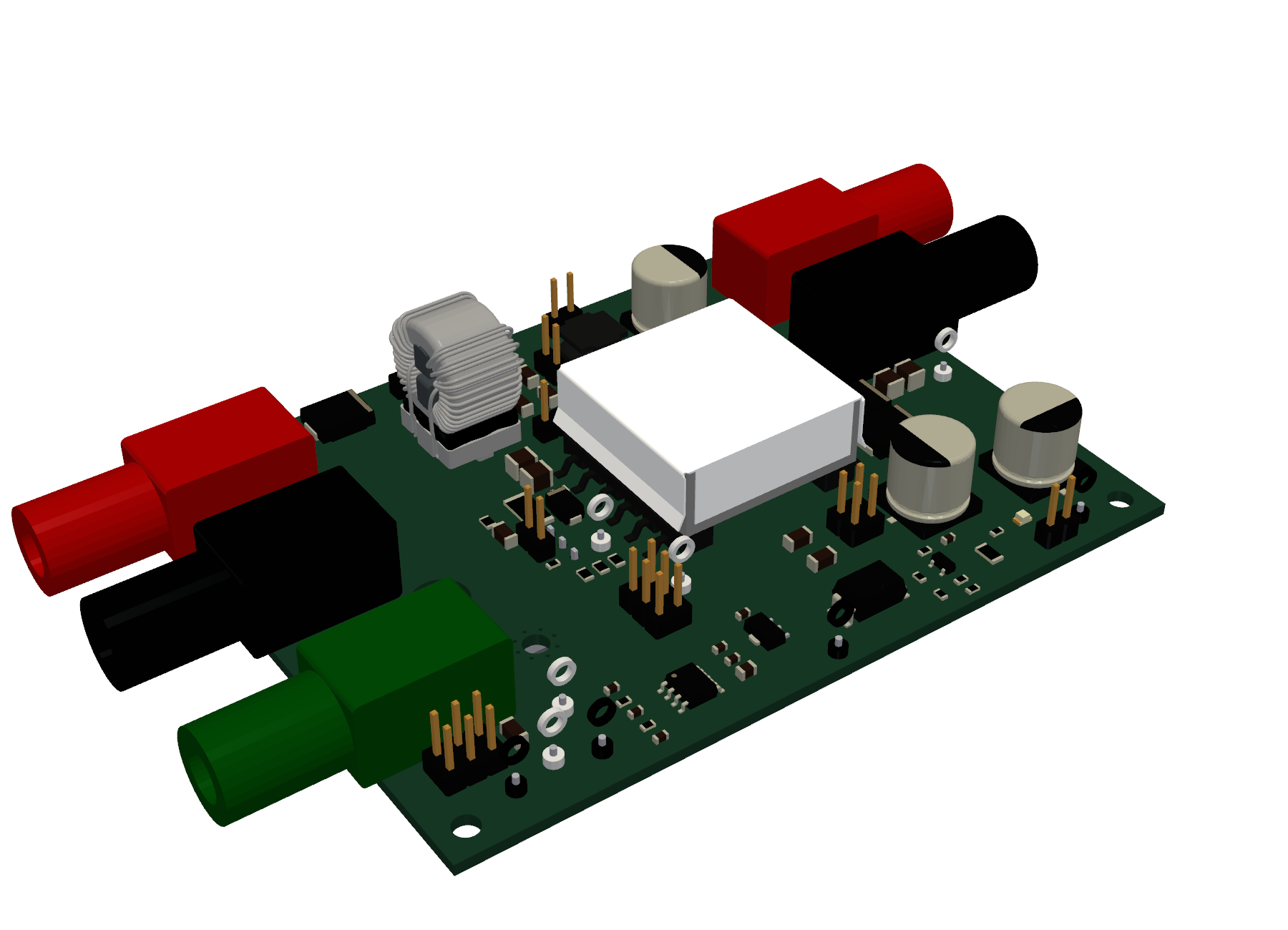
EMC demonstration flyback: a 24 V to 12 V / 1 A isolated flyback for EMC lectures, with jumper "knobs" that switch filters, gate resistance, snubber, and heatsink potential. KiCad project, LTspice simulations, 39-page design report, and fabrication files.
Contributing
Design examples, bug reports, and improvements to the skill are welcome. See CONTRIBUTING.md.
License
This work is licensed under the Creative Commons Attribution 4.0 International License (CC BY 4.0). You may share and adapt it, including for commercial use, as long as you give credit, link to the license, and indicate if you made changes. See LICENSE for the full text.
Suggested credit: "power-pcb-design skill by Chengmin Li, Xiao Yang, https://github.com/ChengminLi/AI-PCB-layout, licensed under CC BY 4.0."
Yorumlar (0)
Yorum birakmak icin giris yap.
Yorum birakSonuc bulunamadi