repobs
Health Warn
- License — License: MIT
- Description — Repository has a description
- Active repo — Last push 0 days ago
- Low visibility — Only 5 GitHub stars
Code Fail
- exec() — Shell command execution in apps/server/src/api/server.ts
- fs.rmSync — Destructive file system operation in apps/server/src/config/config.ts
- os.homedir — User home directory access in apps/server/src/config/config.ts
- process.env — Environment variable access in apps/server/src/config/config.ts
- process.env — Environment variable access in apps/server/src/git/exec.ts
- os.homedir — User home directory access in apps/server/src/git/folder.ts
Permissions Pass
- Permissions — No dangerous permissions requested
No AI report is available for this listing yet.
Local, read-only dashboard for Git worktrees and the Claude Code / Codex agents working in them
repobs — observe your Git worktrees and coding agents, locally.
repobs is a local dashboard for developers who run many coding agents across Git worktrees and branches. It shows each repository's branches on one timeline with the Claude Code and Codex agents that worked on them, so you can see what each agent did, which ones are waiting for you, and what you still need to review.
It only reads. It never changes your repositories or agent files, needs no API keys, and sends nothing off your machine.
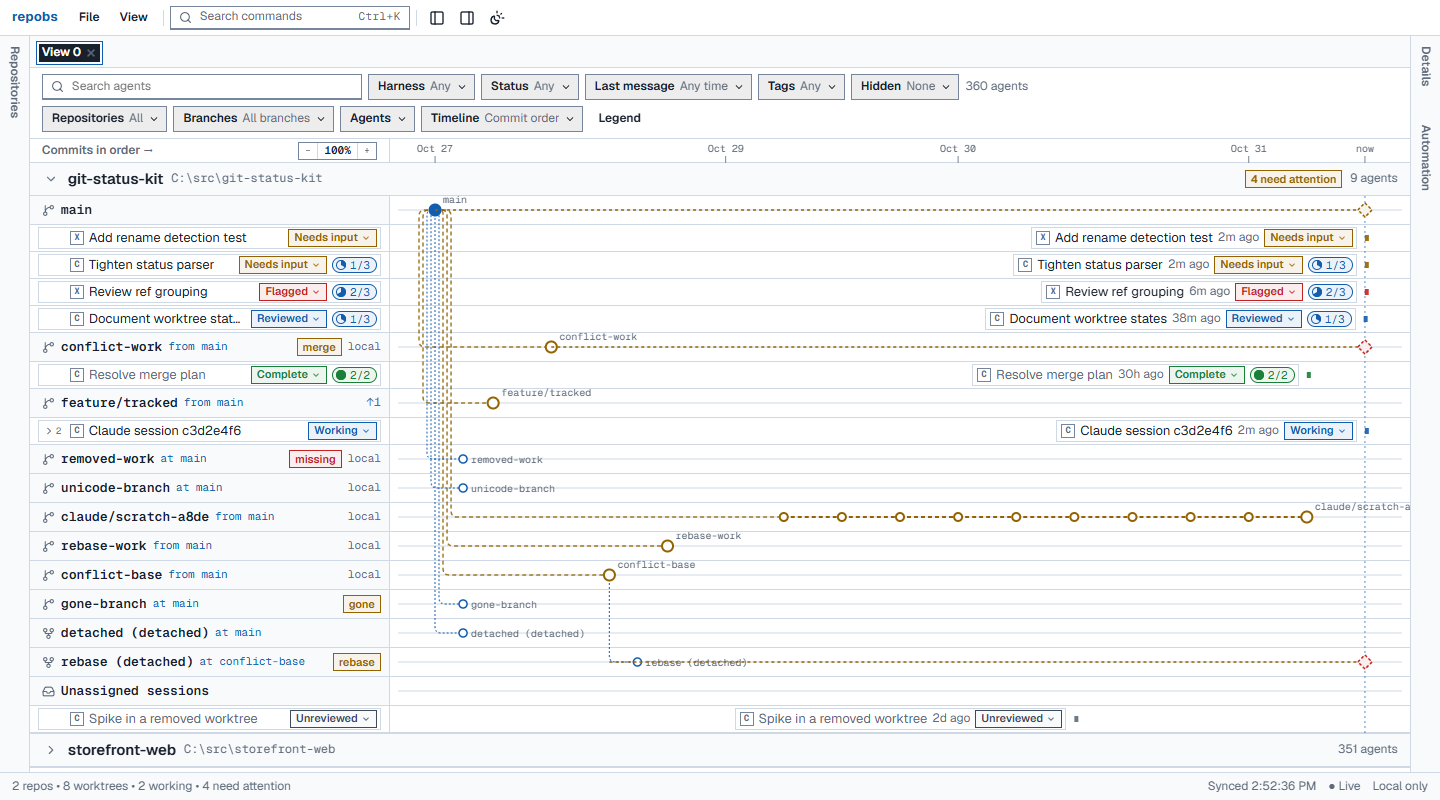
Synthetic demo data: one repository's branches on the timeline, with each agent's status, review state and checklist pill.
Quick start (Windows)
You need Node.js 24 LTS (24.11+) and Git for Windows.
- Download
repobs-<version>.zipfrom the latest release and unzip it anywhere. - In the unzipped folder, run
npm start. repobs starts on127.0.0.1and opens your browser. - Click Add repositories and tick the repositories repobs found in your agent sessions, or add a path such as
C:\src\my-project.
Stop it with Ctrl+C. npm run open opens a new browser link to a running repobs.
Upgrading: unzip the new release and start it; your data stays in %LOCALAPPDATA%\repobs. When a version changes the database (0.3.0 does), it first saves a backup next to it, and older versions cannot open the updated database. See the changelog.
From source:
git clone https://github.com/Chengxuan-Li/repobs.git
cd repobs
npm ci
npm run build
npm start
What you get
See your repositories
- Branches, worktrees and commits of every registered repository on one shared timeline: forks and merges, unpushed commits, uncommitted changes, detached HEADs, missing worktrees, and merges or rebases in progress.
- Commit order or calendar time, zoom and drag to pan; runs of quiet commits fold into groups.
Follow your agents
- Claude Code sessions (terminal or Claude desktop app) and Codex sessions, found in their local files: including sessions started outside repobs, several per worktree, and the sub-agents they spawned.
- Agents working in folders without Git too, once you add the folder.
- Each agent's status with its evidence and confidence. Missing data shows as Unknown, never as idle.
- Optionally, a short redacted excerpt of the agent's latest message and the plan it keeps with its planning tool.
Review them
- Review states (including Flagged and Outdated), tags, alias and notes.
- Checklists in two parts: first the agent's own plan, synced as it works, then your items. You can tick or untick the agent's steps by your own judgement; nothing goes back to the agent.
- Automation rules, for example idle for 7 days → Outdated. Rules can set the review state, tags, alias, note and checklist items.
Organise the view
- Several named views, each with its own filters, hidden agents and repositories; dockable panels and a command palette.
- Export and import your annotations and views as JSON.
- Live updates as Git or agent files change.
- Optional, off by default: a read-only GitHub pull request overlay through the GitHub CLI.
Privacy
- Nothing leaves your machine. repobs listens on
127.0.0.1only, has no telemetry, and makes no network requests unless you turn on the pull request overlay. - Nothing is written to your repositories or agent files. Git is used only through an allowlist of read-only commands, never through a shell.
- Agent content stays in memory. From session files repobs reads structural metadata. Message excerpts and plan steps are optional, held in memory only and never saved. Your own notes, tags, checklists and rules are stored in
%LOCALAPPDATA%\repobs. - Only your browser gets in. It pairs with the local service through a one-time link; every request is checked (session cookie, Host and Origin, CSRF token) under a strict content security policy.
Details: privacy and security and SECURITY.md.
Supported
- Windows 11 first. macOS and Linux are expected to work, and the tests also run on Ubuntu, but they are not the main target.
- Claude Code 2.1.x and Codex 0.165 session files were checked in October 2026. Agent plans were observed with the Claude desktop app's task list in November 2026; Claude Code
TodoWriteand Codex plans follow their published formats. A format repobs does not recognise shows as Unknown instead of failing. - Version 0.x. Features and storage can still change between versions; the changelog says how.
Documentation
The documentation site is at chengxuan-li.github.io/repobs, in two parts: the user guide (getting started, using repobs, status semantics, integrations, privacy and limitations) and the developer documentation.
Development
npm run dev: the server from sources with watch, and the Vite dev UI onhttp://127.0.0.1:5173.node scripts/demo.ts <empty folder>: builds synthetic repositories and agent sessions, and prints the environment to start repobs on them.npm run typecheck,npm run lint,npm test,npm run test:integration,npm run test:e2e(afternpm run build).- Documentation:
python -m pip install -r requirements-docs.txt, thenpython -m mkdocs serve.
See architecture, the HTTP API, testing and the progress log.
License
MIT — see LICENSE.
Reviews (0)
Sign in to leave a review.
Leave a reviewNo results found