claude-code-open
Health Gecti
- License — License: MIT
- Description — Repository has a description
- Active repo — Last push 0 days ago
- Community trust — 23 GitHub stars
Code Basarisiz
- child_process — Shell command execution capability in claude-llm-gateway/bin/cli.js
- fs.rmSync — Destructive file system operation in claude-llm-gateway/bin/cli.js
- process.env — Environment variable access in claude-llm-gateway/bin/cli.js
- fs module — File system access in claude-llm-gateway/bin/cli.js
- network request — Outbound network request in claude-llm-gateway/bin/cli.js
- network request — Outbound network request in claude-llm-gateway/public/app.js
- rm -rf — Recursive force deletion command in claude-llm-gateway/scripts/publish.sh
- network request — Outbound network request in claude-llm-gateway/scripts/test-interfaces.js
Permissions Gecti
- Permissions — No dangerous permissions requested
Bu listing icin henuz AI raporu yok.
🚀 Claude CLI jailbreak using Moonshot API to bypass organization restrictions. Complete tutorial from installation to setup.
🧠 Claude LLM Gateway - Intelligent Multi-LLM API Gateway
Intelligent Multi-Model API Gateway - Unified Interface for 36+ Large Language Models


Claude LLM Gateway is an intelligent API gateway that provides a unified multi-model LLM interface for Claude Code and other applications. It features intelligent model selection, cost optimization, load balancing, and failover capabilities.
✨ Key Features
- 🧠 Intelligent Model Selection - Auto-select optimal models based on task types
- 🌍 36+ Model Support - OpenAI, Anthropic, Google, Meta, DeepSeek, and more
- 🔄 Bilingual Interface - Complete Chinese/English internationalization
- 💰 Cost Optimization - Smart routing to reduce API call costs
- 📊 Real-time Monitoring - Web interface for all provider status monitoring
- 🛡️ Failover Protection - Automatic switching to available backup models
- 🔐 Secure Gateway - API key management and access control
📋 Table of Contents
- 🚀 Quick Start
- 📦 Installation
- ⚙️ Configuration
- 🌐 Web Interface
- 🛠️ CLI Commands
- 🔧 API Usage
- 🌍 Supported Models
- 📊 Intelligent Selection
- 🔐 Security Configuration
- 📝 Troubleshooting
🚀 Quick Start
System Requirements
- Node.js v16+ - Download here
- npm v7+ (comes with Node.js)
- Supported OS: macOS, Linux, Windows
One-Click Installation
# Install globally via NPM
npm install -g claude-llm-gateway

# Start immediately
npx claude-llm-gateway start --port 8765
🎉 Done! Open your browser and visit http://localhost:8765
📦 Installation
Method 1: Global Installation (Recommended)
# Install globally
npm install -g claude-llm-gateway

# Start service
claude-llm-gateway start --port 8765

# Run in background
claude-llm-gateway start --port 8765 --daemon
Method 2: Local Project Installation
# Add to project dependencies
npm install claude-llm-gateway

# Run with npx
npx claude-llm-gateway start --port 8765
Method 3: Build from Source
# Clone repository
git clone https://github.com/chenxingqiang/claude-code-jailbreak.git
cd claude-code-jailbreak/claude-llm-gateway

# Install dependencies
npm install

# Start development mode
npm run dev
⚙️ Configuration
Environment Variable Setup
Create a .env file or set environment variables:
# OpenAI
OPENAI_API_KEY=sk-your-openai-key

# Anthropic Claude
ANTHROPIC_API_KEY=sk-ant-your-anthropic-key

# Google Gemini
GOOGLE_API_KEY=your-google-api-key

# DeepSeek (Recommended, large free quota)
DEEPSEEK_API_KEY=sk-your-deepseek-key

# Other optional configurations
GROQ_API_KEY=gsk_your-groq-key
MISTRAL_API_KEY=your-mistral-key
MOONSHOT_API_KEY=sk-your-moonshot-key
Quick Configuration Template
# Copy environment variable template
cp env.example .env

# Edit configuration file
nano .env
🔒 Security Tips:
- Never commit API keys to Git repositories
- Use environment variables for sensitive information
- Rotate API keys regularly
🌐 Web Interface
After starting the service, you can access the management interface in two ways:
🚀 Method 1: Integrated Web Interface (Default)
claude-llm-gateway start --port 8765
# Visit: http://localhost:8765
🌟 Method 2: Dedicated Web Server (Recommended)
# Start Gateway API service
claude-llm-gateway start --port 8765 --daemon

# Start dedicated Web UI server
cd claude-llm-gateway && npm run web
# Visit: http://localhost:9000

# Or start both services together
npm run both
🎯 Benefits of Method 2:
- Better Performance: Web UI and API separated
- Independent Scaling: Scale web and API separately
- Enhanced Security: API and UI can run on different networks
- Development Friendly: Hot reload for UI development
Interface Overview
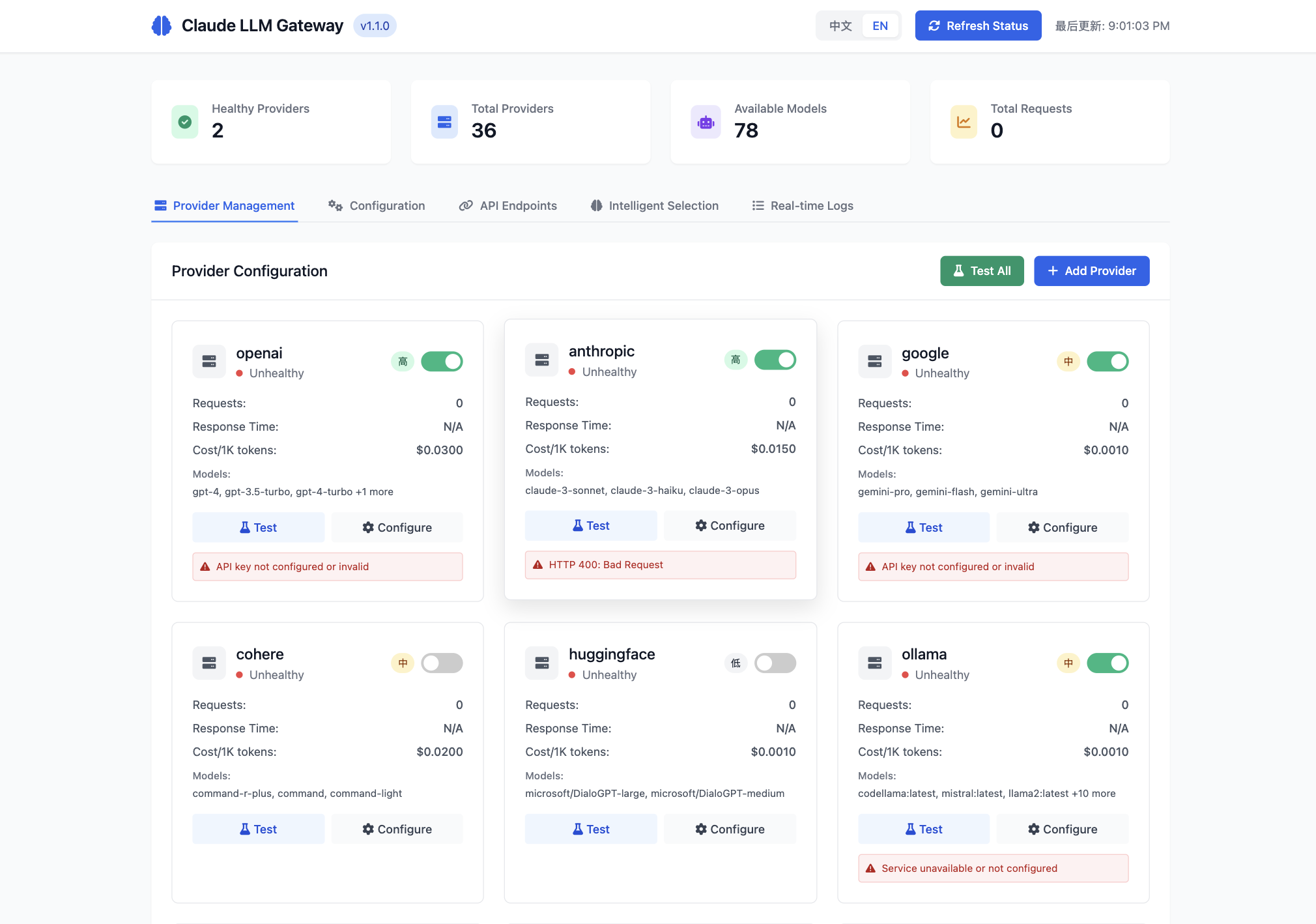
The Claude LLM Gateway features a comprehensive web management interface with multiple functional tabs:
📊 Main Dashboard
The main dashboard provides real-time status overview with provider health monitoring and system statistics.
🔝 Top Status Bar
- Language Toggle: One-click Chinese/English switching
- Refresh Status: Manually refresh all provider statuses
- Last Updated: Display data update timestamp
📊 Status Overview
- Healthy Providers: Number of currently available models (shown as 2 in the image)
- Total Providers: Total supported provider count (36)
- Available Models: Total number of available models (78)
- Total Requests: Request statistics
📝 Main Tabs
1. Provider Management (as shown in image)
- View real-time status of all LLM providers
- Green toggle indicates enabled, red dot indicates unhealthy
- Display request count, response time, cost information for each provider
- Supported model lists (e.g., OpenAI's gpt-4, gpt-3.5-turbo, etc.)
2. Configuration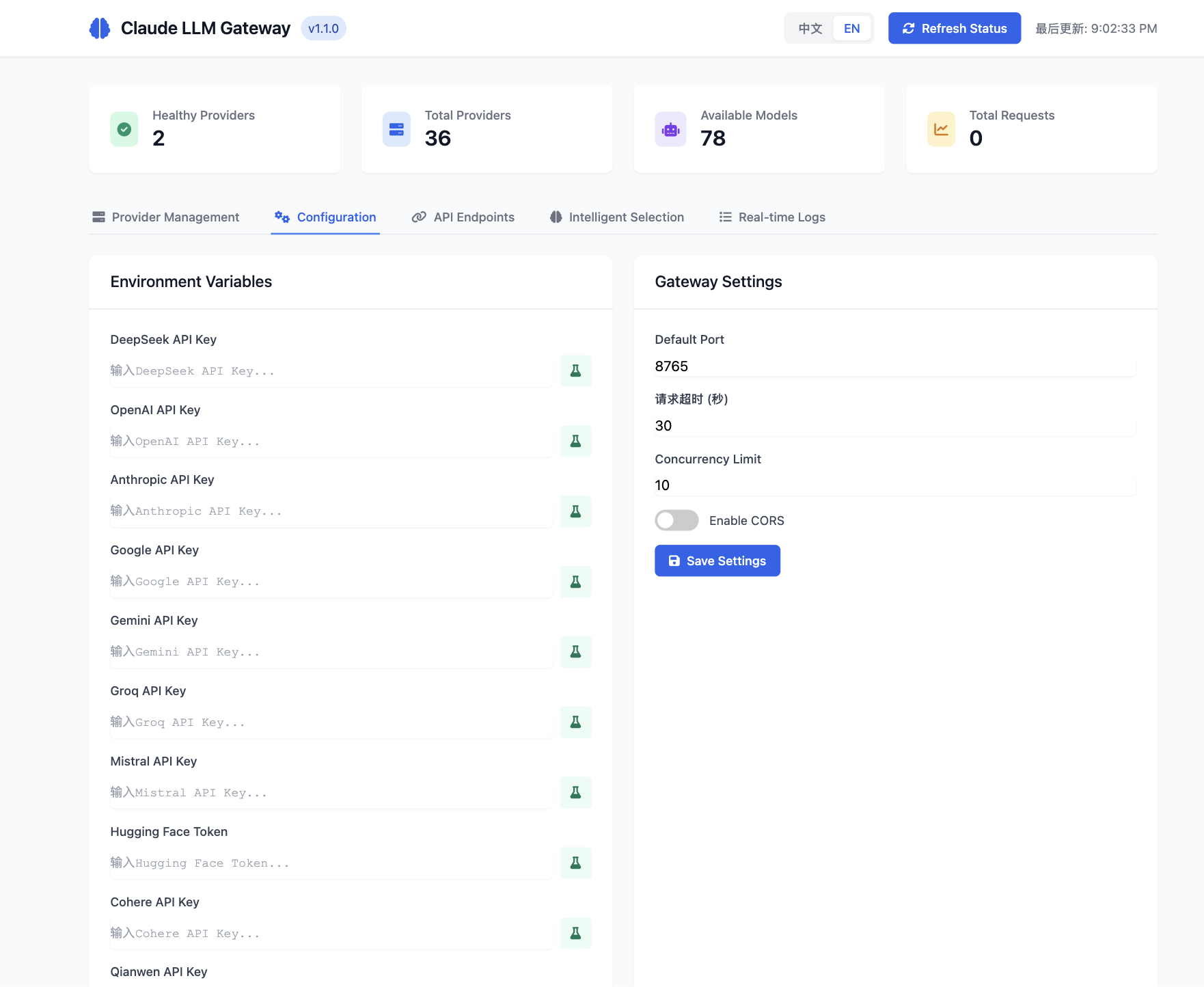
- Environment variable configuration with secure API key management
- Real-time gateway settings adjustment
- Provider-specific configuration options
3. API Endpoints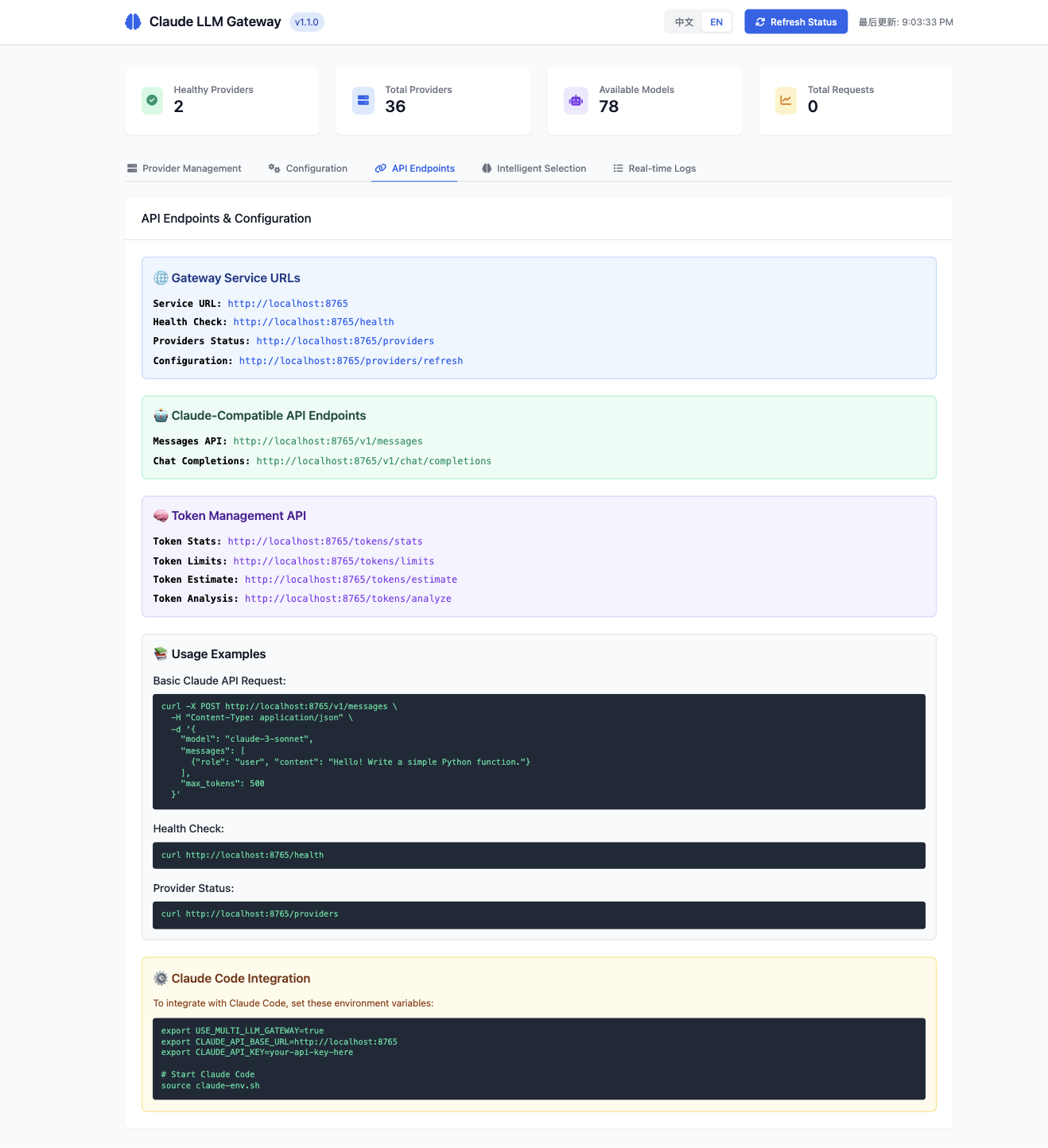
- Complete API documentation with live examples
- Claude-compatible endpoints with usage instructions
- Token management API references
- Health check and provider status interfaces
4. Intelligent Selection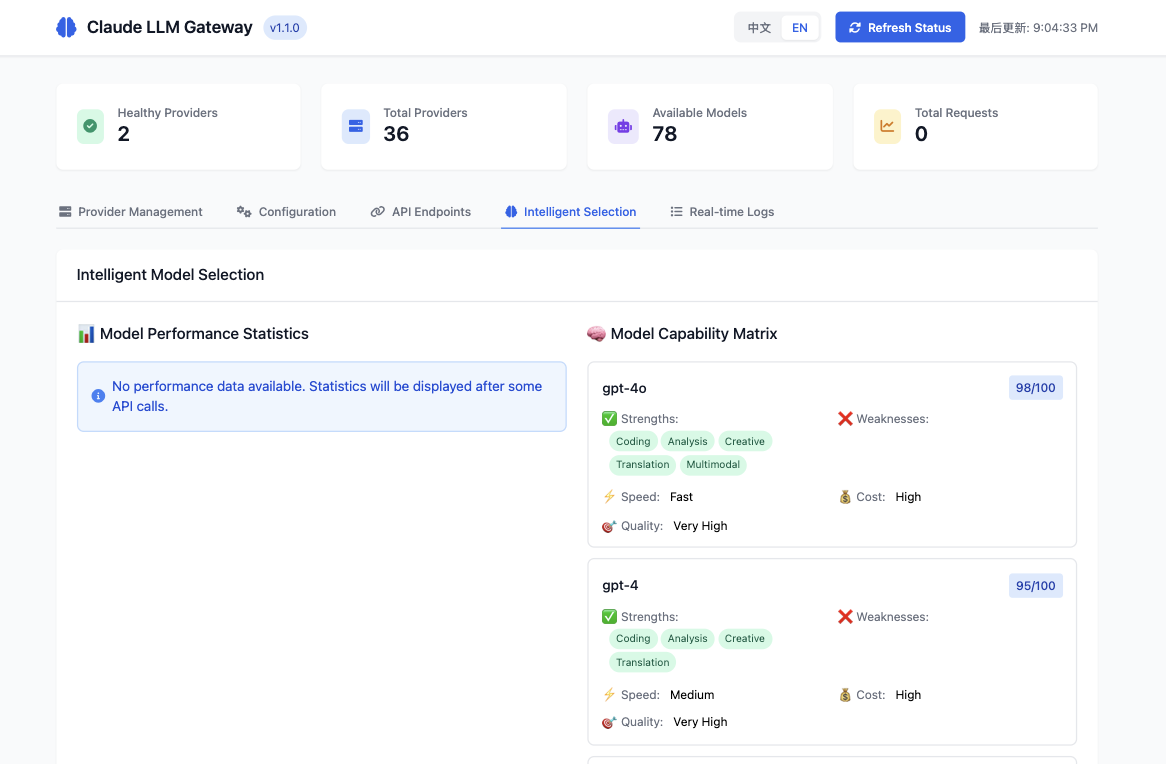
- Comprehensive model capability matrix with detailed statistics
- Performance analytics and optimization insights
- Task-based intelligent selection strategies
- Real-time model comparison and recommendations
5. Real-time Logs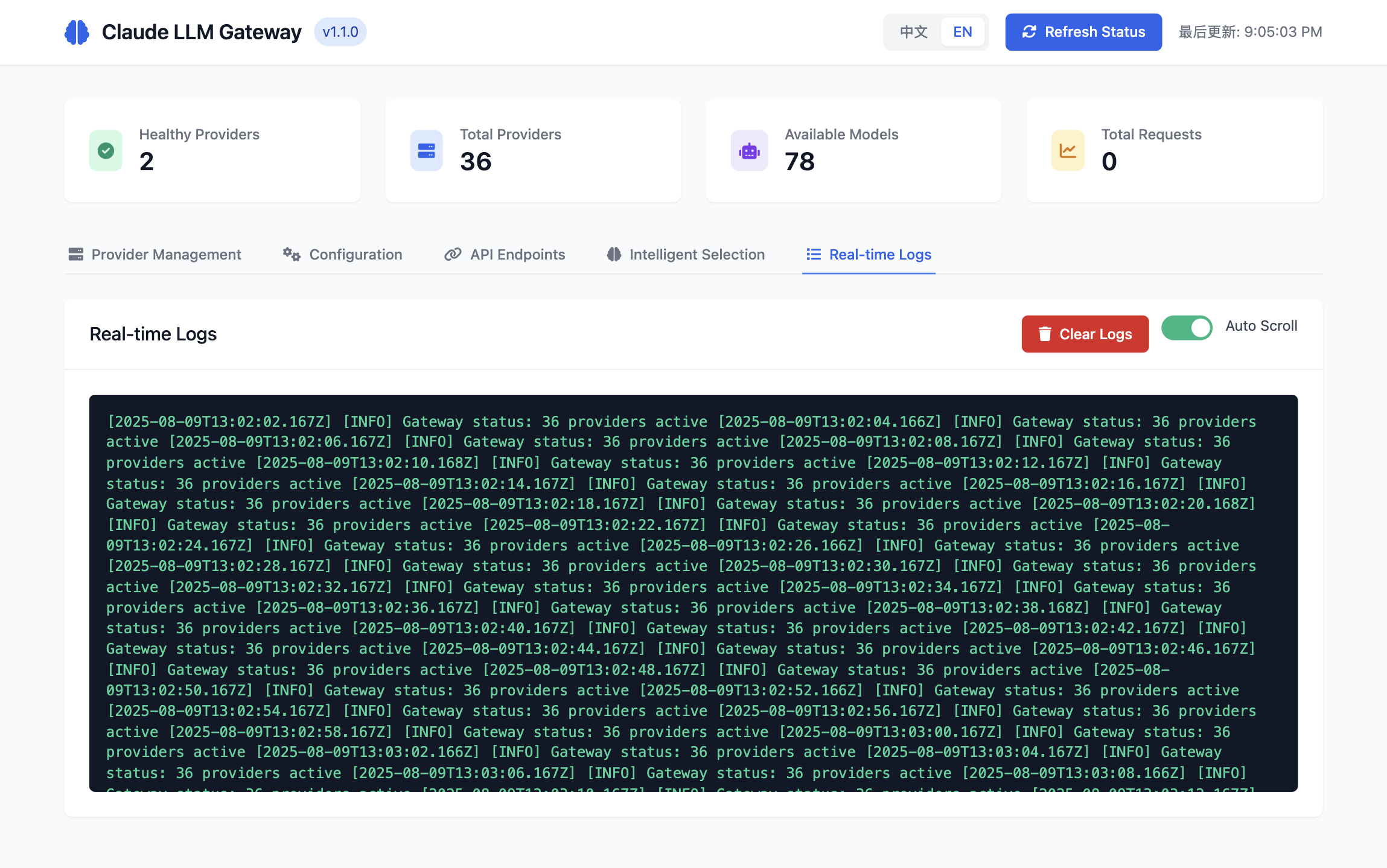
- Live system activity monitoring with auto-scroll
- Detailed request/response logging
- Provider health status updates
- System diagnostic information
🎛️ Provider Card Operations
Each provider card contains:
- Status Indicator: Healthy/unhealthy status
- Enable Toggle: One-click enable/disable provider
- Test Button: Test provider connection
- Configure Button: Quick jump to configuration page
- Error Messages: Display specific error information (e.g., "API key not configured")
🛠️ CLI Commands
Basic Commands
# Start service
claude-llm-gateway start [options]

# Run in background (daemon mode)
claude-llm-gateway start --daemon

# Stop service
claude-llm-gateway stop

# Check status
claude-llm-gateway status

# Show help
claude-llm-gateway --help
Web Server Commands
# Start dedicated web server (port 9000)
cd claude-llm-gateway && npm run web

# Start web server in development mode
npm run web:dev

# Start both API gateway and web server
npm run both
Startup Options
# Specify port (default: 8765)
claude-llm-gateway start --port 3000

# Specify host (default: localhost)
claude-llm-gateway start --host 0.0.0.0

# Run in background (daemon mode)
claude-llm-gateway start --daemon

# Combined usage
claude-llm-gateway start --port 8765 --host 0.0.0.0 --daemon
Status Management
# View detailed status
claude-llm-gateway status

# Check all provider statuses
curl http://localhost:8765/providers

# Health check
curl http://localhost:8765/health
🔧 API Usage
Claude-Compatible Interface
Claude LLM Gateway provides fully compatible Claude API interfaces:
# Claude Messages API
curl -X POST http://localhost:8765/v1/messages \
  -H "Content-Type: application/json" \
  -H "x-api-key: your-api-key" \
  -d '{
    "model": "claude-3-sonnet-20240229",
    "max_tokens": 1024,
    "messages": [
      {
        "role": "user",
        "content": "Hello, world!"
      }
    ]
  }'
OpenAI-Compatible Interface
Also supports OpenAI ChatGPT interface format:
# OpenAI Chat Completions API
curl -X POST http://localhost:8765/v1/chat/completions \
  -H "Content-Type: application/json" \
  -H "Authorization: Bearer your-api-key" \
  -d '{
    "model": "gpt-4",
    "messages": [
      {
        "role": "user",
        "content": "Hello, world!"
      }
    ]
  }'
Intelligent Routing
When no model is specified, the gateway automatically selects the optimal model:
curl -X POST http://localhost:8765/v1/messages \
  -H "Content-Type: application/json" \
  -d '{
    "max_tokens": 1024,
    "messages": [
      {
        "role": "user",
        "content": "Write a Python function to calculate Fibonacci numbers"
      }
    ]
  }'
Node.js SDK Usage
const { ClaudeLLMGateway } = require('claude-llm-gateway');

// Create gateway instance
const gateway = new ClaudeLLMGateway();

// Start service
await gateway.start(8765);

// Use built-in client
const response = await gateway.chat({
  messages: [
    { role: 'user', content: 'Hello!' }
  ]
});

console.log(response.content);
🌍 Supported Models
OpenAI Models
- GPT-4o (gpt-4o) - Latest multimodal model
- GPT-4 Turbo (gpt-4-turbo) - High-performance version
- GPT-4 (gpt-4) - Classic version
- GPT-4o Mini (gpt-4o-mini) - Lightweight version
- GPT-3.5 Turbo (gpt-3.5-turbo) - Fast response
Anthropic Models
- Claude 3 Opus (claude-3-opus) - Strongest reasoning capabilities
- Claude 3.5 Sonnet (claude-3.5-sonnet) - Balanced performance
- Claude 3 Sonnet (claude-3-sonnet) - Standard version
- Claude 3 Haiku (claude-3-haiku) - Fast response
Google Models
- Gemini Ultra (gemini-ultra) - Flagship model
- Gemini 1.5 Pro (gemini-1.5-pro) - Long context
- Gemini Pro (gemini-pro) - Standard version
Meta Models
- Llama 3.1 405B (llama-3.1-405b) - Ultra-large model
- Llama 3.1 70B (llama-3.1-70b) - High performance
- Llama 3.1 8B (llama-3.1-8b) - Lightweight
Chinese-Optimized Models
- DeepSeek V3 (deepseek-v3) - Chinese programming
- DeepSeek Chat (deepseek-chat) - Chinese conversation
- DeepSeek Coder (deepseek-coder) - Code generation
- Qianwen Max (qianwen-max) - Alibaba's large model
- GLM-4 (zhipu-glm-4) - Zhipu AI
- Moonshot V1 (moonshot-v1) - Dark Side of the Moon
Other Models
- Mistral Large (mistral-large) - European AI
- Groq Models - Ultra-fast inference
- Cohere Command R+ - Enterprise-grade
- Grok-1 (grok-1) - xAI humor model
Total: 30+ model providers, 78+ available models
📊 Intelligent Selection
Task Type Detection
The gateway can automatically detect task types and select optimal models:
🔧 Programming Tasks
Input: "Write a Python function to calculate prime numbers"
Recommended: DeepSeek Coder, GPT-4, Claude 3.5 Sonnet
Reason: Strong code generation capabilities, accurate syntax
📝 Creative Tasks
Input: "Write an article about AI"
Recommended: Claude 3 Opus, GPT-4, Gemini Pro
Reason: Strong creative abilities, natural writing style
🔍 Analysis Tasks
Input: "Analyze the trends in this data report"
Recommended: Claude 3 Opus, GPT-4 Turbo, Gemini Ultra
Reason: Strong logical reasoning, deep analysis
💬 Conversation Tasks
Input: "Hello, please introduce yourself"
Recommended: GPT-3.5 Turbo, Claude 3 Haiku, DeepSeek Chat
Reason: Fast response, low cost, natural conversation
Cost Optimization Strategies
- Intelligent Downgrading: Automatically use lower-cost models for simple tasks
- Parallel Requests: Send requests to multiple providers simultaneously, choose fastest response
- Failover: Automatically switch to backup models when primary models are unavailable
- Load Balancing: Distribute requests based on provider response time and success rate
🔐 Security Configuration
API Key Management
# Recommended: Use environment variables
export OPENAI_API_KEY="sk-your-key"

# Avoid: Hard-coding in code
# const apiKey = "sk-your-key"  ❌
Access Control
# Restrict access sources
claude-llm-gateway start --host 127.0.0.1  # Local access only

# Production environment
claude-llm-gateway start --host 0.0.0.0    # Allow external access
Security Measures
- ✅ CORS Configuration: Prevent cross-origin attacks
- ✅ Rate Limiting: Prevent API abuse
- ✅ Helmet Security Headers: Enhanced security
- ✅ Input Validation: Prevent injection attacks
- ✅ Error Handling: No sensitive information leakage
📝 Troubleshooting
Common Issues
Q: Port already in use error on startup
# Check port usage
lsof -i :8765

# Use different port
claude-llm-gateway start --port 8766
Q: Invalid API key error
# Check environment variables
echo $OPENAI_API_KEY

# Reset key
export OPENAI_API_KEY="sk-your-new-key"
Q: Cannot connect to a provider
# Check network connection
curl -I https://api.openai.com

# View detailed errors
claude-llm-gateway start --verbose
Q: Intelligent selection not working
# View model capability configuration
curl http://localhost:8765/model-stats

# Check provider status
curl http://localhost:8765/providers
Debug Mode
# Enable detailed logging
export LOG_LEVEL=debug
claude-llm-gateway start

# View real-time logs
tail -f logs/gateway.log
Performance Optimization
# Increase concurrent connections
export MAX_CONNECTIONS=100

# Enable caching
export ENABLE_CACHE=true

# Set timeout
export REQUEST_TIMEOUT=30000
🤝 Contributing
Welcome to contribute code! Please follow these steps:
- Fork the repository
- Create feature branch:
git checkout -b feature/amazing-feature - Commit changes:
git commit -m 'Add amazing feature' - Push branch:
git push origin feature/amazing-feature - Create Pull Request
Development Environment
# Clone repository
git clone https://github.com/chenxingqiang/claude-code-jailbreak.git
cd claude-code-jailbreak/claude-llm-gateway

# Install dependencies
npm install

# Run tests
npm test

# Start development mode
npm run dev
📄 License
This project is licensed under the MIT License
🌟 Star History
If this project helps you, please give us a ⭐!
📞 Support & Contact
- 📁 GitHub: claude-code-jailbreak
- 📦 NPM: claude-llm-gateway
- 🐛 Issues: GitHub Issues
- 💬 Discussions: GitHub Discussions
🎯 Making AI model selection simple and intelligent!
Yorumlar (0)
Yorum birakmak icin giris yap.
Yorum birakSonuc bulunamadi