hecate
Health Pass
- License — License: MIT
- Description — Repository has a description
- Active repo — Last push 0 days ago
- Community trust — 10 GitHub stars
Code Fail
- rm -rf — Recursive force deletion command in .claude/settings.json
Permissions Pass
- Permissions — No dangerous permissions requested
This tool is an open-source AI gateway and agent-task runtime that acts as a central control plane. It sits between AI clients and model providers to manage routing, spend controls, and task execution, while offering observability and multi-tenant management.
Security Assessment
The application inherently manages sensitive data like API keys and environment variables to route AI requests, and it makes outbound network requests to external model providers. However, several specific code patterns raised flags during the audit. A recursive force deletion command (`rm -rf`) was found in a configuration file, and a script uses synchronous process spawning. Additionally, that same script accesses environment variables and makes network requests. There are no hardcoded secrets, and the tool does not request broadly dangerous permissions. Overall risk is rated as Medium.
Quality Assessment
The project is actively maintained, with its most recent push occurring today. It uses the highly permissive MIT license and features a robust README with clear documentation, badges for testing, and Go report card integration. However, community trust and adoption are currently quite low, as evidenced by only having 10 GitHub stars.
Verdict
Use with caution: the tool is active and properly licensed, but its low community adoption and the presence of potentially risky commands in its scripts warrant a careful security review before deploying in production.
Hecate is an open-source AI gateway, coding-agent console, and agent-task runtime for routing OpenAI- and Anthropic-compatible traffic across cloud and local models, running external coding agents as supervised local adapters, controlling spend, and running agent work behind policy, approvals, and OpenTelemetry.






Local-first AI gateway and agent console.
Route cloud/local models, run Hecate-owned tool agents, supervise Codex / Claude Code / Cursor, and keep every decision observable.
Status: public alpha. Gateway routing, provider onboarding, Hecate Chat, External Agent sessions, and native task runs are usable for alpha workflows. Desktop signing, workspace modes, agent profiles, ACP bridge packaging, and sandbox hardening are still evolving. Read known limitations before depending on it.
Table Of Contents
Why Hecate
AI systems are becoming more than model calls. A useful agent now chooses between cloud and local models, calls tools, edits files, retries flaky providers, spends real money, and leaves behind a trail operators need to understand.
Hecate sits at that crossroads: one local runtime layer between clients, model providers, coding-agent CLIs, and the tools that touch your machine.
| What you get | Why it matters |
|---|---|
| Gateway for cloud + local models | OpenAI, Anthropic, DeepSeek, Gemini, Groq, Mistral, Perplexity, Together AI, xAI, Ollama, LM Studio, LocalAI, llama.cpp-compatible servers, and custom OpenAI-compatible endpoints behind one local API. |
| Hecate Chat | Use one transcript for direct model turns and tools-on task-backed agent turns with approvals, artifacts, streamed activity, and trace links. |
| External Agent console | Run Codex, Claude Code, and Cursor Agent as supervised local ACP sessions with readiness checks, approvals, raw diagnostics, and Git diff inspect/revert. |
| Operator-grade control | Cost accounting, pricebook, budgets, rate limits, routing reports, provider health, task approvals, and OpenTelemetry are on the hot path. |
Quick Start
| Path | Best for |
|---|---|
| Desktop app | Personal use on your laptop. No terminal, no Docker. |
| Docker | Local container, scripted local deploys. |
Desktop app
Download from the latest release:
| Platform | Bundle |
|---|---|
| macOS (Apple Silicon) | Hecate_0.1.0-alpha.18_aarch64.dmg |
| Linux x86_64 | Hecate_0.1.0-alpha.18_amd64.deb or Hecate_0.1.0-alpha.18_amd64.AppImage |
| Windows x86_64 | Hecate_0.1.0-alpha.18_x64_en-US.msi |
Open the bundle and launch Hecate. The app starts the gateway sidecar, waits for it to become healthy, and opens the embedded operator UI automatically. State lives in the platform data dir (~/Library/Application Support/io.github.chicoxyzzy.hecate/ on macOS, %APPDATA%\io.github.chicoxyzzy.hecate\ on Windows, ~/.local/share/io.github.chicoxyzzy.hecate/ on Linux).
Bundles are not yet code-signed. On macOS, the first launch needs right-click → Open (Gatekeeper will block a plain double-click). On Windows, click More info → Run anyway on the SmartScreen warning. Subsequent launches work normally. Full footguns and roadmap in docs/desktop-app.md.
Skip to Add a provider once it's running.
Docker
docker run --rm -p 127.0.0.1:8765:8765 -v hecate-data:/data \
  ghcr.io/hecatehq/hecate:0.1.0-alpha.18
Open http://127.0.0.1:8765. The UI loads with no further setup.
The container intentionally publishes only on
127.0.0.1. Hecate is designed as a local-first operator console, not as a directly exposed network service. If you bind it beyond loopback, put your own access controls, firewall, or reverse proxy in front. See Security for the current threat model.
Pinned image tags, binary tarballs (linux/darwin × amd64/arm64), checksums, compose examples, and storage notes live in docs/deployment.md. Local development setup lives in docs/development.md.
Add a provider
On first boot, Chats is already available. If Hecate detects a local runtime such as Ollama or LM Studio, the model chat setup can be one click: choose Add detected providers and Hecate adds the detected local endpoints with the preset defaults.
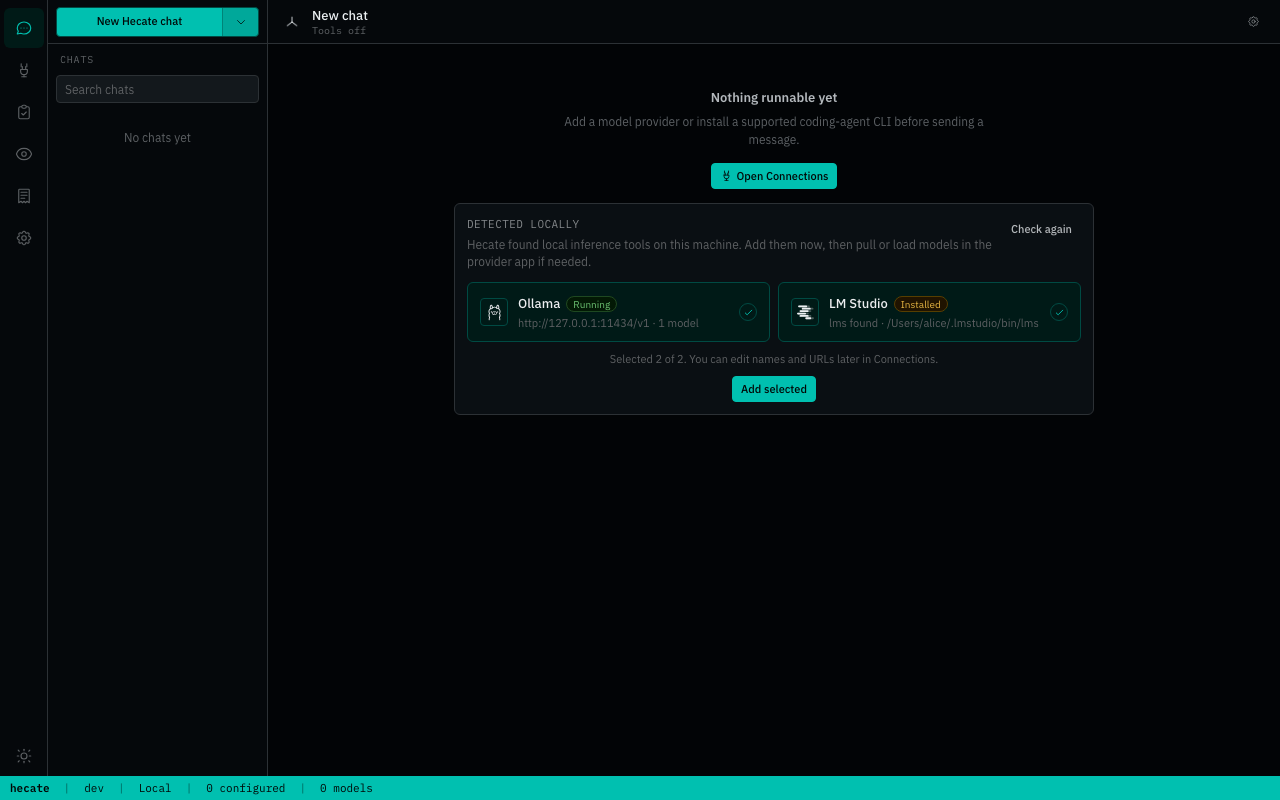
You can still configure providers manually from Providers → Add provider:
- Cloud providers need an API key.
- Local providers need a running local server URL, usually the preset default.
- Custom OpenAI-compatible endpoints can be added from the same modal when the preset catalog is not enough.
After a provider is saved, Hecate discovers models and the Chats model picker becomes routable. The full preset catalog, env bootstrapping, custom-endpoint walk-through, and credential rotation live in docs/providers.md.
Talk to it
Chats is the primary day-to-day surface. It explains missing setup before you send a request, then gives you two clear targets:
- Hecate Chat — select a provider/model. Keep tools on for Hecate-owned task execution, approvals, artifacts, per-call sandboxing, and OpenTelemetry. Turn tools off for direct model chat through the gateway.
- External Agent — select Codex, Claude Code, or Cursor Agent, choose a workspace, and run a supervised local ACP session.
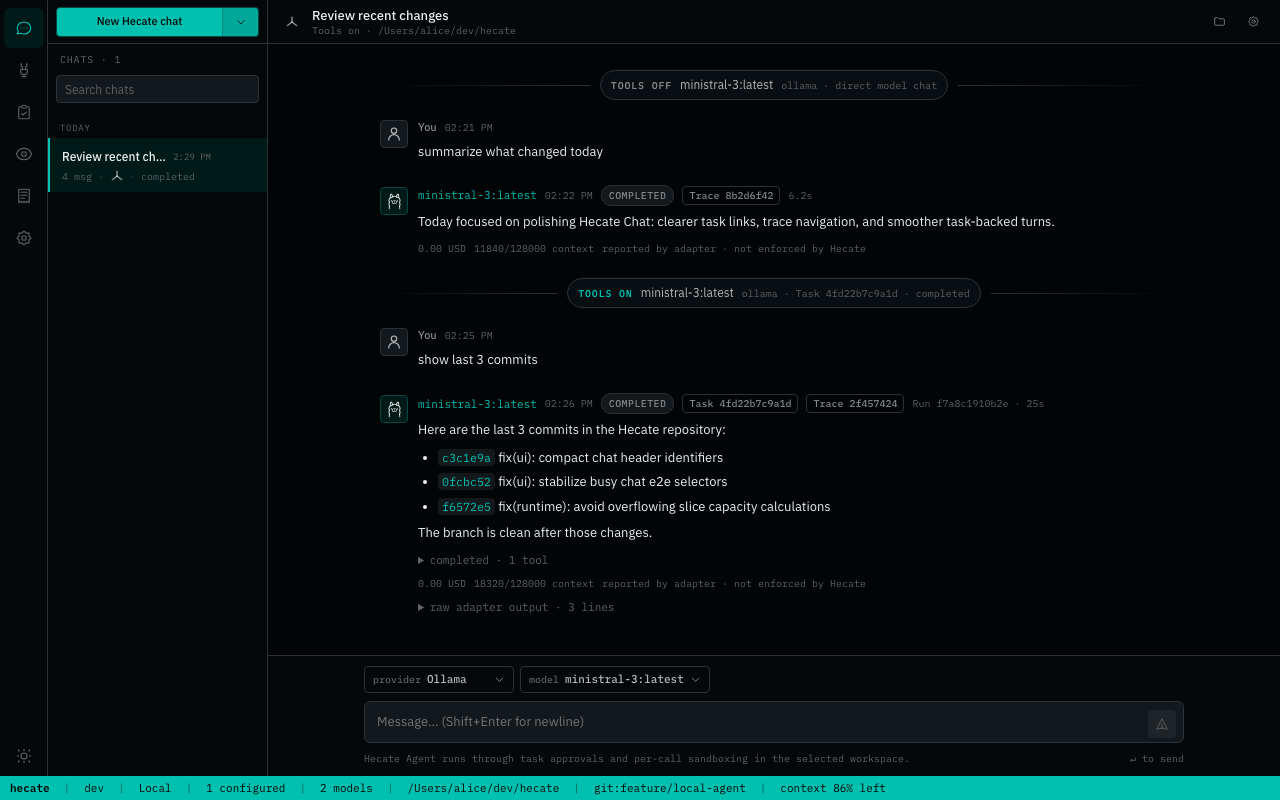
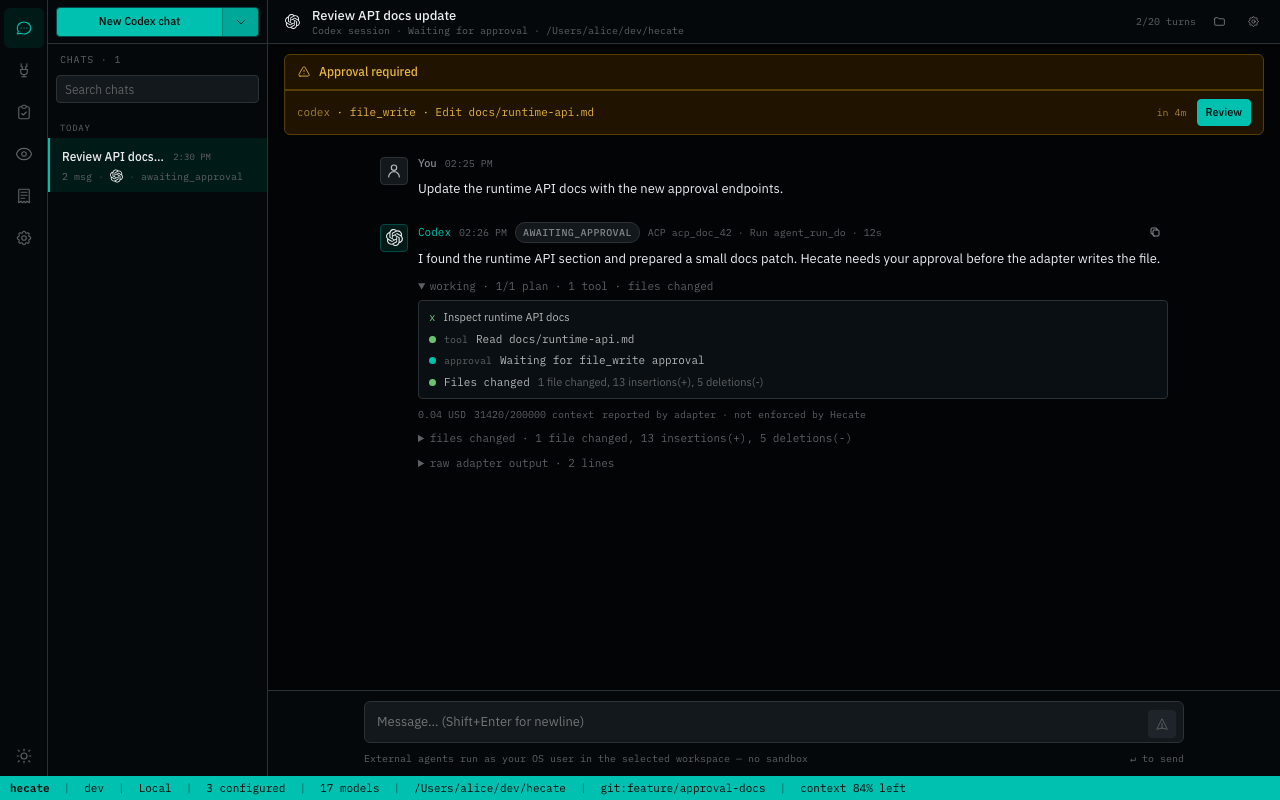
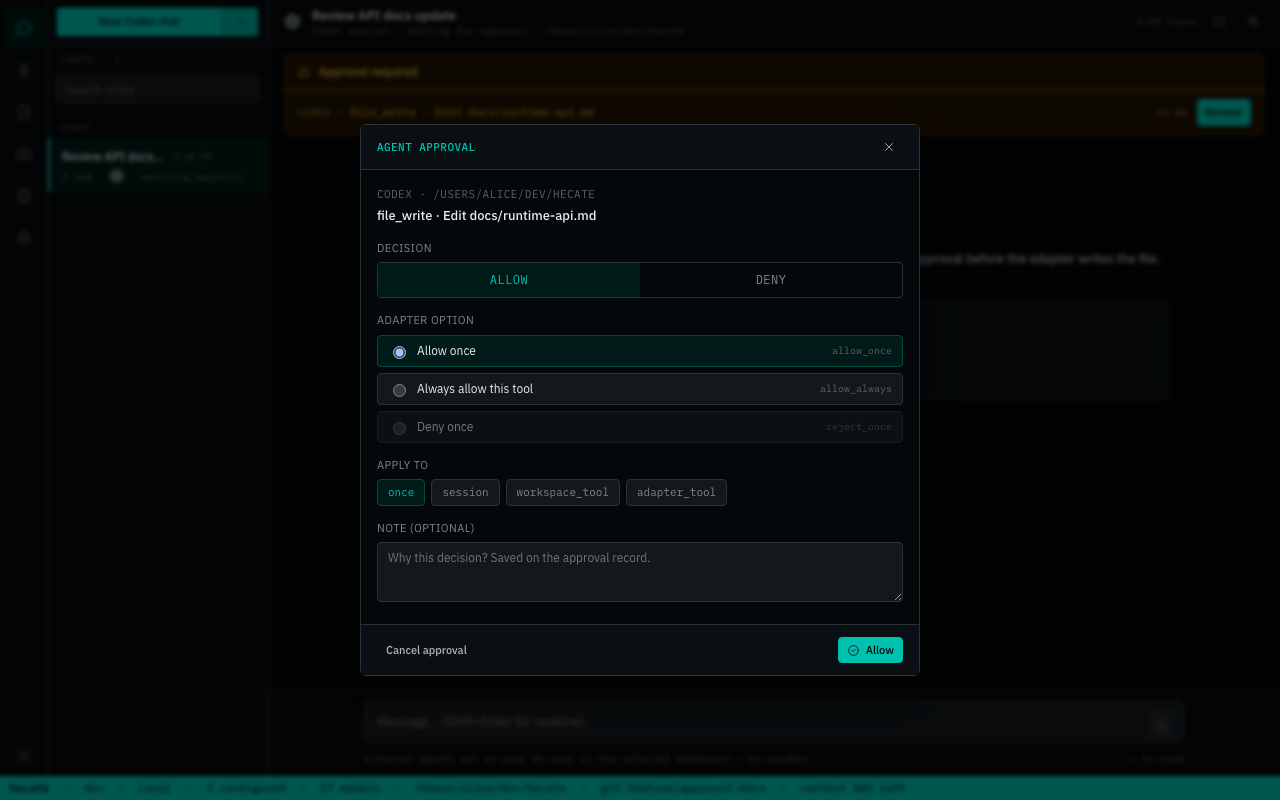
Hecate Chat preserves runtime boundaries inside the transcript: tools-off turns keep route/cost/cache metadata, tools-on turns link to their backing Task/run, and every assistant turn can link to its trace. If a task-backed run is busy, the composer queues the next prompt locally and sends it when the run settles. The Tasks workspace remains canonical for full run history, artifacts, retry/resume, and patch review. See Chat sessions, Agent runtime, and External agent adapters for the deeper contracts.
Architecture
The gateway is one local Go process with the React operator UI embedded. hecate-acp is a separate stdio bridge for editor ACP hosts.
flowchart LR
    UI["Operator UI<br/>Chats · Providers · Tasks · Observability"]
    Clients["OpenAI / Anthropic clients"]
    Editors["ACP editors"]

    Chat["Hecate Chat<br/>tools off: model turn<br/>tools on: task-backed agent"]
    Gateway["Model gateway"]
    Runtime["Task runtime<br/>agent_loop · approvals · artifacts"]
    External["External Agent<br/>Codex · Claude Code · Cursor"]
    ACP["hecate-acp"]

    UI --> Chat
    UI --> External
    Clients --> Gateway
    Editors --> ACP

    Chat --> Gateway
    Chat --> Runtime
    ACP --> Runtime
    External --> AgentCLIs["Coding-agent CLIs"]

    Runtime --> Gateway
    Gateway --> Providers["Cloud + local model providers"]
    Runtime --> Tools["Sandboxed tools + MCP"]

    Gateway --> OTel["OpenTelemetry"]
    Runtime --> OTel
    External --> OTel
For deeper internals, read docs/architecture.md, docs/runtime-api.md, docs/events.md, and docs/telemetry.md.
Operator UI
The embedded UI is a runtime console for the operator.
| Workspace | Job |
|---|---|
| Chats | Model chat, task-backed Hecate Chat, External Agent sessions, trace/task links, timing, raw output, and captured diffs. |
| Providers | Credentials, local/cloud presets, model discovery, base URLs, health, and routing readiness. |
| Tasks | Native agent_loop runs, approvals, retries, resumes, streamed output, artifacts, and full run history. |
| Observability | Request ledger, route candidates, skip reasons, failover, cost, traces, metrics, logs, and local trace events. |
| Costs | Balance, top-up/reset, and usage table. |
| Settings | Pricebook, model capability overrides, retention, external-agent readiness, and durable approval grants. |
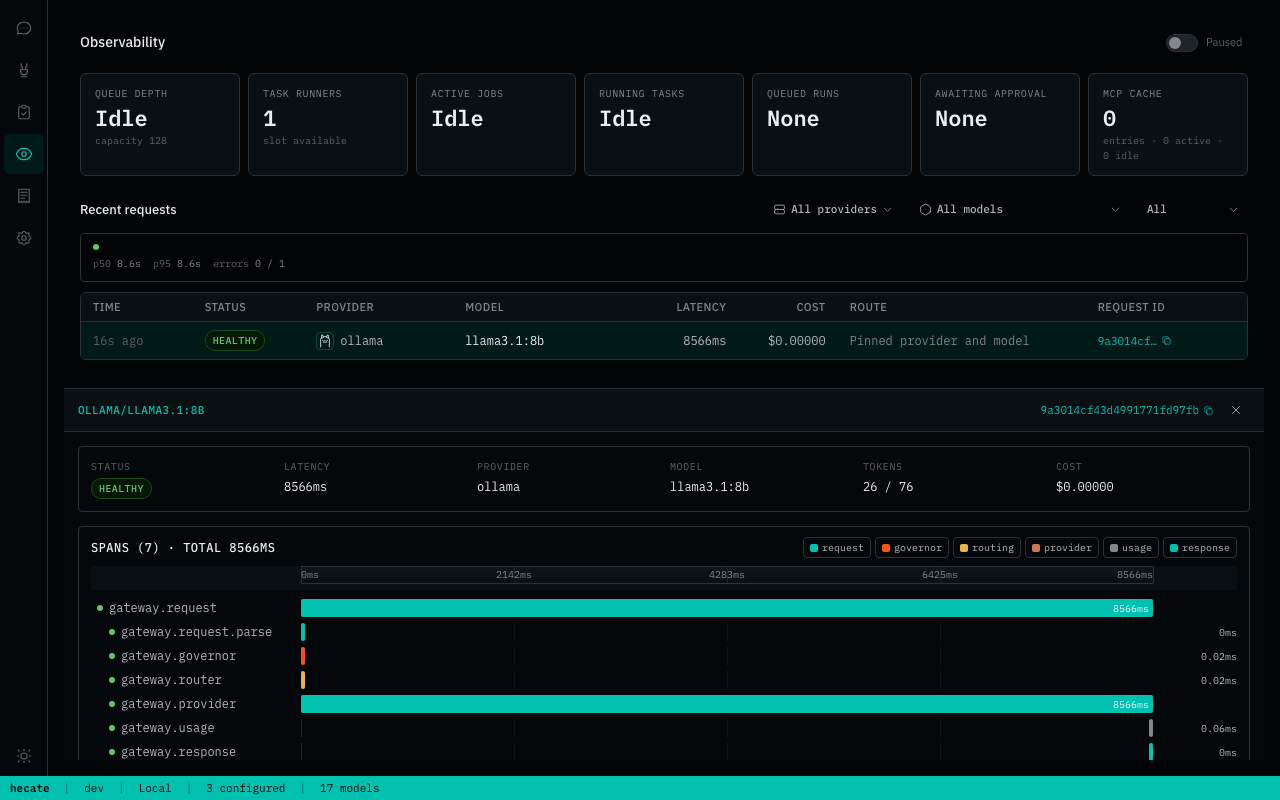


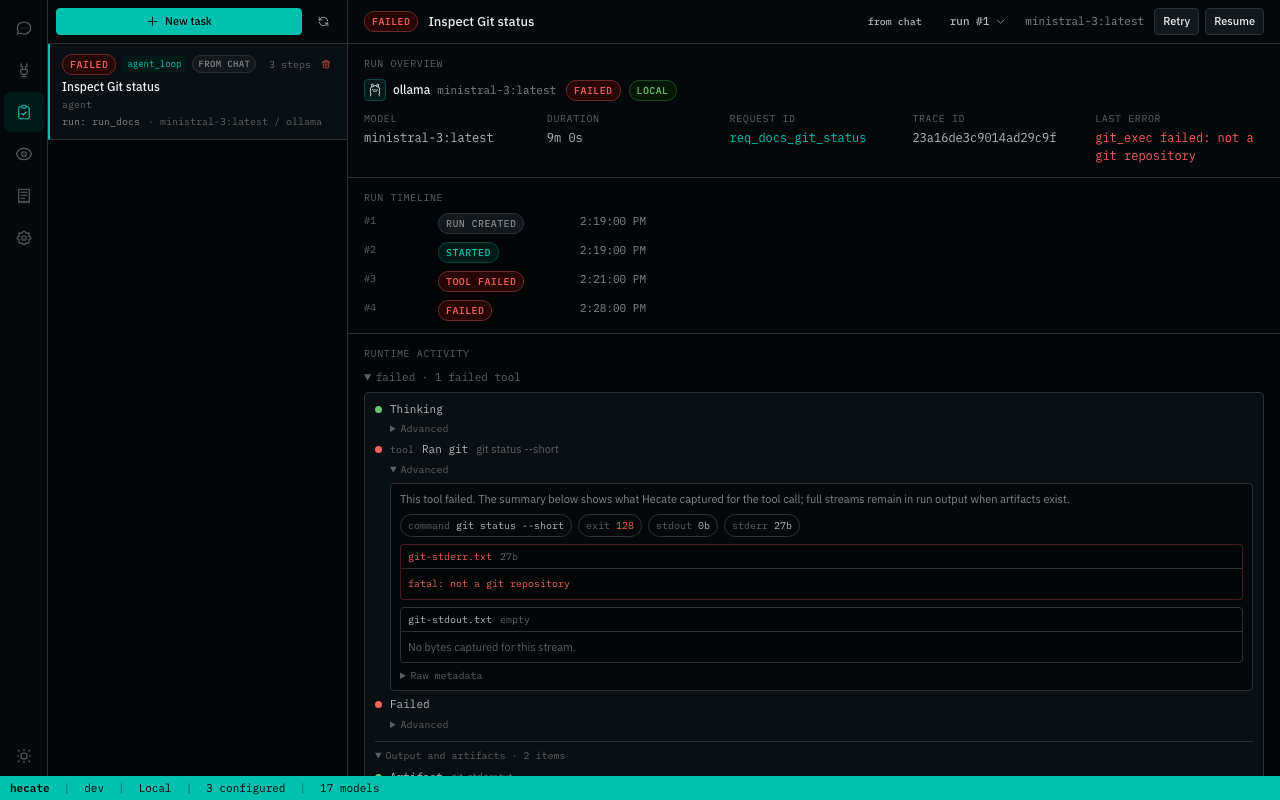


What Works Today
Hecate is public-alpha software. The core gateway, Hecate Chat, and native task runtime are usable for alpha workflows; workspace modes, agent profiles, desktop signing, and sandbox hardening are intentionally still evolving.
Stability stages:
- Alpha-ready: coherent enough for normal alpha use with known caveats.
- Implemented: core mechanism exists, but product polish/hardening is still needed.
- Early: works in some paths, but still rough or incomplete.
- Not shipped: planned, not available.
| Area | State | Notes |
|---|---|---|
| Model gateway | Alpha-ready | OpenAI-compatible Chat Completions, Anthropic-shaped Messages, streaming, vision, model discovery, failover, budgets, rate limits, pricebook, and custom endpoints. |
| Providers | Alpha-ready | Cloud presets plus Ollama, LM Studio, LocalAI, llama.cpp-compatible servers, local discovery, health, credentials, and routing readiness. |
| Hecate Chat | Alpha-ready | Direct model turns and tools-on task-backed agent_loop segments in one transcript, streamed assistant text, task/trace links, local busy-prompt queueing, and inline task approvals. Workspace modes and agent profiles are still future work. |
| External Agent | Alpha-ready | Codex, Claude Code, and Cursor Agent discovery, long-lived ACP sessions, prompt-first approvals, grants, health/version checks, cancel, guardrails, raw diagnostics, and Git diff inspect/revert. Runs as trusted subprocesses. |
| Task runtime | Alpha-ready | Queue/lease execution, approvals, resumable agent_loop, MCP integration, streamed output, artifacts, and stale-run recovery. Broader lifecycle hardening is still ongoing. |
| Observability | Alpha-ready | OTLP traces/metrics/logs, response trace headers, local trace view, route reports, timing buckets, and runtime stats. |
| Storage | Alpha-ready | Memory or SQLite per subsystem; SQLite persists chat/task/provider state. Pending approval reconciliation runs on startup. |
| Desktop app | Early | Native .dmg, .deb, .AppImage, and .msi bundles run Hecate as a sidecar. Bundles are unsigned. |
| ACP bridge | Early | hecate-acp supports session creation, prompts, cancellation, run-event forwarding, and approval round-trip. Registry/editor packaging is not done. |
| Execution isolation | Early | Per-call subprocess + env sanitisation + output cap + timeout, with bwrap / sandbox-exec where available. Not container-level isolation. |
Read docs/known-limitations.md before treating Hecate as production-stable.
Documentation
Full index lives at docs/README.md, organized by reader role. The most-reached-for pages:
Running Hecate
- Deployment — Docker, image pinning, binary install, storage tiers, rate limits.
- Desktop app — native bundles, first-launch footguns, platform data dirs, roadmap.
- Providers — preset catalog, OpenAI-compatible custom endpoints, credentials, health, circuit breaking.
- Known limitations — plain-language list of what's still alpha.
Building against Hecate
- Runtime API — task lifecycle, approvals, queue/lease execution, SSE streaming.
- Chat sessions — Hecate Chat transcript segments, tools on/off behavior, task-backed turns, queueing, and activity rendering.
- Agent runtime —
agent_looploop mechanics, tools, stdout/stderr handling, cost ceilings, retry-from-turn. - External agent adapters — Hecate as an ACP client/operator: use Codex, Claude Code, and Cursor Agent from Chats.
- ACP bridge — Hecate as an ACP agent for editor panels such as Zed and JetBrains.
- Events — every event type, payload shape, when each fires.
- MCP integration — Hecate as MCP server + attaching external MCP servers as tools.
Observability and internals
- Telemetry — OTLP traces / metrics / logs, response headers, local trace view.
- Security — local-first threat model, workspace safety, approvals, secrets, and advisory handling.
- Architecture — gateway request flow, task-runtime queue / lease / sandbox boundary.
- Development — source-build toolchain, local dev, the test ladder, screenshot tooling.
- Release — cutting a tag, verification gate, recovery if CI fails.
First-run environment knobs live in .env.example.
Contributing
See CONTRIBUTING.md. If you work with an AI assistant, start with AGENTS.md; the vendor-neutral agent instruction layer lives in docs-ai/.
License
MIT. See LICENSE.
Third-party notices live in NOTICE.md, including LiteLLM pricing-data attribution and vendored splash-font licenses.
Reviews (0)
Sign in to leave a review.
Leave a reviewNo results found