foxprofile
Health Gecti
- License — License: MIT
- Description — Repository has a description
- Active repo — Last push 0 days ago
- Community trust — 31 GitHub stars
Code Gecti
- Code scan — Scanned 12 files during light audit, no dangerous patterns found
Permissions Gecti
- Permissions — No dangerous permissions requested
Bu listing icin henuz AI raporu yok.
Free, open-source anti-detect browser profile manager: per-profile fingerprint, cookies and proxy, Camoufox and Chrome engines, desktop app, REST API and MCP server for AI agents. Self-hosted alternative to GoLogin / MoreLogin.

FoxProfile
Free, open-source manager for anti-detect browser profiles
Per-profile device fingerprint, cookies and proxy · Two engines: Camoufox (Firefox) and Chrome · English and Vietnamese UI · REST API and MCP for automation





English · Tiếng Việt
Quick start · Features · REST API · MCP · Contributing
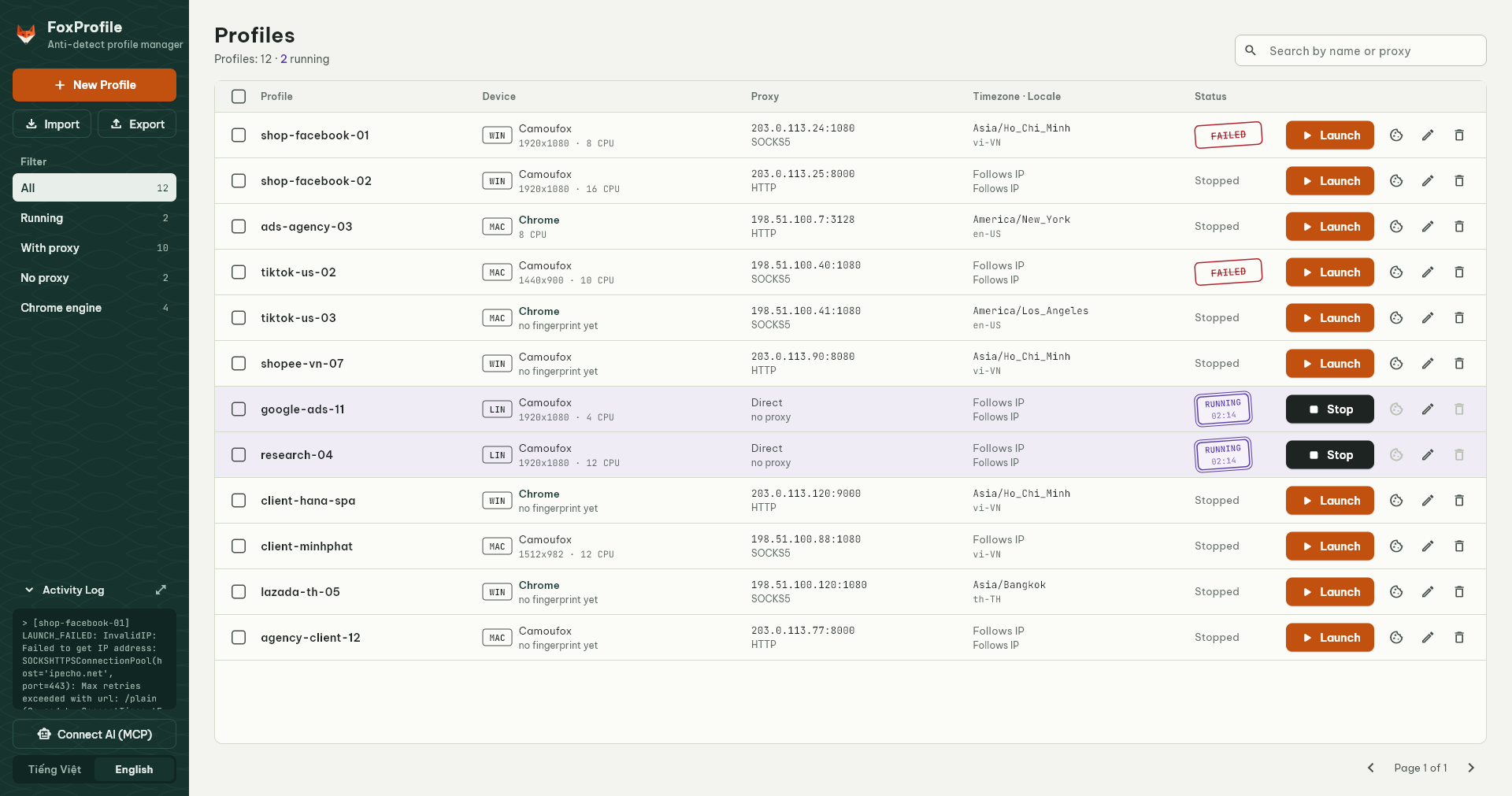
FoxProfile manages anti-detect browser profiles: each profile is a separate identity with its own device fingerprint, cookies, proxy, timezone and locale. The default browser is Camoufox, a Firefox build that spoofs fingerprints at the engine level; an experimental Chrome engine based on fingerprint-chromium is also available. It is a self-hosted alternative, on your machine or a VPS, to paid anti-detect browsers such as GoLogin, GPM or MoreLogin.
Contents
- Features
- Requirements
- Quick start
- Timezone, locale and Check IP
- Server mode and web panel
- MCP: let AI agents drive the browser
- Chrome engine (experimental)
- Cookies and fingerprints
- Configuration
- REST API
- Development
- Contributing
- Support
- Responsible use
- License
- Acknowledgements
Features
- Persistent per-profile fingerprint. The first launch generates a device (screen, GPU, CPU cores, fonts, canvas/audio noise) and stores it; later launches reuse the same device. Generate a new one on demand.
- Two engines. Camoufox (Firefox, default) or Chrome (fingerprint-chromium, experimental), chosen when the profile is created. The Chrome build is downloaded automatically when needed.
- Sessions that stick. History, cookies and logins live in the profile directory; the tabs that were open are reopened on the next launch.
- Per-profile proxy: HTTP/HTTPS/SOCKS4/SOCKS5, with or without auth, including the
host:port:user:passformat, plus a proxy checker. - Timezone and locale follow the exit IP or can be pinned per profile. Check IP compares the exit IP across Cloudflare, ipinfo and ip-api and warns about country/timezone mismatches and datacenter IPs.
- Cookie export/import as Cookie-Editor / EditThisCookie JSON (GoLogin, GPM, Multilogin, the Cookie-Editor extension) and Netscape
cookies.txt(yt-dlp, curl, wget). - Profile export/import as ZIP, with or without browser data, to move profiles between machines. The fingerprint always travels with the profile.
- A profile table built for scanning: every row shows the engine, the emulated device, the proxy (credentials hidden), timezone/locale and the state. States differ in shape as well as colour: a violet double-ruled stamp with the launch time means running, a grey rule means starting, a struck red stamp means the launch failed.
- Filters and search: filter by running, with/without proxy and Chrome engine (with counts); search by name or proxy.
- Bulk actions: launch, stop or delete many profiles at once.
- MCP server so AI agents (Claude, Cursor...) can launch profiles, browse, click, type and take screenshots.
- Server mode + web panel for VPS deployments: manage profiles and view their screens remotely, protected by a token.
- REST API with Swagger docs for scripting.
- English (default) and Vietnamese UI, switchable inside the app. Fonts are bundled, no network needed.
Requirements
- Python 3.10+
- Windows, macOS or Linux (CI tests all three)
- A few hundred MB of free disk space for Camoufox and the GeoIP database, plus ~140-190 MB for the Chrome engine if you use it
Quick start
git clone https://github.com/chienbm98/foxprofile.git
cd foxprofile

python -m venv .venv
.venv\Scripts\activate          # Windows
source .venv/bin/activate       # Linux/macOS

pip install -r requirements.txt
python -m camoufox fetch
camoufox fetch downloads the Camoufox browser (a few hundred MB) from the Camoufox GitHub releases. The first profile launch also downloads a GeoIP database (~50 MB).
Run the app:
python -m src.main
On Windows you can also double-click run_foxprofile.bat. The app opens the manager window and serves the API on http://127.0.0.1:8000; API docs are at http://127.0.0.1:8000/docs. Set FOXPROFILE_LANG=vi for the Vietnamese UI.
Timezone, locale and Check IP
By default, every Camoufox launch looks up the exit IP (through the profile's proxy) and sets the timezone, locale, geolocation and WebRTC IP from it. Worth knowing:
- The automatic locale is drawn at random on every launch, weighted by how many people speak each language in the IP's country. A French IP gives
fr-FRroughly 60% of the time anden-FR,es-FR… otherwise. An account whose language changes between sessions looks suspicious, so pin the locale per profile. - GeoIP databases disagree. Cloudflare may place an IP in one country and Google in another, and Camoufox may pick a same-offset timezone with a different name (a Vietnamese IP gets
Asia/Bangkokrather thanAsia/Ho_Chi_Minh). - Datacenter IPs get captchas whatever the browser looks like. For Cloudflare-protected sites a residential or mobile proxy matters more than any other setting.
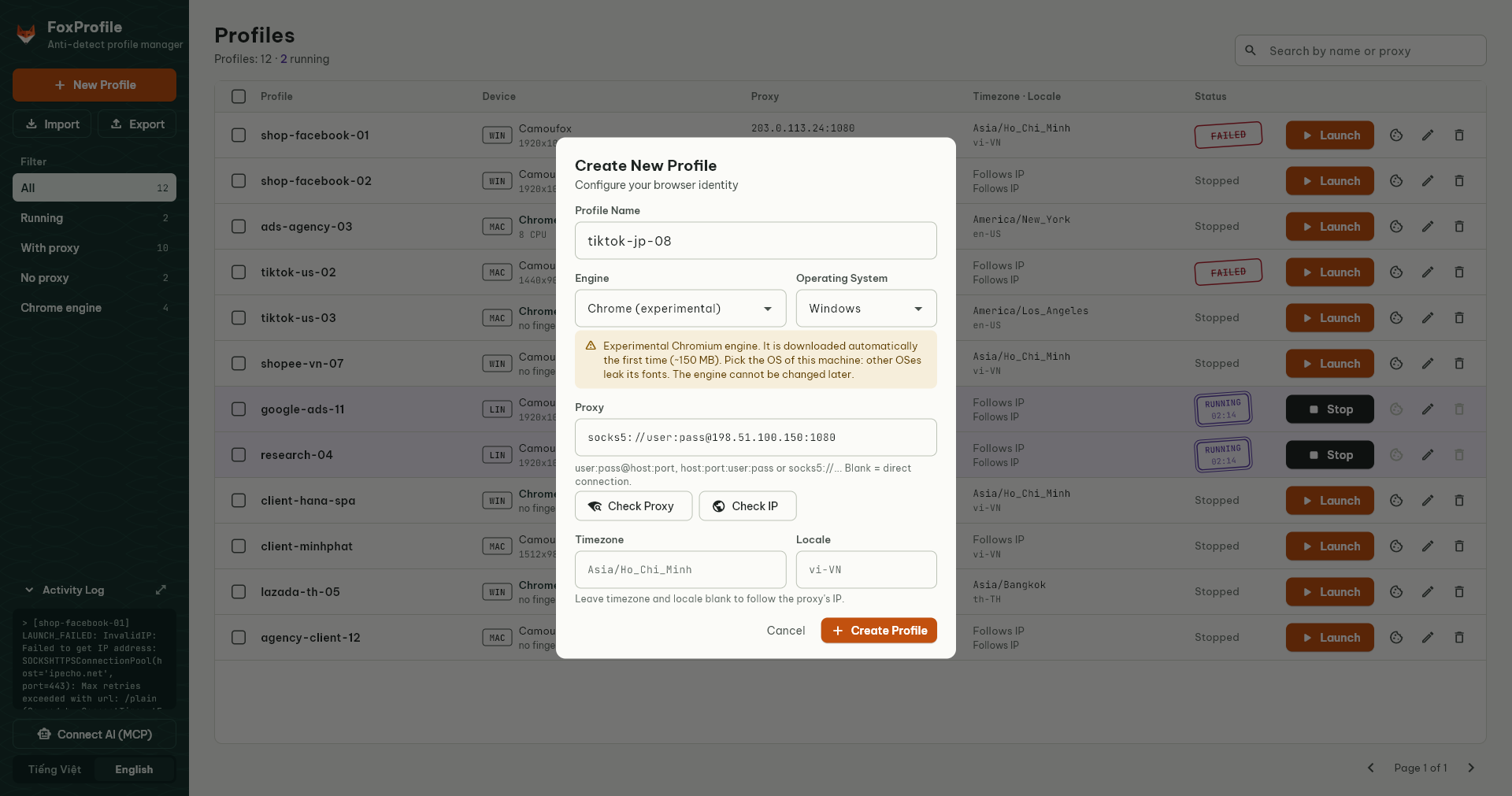
The profile dialog has Timezone (IANA name, e.g. Asia/Ho_Chi_Minh) and Locale (e.g. vi-VN) fields; blank means follow the IP. Check IP resolves the exit IP through the proxy, compares it with Cloudflare, ipinfo and ip-api, and warns about country or timezone mismatches, datacenter IPs, proxies that leave over different IPv4/IPv6 addresses, and a locale left on random.
Server mode and web panel
No desktop window: API + web panel only, browsers run hidden. Suited to a VPS.
python -m src.server                     # http://127.0.0.1:8000
python -m src.server --host 0.0.0.0      # exposed: FOXPROFILE_API_TOKEN is required
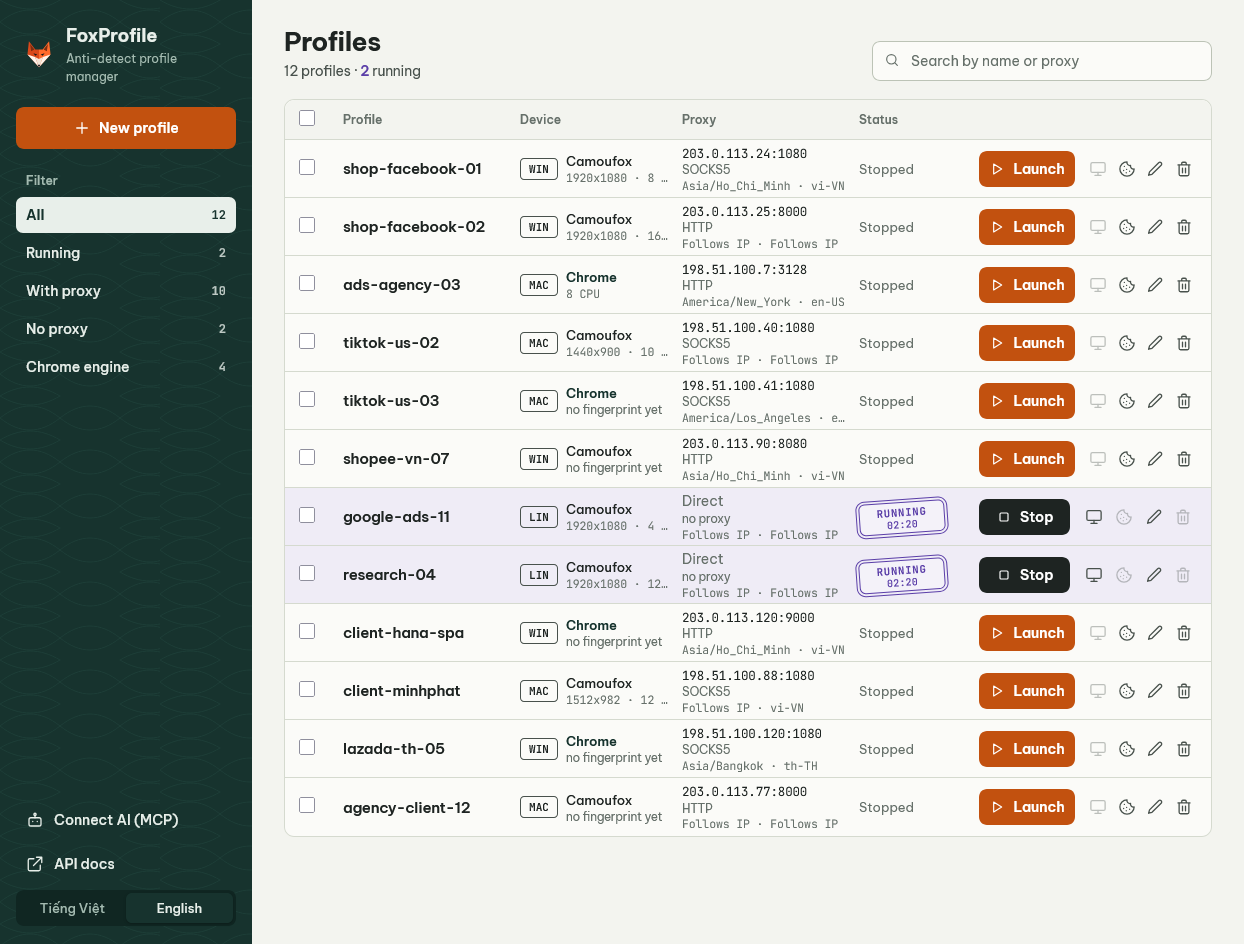
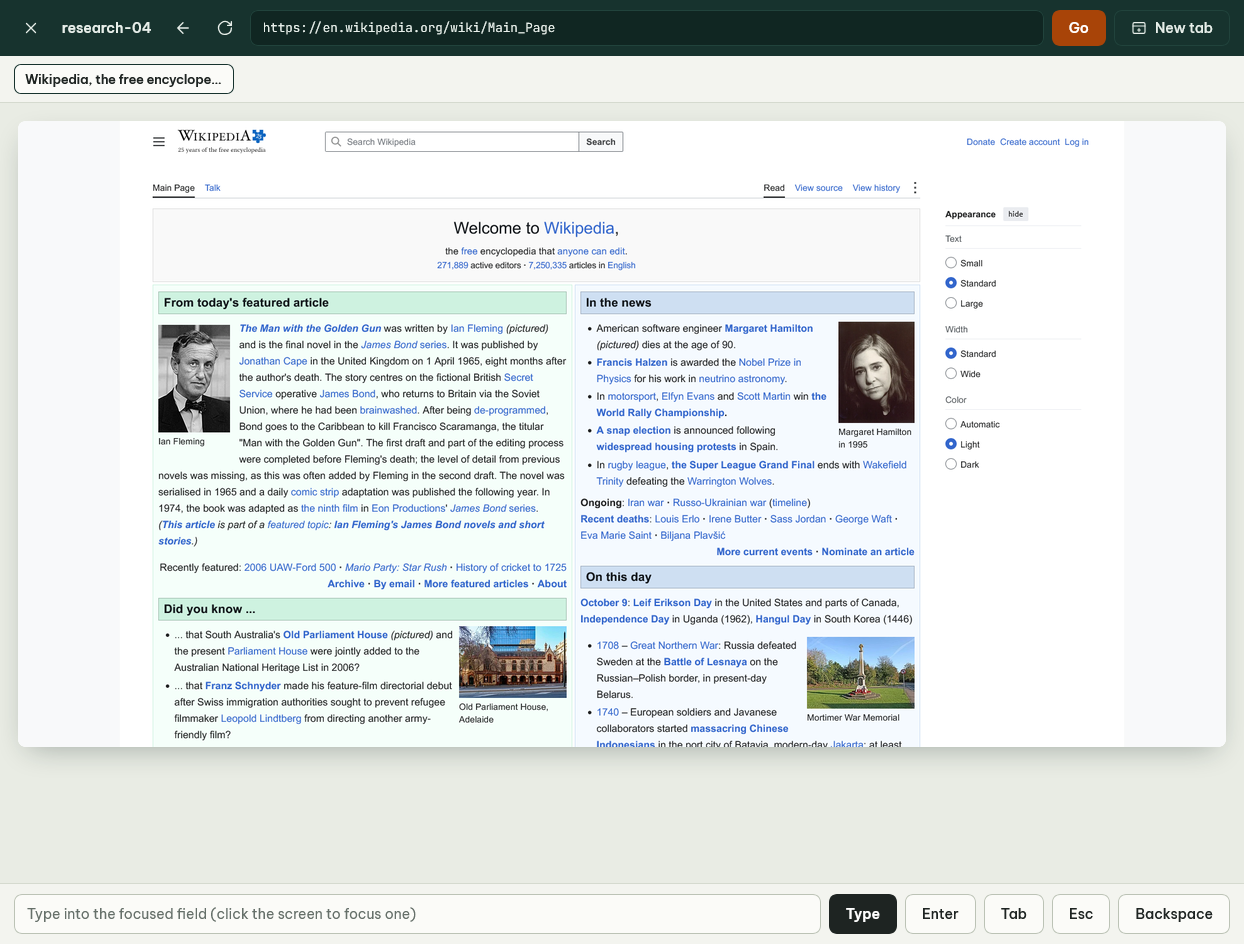
Open http://<host>:8000/ for the web panel: the same profile table, filters and bulk actions as the desktop app; create, edit, launch and stop profiles, move cookies, and view a profile's screen remotely. Click on the screenshot and type to log in or solve a captcha even when the browser runs hidden on a server.
| Web panel | Remote screen view |
|---|---|
 |
 |
Security: when listening on anything but 127.0.0.1, the server refuses to start without FOXPROFILE_API_TOKEN (24+ characters). The panel, the REST API and MCP share that token.
# Generate a random token
python -c "import secrets; print(secrets.token_urlsafe(32))"
On a VPS, put the server behind an HTTPS reverse proxy (Caddy, Nginx) so the token is never sent in clear text. On a display-less Linux box, FOXPROFILE_HEADLESS=virtual (needs xvfb) runs browsers on a virtual display, which is harder to detect than plain headless.
Full deployment guide (Ubuntu, systemd, nginx, HTTPS; in Vietnamese): docs/DEPLOY.md.
MCP: let AI agents drive the browser
FoxProfile ships an MCP server so Claude Code, Claude Desktop, Cursor, VS Code and others can manage profiles and act on pages: navigate, read, click, type, screenshot.
Quickest: click Connect AI (MCP) in the left sidebar of the desktop app or the web panel. It generates ready-to-paste configs for each AI app with your address and token.
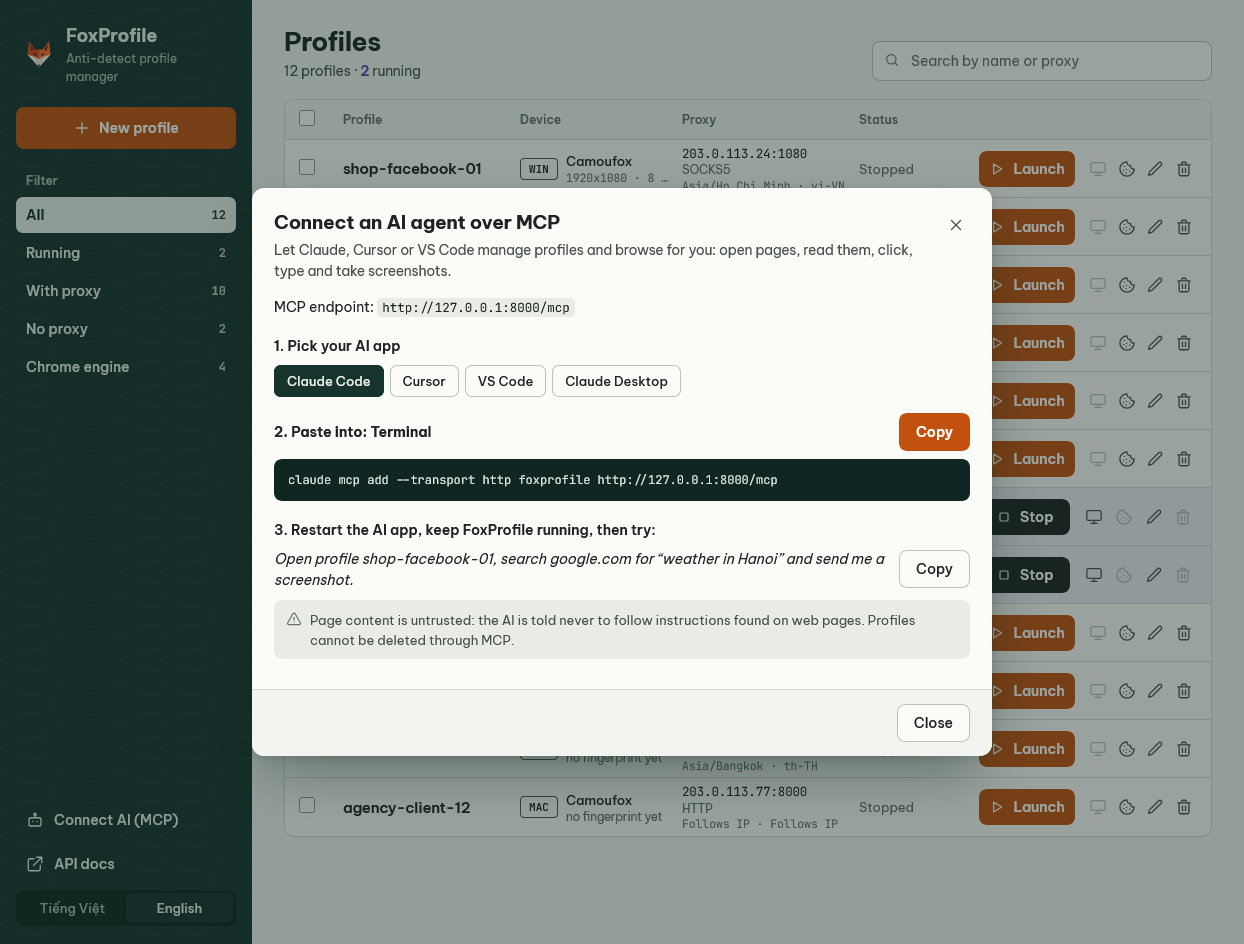
MCP is served over HTTP at /mcp on FoxProfile's own port, so it also works when FoxProfile runs on a VPS:
# Claude Code
claude mcp add --transport http foxprofile http://127.0.0.1:8000/mcp
# Server with a token:
claude mcp add --transport http foxprofile https://your-vps.example.com/mcp --header "Authorization: Bearer <token>"
// Cursor: ~/.cursor/mcp.json
{ "mcpServers": { "foxprofile": { "url": "http://127.0.0.1:8000/mcp" } } }
Claude Desktop only launches local MCP servers: use foxprofile_mcp.py on the same machine, or the npx mcp-remote bridge from another one. The Connect AI dialog generates both.
Then just ask, e.g. "Open profile tiktok-us-02, go to tiktok.com and send me a screenshot".
| Group | Tools |
|---|---|
| Profiles | list_profiles, get_profile, create_profile, update_profile, launch_profile, stop_profile, running_profiles |
| Cookies & fingerprints | export_cookies, import_cookies, get_fingerprint, reset_fingerprint, check_proxy, check_profile_ip |
| Page | browser_navigate, browser_back, browser_snapshot, browser_get_text, browser_click, browser_click_at, browser_type, browser_press, browser_wait_for, browser_screenshot, browser_evaluate |
| Tabs | browser_tabs, browser_tab_new, browser_tab_select, browser_tab_close |
There is deliberately no delete tool, so an agent cannot wipe an account's cookies by mistake. Only http, https and about:blank can be opened; file:// and about:config are blocked.
Chrome engine (experimental)
Besides Camoufox (Firefox), a profile can run on the Chrome engine: a Chromium build with fingerprint spoofing patched in C++ (fingerprint-chromium, BSD-3 license). Pick it in Engine when creating a profile; it cannot be changed afterwards. The browser build (~140-190 MB depending on the OS, fetched from fingerprint-chromium's GitHub releases and verified by SHA-256) is downloaded in the background as soon as the first Chrome profile is created, or on launch if it is still missing; progress shows in the log. To fetch it ahead of time: python -m chrome_engine fetch.
Pick the OS of the machine running FoxProfile: a persona of another OS leaks the machine's fonts, and a Linux persona on Windows/macOS is refused because WebGL reveals the real GPU. Supported: Windows x64, macOS Apple Silicon, Linux x64 (untested). Details and test results (in Vietnamese): chrome_engine/README.md.
Cookies and fingerprints
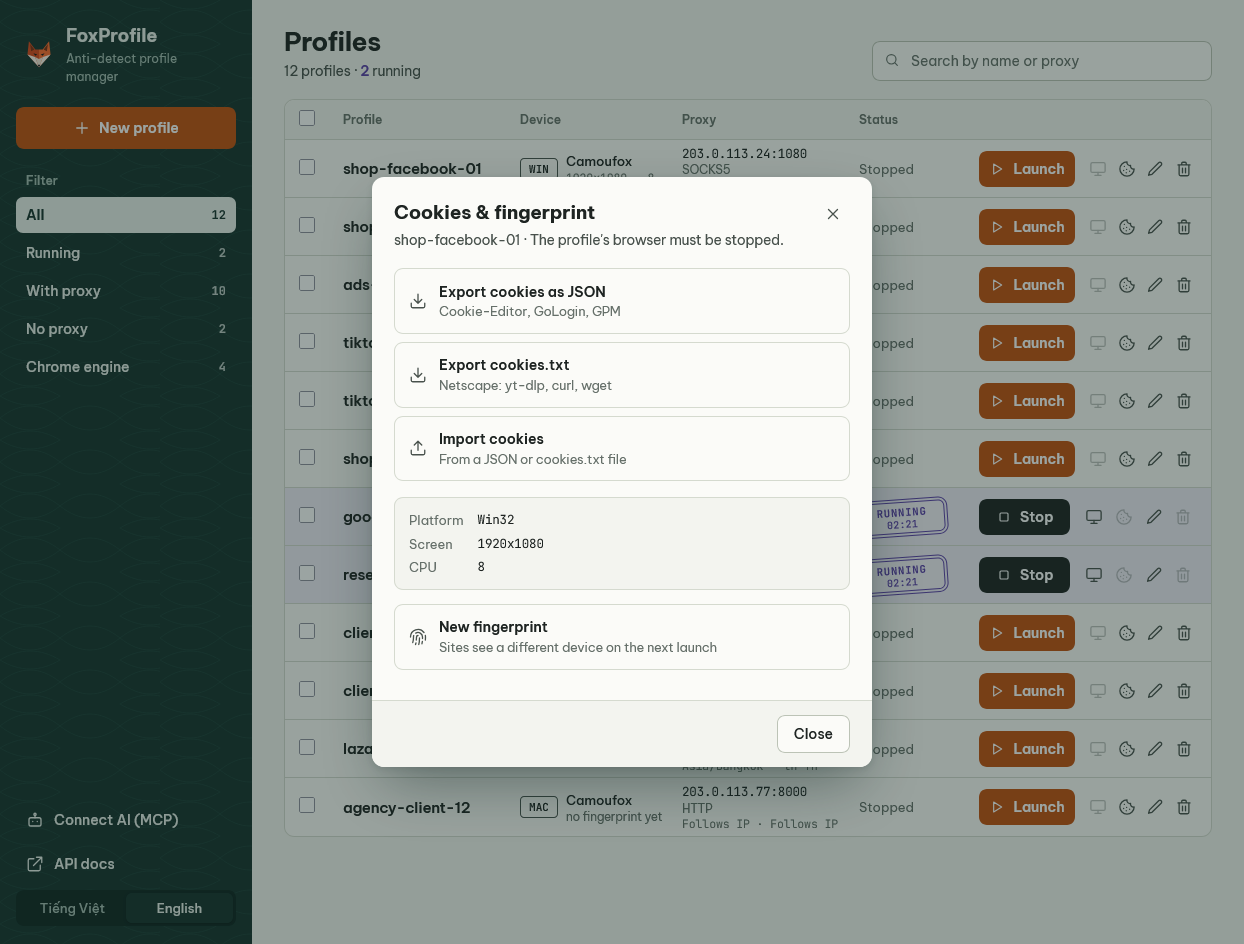
Click the cookie button on a profile row to open Cookies & fingerprint. The profile's browser must be stopped: FoxProfile opens the profile headless to read and write cookies.
- Imported session cookies are given a one-year lifetime; otherwise the browser would discard them when it closes.
- "New fingerprint" deletes the stored fingerprint so the next launch presents a different device. Changing a profile's OS also regenerates it.
Configuration
Everything is optional. To override defaults, copy .env.example to .env.
| Variable | Default | Meaning |
|---|---|---|
FOXPROFILE_LANG |
en |
UI language: en or vi |
FOXPROFILE_PROFILES_FILE |
profiles.json |
Profile list file |
FOXPROFILE_DATA_DIR |
camoufox_data |
Data directory, one subdirectory per profile |
FOXPROFILE_LOG_DIR |
logs |
Log directory |
FOXPROFILE_LOG_LEVEL |
INFO |
Log level |
FOXPROFILE_PROXY_TIMEOUT |
10 |
Proxy check timeout (seconds) |
FOXPROFILE_LAUNCH_TIMEOUT |
90 |
How long the API waits for a browser to finish launching (seconds) |
FOXPROFILE_HEADLESS |
false (true in server mode) |
Hidden browsers: true, false or virtual (Linux + Xvfb) |
FOXPROFILE_RESTORE_TABS |
true |
Reopen the tabs from the previous run |
FOXPROFILE_API_TOKEN |
(empty) | Token for the API, web panel and MCP. Required when the API listens beyond 127.0.0.1 |
FOXPROFILE_API_HOST |
127.0.0.1 |
API host |
FOXPROFILE_API_PORT |
8000 |
API port |
Proxy format
host:port, http://host:port, https://..., socks4://..., socks5://..., optionally with user:pass@. The provider format host:port:user:pass works too. Blank means a direct connection.
Data layout
profiles.json                                  profile list (name, engine, proxy, OS, timezone, locale)
camoufox_data/<profile>/                       browser data: cookies, history, localStorage
camoufox_data/<profile>/fingerprint.json       device fingerprint (Camoufox engine)
camoufox_data/<profile>/chrome_persona.json    device fingerprint (Chrome engine)
camoufox_data/<profile>/tabs.json              tabs to reopen on next launch
logs/foxprofile_YYYYMMDD.log                   daily log
[!WARNING]
camoufox_data/holds the login cookies of every account. Never commit or share it.
REST API
Prefix /api/v1. The full reference is at /docs while the app is running.
| Method | Path | Description |
|---|---|---|
GET |
/health |
Health check |
GET / POST |
/profiles |
List / create profiles |
GET / PATCH / DELETE |
/profiles/{name} |
Read / update / delete a profile (engine cannot change) |
GET |
/profiles/{name}/data-dir |
Path of the profile's data directory |
POST |
/profiles/{name}/export |
Export a profile to ZIP |
POST |
/profiles/import |
Import a profile from ZIP |
GET |
/profiles/{name}/cookies?format=json|netscape |
Export cookies |
POST |
/profiles/{name}/cookies |
Import cookies ({"content": "<JSON or cookies.txt>"}) |
GET / DELETE |
/profiles/{name}/fingerprint |
Show / generate a new fingerprint |
GET |
/profiles/{name}/ip-check |
Where Cloudflare/ipinfo/ip-api place the profile's exit IP, with mismatch warnings |
GET |
/browser |
Running profiles |
GET |
/browser/{name}/status |
Whether the profile is running |
POST |
/browser/{name}/launch |
Launch and wait until ready or failed (409 if already running or busy) |
POST |
/browser/{name}/stop |
Stop |
POST |
/proxy/check |
Check a proxy |
POST |
/proxy/geo-check |
Same as ip-check for an unsaved {proxy, timezone, locale} |
POST |
/browser/{name}/page/navigate · back |
Open a URL in the active tab, go back |
GET |
/browser/{name}/page/snapshot · text |
Accessibility tree of the page (for picking selectors), page text |
POST |
/browser/{name}/page/click · type · press · wait |
Click, type, press a key, wait for an element (Playwright selectors) |
POST |
/browser/{name}/page/click-at · keyboard |
Click at coordinates, type into the focused element |
GET |
/browser/{name}/page/screenshot |
PNG of the tab (?format=json for base64) |
POST |
/browser/{name}/page/evaluate |
Run JavaScript |
GET / POST |
/browser/{name}/page/tabs |
List tabs / open a new tab |
POST / DELETE |
/browser/{name}/page/tabs/{index}/select · /page/tabs/{index} |
Select / close a tab |
GET |
/mcp/setup?base_url=... |
MCP configs for each AI app (used by the Connect AI dialog) |
With FOXPROFILE_API_TOKEN set, every request except /health and /info needs Authorization: Bearer <token>.
Examples:
# Create a macOS profile with a proxy. Add "engine": "chrome" for the Chrome engine (default "camoufox").
curl -X POST http://127.0.0.1:8000/api/v1/profiles \
  -H "Content-Type: application/json" \
  -d '{"name": "tiktok-us-02", "os_type": "macos", "proxy": "socks5://user:[email protected]:1080"}'

# Launch. Returns 200 once running, 502 with the reason on failure.
# Add ?wait=false to return immediately (202).
curl -X POST http://127.0.0.1:8000/api/v1/browser/tiktok-us-02/launch

# Export cookies as cookies.txt
curl "http://127.0.0.1:8000/api/v1/profiles/tiktok-us-02/cookies?format=netscape" -o cookies.txt
Development
pip install -r requirements-dev.txt
ruff check src tests chrome_engine
ruff format --check src tests chrome_engine
pytest                  # real-browser tests skip unless the browsers are fetched
Project layout, code conventions and the PR process are in CONTRIBUTING.md (Vietnamese; issues and PRs in English are welcome). UI changes follow DESIGN.md and touch both the desktop app and the web panel. Release notes: CHANGELOG.md.
Contributing
Contributions of all kinds are welcome: bug reports, feature ideas, docs, translations and code.
- Bugs and ideas: open an issue from a template.
- Code: read CONTRIBUTING.md before opening a pull request.
- Security issues: do not open a public issue, see SECURITY.md.
- Everyone taking part is expected to follow the Code of Conduct.
If FoxProfile is useful to you, consider giving it a ⭐ on GitHub.
Support
FoxProfile is free and open source, built in my spare time, and will stay that way. If it saves you time or money, you can buy me a coffee; it goes toward bug fixes, keeping up with upstream browser releases and faster replies on issues.

Responsible use
Anti-detect browsers are legitimate tools for privacy, web testing and agencies managing client accounts. Running multiple accounts on one platform may still violate the terms of Facebook, TikTok, Google, Shopee and others. You are responsible for how you use this software.
License
Released under the MIT License. Copyright (c) 2026 chienbm98.
Acknowledgements
- The Camoufox browser by daijro.
- fingerprint-chromium by adryfish for the Chrome engine (BSD-3).
- The Be Vietnam Pro and JetBrains Mono fonts, SIL Open Font License (
src/assets/fonts/).
Yorumlar (0)
Yorum birakmak icin giris yap.
Yorum birakSonuc bulunamadi