crune
Health Uyari
- License — License: Apache-2.0
- Description — Repository has a description
- Active repo — Last push 0 days ago
- Low visibility — Only 6 GitHub stars
Code Gecti
- Code scan — Scanned 12 files during light audit, no dangerous patterns found
Permissions Gecti
- Permissions — No dangerous permissions requested
This tool is a static web dashboard and CLI that analyzes Claude Code session logs to extract workflow patterns, session analytics, and synthesize reusable skills. It runs locally against your session history to generate knowledge graphs and standardized skill definition files.
Security Assessment
Overall Risk: Low. The tool reads your local Claude Code session logs, which contain your conversation history and potentially sensitive code snippets, but the code scan found no dangerous patterns, hardcoded secrets, or network exfiltration risks. It functions as a static web application without requesting dangerous permissions. The optional LLM-synthesized skills feature requires the Claude CLI, which triggers external network requests to the Anthropic API, but this is standard and expected behavior explicitly initiated by the user via command flags.
Quality Assessment
The project is under active development, with its most recent push occurring today. It uses the permissive Apache-2.0 license and includes clear documentation with a detailed README. However, it currently has very low community visibility with only 6 GitHub stars. As a young, niche tool, it lacks the widespread community testing and trust that established open-source projects benefit from.
Verdict
Safe to use, though be mindful that it processes your local conversation history.
Decipher the traces etched in past sessions and resurrect them as reusable skills. crune is a static web dashboard that analyzes Claude Code session logs, providing session playback, analytics, a semantic knowledge graph, and skill synthesis.

crune
Claude Code Rune — Traces linger, skills emerge



Decipher the traces etched in past sessions and resurrect them as reusable skills. crune is a static web dashboard and CLI tool that analyzes Claude Code session logs, providing session playback, analytics, a semantic knowledge graph, and skill synthesis.
Features
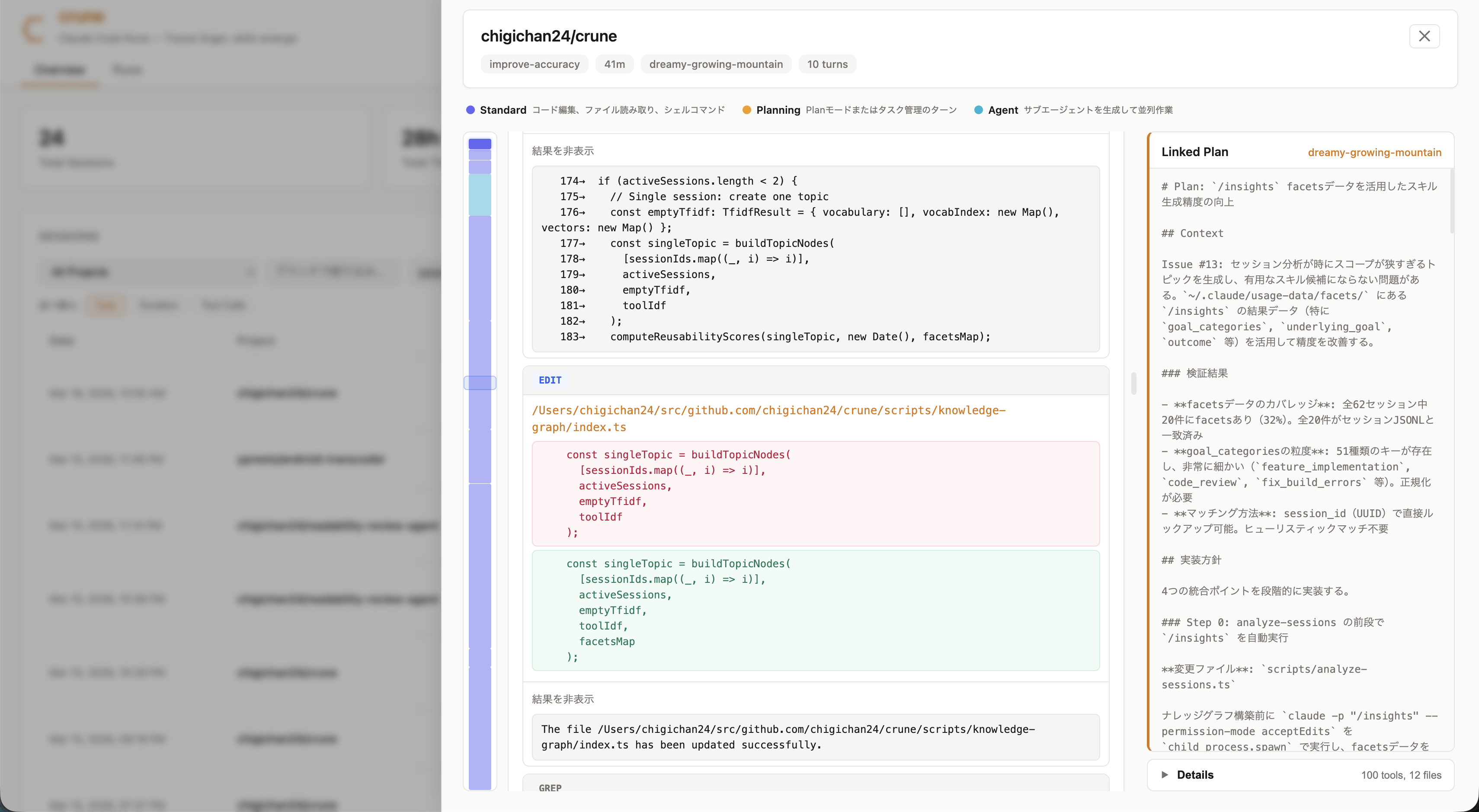
- Session Playback --- Turn-by-turn conversation replay with minimap navigation, tool call inspection, and subagent branch expansion
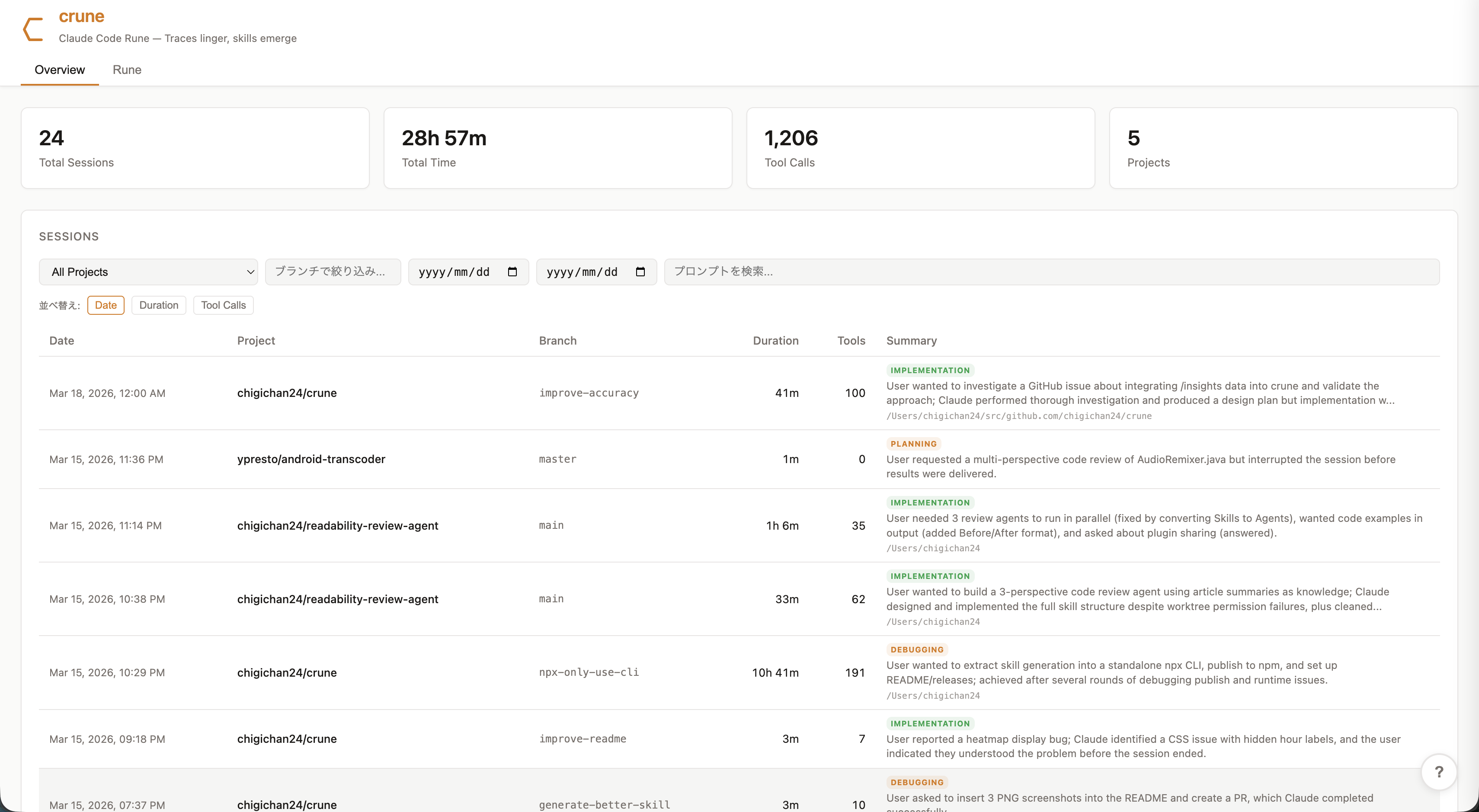
- Overview Dashboard --- Activity heatmap, project distribution, tool usage trends, duration distribution, model usage, and top edited files
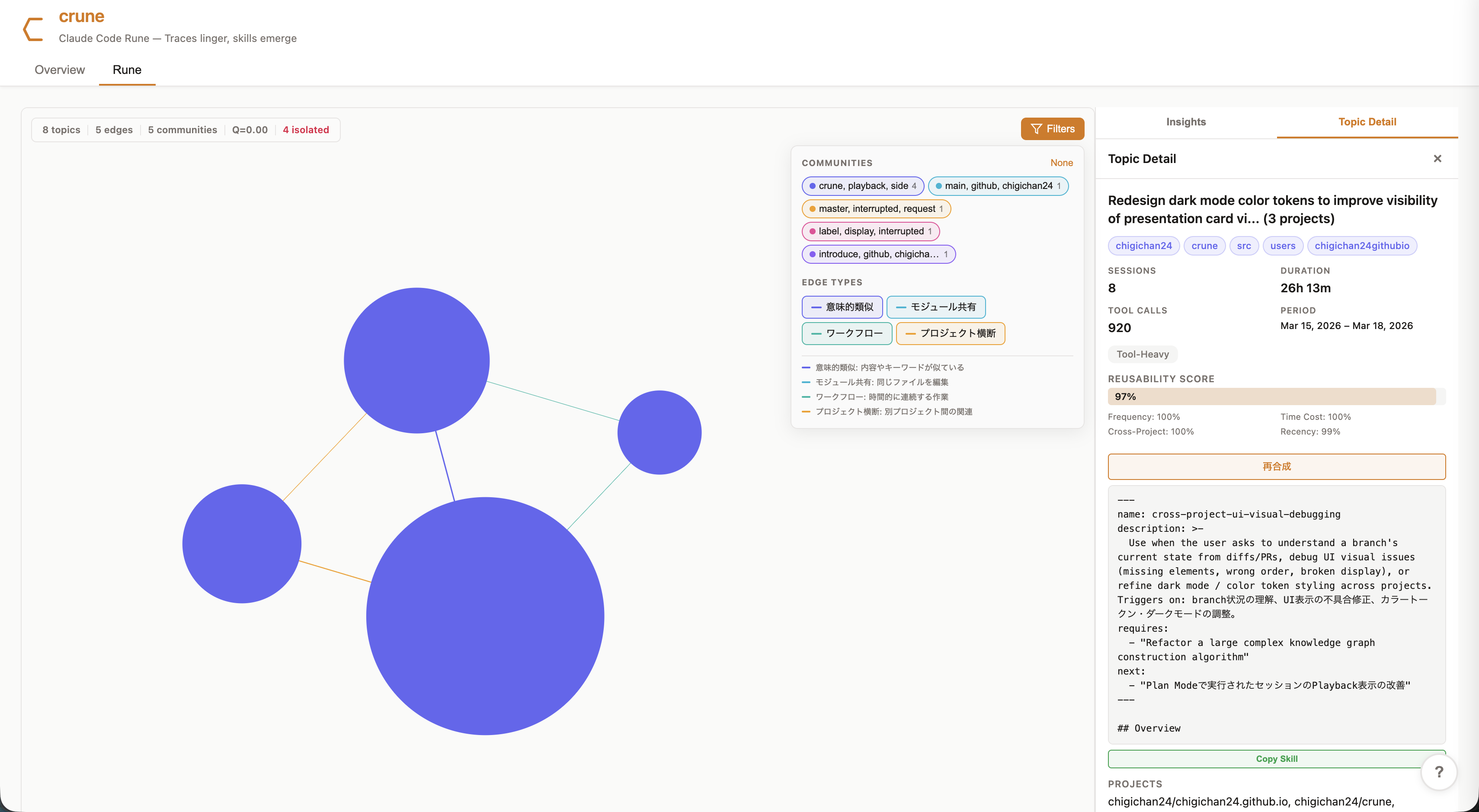
- Semantic Knowledge Graph --- TF-IDF + Tool-IDF + structural features, Truncated SVD, agglomerative clustering, Louvain community detection, Brandes centrality (algorithm details)
- Tacit Knowledge --- Extracted workflow patterns, tool sequences, and pain points (long sessions, hot files)
- Session Summarization --- Automatic session summary and classification (no LLM required), enriched with
/insightsfacets data when available - Skill Synthesis --- Synthesize reusable skill definitions from the knowledge graph (algorithm details)
Overview Dashboard
Session Playback
Semantic Knowledge Graph (Rune)
CLI — Generate Skills via npx
Generate reusable Claude Code skill definitions directly from your session logs. No clone required.
npx @chigichan24/crune --dry-run                    # Preview skill candidates
npx @chigichan24/crune --skip-synthesis              # Generate heuristic skills (no LLM)
npx @chigichan24/crune --count 3 --model haiku       # LLM-synthesized skills (requires claude CLI)
npx @chigichan24/crune --output-dir ~/.claude/skills  # Install skills directly
Output follows the Claude Code skill format (<name>/SKILL.md), ready to use as /skill-name commands.
| Flag | Description |
|---|---|
--sessions-dir <path> |
Session logs directory (default: ~/.claude/projects) |
--output-dir <path> |
Output directory for skill files (default: ./skills) |
--count <n> |
Number of skills to generate (default: 5) |
--model <model> |
Claude model for synthesis (e.g. haiku, sonnet) |
--skip-synthesis |
Skip LLM synthesis, output heuristic skills only |
--dry-run |
Show candidates without writing files |
Web Dashboard
Quick Start
npm install

# Analyze Claude Code session logs (~/.claude/projects/)
npm run analyze-sessions

# Start dev server
npm run dev
Data Pipeline
npm run analyze-sessions reads JSONL session files from ~/.claude/projects/ and outputs structured JSON to public/data/sessions/.
~/.claude/projects/**/*.jsonl
  -> parse & build turns
  -> extract metadata, subagents, linked plans
  -> session summarization (centrality-based representative prompt, workType classification)
  -> TF-IDF + Tool-IDF + structural features -> Truncated SVD -> agglomerative clustering
  -> /insights facets integration (narrow cluster merging, goal-based labeling)
  -> Louvain community detection
  -> skill synthesis (reusability score top-N -> claude -p, enriched with facets insights)
  -> output:
       public/data/sessions/index.json      (session list)
       public/data/sessions/overview.json   (cross-session analytics + knowledge graph)
       public/data/sessions/detail/*.json   (individual session playback data)
Custom paths:
npm run analyze-sessions -- --sessions-dir /path/to/sessions --output-dir /path/to/output
/insights Integration
Before analysis, analyze-sessions automatically runs /insights to refresh facets data. This enriches the pipeline with:
- Better topic labels using LLM-generated
underlying_goalinstead of TF-IDF keywords - Narrow cluster merging based on shared goal categories
- Quality-aware reusability scoring using session outcome and helpfulness
- Richer synthesis prompts with friction details and success rates
- Session summaries using
brief_summaryfrom facets
Skip with --skip-facets or customize the facets path with --facets-dir <path>.
Session Summarization
The session list displays auto-generated summaries. When /insights facets data is available, the LLM-generated brief_summary is used. Otherwise, summaries are processed locally without LLM.
- Representative prompt selection: Selects the most representative prompt from plan mode turns using Jaccard centrality with position weighting
- workType classification: Automatically classifies each session into one of four types:
investigation--- Exploratory, read-heavy sessionsimplementation--- Edit/write-heavy coding sessionsdebugging--- Bash-heavy sessions with editsplanning--- Plan mode sessions with few tool calls
- Keyword extraction: Extracts top keywords from session prompts
- Scope estimation: Infers the session scope from the common directory prefix of edited files
Skill Synthesis
Synthesizes reusable skill definitions from knowledge graph analysis. Follows the anthropics/skills format.
- Pre-synthesis: Automatically synthesizes the top 5 skill candidates via
claude -pduringanalyze-sessions - Instant display: Synthesized skills are immediately viewable and copyable in the UI
- On-demand re-synthesis: The re-synthesis button generates a full version enriched with graph context (connected topics, community, centrality)
- Local server:
npm run skill-serverstarts the synthesis API server (localhost:3456)
Synthesis options:
# Specify model (e.g. haiku for speed)
npm run analyze-sessions -- --synthesis-model haiku

# Change number of candidates to synthesize (default: 5)
npm run analyze-sessions -- --synthesis-count 10

# Skip LLM synthesis (graph construction only)
npm run analyze-sessions -- --skip-synthesis
Scripts
| Command | Description |
|---|---|
npm run dev |
Start Vite dev server |
npm run build |
Type-check + production build |
npm run preview |
Preview production build |
npm run lint |
Run ESLint |
npm run analyze-sessions |
Run data pipeline |
npm run skill-server |
Skill synthesis local server (localhost:3456) |
npm run dev:full |
skill-server + Vite dev server together |
Options for analyze-sessions
| Flag | Description |
|---|---|
--synthesis-model <model> |
Model to use for synthesis (e.g. haiku for speed) |
--synthesis-count <n> |
Number of candidates to synthesize (default: 5) |
--skip-synthesis |
Skip LLM synthesis |
--facets-dir <path> |
Custom facets directory (default: ~/.claude/usage-data/facets) |
--skip-facets |
Skip /insights refresh and facets integration |
Tech Stack
- React 19 + TypeScript 5.9
- Vite 8
- Chart.js + react-chartjs-2
- react-force-graph-2d (d3-force)
- Plain CSS (no CSS-in-JS, no Tailwind)
Project Structure
src/
  components/
    overview/     # Dashboard cards, session list, charts
    playback/     # Session replay, tool call blocks, subagent branches
    knowledge/    # Force graph, node detail, tacit knowledge, skill synthesis
  hooks/          # Data fetching (useSessionIndex, useSessionDetail, useSessionOverview)
  types/          # TypeScript type definitions
scripts/
  cli.ts                     # npx CLI entry point
  session-parser.ts          # JSONL parsing, turn building, metadata extraction
  analyze-sessions.ts        # Dashboard JSON pipeline
  session-summarizer.ts      # Session summarization (local NLP)
  skill-synthesizer.ts       # Skill synthesis (claude -p)
  skill-server.ts            # Synthesis HTTP server
  knowledge-graph-builder.ts # Semantic embedding + graph construction
  knowledge-graph/
    facets-reader.ts         # /insights facets data reader + normalization
public/
  data/sessions/             # Generated JSON (gitignored)
Prerequisites
- Node.js >= 18
- Claude Code session logs at
~/.claude/projects/
License
Apache-2.0 license
Yorumlar (0)
Yorum birakmak icin giris yap.
Yorum birakSonuc bulunamadi