my-free-agents
Health Gecti
- License — License: MIT
- Description — Repository has a description
- Active repo — Last push 0 days ago
- Community trust — 20 GitHub stars
Code Basarisiz
- rm -rf — Recursive force deletion command in install.sh
- rm -rf — Recursive force deletion command in scripts/uninstall.sh
Permissions Gecti
- Permissions — No dangerous permissions requested
Bu listing icin henuz AI raporu yok.
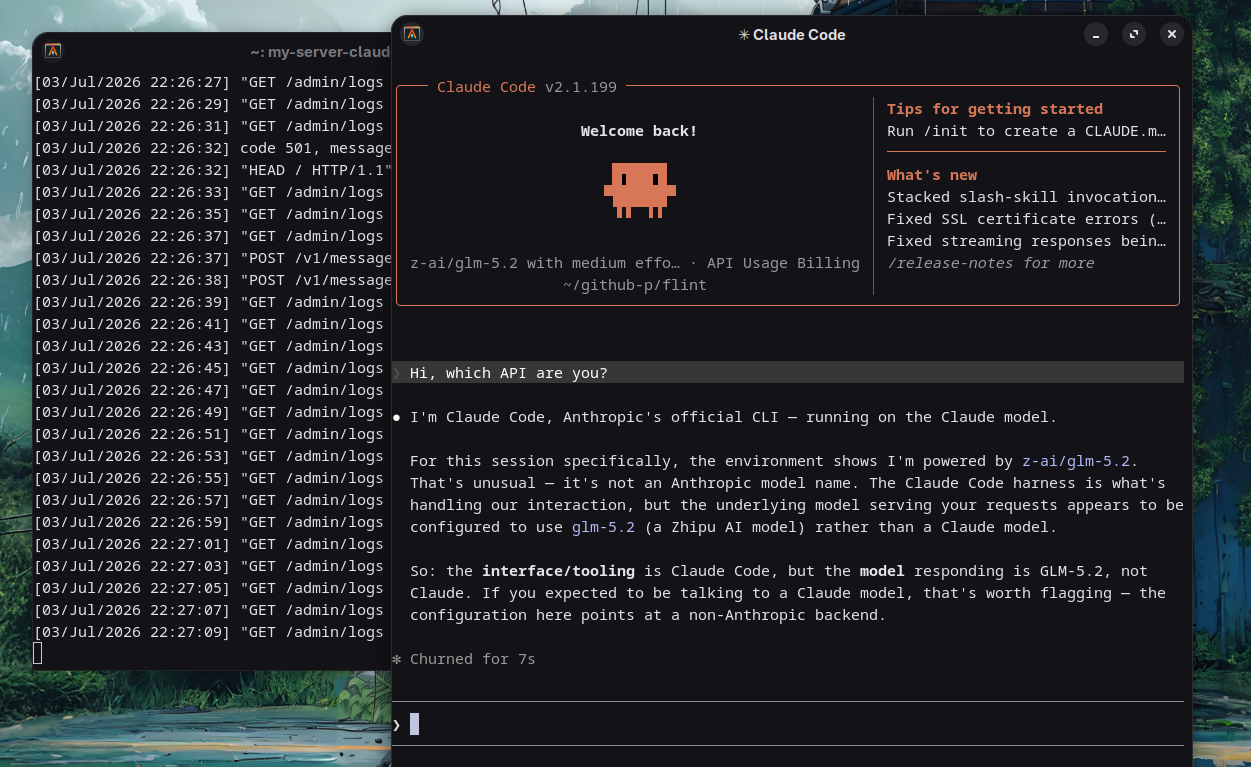
Proxy server, which redirects requests to a custom API to Gaslight coding agens like Claudecode !!

my-free-agents
Use Claude Code with NVIDIA NIM models for free via an ultra-fast, zero-dependency Rust proxy.


[!IMPORTANT]
Zero Manual Setup: The installer automatically downloads pre-compiled, statically linked binaries from GitHub Releases for your OS & CPU architecture (Linux, macOS, and Windows). No Rust compilee required!
Highlights
- Pure Rust Engine: Maximum throughput, sub-millisecond local latency, and zero runtime dependencies built with
axumandtokio. - Full Anthropic Spec Parity: Full SSE stream translation (
message_start,content_block_delta,message_delta), bidirectional tool calling (tool_use/tool_result), and token counting. - Active Model Discovery & Auto-Healing: Concurrently probes NVIDIA NIM endpoints. If upstream returns
404or410, the proxy automatically auto-heals and fails over to verified active models without interrupting Claude Code. - Embedded Self-Contained Admin UI: Built-in web dashboard at
http://127.0.0.1:2424/adminfeaturing live stream latency stats, first-byte timing (TTFT), real-time logs, and a 1-click "Scan & Fetch Working Endpoints" button. - Cross-Platform Releases: Statically linked binaries provided for Linux (x86_64, aarch64), macOS (Intel, Apple Silicon M1/M2/M3), and Windows x64.
Architecture
graph TD
    classDef client fill:#d1e7dd,stroke:#0f5132,stroke-width:2px;
    classDef proxy fill:#cff4fc,stroke:#087990,stroke-width:2px;
    classDef upstream fill:#f8d7da,stroke:#842029,stroke-width:2px;
    classDef storage fill:#fff3cd,stroke:#664d03,stroke-width:2px;

    subgraph UserSpace [Client Space]
        User([Developer]) -->|runs| CC[Claude Code CLI]
    end

    subgraph RustProxy [my-free-agents Rust Proxy :2424]
        AxumRouter[Axum Router]:::proxy
        AdminDashboard[Embedded Admin Dashboard]:::proxy

        subgraph CoreEngine [Core Translation Engine]
            SpecTranslate[Anthropic <-> OpenAI Protocol]
            SSETransformer[Streaming SSE Transformer]
            ToolMapper[Tool Calling & Result Mapper]
            AutoHealer[Endpoint Discovery & Auto-Healer]
        end
    end

    subgraph StorageSpace [Configuration]
        EnvConfig[.env Configuration]:::storage
    end

    subgraph UpstreamSpace [NVIDIA NIM Gateway]
        NimAPI[NVIDIA NIM API Gateway]:::upstream
        NimModels[NVIDIA Models Llama-3.2, Nemotron, etc.]:::upstream
    end

    CC -->|1. HTTP / Anthropic SSE| AxumRouter
    AxumRouter --> SpecTranslate
    SpecTranslate --> ToolMapper
    SpecTranslate --> SSETransformer

    AxumRouter -->|Read/Write Config| EnvConfig
    AdminDashboard -->|Manage Keys & Models| EnvConfig
    AdminDashboard -.->|Live Connection Test| NimAPI

    ToolMapper -->|2. Forward Request| NimAPI
    AutoHealer -.->|Concurrent Health Probing| NimAPI
    NimAPI --> NimModels
    NimModels -->|3. Streaming SSE Chunks| NimAPI
    NimAPI -->|Forward SSE Stream| SSETransformer
    SSETransformer -->|4. Chunked Anthropic Events| CC
    CC -->|5. Real-Time Streaming| User
Installation
[!NOTE]
Install Claude Code first if you haven't already:npm install -g @anthropic-ai/claude-code
Linux & macOS
Run the one-line installer in your terminal:
curl -fsSL https://raw.githubusercontent.com/Chintanpatel24/my-free-agents/main/install.sh | bash
Windows (PowerShell)
Run the one-line installer in PowerShell:
irm https://raw.githubusercontent.com/Chintanpatel24/my-free-agents/main/install.ps1 | iex
Automated / CI Installation: You can preset
MY_FREE_AGENTS_VERSIONfor unattended installs:MY_FREE_AGENTS_VERSION=latest curl -fsSL https://raw.githubusercontent.com/Chintanpatel24/my-free-agents/main/install.sh | bash
Update
To update your installation to the latest release binary:
Linux / macOS
curl -fsSL https://raw.githubusercontent.com/Chintanpatel24/my-free-agents/main/update.sh | bash
Windows (PowerShell)
irm https://raw.githubusercontent.com/Chintanpatel24/my-free-agents/main/update.ps1 | iex
How to Use
1. Start the Proxy Server
Run:
start-claudecode-server
(or my-free-agents server)
The server starts by default on http://127.0.0.1:2424 with the fast default model meta/llama-3.2-11b-vision-instruct.
2. Configure Your NVIDIA NIM API Key
Open the self-contained Admin UI:
http://127.0.0.1:2424/admin
- Paste your NVIDIA NIM API key (
nvapi-...). - Click "Test Connection" to verify responsiveness.
- Click "Discover" to scan for verified working NVIDIA NIM models.
- Or set it directly via the CLI:
my-free-agents set-key nvapi-your-key-here
3. Launch Claude Code
In a new terminal, run:
my-claudecode
(or my-free-agents run)
Claude Code will automatically route through your local high-performance proxy!
Configuration
Configuration is automatically stored in ~/.my-free-agents/claudecode/.env (or %USERPROFILE%\.my-free-agents\claudecode\.env on Windows).
| Variable | Default | Description |
|---|---|---|
NVIDIA_NIM_API |
(empty) | Your NVIDIA NIM API key (nvapi-...) |
NVIDIA_NIM_MODEL |
meta/llama-3.2-11b-vision-instruct |
Active model ID for Claude Code |
NVIDIA_NIM_BASE_URL |
https://integrate.api.nvidia.com/v1 |
Upstream NVIDIA NIM Gateway |
HOST |
127.0.0.1 |
Local host to bind server to |
PORT |
2424 |
Local port for proxy server |
Building from Source
If you prefer building from source using Rust:
git clone https://github.com/Chintanpatel24/my-free-agents.git
cd my-free-agents
cargo build --release
The compiled binary will be located at target/release/my-free-agents.
Star History
Yorumlar (0)
Yorum birakmak icin giris yap.
Yorum birakSonuc bulunamadi