Serpentine3D
Health Uyari
- License — License: MIT
- Description — Repository has a description
- Active repo — Last push 0 days ago
- Low visibility — Only 6 GitHub stars
Code Basarisiz
- exec() — Shell command execution in examples/hero_scene.py
- rm -rf — Recursive force deletion command in packaging/appimage/build-appimage.sh
- rm -rf — Recursive force deletion command in packaging/macos/build-dmg.sh
Permissions Gecti
- Permissions — No dangerous permissions requested
Bu listing icin henuz AI raporu yok.
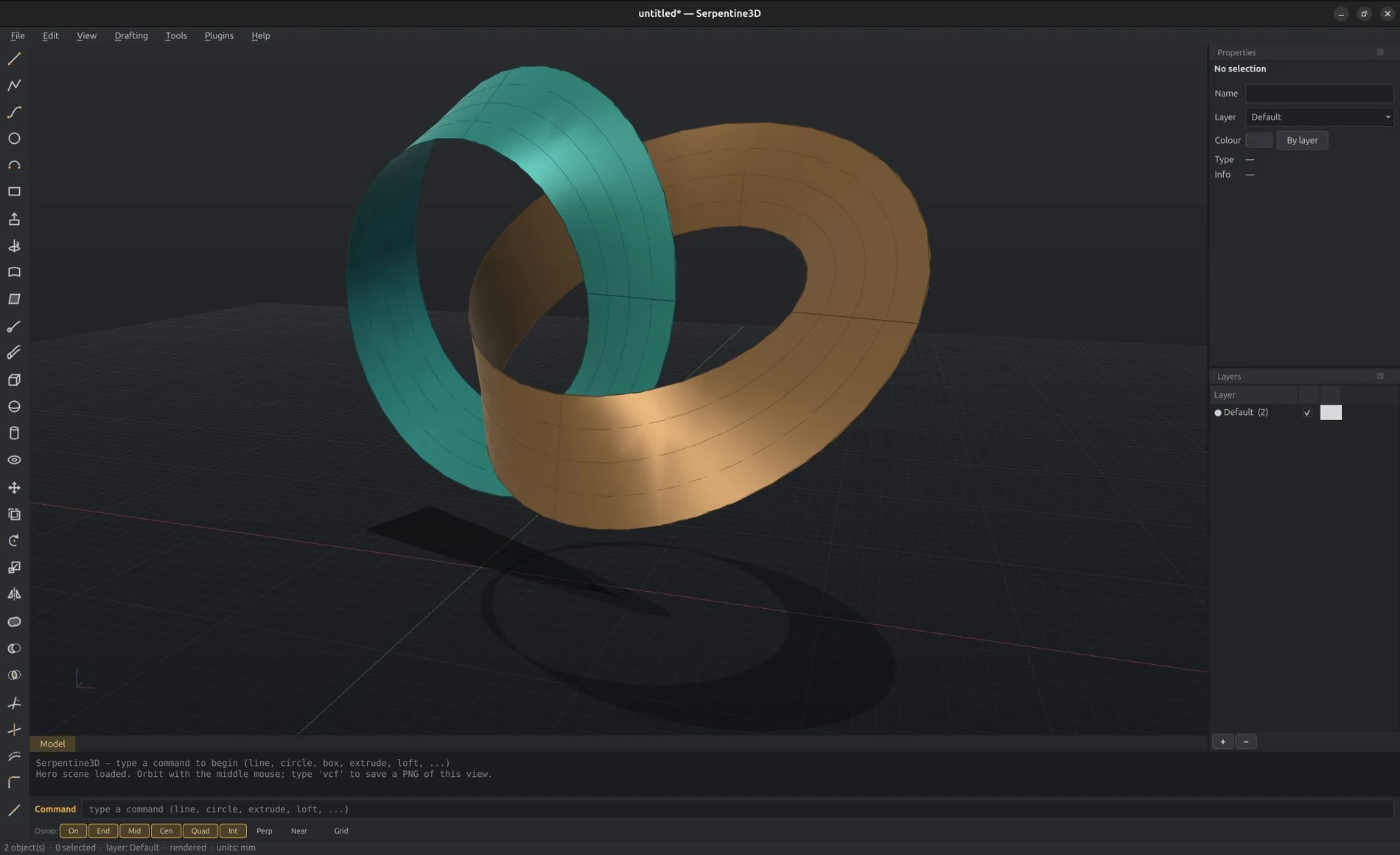
Open-source NURBS surface modeller — a Rhino-style freeform modeller on the OpenCASCADE kernel, with AI-native MCP integration
Serpentine3D
An open-source NURBS surface modeller for Linux, with native AI integration via MCP.
Serpentine3D (serp3d) is a freeform surface modeller in the spirit of Rhinoceros 3D —
BREP/NURBS geometry on the OpenCASCADE kernel, not meshes. It is built for set
designers, architects, and industrial designers who want a genuine Rhino-style
workflow on Linux: a command line that prompts for input, layers, object snaps to
a construction plane, STEP/OBJ interchange, and a dark, focused interface.
Named for the serpentine stone of Zimbabwean Shona sculpture, and for the
S-curve at the heart of NURBS geometry.
Why
- No genuine open-source NURBS modeller exists for Linux. FreeCAD is
parametric CAD; Blender is mesh-based. Serpentine3D fills the freeform
surface-modelling gap. - First CAD tool with native AI integration. The bundled MCP server lets
Claude (or any MCP client) see your viewport, create geometry, run any
command, and manage the scene.
Install
Requires Python 3.10+ on Linux with OpenGL 3.3.
git clone <this-repo> && cd Serpentine3D
python3 -m venv .venv
.venv/bin/pip install -e .
.venv/bin/serp3d        # launch
The OpenCASCADE kernel ships as pip wheels (cadquery-ocp) — no conda, no
system packages.
Windows (experimental): the same pip install works on Windows —
every dependency has prebuilt wheels, and the full test suite passes on
Windows 10 (Python 3.12). The GUI needs a GPU with OpenGL 3.3 drivers,
which any normal desktop has; GPU-less VMs and remote-desktop sessions
only expose Windows' built-in OpenGL 1.1 and get a clear error message
instead of a viewport. Headless use (serp3d-batch, MCP server, file
conversion) works everywhere. macOS is untested — reports welcome.
The command line
Everything works Rhino-style: type a command, answer its prompts. Prompts accept
typed coordinates (10,5,0, relative @5,0,0) or viewport clicks on the
construction plane. Tab completes command names, Up/Down recall history,Enter on an empty line repeats the last command, Escape cancels.
| Commands | |
|---|---|
| Curves | line polyline curve (interpolated NURBS) circle arc ellipse rectangle helix textobject blendcrv project pull intersect |
| Surfaces | extrude revolve loft sweep1 sweep2 planarsrf patch/networksrf offsetsrf unrollsrf |
| Solids | box sphere cylinder cone torus filletedge chamferedge (both pick edges directly; fillets chain and take start,end variable radii) shell cap contour booleansplit pushpull |
| Deform | twist taper bend flow (curve-to-curve) extend matchcrv |
| Booleans | booleanunion booleandifference booleanintersection |
| Transform | move copy rotate scale scalenu mirror array |
| Edit | join explode trim split offset fillet rebuild pointson/pointsoff (control points, curves and surfaces) delete hide show rename undo redo |
| Select | selall selnone selcrv selsrf selsolid sellayer selname sellast invert isolate unisolate |
| Organise | group/ungroup lock/unlockall block insert blocklist count |
| Camera | camera (lens mm, cinema sensors, placement, 2.39/1.85 frame guides) units cplane |
| Array | array (grid) arraypolar arraypath (along a curve) |
| Analysis | distance length area volume curvature zebra curvaturegraph (combs) draftanalysis |
| View | top front right perspective 4view/1view zoomextents wireframe shaded ghosted rendered technical grid snap |
| Render | material (Matte/Plastic/Metal/Glass/custom PBR — flows into GLB/USD export) rendered |
| Layers | layer (new/current/show/hide/rename/weight) — or use the Layers panel |
| Meshes | heavy OBJ/3DM props stay native meshes (instant display); meshtobrep / breptomesh convert |
| Files | new open save import export (.serp is a zip container with thumbnail + metadata) |
| Live | recordhistory — loft/extrude/revolve outputs rebuild when their input curves are edited |
Most commands have Rhino-compatible aliases (l, pl, c, m, co, mi, ...).
Command options appear as clickable chips under the prompt
(Cap=Yes, BothSides=No, Style=Normal) and can be typed
Rhino-style (cap=n) at any moment without losing your place; numeric
prompts show a live gold ghost preview of the result while you
type. help (or F1) opens a searchable command reference. Arrow keys
nudge the selection along the CPlane (Shift ×10, Ctrl ×0.1).
Navigation & shortcuts
- Middle mouse orbit · Shift+Middle pan · Scroll zoom
- F1–F4 top/front/right/perspective · Ctrl+E zoom extents · F7 grid
- Ctrl+Z / Ctrl+Y undo/redo · Ctrl+A select all · Delete delete selection
- Ctrl+S / Ctrl+O / Ctrl+N save/open/new
- Click to select (Shift-click adds, Ctrl-click removes), click empty space
to deselect - Box selection: drag left-to-right for a window (fully enclosed,
gold box), right-to-left for a crossing (anything touched, white box);
Shift adds, Ctrl removes - Control points:
pointson(F10) shows CVs on curves — drag a CV to
edit the curve live;pointsoff(F11) hides them - Object snaps — end, mid, center, quadrant, intersection,
perpendicular, and nearest-point, each with a distinct cursor marker.
Toggle types on the osnap bar under the command line, or in
Settings.gridsnapsnaps picked points to the grid - Launch with a file:
serp3d model.serp(or any importable format)
Drafting & documentation
Serpentine3D has a full two-space drafting workflow — model in 3D, document
in 2D, print to PDF — without leaving the app:
- Layouts (
layout): paper-space sheets (A4–A0, Letter, Tabloid or
custom) with tabs at the bottom of the viewport:[Model] [Sheet 1] … - Detail views (
detail): live windows into the model placed on the
sheet — pick two corners, a view direction (top/front/right/…/perspective)
and a scale (1:10,1:50, …). Double-click a detail to enter it,
then pan (nav-button drag) and zoom (wheel changes the scale); click
outside to exit.detailscale,detailmode,detaillock,detailborder,detaildeletemanage the active detail. - Hidden-line rendering: each detail can be technical (hidden lines
removed), hidden (dashed hidden lines), wireframe or shaded —
powered by OCCT's HLR engine, isolated in a worker process so degenerate
geometry can never crash the app. The same engine drives the model-spacetechnicaldisplay mode. make2d: project the current view (or a selection) into real,
editable 2D curves onMake2D visible/Make2D hiddenlayers.- Annotations: multiline
text,leader,dim/dimradius/dimdiameter/dimangle,hatch(pick corners or Mode=Region
to click inside detail linework),scalebar,titleblock,sheetindexand per-sheetrevisiontables. Everything on a sheet
is selectable — drag to move, grips resize detail frames, Delete
removes,annoteditedits — and dimensions picked inside a detail
are associative: they re-project when the detail pans or
rescales.dimstylemanages named text/arrow styles. exportpdf(Ctrl+P): true vector PDF — linework stays crisp at any
zoom; shaded details are embedded as rendered images. Layouts save/load
with the.serpfile.
The gumball
Select anything and a gumball appears: drag the arrows to move along
an axis, the pads to move in a plane, the circles to rotate (Shift snaps
to 15°), the square knobs to scale along an axis (Shift = uniform).
Alt-drag moves a copy. Escape cancels a drag. gumball toggles it.
Ctrl+Shift-click a face of a solid and the gumball becomes a push/pull
handle along the face normal — drag it, or type a distance, to extrude the
face outward or carve it inward; the solid rebuilds live and the handle
stays on the moved face for repeated pulls. A curved face (a cylinder
or cone wall, a sphere) offsets instead — push it to grow or shrink the
radius, adjacent faces extending to meet it. Select several faces and
one handle offsets them all together, each along its own normal — inflate a
shape, or grow a slab from both sides at once.
Ctrl+Shift-click one or more edges and the gumball becomes a fillet
handle — drag it outward, or type a radius, to round the edges; every
selected edge fillets together at that radius, previewing live. Hold
Alt while dragging to chamfer instead of fillet.
Units
units sets the document units (mm/cm/m/in/feet-and-inches) with an
optional model rescale. Every prompt then accepts unit input — 3'6",2' 4 1/2", 30cm, 1.5in — and coordinates support polar entry
(10<45) and Shift-ortho constraint while picking.
Scripting & automation
- Python console (Tools menu, Ctrl+`): the live scene, geometry
builders and the full API in an interactive session. serpentine3d.scripting.Document: the same power headless —doc.add(geo.make_box(...)),doc.run("filletedge", [...]),doc.export("part.step").serp3d-batch script.py: run scripts from the command line / CI
withdoc,geoandargspredefined. No display needed.- Autosave & crash recovery: every 5 minutes (configurable); on
launch after a crash Serpentine3D offers to restore the autosave. - Drop a
~/.config/serpentine3d/template.serpto start every new
document from your own template (units, layers, title blocks).
Settings
Tools → Settings (Ctrl+,) — five flat pages, changes apply instantly:
- Mouse — orbit with the middle or right mouse button, scroll
direction, orbit/zoom speed - Keyboard — bind any key to any command; import from a text file
(F5 zoomextentsper line) or JSON - Aliases — custom command aliases; imports Rhino alias exports
(Options → Aliases → Export) and maps known commands automatically - Object Snaps and Display (grid size)
Settings live in ~/.config/serpentine3d/settings.json.
File formats
| Format | Import | Export | Notes |
|---|---|---|---|
.serp |
✓ | ✓ | Native: JSON scene + embedded binary BREP |
.step / .stp |
✓ | ✓ | Exact BREP exchange via OCCT |
.3dm |
✓ | ✓ | Rhino: exact NURBS curves both ways; breps/surfaces import as untrimmed NURBS faces, export as meshes; layers preserved |
.obj |
✓ | ✓ | Tessellated mesh with .mtl colours |
.dxf |
✓ | ✓ | Curves/meshes with layers; layout sheets export at paper scale |
.svg |
✓ | ✓ | Paths import as curves (béziers exact); layouts export as vector SVG |
.glb |
✓ | Binary glTF with materials (Unreal/Blender/web) | |
.usda |
✓ | USD for virtual-production pipelines |
The assistant (AI modelling)
Serpentine3D has a built-in AI assistant: open it from the View menu (or
type ai, or Ctrl+Shift+A), describe what you want, and it builds real
BREP geometry in your live scene —
a spiral staircase, 3 m tall, 14 steps, 900 mm radius
fillet every edge of the box 2 mm
what's the volume of the hull?
It works with the full command set (the same commands you type), can
measure and inspect the scene, and can look at the viewport — it
takes a screenshot, checks its own work, and fixes mistakes before
answering. Everything it does streams into the panel as it happens, and
everything is undoable.
Bring your own Anthropic API key (Settings → Assistant, or theANTHROPIC_API_KEY environment variable — get one at
console.anthropic.com). Usage is billed
to your Anthropic account; the assistant never phones home anywhere
else, and the key never leaves your machine except to call the API.
MCP server (AI integration)
Prefer driving Serpentine3D from an external agent (Claude Code, Claude
Desktop)? The same modelling surface is exposed as MCP tools. Start the
app, then register the server with your MCP client:
claude mcp add serpentine3d -- /path/to/.venv/bin/serp3d-mcp
Tools: serp_scene_info, serp_screenshot (returns an image of the viewport),serp_create_curve, serp_create_surface, serp_boolean, serp_transform,serp_select, serp_command (run any command with its interactive inputs),serp_layers, serp_import, serp_export, serp_measure, serp_undo,serp_viewport.
The combination of serp_screenshot and serp_command means an AI assistant
can model alongside you: it sees what you see and can operate every tool the
command line offers. The bridge is a localhost-only JSON-RPC socket
(~/.serpentine3d/rpc.port); set SERP3D_NO_RPC=1 to disable it.
Architecture
serpentine3d/
├── core/          # kernel layer: geometry builders, tessellation,
│                  #   scene graph, layers, selection, undo history
├── commands/      # generator-based interactive commands (Rhino-style
│                  #   prompt protocol, shared by GUI + MCP)
├── ui/            # Qt: GL viewport, command line, panels, dark theme
├── fileio/        # .serp / STEP / OBJ
├── mcp_server/    # stdio MCP server -> RPC bridge
├── api.py         # programmatic API over a running session
└── rpc.py         # localhost JSON-RPC bridge
Geometry is exact BREP on OpenCASCADE 7.9 (via the OCP pybind11 bindings);
the viewport tessellates on demand with trim-aware isocurve display. Commands
are Python generators that yield typed input requests — the same command code
serves typed input, viewport clicks, and MCP calls.
Plugins
Drop a .py file into ~/.serpentine3d/plugins/ definingserpentine3d_plugin(ctx), or ship a package with aserpentine3d.plugins entry point — plugins register first-class
commands (with prompts, osnaps, undo and MCP support for free) and
menu items. See docs/scripting.md.
Development
.venv/bin/pip install -e ".[dev]"
.venv/bin/pytest            # unit tests (geometry, scene, commands, file I/O)
License
MIT
Yorumlar (0)
Yorum birakmak icin giris yap.
Yorum birakSonuc bulunamadi