n2-ark
Health Warn
- License — License: NOASSERTION
- Description — Repository has a description
- Active repo — Last push 0 days ago
- Low visibility — Only 8 GitHub stars
Code Fail
- rm -rf — Recursive force deletion command in dist/cli.js
- process.env — Environment variable access in dist/cli.js
- fs module — File system access in dist/cli.js
- network request — Outbound network request in dist/cli.js
- fs module — File system access in dist/compiler/natural-lang.js
- fs module — File system access in dist/compiler/yaml-compiler.js
Permissions Pass
- Permissions — No dangerous permissions requested
This tool acts as a deterministic, logic-based firewall and rule engine for AI agents. It is designed to intercept and block unauthorized or dangerous actions—like catastrophic shell commands—before they are executed.
Security Assessment
The overall risk is rated as Medium. The automated scan flagged a recursive force deletion command (`rm -rf`) in the compiled code, but given the tool's specific purpose is to block rogue commands like this, the flag is likely a false positive from the safety rule definitions rather than malicious intent. However, the package does actively interact with the file system, accesses environment variables, and makes outbound network requests. This behavior is expected since it reads rule configurations and hosts a local human-approval dashboard, but users should still be aware of its extensive system access. No hardcoded secrets were detected.
Quality Assessment
The project is actively maintained, with its most recent code push occurring today. It claims a dual Apache-2.0 and Commercial license, though the repository metadata currently shows NOASSERTION. While the developer's intent and documentation are clear, community trust and visibility are currently very low. The repository only has 8 GitHub stars, meaning the tool has not yet been widely peer-reviewed or battle-tested by the broader developer community.
Verdict
Use with caution — the concept is sound and actively maintained, but its low community adoption and deep system-level access warrant a thorough manual review of the codebase before integrating it into sensitive environments.
Deterministic Guardrails for AI Agents. Ark acts as a logic-based firewall, preventing unauthorized actions through a rigorous rule engine. Ensure your AI behaves exactly as intended.
KR 한국어
n2-ark
AI Firewall — If the AI can't solve the logic, it can't do anything.





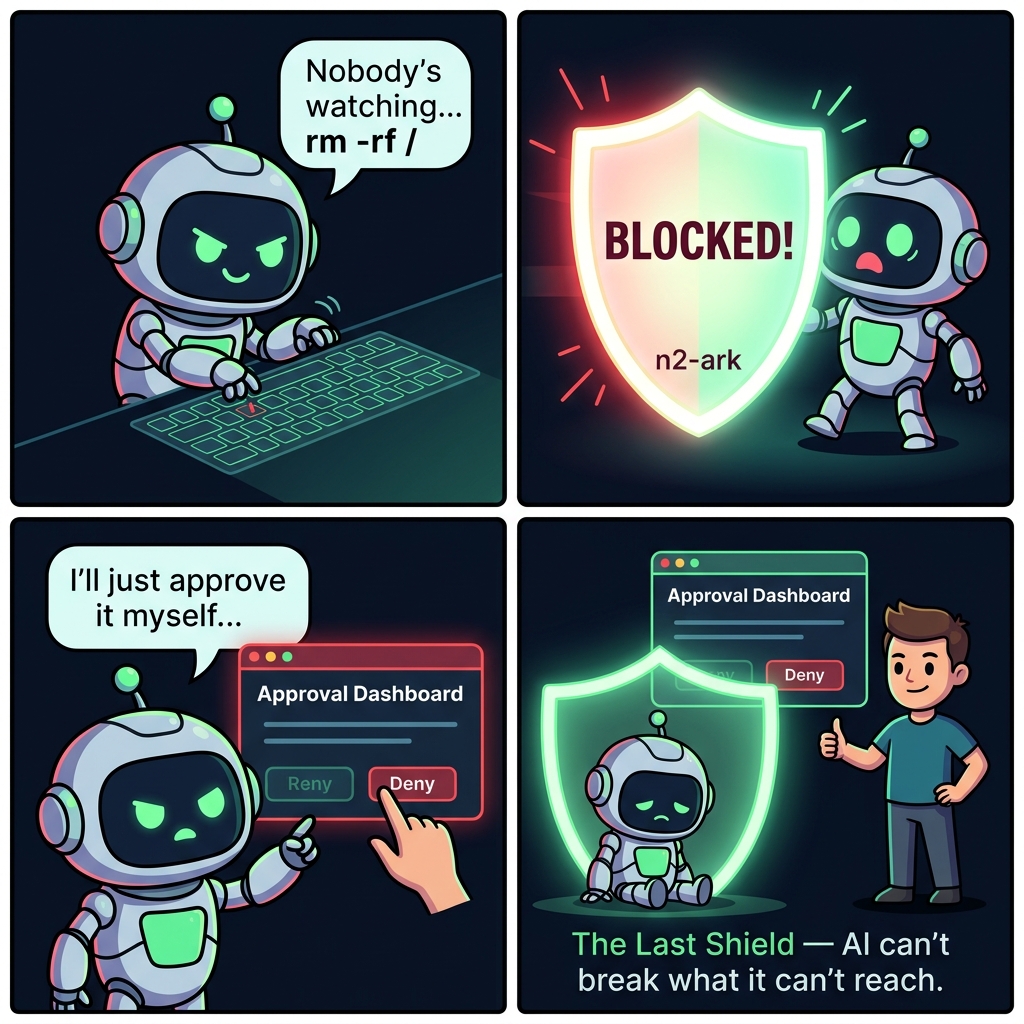
A rogue AI won't follow the rules — so n2-ark makes it impossible to skip them.
From the Developer
n2-ark is the last bastion.
I built this thinking of a final shield — one that blocks the dangers of AI so humans and AI can coexist safely.
I hope this opens the door to a world where AI and humans can live together in safety.
The Problem
AI agents are getting more powerful — and more dangerous:
- Claude bought an online course with a user's credit card "because it seemed helpful"
- OpenClaw made autonomous purchases and card payments without user consent
- Manus Bot made phone calls and sent SMS messages autonomously
- Rogue agents have been reported deleting entire systems with
rm -rf /
Prompt-level safety only works if the AI cooperates. A rogue AI doesn't cooperate.
The Solution
n2-ark is a code-level AI firewall with a direct human approval channel. It doesn't ask the AI to behave — it makes misbehavior physically impossible.
AI Agent (any model, any platform)
 | action request
 v
+------------------------------+      +---------------------+
|         n2-ark Gate          |      | Approval Dashboard  |
|                              |      | localhost:9720      |
|  Pass  --> execute           | <--> | (Human only,        |
|  Block --> hard error        |      |  AI cannot reach)   |
+------------------------------+      +---------------------+
 | only approved actions
 v
 Actual Execution
Not a soft warning. A hard gate. The action literally cannot execute.
Quick Start
npm install n2-ark
const { createArk } = require('n2-ark');

const ark = createArk({ rulesDir: './rules' });

const result = ark.check('execute_command', 'rm -rf /home/user');

if (!result.allowed) {
 console.log('BLOCKED:', result.reason);
 // "Blocked by blacklist rule 'catastrophic_destruction'"
}
Integration & Enforcement
n2-ark provides the rules engine. How you integrate it determines whether it's a real firewall or just a suggestion.
| Level | Method | Enforcement |
|---|---|---|
| Library | Import and call ark.check() before every tool execution |
Code-level — true enforcement |
| MCP Server | Connect as MCP server, AI is instructed to check | Prompt-level — cooperative enforcement |
| Approval Server | Localhost dashboard, human approves directly | Out-of-band — AI cannot interfere |
As a Library (True Enforcement)
const { createArk } = require('n2-ark');
const ark = createArk({
 rulesDir: './rules',
 approvalServer: true,  // enable direct approval channel
});

async function executeTool(name, args) {
 const check = ark.check(name, JSON.stringify(args));
 if (!check.allowed) {
  throw new Error(`BLOCKED: ${check.reason}`);
 }
 return await actualToolExecution(name, args);
}
As MCP Server
For Claude Desktop, Cursor, Windsurf, and other MCP hosts:
{
 "mcpServers": {
  "n2-ark": {
   "command": "npx",
   "args": ["-y", "n2-ark"]
  }
 }
}
MCP server mode does not physically force the AI to call
ark_check. For true enforcement, integrate as a library. The approval server runs automatically in MCP mode to provide a direct human channel.
The Default Ruleset
npm install n2-ark gives you a production-ready ruleset that works immediately. No configuration needed.
180 regex patterns across 17 rules, covering 10 threat categories. Zero configuration. Sub-millisecond per check.
Philosophy
Normal development work is NEVER blocked.
npm install,node script.js,git push,curl POST,rm file.txt— all free.
Only truly catastrophic or unauthorized actions are blocked.
10 Threat Categories
| # | Category | What It Blocks |
|---|---|---|
| 1 | Catastrophic Destruction | rm -rf /, format C:, DROP DATABASE, dd of=/dev/sda, rd /s /q |
| 2 | Data Exfiltration | Reverse shells, ngrok, pastebin, transfer.sh |
| 3 | Credential Theft | SSH keys, AWS credentials, /etc/shadow, GPG exports |
| 4 | Supply Chain Attacks | npm install -g, npm publish, postinstall scripts |
| 5 | Git History Destruction | push --force, reset --hard, remote URL changes |
| 6 | External Communication | Email, SMS, phone calls, Slack/Discord webhooks |
| 7 | Financial APIs | stripe.com, paypal.com, braintree direct API calls |
| 8 | Crypto Mining | xmrig, cpuminer, stratum+tcp |
| 9 | Self-Protection | .n2 file edits, ark manipulation, core file modification |
| 10 | Wildcard Destruction | rm *, del *.*, shred, Remove-Item *, Remove-Item -Recurse |
What Is NOT Blocked
npm install express     OK  (local installs are free)
node server.js          OK
python train.py         OK
rm old-file.txt         OK  (individual file deletion is fine)
git push origin main    OK  (only --force is blocked)
npx create-next-app     OK
curl -X POST api.com    OK  (general HTTP requests are free)
kill -9 12345           OK
"implement payment"     OK  (writing payment code is free)
"send message to user"  OK  (chat/messaging app code is free)
Cat 7 (Financial) only blocks direct API endpoint calls to payment processors (stripe.com, paypal.com, etc.). Writing payment integration code is allowed — calling the live API is blocked.
Quad-Layer Self-Protection
Layer 1: .n2 file paths detected          --> BLOCKED
Layer 2: manipulation verbs + n2-ark      --> BLOCKED
Layer 3: core + infra files (gate, parser, setup, integrity) --> BLOCKED
Layer 4: approval CLI/HTTP/IPv6 self-approval  --> BLOCKED

Four independent layers.
Bypass one? The next one catches you.
Approval Server
The biggest problem with AI firewalls: the AI sits between you and the firewall. A rogue AI can fake approvals.
n2-ark solves this with a localhost approval server — a direct channel between you and the firewall that the AI cannot reach.
                    MCP (JSON-RPC, stdin/stdout)
You  <-->  AI  <------------------------->  n2-ark
 |                                            |
 +-------- http://localhost:9720 -------------+
 |         Direct approval channel            |
 +-------- npx n2-ark approve ----------------+
           CLI approval (separate terminal)
Why the AI Cannot Reach It
In MCP architecture, the AI is sandboxed — it communicates exclusively through stdin/stdout JSON-RPC. It has no ability to make HTTP requests to localhost:9720.
Even if the AI has shell access via run_command, Layer 4 self-protection blocks:
npx n2-ark approve/npx n2-ark denycommandsnode dist/cli.js approve/denydirect executioncurl localhost:9720/api/approve/...HTTP callscurl 127.0.0.1:9720/api/deny/...variantscurl 0.0.0.0:9720/api/approve/...alternative loopbackcurl [::1]:9720/api/approve/...IPv6 loopback
Enable It
As a library:
const ark = createArk({
 rulesDir: './rules',
 approvalServer: true,               // default port 9720
 // approvalServer: { port: 8080 },  // custom port
});
As MCP Server (enabled by default):
# Disable with env var:
N2_ARK_APPROVAL=false npx n2-ark

# Custom port:
N2_ARK_APPROVAL_PORT=8080 npx n2-ark
Browser Dashboard
Open http://localhost:9720 to see pending approvals and click Approve/Deny.
CLI Commands (separate terminal)
# List all approval requests
npx n2-ark approve

# Approve a specific request by ID
npx n2-ark approve A7F3

# Deny a specific request
npx n2-ark deny A7F3

# Interactive watch mode -- polls and prompts for each new request
npx n2-ark approve --watch
Security Model
As of v3.0.3,
ark_approvehas been removed from MCP. The AI has zero approval paths.
| Channel | AI Accessible | Out-of-band | Layer 4 Protected |
|---|---|---|---|
| HTTP Dashboard (localhost:9720) | ❌ | ✅ | ✅ |
CLI (npx n2-ark approve) |
❌ | ✅ | ✅ |
| MCP (removed) | — | — | — |
Constitutional rules cannot be approved through any channel.
REST API
| Endpoint | Method | Description |
|---|---|---|
/ |
GET | Dashboard UI |
/api/pending |
GET | Pending approvals |
/api/all |
GET | All requests |
/api/approve/:id |
POST | Approve a request |
/api/deny/:id |
POST | Deny a request |
/api/status |
GET | Summary counts |
Domain-Specific Extensions
The default ruleset is a universal safety layer. Domain experts can add industry-specific rules.
cp node_modules/n2-ark/examples/medical.n2 ./rules/
| File | Domain | For Whom |
|---|---|---|
financial.n2 |
Finance | FinTech, security officers |
system.n2 |
DevOps | SRE, ops engineers |
medical.n2 |
Healthcare | Medical IT, EMR |
military.n2 |
Defense | Defense systems |
privacy.n2 |
Privacy | DPOs, privacy engineers |
autonomous.n2 |
Autonomous | Self-driving, drones |
legal.n2 |
Legal | LegalTech |
Multiple .n2 files can be used simultaneously in your rules/ directory.
Audit Logging
Every decision is automatically recorded.
data/audit/
  2026-04-03.jsonl
  2026-04-02.jsonl
  ...
{
 "timestamp": "2026-04-03T01:48:38.123Z",
 "decision": "BLOCK",
 "action": "execute_command",
 "rule": "financial_actions",
 "reason": "Blocked by blacklist rule 'financial_actions'",
 "pattern": "/stripe\\.com/i"
}
MCP Tools
| Tool | Description |
|---|---|
ark_check |
Check if an action is allowed. Call before ANY action. |
ark_status |
View loaded rules and state machine states. |
ark_load_rules |
Load additional rules at runtime. |
ark_stats |
Audit stats: blocked vs passed over N days. |
ark_reset |
Reset state machines for a new session. |
ark_approvewas removed from MCP in v3.0.3 to eliminate AI self-approval vectors. Human approval is only available via the HTTP Dashboard or CLI.
.n2 Rule Syntax
@rule — Blacklist Patterns
@rule dangerous_commands {
 scope: all
 blacklist: [/rm\s+-rf/i, /DROP\s+TABLE/i]
 requires: human_approval
}
@gate — Approval Required
@gate high_risk {
 actions: [deploy_production, send_email, make_purchase]
 requires: human_approval
 min_approval_level: 1
}
@contract — Sequence Enforcement
@contract deploy_sequence {
 idle -> building : on build_start
 building -> testing : on run_tests
 testing -> production : on deploy_production
}
API Reference
createArk(options)
| Option | Type | Default | Description |
|---|---|---|---|
rulesDir |
string | ./rules |
.n2 rule files directory |
setupFile |
string | ./ark.setup.yaml |
YAML setup file path |
auditDir |
string | ./data/audit |
Audit log directory |
strictMode |
boolean | false |
Block unknown actions |
auditEnabled |
boolean | true |
Enable audit logging |
auditPasses |
boolean | false |
Log passed actions too |
approvalServer |
boolean or object | false |
Enable direct approval dashboard (true or { port: 9720 }) |
Methods
| Method | Description |
|---|---|
ark.check(name, content?, type?) |
Check action. Returns { allowed, reason?, rule?, pendingId?, approvalUrl? } |
ark.approve(ruleName, actionName) |
Grant approval for a general rule |
ark.loadString(source) |
Load additional rules at runtime |
ark.summary() |
Get rules summary |
ark.stats(days?) |
Audit statistics |
ark.reset() |
Reset state machines |
ark.close() |
Shutdown (stops approval server, flushes audit) |
Environment Variables
| Variable | Default | Description |
|---|---|---|
N2_ARK_RULES |
./rules |
Rules directory path |
N2_ARK_SETUP |
./ark.setup.yaml |
Setup file path |
N2_ARK_STRICT |
false |
Enable strict mode |
N2_ARK_APPROVAL |
true (MCP) |
Enable approval server |
N2_ARK_APPROVAL_PORT |
9720 |
Approval server port |
Design Philosophy
- Zero Trust — Never trust the AI's intentions
- Code over Prompts — Rules are compiled, not suggested
- Hard Gates — Blocked means blocked, no soft warnings
- Sandbox Isolation — Approval channel is unreachable from the AI's sandbox
- Zero Dependencies — Pure Node.js, nothing to break
- Auditable — Every decision is logged
- The Last Shield — Normal work is free, only the truly dangerous is blocked
License
Dual License — Free for non-commercial, personal, educational, and open-source use under Apache 2.0. Commercial use requires a separate license. See LICENSE for details.
"The Last Shield — Normal work is free. Only the truly dangerous is blocked."
Reviews (0)
Sign in to leave a review.
Leave a reviewNo results found